
Patches to bring back a traditional experience for GTK+3
Shell
396
248 commits
updated Sep 21, 2026
README
gtk3-classic



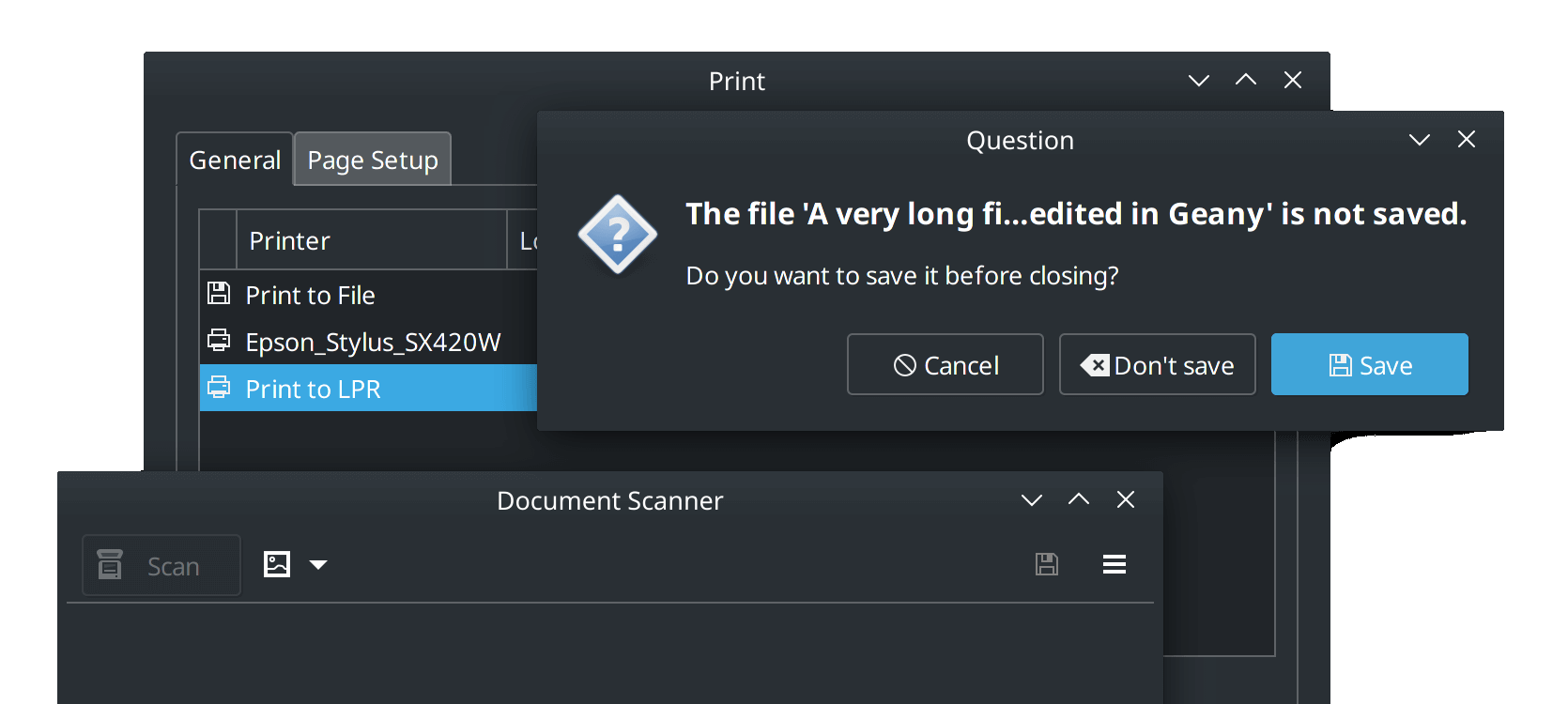
This repository contains patches to restore GTK 3's look & feel reminiscent to earlier versions. With many enhancements such as disabled CSD headers (on X11), traditional dialog boxes and file browser improvements.
These are designed to work on non-GNOME desktops (such as XFCE and MATE) and any other environment where GTK applications are used. Running on GNOME desktops is not recommended!
Patch List | Environment Variables | Screenshots | Wiki
About
Once known as gtk3-mushrooms, this repository is a collection of patches
that apply on top of the GTK 3 source code. It's not a fork of GTK 3.
This repository acts as a central hub for these patches and will keep rolling if there's a new GTK 3 release. The patches aim to bring a bit of reminiscence to GTK 2 and GTK 3's early days (hence, "classic"). See below on contributing patches.
This repository is provided as-is, with no warranty or guaranteed support. While the patched installation should just work, you are entering unsupported territory.
Patches
See these files:
- README.Patches.md — a complete list of what patches do.
- README.Variables.md — a summary of the available environment variables.
Some patches are optional behind environment variables or an additional step (like enabling alternating colour rows)
For best results, try downgrading and pinning older versions of GTK 3 applications.
Download
- Arch Linux
- Gentoo
- Ubuntu (LTS) (discontinued)
See #111 for details about Debian builds based on these patches.
Arch Linux

Available from the AUR under gtk3-classic (previously gtk3-mushrooms).
Based on the official gtk3 package
with some changes to make the package more lightweight:
- Demos, examples and tests excluded.
- Some dependencies made optional:
adwaita-icon-theme- default icon themecantarell-fonts- default fontdconf- default GSettings backendcolord- color management supportlibcups- enable printers in print dialog
There's a few ways to install:
-
The release notes contains a package built autonomously by GitHub Actions for your convenience.
sudo pacman -U ./*.tar.zst -
Use an AUR helper, such as
yay:yay -S gtk3-classicThe AUR's PKGBUILD follows this repository's latest release as its source.
-
Build from source:
git clone https://github.com/lah7/gtk3-classic
cd gtk3-classic
makepkg -s
To exclude patches, comment (
#) them out in theseriesfile.
Ubuntu
[!WARNING] Ubuntu packages for gtk3-classic has been discontinued. The existing PPA will continue to work, but no new packages will be created. Use at your own risk.
You may build them yourself or contribute improvements to reliably build locally via our create-ubuntu-package.sh script.
[!NOTE] Only available for LTS releases: 20.04, 22.04, 24.04
These packages are based on the original gtk+3.0
package, with the version suffixed with ~classic. These packages are rarely
updated, as they are patched against the GTK 3 version originally used for that release.
To install, add the repository and upgrade your packages:
sudo add-apt-repository ppa:lah7/gtk3-classic
sudo apt dist-upgrade
To restore the original GTK 3, use ppa-purge to restore the packages from Ubuntu's repository:
sudo apt-get install ppa-purge
sudo ppa-purge ppa:lah7/gtk3-classic
This works for stock Ubuntu. If you're using an Ubuntu derivative (like Linux Mint), you may need to manually downgrade packages instead.
Gentoo
A Gentoo ebuild is available as x11-libs/gtk3-classic-patches in
the khoverlay overlay. Rather than providing a patched x11-libs/gtk+:3
ebuild directly, this ebuild installs user patches which will be applied on
subsequent builds of GTK 3. This way, the latest official Gentoo GTK 3 ebuild can
always be used.
To install, first add the overlay and accept the package's testing status:
sudo eselect repository enable khoverlay
sudo emerge --sync khoverlay
echo 'x11-libs/gtk3-classic-patches::khoverlay' | sudo tee -a /etc/portage/package.accept_keywords
Then install the patches and rebuild GTK 3:
sudo emerge -av gtk3-classic-patches
sudo emerge -av1 gtk+:3
To revert to standard GTK 3, remove the patches and rebuild GTK 3:
sudo emerge -cav gtk3-classic-patches
sudo emerge -av1 gtk+:3
Problems?
These patches are for your own pleasure. They are not supported by GTK developers, your distribution or application developers. Please don't send bug reports to them because of this patched GTK 3 installation.
If you are having trouble with an application or theme, try:
- Run the application from the terminal with
GTK_CSD=0before the command. - Revert to the original
gtk3to confirm these patches caused the problem.
If a patch is at fault, Arch and Gentoo users for instance can comment out (#)
patches in series until they find the one causing it.
Arch users can use the included scripts/test-exclude-each-patch.sh script.
It'll exclude one patch at a time and create builds using the PKGBUILD in this repository.
Contributing
We're not writing new patches — only maintaining what we've got.
You are welcome to open a pull request with a new patch or fix if:
- It does not break GTK 3 or any GTK applications.
- Offers "classic" functionality remensiant of GTK 2 or early versions of GTK 3.
- Optional behind an environment variable if it introduces a significant change.
Patches are added using the quilt system.
Our primary packaging and testing happens on Arch. Checksums in PKGBUILD
need to be updated to pass the automated checks. On an Arch system, these can be
regenerated automatically:
updpkgsums
(Provided in pacman-contrib)
If you're not using Arch Linux, don't worry! When you create the pull request and automated checks run, it'll fail ❌ and present a patch of required changes.
Community
The Discussions tab is where you can find curated tips, chat, support and introductions from other users.
Here are some complementary projects and themes for your classic experience:
- Human theme
- Raleigh theme & icons
- Bluecurve theme & icons
- Ambiant-MATE theme & icons
- @thesquash's gtk3-classic-module (featuring many of these patches without needing to recompile GTK 3)
- XFCE users might be interested in this additional patch for the file chooser.
- Avaliable from the AUR as
gtk3-classic-xfce
- Avaliable from the AUR as
License
Contributors


Similar repos


Languages
Shell
76.7%
CSS
13.4%
Python
9.9%
Patches to bring back a traditional experience for GTK+3
Shell
396
248 commits
updated Sep 21, 2026
README
gtk3-classic
This repository contains patches to restore GTK 3's look & feel reminiscent to earlier versions. With many enhancements such as disabled CSD headers (on X11), traditional dialog boxes and file browser improvements.
These are designed to work on non-GNOME desktops (such as XFCE and MATE) and any other environment where GTK applications are used. Running on GNOME desktops is not recommended!
Patch List | Environment Variables | Screenshots | Wiki
About
Once known as gtk3-mushrooms, this repository is a collection of patches
that apply on top of the GTK 3 source code. It's not a fork of GTK 3.
This repository acts as a central hub for these patches and will keep rolling if there's a new GTK 3 release. The patches aim to bring a bit of reminiscence to GTK 2 and GTK 3's early days (hence, "classic"). See below on contributing patches.
This repository is provided as-is, with no warranty or guaranteed support. While the patched installation should just work, you are entering unsupported territory.
Patches
See these files:
- README.Patches.md — a complete list of what patches do.
- README.Variables.md — a summary of the available environment variables.
Some patches are optional behind environment variables or an additional step (like enabling alternating colour rows)
For best results, try downgrading and pinning older versions of GTK 3 applications.
Download
- Arch Linux
- Gentoo
- Ubuntu (LTS) (discontinued)
See #111 for details about Debian builds based on these patches.
Arch Linux
Available from the AUR under gtk3-classic (previously gtk3-mushrooms).
Based on the official gtk3 package
with some changes to make the package more lightweight:
- Demos, examples and tests excluded.
- Some dependencies made optional:
adwaita-icon-theme- default icon themecantarell-fonts- default fontdconf- default GSettings backendcolord- color management supportlibcups- enable printers in print dialog
There's a few ways to install:
-
The release notes contains a package built autonomously by GitHub Actions for your convenience.
sudo pacman -U ./*.tar.zst -
Use an AUR helper, such as
yay:yay -S gtk3-classicThe AUR's PKGBUILD follows this repository's latest release as its source.
-
Build from source:
git clone https://github.com/lah7/gtk3-classic
cd gtk3-classic
makepkg -s
To exclude patches, comment (
#) them out in theseriesfile.
Ubuntu
[!WARNING] Ubuntu packages for gtk3-classic has been discontinued. The existing PPA will continue to work, but no new packages will be created. Use at your own risk.
You may build them yourself or contribute improvements to reliably build locally via our create-ubuntu-package.sh script.
[!NOTE] Only available for LTS releases: 20.04, 22.04, 24.04
These packages are based on the original gtk+3.0
package, with the version suffixed with ~classic. These packages are rarely
updated, as they are patched against the GTK 3 version originally used for that release.
To install, add the repository and upgrade your packages:
sudo add-apt-repository ppa:lah7/gtk3-classic
sudo apt dist-upgrade
To restore the original GTK 3, use ppa-purge to restore the packages from Ubuntu's repository:
sudo apt-get install ppa-purge
sudo ppa-purge ppa:lah7/gtk3-classic
This works for stock Ubuntu. If you're using an Ubuntu derivative (like Linux Mint), you may need to manually downgrade packages instead.
Gentoo
A Gentoo ebuild is available as x11-libs/gtk3-classic-patches in
the khoverlay overlay. Rather than providing a patched x11-libs/gtk+:3
ebuild directly, this ebuild installs user patches which will be applied on
subsequent builds of GTK 3. This way, the latest official Gentoo GTK 3 ebuild can
always be used.
To install, first add the overlay and accept the package's testing status:
sudo eselect repository enable khoverlay
sudo emerge --sync khoverlay
echo 'x11-libs/gtk3-classic-patches::khoverlay' | sudo tee -a /etc/portage/package.accept_keywords
Then install the patches and rebuild GTK 3:
sudo emerge -av gtk3-classic-patches
sudo emerge -av1 gtk+:3
To revert to standard GTK 3, remove the patches and rebuild GTK 3:
sudo emerge -cav gtk3-classic-patches
sudo emerge -av1 gtk+:3
Problems?
These patches are for your own pleasure. They are not supported by GTK developers, your distribution or application developers. Please don't send bug reports to them because of this patched GTK 3 installation.
If you are having trouble with an application or theme, try:
- Run the application from the terminal with
GTK_CSD=0before the command. - Revert to the original
gtk3to confirm these patches caused the problem.
If a patch is at fault, Arch and Gentoo users for instance can comment out (#)
patches in series until they find the one causing it.
Arch users can use the included scripts/test-exclude-each-patch.sh script.
It'll exclude one patch at a time and create builds using the PKGBUILD in this repository.
Contributing
We're not writing new patches — only maintaining what we've got.
You are welcome to open a pull request with a new patch or fix if:
- It does not break GTK 3 or any GTK applications.
- Offers "classic" functionality remensiant of GTK 2 or early versions of GTK 3.
- Optional behind an environment variable if it introduces a significant change.
Patches are added using the quilt system.
Our primary packaging and testing happens on Arch. Checksums in PKGBUILD
need to be updated to pass the automated checks. On an Arch system, these can be
regenerated automatically:
updpkgsums
(Provided in pacman-contrib)
If you're not using Arch Linux, don't worry! When you create the pull request and automated checks run, it'll fail ❌ and present a patch of required changes.
Community
The Discussions tab is where you can find curated tips, chat, support and introductions from other users.
Here are some complementary projects and themes for your classic experience:
- Human theme
- Raleigh theme & icons
- Bluecurve theme & icons
- Ambiant-MATE theme & icons
- @thesquash's gtk3-classic-module (featuring many of these patches without needing to recompile GTK 3)
- XFCE users might be interested in this additional patch for the file chooser.
- Avaliable from the AUR as
gtk3-classic-xfce
- Avaliable from the AUR as
License
Similar repos
Contributors
Languages
Shell
76.7%
CSS
13.4%
Python
9.9%