
GTK 3 port of Clearlooks, the default theme for GNOME 2
CSS
131
444 commits
updated May 25, 2025
README

Overview
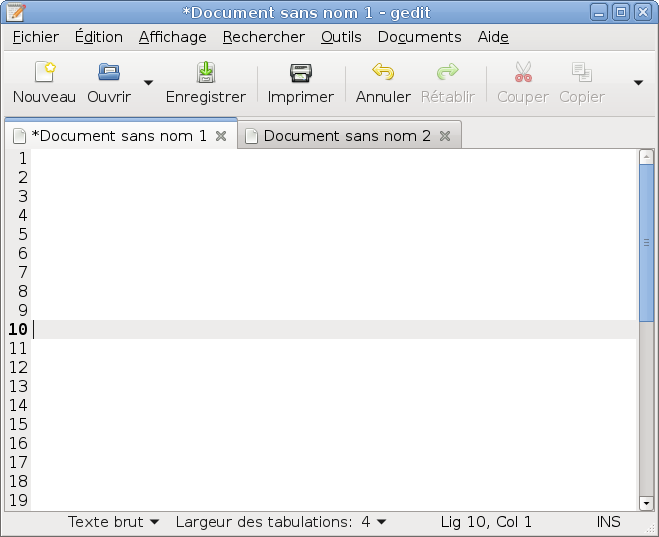
The Clearlooks-Phénix project aims to create a GTK 3 port of Clearlooks, the default theme for GNOME 2. Style is also included for GTK 2, Unity, and for the Metacity, Openbox, and Xfwm4 window managers.
Note: GTK was formerly known as GTK+.
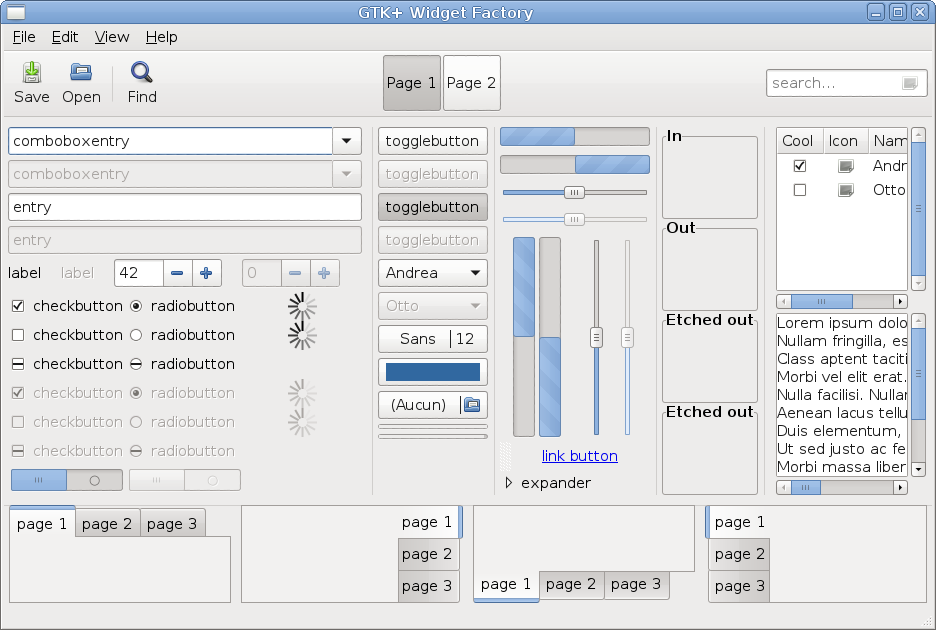
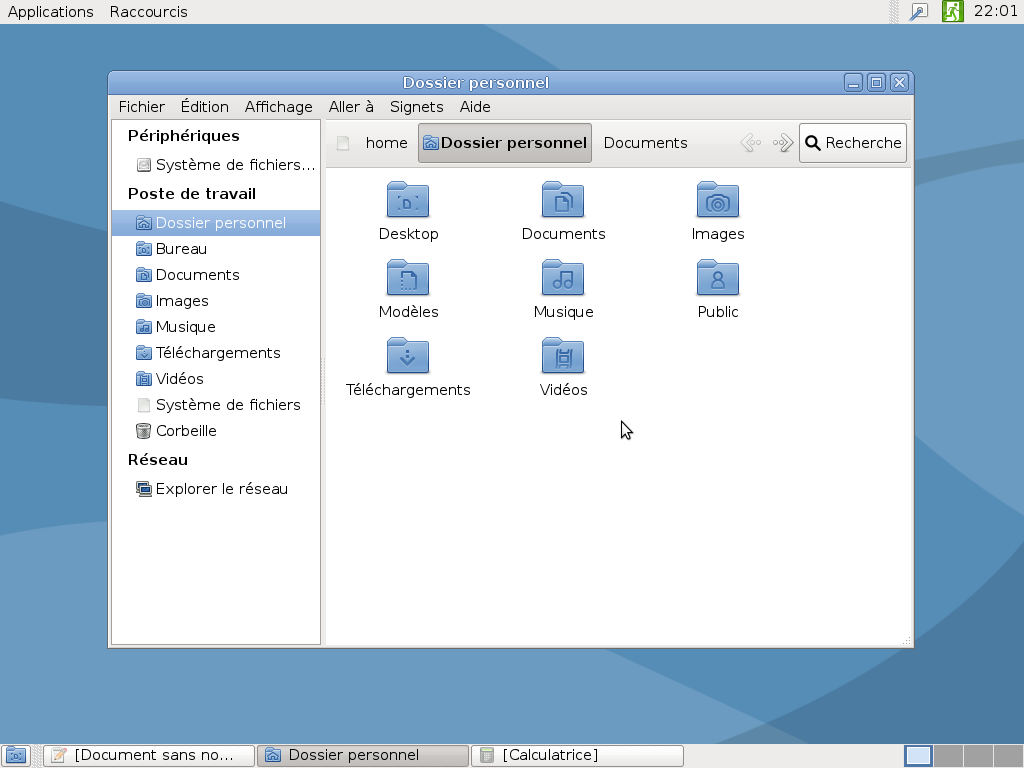
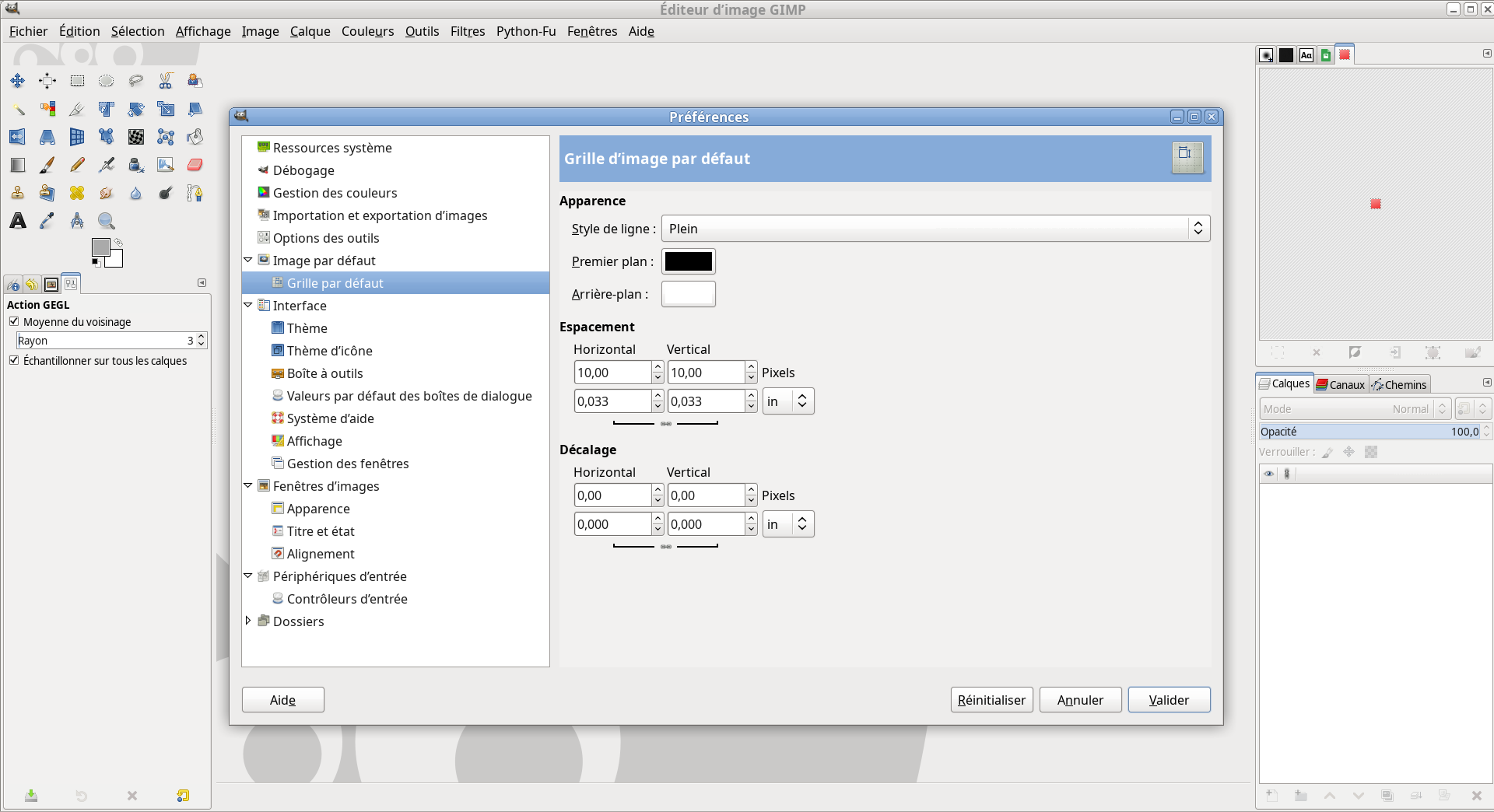
Screenshots
Click to view full-size images:
Requirements
-
Requirements for Clearlooks-Phénix v1:
gnome-themes-standard. -
Requirements for Clearlooks-Phénix v2:
gnome-themes-standardandgtk3-engines-unico.
In all cases, the gtk2-engines package is also required if you're using GTK 2 applications.
Installation
-
Download the appropriate version based on your GTK version:
-
for GTK 3.0/3.2: download Clearlooks-Phénix v1;
-
for GTK 3.4: download Clearlooks-Phénix v2;
-
for GTK 3.6: download Clearlooks-Phénix v3;
-
for GTK 3.8: download Clearlooks-Phénix v4;
-
for GTK 3.10/3.12: download Clearlooks-Phénix v5;
-
for GTK 3.14/3.18: download Clearlooks-Phénix v6;
-
for GTK 3.20 and later: download Clearlooks-Phénix v7.
To check your GTK version, run
gtk-launch --versionin a terminal.You can also browse the official releases for specific or older versions.
-
-
Extract the archive.
-
Rename the extracted folder to
Clearlooks-Phenix. -
Copy the
Clearlooks-Phenixfolder into one of the following locations:For the current user:
- $XDG_DATA_HOME
/themes, or ~/.themes/
For all users, including programs run with root privileges (e.g. your package-update utility):
/usr/share/themes/
- $XDG_DATA_HOME
Selection
The theme must be selected once the installation is complete:
-
On GNOME: with gnome-tweak-tool, by setting Theme > Window theme and Theme > GTK theme, or in a terminal:
dconf write /org/gnome/desktop/wm/preferences/theme \'Clearlooks-Phenix\' dconf write /org/gnome/desktop/interface/gtk-theme \'Clearlooks-Phenix\' -
On Xfce: by going to Settings > Appearance > Style in the main menu for the GTK theme, and to Settings > Window Manager > Style for the Xfwm4 theme, or in a terminal:
xfconf-query -s Clearlooks-Phenix -c xfwm4 -p /general/theme xfconf-query -s Clearlooks-Phenix -c xsettings -p /Net/ThemeName -
Otherwise, set
gtk-theme-namein$XDG_CONFIG_HOME/settings.ini(GTK 3) or~/.gtkrc-2.0(GTK 2).
Configuration
Desktop managed by Nautilus
By default, the font color on a desktop managed by Nautilus is black. To set it to white, open the file gtk-3.0/applications.css with a text editor, find the code relative to Nautilus:
/************
 * Nautilus *
 ************/

/*
COMMENTED
CSS
CODE
*/
and uncomment it, as follows:
/************
 * Nautilus *
 ************/

UNCOMMENTED
CSS
CODE
To get a custom color, change the color directly in the file gtk-3.0/applications.css.
Window buttons layout
If, after installing or updating GNOME, the window buttons are on the left, and you'd prefer them on the right, run the following command in a terminal:
gconftool-2 --set /apps/metacity/general/button_layout --type string ":minimize,maximize,close"
GTK 3 overlay scrollbars
A user has shared a method to disable GTK 3 overlay scrollbars system-wide, for those who prefer it. See issue #46.
⚠️ Not required or officially supported. Use at your own risk.
Wallpaper
The wallpaper used for the GNOME 3 desktop screenshot is available in the folder wallpapers.
Icons
The icon theme used in the same screenshot is Mist, which was included in the gnome-themes package, licensed under the LGPL. However, this package is no longer available. Here's how to manually install the Mist icon theme:
-
Download the latest available archive of the
gnome-themespackage. -
Extract the archive.
-
Copy the folder
usr/share/icons/Mistin one of the following locations:For the current user:
$XDG_DATA_HOME/icons/, or~/.icons/
For all users:
/usr/share/icons/
-
Then, choose Mist:
-
on GNOME: with gnome-tweak-tool by setting Theme > Icon theme;
-
on Xfce: by going to Settings > Appearance > Icons in the main menu;
-
otherwise, set
gtk-icon-theme-namein$XDG_CONFIG_HOME/settings.inifor GTK 3 or ~/.gtkrc-2.0 for GTK 2.
-
Development and license
Git is used for version control. The repository can be viewed online or cloned.
Thanks to Yuri Khan for HiDPI support, and to Andrew Shadura, Andrey Cherepanov, jsane-h8ms, and others for their contributions to GTK 3.20+ support.
Author: Jean-Philippe Fleury (https://github.com/jpfleury)
Copyright © 2011-2014, 2025 Jean-Philippe Fleury
Copyright © 2013-2014 Andrew Shadura
This program is free software: you can redistribute it and/or modify it under the terms of the GNU General Public License as published by the Free Software Foundation, either version 3 of the License, or (at your option) any later version.
This program is distributed in the hope that it will be useful, but WITHOUT ANY WARRANTY; without even the implied warranty of MERCHANTABILITY or FITNESS FOR A PARTICULAR PURPOSE. See the GNU General Public License for more details.
You should have received a copy of the GNU General Public License along with this program. If not, see http://www.gnu.org/licenses/.
Third-party code
-
Adwaita theme, from the package
gnome-themes-standard, under LGPL. -
File
gtk-2.0/gtkrc, from the packagegtk2-engines, under LGPL. -
File
metacity-1/metacity-theme-1.xml, from the packagegnome-themes-selected, under LGPL. -
File
openbox-3/themerc, from the packageopenbox, under GPL. -
Clearlooks XFWM4 theme, under GPL.
-
Files in
wallpapers, based on an image from volvoguy, under GPL.
Contributors


Similar repos


Languages
CSS
99.7%
GTK 3 port of Clearlooks, the default theme for GNOME 2
CSS
131
444 commits
updated May 25, 2025
README
Overview
The Clearlooks-Phénix project aims to create a GTK 3 port of Clearlooks, the default theme for GNOME 2. Style is also included for GTK 2, Unity, and for the Metacity, Openbox, and Xfwm4 window managers.
Note: GTK was formerly known as GTK+.
Screenshots
Click to view full-size images:
Requirements
-
Requirements for Clearlooks-Phénix v1:
gnome-themes-standard. -
Requirements for Clearlooks-Phénix v2:
gnome-themes-standardandgtk3-engines-unico.
In all cases, the gtk2-engines package is also required if you're using GTK 2 applications.
Installation
-
Download the appropriate version based on your GTK version:
-
for GTK 3.0/3.2: download Clearlooks-Phénix v1;
-
for GTK 3.4: download Clearlooks-Phénix v2;
-
for GTK 3.6: download Clearlooks-Phénix v3;
-
for GTK 3.8: download Clearlooks-Phénix v4;
-
for GTK 3.10/3.12: download Clearlooks-Phénix v5;
-
for GTK 3.14/3.18: download Clearlooks-Phénix v6;
-
for GTK 3.20 and later: download Clearlooks-Phénix v7.
To check your GTK version, run
gtk-launch --versionin a terminal.You can also browse the official releases for specific or older versions.
-
-
Extract the archive.
-
Rename the extracted folder to
Clearlooks-Phenix. -
Copy the
Clearlooks-Phenixfolder into one of the following locations:For the current user:
- $XDG_DATA_HOME
/themes, or ~/.themes/
For all users, including programs run with root privileges (e.g. your package-update utility):
/usr/share/themes/
- $XDG_DATA_HOME
Selection
The theme must be selected once the installation is complete:
-
On GNOME: with gnome-tweak-tool, by setting Theme > Window theme and Theme > GTK theme, or in a terminal:
dconf write /org/gnome/desktop/wm/preferences/theme \'Clearlooks-Phenix\' dconf write /org/gnome/desktop/interface/gtk-theme \'Clearlooks-Phenix\' -
On Xfce: by going to Settings > Appearance > Style in the main menu for the GTK theme, and to Settings > Window Manager > Style for the Xfwm4 theme, or in a terminal:
xfconf-query -s Clearlooks-Phenix -c xfwm4 -p /general/theme xfconf-query -s Clearlooks-Phenix -c xsettings -p /Net/ThemeName -
Otherwise, set
gtk-theme-namein$XDG_CONFIG_HOME/settings.ini(GTK 3) or~/.gtkrc-2.0(GTK 2).
Configuration
Desktop managed by Nautilus
By default, the font color on a desktop managed by Nautilus is black. To set it to white, open the file gtk-3.0/applications.css with a text editor, find the code relative to Nautilus:
/************
 * Nautilus *
 ************/

/*
COMMENTED
CSS
CODE
*/
and uncomment it, as follows:
/************
 * Nautilus *
 ************/

UNCOMMENTED
CSS
CODE
To get a custom color, change the color directly in the file gtk-3.0/applications.css.
Window buttons layout
If, after installing or updating GNOME, the window buttons are on the left, and you'd prefer them on the right, run the following command in a terminal:
gconftool-2 --set /apps/metacity/general/button_layout --type string ":minimize,maximize,close"
GTK 3 overlay scrollbars
A user has shared a method to disable GTK 3 overlay scrollbars system-wide, for those who prefer it. See issue #46.
⚠️ Not required or officially supported. Use at your own risk.
Wallpaper
The wallpaper used for the GNOME 3 desktop screenshot is available in the folder wallpapers.
Icons
The icon theme used in the same screenshot is Mist, which was included in the gnome-themes package, licensed under the LGPL. However, this package is no longer available. Here's how to manually install the Mist icon theme:
-
Download the latest available archive of the
gnome-themespackage. -
Extract the archive.
-
Copy the folder
usr/share/icons/Mistin one of the following locations:For the current user:
$XDG_DATA_HOME/icons/, or~/.icons/
For all users:
/usr/share/icons/
-
Then, choose Mist:
-
on GNOME: with gnome-tweak-tool by setting Theme > Icon theme;
-
on Xfce: by going to Settings > Appearance > Icons in the main menu;
-
otherwise, set
gtk-icon-theme-namein$XDG_CONFIG_HOME/settings.inifor GTK 3 or ~/.gtkrc-2.0 for GTK 2.
-
Development and license
Git is used for version control. The repository can be viewed online or cloned.
Thanks to Yuri Khan for HiDPI support, and to Andrew Shadura, Andrey Cherepanov, jsane-h8ms, and others for their contributions to GTK 3.20+ support.
Author: Jean-Philippe Fleury (https://github.com/jpfleury)
Copyright © 2011-2014, 2025 Jean-Philippe Fleury
Copyright © 2013-2014 Andrew Shadura
This program is free software: you can redistribute it and/or modify it under the terms of the GNU General Public License as published by the Free Software Foundation, either version 3 of the License, or (at your option) any later version.
This program is distributed in the hope that it will be useful, but WITHOUT ANY WARRANTY; without even the implied warranty of MERCHANTABILITY or FITNESS FOR A PARTICULAR PURPOSE. See the GNU General Public License for more details.
You should have received a copy of the GNU General Public License along with this program. If not, see http://www.gnu.org/licenses/.
Third-party code
-
Adwaita theme, from the package
gnome-themes-standard, under LGPL. -
File
gtk-2.0/gtkrc, from the packagegtk2-engines, under LGPL. -
File
metacity-1/metacity-theme-1.xml, from the packagegnome-themes-selected, under LGPL. -
File
openbox-3/themerc, from the packageopenbox, under GPL. -
Clearlooks XFWM4 theme, under GPL.
-
Files in
wallpapers, based on an image from volvoguy, under GPL.
Similar repos
Contributors
Languages
CSS
99.7%