AI Proxy is a high performance AI gateway using OpenAI / Claude / Gemini protocol as the entry point. It features intelligent error handling, multi-channel management, and comprehensive monitoring. With support for multiple models, rate limiting, and multi-tenant isolation.
Go
563
592 commits
updated Oct 12, 2026
AI Proxy is a powerful, production-ready AI gateway that provides intelligent request routing, comprehensive monitoring, and seamless multi-tenant management. Built with OpenAI-compatible, Anthropic and Gemini protocols, it serves as the perfect middleware for AI applications requiring reliability, scalability, and advanced features.
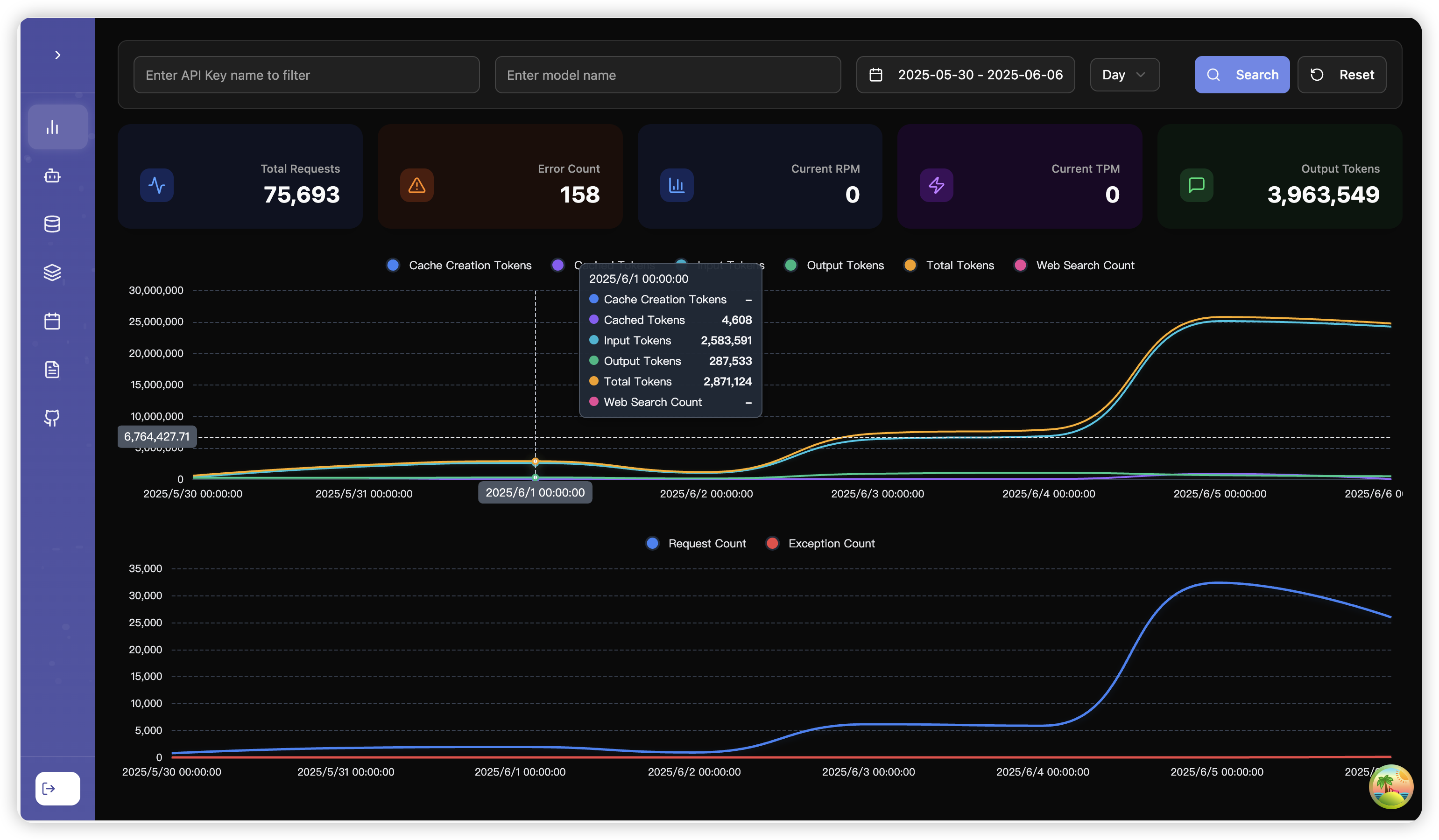
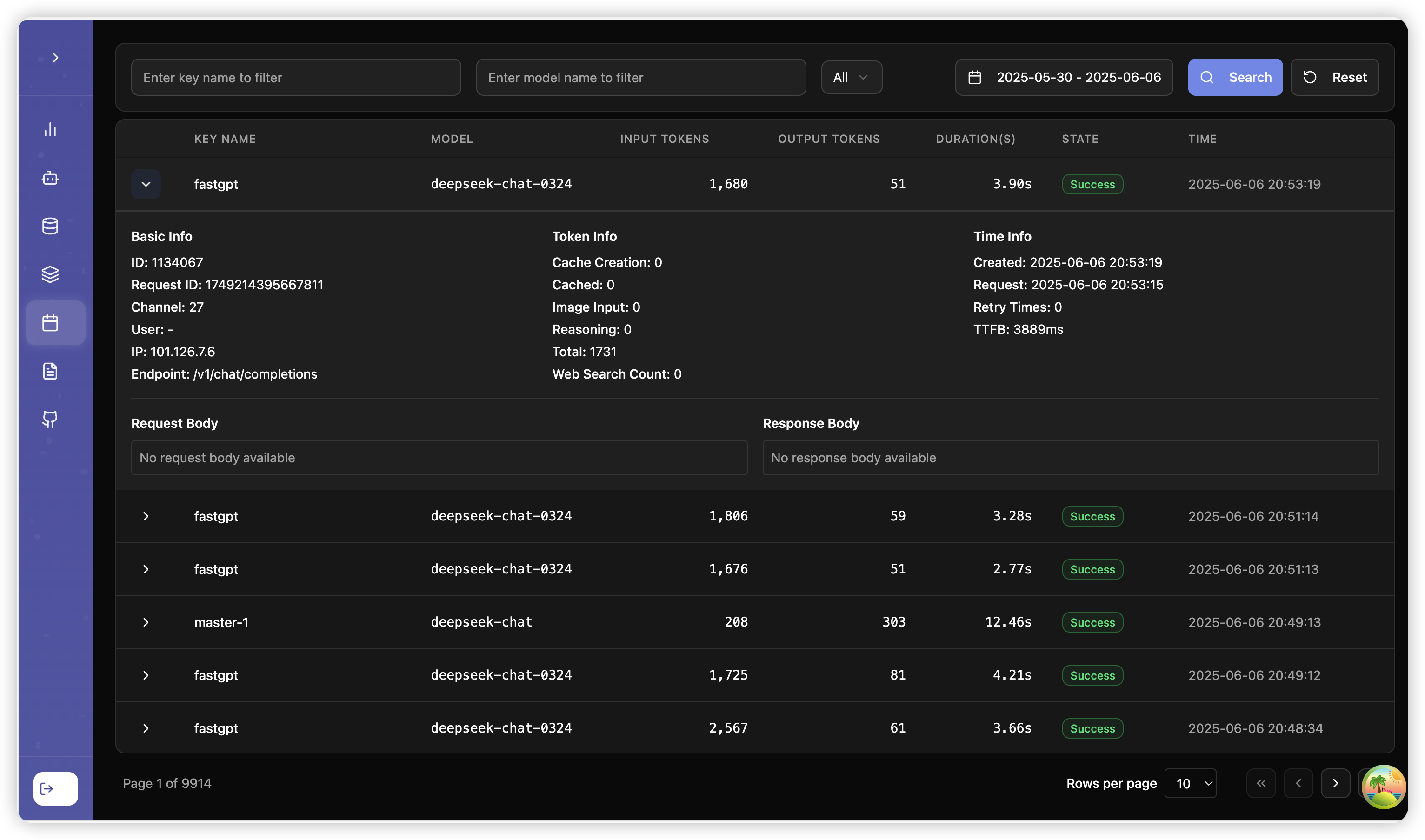
<think> tagsAI Proxy provides a management panel for managing AI Proxy's configuration and monitoring.
graph TB
    Client[Client Applications] --> Gateway[AI Proxy Gateway]
    Gateway --> Auth[Authentication & Authorization]
    Gateway --> Router[Intelligent Router]
    Gateway --> Monitor[Monitoring & Analytics]
    Gateway --> Plugins[Plugin System]

    Plugins --> CachePlugin[Cache Plugin]
    Plugins --> SearchPlugin[Web Search Plugin]
    Plugins --> ThinkSplitPlugin[Think Split Plugin]
    Plugins --> StreamFakePlugin[Stream Fake Plugin]

    Router --> Provider1[OpenAI]
    Router --> Provider2[Anthropic]
    Router --> Provider3[Azure OpenAI]
    Router --> ProviderN[Other Providers]

    Gateway --> MCP[MCP Servers]
    MCP --> PublicMCP[Public MCP]
    MCP --> GroupMCP[Organization MCP]
    MCP --> EmbedMCP[Embedded MCP]

    Monitor --> Alerts[Alert System]
    Monitor --> Analytics[Analytics Dashboard]
    Monitor --> Logs[Audit Logs]
# Quick start with default configuration
docker run -d \
  --name aiproxy \
  -p 3000:3000 \
  -v $(pwd)/aiproxy:/aiproxy \
  -e ADMIN_KEY=your-admin-key \
  ghcr.io/labring/aiproxy:latest

# Nightly build
docker run -d \
  --name aiproxy \
  -p 3000:3000 \
  -v $(pwd)/aiproxy:/aiproxy \
  -e ADMIN_KEY=your-admin-key \
  ghcr.io/labring/aiproxy:main
# Download docker-compose.yaml
curl -O https://raw.githubusercontent.com/labring/aiproxy/main/docker-compose.yaml

# Start services
docker-compose up -d
LISTEN=:3000                    # Server listen address
ADMIN_KEY=your-admin-key        # Admin API key
DISABLE_WEB_ROOT=true           # Redirect only `/` to GitHub, keep other web routes available
These values are read at startup. Size limits use positive decimal byte counts. Unset or invalid values retain the defaults below. Restart after changing them.
MAX_REQUEST_BODY_SIZE=52428800       # 50 MiB; also caps decompressed requests
MAX_RESPONSE_BODY_SIZE=209715200     # 200 MiB for buffered upstream responses
MULTIPART_FORM_MEMORY_LIMIT=4194304   # 4 MiB; larger file parts spill to disk
MAX_IMAGE_SIZE=10485760              # 10 MiB for image reads using the image limit
SQL_DSN=postgres://user:pass@host:5432/db    # Primary database
LOG_SQL_DSN=postgres://user:pass@host:5432/log_db  # Log database (optional)
REDIS=redis://localhost:6379     # Redis for caching
BILLING_ENABLED=true           # Enable billing features
SAVE_ALL_LOG_DETAIL=true     # Log all request details
GROUP_MAX_TOKEN_NUM=100 # Max tokens per group
LOG_STORAGE_HOURS=168          # Log retention (0 = unlimited)
LOG_DETAIL_STORAGE_HOURS=72    # Detail log retention
CLEAN_LOG_BATCH_SIZE=5000      # Log cleanup batch size
IP_GROUPS_THRESHOLD=5          # IP sharing alert threshold
IP_GROUPS_BAN_THRESHOLD=10     # IP sharing ban threshold
AI Proxy supports a plugin system that extends its functionality. Currently available plugins:
The Cache Plugin provides high-performance caching for AI API requests:
View Cache Plugin Documentation
The Web Search Plugin adds real-time web search capabilities:
View Web Search Plugin Documentation
The Think Split Plugin supports content splitting for reasoning models:
<think>...</think> tags in responsesreasoning_content fieldView Think Split Plugin Documentation
The Stream Fake Plugin solves timeout issues with non-streaming requests:
View Stream Fake Plugin Documentation
Visit http://localhost:3000/swagger/index.html for the complete API documentation with interactive examples.
curl -H "Authorization: Bearer your-token" \
  http://localhost:3000/v1/models
curl -X POST http://localhost:3000/v1/chat/completions \
  -H "Authorization: Bearer your-token" \
  -H "Content-Type: application/json" \
  -d '{
    "model": "gpt-4",
    "messages": [{"role": "user", "content": "Hello!"}]
  }'
# Use Claude models through OpenAI API format
curl -X POST http://localhost:3000/v1/messages \
  -H "X-Api-Key: Bearer your-token" \
  -H "Content-Type: application/json" \
  -d '{
    "model": "gpt-5",
    "messages": [{"role": "user", "content": "Hello Claude!"}]
  }'
Deploy instantly on Sealos with built-in model capabilities: Deploy to Sealos
Seamlessly integrate with FastGPT for enhanced AI workflows: FastGPT Documentation
Use AI Proxy with Claude Code by configuring these environment variables:
export ANTHROPIC_BASE_URL=http://127.0.0.1:3000
export ANTHROPIC_AUTH_TOKEN=sk-xxx
export ANTHROPIC_MODEL=gpt-5
export ANTHROPIC_SMALL_FAST_MODEL=gpt-5-nano
Use AI Proxy with Gemini CLI by configuring these environment variables:
export GOOGLE_GEMINI_BASE_URL=http://127.0.0.1:3000
export GEMINI_API_KEY=sk-xxx
Alternatively, you can use the /auth command in the Gemini CLI to output the GEMINI_API_KEY.
Use AI Proxy with Codex by configuring ~/.codex/config.toml:
# Recall that in TOML, root keys must be listed before tables.
model = "gpt-4o"
model_provider = "aiproxy"

[model_providers.aiproxy]
# Name of the provider that will be displayed in the Codex UI.
name = "AIProxy"
# The path `/chat/completions` will be amended to this URL to make the POST
# request for the chat completions.
base_url = "http://127.0.0.1:3000/v1"
# If `env_key` is set, identifies an environment variable that must be set when
# using Codex with this provider. The value of the environment variable must be
# non-empty and will be used in the `Bearer TOKEN` HTTP header for the POST request.
env_key = "AIPROXY_API_KEY"
# Valid values for wire_api are "chat" and "responses". Defaults to "chat" if omitted.
wire_api = "chat"
Protocol Conversion Support:
Reasoning / Thinking Compatibility Docs:
AI Proxy provides comprehensive MCP support for extending AI capabilities:
# Clone repository
git clone https://github.com/labring/aiproxy.git
cd aiproxy

# Build frontend (optional)
cd web && npm install -g pnpm && pnpm install && pnpm run build && cp -r dist ../core/public/dist/ && cd ..

# Build backend
cd core && go build -o aiproxy .

# Run
./aiproxy
This project is licensed under the MIT License - see the LICENSE file for details.
AI Proxy is a high performance AI gateway using OpenAI / Claude / Gemini protocol as the entry point. It features intelligent error handling, multi-channel management, and comprehensive monitoring. With support for multiple models, rate limiting, and multi-tenant isolation.
Go
563
592 commits
updated Oct 12, 2026
AI Proxy is a powerful, production-ready AI gateway that provides intelligent request routing, comprehensive monitoring, and seamless multi-tenant management. Built with OpenAI-compatible, Anthropic and Gemini protocols, it serves as the perfect middleware for AI applications requiring reliability, scalability, and advanced features.
<think> tagsAI Proxy provides a management panel for managing AI Proxy's configuration and monitoring.
graph TB
    Client[Client Applications] --> Gateway[AI Proxy Gateway]
    Gateway --> Auth[Authentication & Authorization]
    Gateway --> Router[Intelligent Router]
    Gateway --> Monitor[Monitoring & Analytics]
    Gateway --> Plugins[Plugin System]

    Plugins --> CachePlugin[Cache Plugin]
    Plugins --> SearchPlugin[Web Search Plugin]
    Plugins --> ThinkSplitPlugin[Think Split Plugin]
    Plugins --> StreamFakePlugin[Stream Fake Plugin]

    Router --> Provider1[OpenAI]
    Router --> Provider2[Anthropic]
    Router --> Provider3[Azure OpenAI]
    Router --> ProviderN[Other Providers]

    Gateway --> MCP[MCP Servers]
    MCP --> PublicMCP[Public MCP]
    MCP --> GroupMCP[Organization MCP]
    MCP --> EmbedMCP[Embedded MCP]

    Monitor --> Alerts[Alert System]
    Monitor --> Analytics[Analytics Dashboard]
    Monitor --> Logs[Audit Logs]
# Quick start with default configuration
docker run -d \
  --name aiproxy \
  -p 3000:3000 \
  -v $(pwd)/aiproxy:/aiproxy \
  -e ADMIN_KEY=your-admin-key \
  ghcr.io/labring/aiproxy:latest

# Nightly build
docker run -d \
  --name aiproxy \
  -p 3000:3000 \
  -v $(pwd)/aiproxy:/aiproxy \
  -e ADMIN_KEY=your-admin-key \
  ghcr.io/labring/aiproxy:main
# Download docker-compose.yaml
curl -O https://raw.githubusercontent.com/labring/aiproxy/main/docker-compose.yaml

# Start services
docker-compose up -d
LISTEN=:3000                    # Server listen address
ADMIN_KEY=your-admin-key        # Admin API key
DISABLE_WEB_ROOT=true           # Redirect only `/` to GitHub, keep other web routes available
These values are read at startup. Size limits use positive decimal byte counts. Unset or invalid values retain the defaults below. Restart after changing them.
MAX_REQUEST_BODY_SIZE=52428800       # 50 MiB; also caps decompressed requests
MAX_RESPONSE_BODY_SIZE=209715200     # 200 MiB for buffered upstream responses
MULTIPART_FORM_MEMORY_LIMIT=4194304   # 4 MiB; larger file parts spill to disk
MAX_IMAGE_SIZE=10485760              # 10 MiB for image reads using the image limit
SQL_DSN=postgres://user:pass@host:5432/db    # Primary database
LOG_SQL_DSN=postgres://user:pass@host:5432/log_db  # Log database (optional)
REDIS=redis://localhost:6379     # Redis for caching
BILLING_ENABLED=true           # Enable billing features
SAVE_ALL_LOG_DETAIL=true     # Log all request details
GROUP_MAX_TOKEN_NUM=100 # Max tokens per group
LOG_STORAGE_HOURS=168          # Log retention (0 = unlimited)
LOG_DETAIL_STORAGE_HOURS=72    # Detail log retention
CLEAN_LOG_BATCH_SIZE=5000      # Log cleanup batch size
IP_GROUPS_THRESHOLD=5          # IP sharing alert threshold
IP_GROUPS_BAN_THRESHOLD=10     # IP sharing ban threshold
AI Proxy supports a plugin system that extends its functionality. Currently available plugins:
The Cache Plugin provides high-performance caching for AI API requests:
View Cache Plugin Documentation
The Web Search Plugin adds real-time web search capabilities:
View Web Search Plugin Documentation
The Think Split Plugin supports content splitting for reasoning models:
<think>...</think> tags in responsesreasoning_content fieldView Think Split Plugin Documentation
The Stream Fake Plugin solves timeout issues with non-streaming requests:
View Stream Fake Plugin Documentation
Visit http://localhost:3000/swagger/index.html for the complete API documentation with interactive examples.
curl -H "Authorization: Bearer your-token" \
  http://localhost:3000/v1/models
curl -X POST http://localhost:3000/v1/chat/completions \
  -H "Authorization: Bearer your-token" \
  -H "Content-Type: application/json" \
  -d '{
    "model": "gpt-4",
    "messages": [{"role": "user", "content": "Hello!"}]
  }'
# Use Claude models through OpenAI API format
curl -X POST http://localhost:3000/v1/messages \
  -H "X-Api-Key: Bearer your-token" \
  -H "Content-Type: application/json" \
  -d '{
    "model": "gpt-5",
    "messages": [{"role": "user", "content": "Hello Claude!"}]
  }'
Deploy instantly on Sealos with built-in model capabilities: Deploy to Sealos
Seamlessly integrate with FastGPT for enhanced AI workflows: FastGPT Documentation
Use AI Proxy with Claude Code by configuring these environment variables:
export ANTHROPIC_BASE_URL=http://127.0.0.1:3000
export ANTHROPIC_AUTH_TOKEN=sk-xxx
export ANTHROPIC_MODEL=gpt-5
export ANTHROPIC_SMALL_FAST_MODEL=gpt-5-nano
Use AI Proxy with Gemini CLI by configuring these environment variables:
export GOOGLE_GEMINI_BASE_URL=http://127.0.0.1:3000
export GEMINI_API_KEY=sk-xxx
Alternatively, you can use the /auth command in the Gemini CLI to output the GEMINI_API_KEY.
Use AI Proxy with Codex by configuring ~/.codex/config.toml:
# Recall that in TOML, root keys must be listed before tables.
model = "gpt-4o"
model_provider = "aiproxy"

[model_providers.aiproxy]
# Name of the provider that will be displayed in the Codex UI.
name = "AIProxy"
# The path `/chat/completions` will be amended to this URL to make the POST
# request for the chat completions.
base_url = "http://127.0.0.1:3000/v1"
# If `env_key` is set, identifies an environment variable that must be set when
# using Codex with this provider. The value of the environment variable must be
# non-empty and will be used in the `Bearer TOKEN` HTTP header for the POST request.
env_key = "AIPROXY_API_KEY"
# Valid values for wire_api are "chat" and "responses". Defaults to "chat" if omitted.
wire_api = "chat"
Protocol Conversion Support:
Reasoning / Thinking Compatibility Docs:
AI Proxy provides comprehensive MCP support for extending AI capabilities:
# Clone repository
git clone https://github.com/labring/aiproxy.git
cd aiproxy

# Build frontend (optional)
cd web && npm install -g pnpm && pnpm install && pnpm run build && cp -r dist ../core/public/dist/ && cd ..

# Build backend
cd core && go build -o aiproxy .

# Run
./aiproxy
This project is licensed under the MIT License - see the LICENSE file for details.








