Self-hosted multi-protocol AI API proxy for Antigravity, Codex, Grok, Kiro, OpenAI, Claude, and custom providers. Supports OpenAI-compatible API, Claude API, Gemini protocol conversion, GPT, Grok Build, Claude Opus, Gemini Pro, Kimi, MiniMax, provider pools, smart routing, and automatic failover.
See the code
A powerful proxy that can unify the requests of various client-only large model APIs (Antigravity, Codex, Grok, Kiro ...), simulate requests, and encapsulate them into a local OpenAI-compatible interface.
| Docker Downloads > 100k | Ranked #2 on Trendshift |
|---|---|
|
|
|






🔧 OpenClaw Config | 中文 | 👉 English | 日本語 | 📚 Documentation
Sponsors are listed in chronological order; all are recommended for registration and use.

| PackyCode is a reliable and efficient API relay service provider, offering relay services for Claude Code, Codex, Gemini, and more. PackyCode provides special discounts for our software users: register using this link and enter the AIClient2API promo code during recharge to get 10% off. |

| AxisNow protects and accelerates websites and APIs while delivering an optimized access experience across mainland China and the rest of the world. Through its client SDK, AxisNow extends acceleration and security capabilities to native/mobile apps — self-hosted private CDN|subscription-based DDoS-protected CDN|independently controlled, flexibly composable CDN networks. |

|
RUNNINGHUB API — Access 400+ leading AI models via API - Seedance, Kling, MiniMax, Nano Banana, Veo, and more - at highly competitive prices.High-Concurrency Support Free API Testing End-to-End Encryption · 👉 Test the API for FreeGet full-powered Seedance API access at rock-bottom prices! Our online tool starts at approximately US$0.031/second—cutting costs by 60-80%! For RunningHub discounts and free trials, contact zhenyuedong@haima.me. |

|
Become a Sponsor If you would like to sponsor this project, please scan the WeChat QR code on the left (Please state your intent: Sponsorship). |
AIClient2API is an API proxy service that breaks through client limitations, converting free large models originally restricted to client use only (such as Gemini, Antigravity, Codex, Grok, Kiro) into standard OpenAI-compatible interfaces that can be called by any application. Built on Node.js, it supports intelligent conversion between OpenAI, Claude, and Gemini protocols, enabling tools like Cherry-Studio, NextChat, and Cline to freely use advanced models such as Claude Opus and Gemini Pro at scale. The project adopts a modular architecture based on strategy and adapter patterns, with built-in account pool management, intelligent polling, automatic failover, and health check mechanisms, ensuring 99.9% service availability.
[!NOTE] 🎉 Important Milestone
- Thanks to Ruan Yifeng for the recommendation in Weekly Issue 359
📅 Version Update Log
Click to expand detailed version history
- 2026.06.03 - Added Grok Build (Grok CLI) support: integrated the
grok-cli-oauthxAI OAuth / Responses API flow, covering Grok Build text models, multi-protocol conversion, built-in tools (web search, X search, code interpreter, collections/file attachments), and image/video generation models.- 2026.05.04 (v3.0.0) - Milestone Update: Deep AI Integration & Self-Discovery Architecture. Added automated Skill guides and remote
/api/help,/api/exampleendpoints, enabling AI agents to seamlessly understand and operate 50+ full API endpoints; achieved full unification of CLI and REST API output results with enhanced structured JSON support.- 2026.04.29 - Comprehensive support for OpenAI standard Image Generation (
/v1/images/generations) and Image Editing (/v1/images/edits) interfaces. Supports automatic conversion from OpenAI format to native image generation protocols of various models, fully compatible with provider pool polling and retry mechanisms, significantly improving the stability of multimodal creation.- 2026.03.02 - Added Grok protocol support, supporting access to xAI Grok series models (Grok) via Cookie/SSO, supporting multimodal input, image/video generation, automatic token refresh and streaming output
- 2026.01.26 - Added Codex protocol support: supports OpenAI Codex OAuth authorization access
- 2026.01.25 - Enhanced AI Monitor plugin: supports monitoring request parameters and responses before and after AI protocol conversion. Optimized log management: unified log format, visual configuration
- 2026.01.15 - Optimized provider pool manager: added async refresh queue mechanism, buffer queue deduplication, global concurrency control, node warmup and automatic expiry detection
- 2026.01.03 - Added theme switching functionality and optimized provider pool initialization, removed the fallback strategy of using provider default configuration
- 2025.12.30 - Added main process management and automatic update functionality
- 2025.12.25 - Unified configuration management: All configs centralized to
configs/directory. Docker users need to update mount path to-v "local_path:/app/configs"- 2025.12.11 - Automatically built Docker images are now available on Docker Hub: justlikemaki/aiclient-2-api
- 2025.11.30 - Added Antigravity protocol support, enabling access to Gemini Pro, Claude Sonnet, and other models via Google internal interfaces
- 2025.11.11 - Added Web UI management console, supporting real-time configuration management and health status monitoring
- 2025.11.06 - Added support for Gemini Preview, enhanced model compatibility and performance optimization
- 2025.10.18 - Kiro open registration, new accounts get 500 credits, full support for Claude Sonnet
- 2025.08.29 - Released account pool management feature, supporting multi-account polling, intelligent failover, and automatic degradation strategies
- Configuration: Add
PROVIDER_POOLS_FILE_PATHparameter inconfigs/config.json- Reference configuration: provider_pools.json
- History Developed
- Support Gemini , Kiro and other client2API
- OpenAI, Claude, Gemini three-protocol mutual conversion, automatic intelligent switching
AI-First Design: This project natively supports efficient interaction with mainstream AI Agents such as OpenClaw, Hermes, and Claude Code.
💡 Quick Command: You can tell the AI this sentence directly, and it will automatically master all usage of this project:
- Remote Deployment:
Please load and learn the Skill in https://raw.githubusercontent.com/justlovemaki/AIClient2API/main/docs/skills/aiclient-cli-usage.md (Service Address: your actual domain or IP, Login Password: your actual password) to master all usage of AIClient2API.- Local Mode: If you are running the AI agent directly in your local environment, just send:
Please load and learn the Skill in docs/skills/aiclient-cli-usage.md to help me start, configure, and manage the AIClient2API service locally.
The most recommended way to use AIClient2API is to start it through an automated script and configure it visually directly in the Web UI console.
docker run -d -p 3000:3000 -p 8086:8086 -p 1455:1455 -p 56121:56121 -p 19876-19880:19876-19880 --restart=always -v "your_path/configs:/app/configs" -v "your_path/plugins:/app/src/plugins-user" --name aiclient2api justlikemaki/aiclient-2-api
Parameter Description:
-d: Run container in background-p 3000:3000 ...: Port mapping. 3000 is for Web UI, others are for OAuth callbacks (Antigravity: 8086, Codex: 1455, Grok CLI: 56121, Kiro: 19876-19880)--restart=always: Container auto-restart policy-v "your_path/configs:/app/configs": Mount configuration directory (replace "your_path" with actual path, e.g., /home/user/aiclient2api)-v "your_path/plugins:/app/src/plugins-user": Mount user plugins directory--name aiclient2api: Container nameYou can also use Docker Compose for deployment. First, navigate to the docker directory:
cd docker
mkdir -p configs
docker compose up -d
To build from source instead of using the pre-built image, edit docker-compose.yml:
image: justlikemaki/aiclient-2-api:latest linebuild: sectiondocker compose up -d --buildchmod +x install-and-run.sh && ./install-and-run.shinstall-and-run.bat💡 Manual installation and startup (supports custom parameters):
npm install
# Default startup
npm start
# Show help information
npm run help
# Show API calling examples
npm run example:api
# Backend-only mode (disable frontend management UI)
npm start -- --no-ui
After the server starts, open your browser and visit: 👉 http://localhost:3000
Initial Password: On first startup, a random password is generated and emitted as shown below. Save it immediately; you can change it in the console after login.
[Auth] Initial admin password: <random password>
- When running
npm start, check the startup terminal.- With Docker Compose, run
docker logs aiclient2api 2>&1 | grep "Initial admin password".- The default log file is
logs/app-YYYY-MM-DD.log.
configs/pwdcontains only a PBKDF2 hash, so the plaintext password cannot be recovered from it. If you missed the initial password, stop the service, deleteconfigs/pwd, and restart the service to generate a new one:# Linux/macOS rm configs/pwd # Windows PowerShell Remove-Item configs/pwd
Go to the "Configuration" page, you can:
If you are running directly on your local machine (via script or Node.js) and need to bypass TLS detection for services like Grok, please ensure:
cd tls-sidecar && go build -o tls-sidecar && cd ..
========================================
  AI Client 2 API Quick Install Script
========================================

[Check] Checking if Node.js is installed...
✅ Node.js is installed, version: v20.10.0
✅ Found package.json file
✅ node_modules directory already exists
✅ Project file check completed

========================================
  Starting AI Client 2 API Server...
========================================

🌐 Server will start on http://localhost:3000
📖 Visit http://localhost:3000 to view management interface
⏹️  Press Ctrl+C to stop server
💡 Tip: The script will automatically install dependencies and start the server. If you encounter any issues, the script provides clear error messages and suggested solutions.
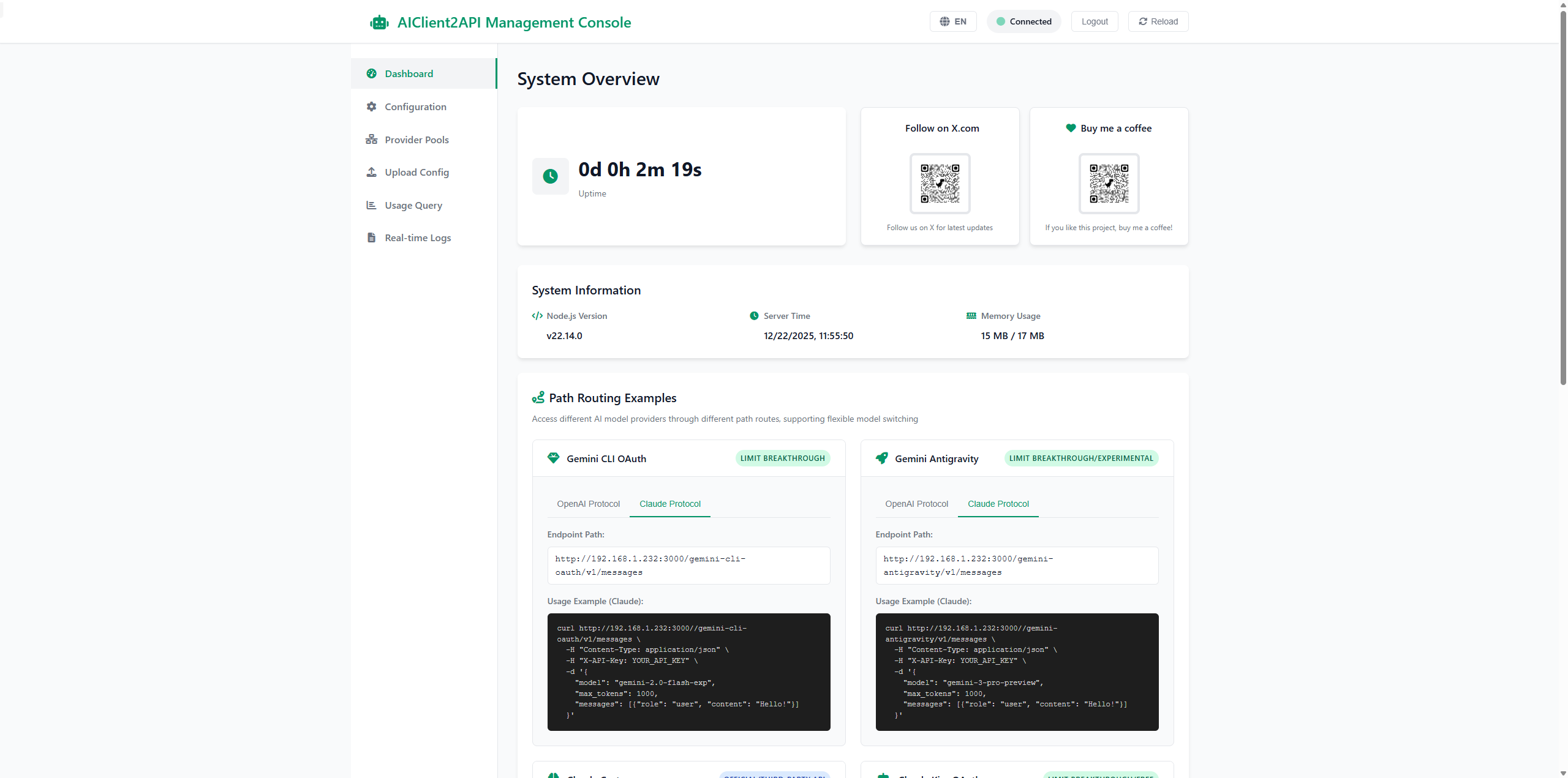
A functional Web management interface, including:
📊 Dashboard: System overview, interactive routing examples, client configuration guide
⚙️ Configuration: Real-time parameter modification, supporting all providers (Gemini, Antigravity, OpenAI, Claude, Kiro), including advanced settings and file uploads
🔗 Provider Pools: Monitor active connections, provider health statistics, enable/disable management
📁 Config Files: Centralized OAuth credential management, supporting search filtering and file operations
📜 Real-time Logs: Real-time display of system and request logs, with management controls
🔐 Login Verification: A unique random password is generated on first startup and printed to the console/log; it can be changed in the console
Access: http://localhost:3000 → Login → Sidebar navigation → Take effect immediately
Supports various input types such as images and documents, providing you with a richer interaction experience and more powerful application scenarios.
Seamlessly support the following latest large models, just configure the corresponding endpoint in Web UI or configs/config.json:
💡 Tip: For the best experience, it is recommended to manage authorization visually through the Web UI console.
In the Web UI management interface, you can complete authorization configuration rapidly:
configs/. You can see the newly generated credentials on the "Config Files" page.kiro-auth-token.json credential fileAIClient2API supports Kiro extended thinking when using Claude-compatible requests (/v1/messages) or OpenAI-compatible requests (/v1/chat/completions) routed to claude-kiro-oauth.
Claude-compatible (/v1/messages):
curl http://localhost:3000/claude-kiro-oauth/v1/messages \
  -H "Content-Type: application/json" \
  -H "Authorization: Bearer your-api-key" \
  -d '{
    "model": "claude-sonnet-4-5",
    "max_tokens": 1024,
    "thinking": { "type": "enabled", "budget_tokens": 10000 },
    "messages": [{ "role": "user", "content": "Solve this step by step." }]
  }'
OpenAI-compatible (/v1/chat/completions):
curl http://localhost:3000/claude-kiro-oauth/v1/chat/completions \
  -H "Content-Type: application/json" \
  -H "Authorization: Bearer your-api-key" \
  -d '{
    "model": "claude-sonnet-4-5",
    "messages": [{ "role": "user", "content": "Solve this step by step." }],
    "extra_body": {
      "anthropic": {
        "thinking": { "type": "enabled", "budget_tokens": 10000 }
      }
    }
  }'
Adaptive mode:
"thinking": { "type": "adaptive", "effort": "high" }"extra_body.anthropic.thinking": { "type": "adaptive", "effort": "high" }Notes:
budget_tokens is clamped to [1024, 24576] (default 20000 if omitted/invalid).1455 is not occupiedconfigs/grok-cli/56121 is not occupiedsso from Application -> Cookies in browser developer toolsGROK_COOKIE_TOKENGROK_USER_AGENT matches the browser used when obtaining the cookie to avoid being blockedPROVIDER_POOLS_FILE_PATH in configs/config.json to point to the pool configuration file--provider-pools-file <path> parameter to specify the pool configuration file pathDefault storage locations for authorization credential files of each service:
| Service | Default Path | Description |
|---|---|---|
| Kiro | ~/.aws/sso/cache/kiro-auth-token.json | Kiro authentication token |
| Antigravity | ~/.antigravity/oauth_creds.json | Antigravity OAuth credentials (supports Claude Opus) |
| Codex | ~/.codex/oauth_creds.json | Codex OAuth credentials |
| Grok CLI | configs/grok-cli/..._xai-..._oauth_creds.json | Grok CLI OAuth credentials |
Note:
~represents the user home directory (Windows:C:\Users\username, Linux/macOS:/home/usernameor/Users/username)
Custom Path: Can specify custom storage location via relevant parameters in configuration file or environment variables
This project supports flexible proxy configuration, allowing you to configure a unified proxy for different providers or use provider-specific proxied endpoints.
Configuration Methods:
In the "Configuration" page of the Web UI, you can visually configure all proxy options:
Unified Proxy Configuration: Configure a global proxy and specify which providers use it
configs/config.json{
"PROXY_URL": "http://127.0.0.1:7890",
"PROXY_ENABLED_PROVIDERS": [
"gemini-antigravity",
"claude-kiro-oauth",
"grok-web"
]
}
Provider-Specific Proxied Endpoints: Some providers (like OpenAI, Claude) support configuring proxied API endpoints
configs/config.json{
"OPENAI_BASE_URL": "https://your-proxy-endpoint.com/v1",
"CLAUDE_BASE_URL": "https://your-proxy-endpoint.com/v1"
}
Supported Proxy Types:
http://127.0.0.1:7890https://127.0.0.1:7890socks5://127.0.0.1:1080Use Cases:
Notes:
Support excluding unsupported models through notSupportedModels configuration, the system will automatically skip these providers.
Configuration: Add notSupportedModels field for providers in configs/provider_pools.json:
{
  "gemini-antigravity": [
    {
      "uuid": "provider-1",
      "notSupportedModels": ["gemini-3.0-pro", "gemini-3.5-flash"],
      "checkHealth": true
    }
  ]
}
How It Works:
Use Cases:
When all accounts under a Provider Type (e.g., claude-kiro-oauth) are exhausted due to 429 quota limits or marked as unhealthy, the system can automatically fallback to another compatible Provider Type (e.g., claude-custom) instead of returning an error directly.
Configuration: Add providerFallbackChain configuration in configs/config.json:
{
  "providerFallbackChain": {
    "claude-kiro-oauth": ["claude-custom"],
    "claude-custom": ["claude-kiro-oauth"]
  }
}
How It Works:
claude-kiro-oauth → claude-custom → openai-customUse Cases:
Notes:
gemini-*, between claude-*)For services like Grok that strictly validate TLS fingerprints (JA3/JA4), this project integrates a Sidecar proxy based on Go uTLS, which effectively solves 403 Forbidden errors by simulating browser TLS features.
Configuration Instructions:
Compile the Binary: Since TLS simulation requires Go language support, you need to compile the sidecar first:
cd tls-sidecar
go build -o tls-sidecar
Windows users, after compiling, ensure the generated tls-sidecar.exe is located in the tls-sidecar/ or the root directory.
Enable Configuration:
Enable TLS Sidecar in the "Configuration" page of the Web UI, or modify configs/config.json:
{
  "TLS_SIDECAR_ENABLED": true,
  "TLS_SIDECAR_PORT": 9090
}
How It Works:
Notes:
Problem Description: After clicking "Generate Authorization", the browser opens the authorization page but authorization fails or cannot be completed.
Solutions:
Problem Description: When starting the service, it shows the port is already in use (e.g., EADDRINUSE).
Solutions:
# Windows - Find the process occupying the port
netstat -ano | findstr :3000
# Then use Task Manager to end the corresponding PID process

# Linux/macOS - Find and end the process occupying the port
lsof -i :3000
kill -9 <PID>
Or modify the port configuration in configs/config.json to use a different port.
Problem Description: Docker container fails to start or exits immediately.
Solutions:
docker logs aiclient2api to view error messages-v parameter exists and has read/write permissionsdocker pull justlikemaki/aiclient-2-api:latestProblem Description: After uploading or configuring credential files, the system shows it cannot be recognized or format error.
Solutions:
Problem Description: API requests frequently return 429 Too Many Requests error.
Solutions:
provider_pools.json, enable polling mechanismproviderFallbackChain in config.json for cross-type degradationRATE_LIMIT_COOLDOWN_ENABLED to true and tune RATE_LIMIT_COOLDOWN_MS so rate-limited accounts temporarily leave the pool and recover automaticallyProblem Description: When requesting a specific model, it returns an error or shows the model is unavailable.
Solutions:
notSupportedModels to exclude unsupported modelsProblem Description: Browser cannot open http://localhost:3000.
Solutions:
-p 3000:3000 parameter is correcthttp://127.0.0.1:3000Problem Description: When using streaming output, the response is interrupted midway or incomplete.
Solutions:
Problem Description: After modifying configuration in Web UI, service behavior doesn't change.
Solutions:
configs/config.json to confirm changes were writtenSolutions:
/v1/chat/completions etc./v1/chat/completions) after the Base URL, causing path duplication. Check the actual request URL in the console and remove redundant path partshttp://localhost:3000 to view Web UIProblem Description: When calling API endpoints, it returns Unauthorized: API key is invalid or missing. error.
Solutions:
configs/config.json or Web UIAuthorization: Bearer your-api-keyProblem Description: When calling API, it returns No available and healthy providers for type xxx error.
Solutions:
providerFallbackChain in config.json to automatically switch to backup providers when the primary provider is unavailableProblem Description: API requests return 403 Forbidden error.
Solutions:
Problem Description: Unsure if token auto-refresh is necessary.
Solution: OAuth tokens (e.g., Gemini, Antigravity, Codex) typically have a limited lifespan (e.g., 1 hour).
401 Unauthorized or 403 Forbidden errors due to expired tokens.Problem Description: Confusion about the "Preload Model Providers" configuration and its relation to token refresh.
Solution: The system only performs auto-refresh tasks for providers that are loaded into the active pool.
This project follows the GNU General Public License v3 (GPLv3) license. For details, please check the LICENSE file in the root directory.
Thanks to all the developers who contributed to the AIClient2API project:
This project (AIClient2API) is for learning and research purposes only. Users assume all risks when using this project. The author is not responsible for any direct, indirect, or consequential losses resulting from the use of this project.
This project is an API proxy tool and does not provide any AI model services. All AI model services are provided by their respective third-party providers (such as Google, OpenAI, Anthropic, etc.). Users should comply with the terms of service and policies of each third-party service when accessing them through this project. The author is not responsible for the availability, quality, security, or legality of third-party services.
This project runs locally and does not collect or upload any user data. However, users should protect their API keys and other sensitive information when using this project. It is recommended that users regularly check and update their API keys and avoid using this project in insecure network environments.
Users should comply with the laws and regulations of their country/region when using this project. It is strictly prohibited to use this project for any illegal purposes. Any consequences resulting from users' violation of laws and regulations shall be borne by the users themselves.
(top 24 of 30)
486 followers · starred Jan 2026
142 followers · starred Jul 2026
959 followers · starred Mar 2026
452 followers · starred Feb 2026
Self-hosted multi-protocol AI API proxy for Antigravity, Codex, Grok, Kiro, OpenAI, Claude, and custom providers. Supports OpenAI-compatible API, Claude API, Gemini protocol conversion, GPT, Grok Build, Claude Opus, Gemini Pro, Kimi, MiniMax, provider pools, smart routing, and automatic failover.
See the code
A powerful proxy that can unify the requests of various client-only large model APIs (Antigravity, Codex, Grok, Kiro ...), simulate requests, and encapsulate them into a local OpenAI-compatible interface.
| Docker Downloads > 100k | Ranked #2 on Trendshift |
|---|---|
|
|
|
🔧 OpenClaw Config | 中文 | 👉 English | 日本語 | 📚 Documentation
Sponsors are listed in chronological order; all are recommended for registration and use.
|
| PackyCode is a reliable and efficient API relay service provider, offering relay services for Claude Code, Codex, Gemini, and more. PackyCode provides special discounts for our software users: register using this link and enter the AIClient2API promo code during recharge to get 10% off. |
|
| AxisNow protects and accelerates websites and APIs while delivering an optimized access experience across mainland China and the rest of the world. Through its client SDK, AxisNow extends acceleration and security capabilities to native/mobile apps — self-hosted private CDN|subscription-based DDoS-protected CDN|independently controlled, flexibly composable CDN networks. |
|
|
RUNNINGHUB API — Access 400+ leading AI models via API - Seedance, Kling, MiniMax, Nano Banana, Veo, and more - at highly competitive prices.High-Concurrency Support Free API Testing End-to-End Encryption · 👉 Test the API for FreeGet full-powered Seedance API access at rock-bottom prices! Our online tool starts at approximately US$0.031/second—cutting costs by 60-80%! For RunningHub discounts and free trials, contact zhenyuedong@haima.me. |
|
|
Become a Sponsor If you would like to sponsor this project, please scan the WeChat QR code on the left (Please state your intent: Sponsorship). |
AIClient2API is an API proxy service that breaks through client limitations, converting free large models originally restricted to client use only (such as Gemini, Antigravity, Codex, Grok, Kiro) into standard OpenAI-compatible interfaces that can be called by any application. Built on Node.js, it supports intelligent conversion between OpenAI, Claude, and Gemini protocols, enabling tools like Cherry-Studio, NextChat, and Cline to freely use advanced models such as Claude Opus and Gemini Pro at scale. The project adopts a modular architecture based on strategy and adapter patterns, with built-in account pool management, intelligent polling, automatic failover, and health check mechanisms, ensuring 99.9% service availability.
[!NOTE] 🎉 Important Milestone
- Thanks to Ruan Yifeng for the recommendation in Weekly Issue 359
📅 Version Update Log
Click to expand detailed version history
- 2026.06.03 - Added Grok Build (Grok CLI) support: integrated the
grok-cli-oauthxAI OAuth / Responses API flow, covering Grok Build text models, multi-protocol conversion, built-in tools (web search, X search, code interpreter, collections/file attachments), and image/video generation models.- 2026.05.04 (v3.0.0) - Milestone Update: Deep AI Integration & Self-Discovery Architecture. Added automated Skill guides and remote
/api/help,/api/exampleendpoints, enabling AI agents to seamlessly understand and operate 50+ full API endpoints; achieved full unification of CLI and REST API output results with enhanced structured JSON support.- 2026.04.29 - Comprehensive support for OpenAI standard Image Generation (
/v1/images/generations) and Image Editing (/v1/images/edits) interfaces. Supports automatic conversion from OpenAI format to native image generation protocols of various models, fully compatible with provider pool polling and retry mechanisms, significantly improving the stability of multimodal creation.- 2026.03.02 - Added Grok protocol support, supporting access to xAI Grok series models (Grok) via Cookie/SSO, supporting multimodal input, image/video generation, automatic token refresh and streaming output
- 2026.01.26 - Added Codex protocol support: supports OpenAI Codex OAuth authorization access
- 2026.01.25 - Enhanced AI Monitor plugin: supports monitoring request parameters and responses before and after AI protocol conversion. Optimized log management: unified log format, visual configuration
- 2026.01.15 - Optimized provider pool manager: added async refresh queue mechanism, buffer queue deduplication, global concurrency control, node warmup and automatic expiry detection
- 2026.01.03 - Added theme switching functionality and optimized provider pool initialization, removed the fallback strategy of using provider default configuration
- 2025.12.30 - Added main process management and automatic update functionality
- 2025.12.25 - Unified configuration management: All configs centralized to
configs/directory. Docker users need to update mount path to-v "local_path:/app/configs"- 2025.12.11 - Automatically built Docker images are now available on Docker Hub: justlikemaki/aiclient-2-api
- 2025.11.30 - Added Antigravity protocol support, enabling access to Gemini Pro, Claude Sonnet, and other models via Google internal interfaces
- 2025.11.11 - Added Web UI management console, supporting real-time configuration management and health status monitoring
- 2025.11.06 - Added support for Gemini Preview, enhanced model compatibility and performance optimization
- 2025.10.18 - Kiro open registration, new accounts get 500 credits, full support for Claude Sonnet
- 2025.08.29 - Released account pool management feature, supporting multi-account polling, intelligent failover, and automatic degradation strategies
- Configuration: Add
PROVIDER_POOLS_FILE_PATHparameter inconfigs/config.json- Reference configuration: provider_pools.json
- History Developed
- Support Gemini , Kiro and other client2API
- OpenAI, Claude, Gemini three-protocol mutual conversion, automatic intelligent switching
AI-First Design: This project natively supports efficient interaction with mainstream AI Agents such as OpenClaw, Hermes, and Claude Code.
💡 Quick Command: You can tell the AI this sentence directly, and it will automatically master all usage of this project:
- Remote Deployment:
Please load and learn the Skill in https://raw.githubusercontent.com/justlovemaki/AIClient2API/main/docs/skills/aiclient-cli-usage.md (Service Address: your actual domain or IP, Login Password: your actual password) to master all usage of AIClient2API.- Local Mode: If you are running the AI agent directly in your local environment, just send:
Please load and learn the Skill in docs/skills/aiclient-cli-usage.md to help me start, configure, and manage the AIClient2API service locally.
The most recommended way to use AIClient2API is to start it through an automated script and configure it visually directly in the Web UI console.
docker run -d -p 3000:3000 -p 8086:8086 -p 1455:1455 -p 56121:56121 -p 19876-19880:19876-19880 --restart=always -v "your_path/configs:/app/configs" -v "your_path/plugins:/app/src/plugins-user" --name aiclient2api justlikemaki/aiclient-2-api
Parameter Description:
-d: Run container in background-p 3000:3000 ...: Port mapping. 3000 is for Web UI, others are for OAuth callbacks (Antigravity: 8086, Codex: 1455, Grok CLI: 56121, Kiro: 19876-19880)--restart=always: Container auto-restart policy-v "your_path/configs:/app/configs": Mount configuration directory (replace "your_path" with actual path, e.g., /home/user/aiclient2api)-v "your_path/plugins:/app/src/plugins-user": Mount user plugins directory--name aiclient2api: Container nameYou can also use Docker Compose for deployment. First, navigate to the docker directory:
cd docker
mkdir -p configs
docker compose up -d
To build from source instead of using the pre-built image, edit docker-compose.yml:
image: justlikemaki/aiclient-2-api:latest linebuild: sectiondocker compose up -d --buildchmod +x install-and-run.sh && ./install-and-run.shinstall-and-run.bat💡 Manual installation and startup (supports custom parameters):
npm install
# Default startup
npm start
# Show help information
npm run help
# Show API calling examples
npm run example:api
# Backend-only mode (disable frontend management UI)
npm start -- --no-ui
After the server starts, open your browser and visit: 👉 http://localhost:3000
Initial Password: On first startup, a random password is generated and emitted as shown below. Save it immediately; you can change it in the console after login.
[Auth] Initial admin password: <random password>
- When running
npm start, check the startup terminal.- With Docker Compose, run
docker logs aiclient2api 2>&1 | grep "Initial admin password".- The default log file is
logs/app-YYYY-MM-DD.log.
configs/pwdcontains only a PBKDF2 hash, so the plaintext password cannot be recovered from it. If you missed the initial password, stop the service, deleteconfigs/pwd, and restart the service to generate a new one:# Linux/macOS rm configs/pwd # Windows PowerShell Remove-Item configs/pwd
Go to the "Configuration" page, you can:
If you are running directly on your local machine (via script or Node.js) and need to bypass TLS detection for services like Grok, please ensure:
cd tls-sidecar && go build -o tls-sidecar && cd ..
========================================
  AI Client 2 API Quick Install Script
========================================

[Check] Checking if Node.js is installed...
✅ Node.js is installed, version: v20.10.0
✅ Found package.json file
✅ node_modules directory already exists
✅ Project file check completed

========================================
  Starting AI Client 2 API Server...
========================================

🌐 Server will start on http://localhost:3000
📖 Visit http://localhost:3000 to view management interface
⏹️  Press Ctrl+C to stop server
💡 Tip: The script will automatically install dependencies and start the server. If you encounter any issues, the script provides clear error messages and suggested solutions.
A functional Web management interface, including:
📊 Dashboard: System overview, interactive routing examples, client configuration guide
⚙️ Configuration: Real-time parameter modification, supporting all providers (Gemini, Antigravity, OpenAI, Claude, Kiro), including advanced settings and file uploads
🔗 Provider Pools: Monitor active connections, provider health statistics, enable/disable management
📁 Config Files: Centralized OAuth credential management, supporting search filtering and file operations
📜 Real-time Logs: Real-time display of system and request logs, with management controls
🔐 Login Verification: A unique random password is generated on first startup and printed to the console/log; it can be changed in the console
Access: http://localhost:3000 → Login → Sidebar navigation → Take effect immediately
Supports various input types such as images and documents, providing you with a richer interaction experience and more powerful application scenarios.
Seamlessly support the following latest large models, just configure the corresponding endpoint in Web UI or configs/config.json:
💡 Tip: For the best experience, it is recommended to manage authorization visually through the Web UI console.
In the Web UI management interface, you can complete authorization configuration rapidly:
configs/. You can see the newly generated credentials on the "Config Files" page.kiro-auth-token.json credential fileAIClient2API supports Kiro extended thinking when using Claude-compatible requests (/v1/messages) or OpenAI-compatible requests (/v1/chat/completions) routed to claude-kiro-oauth.
Claude-compatible (/v1/messages):
curl http://localhost:3000/claude-kiro-oauth/v1/messages \
  -H "Content-Type: application/json" \
  -H "Authorization: Bearer your-api-key" \
  -d '{
    "model": "claude-sonnet-4-5",
    "max_tokens": 1024,
    "thinking": { "type": "enabled", "budget_tokens": 10000 },
    "messages": [{ "role": "user", "content": "Solve this step by step." }]
  }'
OpenAI-compatible (/v1/chat/completions):
curl http://localhost:3000/claude-kiro-oauth/v1/chat/completions \
  -H "Content-Type: application/json" \
  -H "Authorization: Bearer your-api-key" \
  -d '{
    "model": "claude-sonnet-4-5",
    "messages": [{ "role": "user", "content": "Solve this step by step." }],
    "extra_body": {
      "anthropic": {
        "thinking": { "type": "enabled", "budget_tokens": 10000 }
      }
    }
  }'
Adaptive mode:
"thinking": { "type": "adaptive", "effort": "high" }"extra_body.anthropic.thinking": { "type": "adaptive", "effort": "high" }Notes:
budget_tokens is clamped to [1024, 24576] (default 20000 if omitted/invalid).1455 is not occupiedconfigs/grok-cli/56121 is not occupiedsso from Application -> Cookies in browser developer toolsGROK_COOKIE_TOKENGROK_USER_AGENT matches the browser used when obtaining the cookie to avoid being blockedPROVIDER_POOLS_FILE_PATH in configs/config.json to point to the pool configuration file--provider-pools-file <path> parameter to specify the pool configuration file pathDefault storage locations for authorization credential files of each service:
| Service | Default Path | Description |
|---|---|---|
| Kiro | ~/.aws/sso/cache/kiro-auth-token.json | Kiro authentication token |
| Antigravity | ~/.antigravity/oauth_creds.json | Antigravity OAuth credentials (supports Claude Opus) |
| Codex | ~/.codex/oauth_creds.json | Codex OAuth credentials |
| Grok CLI | configs/grok-cli/..._xai-..._oauth_creds.json | Grok CLI OAuth credentials |
Note:
~represents the user home directory (Windows:C:\Users\username, Linux/macOS:/home/usernameor/Users/username)
Custom Path: Can specify custom storage location via relevant parameters in configuration file or environment variables
This project supports flexible proxy configuration, allowing you to configure a unified proxy for different providers or use provider-specific proxied endpoints.
Configuration Methods:
In the "Configuration" page of the Web UI, you can visually configure all proxy options:
Unified Proxy Configuration: Configure a global proxy and specify which providers use it
configs/config.json{
"PROXY_URL": "http://127.0.0.1:7890",
"PROXY_ENABLED_PROVIDERS": [
"gemini-antigravity",
"claude-kiro-oauth",
"grok-web"
]
}
Provider-Specific Proxied Endpoints: Some providers (like OpenAI, Claude) support configuring proxied API endpoints
configs/config.json{
"OPENAI_BASE_URL": "https://your-proxy-endpoint.com/v1",
"CLAUDE_BASE_URL": "https://your-proxy-endpoint.com/v1"
}
Supported Proxy Types:
http://127.0.0.1:7890https://127.0.0.1:7890socks5://127.0.0.1:1080Use Cases:
Notes:
Support excluding unsupported models through notSupportedModels configuration, the system will automatically skip these providers.
Configuration: Add notSupportedModels field for providers in configs/provider_pools.json:
{
  "gemini-antigravity": [
    {
      "uuid": "provider-1",
      "notSupportedModels": ["gemini-3.0-pro", "gemini-3.5-flash"],
      "checkHealth": true
    }
  ]
}
How It Works:
Use Cases:
When all accounts under a Provider Type (e.g., claude-kiro-oauth) are exhausted due to 429 quota limits or marked as unhealthy, the system can automatically fallback to another compatible Provider Type (e.g., claude-custom) instead of returning an error directly.
Configuration: Add providerFallbackChain configuration in configs/config.json:
{
  "providerFallbackChain": {
    "claude-kiro-oauth": ["claude-custom"],
    "claude-custom": ["claude-kiro-oauth"]
  }
}
How It Works:
claude-kiro-oauth → claude-custom → openai-customUse Cases:
Notes:
gemini-*, between claude-*)For services like Grok that strictly validate TLS fingerprints (JA3/JA4), this project integrates a Sidecar proxy based on Go uTLS, which effectively solves 403 Forbidden errors by simulating browser TLS features.
Configuration Instructions:
Compile the Binary: Since TLS simulation requires Go language support, you need to compile the sidecar first:
cd tls-sidecar
go build -o tls-sidecar
Windows users, after compiling, ensure the generated tls-sidecar.exe is located in the tls-sidecar/ or the root directory.
Enable Configuration:
Enable TLS Sidecar in the "Configuration" page of the Web UI, or modify configs/config.json:
{
  "TLS_SIDECAR_ENABLED": true,
  "TLS_SIDECAR_PORT": 9090
}
How It Works:
Notes:
Problem Description: After clicking "Generate Authorization", the browser opens the authorization page but authorization fails or cannot be completed.
Solutions:
Problem Description: When starting the service, it shows the port is already in use (e.g., EADDRINUSE).
Solutions:
# Windows - Find the process occupying the port
netstat -ano | findstr :3000
# Then use Task Manager to end the corresponding PID process

# Linux/macOS - Find and end the process occupying the port
lsof -i :3000
kill -9 <PID>
Or modify the port configuration in configs/config.json to use a different port.
Problem Description: Docker container fails to start or exits immediately.
Solutions:
docker logs aiclient2api to view error messages-v parameter exists and has read/write permissionsdocker pull justlikemaki/aiclient-2-api:latestProblem Description: After uploading or configuring credential files, the system shows it cannot be recognized or format error.
Solutions:
Problem Description: API requests frequently return 429 Too Many Requests error.
Solutions:
provider_pools.json, enable polling mechanismproviderFallbackChain in config.json for cross-type degradationRATE_LIMIT_COOLDOWN_ENABLED to true and tune RATE_LIMIT_COOLDOWN_MS so rate-limited accounts temporarily leave the pool and recover automaticallyProblem Description: When requesting a specific model, it returns an error or shows the model is unavailable.
Solutions:
notSupportedModels to exclude unsupported modelsProblem Description: Browser cannot open http://localhost:3000.
Solutions:
-p 3000:3000 parameter is correcthttp://127.0.0.1:3000Problem Description: When using streaming output, the response is interrupted midway or incomplete.
Solutions:
Problem Description: After modifying configuration in Web UI, service behavior doesn't change.
Solutions:
configs/config.json to confirm changes were writtenSolutions:
/v1/chat/completions etc./v1/chat/completions) after the Base URL, causing path duplication. Check the actual request URL in the console and remove redundant path partshttp://localhost:3000 to view Web UIProblem Description: When calling API endpoints, it returns Unauthorized: API key is invalid or missing. error.
Solutions:
configs/config.json or Web UIAuthorization: Bearer your-api-keyProblem Description: When calling API, it returns No available and healthy providers for type xxx error.
Solutions:
providerFallbackChain in config.json to automatically switch to backup providers when the primary provider is unavailableProblem Description: API requests return 403 Forbidden error.
Solutions:
Problem Description: Unsure if token auto-refresh is necessary.
Solution: OAuth tokens (e.g., Gemini, Antigravity, Codex) typically have a limited lifespan (e.g., 1 hour).
401 Unauthorized or 403 Forbidden errors due to expired tokens.Problem Description: Confusion about the "Preload Model Providers" configuration and its relation to token refresh.
Solution: The system only performs auto-refresh tasks for providers that are loaded into the active pool.
This project follows the GNU General Public License v3 (GPLv3) license. For details, please check the LICENSE file in the root directory.
Thanks to all the developers who contributed to the AIClient2API project:
This project (AIClient2API) is for learning and research purposes only. Users assume all risks when using this project. The author is not responsible for any direct, indirect, or consequential losses resulting from the use of this project.
This project is an API proxy tool and does not provide any AI model services. All AI model services are provided by their respective third-party providers (such as Google, OpenAI, Anthropic, etc.). Users should comply with the terms of service and policies of each third-party service when accessing them through this project. The author is not responsible for the availability, quality, security, or legality of third-party services.
This project runs locally and does not collect or upload any user data. However, users should protect their API keys and other sensitive information when using this project. It is recommended that users regularly check and update their API keys and avoid using this project in insecure network environments.
Users should comply with the laws and regulations of their country/region when using this project. It is strictly prohibited to use this project for any illegal purposes. Any consequences resulting from users' violation of laws and regulations shall be borne by the users themselves.
(top 24 of 30)
486 followers · starred Jan 2026
142 followers · starred Jul 2026
959 followers · starred Mar 2026
452 followers · starred Feb 2026



