
See what people are saying
README
OLS (Open Local Server)
A free, open-source local development environment manager for Windows — runtimes, sites, databases, and trusted HTTPS, without touching your system by hand.






OLS (Open Local Server) is an all-in-one local development environment for Windows with broad runtime coverage and full extensibility. Every project gets isolated runtimes, its own .test domain, and trusted local HTTPS. One core engine (ols-core) powers three front doors: desktop GUI, CLI (olsc), and local HTTP API.
Free, open source, and no limit on the number of sites.
Why I built it
I found plenty of free tools, but none of them had everything I wanted in one place. So I built one that does, first of all for myself. It is not made for profit, just to have the tool I wanted and to share it. It is and will stay completely free.
It is still in the early stages, so expect rough edges. Feedback and bug reports are very welcome.
Contents
- Download · Tour · Runtimes · Sites & HTTPS · Projects · Databases & Services · Dashboard & Monitoring · Sharing · Automation
- Getting Started · Usage · Project Structure · Built for AI · Contributing · Third-Party Notices · License
📥 Download
Grab the latest installer from the Releases page.
- The app itself comes empty. Nothing is bundled. From the interface you download only the runtimes, web servers, and databases you need, or point OLS to ones you already have.
- SmartScreen: the installer isn't code-signed yet, so Windows SmartScreen may show a warning. Click More info, then Run anyway.
📸 Tour
Captured from running app (dark theme).
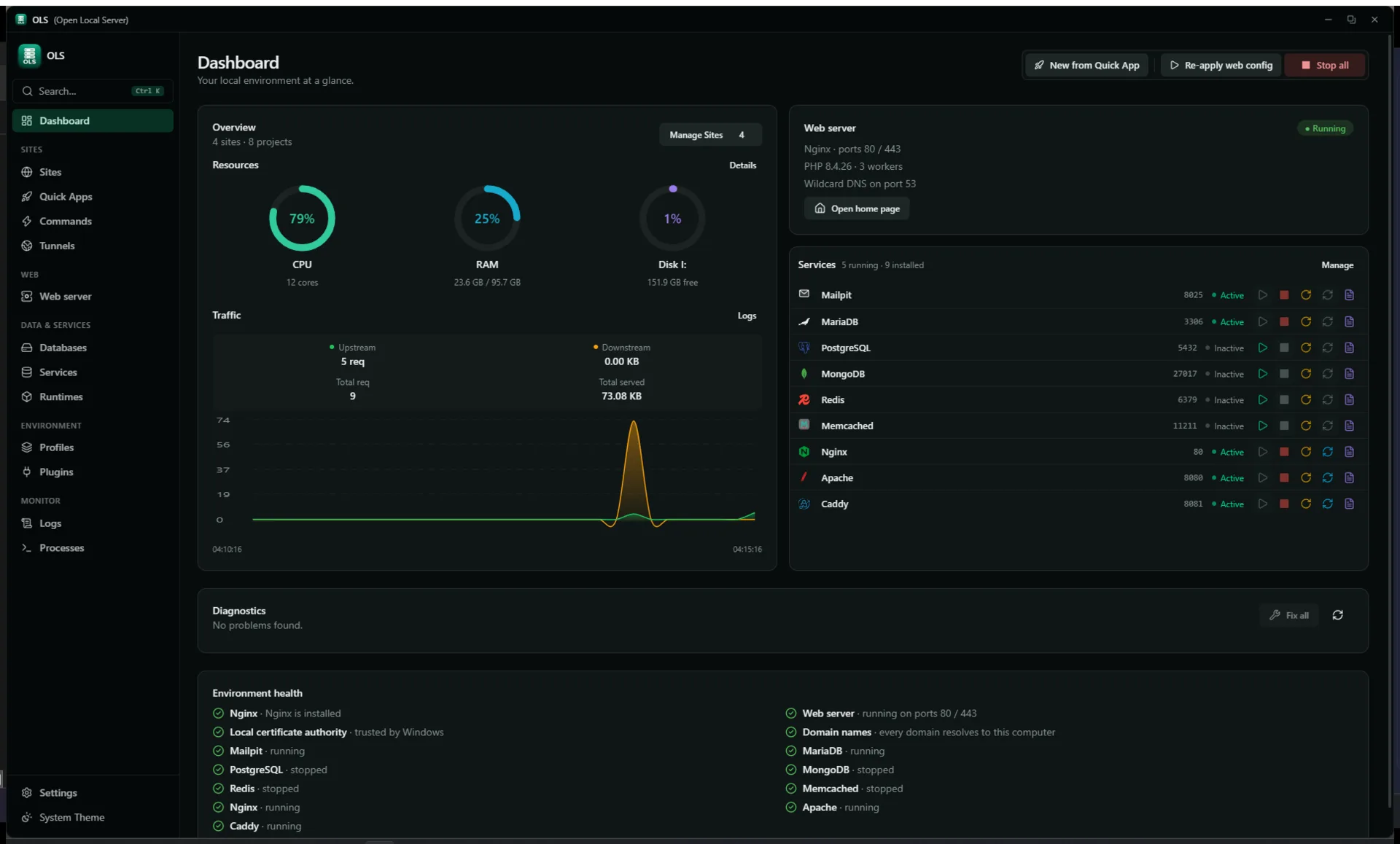
Dashboard — health, services, diagnostics at a glance
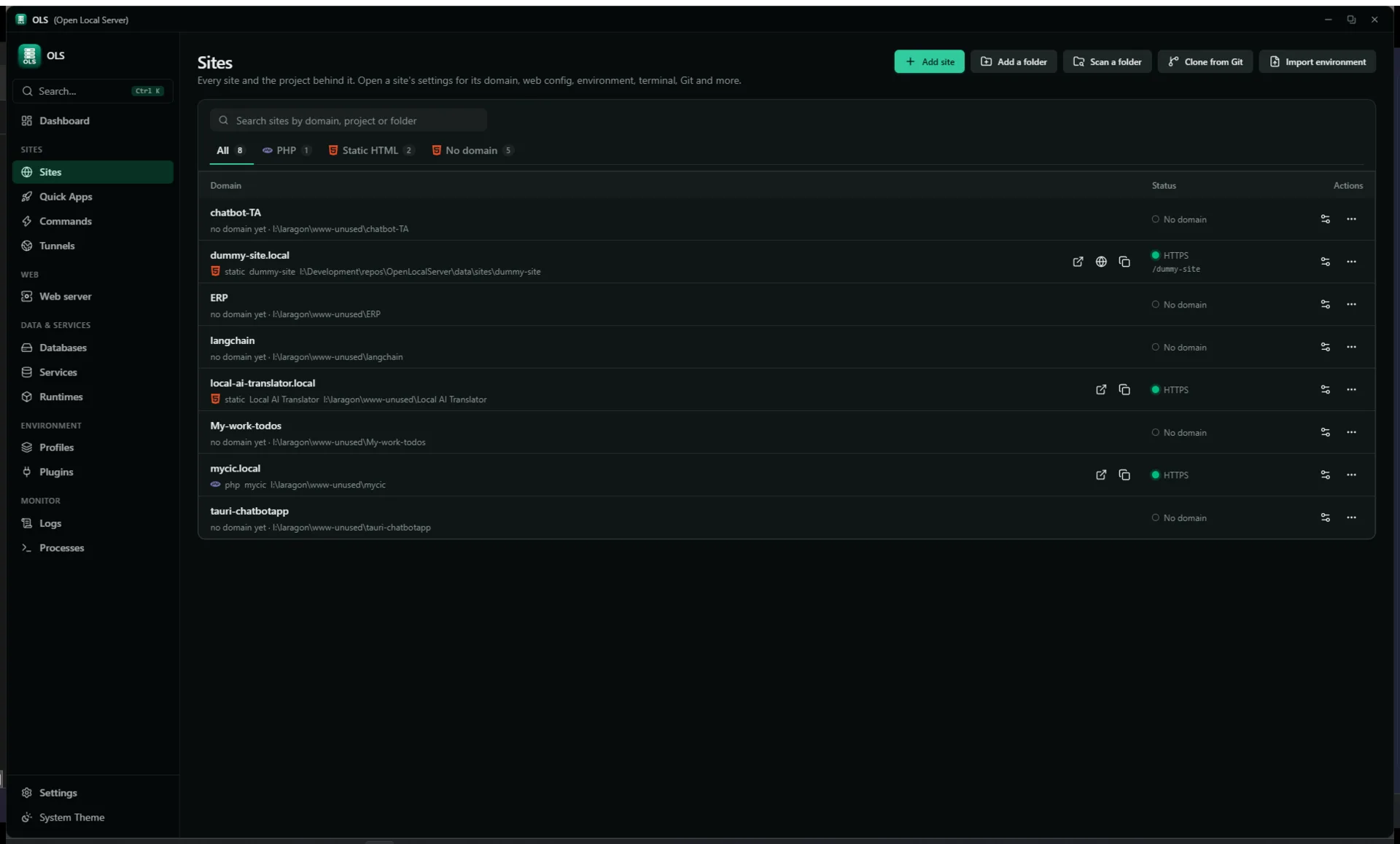
Sites — domains, per-site PHP, HTTPS, reverse proxy
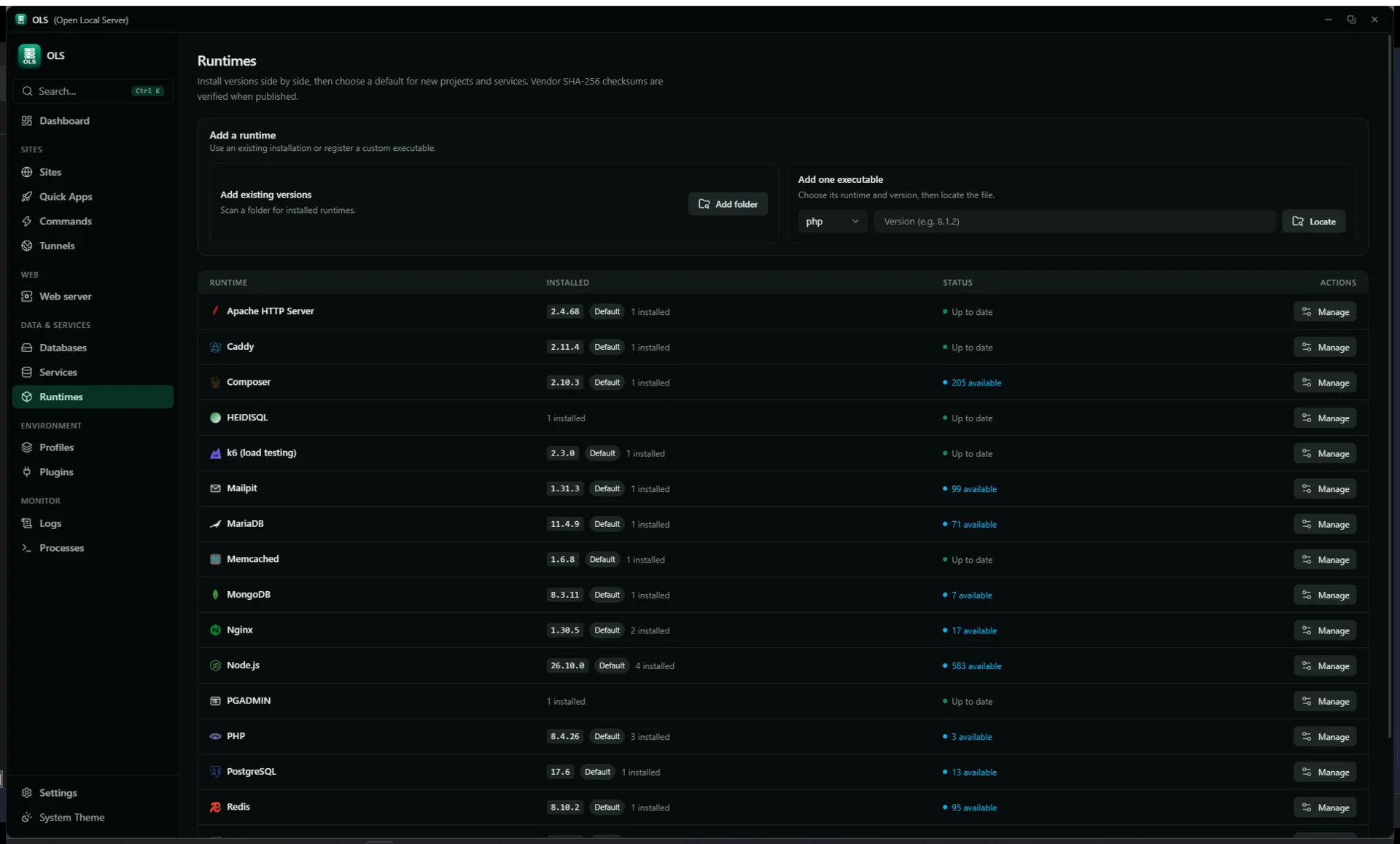
Runtimes — side-by-side versions and defaults
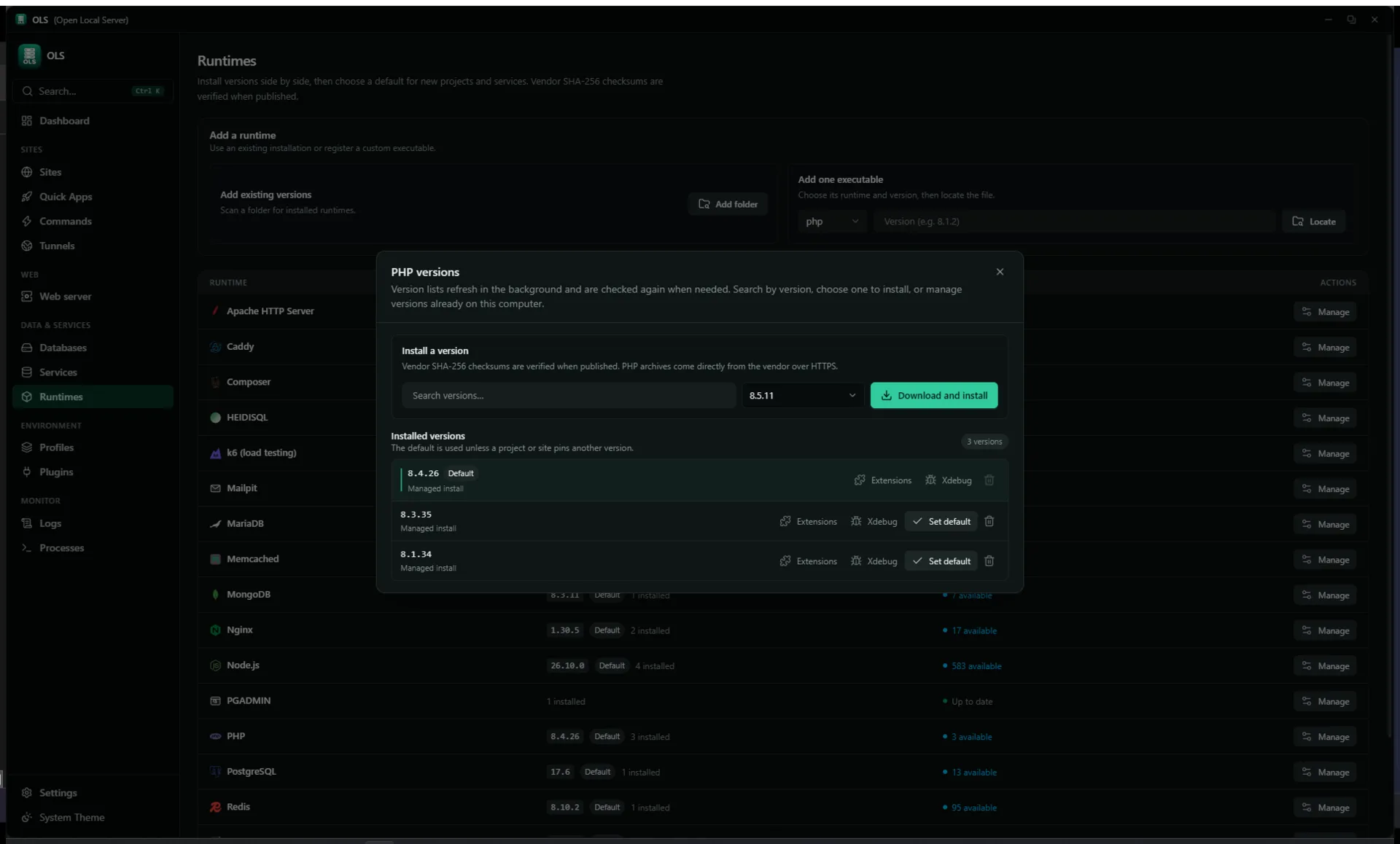
Version manager — install and manage versions per runtime
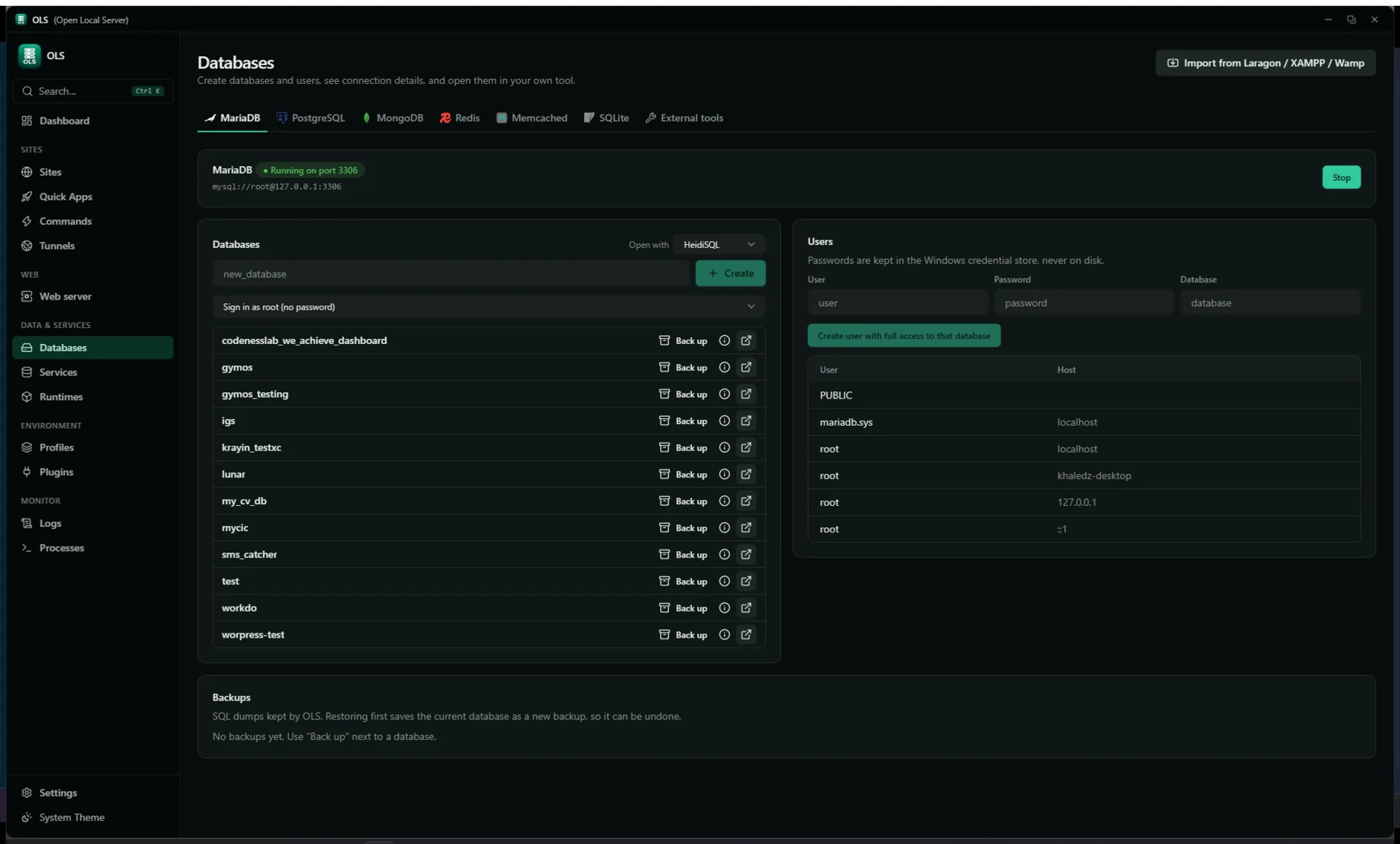
Databases — engines, users, backups
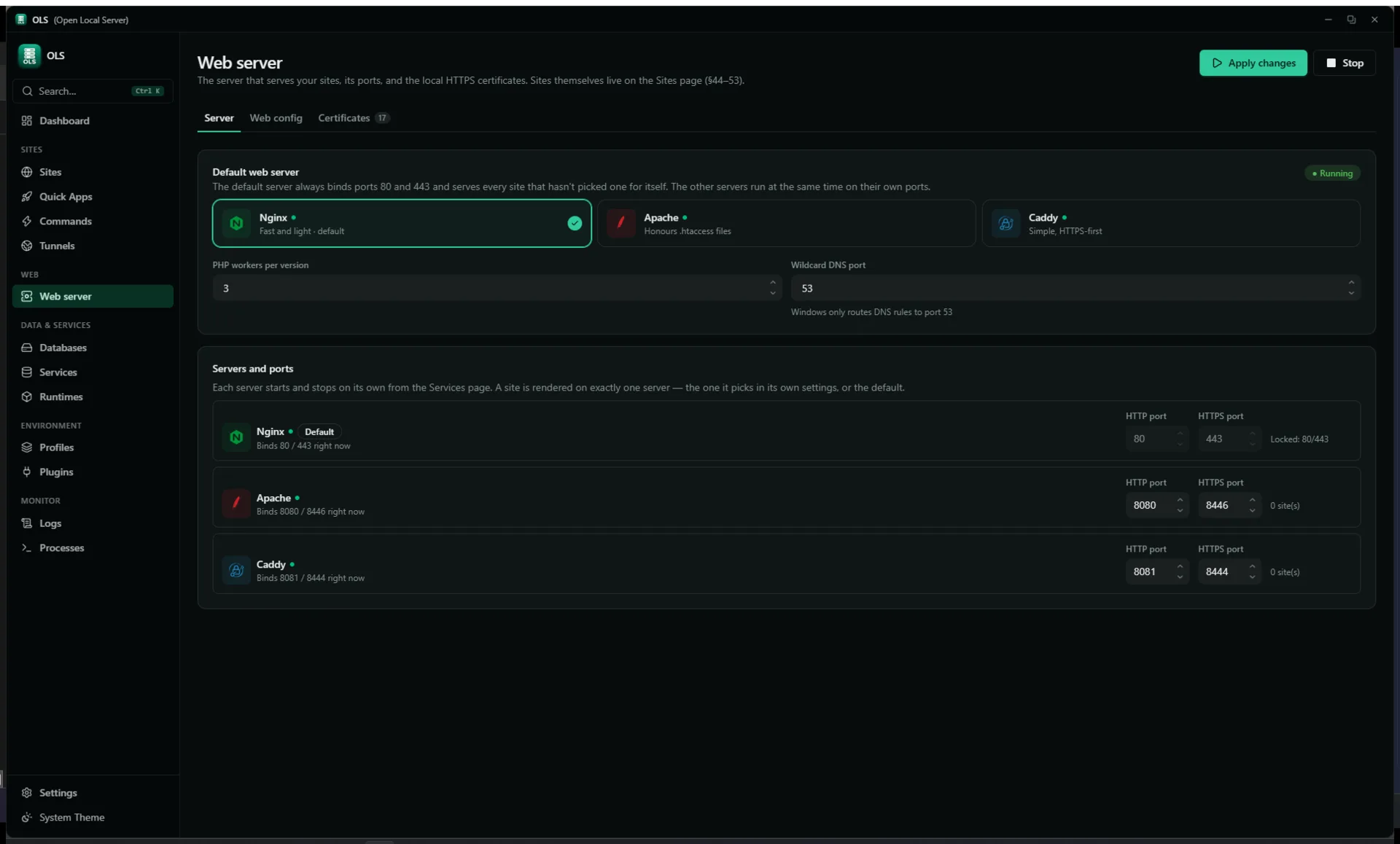
Web server — engine config and control
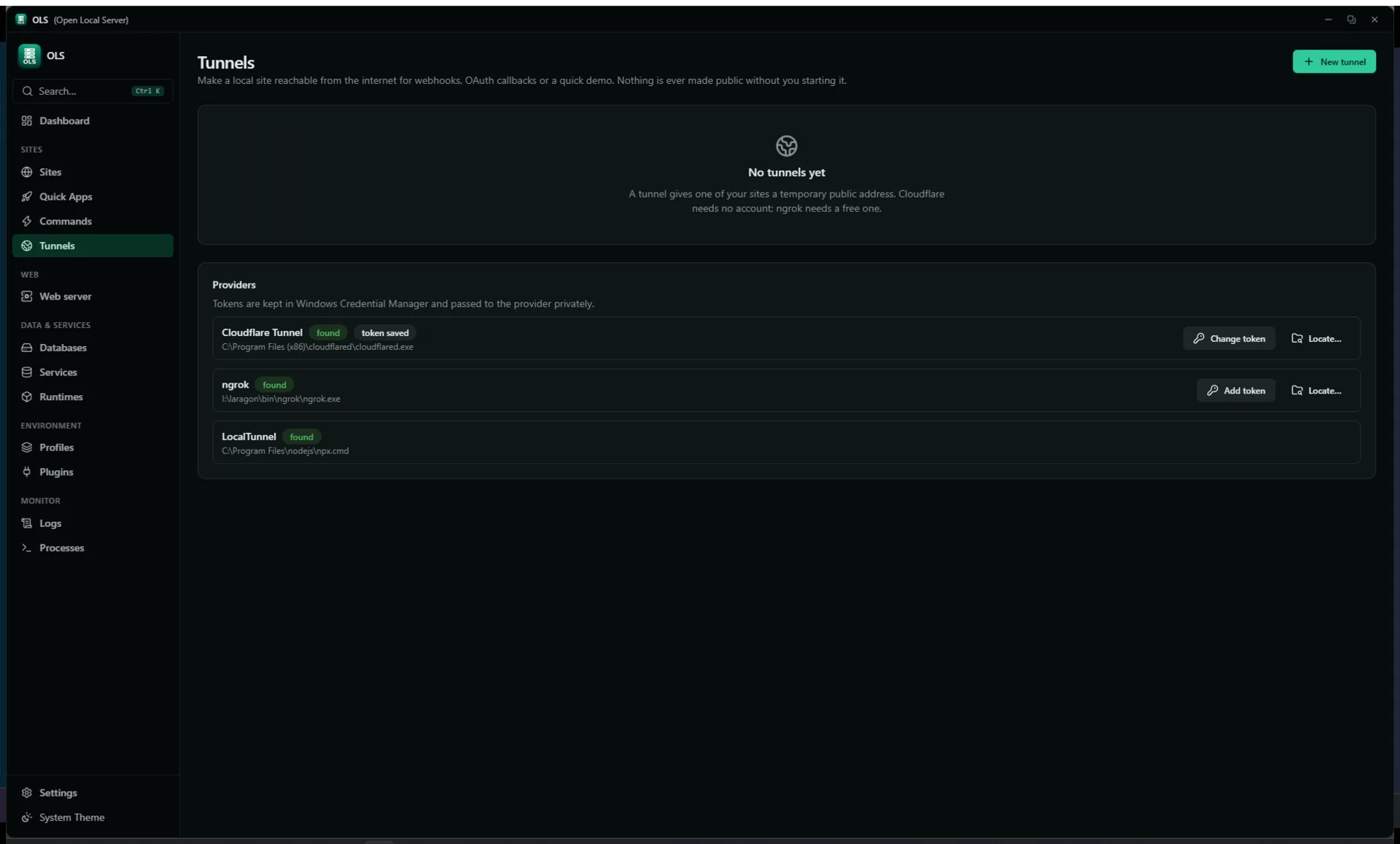
Tunnels — share a local site, inspect traffic
✨ Features
📦 Runtimes & Toolchain
- Side-by-side versions per runtime with a version manager dialog: search, install, default badge, per-version path display.
- Managed lineup: PHP NTS 8.1–8.5 (per-version extensions, Xdebug per version, PECL), Node 22/24 (corepack npm/pnpm/yarn), Composer, Python venvs, portable Git, k6 (load testing).
- Online catalogs per runtime (vendor sources, 24h cache, background refresh) + SHA-256 verified downloads, resume-safe cache, atomic extract.
- Bring your own: scan a folder for existing PHP installs, or register one executable (PHP/Node/Python) by locating the file.
- Resolution order: project manifest pin > auto-detected > global default. Changing a default never touches project files.
🌐 Sites, Web Servers & HTTPS
- Add a site from inside the app: pick a folder, add a root folder so every project inside it becomes a site automatically, or add one straight from a Git repository.
- Unlimited sites. Any domain + wildcard subdomains; automatic
<folder>.test; static sites; reverse proxy to any host:port. Run on a domain, on localhost, or both at the same time. - Trusted local HTTPS: on-device CA, 397-day leaf certs, auto-renew under 30 days, SAN-aware reuse.
- Per-site PHP version and per-site web server: each site can run on its own PHP version and its own server (Nginx, Apache, or Caddy); unpinned sites follow the global default.
- Nginx 1.28 / Apache 2.4 / Caddy 2.11 with generated configs; Managed / Advanced / Manual modes; validate-before-reload with rollback; drift detection; config history with diff + restore.
- Built-in wildcard DNS for
.test/.localhost/.internal; optional elevated helper for hosts/NRPT (no repeated UAC prompts).
🧩 Projects & Reproducible Environments
- Auto-detection: framework + version from
composer.json,package.json,manage.py, markers; workspace scan. - Manifests (
.openlocalserver/*.yaml): environment, services, commands, lock file. - 14-step setup pipeline: resolve → plan → conflict report → dry-run → apply, journaled with rollback and file lock.
- Profiles (Development / Testing / Debugging / Demo), snapshots and backups (zip, clone, import/export),
.envlossless editor (comments/order/CRLF preserved). - Quick Apps: 13 built-in recipes (Laravel, Symfony, WordPress, Express, React/Vite, Vue, Next.js, Django, FastAPI, static…) — validate → plan review → run with history.
- Quick Commands + project commands: discovered Composer/npm scripts with one-click run and output ring, plus ready-made commands for Laravel, Node, and Python projects.
🗄️ Databases & Services
- Engines: MariaDB 11.4 (per-series data folders), PostgreSQL 17, MongoDB, Redis (
redis-windows), Memcached, Mailpit, SQLite. - Per-engine DB + user management, connection details, backup/restore (safety copy first), SQLite
.backup+ integrity checks. - One-click external GUIs: HeidiSQL, pgAdmin 4, NoSQLBooster, Tiny RDM (auto-detected, Redis URI copy).
- Importers: Laragon / XAMPP / WampServer databases without SQL dumps (live-dump importer).
- Service lifecycle with TCP health, Mailpit mail capture per framework (
.envplanner with diff preview). - Resource limits per service: cap RAM, CPU, and process count for each service, plus engine settings such as the MariaDB buffer pool.
📊 Dashboard & Monitoring
- Services card: all built-ins in a fixed order — start/stop/restart/reload/logs colour-coded per action, and anything unavailable right now shown flat grey instead of looking clickable. In a narrow window the Web server card moves above Overview; side by side it sits above Services.
- Ports tab: one aligned row per server (icon, name, HTTP, HTTPS, site count) with fixed-width port fields sized to five digits; a server that is the default shows its 80/443 fields locked rather than editable.
- Number fields: ports, worker counts, memory limits and IDE ports all use an in-app stepper (rounded chevrons, app palette, arrow keys work) rather than the browser's default arrows.
- Overview: sites/projects counts, resource donuts (CPU/RAM/disk), traffic graph from web access log (30-bucket, hover inspector).
- Diagnostics card: findings as Problem/Cause/Fix, safe one-click auto-repair, ignore list, AI explain per finding.
- Doctor: full report + repair planner; every error is
Diagnostic{problem, cause, fix}. - Logs page: unified severity-aware viewer (search/filter/export/clear); send logs to the AI assistant to explain an error. Processes page: raw process manager + system stats; per-site usage rollups.
- Command palette (
Ctrl+Shift+P), global search (Ctrl+K).
🔗 Sharing & Tunnels
- Providers: Cloudflare, ngrok, LocalTunnel, Tailscale (abstraction + confirm gate). LocalTunnel needs no account, though it doesn't always work.
- Exposure confirmation, optional password, public badge, one-click stop.
- Traffic inspector: forwarding proxy, redacted log (500 cap), replay, webhook tester.
Provider binaries are found, not installed. Put the program on PATH or in a
known location before starting a tunnel:
winget install --id Cloudflare.cloudflared   # cloudflared -> <prefix>.trycloudflare.com
winget install --id ngrok.ngrok               # ngrok     -> needs an authtoken
- Searched: anything on
PATH, plusC:\Program Files\cloudflared\andC:\Program Files (x86)\cloudflared\. - ngrok additionally needs its authtoken saved in the app (Tunnels → ngrok → token); it is kept in Windows Credential Manager, never in a file or log.
- The inspector captures normal HTTP requests only. WebSocket upgrades and streamed/chunked responses pass through without being logged, replayed or fed to the webhook tester.
🤖 CLI, API & Automation
- CLI (
olsc):setup [--dry-run] | doctor | repair | status | start | stop, plusproject | runtime | service | tunnel | worker | snapshot | quick-command | search; background daemon keeps working with GUI closed. - Local HTTP API (
127.0.0.1:7420): sameCoreCommandJSON, bearer token, origin reject, read-only vs operate scopes. - Workers (queue registry, max 16, Procfile.dev import), scheduled tasks (cron, 1-min tick, no overlap), terminal (portable-pty shells with runtime PATH-first, max 8).
- Git manager: status/stage/commit/branches/pull/push/remotes/stash/clone with credential helper.
- k6 load testing (VU cap, JSON metrics), AI assistant (runs locally with LM Studio, or connect Hugging Face / OpenRouter / any OpenAI-compatible provider) with scoped permissions.
- Plugins: declarative
plugin.yaml(runtimes, quick apps, detections, health checks) via minisign-signed catalogs, re-verified each load. - Self-updater (signed
latest.json+ SHA check), tray icon, notifications, start with Windows, leftover-server cleanup, memory limits. See docs/PLUGINS.md, docs/API.md, docs/AI_ASSISTANT.md.
🚀 Getting Started
Most people only need the installer from the Download section. The steps below are for building from source.
Prerequisites
| Requirement | Version | Notes |
|---|---|---|
| Windows | 10 / 11 (64-bit) | Windows-only |
| Rust | stable | rustup toolchain |
| Node.js | 22+ | UI build |
| Tauri prerequisites | — | WebView2, MSVC, WiX — see Tauri prerequisites |
Install dependencies
# Rust toolchain (if missing)
winget install Rustlang.Rustup

# Node 22 (if missing)
winget install OpenJS.NodeJS.LTS --version 22

# UI dependencies
cd ui
npm install
Run locally (dev)
# From repo root — starts Tauri + Vite + Rust core
.\scripts\dev.bat
This launches the desktop app with hot-reload (Vite on http://localhost:1420).
Build for production
# Core + helper checks
cargo fmt --all
cargo clippy -p ols-core -p ols-helper --all-targets
cargo test -p ols-core -p ols-helper

# UI lint + build
cd ui
npm run lint
npm run build

# Tauri bundle (NSIS/MSI)
cd ..
cargo tauri build
💻 Usage
Register a project and go live
# Clone any PHP / Node / Python project
git clone https://github.com/example/my-laravel-app.git
cd my-laravel-app

# Full environment setup: runtimes → DB → domain → DNS → SSL → mail → workers
olsc setup

# Preview plan without applying
olsc setup --dry-run

# Check health, auto-fix safe issues
olsc doctor
olsc repair
Daily commands
olsc status                  # services, sites, runtimes
olsc start                   # start all enabled services
olsc stop                    # stop all

olsc project list            # registered projects
olsc service list            # MariaDB, Postgres, Redis, Mailpit…
olsc runtime list            # installed PHP/Node versions

olsc tunnel start --provider cloudflared --port 443
olsc worker run --queue default
olsc snapshot create --name "before-upgrade"
olsc search "mailpit"        # global search
Typical flow in GUI
- Add project — register or scan a folder, or add from a Git repository → framework auto-detected
- Setup — review 14-step plan → Apply (rollback on failure)
- Open site —
https://myapp.testwith trusted cert, per-site PHP - Develop —
.enveditor, terminal, Git tab, logs, Mailpit for mail - Share — tunnel with confirmation → inspector → one-click stop
All errors surface as
Diagnostic{ problem, cause, fix }— what broke, why, and how to fix it.
📁 Project Structure
OpenLocalServer/
├── crates/
│   ├── ols-core/        # All logic — CoreCommand dispatcher (~150-200 variants),
│   │                    # managers: Runtime, Service, Web, Domain, Certs, Project,
│   │                    # ProcessSupervisor, Workers, Scheduler, Tunnel, Mail,
│   │                    # Diagnostics, QuickApp, Plugin
│   ├── ols-helper/      # Elevated helper — hosts/NRPT/service via UAC or
│   │                    # LocalSystem named pipe (closed validated set)
│   └── ols-cli/         # CLI (`olsc.exe` beside the app) — drives the app or a background daemon
├── src-tauri/           # Tauri 2 shell — window, tray, single IPC `run_command`
├── ui/src/              # React 19 + Vite 8 + Tailwind 4 + shadcn/ui,
│   │                    # CodeMirror 6, xterm.js, `core.ts` IPC wrapper
│   ├── pages/           # Dashboard, Sites, Environment, Git, Workers,
│   │                    # Snapshots, Tunnels, Profiles, Repair, Doctor…
│   └── components/      # shadcn/ui primitives, dialogs, editors
├── data/                # SQLite app database (app.db),
│                        # OLS_HOME env overrides all paths
├── docs/                # STATUS.md, IMPLEMENTATION_PLAN.md, AI_ASSISTANT.md…
├── specs/               # Single source of truth — architecture, catalog,
│                        # relationships, data models, API reference, diagrams
├── installer/          # Inno Setup script (open-local-server.iss)
├── scripts/            # dev.bat, build-installer.bat, upload-release.bat
├── assets/              # App icons + README screenshots (dashboard, sites,
│                        # runtimes, version-manager, databases, webserver,
│                        # tunnels — all .webp)
└── OLS_Master_SRS_v4.md  # Full requirements spec (v4)
Architecture (one core, many front doors):
GUI (React) ──┐
CLI (olsc) ────┼──> Core::dispatch(CoreCommand) -> Inner (Arc-shared state)
HTTP API ─────┘         |
                        v
              Managers: Runtime, Service, Web, Domain, Certs,
              Project, ProcessSupervisor, Workers, Scheduler,
              Tunnel, Mail, Diagnostics, QuickApp, Plugin
🤖 Built for AI, built to be forked
The whole project is documented so an AI agent can understand it and keep building it:
specs/is the single source of truth: architecture, catalog, data models, API reference, diagrams.AGENTS.mdtells an agent how the project works, what to do, and what to avoid.docs/and the Master SRS explain the plan and the requirements.
Fork it, point your own AI agent (Claude Code, Cursor, or any other) at the repo, and turn it into the tool you want.
🤝 Contributing
Contributions welcome. Please read CONTRIBUTING.md and the Code of Conduct first.
# Quality gates — must pass before PR
cargo fmt --all
cargo clippy -p ols-core -p ols-helper --all-targets
cargo test -p ols-core -p ols-helper
cd ui; npm run lint; npm run build
- Specs-sync mandate:
specs/is source of truth. Any behavior change must update matchingspecs/files in same PR + append log line tospecs/runtime.md. Behavior PR without spec update gets rejected. See AGENTS.md. - Safety: user errors use
Diagnostic{problem,cause,fix}· downloads verify SHA-256 · secrets in OS keyring only, never logs/files/bundles. - Commits: Conventional Commits (
feat:,fix:,docs:…).
🧾 Third-Party Notices
olsc is GPL-3.0-only (see LICENSE).
The installer ships OLS only — no third-party software is bundled. Runtimes, web servers, and databases are downloaded by you on demand from the vendor and SHA-256 verified, and are installed into OLS-managed folders you can delete at any time. Tunnel binaries are neither downloaded nor installed — OLS only finds them already on your PATH (see Tunnels).
Downloaded on demand (NOT part of the installer)
| Component | License | Source |
|---|---|---|
| PHP (NTS 8.1–8.5) | PHP License 3.01 | windows.php.net |
| Composer | MIT | getcomposer.org |
| Node.js 22 / 24 | MIT | nodejs.org |
| corepack / npm / pnpm / yarn | MIT | nodejs.org |
| Portable Git | GPL-2.0-only | git-scm.com/downloads |
| Python | PSF License | python.org |
| k6 | AGPL-3.0-only | grafana.com/docs/k6 |
| Nginx 1.28 | BSD-2-Clause | nginx.org |
| Apache httpd 2.4 | Apache-2.0 | httpd.apache.org |
| Caddy 2.11 | Apache-2.0 | caddyserver.com |
| MariaDB 11.4 | GPL-2.0-only | mariadb.org |
| PostgreSQL 17 | PostgreSQL License | postgresql.org |
| MongoDB | SSPL-1.0 | mongodb.com |
Redis (redis-windows) | RSALv2 / SSPLv1 | redis.io |
| Memcached | BSD-3-Clause | memcached.org |
| Mailpit | MIT | github.com/axllent/mailpit |
| HeidiSQL | GPL-3.0-only | heidisql.com |
| pgAdmin 4 | PostgreSQL License | pgadmin.org |
| NoSQLBooster | MIT | nosqlbooster.com |
| Tiny RDM | MIT | github.com/rvigster/TinyRDM |
| cloudflared | Apache-2.0 | github.com/cloudflare/cloudflared |
| ngrok | Apache-2.0 | github.com/ngrok/ngrok |
| localtunnel | MIT | github.com/localtunnel/localtunnel |
| Tailscale | BSD-3-Clause | tailscale.com |
Notes
- Everything above runs as a separate process in a separate folder, is never linked into the OLS binary, and is removed when you uninstall it. Each project license applies to its own install.
- Redis and MongoDB are source-available, not OSI-approved.
- Tunnel provider binaries (cloudflared, ngrok) are found on
PATH, never downloaded or installed by OLS. - Licenses come from upstream vendor metadata; re-verify at release time.
📄 License
GPL-3.0-only — see LICENSE. See SECURITY.md for reporting policy.
Feel free to use the code, edit it, and make your own version.
Built with Rust · Tauri 2 · React 19 · Tokio
Status ·
Implementation Plan ·
Master SRS v4 ·
Contributing
Similar repos


Languages
Rust
65.4%
TypeScript
29.0%
HTML
1.6%
Inno Setup
1.1%
See what people are saying
README
OLS (Open Local Server)
A free, open-source local development environment manager for Windows — runtimes, sites, databases, and trusted HTTPS, without touching your system by hand.
OLS (Open Local Server) is an all-in-one local development environment for Windows with broad runtime coverage and full extensibility. Every project gets isolated runtimes, its own .test domain, and trusted local HTTPS. One core engine (ols-core) powers three front doors: desktop GUI, CLI (olsc), and local HTTP API.
Free, open source, and no limit on the number of sites.
Why I built it
I found plenty of free tools, but none of them had everything I wanted in one place. So I built one that does, first of all for myself. It is not made for profit, just to have the tool I wanted and to share it. It is and will stay completely free.
It is still in the early stages, so expect rough edges. Feedback and bug reports are very welcome.
Contents
- Download · Tour · Runtimes · Sites & HTTPS · Projects · Databases & Services · Dashboard & Monitoring · Sharing · Automation
- Getting Started · Usage · Project Structure · Built for AI · Contributing · Third-Party Notices · License
📥 Download
Grab the latest installer from the Releases page.
- The app itself comes empty. Nothing is bundled. From the interface you download only the runtimes, web servers, and databases you need, or point OLS to ones you already have.
- SmartScreen: the installer isn't code-signed yet, so Windows SmartScreen may show a warning. Click More info, then Run anyway.
📸 Tour
Captured from running app (dark theme).
Dashboard — health, services, diagnostics at a glance
Sites — domains, per-site PHP, HTTPS, reverse proxy
Runtimes — side-by-side versions and defaults
Version manager — install and manage versions per runtime
Databases — engines, users, backups
Web server — engine config and control
Tunnels — share a local site, inspect traffic
✨ Features
📦 Runtimes & Toolchain
- Side-by-side versions per runtime with a version manager dialog: search, install, default badge, per-version path display.
- Managed lineup: PHP NTS 8.1–8.5 (per-version extensions, Xdebug per version, PECL), Node 22/24 (corepack npm/pnpm/yarn), Composer, Python venvs, portable Git, k6 (load testing).
- Online catalogs per runtime (vendor sources, 24h cache, background refresh) + SHA-256 verified downloads, resume-safe cache, atomic extract.
- Bring your own: scan a folder for existing PHP installs, or register one executable (PHP/Node/Python) by locating the file.
- Resolution order: project manifest pin > auto-detected > global default. Changing a default never touches project files.
🌐 Sites, Web Servers & HTTPS
- Add a site from inside the app: pick a folder, add a root folder so every project inside it becomes a site automatically, or add one straight from a Git repository.
- Unlimited sites. Any domain + wildcard subdomains; automatic
<folder>.test; static sites; reverse proxy to any host:port. Run on a domain, on localhost, or both at the same time. - Trusted local HTTPS: on-device CA, 397-day leaf certs, auto-renew under 30 days, SAN-aware reuse.
- Per-site PHP version and per-site web server: each site can run on its own PHP version and its own server (Nginx, Apache, or Caddy); unpinned sites follow the global default.
- Nginx 1.28 / Apache 2.4 / Caddy 2.11 with generated configs; Managed / Advanced / Manual modes; validate-before-reload with rollback; drift detection; config history with diff + restore.
- Built-in wildcard DNS for
.test/.localhost/.internal; optional elevated helper for hosts/NRPT (no repeated UAC prompts).
🧩 Projects & Reproducible Environments
- Auto-detection: framework + version from
composer.json,package.json,manage.py, markers; workspace scan. - Manifests (
.openlocalserver/*.yaml): environment, services, commands, lock file. - 14-step setup pipeline: resolve → plan → conflict report → dry-run → apply, journaled with rollback and file lock.
- Profiles (Development / Testing / Debugging / Demo), snapshots and backups (zip, clone, import/export),
.envlossless editor (comments/order/CRLF preserved). - Quick Apps: 13 built-in recipes (Laravel, Symfony, WordPress, Express, React/Vite, Vue, Next.js, Django, FastAPI, static…) — validate → plan review → run with history.
- Quick Commands + project commands: discovered Composer/npm scripts with one-click run and output ring, plus ready-made commands for Laravel, Node, and Python projects.
🗄️ Databases & Services
- Engines: MariaDB 11.4 (per-series data folders), PostgreSQL 17, MongoDB, Redis (
redis-windows), Memcached, Mailpit, SQLite. - Per-engine DB + user management, connection details, backup/restore (safety copy first), SQLite
.backup+ integrity checks. - One-click external GUIs: HeidiSQL, pgAdmin 4, NoSQLBooster, Tiny RDM (auto-detected, Redis URI copy).
- Importers: Laragon / XAMPP / WampServer databases without SQL dumps (live-dump importer).
- Service lifecycle with TCP health, Mailpit mail capture per framework (
.envplanner with diff preview). - Resource limits per service: cap RAM, CPU, and process count for each service, plus engine settings such as the MariaDB buffer pool.
📊 Dashboard & Monitoring
- Services card: all built-ins in a fixed order — start/stop/restart/reload/logs colour-coded per action, and anything unavailable right now shown flat grey instead of looking clickable. In a narrow window the Web server card moves above Overview; side by side it sits above Services.
- Ports tab: one aligned row per server (icon, name, HTTP, HTTPS, site count) with fixed-width port fields sized to five digits; a server that is the default shows its 80/443 fields locked rather than editable.
- Number fields: ports, worker counts, memory limits and IDE ports all use an in-app stepper (rounded chevrons, app palette, arrow keys work) rather than the browser's default arrows.
- Overview: sites/projects counts, resource donuts (CPU/RAM/disk), traffic graph from web access log (30-bucket, hover inspector).
- Diagnostics card: findings as Problem/Cause/Fix, safe one-click auto-repair, ignore list, AI explain per finding.
- Doctor: full report + repair planner; every error is
Diagnostic{problem, cause, fix}. - Logs page: unified severity-aware viewer (search/filter/export/clear); send logs to the AI assistant to explain an error. Processes page: raw process manager + system stats; per-site usage rollups.
- Command palette (
Ctrl+Shift+P), global search (Ctrl+K).
🔗 Sharing & Tunnels
- Providers: Cloudflare, ngrok, LocalTunnel, Tailscale (abstraction + confirm gate). LocalTunnel needs no account, though it doesn't always work.
- Exposure confirmation, optional password, public badge, one-click stop.
- Traffic inspector: forwarding proxy, redacted log (500 cap), replay, webhook tester.
Provider binaries are found, not installed. Put the program on PATH or in a
known location before starting a tunnel:
winget install --id Cloudflare.cloudflared   # cloudflared -> <prefix>.trycloudflare.com
winget install --id ngrok.ngrok               # ngrok     -> needs an authtoken
- Searched: anything on
PATH, plusC:\Program Files\cloudflared\andC:\Program Files (x86)\cloudflared\. - ngrok additionally needs its authtoken saved in the app (Tunnels → ngrok → token); it is kept in Windows Credential Manager, never in a file or log.
- The inspector captures normal HTTP requests only. WebSocket upgrades and streamed/chunked responses pass through without being logged, replayed or fed to the webhook tester.
🤖 CLI, API & Automation
- CLI (
olsc):setup [--dry-run] | doctor | repair | status | start | stop, plusproject | runtime | service | tunnel | worker | snapshot | quick-command | search; background daemon keeps working with GUI closed. - Local HTTP API (
127.0.0.1:7420): sameCoreCommandJSON, bearer token, origin reject, read-only vs operate scopes. - Workers (queue registry, max 16, Procfile.dev import), scheduled tasks (cron, 1-min tick, no overlap), terminal (portable-pty shells with runtime PATH-first, max 8).
- Git manager: status/stage/commit/branches/pull/push/remotes/stash/clone with credential helper.
- k6 load testing (VU cap, JSON metrics), AI assistant (runs locally with LM Studio, or connect Hugging Face / OpenRouter / any OpenAI-compatible provider) with scoped permissions.
- Plugins: declarative
plugin.yaml(runtimes, quick apps, detections, health checks) via minisign-signed catalogs, re-verified each load. - Self-updater (signed
latest.json+ SHA check), tray icon, notifications, start with Windows, leftover-server cleanup, memory limits. See docs/PLUGINS.md, docs/API.md, docs/AI_ASSISTANT.md.
🚀 Getting Started
Most people only need the installer from the Download section. The steps below are for building from source.
Prerequisites
| Requirement | Version | Notes |
|---|---|---|
| Windows | 10 / 11 (64-bit) | Windows-only |
| Rust | stable | rustup toolchain |
| Node.js | 22+ | UI build |
| Tauri prerequisites | — | WebView2, MSVC, WiX — see Tauri prerequisites |
Install dependencies
# Rust toolchain (if missing)
winget install Rustlang.Rustup

# Node 22 (if missing)
winget install OpenJS.NodeJS.LTS --version 22

# UI dependencies
cd ui
npm install
Run locally (dev)
# From repo root — starts Tauri + Vite + Rust core
.\scripts\dev.bat
This launches the desktop app with hot-reload (Vite on http://localhost:1420).
Build for production
# Core + helper checks
cargo fmt --all
cargo clippy -p ols-core -p ols-helper --all-targets
cargo test -p ols-core -p ols-helper

# UI lint + build
cd ui
npm run lint
npm run build

# Tauri bundle (NSIS/MSI)
cd ..
cargo tauri build
💻 Usage
Register a project and go live
# Clone any PHP / Node / Python project
git clone https://github.com/example/my-laravel-app.git
cd my-laravel-app

# Full environment setup: runtimes → DB → domain → DNS → SSL → mail → workers
olsc setup

# Preview plan without applying
olsc setup --dry-run

# Check health, auto-fix safe issues
olsc doctor
olsc repair
Daily commands
olsc status                  # services, sites, runtimes
olsc start                   # start all enabled services
olsc stop                    # stop all

olsc project list            # registered projects
olsc service list            # MariaDB, Postgres, Redis, Mailpit…
olsc runtime list            # installed PHP/Node versions

olsc tunnel start --provider cloudflared --port 443
olsc worker run --queue default
olsc snapshot create --name "before-upgrade"
olsc search "mailpit"        # global search
Typical flow in GUI
- Add project — register or scan a folder, or add from a Git repository → framework auto-detected
- Setup — review 14-step plan → Apply (rollback on failure)
- Open site —
https://myapp.testwith trusted cert, per-site PHP - Develop —
.enveditor, terminal, Git tab, logs, Mailpit for mail - Share — tunnel with confirmation → inspector → one-click stop
All errors surface as
Diagnostic{ problem, cause, fix }— what broke, why, and how to fix it.
📁 Project Structure
OpenLocalServer/
├── crates/
│   ├── ols-core/        # All logic — CoreCommand dispatcher (~150-200 variants),
│   │                    # managers: Runtime, Service, Web, Domain, Certs, Project,
│   │                    # ProcessSupervisor, Workers, Scheduler, Tunnel, Mail,
│   │                    # Diagnostics, QuickApp, Plugin
│   ├── ols-helper/      # Elevated helper — hosts/NRPT/service via UAC or
│   │                    # LocalSystem named pipe (closed validated set)
│   └── ols-cli/         # CLI (`olsc.exe` beside the app) — drives the app or a background daemon
├── src-tauri/           # Tauri 2 shell — window, tray, single IPC `run_command`
├── ui/src/              # React 19 + Vite 8 + Tailwind 4 + shadcn/ui,
│   │                    # CodeMirror 6, xterm.js, `core.ts` IPC wrapper
│   ├── pages/           # Dashboard, Sites, Environment, Git, Workers,
│   │                    # Snapshots, Tunnels, Profiles, Repair, Doctor…
│   └── components/      # shadcn/ui primitives, dialogs, editors
├── data/                # SQLite app database (app.db),
│                        # OLS_HOME env overrides all paths
├── docs/                # STATUS.md, IMPLEMENTATION_PLAN.md, AI_ASSISTANT.md…
├── specs/               # Single source of truth — architecture, catalog,
│                        # relationships, data models, API reference, diagrams
├── installer/          # Inno Setup script (open-local-server.iss)
├── scripts/            # dev.bat, build-installer.bat, upload-release.bat
├── assets/              # App icons + README screenshots (dashboard, sites,
│                        # runtimes, version-manager, databases, webserver,
│                        # tunnels — all .webp)
└── OLS_Master_SRS_v4.md  # Full requirements spec (v4)
Architecture (one core, many front doors):
GUI (React) ──┐
CLI (olsc) ────┼──> Core::dispatch(CoreCommand) -> Inner (Arc-shared state)
HTTP API ─────┘         |
                        v
              Managers: Runtime, Service, Web, Domain, Certs,
              Project, ProcessSupervisor, Workers, Scheduler,
              Tunnel, Mail, Diagnostics, QuickApp, Plugin
🤖 Built for AI, built to be forked
The whole project is documented so an AI agent can understand it and keep building it:
specs/is the single source of truth: architecture, catalog, data models, API reference, diagrams.AGENTS.mdtells an agent how the project works, what to do, and what to avoid.docs/and the Master SRS explain the plan and the requirements.
Fork it, point your own AI agent (Claude Code, Cursor, or any other) at the repo, and turn it into the tool you want.
🤝 Contributing
Contributions welcome. Please read CONTRIBUTING.md and the Code of Conduct first.
# Quality gates — must pass before PR
cargo fmt --all
cargo clippy -p ols-core -p ols-helper --all-targets
cargo test -p ols-core -p ols-helper
cd ui; npm run lint; npm run build
- Specs-sync mandate:
specs/is source of truth. Any behavior change must update matchingspecs/files in same PR + append log line tospecs/runtime.md. Behavior PR without spec update gets rejected. See AGENTS.md. - Safety: user errors use
Diagnostic{problem,cause,fix}· downloads verify SHA-256 · secrets in OS keyring only, never logs/files/bundles. - Commits: Conventional Commits (
feat:,fix:,docs:…).
🧾 Third-Party Notices
olsc is GPL-3.0-only (see LICENSE).
The installer ships OLS only — no third-party software is bundled. Runtimes, web servers, and databases are downloaded by you on demand from the vendor and SHA-256 verified, and are installed into OLS-managed folders you can delete at any time. Tunnel binaries are neither downloaded nor installed — OLS only finds them already on your PATH (see Tunnels).
Downloaded on demand (NOT part of the installer)
| Component | License | Source |
|---|---|---|
| PHP (NTS 8.1–8.5) | PHP License 3.01 | windows.php.net |
| Composer | MIT | getcomposer.org |
| Node.js 22 / 24 | MIT | nodejs.org |
| corepack / npm / pnpm / yarn | MIT | nodejs.org |
| Portable Git | GPL-2.0-only | git-scm.com/downloads |
| Python | PSF License | python.org |
| k6 | AGPL-3.0-only | grafana.com/docs/k6 |
| Nginx 1.28 | BSD-2-Clause | nginx.org |
| Apache httpd 2.4 | Apache-2.0 | httpd.apache.org |
| Caddy 2.11 | Apache-2.0 | caddyserver.com |
| MariaDB 11.4 | GPL-2.0-only | mariadb.org |
| PostgreSQL 17 | PostgreSQL License | postgresql.org |
| MongoDB | SSPL-1.0 | mongodb.com |
Redis (redis-windows) | RSALv2 / SSPLv1 | redis.io |
| Memcached | BSD-3-Clause | memcached.org |
| Mailpit | MIT | github.com/axllent/mailpit |
| HeidiSQL | GPL-3.0-only | heidisql.com |
| pgAdmin 4 | PostgreSQL License | pgadmin.org |
| NoSQLBooster | MIT | nosqlbooster.com |
| Tiny RDM | MIT | github.com/rvigster/TinyRDM |
| cloudflared | Apache-2.0 | github.com/cloudflare/cloudflared |
| ngrok | Apache-2.0 | github.com/ngrok/ngrok |
| localtunnel | MIT | github.com/localtunnel/localtunnel |
| Tailscale | BSD-3-Clause | tailscale.com |
Notes
- Everything above runs as a separate process in a separate folder, is never linked into the OLS binary, and is removed when you uninstall it. Each project license applies to its own install.
- Redis and MongoDB are source-available, not OSI-approved.
- Tunnel provider binaries (cloudflared, ngrok) are found on
PATH, never downloaded or installed by OLS. - Licenses come from upstream vendor metadata; re-verify at release time.
📄 License
GPL-3.0-only — see LICENSE. See SECURITY.md for reporting policy.
Feel free to use the code, edit it, and make your own version.
Built with Rust · Tauri 2 · React 19 · Tokio
Status ·
Implementation Plan ·
Master SRS v4 ·
Contributing
Similar repos
Languages
Rust
65.4%
TypeScript
29.0%
HTML
1.6%
Inno Setup
1.1%