
See what people are saying
README
Stratego
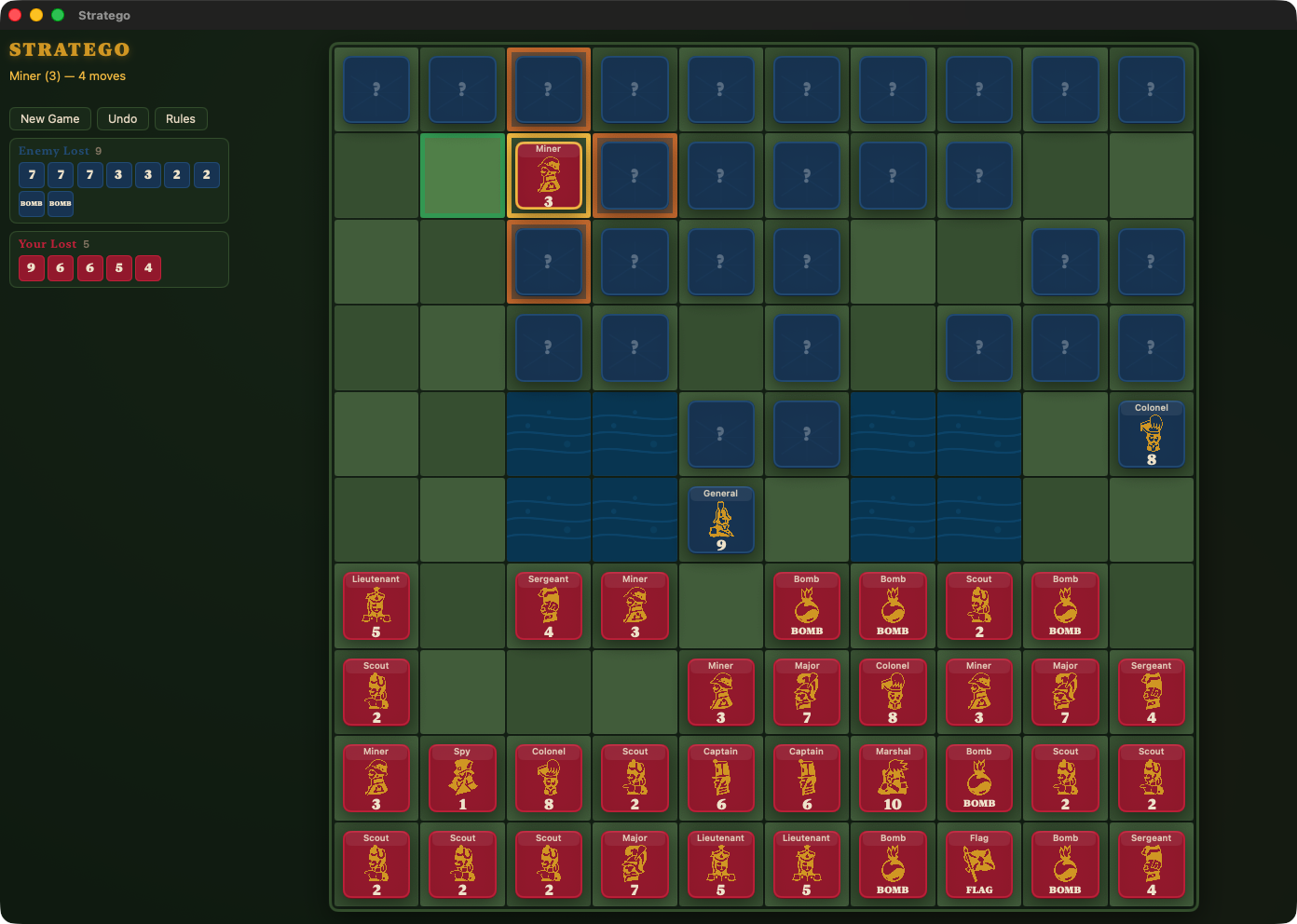
A native macOS game of Stratego, ported from the single-file web prototype in
stratego.html.
- Target: macOS 26.0+, Swift 6, Xcode 26.6
- Bundle id:
net.kuyawa.stratego - Dependencies: none. No third-party packages, no external fonts.
Layout
| Path | What it is |
|---|---|
architecture.md | The design of record: parity contract, engine and UI design, measurements, milestones |
prompt.md | Kickoff brief for a coding agent picking the work up |
stratego.html | The web prototype. The behavioural reference — never edited. |
stratego-art-preview.html | Artwork preview harness with an SVG / vintage toggle |
resources/ | Original art, exactly as supplied. Never shipped, never edited. |
PieceArt/ | Normalised art the app bundles. Generated — do not hand-edit. |
tools/normalize-svg.py | Generates PieceArt/ from resources/ |
Packages/StrategoEngine/ | All rules, state and opponents. No UI, no AppKit. |
Stratego/ | The SwiftUI app target (sources only) |
Stratego.xcodeproj | Hand-authored project, objectVersion = 77 |
tools/build.sh | Builds the app and copies the bundle to build/Stratego.app |
Build and test
# The rules engine — fast, no Xcode project needed
swift build --package-path Packages/StrategoEngine
swift test  --package-path Packages/StrategoEngine

# The app: builds and drops the bundle at build/Stratego.app
tools/build.sh            # or: tools/build.sh Release
open build/Stratego.app
The artwork pipeline
The supplied SVGs are A4 pages with no viewBox, and the drawings overflow the
page whenever a renderer maps 1 mm to 1 pt — which AppKit does, clipping a
quarter of the artwork. tools/normalize-svg.py parses each path, computes the
exact ink box, and writes a tight viewBox into PieceArt/:
python3 tools/normalize-svg.py            # regenerate
python3 tools/normalize-svg.py --report   # show the geometry only
PieceArt/ is committed. Re-run the script only if resources/*.svg changes.
The folder is added to the app target as a folder reference, which is why it
sits outside Stratego/: that directory is a folder-synchronised group, and
Xcode copies resources out of one flat — see architecture.md §6.5.
The silhouettes are detailed etchings, so the board is deliberately large: cells below roughly 72 pt turn the art into an unreadable mass, which is why the window has a 1024 × 776 minimum.
Development notes
The app takes one launch argument:
# Start with the welcome card dismissed, so the board can be inspected directly.
build/Stratego.app/Contents/MacOS/Stratego -StrategoSkipWelcome
Pieces are drawn from PieceArt/, which is bundled as a folder reference, so
Contents/Resources/PieceArt/*.svg is what the app loads at runtime.
Reference material
open stratego.html              # the web prototype, for side-by-side parity checks
open stratego-art-preview.html  # the artwork harness
This is just a port of the game to Swift and macOS, just for fun not for commercial sale, all rights of the game and artwork belong to their respective owners. Copy it, learn from it, but do not resale any part of it without legal consent from the rightful owners
Made with ♥️ by DeepSeek
Similar repos


Languages
Swift
75.7%
HTML
21.3%
Python
2.7%
See what people are saying
README
Stratego
A native macOS game of Stratego, ported from the single-file web prototype in
stratego.html.
- Target: macOS 26.0+, Swift 6, Xcode 26.6
- Bundle id:
net.kuyawa.stratego - Dependencies: none. No third-party packages, no external fonts.
Layout
| Path | What it is |
|---|---|
architecture.md | The design of record: parity contract, engine and UI design, measurements, milestones |
prompt.md | Kickoff brief for a coding agent picking the work up |
stratego.html | The web prototype. The behavioural reference — never edited. |
stratego-art-preview.html | Artwork preview harness with an SVG / vintage toggle |
resources/ | Original art, exactly as supplied. Never shipped, never edited. |
PieceArt/ | Normalised art the app bundles. Generated — do not hand-edit. |
tools/normalize-svg.py | Generates PieceArt/ from resources/ |
Packages/StrategoEngine/ | All rules, state and opponents. No UI, no AppKit. |
Stratego/ | The SwiftUI app target (sources only) |
Stratego.xcodeproj | Hand-authored project, objectVersion = 77 |
tools/build.sh | Builds the app and copies the bundle to build/Stratego.app |
Build and test
# The rules engine — fast, no Xcode project needed
swift build --package-path Packages/StrategoEngine
swift test  --package-path Packages/StrategoEngine

# The app: builds and drops the bundle at build/Stratego.app
tools/build.sh            # or: tools/build.sh Release
open build/Stratego.app
The artwork pipeline
The supplied SVGs are A4 pages with no viewBox, and the drawings overflow the
page whenever a renderer maps 1 mm to 1 pt — which AppKit does, clipping a
quarter of the artwork. tools/normalize-svg.py parses each path, computes the
exact ink box, and writes a tight viewBox into PieceArt/:
python3 tools/normalize-svg.py            # regenerate
python3 tools/normalize-svg.py --report   # show the geometry only
PieceArt/ is committed. Re-run the script only if resources/*.svg changes.
The folder is added to the app target as a folder reference, which is why it
sits outside Stratego/: that directory is a folder-synchronised group, and
Xcode copies resources out of one flat — see architecture.md §6.5.
The silhouettes are detailed etchings, so the board is deliberately large: cells below roughly 72 pt turn the art into an unreadable mass, which is why the window has a 1024 × 776 minimum.
Development notes
The app takes one launch argument:
# Start with the welcome card dismissed, so the board can be inspected directly.
build/Stratego.app/Contents/MacOS/Stratego -StrategoSkipWelcome
Pieces are drawn from PieceArt/, which is bundled as a folder reference, so
Contents/Resources/PieceArt/*.svg is what the app loads at runtime.
Reference material
open stratego.html              # the web prototype, for side-by-side parity checks
open stratego-art-preview.html  # the artwork harness
This is just a port of the game to Swift and macOS, just for fun not for commercial sale, all rights of the game and artwork belong to their respective owners. Copy it, learn from it, but do not resale any part of it without legal consent from the rightful owners
Made with ♥️ by DeepSeek
Similar repos
Languages
Swift
75.7%
HTML
21.3%
Python
2.7%