
See what people are saying
README
Prince of Persia
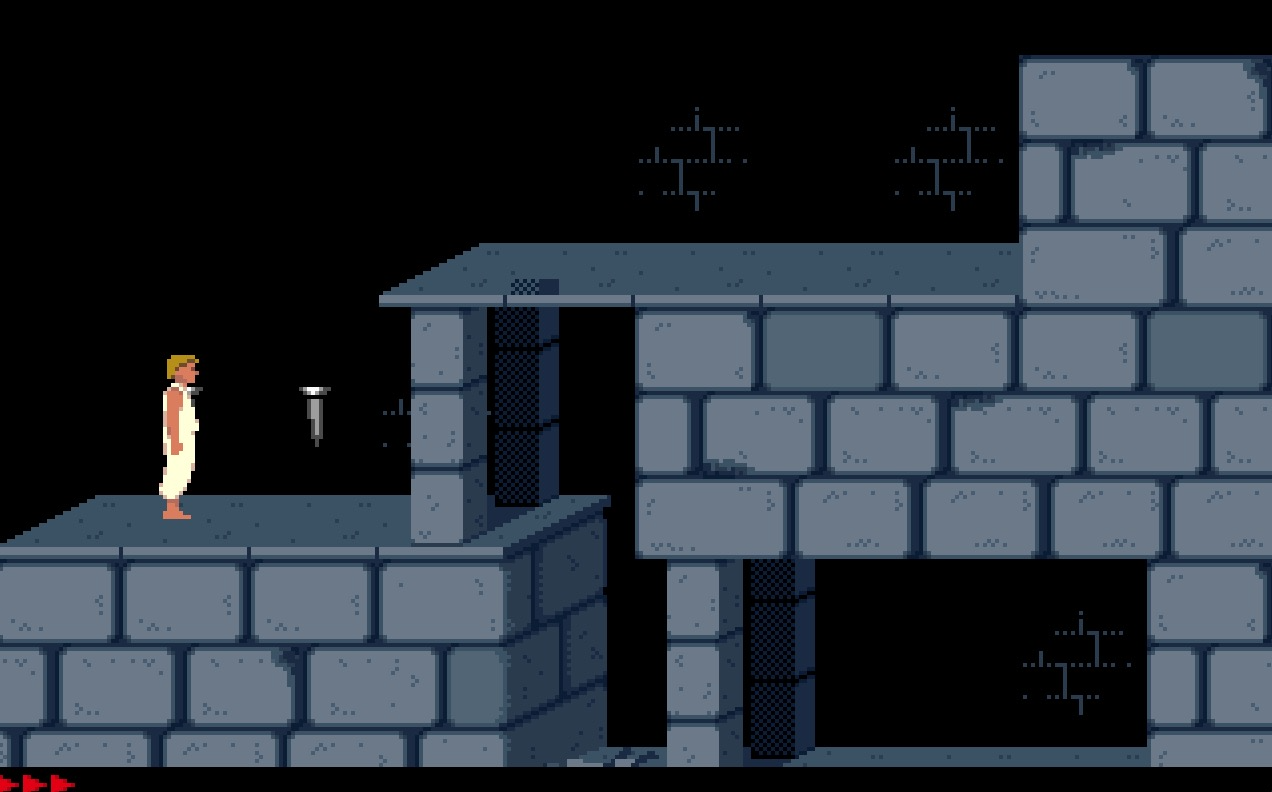
A faithful port of Jordan Mechner's 1989 Prince of Persia to Swift 6 and SpriteKit, for macOS.
What this is
The guiding idea is one sentence: port the game exactly; rewrite the engine completely.
Prince of Persia is not a platformer with a physics engine. It is a virtual machine: an actor runs a sequence of opcodes until one of them emits a frame, and one tick is exactly one frame. Every animation is the state machine — a strike is only legal on six specific frame numbers, and pressing the key on any other frame does nothing at all. That is why the game feels deliberate rather than mashable, and it is the single most important thing to preserve.
So the simulation is transcribed from the reference rather than re-derived, down to the numbers that look like mistakes. It is headless, deterministic from a seed, and covered by a few hundred tests that run in half a second.
Quick start
Clone and double-click:
open "build/Prince of Persia.app"
Or build and run it yourself:
cd PrinceOfPersia
swift run Prince
Requires macOS 26 and a Swift 6.2 toolchain. There are no dependencies.
To rebuild the .app after changing something:
./Scripts/make-app.sh
Controls
Movement and action
| Key | Does |
|---|---|
| ← → | Walk, run, turn |
| ↑ | Jump — or climb up a ledge you are hanging from |
| ↓ | Crouch — or lower yourself over an edge |
| Shift | The action key |
Shift does everything that is not walking: pick up a sword, drink a potion, strike with your sword, grab a ledge while falling, hold on to a ledge, and climb the stairs at an exit. It is a modifier rather than a letter key, which is why it is read from the modifier state and why you can rebind it.
Note the two sequences you will press by accident:
- ↑ + ←/→ is a standing jump; ↑ alone jumps straight up, and becomes a high jump when there is room above him.
- Shift alone reaches for whatever is in front of you — a sword, a potion, a ledge above. Shift while falling catches a ledge, and there is a window of only a few frames in which that works, so it has to be pressed early.
Window size
The game always simulates at its original 320 × 200 pixels, and the window is an integer multiple of that. Change it at any time; nothing about the game changes.
| Shortcut | Window | Shortcut | Window | |
|---|---|---|---|---|
| ⌘ 1 | 320 × 200 | ⌘ 5 | 1600 × 1000 | |
| ⌘ 2 | 640 × 400 (default) | ⌘ 6 | 1920 × 1200 | |
| ⌘ 3 | 960 × 600 | ⌘ 7 | 2240 × 1400 | |
| ⌘ 4 | 1280 × 800 | ⌘ 8 | 2560 × 1600 |
The View menu lists only the sizes that fit your display, so on a laptop the higher entries may be missing. Sizes are capped to the screen rather than offered and then rejected. Integer multiples only: a fractional scale would land the 32 × 63 tile grid on non-integer pixels and the art would shimmer.
Menus
| Shortcut | Does |
|---|---|
| ⌘ W | Close the window — which quits the game, since there is only one |
| ⌘ M | Minimise |
| ⌘ K | Open your key bindings in the default editor |
| ⌘ Q | Quit |
| ⌘ H | Hide |
There is one window and no document, so closing it means you are done: the app terminates rather than sitting in the Dock doing nothing. The Options menu also has Reset Key Bindings to Default.
Rebinding the keys
Key bindings live in a file, not in a dialog:
~/Library/Application Support/PrinceOfPersia/keys.json
It is written with the defaults the first time the game launches. ⌘ K opens it.
Edit and relaunch. The values are macOS virtual key codes, which you can read off
with hidutil or find in Carbon.HIToolbox's kVK_* constants.
{
  "action" : 56,
  "down" : 125,
  "left" : 123,
  "right" : 124,
  "shiftIsAction" : true,
  "up" : 126
}
| Field | Default | Meaning |
|---|---|---|
left right up down | 123 124 126 125 | The arrow keys |
action | 56 | Left Shift |
shiftIsAction | true | Whether the Shift modifier also counts as the action key |
shiftIsAction is the one that needs explaining. Shift never arrives as a key-down
in a window's event monitor, so it is read from the modifier flags instead — and it
stays correct when you tab away and back. If you would rather put the action on a
letter, set action to that key's code and shiftIsAction to false.
A garbled or missing file is ignored and the defaults are used. The game will not refuse to start because of a typo.
Command line
The same binary takes flags, which is useful for screenshots, for the trace, and for jumping straight to a room:
swift run Prince                              # the game
swift run Prince --scale 4                    # 1280 x 800
swift run Prince --level 3 --room 16          # start in the chopper room
swift run Prince --no-audio                   # silent
| Flag | Does |
|---|---|
--scale N | Window scale, 1–8, capped to the display |
--level N | Start on level 1–14 |
--room N | Start in a specific room |
--location N | Start at a specific tile (y * 10 + x) |
--seed N | Seed the RNG, so a run is reproducible |
--volume F | 0–1 |
--mute, --no-music, --no-audio | Silence, one channel at a time |
Diagnostics:
| Flag | Does |
|---|---|
--trace --ticks N | Print the simulation tick by tick, with sounds and music |
--hold left,up | Hold inputs for the run, for reproducible screenshots |
--screenshot out.png | Render one frame headlessly and exit |
--dump-frame FRAME --atlas SHEET | Render a single atlas frame at 1:1 |
# Walk right for two hundred ticks and list every sound the game made.
swift run Prince --trace --level 1 --hold right --ticks 200 | grep 'sound:'

# A frame with the spikes up, without opening a window.
swift run Prince --level 1 --room 6 --location 1 --hold right --ticks 16 \
    --screenshot spikes.png
What is in it
Everything that made the original game:
- The sequence VM — all 256 opcodes, and the per-actor-class dispatch that makes an opcode a silent no-op for an actor that never registered it.
- The Prince — walking, running, turning, crouching, crawling, jumping, hanging from ledges, climbing, and the swing-to-momentum drop.
- Combat — sword fighting with the original frame-by-frame gates, and the guard AI with its twelve probability tables transcribed verbatim.
- Every hazard — collapsing floors, spikes, slicer blades, potions, the sword, gates, floor buttons, the exit door.
- The hourglass — sixty real minutes, and the run ends when it empties.
- The sound — all 33 effects and the eight music tracks the original loads.
- All fourteen levels, chained: finish one and the next loads with your health.
What is not
- Cutscenes. The title screen, the prologue and the ending are not ported.
- The shadow overlay on levels 5 and 6, which needs a mirror-merge effect.
Nothing is simplified. Where the original does something odd, this does the same
odd thing, and ARCHITECTURE.md records why.
Testing
cd PrinceOfPersia
swift test
339 tests, about half a second. They are all headless — no window, no audio device — because the simulation is a pure value type and never touches either. That is the whole reason the port is structured the way it is, and it is what kept the work checkable.
The tests are not just coverage. Several of them exist because a test falsified
something that had been assumed: that events are indexed by position rather than by
label, that a button's modifier is an array index, that a falling actor only dies at
fallingBlocks === 2, that Phaser.Rectangle.intersects counts edge-touching as
overlapping. Those are all in ARCHITECTURE.md.
Layout
PrinceOfPersia/
  Sources/PoPCore/     the faithful port. No Apple UI framework, ever.
  Sources/PoPHost/     the Swift 6 rewrite: rendering, input, audio, flow.
  Sources/Prince/      the executable, and its command-line flags.
  Tests/               the headless test suite

Scripts/make-app.sh    assembles Prince of Persia.app
ARCHITECTURE.md        the design, the laws, and every decision with its reason
PROMPT.md              the milestone board and what is still open
The split is enforced, not merely intended. PoPCore may not import SpriteKit,
AppKit, GameplayKit or AVFoundation, and there is a one-line check for it:
grep -rE 'import (SpriteKit|AppKit|GameplayKit|AVFoundation)' \
    PrinceOfPersia/Sources/PoPCore/ && echo VIOLATED || echo 'core is clean'
Troubleshooting
The app shows a generic icon, or the previous one
Nothing is wrong with the bundle. Scripts/make-app.sh deletes the app and recreates it at the
same path with the same bundle identifier, and the Finder and LaunchServices key their icon
caches on exactly that identity — so a rebuild keeps showing the old icon, or none at all,
while the file on disk is perfectly correct.
The script re-registers the bundle with LaunchServices on every build, which handles the Finder. If the Dock is still stale it is holding its own copy:
./Scripts/make-app.sh      # already re-registers; try this first
killall Dock               # the Dock keeps a separate cache
To confirm the bundle itself is fine:
ls "build/Prince of Persia.app/Contents/Resources/AppIcon.icns"
iconutil -c iconset "build/Prince of Persia.app/Contents/Resources/AppIcon.icns" -o /tmp/i.iconset
ls /tmp/i.iconset          # ten images, 16x16 through 512x512@2x
Licensing
This is a port, written from publicly available reimplementations rather than from any original source. It contains no code from the 1989 game.
The game design and the artwork, music and sound effects are Ubisoft's, and they ship with this repository because the port is meaningless without them. This is a preservation and learning project, not a product. Do not sell it. If you are Ubisoft and you would like it taken down, it will be.
The Swift source in this repository is the author's own work. Three reference
implementations were read while writing it, and ARCHITECTURE.md section 2 records
exactly what each one contributed:
- PrinceJS — the port source, The Unlicense.
- SDLPoP — read as a behavioural oracle only, never transcribed. GPLv3.
- Mechner's Apple II source — historical reference, not a port source.
Made with ♥️ by DeepSeek
Contributors

36 commits
Similar repos


Languages
Swift
99.1%
See what people are saying
README
Prince of Persia
A faithful port of Jordan Mechner's 1989 Prince of Persia to Swift 6 and SpriteKit, for macOS.
What this is
The guiding idea is one sentence: port the game exactly; rewrite the engine completely.
Prince of Persia is not a platformer with a physics engine. It is a virtual machine: an actor runs a sequence of opcodes until one of them emits a frame, and one tick is exactly one frame. Every animation is the state machine — a strike is only legal on six specific frame numbers, and pressing the key on any other frame does nothing at all. That is why the game feels deliberate rather than mashable, and it is the single most important thing to preserve.
So the simulation is transcribed from the reference rather than re-derived, down to the numbers that look like mistakes. It is headless, deterministic from a seed, and covered by a few hundred tests that run in half a second.
Quick start
Clone and double-click:
open "build/Prince of Persia.app"
Or build and run it yourself:
cd PrinceOfPersia
swift run Prince
Requires macOS 26 and a Swift 6.2 toolchain. There are no dependencies.
To rebuild the .app after changing something:
./Scripts/make-app.sh
Controls
Movement and action
| Key | Does |
|---|---|
| ← → | Walk, run, turn |
| ↑ | Jump — or climb up a ledge you are hanging from |
| ↓ | Crouch — or lower yourself over an edge |
| Shift | The action key |
Shift does everything that is not walking: pick up a sword, drink a potion, strike with your sword, grab a ledge while falling, hold on to a ledge, and climb the stairs at an exit. It is a modifier rather than a letter key, which is why it is read from the modifier state and why you can rebind it.
Note the two sequences you will press by accident:
- ↑ + ←/→ is a standing jump; ↑ alone jumps straight up, and becomes a high jump when there is room above him.
- Shift alone reaches for whatever is in front of you — a sword, a potion, a ledge above. Shift while falling catches a ledge, and there is a window of only a few frames in which that works, so it has to be pressed early.
Window size
The game always simulates at its original 320 × 200 pixels, and the window is an integer multiple of that. Change it at any time; nothing about the game changes.
| Shortcut | Window | Shortcut | Window | |
|---|---|---|---|---|
| ⌘ 1 | 320 × 200 | ⌘ 5 | 1600 × 1000 | |
| ⌘ 2 | 640 × 400 (default) | ⌘ 6 | 1920 × 1200 | |
| ⌘ 3 | 960 × 600 | ⌘ 7 | 2240 × 1400 | |
| ⌘ 4 | 1280 × 800 | ⌘ 8 | 2560 × 1600 |
The View menu lists only the sizes that fit your display, so on a laptop the higher entries may be missing. Sizes are capped to the screen rather than offered and then rejected. Integer multiples only: a fractional scale would land the 32 × 63 tile grid on non-integer pixels and the art would shimmer.
Menus
| Shortcut | Does |
|---|---|
| ⌘ W | Close the window — which quits the game, since there is only one |
| ⌘ M | Minimise |
| ⌘ K | Open your key bindings in the default editor |
| ⌘ Q | Quit |
| ⌘ H | Hide |
There is one window and no document, so closing it means you are done: the app terminates rather than sitting in the Dock doing nothing. The Options menu also has Reset Key Bindings to Default.
Rebinding the keys
Key bindings live in a file, not in a dialog:
~/Library/Application Support/PrinceOfPersia/keys.json
It is written with the defaults the first time the game launches. ⌘ K opens it.
Edit and relaunch. The values are macOS virtual key codes, which you can read off
with hidutil or find in Carbon.HIToolbox's kVK_* constants.
{
  "action" : 56,
  "down" : 125,
  "left" : 123,
  "right" : 124,
  "shiftIsAction" : true,
  "up" : 126
}
| Field | Default | Meaning |
|---|---|---|
left right up down | 123 124 126 125 | The arrow keys |
action | 56 | Left Shift |
shiftIsAction | true | Whether the Shift modifier also counts as the action key |
shiftIsAction is the one that needs explaining. Shift never arrives as a key-down
in a window's event monitor, so it is read from the modifier flags instead — and it
stays correct when you tab away and back. If you would rather put the action on a
letter, set action to that key's code and shiftIsAction to false.
A garbled or missing file is ignored and the defaults are used. The game will not refuse to start because of a typo.
Command line
The same binary takes flags, which is useful for screenshots, for the trace, and for jumping straight to a room:
swift run Prince                              # the game
swift run Prince --scale 4                    # 1280 x 800
swift run Prince --level 3 --room 16          # start in the chopper room
swift run Prince --no-audio                   # silent
| Flag | Does |
|---|---|
--scale N | Window scale, 1–8, capped to the display |
--level N | Start on level 1–14 |
--room N | Start in a specific room |
--location N | Start at a specific tile (y * 10 + x) |
--seed N | Seed the RNG, so a run is reproducible |
--volume F | 0–1 |
--mute, --no-music, --no-audio | Silence, one channel at a time |
Diagnostics:
| Flag | Does |
|---|---|
--trace --ticks N | Print the simulation tick by tick, with sounds and music |
--hold left,up | Hold inputs for the run, for reproducible screenshots |
--screenshot out.png | Render one frame headlessly and exit |
--dump-frame FRAME --atlas SHEET | Render a single atlas frame at 1:1 |
# Walk right for two hundred ticks and list every sound the game made.
swift run Prince --trace --level 1 --hold right --ticks 200 | grep 'sound:'

# A frame with the spikes up, without opening a window.
swift run Prince --level 1 --room 6 --location 1 --hold right --ticks 16 \
    --screenshot spikes.png
What is in it
Everything that made the original game:
- The sequence VM — all 256 opcodes, and the per-actor-class dispatch that makes an opcode a silent no-op for an actor that never registered it.
- The Prince — walking, running, turning, crouching, crawling, jumping, hanging from ledges, climbing, and the swing-to-momentum drop.
- Combat — sword fighting with the original frame-by-frame gates, and the guard AI with its twelve probability tables transcribed verbatim.
- Every hazard — collapsing floors, spikes, slicer blades, potions, the sword, gates, floor buttons, the exit door.
- The hourglass — sixty real minutes, and the run ends when it empties.
- The sound — all 33 effects and the eight music tracks the original loads.
- All fourteen levels, chained: finish one and the next loads with your health.
What is not
- Cutscenes. The title screen, the prologue and the ending are not ported.
- The shadow overlay on levels 5 and 6, which needs a mirror-merge effect.
Nothing is simplified. Where the original does something odd, this does the same
odd thing, and ARCHITECTURE.md records why.
Testing
cd PrinceOfPersia
swift test
339 tests, about half a second. They are all headless — no window, no audio device — because the simulation is a pure value type and never touches either. That is the whole reason the port is structured the way it is, and it is what kept the work checkable.
The tests are not just coverage. Several of them exist because a test falsified
something that had been assumed: that events are indexed by position rather than by
label, that a button's modifier is an array index, that a falling actor only dies at
fallingBlocks === 2, that Phaser.Rectangle.intersects counts edge-touching as
overlapping. Those are all in ARCHITECTURE.md.
Layout
PrinceOfPersia/
  Sources/PoPCore/     the faithful port. No Apple UI framework, ever.
  Sources/PoPHost/     the Swift 6 rewrite: rendering, input, audio, flow.
  Sources/Prince/      the executable, and its command-line flags.
  Tests/               the headless test suite

Scripts/make-app.sh    assembles Prince of Persia.app
ARCHITECTURE.md        the design, the laws, and every decision with its reason
PROMPT.md              the milestone board and what is still open
The split is enforced, not merely intended. PoPCore may not import SpriteKit,
AppKit, GameplayKit or AVFoundation, and there is a one-line check for it:
grep -rE 'import (SpriteKit|AppKit|GameplayKit|AVFoundation)' \
    PrinceOfPersia/Sources/PoPCore/ && echo VIOLATED || echo 'core is clean'
Troubleshooting
The app shows a generic icon, or the previous one
Nothing is wrong with the bundle. Scripts/make-app.sh deletes the app and recreates it at the
same path with the same bundle identifier, and the Finder and LaunchServices key their icon
caches on exactly that identity — so a rebuild keeps showing the old icon, or none at all,
while the file on disk is perfectly correct.
The script re-registers the bundle with LaunchServices on every build, which handles the Finder. If the Dock is still stale it is holding its own copy:
./Scripts/make-app.sh      # already re-registers; try this first
killall Dock               # the Dock keeps a separate cache
To confirm the bundle itself is fine:
ls "build/Prince of Persia.app/Contents/Resources/AppIcon.icns"
iconutil -c iconset "build/Prince of Persia.app/Contents/Resources/AppIcon.icns" -o /tmp/i.iconset
ls /tmp/i.iconset          # ten images, 16x16 through 512x512@2x
Licensing
This is a port, written from publicly available reimplementations rather than from any original source. It contains no code from the 1989 game.
The game design and the artwork, music and sound effects are Ubisoft's, and they ship with this repository because the port is meaningless without them. This is a preservation and learning project, not a product. Do not sell it. If you are Ubisoft and you would like it taken down, it will be.
The Swift source in this repository is the author's own work. Three reference
implementations were read while writing it, and ARCHITECTURE.md section 2 records
exactly what each one contributed:
- PrinceJS — the port source, The Unlicense.
- SDLPoP — read as a behavioural oracle only, never transcribed. GPLv3.
- Mechner's Apple II source — historical reference, not a port source.
Made with ♥️ by DeepSeek
Similar repos
Contributors
36 commits
Languages
Swift
99.1%