A macOS menu bar app that safely keeps your MacBook awake with the lid closed, for timed agent sessions.
See the code

Keep your Mac awake. Give the session an end time.
A macOS menu bar app for timed awake sessions. Insomnia is an eye icon that lives in your MacBook menu bar. It has no Dock icon and no main window. Set how long your Mac stays awake, choose what happens when the lid closes, and see when something could not be undone.
Website · Install · Using it · Lid close · Recovery · Security



Use a stable, well-ventilated surface, not a closed bag. Insomnia is experimental. Recovery can fail, and a running timer is not a safety guarantee. Validation status · Apple's ventilation guidance

Requires macOS 26 or later on an Apple Silicon Mac.
Paste this into your coding agent:
Install the latest stable Insomnia release by following https://github.com/krishhgg/Insomnia/blob/main/skills/install-insomnia/SKILL.md. If a step needs my password, give me the command to run in Terminal.
For the newest nightly, write "the newest Insomnia nightly prerelease" in
place of "the latest stable Insomnia release". Nightlies are built from main
on each day it has new commits. They have the newest code and may be broken.
To install a release yourself, follow docs/install.md. It
covers both channels, how to check the download, and v0.1.0, which installs
differently.
Needs Xcode with Swift 6.2 or later. Replace v<version> with the latest
stable tag, or a nightly tag for the newest code:
git clone --branch v<version> --depth 1 https://github.com/krishhgg/Insomnia.git
cd Insomnia
./scripts/install.sh
open "$HOME/Applications/Insomnia.app"
The installer needs your password, because the sudoers rule is a system file. It installs:
~/Applications/Insomnia.app.launchd job that runs every minute. If the app is
gone when a session should have ended, the agent tries to undo the
session's changes./etc/sudoers.d/insomnia. A sudoers rule decides who
can run what with sudo. This one lets your user account, not just
Insomnia, run these four commands without a password:/usr/bin/pmset -a disablesleep 1
/usr/bin/pmset -a disablesleep 0
/usr/bin/pmset -b lowpowermode 1
/usr/bin/pmset -b lowpowermode 0
Any program running as you can use that rule too, so review it before you install. docs/install.md lists every file and explains how upgrades replace them.
You don't have to close the lid, and opening it doesn't end the session.
On battery power, Insomnia turns on Low Power Mode below 40% and ends the session below 10%. Those are the defaults. You can change both in Settings, and an end floor of 0 turns the battery end off. The heat rules turn on Low Power Mode when the Mac gets seriously hot and end the session at critical heat. They are on by default, and Settings can turn them off. All of these rules only work while the app runs.
Before your first session, check Settings. Then run a short session you can
watch, and read ~/Library/Logs/Insomnia/insomnia.log afterward.
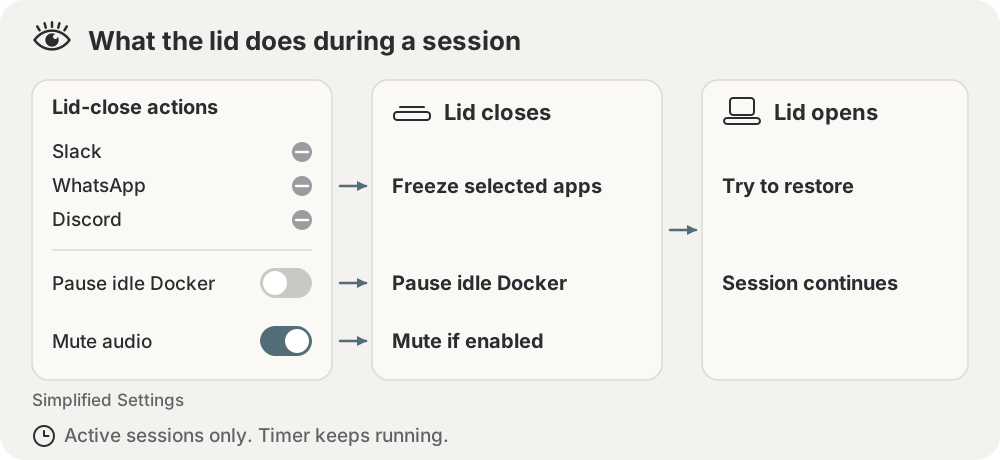
During a session, closing the lid does each of these, and opening it tries to undo them. The timer keeps counting down while the lid is closed.
SIGSTOP, which pauses them until SIGCONT on lid open. The list starts
with Slack, WhatsApp and Discord. "Freeze every other app" is off by
default. Even when on, it skips meeting, recording and dictation apps: Zoom,
Teams, Webex, FaceTime, Wispr Flow, Granola, Otter, OBS and Loom.On Mac laptops with Apple silicon or a T2 chip, closing the lid disconnects the built-in microphone in hardware. Recording a meeting with the lid closed needs AirPods or an external mic.
docs/lid-close.md has the details: how Docker is checked, how brightness is restored, the one-time settings change when you upgrade, and how to test lid actions without closing the lid.
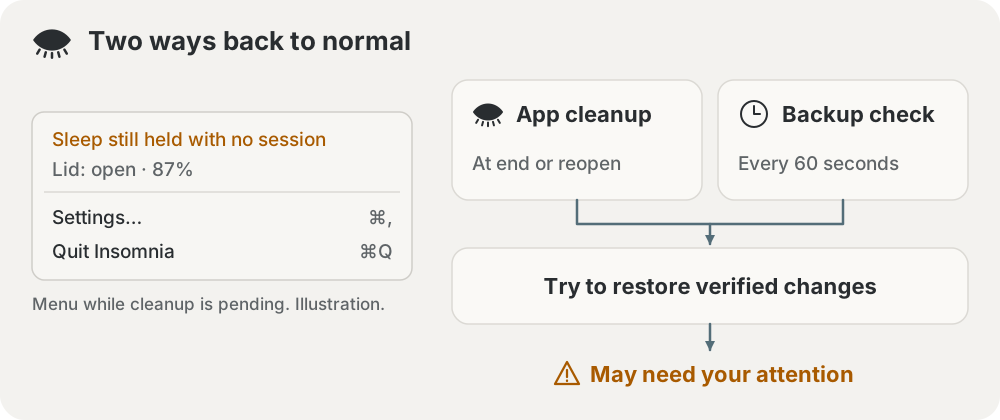
Insomnia writes each change to a recovery journal, a file on disk, before it makes the change. Ending the session tries to undo what the journal lists. If the app crashes or quits, the recovery agent tries the same once the session's end time has passed.
Some things need you:
If the menu shows a recovery warning, deal with it before you leave the Mac alone. docs/recovery.md explains each case.
If the Wi-Fi drops during a session, Insomnia can join your iPhone's hotspot. Set System Settings > Wi-Fi > Ask to join hotspots to Automatically, then enter the hotspot's name and password in Insomnia's Settings. The password stays in your login Keychain. Insomnia asks for Location Services access, because macOS requires it to read Wi-Fi network names. It never reads your location. After you reinstall Insomnia, enter the password again.
After 90 seconds without a network, Insomnia can also type continue into a
tmux pane running a coding agent. It only types into panes you list in
Settings and mark yourself:
tmux set-option -p -t <session:window.pane> @insomnia-nudge on
It doesn't press Enter unless you turn that on. Mark a pane you don't type in. docs/extras.md has the details.
These browsers slow down windows that macOS reports as hidden, which includes
every window while the lid is closed. If a running browser lacks
--disable-backgrounding-occluded-windows or
--disable-renderer-backgrounding, the right-click menu offers "Relaunch
[browser] unthrottled". It asks first, because relaunching quits the browser,
and tabs come back only if the browser reopens them on startup. Some web apps
may still stop with the lid closed.
docs/extras.md has the
details.
Settings live in ~/Library/Application Support/Insomnia/config.json and logs
in ~/Library/Logs/Insomnia/. Insomnia sets both folders and their files to
owner-only permissions. It leaves symlinks and access control lists (ACLs,
extra per-account permission entries) as they are, so another account can
still have access through one. Logs can contain Wi-Fi names, process details
and tmux targets, so check them before you share one.
docs/extras.md has the details.
From your checkout:
./scripts/uninstall.sh          # removes the app, the agent and the sudoers rule
./scripts/uninstall.sh --purge  # also removes settings and logs
From an unpacked release zip, run ./uninstall.sh in its folder instead. The
uninstaller undoes any open session first and stops if it can't.
docs/install.md has the details.
swift build
swift test
The tests use fakes and temporary folders, so they never change your power settings. See Contributing, Security reporting, Release validation and Design notes.
8,918 followers · starred Oct 2026
6,684 followers · starred Oct 2026
178 followers · starred Oct 2026
23 followers · starred Oct 2026
A macOS menu bar app that safely keeps your MacBook awake with the lid closed, for timed agent sessions.
See the code
Keep your Mac awake. Give the session an end time.
A macOS menu bar app for timed awake sessions. Insomnia is an eye icon that lives in your MacBook menu bar. It has no Dock icon and no main window. Set how long your Mac stays awake, choose what happens when the lid closes, and see when something could not be undone.
Website · Install · Using it · Lid close · Recovery · Security
Use a stable, well-ventilated surface, not a closed bag. Insomnia is experimental. Recovery can fail, and a running timer is not a safety guarantee. Validation status · Apple's ventilation guidance
Requires macOS 26 or later on an Apple Silicon Mac.
Paste this into your coding agent:
Install the latest stable Insomnia release by following https://github.com/krishhgg/Insomnia/blob/main/skills/install-insomnia/SKILL.md. If a step needs my password, give me the command to run in Terminal.
For the newest nightly, write "the newest Insomnia nightly prerelease" in
place of "the latest stable Insomnia release". Nightlies are built from main
on each day it has new commits. They have the newest code and may be broken.
To install a release yourself, follow docs/install.md. It
covers both channels, how to check the download, and v0.1.0, which installs
differently.
Needs Xcode with Swift 6.2 or later. Replace v<version> with the latest
stable tag, or a nightly tag for the newest code:
git clone --branch v<version> --depth 1 https://github.com/krishhgg/Insomnia.git
cd Insomnia
./scripts/install.sh
open "$HOME/Applications/Insomnia.app"
The installer needs your password, because the sudoers rule is a system file. It installs:
~/Applications/Insomnia.app.launchd job that runs every minute. If the app is
gone when a session should have ended, the agent tries to undo the
session's changes./etc/sudoers.d/insomnia. A sudoers rule decides who
can run what with sudo. This one lets your user account, not just
Insomnia, run these four commands without a password:/usr/bin/pmset -a disablesleep 1
/usr/bin/pmset -a disablesleep 0
/usr/bin/pmset -b lowpowermode 1
/usr/bin/pmset -b lowpowermode 0
Any program running as you can use that rule too, so review it before you install. docs/install.md lists every file and explains how upgrades replace them.
You don't have to close the lid, and opening it doesn't end the session.
On battery power, Insomnia turns on Low Power Mode below 40% and ends the session below 10%. Those are the defaults. You can change both in Settings, and an end floor of 0 turns the battery end off. The heat rules turn on Low Power Mode when the Mac gets seriously hot and end the session at critical heat. They are on by default, and Settings can turn them off. All of these rules only work while the app runs.
Before your first session, check Settings. Then run a short session you can
watch, and read ~/Library/Logs/Insomnia/insomnia.log afterward.
During a session, closing the lid does each of these, and opening it tries to undo them. The timer keeps counting down while the lid is closed.
SIGSTOP, which pauses them until SIGCONT on lid open. The list starts
with Slack, WhatsApp and Discord. "Freeze every other app" is off by
default. Even when on, it skips meeting, recording and dictation apps: Zoom,
Teams, Webex, FaceTime, Wispr Flow, Granola, Otter, OBS and Loom.On Mac laptops with Apple silicon or a T2 chip, closing the lid disconnects the built-in microphone in hardware. Recording a meeting with the lid closed needs AirPods or an external mic.
docs/lid-close.md has the details: how Docker is checked, how brightness is restored, the one-time settings change when you upgrade, and how to test lid actions without closing the lid.
Insomnia writes each change to a recovery journal, a file on disk, before it makes the change. Ending the session tries to undo what the journal lists. If the app crashes or quits, the recovery agent tries the same once the session's end time has passed.
Some things need you:
If the menu shows a recovery warning, deal with it before you leave the Mac alone. docs/recovery.md explains each case.
If the Wi-Fi drops during a session, Insomnia can join your iPhone's hotspot. Set System Settings > Wi-Fi > Ask to join hotspots to Automatically, then enter the hotspot's name and password in Insomnia's Settings. The password stays in your login Keychain. Insomnia asks for Location Services access, because macOS requires it to read Wi-Fi network names. It never reads your location. After you reinstall Insomnia, enter the password again.
After 90 seconds without a network, Insomnia can also type continue into a
tmux pane running a coding agent. It only types into panes you list in
Settings and mark yourself:
tmux set-option -p -t <session:window.pane> @insomnia-nudge on
It doesn't press Enter unless you turn that on. Mark a pane you don't type in. docs/extras.md has the details.
These browsers slow down windows that macOS reports as hidden, which includes
every window while the lid is closed. If a running browser lacks
--disable-backgrounding-occluded-windows or
--disable-renderer-backgrounding, the right-click menu offers "Relaunch
[browser] unthrottled". It asks first, because relaunching quits the browser,
and tabs come back only if the browser reopens them on startup. Some web apps
may still stop with the lid closed.
docs/extras.md has the
details.
Settings live in ~/Library/Application Support/Insomnia/config.json and logs
in ~/Library/Logs/Insomnia/. Insomnia sets both folders and their files to
owner-only permissions. It leaves symlinks and access control lists (ACLs,
extra per-account permission entries) as they are, so another account can
still have access through one. Logs can contain Wi-Fi names, process details
and tmux targets, so check them before you share one.
docs/extras.md has the details.
From your checkout:
./scripts/uninstall.sh          # removes the app, the agent and the sudoers rule
./scripts/uninstall.sh --purge  # also removes settings and logs
From an unpacked release zip, run ./uninstall.sh in its folder instead. The
uninstaller undoes any open session first and stops if it can't.
docs/install.md has the details.
swift build
swift test
The tests use fakes and temporary folders, so they never change your power settings. See Contributing, Security reporting, Release validation and Design notes.
8,918 followers · starred Oct 2026
6,684 followers · starred Oct 2026
178 followers · starred Oct 2026
23 followers · starred Oct 2026



