Asynchronous implementation of ping in rust, based on tokio 1.x
See the codeAsynchronous ICMP ping library for Rust, built on tokio + socket2 + pnet_packet.



surge-ping lets you send ICMP echo requests and await the replies from async
Rust. A single Client owns one system socket and can be cloned cheaply across
tasks, so you can ping thousands of hosts concurrently without opening thousands
of sockets.
tokio, non-blocking from the ground up.Client across tasks and multiplex
replies by identifier/sequence.DGRAM sockets when available, so no
root or CAP_NET_RAW required. Falls back to RAW sockets elsewhere.ConfigBuilder.The usual approach — one socket per target — doesn't scale: pinging 10,000
hosts would open 10,000 sockets. surge-ping instead shares one socket
across every target.
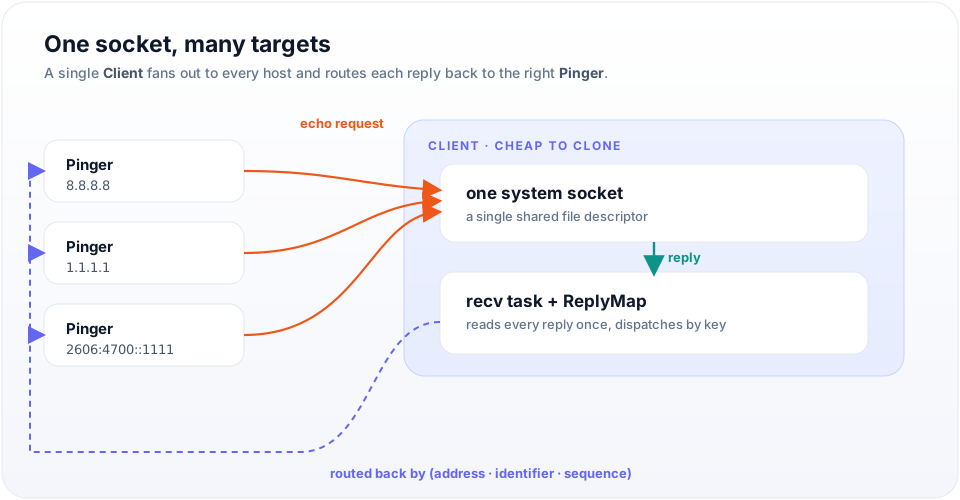
A Client wraps a single system socket and spawns one background receive task.
Each Pinger you derive sends its echo request through that shared socket and
registers as a waiter keyed by (address, identifier, sequence). The receive
task reads every incoming reply once and routes it back to the exact Pinger
waiting for it. Cloning a Client is cheap, so you can fan out across thousands
of tasks while holding just one file descriptor.
cargo add surge-ping
cargo add tokio --features full
Or add it to Cargo.toml manually:
[dependencies]
surge-ping = "0.9"
tokio = { version = "1", features = ["full"] }
The Client example below also uses rand to generate an identifier:
cargo add rand.
The ping shortcut is the fastest way to send a single echo request. It creates
an internal Client on every call, so reach for Client directly (below) when
pinging more than one target.
#[tokio::main]
async fn main() -> Result<(), Box<dyn std::error::Error>> {
    let payload = [0; 8];
    let (_packet, duration) = surge_ping::ping("127.0.0.1".parse()?, &payload).await?;

    println!("Ping took {:.3?}", duration);
    Ok(())
}
For repeated pings or many targets, create one Client and derive a Pinger
per host. Each Pinger is identified by a PingIdentifier, and every echo
request carries a PingSequence.
use std::time::Duration;

use rand::random;
use surge_ping::{Client, Config, IcmpPacket, PingIdentifier, PingSequence};

#[tokio::main]
async fn main() -> Result<(), Box<dyn std::error::Error>> {
    let client = Client::new(&Config::default())?;
    let mut pinger = client.pinger("8.8.8.8".parse()?, PingIdentifier(random())).await;
    pinger.timeout(Duration::from_secs(1));

    for seq in 0..5 {
        match pinger.ping(PingSequence(seq), &[0; 56]).await {
            Ok((IcmpPacket::V4(reply), dur)) => println!(
                "{} bytes from {}: icmp_seq={} ttl={:?} time={:.2?}",
                reply.get_size(), reply.get_source(), reply.get_sequence(), reply.get_ttl(), dur,
            ),
            Ok((IcmpPacket::V6(reply), dur)) => println!(
                "{} bytes from {}: icmp_seq={} hlim={} time={:.2?}",
                reply.get_size(), reply.get_source(), reply.get_sequence(), reply.get_max_hop_limit(), dur,
            ),
            Err(e) => println!("seq={seq} error: {e}"),
        }
    }
    Ok(())
}
Clone the Client into separate tasks to ping many hosts over the same socket —
see examples/multi_ping.rs.
Three runnable examples ship with the crate:
git clone https://github.com/kolapapa/surge-ping.git
cd surge-ping

# One-shot ping with a chosen payload size
$ cargo run --example simple -- -h 8.8.8.8 -s 56
V4(Icmpv4Packet { source: 8.8.8.8, ttl: 53, icmp_type: IcmpType(0), size: 64, sequence: 0, .. }) 112.36ms

# A ping(8)-style CLI with statistics
$ cargo run --example cmd -- -h google.com -c 5
PING google.com (172.217.24.238): 56 data bytes
64 bytes from 172.217.24.238: icmp_seq=0 ttl=115 time=109.902 ms
64 bytes from 172.217.24.238: icmp_seq=1 ttl=115 time=73.684 ms
...
--- google.com ping statistics ---
5 packets transmitted, 5 packets received, 0.00% packet loss
round-trip min/avg/max/stddev = 65.865/76.897/109.902/16.734 ms

# Ping many IPv4/IPv6 hosts concurrently from one client
$ cargo run --example multi_ping
On Linux (kernel 2.6.30+), surge-ping can use unprivileged ICMP DGRAM
sockets, so ping works without root or CAP_NET_RAW. It tries socket types in
this order and uses the first that succeeds:
DGRAM — non-privileged, subject to the ICMP ECHO restriction.RAW — requires root / CAP_NET_RAW; the fallback on other systems.If you hit Permission denied, check that unprivileged ICMP is enabled for your
group range:
# Inspect the current range (enabled looks like "0   2147483647")
sysctl net.ipv4.ping_group_range

# Enable for all groups (temporary)
sudo sysctl -w net.ipv4.ping_group_range="0 2147483647"

# Persist across reboots
echo "net.ipv4.ping_group_range=0 2147483647" | sudo tee -a /etc/sysctl.conf
sudo sysctl -p
As a last resort, run the binary with sudo or grant it the capability:
sudo setcap cap_net_raw+ep your-binary
Some container runtimes impose additional restrictions beyond ping_group_range.
If your measurements are time-sensitive, be cautious with async ping. When a
large number of tasks are waiting to wake up, scheduling latency skews the
round-trip time. For precise measurements, prefer the operating system's native
ping command.
Licensed under the MIT license.
Overall
Maintained
Code review
crates.io
Latest release
Releases this year
98 followers · starred Jun 2025
93 followers · starred Nov 2025
38 followers · starred Aug 2021
24 followers · starred Jan 2023
Asynchronous implementation of ping in rust, based on tokio 1.x
See the codeAsynchronous ICMP ping library for Rust, built on tokio + socket2 + pnet_packet.
surge-ping lets you send ICMP echo requests and await the replies from async
Rust. A single Client owns one system socket and can be cloned cheaply across
tasks, so you can ping thousands of hosts concurrently without opening thousands
of sockets.
tokio, non-blocking from the ground up.Client across tasks and multiplex
replies by identifier/sequence.DGRAM sockets when available, so no
root or CAP_NET_RAW required. Falls back to RAW sockets elsewhere.ConfigBuilder.The usual approach — one socket per target — doesn't scale: pinging 10,000
hosts would open 10,000 sockets. surge-ping instead shares one socket
across every target.
A Client wraps a single system socket and spawns one background receive task.
Each Pinger you derive sends its echo request through that shared socket and
registers as a waiter keyed by (address, identifier, sequence). The receive
task reads every incoming reply once and routes it back to the exact Pinger
waiting for it. Cloning a Client is cheap, so you can fan out across thousands
of tasks while holding just one file descriptor.
cargo add surge-ping
cargo add tokio --features full
Or add it to Cargo.toml manually:
[dependencies]
surge-ping = "0.9"
tokio = { version = "1", features = ["full"] }
The Client example below also uses rand to generate an identifier:
cargo add rand.
The ping shortcut is the fastest way to send a single echo request. It creates
an internal Client on every call, so reach for Client directly (below) when
pinging more than one target.
#[tokio::main]
async fn main() -> Result<(), Box<dyn std::error::Error>> {
    let payload = [0; 8];
    let (_packet, duration) = surge_ping::ping("127.0.0.1".parse()?, &payload).await?;

    println!("Ping took {:.3?}", duration);
    Ok(())
}
For repeated pings or many targets, create one Client and derive a Pinger
per host. Each Pinger is identified by a PingIdentifier, and every echo
request carries a PingSequence.
use std::time::Duration;

use rand::random;
use surge_ping::{Client, Config, IcmpPacket, PingIdentifier, PingSequence};

#[tokio::main]
async fn main() -> Result<(), Box<dyn std::error::Error>> {
    let client = Client::new(&Config::default())?;
    let mut pinger = client.pinger("8.8.8.8".parse()?, PingIdentifier(random())).await;
    pinger.timeout(Duration::from_secs(1));

    for seq in 0..5 {
        match pinger.ping(PingSequence(seq), &[0; 56]).await {
            Ok((IcmpPacket::V4(reply), dur)) => println!(
                "{} bytes from {}: icmp_seq={} ttl={:?} time={:.2?}",
                reply.get_size(), reply.get_source(), reply.get_sequence(), reply.get_ttl(), dur,
            ),
            Ok((IcmpPacket::V6(reply), dur)) => println!(
                "{} bytes from {}: icmp_seq={} hlim={} time={:.2?}",
                reply.get_size(), reply.get_source(), reply.get_sequence(), reply.get_max_hop_limit(), dur,
            ),
            Err(e) => println!("seq={seq} error: {e}"),
        }
    }
    Ok(())
}
Clone the Client into separate tasks to ping many hosts over the same socket —
see examples/multi_ping.rs.
Three runnable examples ship with the crate:
git clone https://github.com/kolapapa/surge-ping.git
cd surge-ping

# One-shot ping with a chosen payload size
$ cargo run --example simple -- -h 8.8.8.8 -s 56
V4(Icmpv4Packet { source: 8.8.8.8, ttl: 53, icmp_type: IcmpType(0), size: 64, sequence: 0, .. }) 112.36ms

# A ping(8)-style CLI with statistics
$ cargo run --example cmd -- -h google.com -c 5
PING google.com (172.217.24.238): 56 data bytes
64 bytes from 172.217.24.238: icmp_seq=0 ttl=115 time=109.902 ms
64 bytes from 172.217.24.238: icmp_seq=1 ttl=115 time=73.684 ms
...
--- google.com ping statistics ---
5 packets transmitted, 5 packets received, 0.00% packet loss
round-trip min/avg/max/stddev = 65.865/76.897/109.902/16.734 ms

# Ping many IPv4/IPv6 hosts concurrently from one client
$ cargo run --example multi_ping
On Linux (kernel 2.6.30+), surge-ping can use unprivileged ICMP DGRAM
sockets, so ping works without root or CAP_NET_RAW. It tries socket types in
this order and uses the first that succeeds:
DGRAM — non-privileged, subject to the ICMP ECHO restriction.RAW — requires root / CAP_NET_RAW; the fallback on other systems.If you hit Permission denied, check that unprivileged ICMP is enabled for your
group range:
# Inspect the current range (enabled looks like "0   2147483647")
sysctl net.ipv4.ping_group_range

# Enable for all groups (temporary)
sudo sysctl -w net.ipv4.ping_group_range="0 2147483647"

# Persist across reboots
echo "net.ipv4.ping_group_range=0 2147483647" | sudo tee -a /etc/sysctl.conf
sudo sysctl -p
As a last resort, run the binary with sudo or grant it the capability:
sudo setcap cap_net_raw+ep your-binary
Some container runtimes impose additional restrictions beyond ping_group_range.
If your measurements are time-sensitive, be cautious with async ping. When a
large number of tasks are waiting to wake up, scheduling latency skews the
round-trip time. For precise measurements, prefer the operating system's native
ping command.
Licensed under the MIT license.
Overall
Maintained
Code review
crates.io
Latest release
Releases this year
98 followers · starred Jun 2025
93 followers · starred Nov 2025
38 followers · starred Aug 2021
24 followers · starred Jan 2023



