🏎 Nping mean NB Ping, A Ping Tool in Rust with Real-Time Data and Visualizations
Rust
2,244
59 commits
updated Aug 31, 2026
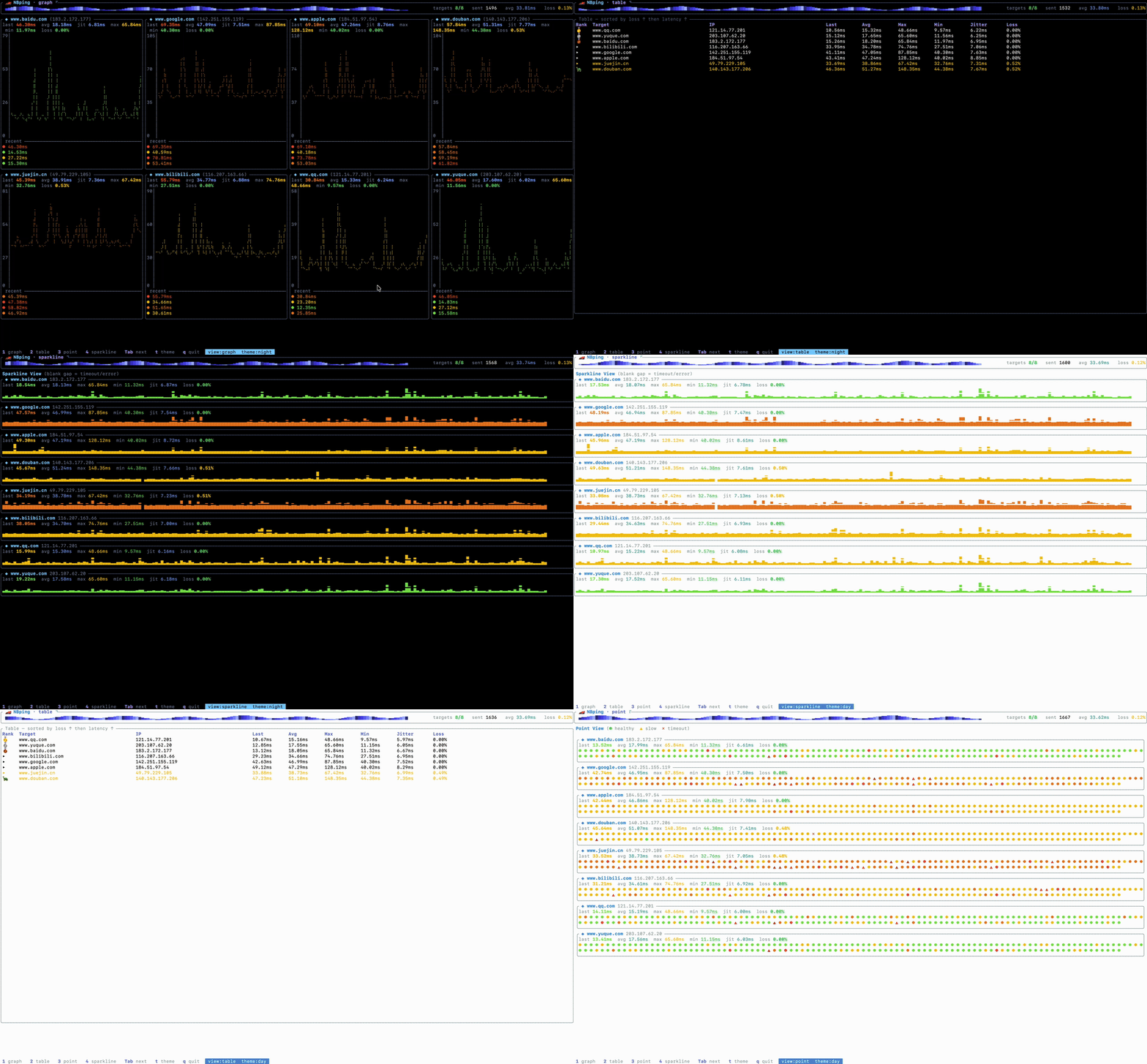
NBping is a Ping tool developed in Rust. It supports concurrent Ping for multiple addresses, visual chart display, real-time data updates, and other features.


📢 NBPing (formerly Nping)
[!IMPORTANT] Renaming Notice
This project has been officially renamed from Nping to NBPing.
Please update your bookmarks, dependencies, and installation scripts accordingly. The old name is now deprecated and will no longer be maintained.
nbping --help
Exporter Mode
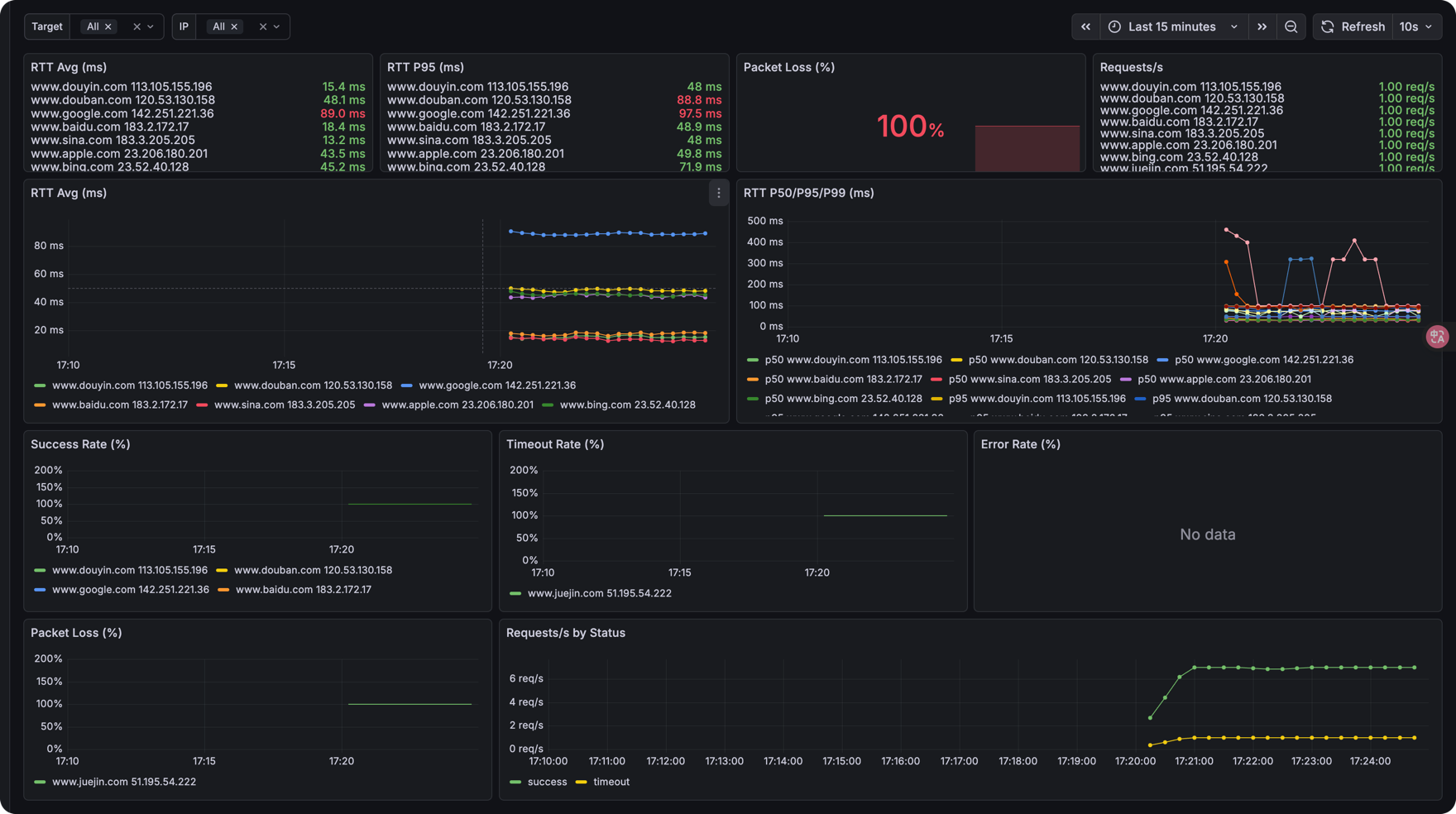
Now NBping supports exporting ping metrics to Prometheus format, so you can visualize them with tools like Grafana.
nbping exporter www.baidu.com www.google.com -i 1 -p 9100
Then, you can scrape the metrics from http://localhost:9100/metrics
You can use Grafana to visualize the data:
brew install nbping

nbping --help
nbping www.baidu.com www.google.com www.apple.com www.sina.com -c 20 -i 2

nbping --help

🏎  NBping mean NB Ping, A Ping Tool in Rust with Real-Time Data and Visualizations

Usage: nbping [OPTIONS] <TARGET>...

Arguments:
  <TARGET>...  target IP address or hostname to ping

Options:
      --config <CONFIG>        Path to a YAML config file (CLI flags override its values)
  -c, --count <COUNT>          Number of pings to send [default: 0 = unlimited]
  -i, --interval <INTERVAL>    Interval in seconds between pings [default: 0]
  -6, --force_ipv6             Force using IPv6 (config-only field can also enable this)
  -m, --multiple <MULTIPLE>    Specify the maximum number of target addresses, Only works on one target address [default: 0]
  -v, --view-type <VIEW_TYPE>  Initial view mode: graph/table/point/sparkline (switch at runtime with 1-4 / Tab) [default: graph]
  -o, --output <OUTPUT>        Output file to save ping results
  -h, --help                   Print help
  -V, --version                Print version
nbping exporter www.baidu.com www.google.com -i 1 -p 9100

./nbping exporter --help
Exporter mode for monitoring

Usage: nbping exporter [OPTIONS] [TARGET]...

Arguments:
  [TARGET]...  target IP addresses or hostnames to ping

Options:
      --config <CONFIG>      Path to a YAML config file (CLI flags override its values)
  -i, --interval <INTERVAL>  Interval in seconds between pings [default: 1]
  -p, --port <PORT>          Prometheus metrics HTTP port [default: 9090]
  -6, --force_ipv6           Force using IPv6 (config-only field can also enable this)
  -h, --help                 Print help
Instead of passing everything on the command line, you can start NBping from a
YAML file with --config:
nbping --config nbping.yaml
The file mirrors the command-line flags. See nbping.example.yaml:
mode: tui              # tui | exporter (default: tui)
targets:
  - google.com
  - github.com
  - apple.com
  - baidu.com
  - 1.1.1.1
count: 0               # 0 = unlimited
interval: 1            # seconds
force_ipv6: false
multiple: 0            # tui mode only
view_type: graph       # graph | table | point | sparkline (tui mode only)
# output: results.log  # tui mode only
port: 9090             # exporter mode only
Notes:
CLI flag > YAML config > default). For example,
nbping --config nbping.yaml -i 1 forces a 1-second interval regardless of the
file.mode field selects TUI or exporter mode when no subcommand is
given. Running the explicit nbping exporter ... subcommand always uses
exporter mode.force_ipv6: the -6 flag can only turn IPv6 on; to disable IPv6 while a
config enables it, set force_ipv6: false in the file.Thanks to these people for their feedback and suggestions for 🏎NBping!
| ThatFlower | zx4i | snail2sky | shenshouer | vnt-dev | qingyuan0o0 | Onlywzr
Thanks to these self-media for reposting and paying attention to 🏎NBping!
| 阮一峰的网络日志 |Rust 中文社区 | 公众号:奇妙的linux世界 | 公众号:IT运维技术圈 | X:@geekbb | 公众号:一飞开源 | 公众号: 开源日记
(top 24 of 38)
155 followers · starred Feb 2025
139 followers · starred Oct 2025
162 followers · starred Mar 2025
288 followers · starred Feb 2025
🏎 Nping mean NB Ping, A Ping Tool in Rust with Real-Time Data and Visualizations
Rust
2,244
59 commits
updated Aug 31, 2026
NBping is a Ping tool developed in Rust. It supports concurrent Ping for multiple addresses, visual chart display, real-time data updates, and other features.
📢 NBPing (formerly Nping)
[!IMPORTANT] Renaming Notice
This project has been officially renamed from Nping to NBPing.
Please update your bookmarks, dependencies, and installation scripts accordingly. The old name is now deprecated and will no longer be maintained.
nbping --help
Exporter Mode
Now NBping supports exporting ping metrics to Prometheus format, so you can visualize them with tools like Grafana.
nbping exporter www.baidu.com www.google.com -i 1 -p 9100
Then, you can scrape the metrics from http://localhost:9100/metrics
You can use Grafana to visualize the data:
brew install nbping

nbping --help
nbping www.baidu.com www.google.com www.apple.com www.sina.com -c 20 -i 2

nbping --help

🏎  NBping mean NB Ping, A Ping Tool in Rust with Real-Time Data and Visualizations

Usage: nbping [OPTIONS] <TARGET>...

Arguments:
  <TARGET>...  target IP address or hostname to ping

Options:
      --config <CONFIG>        Path to a YAML config file (CLI flags override its values)
  -c, --count <COUNT>          Number of pings to send [default: 0 = unlimited]
  -i, --interval <INTERVAL>    Interval in seconds between pings [default: 0]
  -6, --force_ipv6             Force using IPv6 (config-only field can also enable this)
  -m, --multiple <MULTIPLE>    Specify the maximum number of target addresses, Only works on one target address [default: 0]
  -v, --view-type <VIEW_TYPE>  Initial view mode: graph/table/point/sparkline (switch at runtime with 1-4 / Tab) [default: graph]
  -o, --output <OUTPUT>        Output file to save ping results
  -h, --help                   Print help
  -V, --version                Print version
nbping exporter www.baidu.com www.google.com -i 1 -p 9100

./nbping exporter --help
Exporter mode for monitoring

Usage: nbping exporter [OPTIONS] [TARGET]...

Arguments:
  [TARGET]...  target IP addresses or hostnames to ping

Options:
      --config <CONFIG>      Path to a YAML config file (CLI flags override its values)
  -i, --interval <INTERVAL>  Interval in seconds between pings [default: 1]
  -p, --port <PORT>          Prometheus metrics HTTP port [default: 9090]
  -6, --force_ipv6           Force using IPv6 (config-only field can also enable this)
  -h, --help                 Print help
Instead of passing everything on the command line, you can start NBping from a
YAML file with --config:
nbping --config nbping.yaml
The file mirrors the command-line flags. See nbping.example.yaml:
mode: tui              # tui | exporter (default: tui)
targets:
  - google.com
  - github.com
  - apple.com
  - baidu.com
  - 1.1.1.1
count: 0               # 0 = unlimited
interval: 1            # seconds
force_ipv6: false
multiple: 0            # tui mode only
view_type: graph       # graph | table | point | sparkline (tui mode only)
# output: results.log  # tui mode only
port: 9090             # exporter mode only
Notes:
CLI flag > YAML config > default). For example,
nbping --config nbping.yaml -i 1 forces a 1-second interval regardless of the
file.mode field selects TUI or exporter mode when no subcommand is
given. Running the explicit nbping exporter ... subcommand always uses
exporter mode.force_ipv6: the -6 flag can only turn IPv6 on; to disable IPv6 while a
config enables it, set force_ipv6: false in the file.Thanks to these people for their feedback and suggestions for 🏎NBping!
| ThatFlower | zx4i | snail2sky | shenshouer | vnt-dev | qingyuan0o0 | Onlywzr
Thanks to these self-media for reposting and paying attention to 🏎NBping!
| 阮一峰的网络日志 |Rust 中文社区 | 公众号:奇妙的linux世界 | 公众号:IT运维技术圈 | X:@geekbb | 公众号:一飞开源 | 公众号: 开源日记
(top 24 of 38)
155 followers · starred Feb 2025
139 followers · starred Oct 2025
162 followers · starred Mar 2025
288 followers · starred Feb 2025



