
A private, local-first thought capture app for Mac. Open source under MIT; source preview.
TypeScript
0
4 commits
updated Oct 2, 2026
See what people are saying
README
Brain Cache
Catch a thought. Get back to what you were doing.
A private, local-first thought capture app for Mac.
⌥ Space to capture. ⌘ Return to save.

Browser preview with fictional notes.
Build from source · Features · Feature tour · Privacy · Contribute
Mac only · Source preview · MIT licensed
Features
- Global quick capture: summon a focused floating window with ⌥ Space, save, and return to your work.
- Local storage: thoughts and attachments stay on your device. Capture works offline and confirms success only after the local write is verified.
- Search and tags: find notes by text or tag, combine them with queries like
meeting #work, and assign shared tag colors. - Rich text notes: write headings, paragraphs, lists, and checklists with inline images, undo/redo, and automatic local saving.
- Local attachments: add files, drag and drop, or paste images. Files are copied into app-managed storage.
- Checklists and reminders: check off tasks directly from their cards and set optional reminders for notes or individual items.
- Pins and collections: keep useful thoughts at the top and browse All thoughts, Today, Completed, and recoverable Trash.
- Task activity: open the Activity garden for local completion counts, recent finishes, and optional history and charts.
- Settings: choose light mode and text size, and manage sidebar visibility, shortcut hints, and launch at login.
- Menu-bar access: keep Brain Cache nearby, with optional launch at login and a companion that stays quiet until summoned.
See the feature tour for examples you can try.
Installation
Brain Cache's first public milestone is an early source-only Mac preview. To run it, follow Building from source below. There is no official downloadable installer. Apple Developer Program membership and signing credentials are not needed to build and use the checked-in local configuration. Signing and notarization are deferred until a later packaged release.
The build targets macOS 13 or later; verified build environments are Apple silicon on macOS 15.7.9 and 26.4. macOS 13 and Intel have not been verified. Windows and Linux are not currently supported targets.
This preview is Mac only. Mobile and device sync are outside its scope. Existing mobile code is retained for future development. See the release plan for source-publication checks and the later installer requirements.
Permissions and startup
- Notifications are requested when you schedule a reminder. Ordinary capture does not require notification permission.
- Launch at login is optional and can be enabled in the app. Brain Cache starts quietly with its windows hidden.
- No account, backend service, or API key is needed to use the app.
Building from Source
Mac requirements
| Requirement | Version or detail |
|---|---|
| macOS | 13 or later is the configured minimum; see the verified environments above |
| Node.js | 22.13 or later |
| pnpm | 11.24.0, matching package.json |
| Rust | Rust toolchain with Cargo |
| Apple tools | Xcode Command Line Tools; install with xcode-select --install if needed |
The first dependency installation needs a network connection. Capturing thoughts afterward works offline.
Run the Mac app
git clone https://github.com/klmrmt/brain-cache.git BrainCache
cd BrainCache/apps/mac
pnpm install --frozen-lockfile
pnpm tauri dev
Press ⌥ Space to start capturing. Click Brain Cache in the Dock to browse your library. You can also right-click the menu-bar Blob and choose Show Library.
The unbundled development process supports capture and the library. macOS reminders require an application bundle: build the .app below and open it to test notifications.
Build a Mac app and disk image
From apps/mac:
pnpm tauri build
The default outputs are in apps/mac/src-tauri/target/release/bundle/, including the .app and .dmg. The checked-in configuration uses ad hoc signing for local builds; it does not produce a notarized public release.
For a clean, checked candidate with version checks, tests, native packaging, and checksums, follow the verified Mac build procedure. It uses the exact toolchain recorded in the repository.
Browser preview
For interface development, run this from apps/mac:
pnpm dev
Open localhost:1420. The preview stores its data in browser local storage, separate from the native app's SQLite database. Use the native app to verify global shortcuts, menu-bar behavior, and macOS notifications.
How It Works
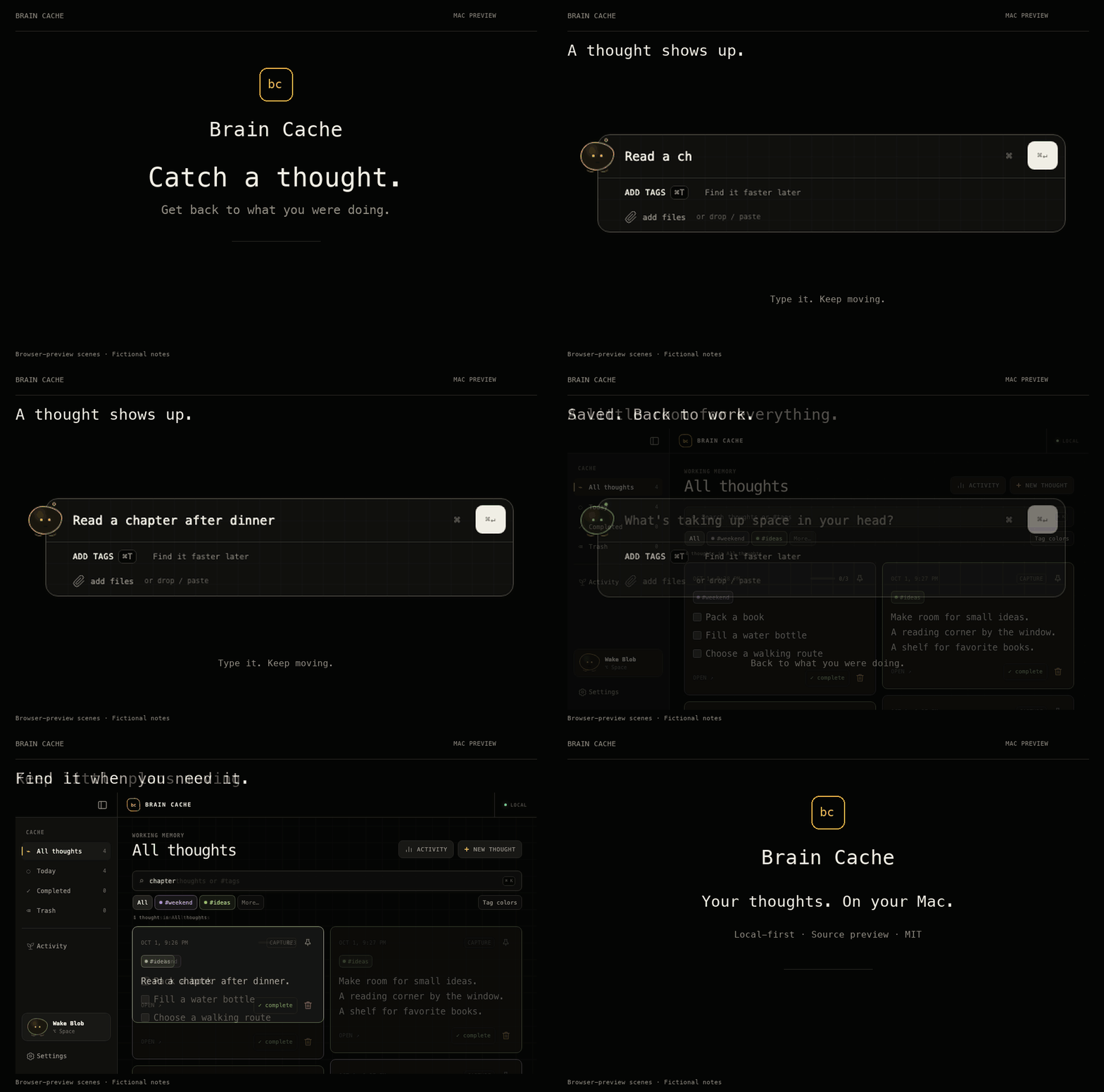
A short product tour. Browser-preview scenes with fictional notes. View a still image.
Try your first capture
Start with Brain Cache running. If you haven't set it up yet, build and open the Mac app.
-
Open quick capture
Hold Option (⌥) and press Space. A small writing window appears.
-
Type a thought
Try: “Read a chapter after dinner.”
-
Save and get back to work
Hold Command (⌘) and press Return. The outline briefly turns green to confirm the save, then the capture window disappears. Your thought is stored on your Mac.
-
Find your thought later
Click Brain Cache in the Dock. Click the search bar and type chapter to find the note you just saved.
Tags, checklists, and files are optional. You can add them when you need them.
Keyboard shortcuts
Except for the global ⌥ Space shortcut, these apply within Mac quick capture.
| Shortcut | Action |
|---|---|
| ⌥ Space | Open quick capture |
| ⌘ Return | Save the thought |
| ⌘ T | Open tags |
| ⌘ ⇧ 7 | Start a numbered list |
| ⌘ ⇧ 8 | Start a bulleted list |
| ⌘ ⇧ 9 | Toggle checklist mode |
| Hold ⌘ | Preview shortcut help |
| ⌘ ? | Toggle shortcut help |
| Escape | Dismiss shortcut help or tags first, then capture |
Feature Tour
These examples were recorded in the browser preview with fictional notes. Preview storage is separate from the Mac app.
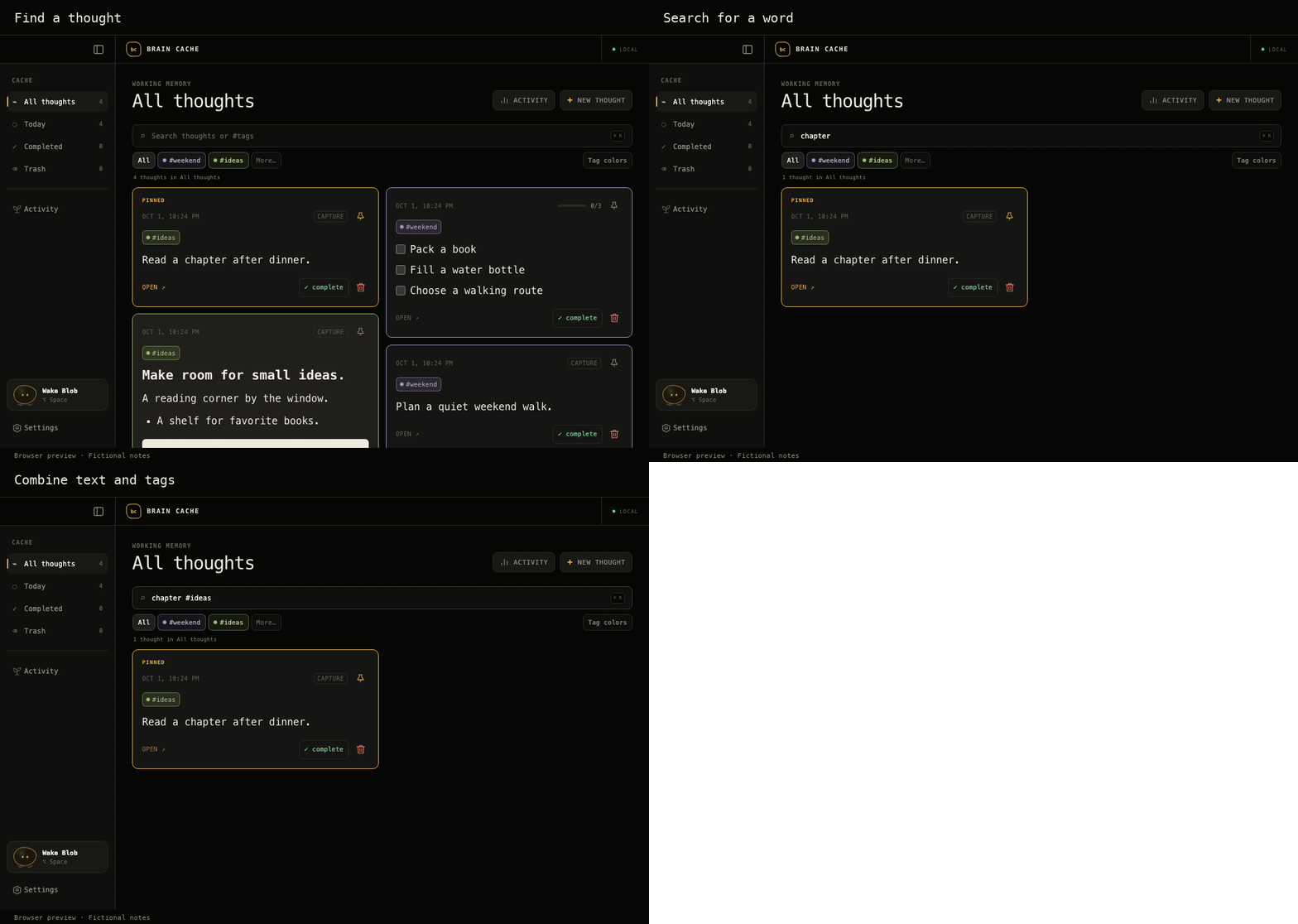
1. Find a thought with search and tags
Type chapter to find the sample reading note. Add #ideas to narrow the search: chapter #ideas.
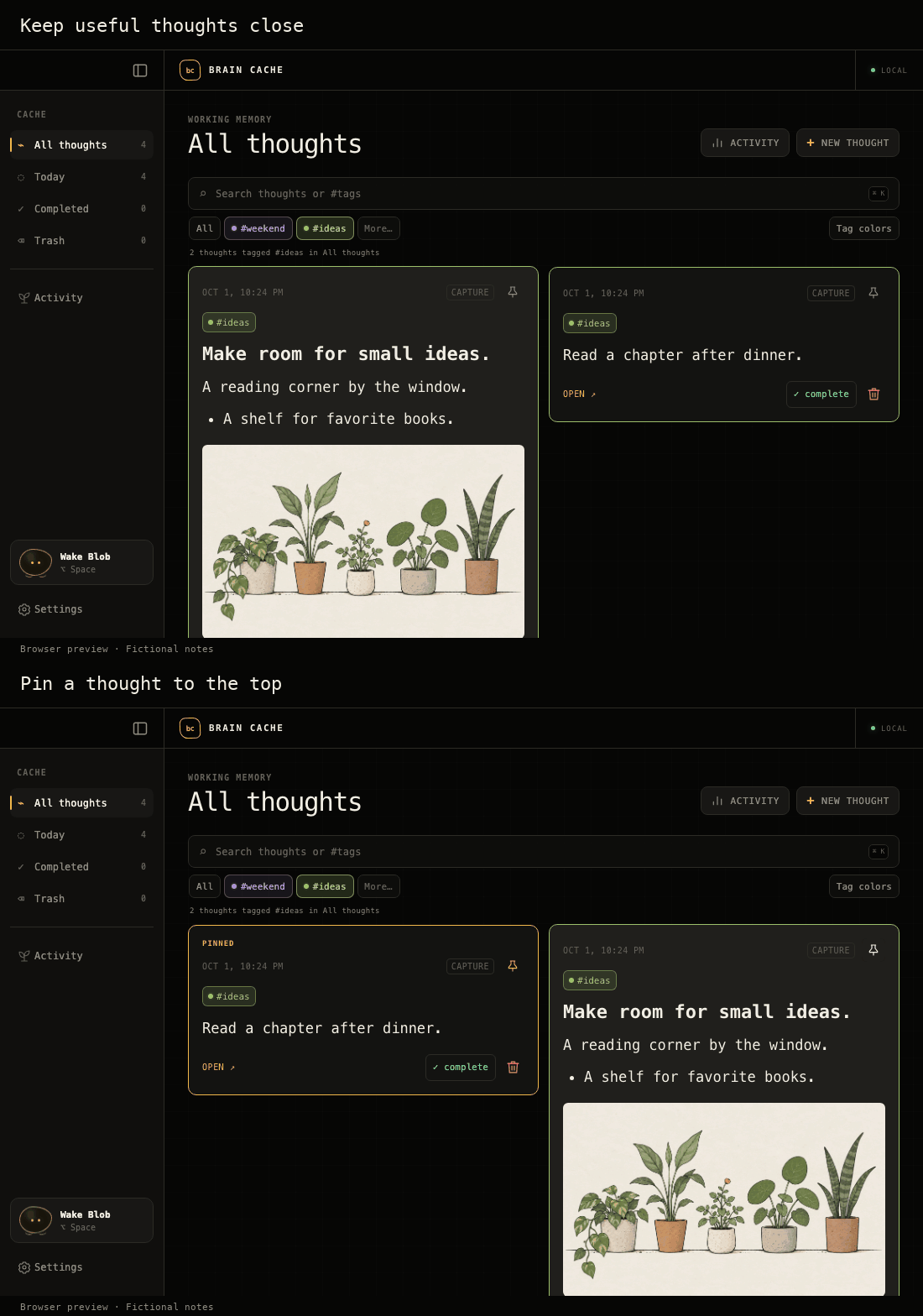
2. Keep important thoughts at the top
Click a card's pin icon to keep it with your pinned thoughts at the top. Click it again to unpin.
3. Give a note more room
Open a thought, then expand it. Use the toolbar for headings, lists, and inline images. Edits save automatically.
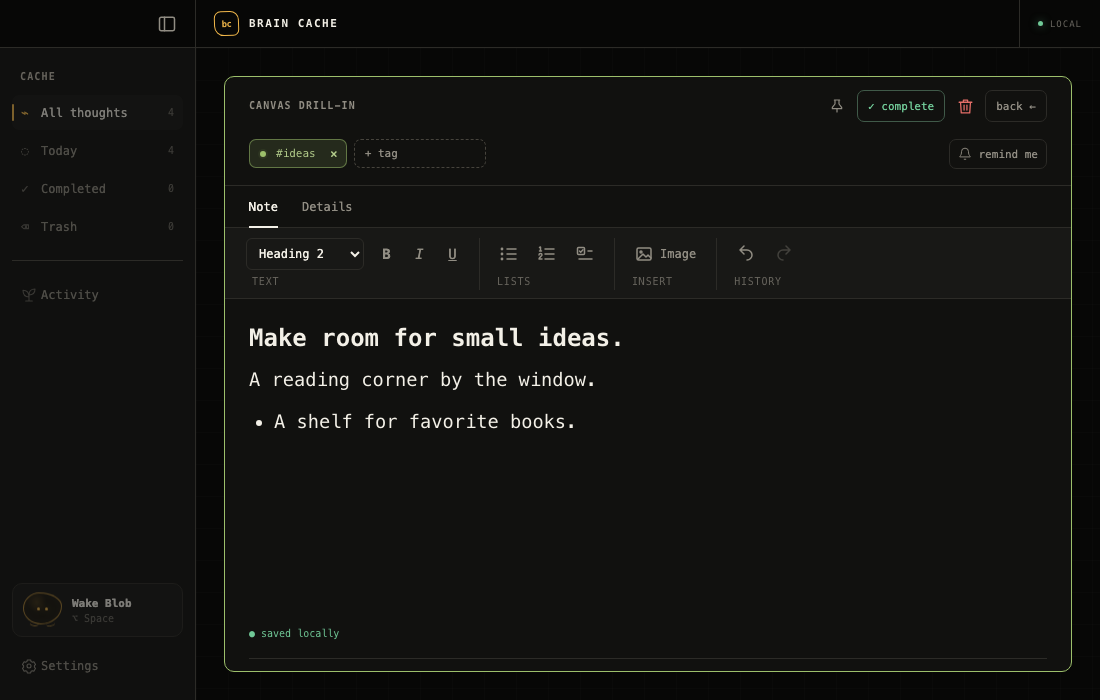
Try the fictional plant illustration when exploring image attachments.
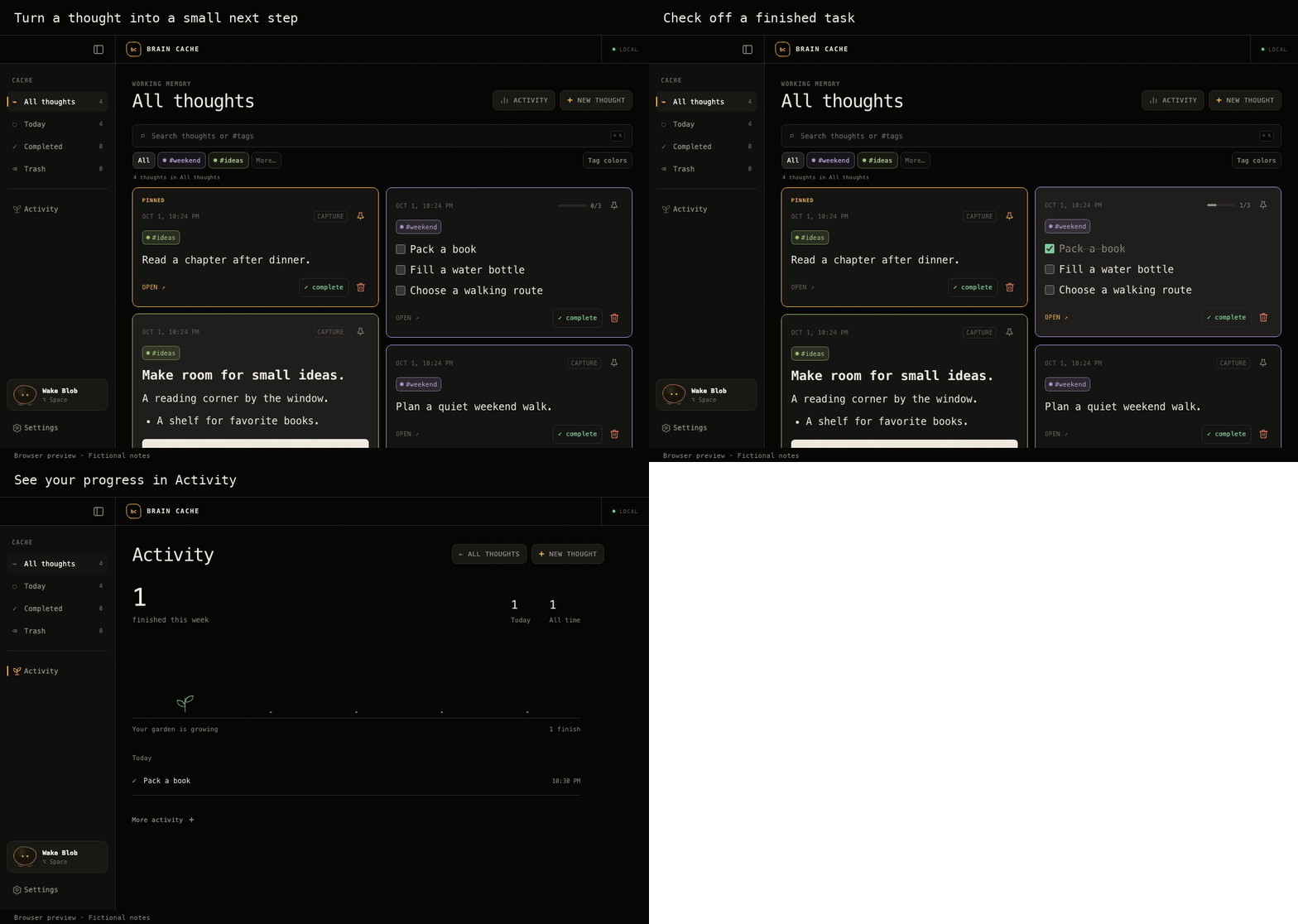
4. Check off a task and see your progress
Check off a task on its card, then open Activity in the sidebar to see the completion recorded.
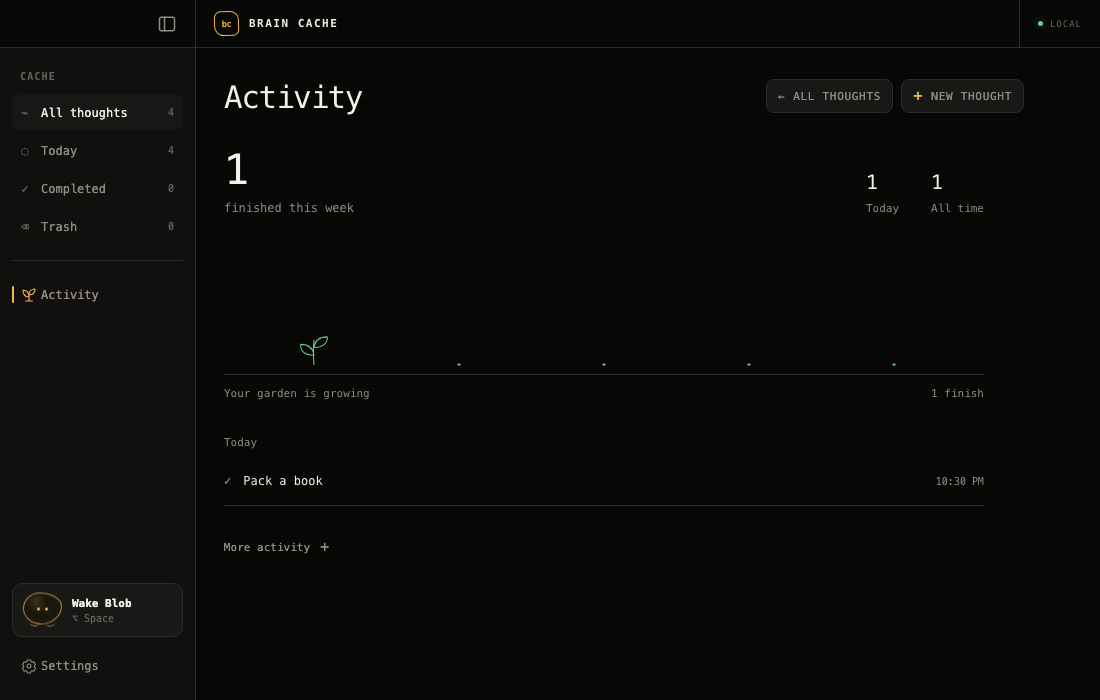
5. Watch your Activity garden grow
The garden grows with completed checklist tasks. More activity opens history and charts.
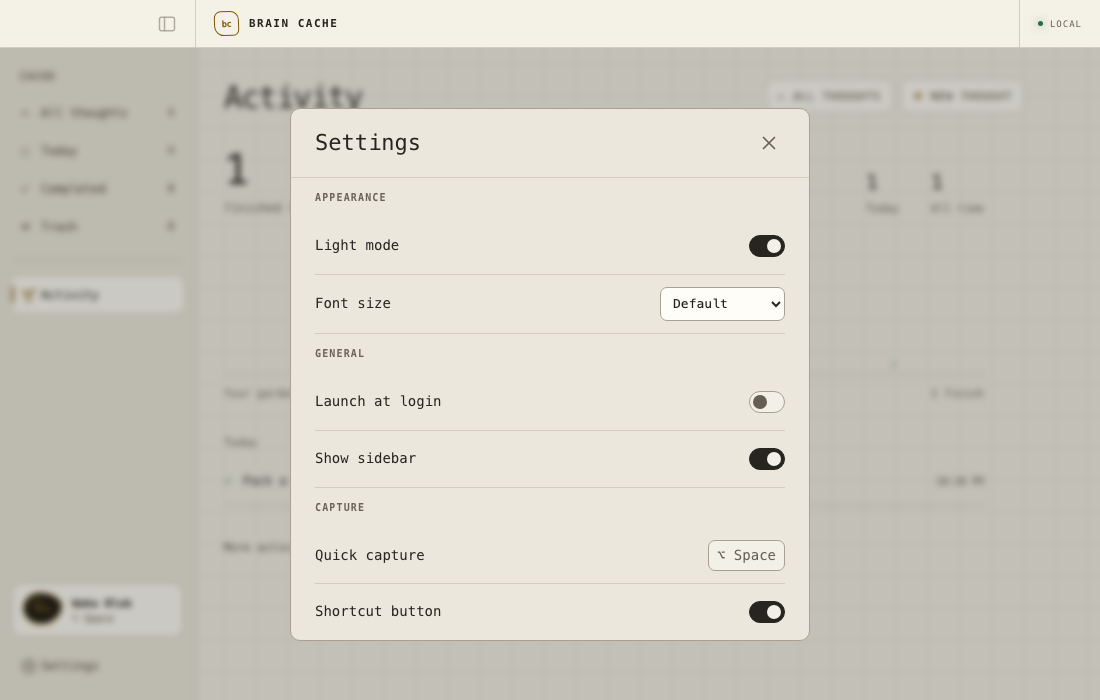
6. Make the app comfortable to read
Open Settings and turn on Light mode. Adjust Font size for more comfortable reading.
Privacy
- Capture stays local. Saving thoughts does not require an account or a network connection.
- Mac storage uses SQLite. Thoughts and attachment bytes live in
brain-cache.sqlite3in the app's macOS application-data directory. - Reminders use macOS notifications. Reminder intent is stored locally before system scheduling, with permission requested only when needed.
- Files are copied, not just linked. Attachments support up to 20 MB per file, 20 files per thought, and 50 MB total per thought.
With the checked-in Mac app identifier, the default database location is:
~/Library/Application Support/com.braincache.desktop/brain-cache.sqlite3
Follow the Mac backup and restore guide to create a verified recovery copy without losing SQLite WAL data.
Device sync is outside the current release. Any future synchronization must preserve the rule that a thought is saved on the originating device first.
Contributing
Bug reports, documentation improvements, and focused pull requests are welcome. Start with the contributor guide, then use GitHub Issues to report a problem or discuss a larger change. Follow the security-reporting instructions for suspected vulnerabilities.
- Fork the repository and create a branch for your change.
- Read AGENTS.md for the development workflow, ARCHITECTURE.md for system boundaries, and DESIGN.md before making interface changes.
- Make a focused change and add tests for behavior changes. Preserve local capture and compatibility with existing saved thoughts.
- Run the relevant checks and open a pull request explaining what changed, why, and how you verified it.
For bug reports, include your operating-system version, how you ran the app, reproduction steps, and expected behavior. Use sample thoughts and attachments in screenshots.
Verification
For Mac application changes, run these checks from apps/mac:
pnpm test
pnpm build
cargo test --manifest-path src-tauri/Cargo.toml
pnpm tauri build
Also exercise the change in the native app and verify that a thought survives capture, save, quit, and relaunch while offline. A browser preview alone does not verify the native app.
For documentation-only changes, check links, paths, and commands, then run git diff --check. If you work on the retained mobile code, its separate verification requirements remain in apps/ios/README.md.
Project Structure
| Path | Purpose |
|---|---|
apps/mac/src | React and TypeScript interface; bridge.ts is the native boundary |
apps/mac/src-tauri | Rust/Tauri host, SQLite storage, native windows, shortcuts, and reminders |
apps/ios | Retained mobile code and tests; outside the current release |
docs/design | Feature design notes |
legacy/swift-mac-prototype | Preserved earlier Mac prototype |
Documentation
- Release plan: Mac release scope, current evidence, and remaining launch requirements.
- Verified Mac builds: pinned tools, CI, candidate artifacts, and checksums.
- Distribution signing: deferred maintainer certificate setup, notarization, and installer acceptance.
- Contributor guide: development setup, issue reports, and pull requests.
- Security reporting: private disclosure instructions and current availability.
- Agent instructions: product rules, implementation workflow, and verification requirements.
- Architecture: platform boundaries, storage, and the shared thought contract.
- Design system: typography, colors, layout, interactions, and Blob's behavior.
- Feature backlog: product direction and implementation status.
- Changelog: changes across the project.
- Mobile developer notes: setup and testing for retained code outside the release scope.
License
Brain Cache is licensed under the MIT License. Copyright (c) 2026 braincache.
Third-party dependencies retain their own licenses. See dependencies and assets for the current inventory and distribution requirements.
Acknowledgments
Brain Cache is built with Tauri, React, TypeScript, Rust, SQLite, and Tiptap.
Similar repos


Languages
TypeScript
50.1%
Rust
18.9%
Swift
13.7%
Python
9.4%
CSS
8.0%
A private, local-first thought capture app for Mac. Open source under MIT; source preview.
TypeScript
0
4 commits
updated Oct 2, 2026
See what people are saying
README
Brain Cache
Catch a thought. Get back to what you were doing.
A private, local-first thought capture app for Mac.
⌥ Space to capture. ⌘ Return to save.
Browser preview with fictional notes.
Build from source · Features · Feature tour · Privacy · Contribute
Mac only · Source preview · MIT licensed
Features
- Global quick capture: summon a focused floating window with ⌥ Space, save, and return to your work.
- Local storage: thoughts and attachments stay on your device. Capture works offline and confirms success only after the local write is verified.
- Search and tags: find notes by text or tag, combine them with queries like
meeting #work, and assign shared tag colors. - Rich text notes: write headings, paragraphs, lists, and checklists with inline images, undo/redo, and automatic local saving.
- Local attachments: add files, drag and drop, or paste images. Files are copied into app-managed storage.
- Checklists and reminders: check off tasks directly from their cards and set optional reminders for notes or individual items.
- Pins and collections: keep useful thoughts at the top and browse All thoughts, Today, Completed, and recoverable Trash.
- Task activity: open the Activity garden for local completion counts, recent finishes, and optional history and charts.
- Settings: choose light mode and text size, and manage sidebar visibility, shortcut hints, and launch at login.
- Menu-bar access: keep Brain Cache nearby, with optional launch at login and a companion that stays quiet until summoned.
See the feature tour for examples you can try.
Installation
Brain Cache's first public milestone is an early source-only Mac preview. To run it, follow Building from source below. There is no official downloadable installer. Apple Developer Program membership and signing credentials are not needed to build and use the checked-in local configuration. Signing and notarization are deferred until a later packaged release.
The build targets macOS 13 or later; verified build environments are Apple silicon on macOS 15.7.9 and 26.4. macOS 13 and Intel have not been verified. Windows and Linux are not currently supported targets.
This preview is Mac only. Mobile and device sync are outside its scope. Existing mobile code is retained for future development. See the release plan for source-publication checks and the later installer requirements.
Permissions and startup
- Notifications are requested when you schedule a reminder. Ordinary capture does not require notification permission.
- Launch at login is optional and can be enabled in the app. Brain Cache starts quietly with its windows hidden.
- No account, backend service, or API key is needed to use the app.
Building from Source
Mac requirements
| Requirement | Version or detail |
|---|---|
| macOS | 13 or later is the configured minimum; see the verified environments above |
| Node.js | 22.13 or later |
| pnpm | 11.24.0, matching package.json |
| Rust | Rust toolchain with Cargo |
| Apple tools | Xcode Command Line Tools; install with xcode-select --install if needed |
The first dependency installation needs a network connection. Capturing thoughts afterward works offline.
Run the Mac app
git clone https://github.com/klmrmt/brain-cache.git BrainCache
cd BrainCache/apps/mac
pnpm install --frozen-lockfile
pnpm tauri dev
Press ⌥ Space to start capturing. Click Brain Cache in the Dock to browse your library. You can also right-click the menu-bar Blob and choose Show Library.
The unbundled development process supports capture and the library. macOS reminders require an application bundle: build the .app below and open it to test notifications.
Build a Mac app and disk image
From apps/mac:
pnpm tauri build
The default outputs are in apps/mac/src-tauri/target/release/bundle/, including the .app and .dmg. The checked-in configuration uses ad hoc signing for local builds; it does not produce a notarized public release.
For a clean, checked candidate with version checks, tests, native packaging, and checksums, follow the verified Mac build procedure. It uses the exact toolchain recorded in the repository.
Browser preview
For interface development, run this from apps/mac:
pnpm dev
Open localhost:1420. The preview stores its data in browser local storage, separate from the native app's SQLite database. Use the native app to verify global shortcuts, menu-bar behavior, and macOS notifications.
How It Works
A short product tour. Browser-preview scenes with fictional notes. View a still image.
Try your first capture
Start with Brain Cache running. If you haven't set it up yet, build and open the Mac app.
-
Open quick capture
Hold Option (⌥) and press Space. A small writing window appears.
-
Type a thought
Try: “Read a chapter after dinner.”
-
Save and get back to work
Hold Command (⌘) and press Return. The outline briefly turns green to confirm the save, then the capture window disappears. Your thought is stored on your Mac.
-
Find your thought later
Click Brain Cache in the Dock. Click the search bar and type chapter to find the note you just saved.
Tags, checklists, and files are optional. You can add them when you need them.
Keyboard shortcuts
Except for the global ⌥ Space shortcut, these apply within Mac quick capture.
| Shortcut | Action |
|---|---|
| ⌥ Space | Open quick capture |
| ⌘ Return | Save the thought |
| ⌘ T | Open tags |
| ⌘ ⇧ 7 | Start a numbered list |
| ⌘ ⇧ 8 | Start a bulleted list |
| ⌘ ⇧ 9 | Toggle checklist mode |
| Hold ⌘ | Preview shortcut help |
| ⌘ ? | Toggle shortcut help |
| Escape | Dismiss shortcut help or tags first, then capture |
Feature Tour
These examples were recorded in the browser preview with fictional notes. Preview storage is separate from the Mac app.
1. Find a thought with search and tags
Type chapter to find the sample reading note. Add #ideas to narrow the search: chapter #ideas.
2. Keep important thoughts at the top
Click a card's pin icon to keep it with your pinned thoughts at the top. Click it again to unpin.
3. Give a note more room
Open a thought, then expand it. Use the toolbar for headings, lists, and inline images. Edits save automatically.
Try the fictional plant illustration when exploring image attachments.
4. Check off a task and see your progress
Check off a task on its card, then open Activity in the sidebar to see the completion recorded.
5. Watch your Activity garden grow
The garden grows with completed checklist tasks. More activity opens history and charts.
6. Make the app comfortable to read
Open Settings and turn on Light mode. Adjust Font size for more comfortable reading.
Privacy
- Capture stays local. Saving thoughts does not require an account or a network connection.
- Mac storage uses SQLite. Thoughts and attachment bytes live in
brain-cache.sqlite3in the app's macOS application-data directory. - Reminders use macOS notifications. Reminder intent is stored locally before system scheduling, with permission requested only when needed.
- Files are copied, not just linked. Attachments support up to 20 MB per file, 20 files per thought, and 50 MB total per thought.
With the checked-in Mac app identifier, the default database location is:
~/Library/Application Support/com.braincache.desktop/brain-cache.sqlite3
Follow the Mac backup and restore guide to create a verified recovery copy without losing SQLite WAL data.
Device sync is outside the current release. Any future synchronization must preserve the rule that a thought is saved on the originating device first.
Contributing
Bug reports, documentation improvements, and focused pull requests are welcome. Start with the contributor guide, then use GitHub Issues to report a problem or discuss a larger change. Follow the security-reporting instructions for suspected vulnerabilities.
- Fork the repository and create a branch for your change.
- Read AGENTS.md for the development workflow, ARCHITECTURE.md for system boundaries, and DESIGN.md before making interface changes.
- Make a focused change and add tests for behavior changes. Preserve local capture and compatibility with existing saved thoughts.
- Run the relevant checks and open a pull request explaining what changed, why, and how you verified it.
For bug reports, include your operating-system version, how you ran the app, reproduction steps, and expected behavior. Use sample thoughts and attachments in screenshots.
Verification
For Mac application changes, run these checks from apps/mac:
pnpm test
pnpm build
cargo test --manifest-path src-tauri/Cargo.toml
pnpm tauri build
Also exercise the change in the native app and verify that a thought survives capture, save, quit, and relaunch while offline. A browser preview alone does not verify the native app.
For documentation-only changes, check links, paths, and commands, then run git diff --check. If you work on the retained mobile code, its separate verification requirements remain in apps/ios/README.md.
Project Structure
| Path | Purpose |
|---|---|
apps/mac/src | React and TypeScript interface; bridge.ts is the native boundary |
apps/mac/src-tauri | Rust/Tauri host, SQLite storage, native windows, shortcuts, and reminders |
apps/ios | Retained mobile code and tests; outside the current release |
docs/design | Feature design notes |
legacy/swift-mac-prototype | Preserved earlier Mac prototype |
Documentation
- Release plan: Mac release scope, current evidence, and remaining launch requirements.
- Verified Mac builds: pinned tools, CI, candidate artifacts, and checksums.
- Distribution signing: deferred maintainer certificate setup, notarization, and installer acceptance.
- Contributor guide: development setup, issue reports, and pull requests.
- Security reporting: private disclosure instructions and current availability.
- Agent instructions: product rules, implementation workflow, and verification requirements.
- Architecture: platform boundaries, storage, and the shared thought contract.
- Design system: typography, colors, layout, interactions, and Blob's behavior.
- Feature backlog: product direction and implementation status.
- Changelog: changes across the project.
- Mobile developer notes: setup and testing for retained code outside the release scope.
License
Brain Cache is licensed under the MIT License. Copyright (c) 2026 braincache.
Third-party dependencies retain their own licenses. See dependencies and assets for the current inventory and distribution requirements.
Acknowledgments
Brain Cache is built with Tauri, React, TypeScript, Rust, SQLite, and Tiptap.
Similar repos
Languages
TypeScript
50.1%
Rust
18.9%
Swift
13.7%
Python
9.4%
CSS
8.0%