Scope for Linux: Browse, update, and uninstall Linux apps in one place.
See the code

See, update, and uninstall every app on your Linux system in one place.
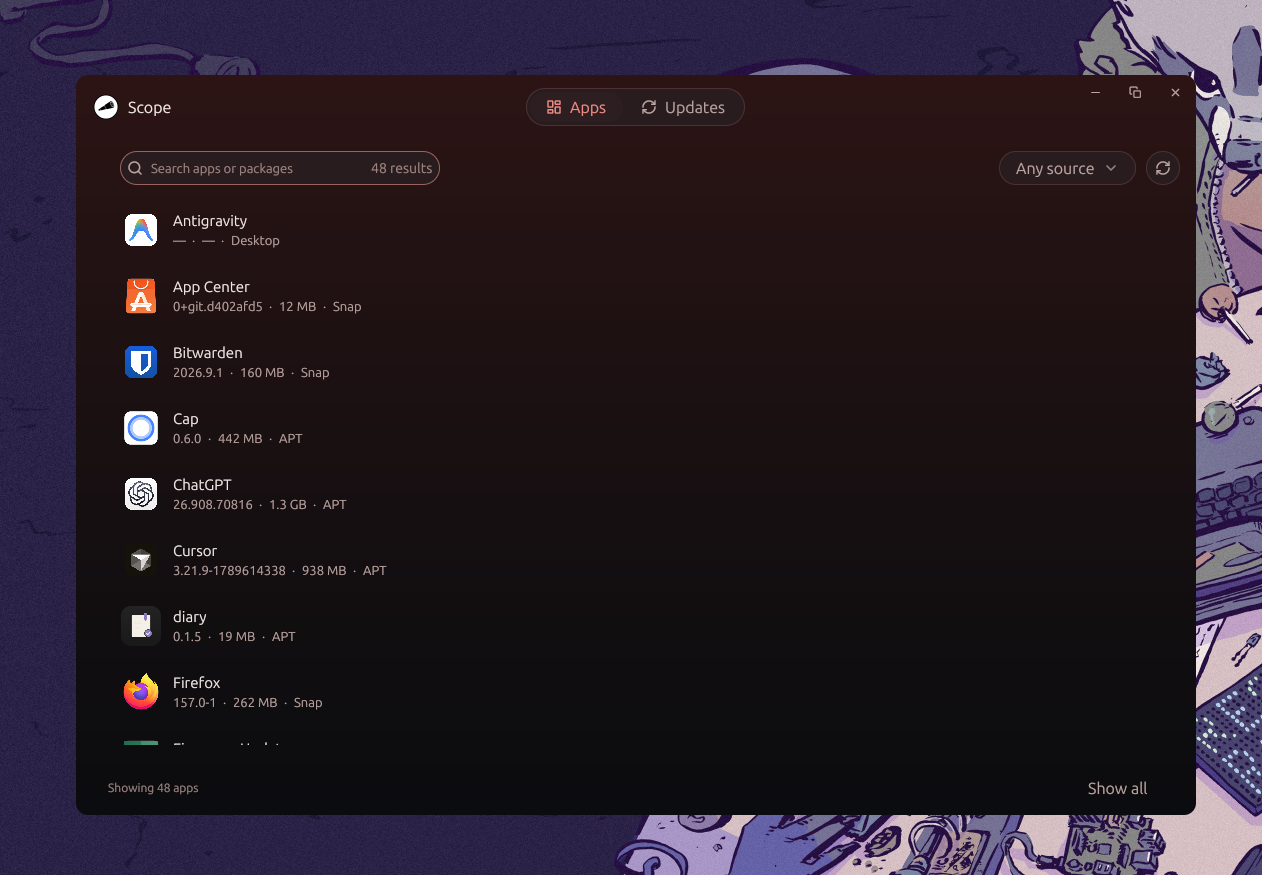
Scope brings APT, Snap, Flatpak, AppImages, and user-local desktop apps into one searchable list. Update or uninstall supported apps after reviewing a preview of the operation. Privileged actions use the standard Polkit dialog, so Scope never handles your password.
Built with Zed's GPUI (Rust binary in src/, no webview). Architecture and module rules live in AGENTS.md.
Current release: v0.3.3.
Download scope_0.3.3_amd64.deb for Ubuntu on x86-64, then run this command from the download directory:
sudo apt install ./scope_0.3.3_amd64.deb
Scope checks GitHub Releases on startup. Official .deb builds from v0.3.3 can install updates after verifying the signed checksum manifest. Install v0.3.3 manually when upgrading from an earlier version without an embedded verification key. Other install types open the Releases page when a compatible verified package is unavailable.
To build from source, install Rust stable and the Linux dependencies, then clone the repository:
sudo apt install build-essential pkg-config libfontconfig1-dev libx11-dev libx11-xcb-dev \
  libxcb1-dev libxkbcommon-dev libxkbcommon-x11-dev libwayland-dev wayland-protocols
git clone https://github.com/khurrambhutto/scope.git
cd scope
cargo run
Use the centered Apps / Updates toggle to switch between installed apps and available updates. Search by app or package name, filter by source, or refresh to rescan. Select a row for details and supported actions.
The default list shows recognizable GUI apps and command-line tools. AppImages and user-local desktop apps appear for discovery, with update and uninstall disabled. Show all in the footer reveals every row returned by the scanners, including libraries and system components. APT scans manual installs only, and Snap and Flatpak runtimes remain excluded. Protected packages cannot be uninstalled, even with Show all enabled.
Update and uninstall follow the same flow. Scope builds a plan showing exactly what will run and waits for your confirmation. The backend then revalidates the package against the live system and executes. Commands that need root trigger the standard system password dialog. System-critical packages are deny-listed in the backend and cannot be removed through Scope.
Works today:
.deb builds.deb releases with a signed SHA-256 manifest, targeting Ubuntu firstNot yet:
.rpm and .AppImage release artifacts (installs of those kinds fall back to manual download)cargo run
cargo check
cargo test
cargo clippy
Run all three checks before submitting. Safety-sensitive backend changes need targeted Rust tests first.
Good first contributions are AppImage auto-update (src/domain/operations/update.rs), Snap target versions (src/domain/scanner/snap.rs), .rpm/AppImage release artifacts (.github/workflows/release.yml), and new scanners through the Scanner trait (src/domain/scanner/).
The release job refuses tags that do not match Cargo.toml, hashes every package artifact, and signs SHA256SUMS with minisign. Repository variable SCOPE_UPDATE_PUBLIC_KEY is compiled into release builds. Repository secret SCOPE_UPDATE_SECRET_KEY signs the manifest in GitHub Actions. Never commit the private key.
To rotate keys, generate a new pair, replace both GitHub values before the next release, and publish that release through the normal workflow. Existing builds trust their embedded old key and must update manually across a key rotation.
APT previews run a package-manager simulation and show the transaction impact. Scope rejects any indirect protected removal and repeats the simulation before applying. Flatpak operations fail if the scanner did not provide an explicit user or system scope.
Keep feature logic in domain modules; main.rs and app_view.rs only compose and wire, backend.rs stays a thin orchestration layer. PRs welcome.
Scope for Linux: Browse, update, and uninstall Linux apps in one place.
See the code
See, update, and uninstall every app on your Linux system in one place.
Scope brings APT, Snap, Flatpak, AppImages, and user-local desktop apps into one searchable list. Update or uninstall supported apps after reviewing a preview of the operation. Privileged actions use the standard Polkit dialog, so Scope never handles your password.
Built with Zed's GPUI (Rust binary in src/, no webview). Architecture and module rules live in AGENTS.md.
Current release: v0.3.3.
Download scope_0.3.3_amd64.deb for Ubuntu on x86-64, then run this command from the download directory:
sudo apt install ./scope_0.3.3_amd64.deb
Scope checks GitHub Releases on startup. Official .deb builds from v0.3.3 can install updates after verifying the signed checksum manifest. Install v0.3.3 manually when upgrading from an earlier version without an embedded verification key. Other install types open the Releases page when a compatible verified package is unavailable.
To build from source, install Rust stable and the Linux dependencies, then clone the repository:
sudo apt install build-essential pkg-config libfontconfig1-dev libx11-dev libx11-xcb-dev \
  libxcb1-dev libxkbcommon-dev libxkbcommon-x11-dev libwayland-dev wayland-protocols
git clone https://github.com/khurrambhutto/scope.git
cd scope
cargo run
Use the centered Apps / Updates toggle to switch between installed apps and available updates. Search by app or package name, filter by source, or refresh to rescan. Select a row for details and supported actions.
The default list shows recognizable GUI apps and command-line tools. AppImages and user-local desktop apps appear for discovery, with update and uninstall disabled. Show all in the footer reveals every row returned by the scanners, including libraries and system components. APT scans manual installs only, and Snap and Flatpak runtimes remain excluded. Protected packages cannot be uninstalled, even with Show all enabled.
Update and uninstall follow the same flow. Scope builds a plan showing exactly what will run and waits for your confirmation. The backend then revalidates the package against the live system and executes. Commands that need root trigger the standard system password dialog. System-critical packages are deny-listed in the backend and cannot be removed through Scope.
Works today:
.deb builds.deb releases with a signed SHA-256 manifest, targeting Ubuntu firstNot yet:
.rpm and .AppImage release artifacts (installs of those kinds fall back to manual download)cargo run
cargo check
cargo test
cargo clippy
Run all three checks before submitting. Safety-sensitive backend changes need targeted Rust tests first.
Good first contributions are AppImage auto-update (src/domain/operations/update.rs), Snap target versions (src/domain/scanner/snap.rs), .rpm/AppImage release artifacts (.github/workflows/release.yml), and new scanners through the Scanner trait (src/domain/scanner/).
The release job refuses tags that do not match Cargo.toml, hashes every package artifact, and signs SHA256SUMS with minisign. Repository variable SCOPE_UPDATE_PUBLIC_KEY is compiled into release builds. Repository secret SCOPE_UPDATE_SECRET_KEY signs the manifest in GitHub Actions. Never commit the private key.
To rotate keys, generate a new pair, replace both GitHub values before the next release, and publish that release through the normal workflow. Existing builds trust their embedded old key and must update manually across a key rotation.
APT previews run a package-manager simulation and show the transaction impact. Scope rejects any indirect protected removal and repeats the simulation before applying. Flatpak operations fail if the scanner did not provide an explicit user or system scope.
Keep feature logic in domain modules; main.rs and app_view.rs only compose and wire, backend.rs stays a thin orchestration layer. PRs welcome.



