Nix configuration for my systems supporting macOS, NixOS, and WSL.
Python
347
7,790 commits
updated Oct 18, 2026


 NixOS Config for Khaneliman



Welcome to khanelinix, a personal Nix configuration repository. This repository contains my NixOS and Nixpkgs configurations, along with various tools and customizations to enhance the Nix experience.
Before diving in, ensure that you have Nix installed on your system. If not, you can download and install it from the official Nix website or from the Determinate Systems installer. On macOS, Nix is sufficient to build the neutral examples. Follow the nix-darwin instructions before the first activation of your adapted configuration.
# New machine without git
nix-shell -p git

# Clone
git clone https://github.com/khaneliman/khanelinix.git
cd khanelinix

# Choose and adapt a neutral first-host/first-home configuration.
# See docs/start-here.md before building or activating a new machine.
nix build .#docs-html
Read Start Here for tested public consumer examples and support boundaries for verification levels. Existing fleet outputs are not generic installation profiles.
# List available hosts
nix run .#deploy

# Deploy to remote host
nix run .#deploy -- <host> [switch|boot|test|build]

# Shell aliases, one per remote host, generated from the host inventory
deploy-bruddynix
deploy-khanelimac
The app resolves the flake from NH_FLAKE, so the aliases work from any
directory.
Here's an overview of what my Nix configuration offers:
External Dependency Integrations:
macOS Support: Seamlessly configure and manage Nix on macOS using the power of Nix-darwin, also leveraging homebrew for GUI applications.
Home Manager: Manage your dotfiles, home environment, and user-specific configurations with Home Manager.
DevShell Support: The flake provides a development shell (devShell) to
support maintaining this flake. You can use the devShell for convenient
development and maintenance of your Nix environment.
CI with Cachix: The configuration includes continuous integration (CI) that pushes built artifacts to Cachix. This ensures efficient builds and reduces the need to build dependencies on your local machine.
Utilize sops-nix: Secret management with sops-nix for secure and encrypted handling of sensitive information.
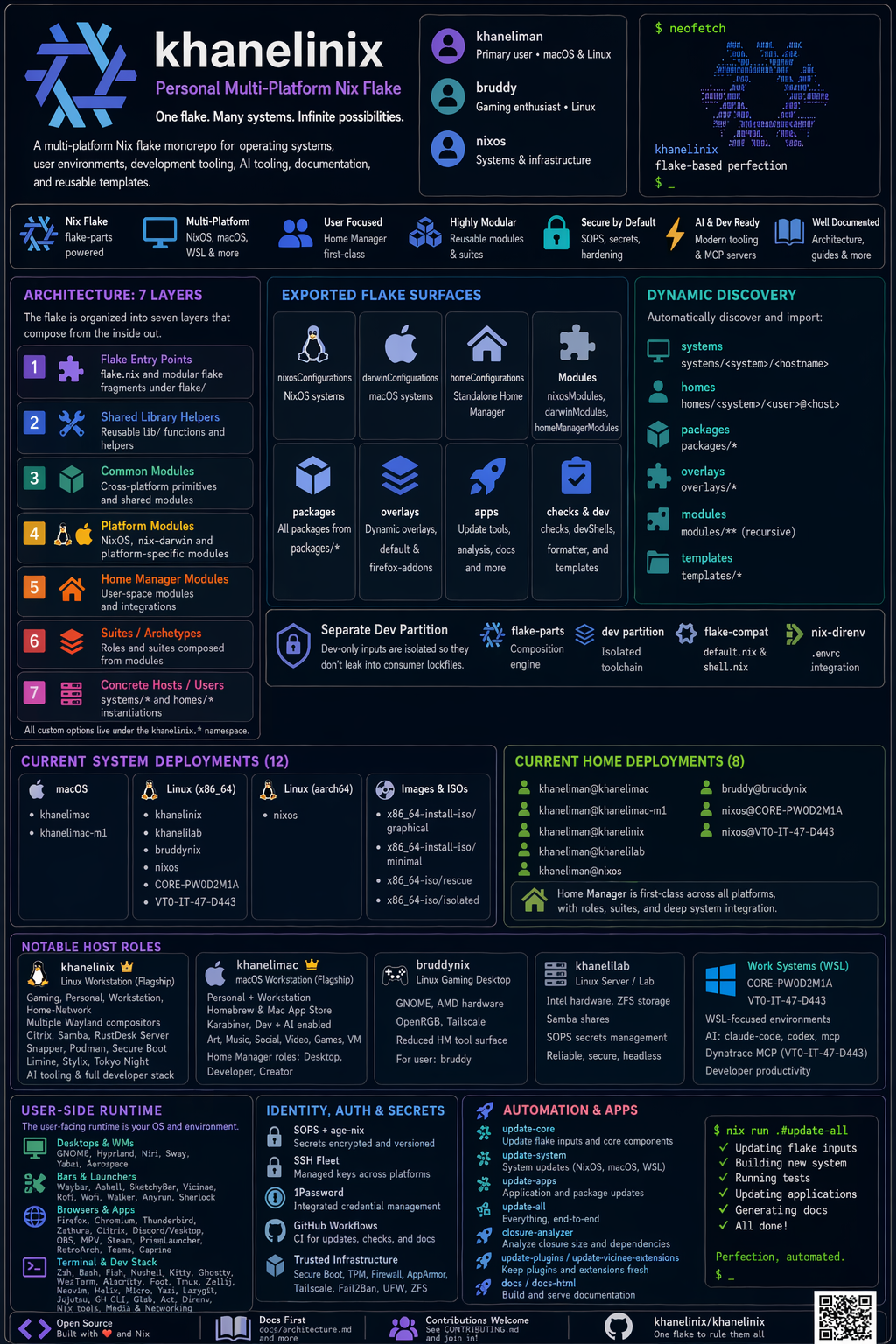
My Nix configuration is built using flake-parts, providing a flexible and modular approach to managing your Nix environment. Here's how it works:
Flake Parts Structure: The configuration uses flake-parts to organize
outputs into modular parts, with the main flake definition importing from the
flake/ directory for better organization.
Custom Library: The lib/ directory contains custom library functions and
utilities that extend the standard nixpkgs lib, providing additional helpers
for system configuration.
Package Management: The packages/ directory contains custom packages
exported by the flake. Each package is built using callPackage and can be
used across different system configurations.
Modular Configurations: The modules/ directory defines reusable NixOS,
Darwin, and Home Manager modules. This modular approach allows for consistent
configuration across different platforms and systems.
Overlay System: Custom overlays in the overlays/ directory modify and
extend the nixpkgs package set, allowing for package customizations and
additions.
System Configurations: Host-specific configurations are organized in
systems/ with separate directories for different architectures
(x86_64-linux, aarch64-darwin).
Home Configurations: User-specific Home Manager configurations in the
homes/ directory, organized by user and system architecture.
Development Environment: A partitioned development environment in
flake/dev/ provides development shells, formatting tools, and checks
separate from the main flake outputs.
This flake-parts based approach provides excellent modularity and makes it easy to maintain and extend the configuration while keeping related functionality organized.
Run packages directly with:
nix run --extra-experimental-features 'nix-command flakes' github:khaneliman/khanelinix#packageName
Or install from the packages output. For example:
# flake.nix
{
  inputs.khanelinix = {
    url = "github:khaneliman/khanelinix";
    inputs.nixpkgs.follows = "nixpkgs";
  };
}

# configuration.nix
{pkgs, inputs, system, ...}: {
  environment.systemPackages = [
    inputs.khanelinix.packages."${system}".packageName
  ];
}
Other configurations from where I learned and copied:
618 followers · starred Oct 2024
418 followers · starred Aug 2026
80 followers · starred Aug 2025
31 followers · starred Jun 2025
Nix configuration for my systems supporting macOS, NixOS, and WSL.
Python
347
7,790 commits
updated Oct 18, 2026
NixOS Config for Khaneliman
Welcome to khanelinix, a personal Nix configuration repository. This repository contains my NixOS and Nixpkgs configurations, along with various tools and customizations to enhance the Nix experience.
Before diving in, ensure that you have Nix installed on your system. If not, you can download and install it from the official Nix website or from the Determinate Systems installer. On macOS, Nix is sufficient to build the neutral examples. Follow the nix-darwin instructions before the first activation of your adapted configuration.
# New machine without git
nix-shell -p git

# Clone
git clone https://github.com/khaneliman/khanelinix.git
cd khanelinix

# Choose and adapt a neutral first-host/first-home configuration.
# See docs/start-here.md before building or activating a new machine.
nix build .#docs-html
Read Start Here for tested public consumer examples and support boundaries for verification levels. Existing fleet outputs are not generic installation profiles.
# List available hosts
nix run .#deploy

# Deploy to remote host
nix run .#deploy -- <host> [switch|boot|test|build]

# Shell aliases, one per remote host, generated from the host inventory
deploy-bruddynix
deploy-khanelimac
The app resolves the flake from NH_FLAKE, so the aliases work from any
directory.
Here's an overview of what my Nix configuration offers:
External Dependency Integrations:
macOS Support: Seamlessly configure and manage Nix on macOS using the power of Nix-darwin, also leveraging homebrew for GUI applications.
Home Manager: Manage your dotfiles, home environment, and user-specific configurations with Home Manager.
DevShell Support: The flake provides a development shell (devShell) to
support maintaining this flake. You can use the devShell for convenient
development and maintenance of your Nix environment.
CI with Cachix: The configuration includes continuous integration (CI) that pushes built artifacts to Cachix. This ensures efficient builds and reduces the need to build dependencies on your local machine.
Utilize sops-nix: Secret management with sops-nix for secure and encrypted handling of sensitive information.
My Nix configuration is built using flake-parts, providing a flexible and modular approach to managing your Nix environment. Here's how it works:
Flake Parts Structure: The configuration uses flake-parts to organize
outputs into modular parts, with the main flake definition importing from the
flake/ directory for better organization.
Custom Library: The lib/ directory contains custom library functions and
utilities that extend the standard nixpkgs lib, providing additional helpers
for system configuration.
Package Management: The packages/ directory contains custom packages
exported by the flake. Each package is built using callPackage and can be
used across different system configurations.
Modular Configurations: The modules/ directory defines reusable NixOS,
Darwin, and Home Manager modules. This modular approach allows for consistent
configuration across different platforms and systems.
Overlay System: Custom overlays in the overlays/ directory modify and
extend the nixpkgs package set, allowing for package customizations and
additions.
System Configurations: Host-specific configurations are organized in
systems/ with separate directories for different architectures
(x86_64-linux, aarch64-darwin).
Home Configurations: User-specific Home Manager configurations in the
homes/ directory, organized by user and system architecture.
Development Environment: A partitioned development environment in
flake/dev/ provides development shells, formatting tools, and checks
separate from the main flake outputs.
This flake-parts based approach provides excellent modularity and makes it easy to maintain and extend the configuration while keeping related functionality organized.
Run packages directly with:
nix run --extra-experimental-features 'nix-command flakes' github:khaneliman/khanelinix#packageName
Or install from the packages output. For example:
# flake.nix
{
  inputs.khanelinix = {
    url = "github:khaneliman/khanelinix";
    inputs.nixpkgs.follows = "nixpkgs";
  };
}

# configuration.nix
{pkgs, inputs, system, ...}: {
  environment.systemPackages = [
    inputs.khanelinix.packages."${system}".packageName
  ];
}
Other configurations from where I learned and copied:
618 followers · starred Oct 2024
418 followers · starred Aug 2026
80 followers · starred Aug 2025
31 followers · starred Jun 2025



