
README
🎬 AnimStudio AI






A modern, open-source AI-powered video creation studio & multi-track timeline editor.
Craft viral Shorts, Reels, YouTube videos, animated stories, and narrated slideshows with ease.
Quick Start • Features • Architecture • Setup Guide • Contributing • Roadmap
📸 Screenshots
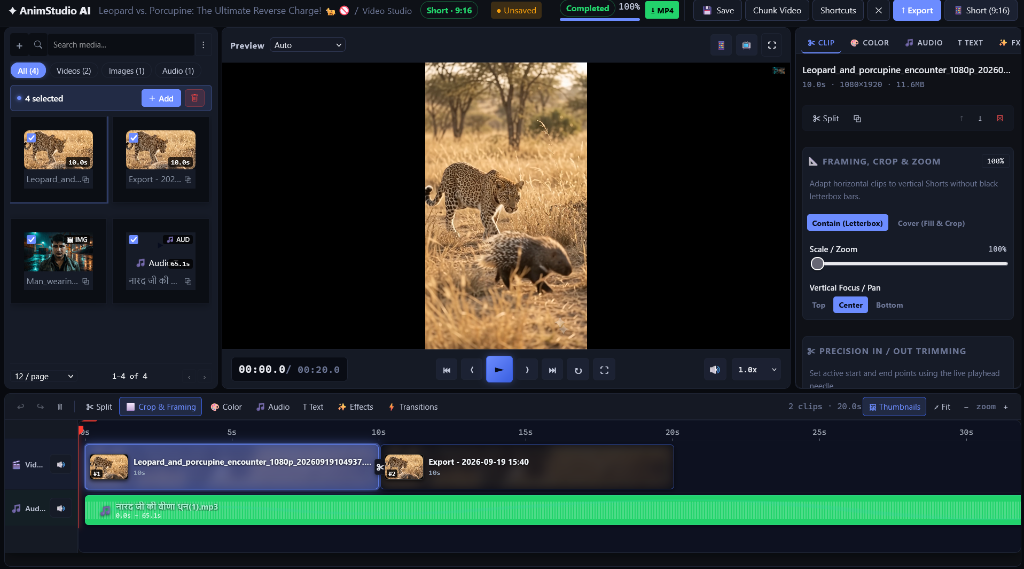
📱 Vertical Studio (9:16 Shorts & Reels with Framing, Crop & Waveform Timeline)
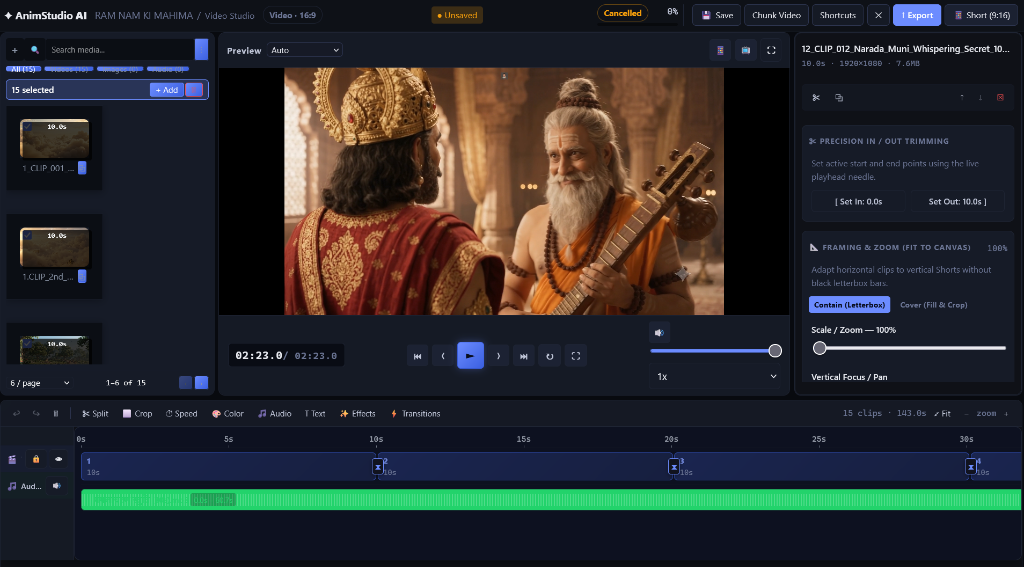
🖥️ Widescreen Studio (16:9 Cinema Mode with Precision Trimming & Transitions)
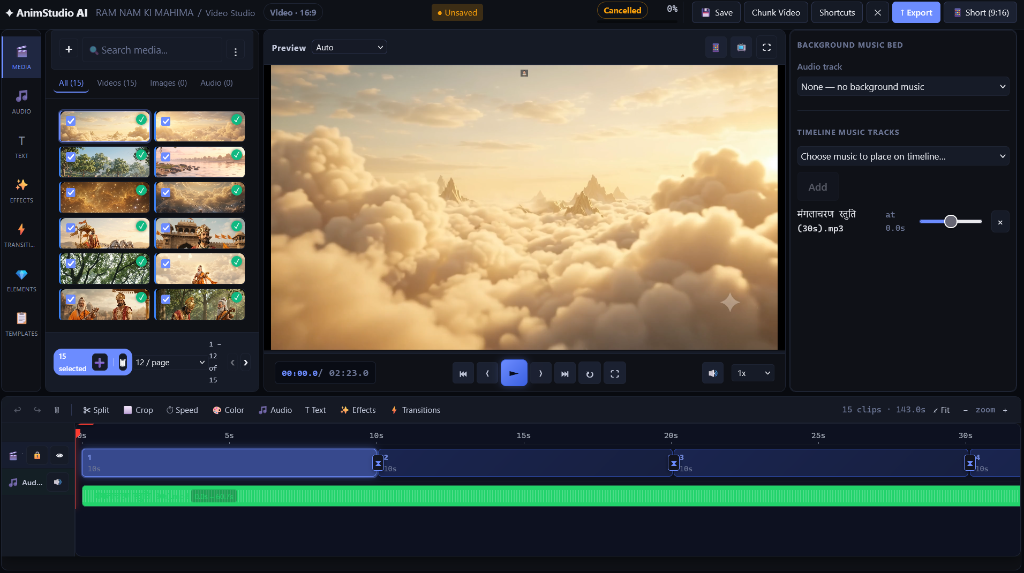
🎵 Multi-Track Audio Engine & Timeline Music Cues
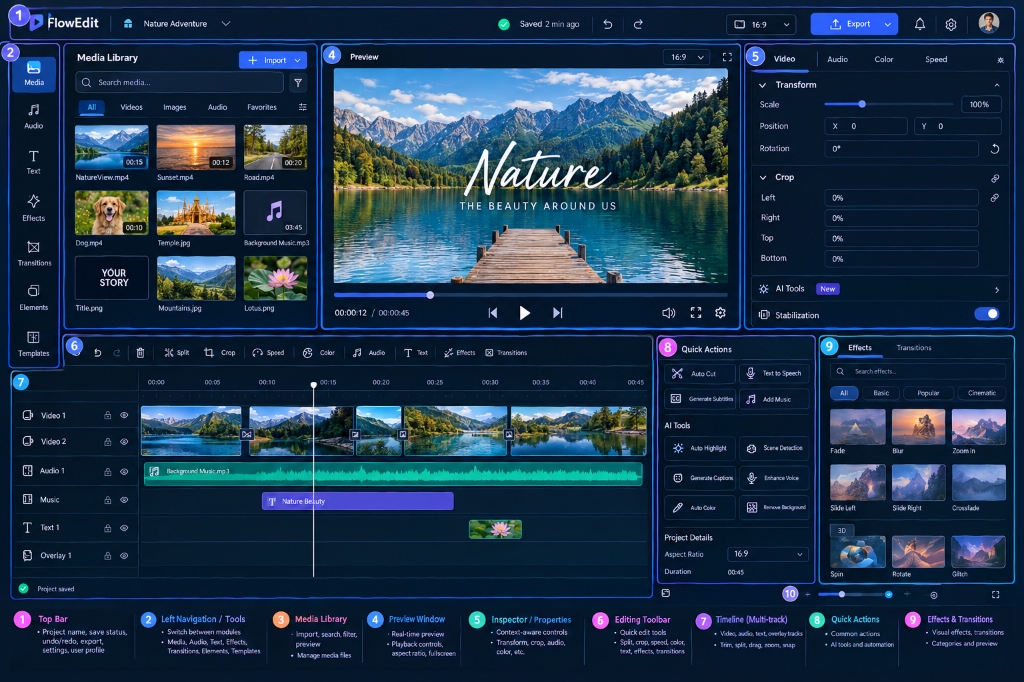
📐 Workspace Architectural Layout
✨ Key Features
🎞️ Video Studio 2.0
- Multi-Track Timeline: Synchronized video and audio tracks with playhead scrubbing, live waveform visualization, and thumbnail previews.
- Precision Trimming & Splitting: Split clips at playhead needle, trim In/Out points, duplicate clips, and arrange sequences effortlessly.
- Seamless Live Transitions: Real-time crossfades, directional slides, and wipe transitions with FFmpeg
xfadeintegration. - Smart Aspect Ratio Switching: Instant toggle between 16:9 (YouTube), 9:16 (Shorts/TikTok/Reels), 1:1 (Instagram), and 4:5 with automatic letterbox (Contain) or smart crop (Cover) scaling.
🎧 Audio & Sound Design
- Background Music Bed: Loopable ambient audio track with master volume control.
- Timeline Music Cues: Place multiple audio tracks at specific timestamps with independent volume sliders.
- Intelligent Audio Ducking: Automatically lower or mute video sound when a background music cue begins playing.
🎨 Color Grading & Effects
- 9 Cinematic LUT Filter Presets: Natural, Cinematic Warm, Cool Sci-Fi, Vivid Pop, Golden Hour, Teal & Orange, Cyberpunk, Film Noir, and Faded 90s.
- Text & Logo Watermarks: Positionable text or logo watermarks (Top-Left, Top-Right, Bottom-Left, Bottom-Right, Center) with font and opacity controls.
🤖 AI Video Generation & Script Ingestion
- Script Ingestion: Paste raw script text, upload
.srt/.vttsubtitles, or ingest YouTube video captions directly viayt-dlp. - Pluggable AI Providers: Modular provider architecture supporting Groq, Google Gemini, OpenRouter, Ollama, Cloudflare AI, Hugging Face, and ComfyUI.
- Speech Synthesis (TTS): Support for local Kokoro and Piper voice synthesis models.
- Automated Caption Segmentation: Intelligent sentence boundary detection, word-level timestamps, and subtitle formatting.
🚀 High-Performance FFmpeg Rendering Engine
- Hardware-Probed Filter Graphs: Generates optimized FFmpeg filtergraphs supporting
libassburned subtitles,libx264encoding, and Ken Burns motion. - Lease-Based Job Queue: Robust background worker architecture designed for distributed video encoding jobs with auto-cleanup and failure recovery.
🏗️ Architecture & Tech Stack
flowchart TD
    subgraph Frontend ["Frontend (Angular 22 LTS)"]
        UI[Standalone Components]
        Signals[Angular Signals Reactive State]
        Studio[Video Studio & Timeline]
        Preview[Live HTML5 Player & Canvas]
    end

    subgraph Backend ["Backend (ASP.NET Core .NET 10)"]
        API[RESTful API Controllers]
        App[Application Services & Orchestrators]
        Domain[Domain Entities & Value Objects]
        Infra[Infrastructure: FFmpeg & Storage]
    end

    subgraph StorageEngine ["Persistence & Media"]
        DB[(MongoDB / SQL Server)]
        Disk[(Local Storage / S3)]
        FFmpeg[FFmpeg 6/7 Engine]
    end

    UI --> Signals
    Signals --> Studio
    Studio --> Preview
    Preview --> API
    API --> App
    App --> Domain
    App --> Infra
    Infra --> DB
    Infra --> Disk
    Infra --> FFmpeg
| Layer | Technology |
|---|---|
| Backend | ASP.NET Core (.NET 10.0 Web API), C# 13, Minimal APIs + Controllers |
| Persistence | MongoDB (6.0+) or Microsoft SQL Server (2019+), EF Core / Dapper |
| Media Processing | FFmpeg (6.0+ or 7.0+ full build with libass & libx264), yt-dlp |
| Frontend | Angular 22, TypeScript 6, Tailwind CSS & Modern CSS Custom Properties |
| State Management | Angular Signals (signal(), computed()), Standalone Components |
⚡ Quick Start
1. Prerequisites
Ensure you have the following installed:
- .NET 10 SDK
- Node.js 22 LTS & npm
- FFmpeg 6.0+ (ensure
ffmpegandffprobeare on your PATH) - MongoDB (or local SQL Server)
💡 Tip for Windows users: You can install everything with
winget:winget install Microsoft.DotNet.SDK.10 OpenJS.NodeJS.LTS Gyan.FFmpeg MongoDB.Server Git.GitSee docs/SETUP.md for full Linux, macOS, and Windows instructions.
2. Run the Application
🚀 Option A: One-Click Launcher (Windows)
Double-click run.bat in the repository root. It launches both backend and frontend in Windows Terminal with live logs.
🛠️ Option B: Manual Terminal Launch
Terminal 1 — Backend:
cd backend/AnimStudio.Api
dotnet run
API runs at http://localhost:5000 (Swagger at http://localhost:5000/swagger).
Terminal 2 — Frontend:
cd frontend
npm install
npm start
Frontend runs at http://localhost:4200.
⚙️ Configuration & Secrets
AnimStudio AI follows strict security practices. No secrets or credentials are ever committed to configuration files.
Database Setup
To set your local MongoDB connection string:
cd backend/AnimStudio.Api
dotnet user-secrets set "Mongo:ConnectionString" "mongodb://localhost:27017"
Or for SQL Server:
dotnet user-secrets set "SqlServer:ConnectionString" "Server=localhost;Database=AnimStudioDb;Trusted_Connection=True;TrustServerCertificate=True;"
AI Provider Keys (Optional)
AI keys can be added via User Secrets or through the built-in Admin Settings UI:
dotnet user-secrets set "Ai:Secrets:groq" "gsk_your_groq_api_key"
dotnet user-secrets set "Ai:Secrets:gemini" "your_gemini_api_key"
🤝 Contributing & Hacktoberfest
We love contributions! Whether you're fixing bugs, adding new audio/video filters, polishing UI components, or adding documentation:
- Read our Contributing Guide.
- Check open issues labeled
good first issueorhacktoberfest. - Fork, branch, code, and submit a PR!
🔒 Security
Security issues and vulnerabilities should be reported responsibly according to our Security Policy. Please do not open public issues containing sensitive vulnerability details.
📄 License
This project is licensed under the MIT License — see the LICENSE file for details.
Made with ❤️ by Keshav Singh and open-source contributors.
⭐ Star this repository if you find it helpful!
Similar repos


Languages
C#
52.4%
HTML
18.0%
TypeScript
17.3%
CSS
12.1%
README
🎬 AnimStudio AI
A modern, open-source AI-powered video creation studio & multi-track timeline editor.
Craft viral Shorts, Reels, YouTube videos, animated stories, and narrated slideshows with ease.
Quick Start • Features • Architecture • Setup Guide • Contributing • Roadmap
📸 Screenshots
📱 Vertical Studio (9:16 Shorts & Reels with Framing, Crop & Waveform Timeline)
🖥️ Widescreen Studio (16:9 Cinema Mode with Precision Trimming & Transitions)
🎵 Multi-Track Audio Engine & Timeline Music Cues
📐 Workspace Architectural Layout
✨ Key Features
🎞️ Video Studio 2.0
- Multi-Track Timeline: Synchronized video and audio tracks with playhead scrubbing, live waveform visualization, and thumbnail previews.
- Precision Trimming & Splitting: Split clips at playhead needle, trim In/Out points, duplicate clips, and arrange sequences effortlessly.
- Seamless Live Transitions: Real-time crossfades, directional slides, and wipe transitions with FFmpeg
xfadeintegration. - Smart Aspect Ratio Switching: Instant toggle between 16:9 (YouTube), 9:16 (Shorts/TikTok/Reels), 1:1 (Instagram), and 4:5 with automatic letterbox (Contain) or smart crop (Cover) scaling.
🎧 Audio & Sound Design
- Background Music Bed: Loopable ambient audio track with master volume control.
- Timeline Music Cues: Place multiple audio tracks at specific timestamps with independent volume sliders.
- Intelligent Audio Ducking: Automatically lower or mute video sound when a background music cue begins playing.
🎨 Color Grading & Effects
- 9 Cinematic LUT Filter Presets: Natural, Cinematic Warm, Cool Sci-Fi, Vivid Pop, Golden Hour, Teal & Orange, Cyberpunk, Film Noir, and Faded 90s.
- Text & Logo Watermarks: Positionable text or logo watermarks (Top-Left, Top-Right, Bottom-Left, Bottom-Right, Center) with font and opacity controls.
🤖 AI Video Generation & Script Ingestion
- Script Ingestion: Paste raw script text, upload
.srt/.vttsubtitles, or ingest YouTube video captions directly viayt-dlp. - Pluggable AI Providers: Modular provider architecture supporting Groq, Google Gemini, OpenRouter, Ollama, Cloudflare AI, Hugging Face, and ComfyUI.
- Speech Synthesis (TTS): Support for local Kokoro and Piper voice synthesis models.
- Automated Caption Segmentation: Intelligent sentence boundary detection, word-level timestamps, and subtitle formatting.
🚀 High-Performance FFmpeg Rendering Engine
- Hardware-Probed Filter Graphs: Generates optimized FFmpeg filtergraphs supporting
libassburned subtitles,libx264encoding, and Ken Burns motion. - Lease-Based Job Queue: Robust background worker architecture designed for distributed video encoding jobs with auto-cleanup and failure recovery.
🏗️ Architecture & Tech Stack
flowchart TD
    subgraph Frontend ["Frontend (Angular 22 LTS)"]
        UI[Standalone Components]
        Signals[Angular Signals Reactive State]
        Studio[Video Studio & Timeline]
        Preview[Live HTML5 Player & Canvas]
    end

    subgraph Backend ["Backend (ASP.NET Core .NET 10)"]
        API[RESTful API Controllers]
        App[Application Services & Orchestrators]
        Domain[Domain Entities & Value Objects]
        Infra[Infrastructure: FFmpeg & Storage]
    end

    subgraph StorageEngine ["Persistence & Media"]
        DB[(MongoDB / SQL Server)]
        Disk[(Local Storage / S3)]
        FFmpeg[FFmpeg 6/7 Engine]
    end

    UI --> Signals
    Signals --> Studio
    Studio --> Preview
    Preview --> API
    API --> App
    App --> Domain
    App --> Infra
    Infra --> DB
    Infra --> Disk
    Infra --> FFmpeg
| Layer | Technology |
|---|---|
| Backend | ASP.NET Core (.NET 10.0 Web API), C# 13, Minimal APIs + Controllers |
| Persistence | MongoDB (6.0+) or Microsoft SQL Server (2019+), EF Core / Dapper |
| Media Processing | FFmpeg (6.0+ or 7.0+ full build with libass & libx264), yt-dlp |
| Frontend | Angular 22, TypeScript 6, Tailwind CSS & Modern CSS Custom Properties |
| State Management | Angular Signals (signal(), computed()), Standalone Components |
⚡ Quick Start
1. Prerequisites
Ensure you have the following installed:
- .NET 10 SDK
- Node.js 22 LTS & npm
- FFmpeg 6.0+ (ensure
ffmpegandffprobeare on your PATH) - MongoDB (or local SQL Server)
💡 Tip for Windows users: You can install everything with
winget:winget install Microsoft.DotNet.SDK.10 OpenJS.NodeJS.LTS Gyan.FFmpeg MongoDB.Server Git.GitSee docs/SETUP.md for full Linux, macOS, and Windows instructions.
2. Run the Application
🚀 Option A: One-Click Launcher (Windows)
Double-click run.bat in the repository root. It launches both backend and frontend in Windows Terminal with live logs.
🛠️ Option B: Manual Terminal Launch
Terminal 1 — Backend:
cd backend/AnimStudio.Api
dotnet run
API runs at http://localhost:5000 (Swagger at http://localhost:5000/swagger).
Terminal 2 — Frontend:
cd frontend
npm install
npm start
Frontend runs at http://localhost:4200.
⚙️ Configuration & Secrets
AnimStudio AI follows strict security practices. No secrets or credentials are ever committed to configuration files.
Database Setup
To set your local MongoDB connection string:
cd backend/AnimStudio.Api
dotnet user-secrets set "Mongo:ConnectionString" "mongodb://localhost:27017"
Or for SQL Server:
dotnet user-secrets set "SqlServer:ConnectionString" "Server=localhost;Database=AnimStudioDb;Trusted_Connection=True;TrustServerCertificate=True;"
AI Provider Keys (Optional)
AI keys can be added via User Secrets or through the built-in Admin Settings UI:
dotnet user-secrets set "Ai:Secrets:groq" "gsk_your_groq_api_key"
dotnet user-secrets set "Ai:Secrets:gemini" "your_gemini_api_key"
🤝 Contributing & Hacktoberfest
We love contributions! Whether you're fixing bugs, adding new audio/video filters, polishing UI components, or adding documentation:
- Read our Contributing Guide.
- Check open issues labeled
good first issueorhacktoberfest. - Fork, branch, code, and submit a PR!
🔒 Security
Security issues and vulnerabilities should be reported responsibly according to our Security Policy. Please do not open public issues containing sensitive vulnerability details.
📄 License
This project is licensed under the MIT License — see the LICENSE file for details.
Made with ❤️ by Keshav Singh and open-source contributors.
⭐ Star this repository if you find it helpful!
Similar repos
Languages
C#
52.4%
HTML
18.0%
TypeScript
17.3%
CSS
12.1%