
README
Ultimate Video Editor
An AI-assisted production workspace for turning source videos or scripts into edited, narrated, subtitled, translated, and publish-ready video packages.
Ultimate Video Editor combines a Next.js dashboard with Baserow, MinIO, FFmpeg, local or hosted AI models, speech services, and image/video generation providers. It is designed for scene-based production: ingest a source, generate or refine its script, build scene media, synchronize narration, run quality-control passes, assemble the final video, and export the accompanying YouTube assets.
Application preview
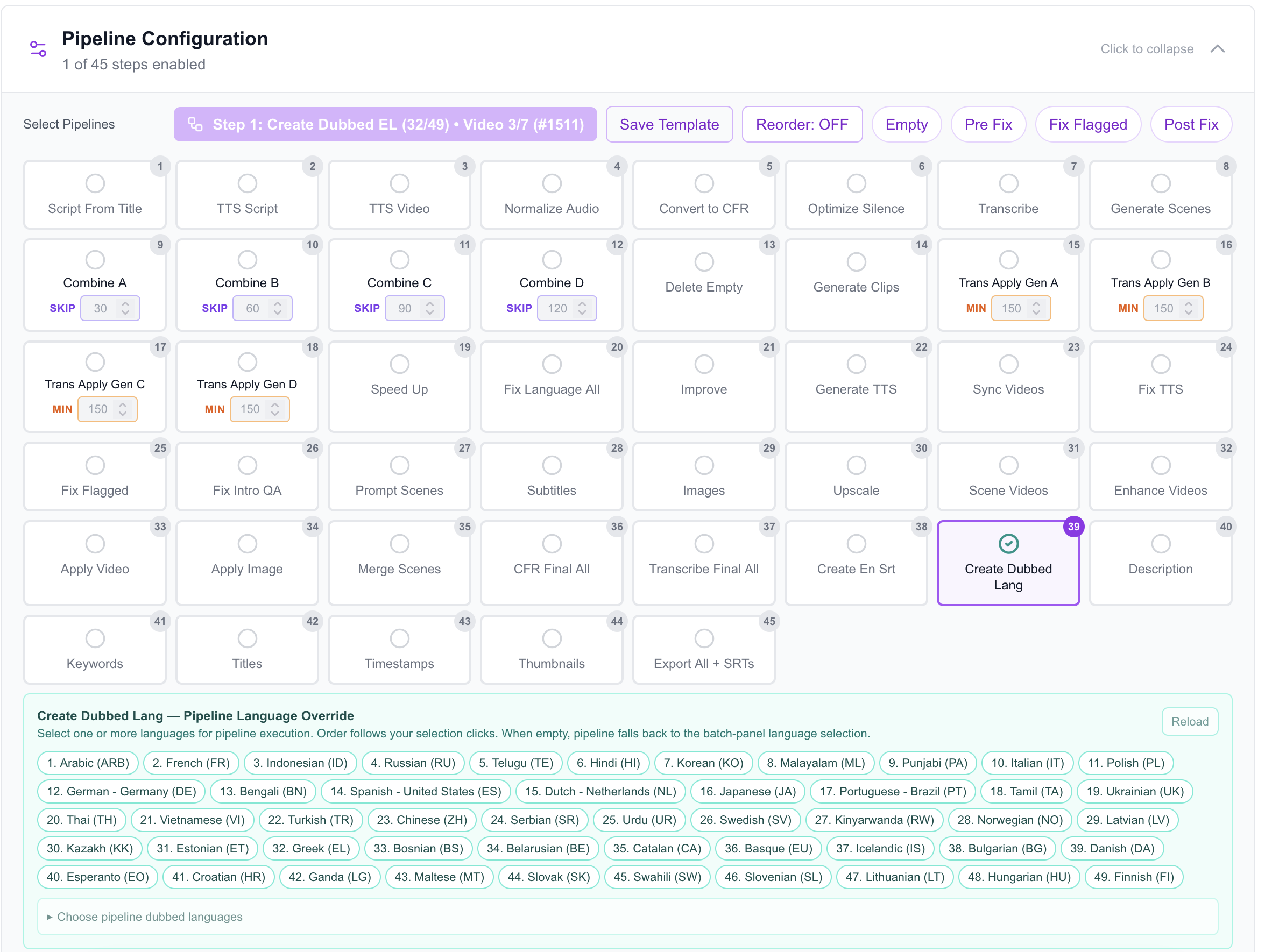
The configurable production pipeline supports reusable templates, multi-step automation, and language-specific dubbing.
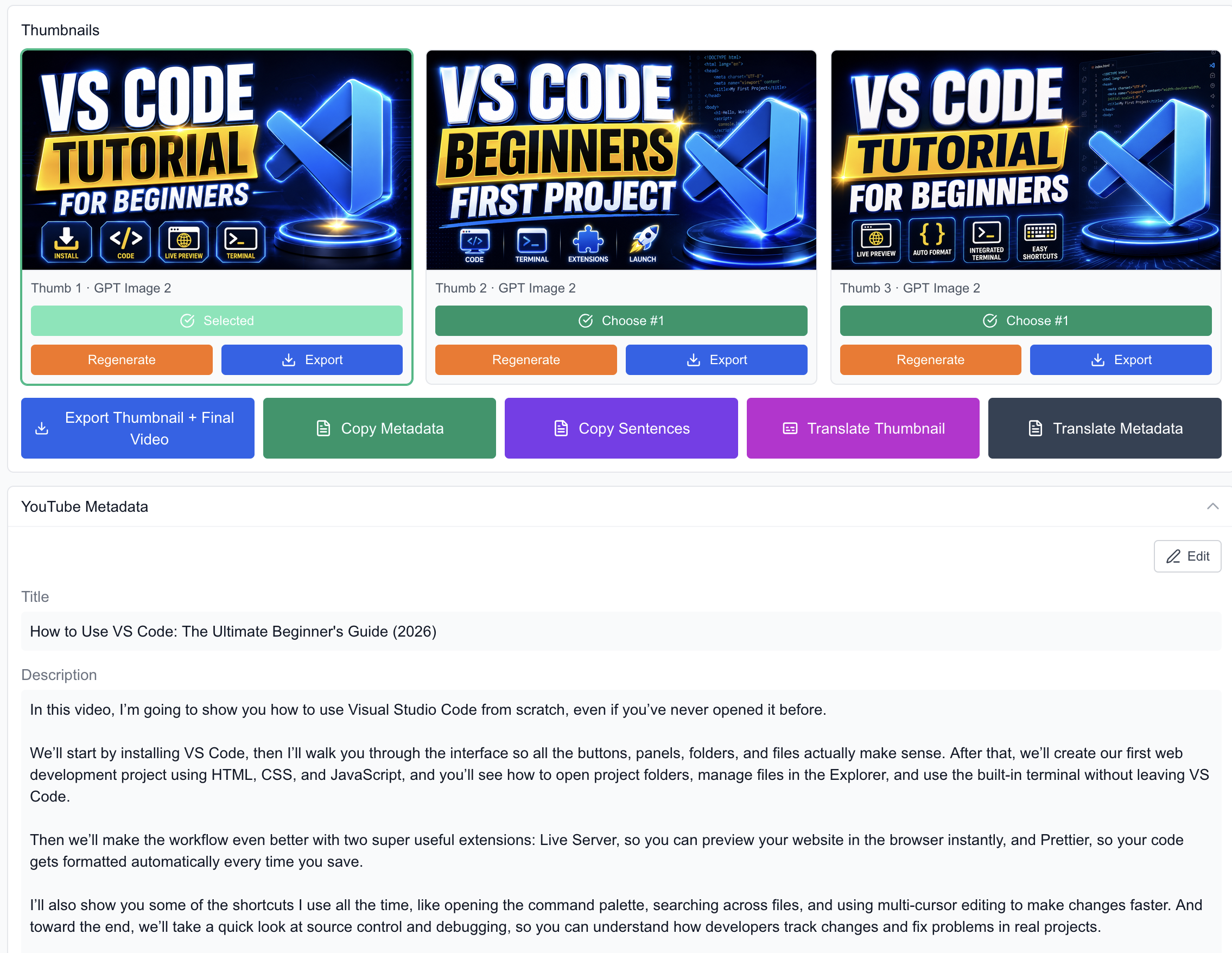
Generate and compare thumbnail variants, select or export the final artwork, and manage YouTube metadata from the same workspace.
[!NOTE] This is a self-hosted production application, not a hosted SaaS product. Several workflows depend on separately configured services, provider credentials, Baserow tables, and local filesystem paths. Review the configuration section before running it outside the original development environment.
Features
Source and project management
- Browse video projects and their linked scenes from Baserow.
- Upload a single source video or select, reorder, and merge multiple files before upload.
- Edit scene text and production data directly from the dashboard.
- Preview source, generated, synchronized, and merged media without leaving the application.
Script and AI workflows
- Generate scripts from titles, improve scene text, fix language issues, and create scene prompts.
- Choose hosted models through OpenRouter or connect an OpenAI-compatible local OMLX endpoint.
- Create YouTube titles, descriptions, keywords, timestamps, and thumbnail variants.
- Generate editorial scene images, upscale them, turn them into video clips, and apply enhanced media back to scenes.
Speech, transcription, and dubbing
- Generate narration with the configured TTS integrations, including Fish Audio and OmniVoice workflows.
- Maintain reusable voice references and word-replacement rules.
- Transcribe source or final media with Parakeet, Cohere Local, Whisper-family, WhisperX, or MLX WhisperX options.
- Generate timed subtitles and English SRT files.
- Produce and merge dubbed audio for one or more configured languages.
- Detect and repair flagged TTS, intro-silence, and transcription issues.
Video and audio processing
- Synchronize scene video duration to generated narration.
- Normalize or enhance audio, optimize silence, adjust playback speed, and fit final duration.
- Convert footage to constant frame rate, concatenate scenes, and merge final videos with FFmpeg.
- Split long scenes, generate individual clips, and combine eligible scene pairs.
- Scene separation can use either the original scene video or the final scene video. Final-mode clips use final-video-local transcription ranges, while the existing original Start/End interval is evenly divided across the new output scenes.
- Add image and text overlays, highlighted subtitles, typing effects, and GIF assets.
- Optionally upscale or interpolate scene video through the bundled REAL Video Enhancer backend.
Automation and delivery
- Run operations on one scene, an entire video, or a configurable full pipeline.
- Enable, disable, reorder, and save reusable pipeline presets.
- Apply filters and multi-pass controls to expensive batch operations.
- Receive completion and failure notifications through Telegram.
- Export a per-video folder or ZIP containing the final media, script, metadata, thumbnails, subtitles, and dubbed audio.
Pipeline
The full pipeline is configurable, but a typical production flow looks like this:
Source video or title
        |
        v
Script -> narration -> transcription -> scene separation
        |
        v
Scene clips -> text fixes -> TTS -> synchronization -> QA
        |
        v
Subtitles -> images -> scene videos -> enhancement -> final merge
        |
        v
Dubbing -> YouTube metadata -> thumbnails -> asset export
Pipeline presets can retain different combinations of these steps for different channels, languages, or production styles.
Technology
- Next.js 15 App Router, React 19, TypeScript, and Tailwind CSS
- Zustand for client-side workflow and settings state
- Baserow for project and scene records
- MinIO for media object storage
- FFmpeg for local audio and video processing
- OpenRouter, OpenAI-compatible local models, KIE, Fish Audio, and OmniVoice integrations
- Sharp and Tesseract.js for image processing and OCR-assisted workflows
- yt-dlp for YouTube subtitle retrieval
- REAL Video Enhancer for optional local upscaling and frame interpolation
Requirements
At minimum, development requires:
- Node.js 20 or newer
- npm
- FFmpeg and FFprobe available on
PATH - A reachable Baserow instance with the expected video and scene tables
- A reachable MinIO instance and bucket
Additional features require their corresponding services or credentials:
- OpenRouter or OpenAI API access, or an OpenAI-compatible local model server
- KIE API access for configured image and video generation models
- Fish Audio and/or OmniVoice for their TTS workflows
- yt-dlp for YouTube subtitle downloads
- Python and the REAL Video Enhancer dependencies for local enhancement
- A Telegram bot and chat ID for notifications
Getting started
-
Clone the repository and enter the project:
git clone https://github.com/sahandghavidel/ai-video-editor.git cd ai-video-editor -
Install the Node.js dependencies:
npm install -
Create the local environment file:
cp .env.example .env.local -
Add the values required by the workflows you intend to use. The core configuration normally includes:
# Baserow
BASEROW_API_URL=http://localhost:714/api
BASEROW_TABLE_ID=your_scenes_table_id
BASEROW_SCENES_TABLE_ID=your_scenes_table_id
BASEROW_EMAIL=you@example.com
BASEROW_PASSWORD=your_password
# Alternatively, configure BASEROW_TOKEN and BASEROW_USE_DATABASE_TOKEN.

# MinIO
MINIO_BASE_URL=http://localhost:9000
MINIO_BUCKET=your_bucket
MINIO_ROOT_USER=your_access_key
MINIO_ROOT_PASSWORD=your_secret_key

# AI providers (configure only what you use)
OPENROUTER_API_KEY=your_openrouter_key
OPENAI_API_KEY=your_openai_key
KIE_API_KEY=your_kie_key
FISH_TTS_API_KEY=your_fish_audio_key

# Optional notifications
TELEGRAM_BOT_TOKEN=your_bot_token
TELEGRAM_CHAT_ID=your_chat_id
The committed .env.example also documents the yt-dlp cache, cookie, rate-limit, and client-rotation settings. Feature-specific routes contain additional optional tuning variables for local transcription, TTS cleanup, FFmpeg timeouts, and video enhancement.
-
Start the development environment:
npm run devThe development script starts Next.js at http://localhost:9540 and restarts the local MinIO server. It currently contains macOS-specific paths and expects the
minioexecutable plusMINIO_ROOT_PASSWORD; adjustscripts/dev-with-minio.shfor your machine if necessary.To run Next.js without the helper script:
npx next dev -p 9540
Configuration notes
- Baserow field mappings are part of the application code and must match your schema. Review
src/lib/baserow-actions.tsand the Baserow API helpers before connecting a new database. - The local folder exporter currently writes to a developer-specific path defined in
src/lib/local-video-export.ts. ChangeLOCAL_VIDEO_EXPORT_BASE_DIRbefore using folder export on another machine. - Browser-facing and server-side MinIO variables are separate in some workflows. Configure the
NEXT_PUBLIC_MINIO_*values when the browser needs direct object URLs. - AI model choice, pipeline steps, transcription settings, and several production preferences are saved locally in the browser.
- Never commit
.env.local, provider keys, database credentials, or storage secrets.
Commands
| Command | Purpose |
|---|---|
npm run dev | Start Next.js on port 9540 and restart local MinIO |
npm run dev:restart | Run the same development helper without caffeinate |
npm run build | Create a production Next.js build |
npm run start | Start the production server |
npm run lint | Run ESLint |
Project structure
src/
├── app/                 Next.js pages and API routes
├── components/          Dashboard, scene editor, settings, and batch UI
├── data/                TTS references and replacement data
├── features/            Focused production workflows
├── lib/                 Baserow, MinIO, AI provider, and export services
├── server/              Server-only integrations and notifications
├── store/               Zustand application state and pipeline presets
└── utils/               FFmpeg, captions, uploads, and batch utilities

docs/                    Operational and batch-pipeline guides
scripts/                 Development and local processing helpers
cohere-local/            Local Cohere transcription service notes
omnivoice-local/         Local OmniVoice service notes
REAL-Video-Enhancer/     Optional third-party enhancement backend
Documentation
- Batch Operations Guide
- Pipeline Batch Operations Playbook
- Dubbed Audio Pipeline Procedure
- FFmpeg Fonts on macOS
- HyperFrames Scene Drafts
Contributing
Contributions are welcome. Before opening a pull request:
- Keep changes focused and avoid committing environment-specific secrets or generated media.
- Run
npm run lintand, when relevant,npm run build. - Document new environment variables, Baserow fields, external services, and pipeline steps.
- Include a concise description of the workflow tested and any local service requirements.
License
This project is licensed under the MIT License.
Third-party projects and model code included in or used by this repository remain subject to their own licenses. See the license files within those directories for details.
Contributors

1,090 commits
Similar repos


Languages
TypeScript
62.4%
Python
36.6%
README
Ultimate Video Editor
An AI-assisted production workspace for turning source videos or scripts into edited, narrated, subtitled, translated, and publish-ready video packages.
Ultimate Video Editor combines a Next.js dashboard with Baserow, MinIO, FFmpeg, local or hosted AI models, speech services, and image/video generation providers. It is designed for scene-based production: ingest a source, generate or refine its script, build scene media, synchronize narration, run quality-control passes, assemble the final video, and export the accompanying YouTube assets.
Application preview
The configurable production pipeline supports reusable templates, multi-step automation, and language-specific dubbing.
Generate and compare thumbnail variants, select or export the final artwork, and manage YouTube metadata from the same workspace.
[!NOTE] This is a self-hosted production application, not a hosted SaaS product. Several workflows depend on separately configured services, provider credentials, Baserow tables, and local filesystem paths. Review the configuration section before running it outside the original development environment.
Features
Source and project management
- Browse video projects and their linked scenes from Baserow.
- Upload a single source video or select, reorder, and merge multiple files before upload.
- Edit scene text and production data directly from the dashboard.
- Preview source, generated, synchronized, and merged media without leaving the application.
Script and AI workflows
- Generate scripts from titles, improve scene text, fix language issues, and create scene prompts.
- Choose hosted models through OpenRouter or connect an OpenAI-compatible local OMLX endpoint.
- Create YouTube titles, descriptions, keywords, timestamps, and thumbnail variants.
- Generate editorial scene images, upscale them, turn them into video clips, and apply enhanced media back to scenes.
Speech, transcription, and dubbing
- Generate narration with the configured TTS integrations, including Fish Audio and OmniVoice workflows.
- Maintain reusable voice references and word-replacement rules.
- Transcribe source or final media with Parakeet, Cohere Local, Whisper-family, WhisperX, or MLX WhisperX options.
- Generate timed subtitles and English SRT files.
- Produce and merge dubbed audio for one or more configured languages.
- Detect and repair flagged TTS, intro-silence, and transcription issues.
Video and audio processing
- Synchronize scene video duration to generated narration.
- Normalize or enhance audio, optimize silence, adjust playback speed, and fit final duration.
- Convert footage to constant frame rate, concatenate scenes, and merge final videos with FFmpeg.
- Split long scenes, generate individual clips, and combine eligible scene pairs.
- Scene separation can use either the original scene video or the final scene video. Final-mode clips use final-video-local transcription ranges, while the existing original Start/End interval is evenly divided across the new output scenes.
- Add image and text overlays, highlighted subtitles, typing effects, and GIF assets.
- Optionally upscale or interpolate scene video through the bundled REAL Video Enhancer backend.
Automation and delivery
- Run operations on one scene, an entire video, or a configurable full pipeline.
- Enable, disable, reorder, and save reusable pipeline presets.
- Apply filters and multi-pass controls to expensive batch operations.
- Receive completion and failure notifications through Telegram.
- Export a per-video folder or ZIP containing the final media, script, metadata, thumbnails, subtitles, and dubbed audio.
Pipeline
The full pipeline is configurable, but a typical production flow looks like this:
Source video or title
        |
        v
Script -> narration -> transcription -> scene separation
        |
        v
Scene clips -> text fixes -> TTS -> synchronization -> QA
        |
        v
Subtitles -> images -> scene videos -> enhancement -> final merge
        |
        v
Dubbing -> YouTube metadata -> thumbnails -> asset export
Pipeline presets can retain different combinations of these steps for different channels, languages, or production styles.
Technology
- Next.js 15 App Router, React 19, TypeScript, and Tailwind CSS
- Zustand for client-side workflow and settings state
- Baserow for project and scene records
- MinIO for media object storage
- FFmpeg for local audio and video processing
- OpenRouter, OpenAI-compatible local models, KIE, Fish Audio, and OmniVoice integrations
- Sharp and Tesseract.js for image processing and OCR-assisted workflows
- yt-dlp for YouTube subtitle retrieval
- REAL Video Enhancer for optional local upscaling and frame interpolation
Requirements
At minimum, development requires:
- Node.js 20 or newer
- npm
- FFmpeg and FFprobe available on
PATH - A reachable Baserow instance with the expected video and scene tables
- A reachable MinIO instance and bucket
Additional features require their corresponding services or credentials:
- OpenRouter or OpenAI API access, or an OpenAI-compatible local model server
- KIE API access for configured image and video generation models
- Fish Audio and/or OmniVoice for their TTS workflows
- yt-dlp for YouTube subtitle downloads
- Python and the REAL Video Enhancer dependencies for local enhancement
- A Telegram bot and chat ID for notifications
Getting started
-
Clone the repository and enter the project:
git clone https://github.com/sahandghavidel/ai-video-editor.git cd ai-video-editor -
Install the Node.js dependencies:
npm install -
Create the local environment file:
cp .env.example .env.local -
Add the values required by the workflows you intend to use. The core configuration normally includes:
# Baserow
BASEROW_API_URL=http://localhost:714/api
BASEROW_TABLE_ID=your_scenes_table_id
BASEROW_SCENES_TABLE_ID=your_scenes_table_id
BASEROW_EMAIL=you@example.com
BASEROW_PASSWORD=your_password
# Alternatively, configure BASEROW_TOKEN and BASEROW_USE_DATABASE_TOKEN.

# MinIO
MINIO_BASE_URL=http://localhost:9000
MINIO_BUCKET=your_bucket
MINIO_ROOT_USER=your_access_key
MINIO_ROOT_PASSWORD=your_secret_key

# AI providers (configure only what you use)
OPENROUTER_API_KEY=your_openrouter_key
OPENAI_API_KEY=your_openai_key
KIE_API_KEY=your_kie_key
FISH_TTS_API_KEY=your_fish_audio_key

# Optional notifications
TELEGRAM_BOT_TOKEN=your_bot_token
TELEGRAM_CHAT_ID=your_chat_id
The committed .env.example also documents the yt-dlp cache, cookie, rate-limit, and client-rotation settings. Feature-specific routes contain additional optional tuning variables for local transcription, TTS cleanup, FFmpeg timeouts, and video enhancement.
-
Start the development environment:
npm run devThe development script starts Next.js at http://localhost:9540 and restarts the local MinIO server. It currently contains macOS-specific paths and expects the
minioexecutable plusMINIO_ROOT_PASSWORD; adjustscripts/dev-with-minio.shfor your machine if necessary.To run Next.js without the helper script:
npx next dev -p 9540
Configuration notes
- Baserow field mappings are part of the application code and must match your schema. Review
src/lib/baserow-actions.tsand the Baserow API helpers before connecting a new database. - The local folder exporter currently writes to a developer-specific path defined in
src/lib/local-video-export.ts. ChangeLOCAL_VIDEO_EXPORT_BASE_DIRbefore using folder export on another machine. - Browser-facing and server-side MinIO variables are separate in some workflows. Configure the
NEXT_PUBLIC_MINIO_*values when the browser needs direct object URLs. - AI model choice, pipeline steps, transcription settings, and several production preferences are saved locally in the browser.
- Never commit
.env.local, provider keys, database credentials, or storage secrets.
Commands
| Command | Purpose |
|---|---|
npm run dev | Start Next.js on port 9540 and restart local MinIO |
npm run dev:restart | Run the same development helper without caffeinate |
npm run build | Create a production Next.js build |
npm run start | Start the production server |
npm run lint | Run ESLint |
Project structure
src/
├── app/                 Next.js pages and API routes
├── components/          Dashboard, scene editor, settings, and batch UI
├── data/                TTS references and replacement data
├── features/            Focused production workflows
├── lib/                 Baserow, MinIO, AI provider, and export services
├── server/              Server-only integrations and notifications
├── store/               Zustand application state and pipeline presets
└── utils/               FFmpeg, captions, uploads, and batch utilities

docs/                    Operational and batch-pipeline guides
scripts/                 Development and local processing helpers
cohere-local/            Local Cohere transcription service notes
omnivoice-local/         Local OmniVoice service notes
REAL-Video-Enhancer/     Optional third-party enhancement backend
Documentation
- Batch Operations Guide
- Pipeline Batch Operations Playbook
- Dubbed Audio Pipeline Procedure
- FFmpeg Fonts on macOS
- HyperFrames Scene Drafts
Contributing
Contributions are welcome. Before opening a pull request:
- Keep changes focused and avoid committing environment-specific secrets or generated media.
- Run
npm run lintand, when relevant,npm run build. - Document new environment variables, Baserow fields, external services, and pipeline steps.
- Include a concise description of the workflow tested and any local service requirements.
License
This project is licensed under the MIT License.
Third-party projects and model code included in or used by this repository remain subject to their own licenses. See the license files within those directories for details.
Similar repos
Contributors
1,090 commits
Languages
TypeScript
62.4%
Python
36.6%