
See what people are saying
README
⚡️ Power Struggle
A two-player tap battle over USB-C where you physically steal battery power from your opponent.
Connect two phones with a USB-C cable and tap. Whoever is winning actually gets charged; the loser's battery really drains. For those "We're both at 5% and neither can make it home, but one of us could survive if they take the other's charge" standoffs.
📖 Project page: ideas.skip.work/…/power-struggle
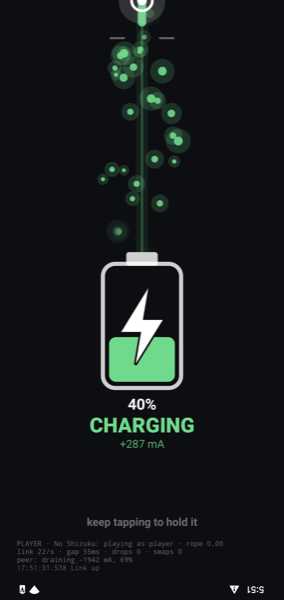
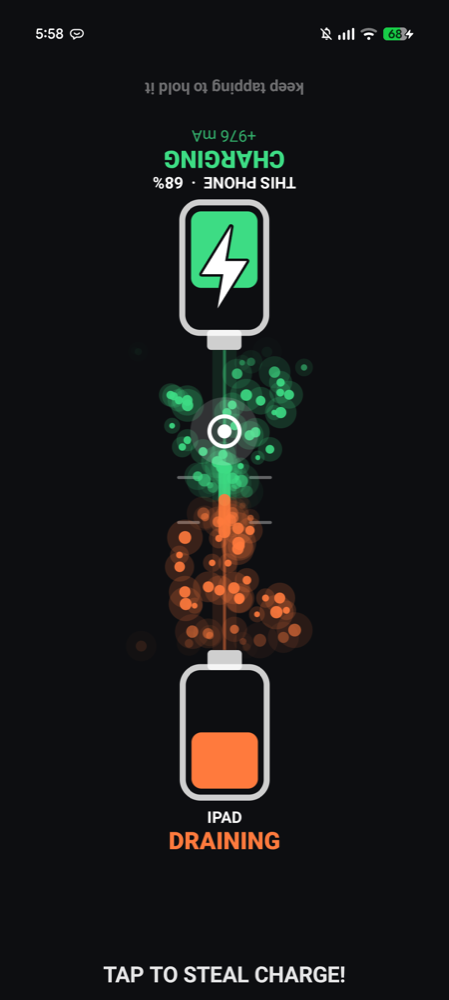
Left: two-phone mode, the winning side. Right: one-phone mode against an iPad, which can't run the app but still swaps power.
How to play
- The two phones lie on the table bottom to bottom, joined by the cable, with a player behind each one. (That's why the UI is drawn upside down.)
- Tap anywhere to pull the knot on the energy stream towards your battery. It springs back towards the cable on its own.
- When the knot passes the line just beyond the cable, power swaps and flows to you. The phone's own status bar charging icon is your proof.
- Faster tapping = more of your opponent's battery. Losing actually costs you charge.
If the other device isn't running the app (not installed, or an iPad/iPhone), one phone shows both players on a split screen and still swaps power with the other device.
How it works
Swapping who charges whom. A USB-C port on a modern phone can either supply power (source) or receive it (sink). When two phones are connected, USB Power Delivery decides which is which, and the spec also allows a power role swap mid-connection without unplugging. That's what Android's "Charge connected device" USB setting does. Power Struggle triggers the same swap from inside the game by running
dumpsys usb set-port-roles <port> <source|sink> <host|device>
That needs shell-level permission, so the app runs it through Shizuku, which lends an app the permissions of an adb shell. No root required. Only one phone needs this: the swap is negotiated between the two phones, and the other just accepts the request. A swap takes about half a second; afterwards roughly 4.5 W (5 V, 0.9 A on a Pixel) flows the other way.
Game data over the same cable. The phone running Shizuku takes the USB host role and switches the other phone into Android Open Accessory mode, a protocol originally meant for car head units and docks. That gives the two phones a direct, millisecond-latency data channel for taps and game state. Power role and data role are independent in USB, so the link stays up while power flips back and forth underneath it.
Truthful UI. Each phone's "charging / draining" display comes from its own BatteryManager readings, not from game messages, so the screen shows what the battery is actually doing.
Measured on a Pixel 9 Pro XL ↔ Pixel 4 XL: the supplying phone's battery drains at around 1500 mA while the receiving phone's battery gains only around 400 mA. Both screens and the animation eat into the roughly 4.5 W delivered, so use it only in a genuine emergency.
Trying it
You need:
- The "host" phone: Android 13+, with Shizuku installed and running (start it via Wireless debugging; it needs restarting after each reboot).
- The other device: another Android phone with USB-C (ideally with this app installed too, but no need for Shizuku), or an iPad/USB-C iPhone for one-phone mode.
- A USB-C to USB-C cable that carries data, not just power.
Build and install (JDK 17+):
./gradlew installDebug
Open the app on both phones, plug them together, and accept the prompts: Shizuku permission and USB access on the host phone, and "Open Power Struggle" on the other one. The phone with Shizuku becomes the host automatically.
Status and caveats
This is a proof of concept, tested only on Pixels (and against an iPad).
dumpsys usb set-port-rolesis a debug interface, not a public API. Other manufacturers' builds or future Android versions may not support it.- Some phones won't supply power when their own battery is low, and the app doesn't yet enforce a battery floor of its own. Don't play it with a phone you need to keep alive.
- iPads/iPhones can't run the app over USB (no Android Open Accessory), so they're power-only opponents in one-phone mode.
Code tour
| File | What it does |
|---|---|
Battle.kt | Game state, tug-of-war rope, one/two-phone mode detection, wire protocol |
PowerControl.kt, ShellService.kt | Shizuku user service that runs dumpsys usb as the shell user |
UsbLink.kt | Android Open Accessory host and accessory ends of the data link |
MainActivity.kt | Compose UI: energy stream, knot, battery gauge, split screen |
License
MIT © 2026 Ken Kawamoto
Similar repos


Languages
Kotlin
99.3%
See what people are saying
README
⚡️ Power Struggle
A two-player tap battle over USB-C where you physically steal battery power from your opponent.
Connect two phones with a USB-C cable and tap. Whoever is winning actually gets charged; the loser's battery really drains. For those "We're both at 5% and neither can make it home, but one of us could survive if they take the other's charge" standoffs.
📖 Project page: ideas.skip.work/…/power-struggle
Left: two-phone mode, the winning side. Right: one-phone mode against an iPad, which can't run the app but still swaps power.
How to play
- The two phones lie on the table bottom to bottom, joined by the cable, with a player behind each one. (That's why the UI is drawn upside down.)
- Tap anywhere to pull the knot on the energy stream towards your battery. It springs back towards the cable on its own.
- When the knot passes the line just beyond the cable, power swaps and flows to you. The phone's own status bar charging icon is your proof.
- Faster tapping = more of your opponent's battery. Losing actually costs you charge.
If the other device isn't running the app (not installed, or an iPad/iPhone), one phone shows both players on a split screen and still swaps power with the other device.
How it works
Swapping who charges whom. A USB-C port on a modern phone can either supply power (source) or receive it (sink). When two phones are connected, USB Power Delivery decides which is which, and the spec also allows a power role swap mid-connection without unplugging. That's what Android's "Charge connected device" USB setting does. Power Struggle triggers the same swap from inside the game by running
dumpsys usb set-port-roles <port> <source|sink> <host|device>
That needs shell-level permission, so the app runs it through Shizuku, which lends an app the permissions of an adb shell. No root required. Only one phone needs this: the swap is negotiated between the two phones, and the other just accepts the request. A swap takes about half a second; afterwards roughly 4.5 W (5 V, 0.9 A on a Pixel) flows the other way.
Game data over the same cable. The phone running Shizuku takes the USB host role and switches the other phone into Android Open Accessory mode, a protocol originally meant for car head units and docks. That gives the two phones a direct, millisecond-latency data channel for taps and game state. Power role and data role are independent in USB, so the link stays up while power flips back and forth underneath it.
Truthful UI. Each phone's "charging / draining" display comes from its own BatteryManager readings, not from game messages, so the screen shows what the battery is actually doing.
Measured on a Pixel 9 Pro XL ↔ Pixel 4 XL: the supplying phone's battery drains at around 1500 mA while the receiving phone's battery gains only around 400 mA. Both screens and the animation eat into the roughly 4.5 W delivered, so use it only in a genuine emergency.
Trying it
You need:
- The "host" phone: Android 13+, with Shizuku installed and running (start it via Wireless debugging; it needs restarting after each reboot).
- The other device: another Android phone with USB-C (ideally with this app installed too, but no need for Shizuku), or an iPad/USB-C iPhone for one-phone mode.
- A USB-C to USB-C cable that carries data, not just power.
Build and install (JDK 17+):
./gradlew installDebug
Open the app on both phones, plug them together, and accept the prompts: Shizuku permission and USB access on the host phone, and "Open Power Struggle" on the other one. The phone with Shizuku becomes the host automatically.
Status and caveats
This is a proof of concept, tested only on Pixels (and against an iPad).
dumpsys usb set-port-rolesis a debug interface, not a public API. Other manufacturers' builds or future Android versions may not support it.- Some phones won't supply power when their own battery is low, and the app doesn't yet enforce a battery floor of its own. Don't play it with a phone you need to keep alive.
- iPads/iPhones can't run the app over USB (no Android Open Accessory), so they're power-only opponents in one-phone mode.
Code tour
| File | What it does |
|---|---|
Battle.kt | Game state, tug-of-war rope, one/two-phone mode detection, wire protocol |
PowerControl.kt, ShellService.kt | Shizuku user service that runs dumpsys usb as the shell user |
UsbLink.kt | Android Open Accessory host and accessory ends of the data link |
MainActivity.kt | Compose UI: energy stream, knot, battery gauge, split screen |
License
MIT © 2026 Ken Kawamoto
Similar repos
Languages
Kotlin
99.3%