In-app feedback for React: one well-timed question, a category panel, and quiet friction signals. Copy the folder, pick a store, and your coding agent proposes where it asks.
See the codeIn-app feedback for React apps. One well-timed question, three answers, an optional line. Your coding agent picks where it asks.



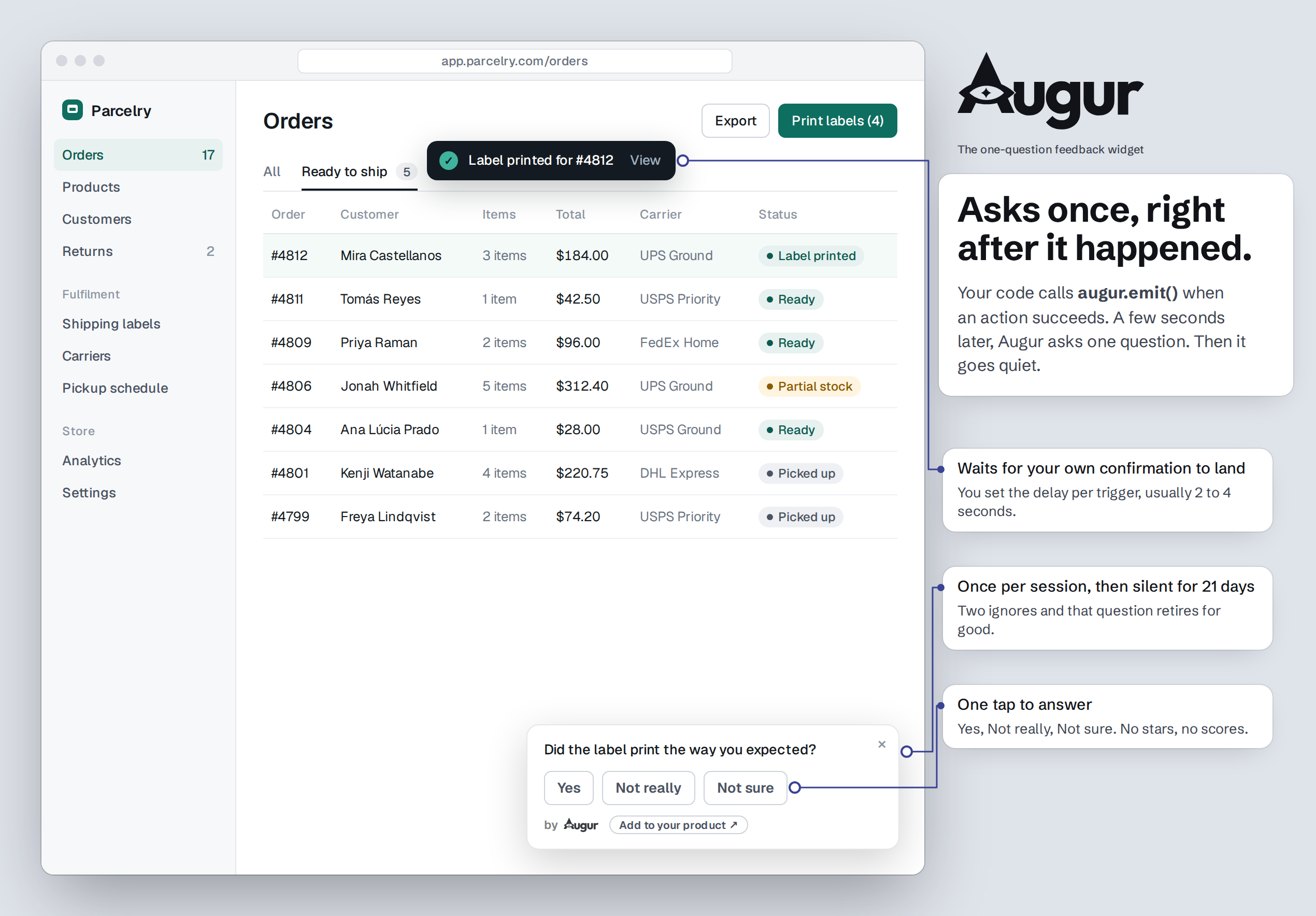
Augur is in-app user feedback for React and TypeScript. It asks one question at a real moment in your product ("Was it easy to export that report?"), takes one of three answers and an optional line, then gets out of the way. It is not a form builder, not an NPS widget, not a survey tool. It exists to catch honest reactions at the moment they happen, without ceremony.
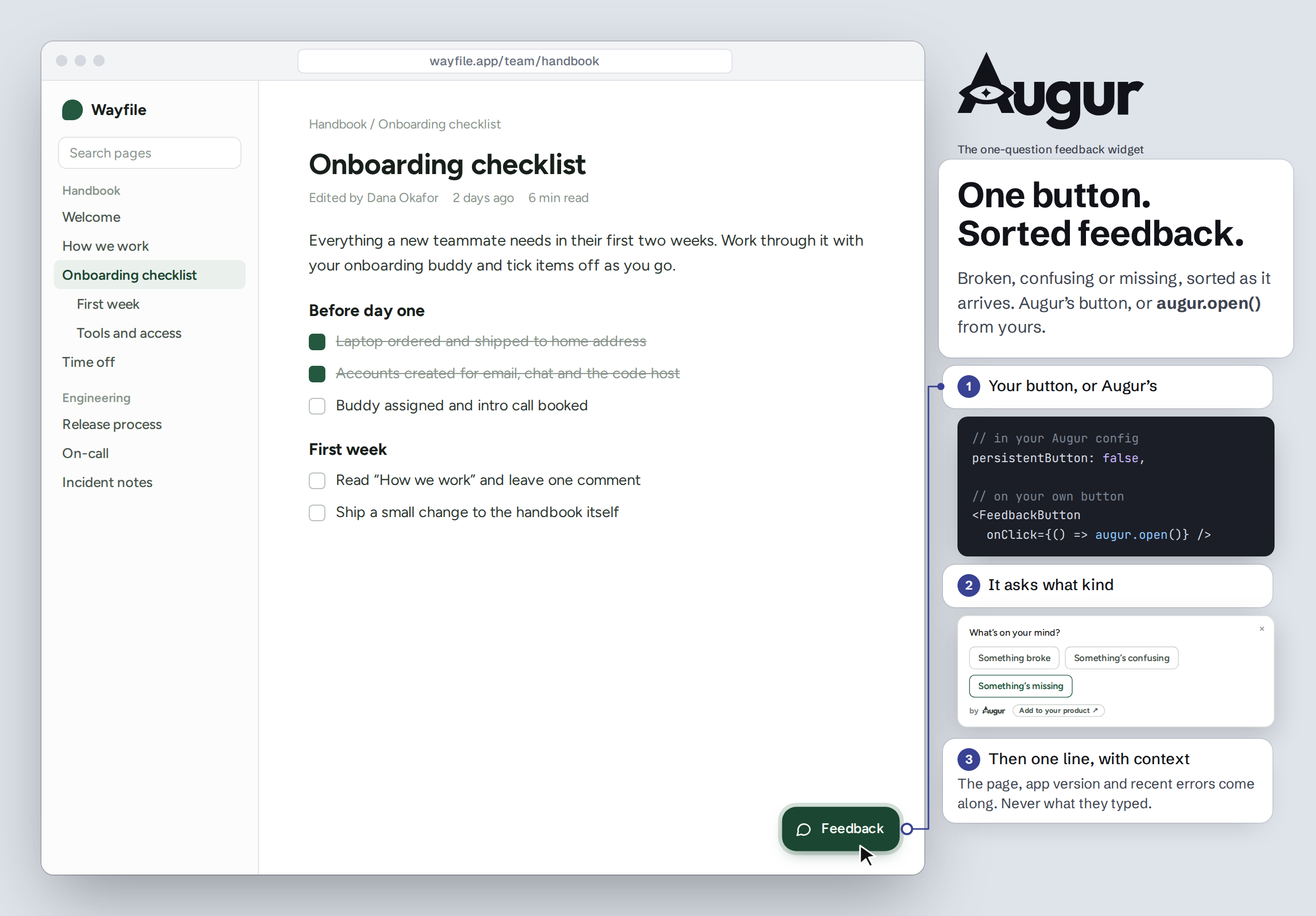
Already have a help or bug button? Augur can be it. Its feedback button opens a
small panel: "What's on your mind?" with Something broke / confusing / missing,
then a line. Use the built-in button, or keep your own and call augur.open() from
it (persistentButton: false). Both are supported, and both record the same way.
Distribution is copy the folder. No npm install, no build step, no service to
run. Drop augur/ into your React app, pick where the data goes, mount it once.
Works with React 18+: Vite, Next.js (as a client component), Remix. The engine (triggers, caps, stores) is plain TypeScript; only the visible layer is React.
1. Copy the augur/ folder into your src/.
2. Pick a store — the one seam between Augur and your database:
| Store | Backend | Use |
|---|---|---|
LocalStore | localStorage | demo / dev, single device |
SupabaseStore(client) | Supabase | run sql/schema.sql once |
HttpStore({endpoint}) | your API | you implement the routes |
Or write your own to the AugurStore interface in augur/store.ts.
3. Mount once and emit — the whole integration is two lines:
import { Augur, augur } from "./augur";

// declare the trigger in your config…
"checkout.done": { enabled: true, version: 1, delayMs: 3000,
  maxAsks: 1, dismissKill: 2, question: "Did that go through as expected?" }

// …mount once, high in the tree…
<Augur userId={session.user.id} store={store} config={MY_TRIGGERS} />

// …and emit where the action completes. Fire-and-forget; caps decide if it shows.
await placeOrder(cart);
augur.emit("checkout.done");
See example/usage.tsx for a complete file.
Paste this into Claude Code, Cursor, or your AI app builder:
Add Augur (in-app feedback) to this app: https://github.com/kaezee/Augur
Read AGENTS.md in that repo first and follow it exactly. Audit this app and propose
where Augur should ask, and check the plan with me before you write any code.
If you can't open the link, stop and tell me.
Later, you can ask the same tool to turn Augur off, pause a prompt, or remove it. AGENTS.md tells it how.
Response types — choice3 (Yes · Not really · Not sure — the default, and the
only one that rolls into the summary), choice (2–5 custom options), and text.
Deliberately closed: no ranking, matrix, NPS, or star ratings. That is the line
between a feedback prompt and a form builder, and Augur stays on the near side.
Caps, enforced locally — one prompt per session, one per user per N days, quiet for N days after any answer, plus per-trigger lifetime and dies-after-N-ignores. Per-device and best-effort by design (no user history is ever read back); the analytics stay exact.
Testing mode — a switch in admin that keeps every prompt visible so you can try the flow, while recording nothing: no events, no counts, no manual-button clicks. QA in testing, flip to live when you're ready, and your own clicks never skew the data.
Unconfigured emits are caught — an emit() with no config entry is logged and
surfaced in admin instead of vanishing silently, the most common integration slip.
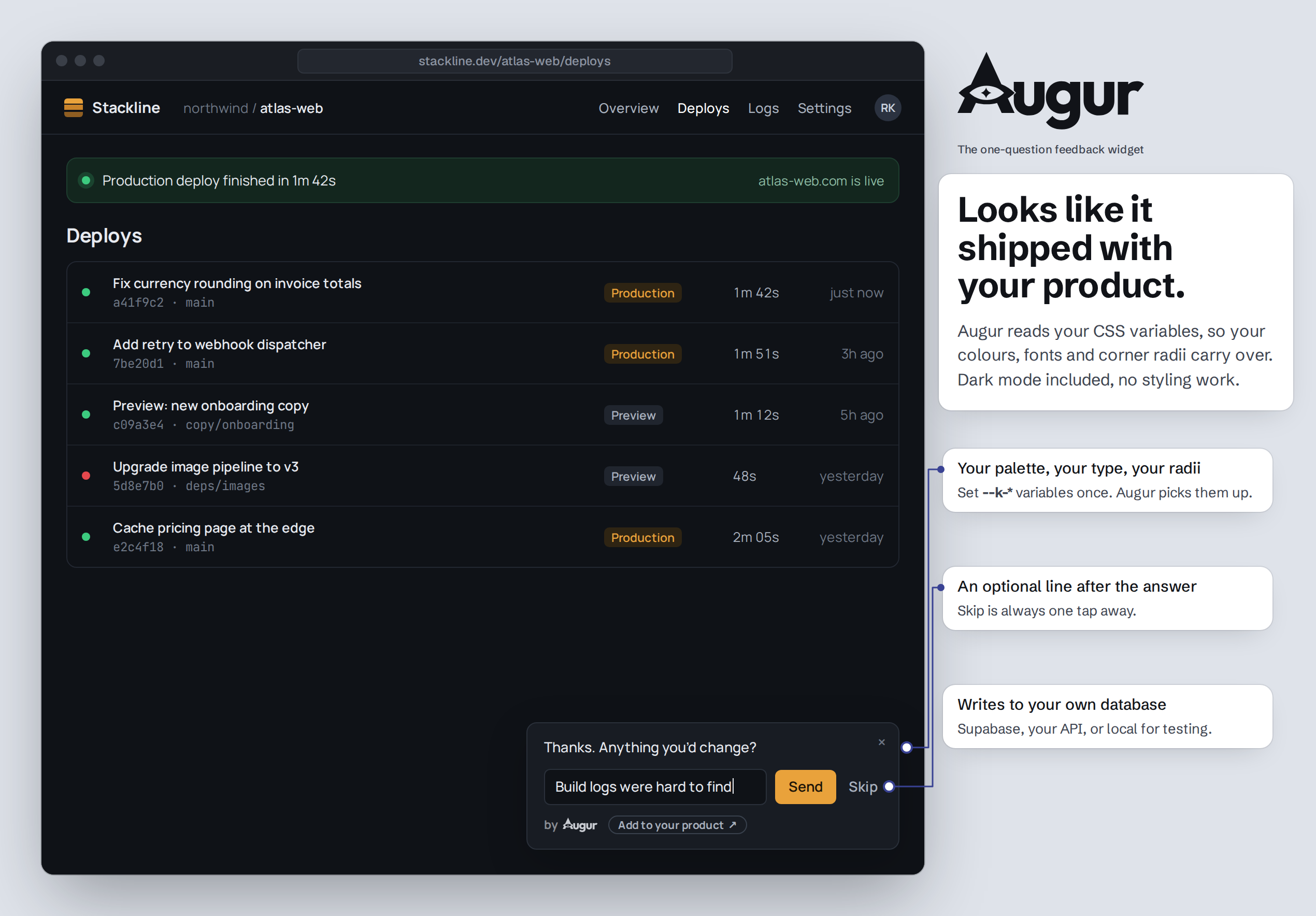
Theme-aware, self-contained — the snackbar reads your --k-* CSS variables
with sane fallbacks, so it inherits your look and still renders fine where none
are defined. No external assets, no fonts, no network.
Row-level security on by default — the Supabase schema enables RLS on every table and routes admin reads through checked functions, so feedback isn't readable by anyone with your public key.
Bring your own button — set persistentButton: false and call augur.open()
from any control in your UI. Your design, Augur's prompt and logging.
augur.open("help-menu") records where it was opened from; augur.close() closes
whatever Augur is showing; augur.onPanelState(open => …) lets your button hide
while Augur is on screen.
Categories on the button's panel — Something broke, Something's confusing,
Something's missing by default. Set your own (2 to 5, each { key, label } with
an optional placeholder), or categories: [] for plain free text. Optional
moreLink: { label, href } adds a quiet "Say more ↗" link. Categories are only
for feedback people start themselves; triggered prompts keep their own question.
Diagnostic context with each button submission, on by default, so a report is fixable. It collects places, never words:
location.pathname only: never the query string or # fragment,
which often carry tokens and emails),appVersion to <Augur>,ignoreErrorSources.It never reads the page, form fields, or anything the person typed elsewhere.
context: false turns it off entirely: no listeners, nothing sent.
Every string configurable — strings covers each visible word (buttons,
headings, placeholders, accessible labels) and merges per key, so you can
override one without restating the rest. Translate followup, manualQuestion
and the answers labels alongside it.
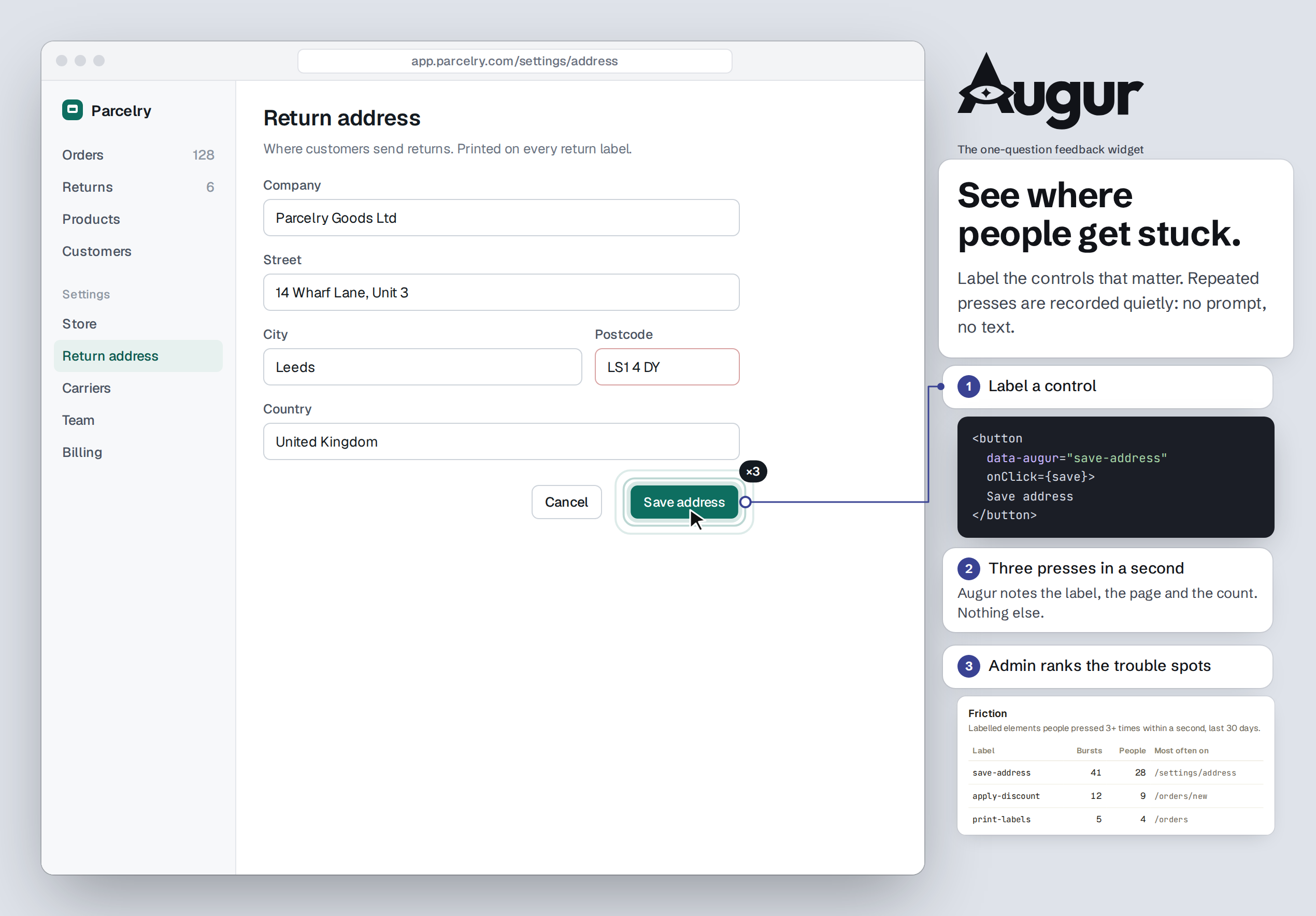
Friction, without asking — label the controls that matter with
data-augur="save-entity". When someone presses the same labelled control 3 times
within a second (the "is this thing working?" moment), Augur records it quietly:
the label, the page path and the press count. No prompt, no element text, nothing
typed, at most 20 per session. Admin shows which labels people fight with most.
Unlabelled elements are never watched; friction: false turns it off.
<button data-augur="save-entity" onClick={save}>Save</button>
Accessible — prompts are announced politely, triggered prompts never take focus, the panel takes focus when someone opens it and gives it back when it closes, Esc closes in every state, and every control has a visible focus ring.
Mount <AugurAdminSection store={store} hostConfig={MY_TRIGGERS} /> behind your own
route and guard. Two tabs: Results (a plain-sentence summary, a per-trigger
table, and the notes) and Settings (reword questions and answer labels, tune caps
and timing, Show preview to see a prompt at real width — previews are never
counted — and a master switch). The route, the
admin check, and the 404 are yours — Augur ships the section, not the page.
Results also counts button submissions by category and by entry point, filters notes by category, and shows each submission's context in plain words.
Skip the admin import entirely and collection still works, with a smaller bundle.
Augur stores feedback; it doesn't page you. Admin shows the unread notes, but if nobody opens it, a "this is broken" note can sit for weeks. Have the backend send you a ping when a note is saved. It must come from the server: a webhook URL in browser code is public.
Keep the ping short: the category, the screen, and a link to your admin. Put the note itself, or who wrote it, in Slack or email only if your privacy notice says feedback goes there.
Supabase. Dashboard → Database → Webhooks → Create a new hook: table
augur_notes, event Insert, type Supabase Edge Function. The function posts to
Slack (set SLACK_WEBHOOK_URL as a function secret):
// supabase/functions/augur-ping/index.ts
Deno.serve(async (req) => {
  const { record } = await req.json();                 // the new augur_notes row
  await fetch(Deno.env.get("SLACK_WEBHOOK_URL")!, {
    method: "POST", headers: { "content-type": "application/json" },
    body: JSON.stringify({ text: `New Augur feedback (note ${record.id}). Open admin to read it.` }),
  });
  return new Response("ok");
});
Firestore (your own adapter). A Cloud Function on the collection your adapter writes to:
import { onDocumentCreated } from "firebase-functions/v2/firestore";
export const augurPing = onDocumentCreated("feedback/{id}", async (e) => {
  const d = e.data?.data();
  await fetch(process.env.SLACK_WEBHOOK_URL!, {
    method: "POST", headers: { "content-type": "application/json" },
    body: JSON.stringify({ text: `New feedback: ${d?.category ?? "general"} on ${d?.context?.route ?? "?"}` }),
  });
});
For email instead of Slack, have the function add a document to the mail collection
used by Firebase's Trigger Email extension.
HttpStore. Send the ping from your endpoint, after the note is stored.
If a ping per note is too much, run the same function on a schedule and send one digest a day. Or ask your coding agent to go through the feedback each week: AGENTS.md §6 covers it.
The default caps (one prompt per session, then 21 days of quiet) are right for a shipped product, where asking too often costs goodwill. In a beta, people expect to be asked, so you can tighten the loop:
caps: { perSession: 1, perUserDays: 7, suppressAfterAnswerDays: 7 },
Go back to the defaults when you launch.
Augur has no server and calls nothing outside your app. Everything it records goes to the store you chose: your Supabase project, your API, or the browser in local mode.
What it records
| When | What |
|---|---|
| A triggered prompt shows | the userId you pass, the trigger id and version, the time, then the outcome (answered / dismissed / ignored), the answer, and the optional line |
| Someone sends feedback from the button | the category, their line, the entry point, and the diagnostic context listed under What you get (page path, app version, window size, user agent, time, per-tab session id, the last 5 uncaught errors) |
| A labelled control is pressed 3 times in a second | the userId, the data-augur label, the page path, the press count, the time |
It never reads page content, form fields or keystrokes, and sets no cookies. In the
browser it keeps prompt-cap counters in localStorage and a per-tab session id in
sessionStorage. Page paths keep location.pathname only, so the query string and
fragment are never stored.
How long it's kept. Until you delete it. Augur never deletes anything on its
own. Admin → Purge clears prompt events, submissions and friction older than the
number of days you pick, or all of it. Augur's rows are keyed by user_id with no
foreign key to your users table, so add them to your account-deletion path:
delete from augur_events       where user_id = :id;  -- notes cascade
delete from augur_unconfigured where user_id = :id;
delete from augur_friction     where user_id = :id;
Before you ship it, consider:
/users/jane@example.com), set context: false and don't label controls on those
pages. Paths that hold opaque ids are fine to keep, but say so in your policy.userId, never an email, and
never put personal data in a data-augur label: labels are stored as written.context: false attaches no context and installs no
error listeners. friction: false, or simply no data-augur labels, records no
friction. enabled: false stops prompts, the button and friction; error listeners
follow context alone, so set both to false for nothing at all.Replace your augur/ folder with the new one, then on Supabase run each migration
newer than the version you had, in order. They're additive and safe to rerun.
main): sql/migrations/0.5.0.sql
(paged notes, store-side submission tallies, a date index).0.4.0.sql (friction), then 0.5.0.sql.0.3.0.sql, then 0.4.0.sql and 0.5.0.sql. The
built-in button now opens the category panel; set categories: [] to keep plain
free text.Your triggers keep working unchanged. See CHANGELOG.md.
Augur is MIT-licensed. Use it, change it, ship it, commercially or not.
Each prompt carries a small "by Augur" byline linking back here. It's on by default, and it's how other builders find Augur. If it doesn't fit your product, turn it off in code:
<Augur userId={session.user.id} store={store} config={MY_TRIGGERS} byline={false} />
No license, no form, no asking. If you do switch it off, a mention in your credits or changelog, or a star on this repo, is what keeps Augur free.
Your feedback entry point (the floating "Feedback" button and its icon) is yours
to restyle or replace. See branding/README.md.
The name "Augur" and the eye-in-triangle mark aren't covered by the MIT license. Fork freely; give your fork its own name. Details in TRADEMARKS.md.
Delete the augur/ folder, the one <Augur/> mount, your emit() calls, and drop
the tables. Nothing else references it.
0.emit() in
your source. Everything else — wording, caps, enable/disable — is tunable in admin
without a deploy.MIT © 2026 Krishnachandran Ramachandran (kaezee). Name and mark: TRADEMARKS.md.
Issues are welcome; for pull requests, open an issue first (CONTRIBUTING.md). Report security problems privately (SECURITY.md).
In-app feedback for React: one well-timed question, a category panel, and quiet friction signals. Copy the folder, pick a store, and your coding agent proposes where it asks.
See the codeIn-app feedback for React apps. One well-timed question, three answers, an optional line. Your coding agent picks where it asks.
Augur is in-app user feedback for React and TypeScript. It asks one question at a real moment in your product ("Was it easy to export that report?"), takes one of three answers and an optional line, then gets out of the way. It is not a form builder, not an NPS widget, not a survey tool. It exists to catch honest reactions at the moment they happen, without ceremony.
Already have a help or bug button? Augur can be it. Its feedback button opens a
small panel: "What's on your mind?" with Something broke / confusing / missing,
then a line. Use the built-in button, or keep your own and call augur.open() from
it (persistentButton: false). Both are supported, and both record the same way.
Distribution is copy the folder. No npm install, no build step, no service to
run. Drop augur/ into your React app, pick where the data goes, mount it once.
Works with React 18+: Vite, Next.js (as a client component), Remix. The engine (triggers, caps, stores) is plain TypeScript; only the visible layer is React.
1. Copy the augur/ folder into your src/.
2. Pick a store — the one seam between Augur and your database:
| Store | Backend | Use |
|---|---|---|
LocalStore | localStorage | demo / dev, single device |
SupabaseStore(client) | Supabase | run sql/schema.sql once |
HttpStore({endpoint}) | your API | you implement the routes |
Or write your own to the AugurStore interface in augur/store.ts.
3. Mount once and emit — the whole integration is two lines:
import { Augur, augur } from "./augur";

// declare the trigger in your config…
"checkout.done": { enabled: true, version: 1, delayMs: 3000,
  maxAsks: 1, dismissKill: 2, question: "Did that go through as expected?" }

// …mount once, high in the tree…
<Augur userId={session.user.id} store={store} config={MY_TRIGGERS} />

// …and emit where the action completes. Fire-and-forget; caps decide if it shows.
await placeOrder(cart);
augur.emit("checkout.done");
See example/usage.tsx for a complete file.
Paste this into Claude Code, Cursor, or your AI app builder:
Add Augur (in-app feedback) to this app: https://github.com/kaezee/Augur
Read AGENTS.md in that repo first and follow it exactly. Audit this app and propose
where Augur should ask, and check the plan with me before you write any code.
If you can't open the link, stop and tell me.
Later, you can ask the same tool to turn Augur off, pause a prompt, or remove it. AGENTS.md tells it how.
Response types — choice3 (Yes · Not really · Not sure — the default, and the
only one that rolls into the summary), choice (2–5 custom options), and text.
Deliberately closed: no ranking, matrix, NPS, or star ratings. That is the line
between a feedback prompt and a form builder, and Augur stays on the near side.
Caps, enforced locally — one prompt per session, one per user per N days, quiet for N days after any answer, plus per-trigger lifetime and dies-after-N-ignores. Per-device and best-effort by design (no user history is ever read back); the analytics stay exact.
Testing mode — a switch in admin that keeps every prompt visible so you can try the flow, while recording nothing: no events, no counts, no manual-button clicks. QA in testing, flip to live when you're ready, and your own clicks never skew the data.
Unconfigured emits are caught — an emit() with no config entry is logged and
surfaced in admin instead of vanishing silently, the most common integration slip.
Theme-aware, self-contained — the snackbar reads your --k-* CSS variables
with sane fallbacks, so it inherits your look and still renders fine where none
are defined. No external assets, no fonts, no network.
Row-level security on by default — the Supabase schema enables RLS on every table and routes admin reads through checked functions, so feedback isn't readable by anyone with your public key.
Bring your own button — set persistentButton: false and call augur.open()
from any control in your UI. Your design, Augur's prompt and logging.
augur.open("help-menu") records where it was opened from; augur.close() closes
whatever Augur is showing; augur.onPanelState(open => …) lets your button hide
while Augur is on screen.
Categories on the button's panel — Something broke, Something's confusing,
Something's missing by default. Set your own (2 to 5, each { key, label } with
an optional placeholder), or categories: [] for plain free text. Optional
moreLink: { label, href } adds a quiet "Say more ↗" link. Categories are only
for feedback people start themselves; triggered prompts keep their own question.
Diagnostic context with each button submission, on by default, so a report is fixable. It collects places, never words:
location.pathname only: never the query string or # fragment,
which often carry tokens and emails),appVersion to <Augur>,ignoreErrorSources.It never reads the page, form fields, or anything the person typed elsewhere.
context: false turns it off entirely: no listeners, nothing sent.
Every string configurable — strings covers each visible word (buttons,
headings, placeholders, accessible labels) and merges per key, so you can
override one without restating the rest. Translate followup, manualQuestion
and the answers labels alongside it.
Friction, without asking — label the controls that matter with
data-augur="save-entity". When someone presses the same labelled control 3 times
within a second (the "is this thing working?" moment), Augur records it quietly:
the label, the page path and the press count. No prompt, no element text, nothing
typed, at most 20 per session. Admin shows which labels people fight with most.
Unlabelled elements are never watched; friction: false turns it off.
<button data-augur="save-entity" onClick={save}>Save</button>
Accessible — prompts are announced politely, triggered prompts never take focus, the panel takes focus when someone opens it and gives it back when it closes, Esc closes in every state, and every control has a visible focus ring.
Mount <AugurAdminSection store={store} hostConfig={MY_TRIGGERS} /> behind your own
route and guard. Two tabs: Results (a plain-sentence summary, a per-trigger
table, and the notes) and Settings (reword questions and answer labels, tune caps
and timing, Show preview to see a prompt at real width — previews are never
counted — and a master switch). The route, the
admin check, and the 404 are yours — Augur ships the section, not the page.
Results also counts button submissions by category and by entry point, filters notes by category, and shows each submission's context in plain words.
Skip the admin import entirely and collection still works, with a smaller bundle.
Augur stores feedback; it doesn't page you. Admin shows the unread notes, but if nobody opens it, a "this is broken" note can sit for weeks. Have the backend send you a ping when a note is saved. It must come from the server: a webhook URL in browser code is public.
Keep the ping short: the category, the screen, and a link to your admin. Put the note itself, or who wrote it, in Slack or email only if your privacy notice says feedback goes there.
Supabase. Dashboard → Database → Webhooks → Create a new hook: table
augur_notes, event Insert, type Supabase Edge Function. The function posts to
Slack (set SLACK_WEBHOOK_URL as a function secret):
// supabase/functions/augur-ping/index.ts
Deno.serve(async (req) => {
  const { record } = await req.json();                 // the new augur_notes row
  await fetch(Deno.env.get("SLACK_WEBHOOK_URL")!, {
    method: "POST", headers: { "content-type": "application/json" },
    body: JSON.stringify({ text: `New Augur feedback (note ${record.id}). Open admin to read it.` }),
  });
  return new Response("ok");
});
Firestore (your own adapter). A Cloud Function on the collection your adapter writes to:
import { onDocumentCreated } from "firebase-functions/v2/firestore";
export const augurPing = onDocumentCreated("feedback/{id}", async (e) => {
  const d = e.data?.data();
  await fetch(process.env.SLACK_WEBHOOK_URL!, {
    method: "POST", headers: { "content-type": "application/json" },
    body: JSON.stringify({ text: `New feedback: ${d?.category ?? "general"} on ${d?.context?.route ?? "?"}` }),
  });
});
For email instead of Slack, have the function add a document to the mail collection
used by Firebase's Trigger Email extension.
HttpStore. Send the ping from your endpoint, after the note is stored.
If a ping per note is too much, run the same function on a schedule and send one digest a day. Or ask your coding agent to go through the feedback each week: AGENTS.md §6 covers it.
The default caps (one prompt per session, then 21 days of quiet) are right for a shipped product, where asking too often costs goodwill. In a beta, people expect to be asked, so you can tighten the loop:
caps: { perSession: 1, perUserDays: 7, suppressAfterAnswerDays: 7 },
Go back to the defaults when you launch.
Augur has no server and calls nothing outside your app. Everything it records goes to the store you chose: your Supabase project, your API, or the browser in local mode.
What it records
| When | What |
|---|---|
| A triggered prompt shows | the userId you pass, the trigger id and version, the time, then the outcome (answered / dismissed / ignored), the answer, and the optional line |
| Someone sends feedback from the button | the category, their line, the entry point, and the diagnostic context listed under What you get (page path, app version, window size, user agent, time, per-tab session id, the last 5 uncaught errors) |
| A labelled control is pressed 3 times in a second | the userId, the data-augur label, the page path, the press count, the time |
It never reads page content, form fields or keystrokes, and sets no cookies. In the
browser it keeps prompt-cap counters in localStorage and a per-tab session id in
sessionStorage. Page paths keep location.pathname only, so the query string and
fragment are never stored.
How long it's kept. Until you delete it. Augur never deletes anything on its
own. Admin → Purge clears prompt events, submissions and friction older than the
number of days you pick, or all of it. Augur's rows are keyed by user_id with no
foreign key to your users table, so add them to your account-deletion path:
delete from augur_events       where user_id = :id;  -- notes cascade
delete from augur_unconfigured where user_id = :id;
delete from augur_friction     where user_id = :id;
Before you ship it, consider:
/users/jane@example.com), set context: false and don't label controls on those
pages. Paths that hold opaque ids are fine to keep, but say so in your policy.userId, never an email, and
never put personal data in a data-augur label: labels are stored as written.context: false attaches no context and installs no
error listeners. friction: false, or simply no data-augur labels, records no
friction. enabled: false stops prompts, the button and friction; error listeners
follow context alone, so set both to false for nothing at all.Replace your augur/ folder with the new one, then on Supabase run each migration
newer than the version you had, in order. They're additive and safe to rerun.
main): sql/migrations/0.5.0.sql
(paged notes, store-side submission tallies, a date index).0.4.0.sql (friction), then 0.5.0.sql.0.3.0.sql, then 0.4.0.sql and 0.5.0.sql. The
built-in button now opens the category panel; set categories: [] to keep plain
free text.Your triggers keep working unchanged. See CHANGELOG.md.
Augur is MIT-licensed. Use it, change it, ship it, commercially or not.
Each prompt carries a small "by Augur" byline linking back here. It's on by default, and it's how other builders find Augur. If it doesn't fit your product, turn it off in code:
<Augur userId={session.user.id} store={store} config={MY_TRIGGERS} byline={false} />
No license, no form, no asking. If you do switch it off, a mention in your credits or changelog, or a star on this repo, is what keeps Augur free.
Your feedback entry point (the floating "Feedback" button and its icon) is yours
to restyle or replace. See branding/README.md.
The name "Augur" and the eye-in-triangle mark aren't covered by the MIT license. Fork freely; give your fork its own name. Details in TRADEMARKS.md.
Delete the augur/ folder, the one <Augur/> mount, your emit() calls, and drop
the tables. Nothing else references it.
0.emit() in
your source. Everything else — wording, caps, enable/disable — is tunable in admin
without a deploy.MIT © 2026 Krishnachandran Ramachandran (kaezee). Name and mark: TRADEMARKS.md.
Issues are welcome; for pull requests, open an issue first (CONTRIBUTING.md). Report security problems privately (SECURITY.md).



