Open source interface for iCUE LINK Hub and other Corsair AIOs, Hubs for Linux. Manage RGB lighting, fan speeds, system metrics, as well as keyboards, mice, headsets via a web dashboard.
See the codeAn open-source Linux interface for iCUE LINK hubs and other Corsair AIOs and hubs. Manage RGB lighting, fan speeds, system metrics, as well as keyboards, mice, and headsets via a web dashboard.

Available in other languages: Portuguese (Brazil)
http://localhost:27003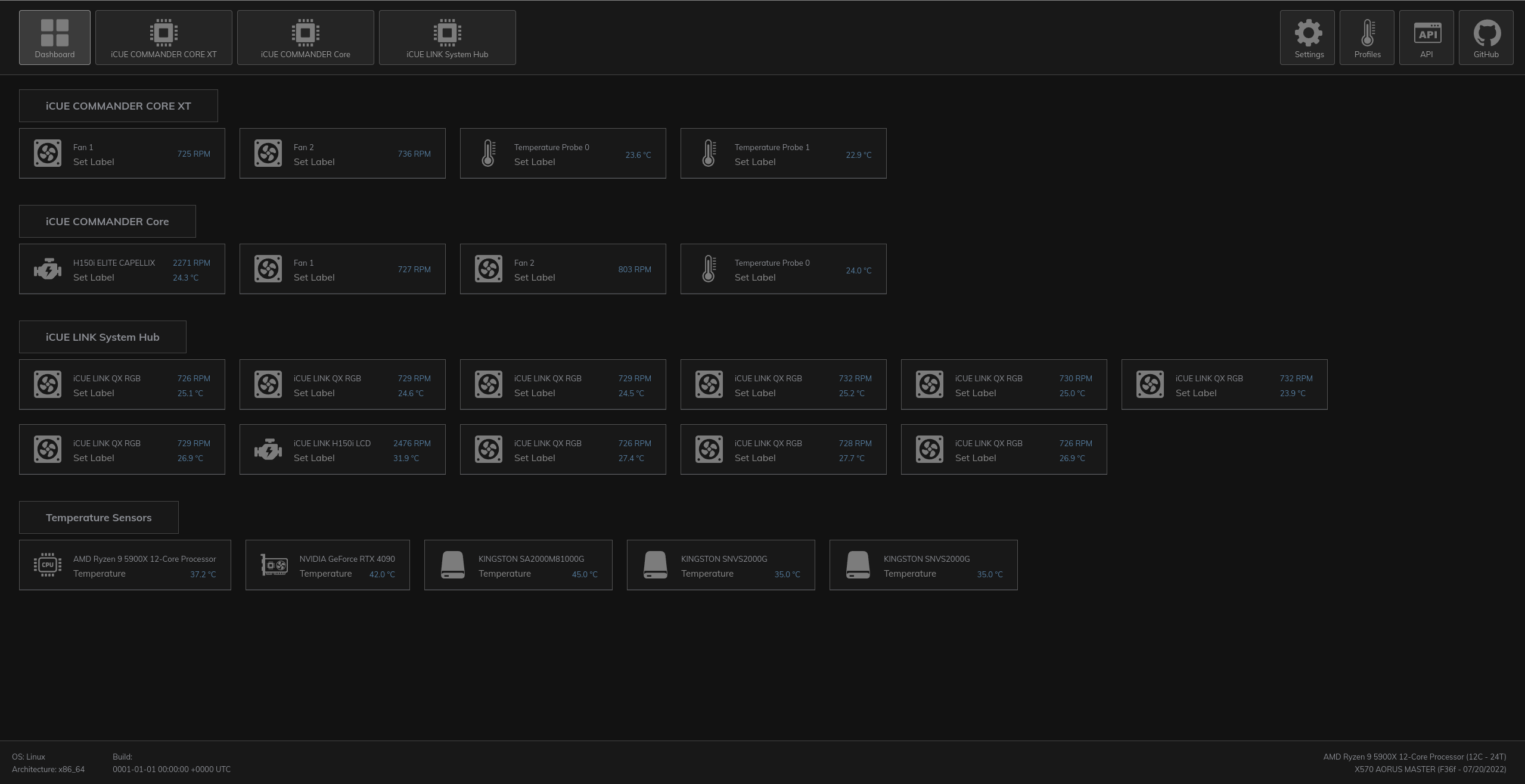
curl -fsSL https://raw.githubusercontent.com/jurkovic-nikola/OpenLinkHub/main/remote-install.sh | bash
This script will:
# Debian-Based (deb)
$ sudo apt install ./OpenLinkHub_?.?.?_amd64.deb

# RPM-based (rpm)
$ sudo dnf install ./OpenLinkHub-?.?.?-1.x86_64.rpm
$ sudo add-apt-repository ppa:jurkovic-nikola/openlinkhub
$ sudo apt update
$ sudo apt-get install openlinkhub
$ sudo dnf copr enable jurkovic-nikola/OpenLinkHub
$ sudo dnf install OpenLinkHub
# Required packages (deb)
$ sudo apt-get install libudev-dev
$ sudo apt-get install usbutils
$ sudo apt-get install libpipewire-0.3-dev
$ sudo apt-get install pkg-config

# Required packages (rpm)
$ sudo dnf install libudev-devel
$ sudo dnf install usbutils
$ sudo dnf install pipewire-devel
$ sudo dnf install pkg-config
Or use the provided devcontainer in VScode. This is useful for immutable distributions.
$ git clone https://github.com/jurkovic-nikola/OpenLinkHub.git
$ cd OpenLinkHub/
$ CGO_CFLAGS_ALLOW='-fno-strict-overflow' go build .
$ chmod +x install.sh
$ sudo ./install.sh
# Download latest build from https://github.com/jurkovic-nikola/OpenLinkHub/releases/latest
$ wget "https://github.com/jurkovic-nikola/OpenLinkHub/releases/latest/download/OpenLinkHub_$(curl -s https://api.github.com/repos/jurkovic-nikola/OpenLinkHub/releases/latest | jq -r '.tag_name')_amd64.tar.gz"
$ tar xf OpenLinkHub_?.?.?_amd64.tar.gz
$ cd /home/$USER/OpenLinkHub/
$ chmod +x install.sh
$ sudo ./install.sh
# Do not install RPM or DEB packages on immutable distributions, they will not work.
# This same procedure may be followed to update an existing installation.
# Download the latest tar.gz from the Release page, or use the following command to download the latest release.
$ wget "https://github.com/jurkovic-nikola/OpenLinkHub/releases/latest/download/OpenLinkHub_$(curl -s https://api.github.com/repos/jurkovic-nikola/OpenLinkHub/releases/latest | jq -r '.tag_name')_amd64.tar.gz"

# Extract the package to your home directory
$ tar xf OpenLinkHub_?.?.?_amd64.tar.gz -C /home/$USER/

# Go to the extract folder
$ cd /home/$USER/OpenLinkHub

# Make install-user-space.sh executable
$ chmod +x install-user-space.sh

# Run install-user-space.sh. Enter your password for sudo when asked to copy 99-openlinkhub.rules file
$ ./install-user-space.sh

# Restart
$ systemctl reboot

# Check if service is running
$ systemctl status --user OpenLinkHub.service
sudo systemctl start OpenLinkHub.service
xdg-open http://127.0.0.1:27003
/opt/OpenLinkHub/config.json
{
  "debug": false,
  "listenPort": 27003,
  "listenAddress": "127.0.0.1",
  "cpuSensorChip": "k10temp",
  "manual": false,
  "frontend": true,
  "metrics": true,
  "resumeDelay": 15000,
  "memory": false,
  "memorySmBus": "i2c-0",
  "memoryType": 4,
  "exclude": [],
  "decodeMemorySku": true,
  "memorySku": "",
  "logFile": "",
  "logLevel": "info",
  "enhancementKits": [],
  "temperatureOffset": 0,
  "amdGpuIndex": 0,
  "amdsmiPath": "",
  "cpuTempFile": "",
  "graphProfiles": false,
  "ramTempViaHwmon": false,
  "nvidiaGpuIndex": [0],
  "defaultNvidiaGPU": 0,
  "enableGamepad": true,
  "enableMotherboard": false,
  "motherboardBiosOnExit": false
}
k10temp or zenpower for AMD and coretemp for IntelmemorySku value.sudo dmidecode -t memory | grep 'Part Number'- for logFile will send all logs to standard console output."enhancementKits": [80,82],. This value is a byte value converted from hexadecimal output in i2cdetect
decodeMemorySku to false and define memorySkuamd-smi static --asic --jsonamd-smi path in $PATH variable if missing.cpuSensorChip.true will enable graph-based temperature profiles on /temperature endpoint and enable temperature interpolation.The web UI supports installation as a progressive web app (PWA). With a supported browser, this allows the UI to appear as a standalone application. Chromium-based browsers support PWAs; Firefox currently does not. GNOME 'Web,' also known as 'Epiphany', is a good option for PWAs on GNOME systems.
# Stop service
sudo systemctl stop OpenLinkHub.service

# Remove application directory
sudo rm -rf /opt/OpenLinkHub/

# Remove systemd file (file location can be found by running sudo systemctl status OpenLinkHub.service)
sudo rm /etc/systemd/system/OpenLinkHub.service
# or
sudo rm /usr/lib/systemd/system/OpenLinkHub.service

# Reload systemd
sudo systemctl daemon-reload

# Remove udev rules
sudo rm -f /etc/udev/rules.d/99-openlinkhub.rules
sudo rm -f /etc/udev/rules.d/98-corsair-memory.rules

# Reload udev
sudo udevadm control --reload-rules
sudo udevadm trigger
As an alternative, OpenLinkHub can be run in Docker, using the Dockerfile in this repository to build it locally. A configuration file has to be mounted to /opt/OpenLinkHub/config.json
$ docker build . -t openlinkhub
$ # To build a specific version, you can use the GIT_TAG build argument
$ docker build --build-arg GIT_TAG=0.1.3-beta -t openlinkhub .

$ docker run --privileged openlinkhub

# For WebUI access, networking is required
$ docker run --network host --privileged openlinkhub
/opt/OpenLinkHub/database/lcd/images/http://127.0.0.1:27003/database/rgb/your-device-serial.json file3,475 followers · starred Jan 2026
2,809 followers · starred Aug 2025
585 followers · starred May 2026
51 followers · starred Mar 2026
Open source interface for iCUE LINK Hub and other Corsair AIOs, Hubs for Linux. Manage RGB lighting, fan speeds, system metrics, as well as keyboards, mice, headsets via a web dashboard.
See the codeAn open-source Linux interface for iCUE LINK hubs and other Corsair AIOs and hubs. Manage RGB lighting, fan speeds, system metrics, as well as keyboards, mice, and headsets via a web dashboard.
Available in other languages: Portuguese (Brazil)
http://localhost:27003
curl -fsSL https://raw.githubusercontent.com/jurkovic-nikola/OpenLinkHub/main/remote-install.sh | bash
This script will:
# Debian-Based (deb)
$ sudo apt install ./OpenLinkHub_?.?.?_amd64.deb

# RPM-based (rpm)
$ sudo dnf install ./OpenLinkHub-?.?.?-1.x86_64.rpm
$ sudo add-apt-repository ppa:jurkovic-nikola/openlinkhub
$ sudo apt update
$ sudo apt-get install openlinkhub
$ sudo dnf copr enable jurkovic-nikola/OpenLinkHub
$ sudo dnf install OpenLinkHub
# Required packages (deb)
$ sudo apt-get install libudev-dev
$ sudo apt-get install usbutils
$ sudo apt-get install libpipewire-0.3-dev
$ sudo apt-get install pkg-config

# Required packages (rpm)
$ sudo dnf install libudev-devel
$ sudo dnf install usbutils
$ sudo dnf install pipewire-devel
$ sudo dnf install pkg-config
Or use the provided devcontainer in VScode. This is useful for immutable distributions.
$ git clone https://github.com/jurkovic-nikola/OpenLinkHub.git
$ cd OpenLinkHub/
$ CGO_CFLAGS_ALLOW='-fno-strict-overflow' go build .
$ chmod +x install.sh
$ sudo ./install.sh
# Download latest build from https://github.com/jurkovic-nikola/OpenLinkHub/releases/latest
$ wget "https://github.com/jurkovic-nikola/OpenLinkHub/releases/latest/download/OpenLinkHub_$(curl -s https://api.github.com/repos/jurkovic-nikola/OpenLinkHub/releases/latest | jq -r '.tag_name')_amd64.tar.gz"
$ tar xf OpenLinkHub_?.?.?_amd64.tar.gz
$ cd /home/$USER/OpenLinkHub/
$ chmod +x install.sh
$ sudo ./install.sh
# Do not install RPM or DEB packages on immutable distributions, they will not work.
# This same procedure may be followed to update an existing installation.
# Download the latest tar.gz from the Release page, or use the following command to download the latest release.
$ wget "https://github.com/jurkovic-nikola/OpenLinkHub/releases/latest/download/OpenLinkHub_$(curl -s https://api.github.com/repos/jurkovic-nikola/OpenLinkHub/releases/latest | jq -r '.tag_name')_amd64.tar.gz"

# Extract the package to your home directory
$ tar xf OpenLinkHub_?.?.?_amd64.tar.gz -C /home/$USER/

# Go to the extract folder
$ cd /home/$USER/OpenLinkHub

# Make install-user-space.sh executable
$ chmod +x install-user-space.sh

# Run install-user-space.sh. Enter your password for sudo when asked to copy 99-openlinkhub.rules file
$ ./install-user-space.sh

# Restart
$ systemctl reboot

# Check if service is running
$ systemctl status --user OpenLinkHub.service
sudo systemctl start OpenLinkHub.service
xdg-open http://127.0.0.1:27003
/opt/OpenLinkHub/config.json
{
  "debug": false,
  "listenPort": 27003,
  "listenAddress": "127.0.0.1",
  "cpuSensorChip": "k10temp",
  "manual": false,
  "frontend": true,
  "metrics": true,
  "resumeDelay": 15000,
  "memory": false,
  "memorySmBus": "i2c-0",
  "memoryType": 4,
  "exclude": [],
  "decodeMemorySku": true,
  "memorySku": "",
  "logFile": "",
  "logLevel": "info",
  "enhancementKits": [],
  "temperatureOffset": 0,
  "amdGpuIndex": 0,
  "amdsmiPath": "",
  "cpuTempFile": "",
  "graphProfiles": false,
  "ramTempViaHwmon": false,
  "nvidiaGpuIndex": [0],
  "defaultNvidiaGPU": 0,
  "enableGamepad": true,
  "enableMotherboard": false,
  "motherboardBiosOnExit": false
}
k10temp or zenpower for AMD and coretemp for IntelmemorySku value.sudo dmidecode -t memory | grep 'Part Number'- for logFile will send all logs to standard console output."enhancementKits": [80,82],. This value is a byte value converted from hexadecimal output in i2cdetect
decodeMemorySku to false and define memorySkuamd-smi static --asic --jsonamd-smi path in $PATH variable if missing.cpuSensorChip.true will enable graph-based temperature profiles on /temperature endpoint and enable temperature interpolation.The web UI supports installation as a progressive web app (PWA). With a supported browser, this allows the UI to appear as a standalone application. Chromium-based browsers support PWAs; Firefox currently does not. GNOME 'Web,' also known as 'Epiphany', is a good option for PWAs on GNOME systems.
# Stop service
sudo systemctl stop OpenLinkHub.service

# Remove application directory
sudo rm -rf /opt/OpenLinkHub/

# Remove systemd file (file location can be found by running sudo systemctl status OpenLinkHub.service)
sudo rm /etc/systemd/system/OpenLinkHub.service
# or
sudo rm /usr/lib/systemd/system/OpenLinkHub.service

# Reload systemd
sudo systemctl daemon-reload

# Remove udev rules
sudo rm -f /etc/udev/rules.d/99-openlinkhub.rules
sudo rm -f /etc/udev/rules.d/98-corsair-memory.rules

# Reload udev
sudo udevadm control --reload-rules
sudo udevadm trigger
As an alternative, OpenLinkHub can be run in Docker, using the Dockerfile in this repository to build it locally. A configuration file has to be mounted to /opt/OpenLinkHub/config.json
$ docker build . -t openlinkhub
$ # To build a specific version, you can use the GIT_TAG build argument
$ docker build --build-arg GIT_TAG=0.1.3-beta -t openlinkhub .

$ docker run --privileged openlinkhub

# For WebUI access, networking is required
$ docker run --network host --privileged openlinkhub
/opt/OpenLinkHub/database/lcd/images/http://127.0.0.1:27003/database/rgb/your-device-serial.json file3,475 followers · starred Jan 2026
2,809 followers · starred Aug 2025
585 followers · starred May 2026
51 followers · starred Mar 2026