
A side-panel assistant that finds the blind spots in your prompts. For Claude Code and Codex CLI.
TypeScript
2
1 commits
updated Sep 22, 2026
See what people are saying
README
jev-blindspot





Good results start with good requests.
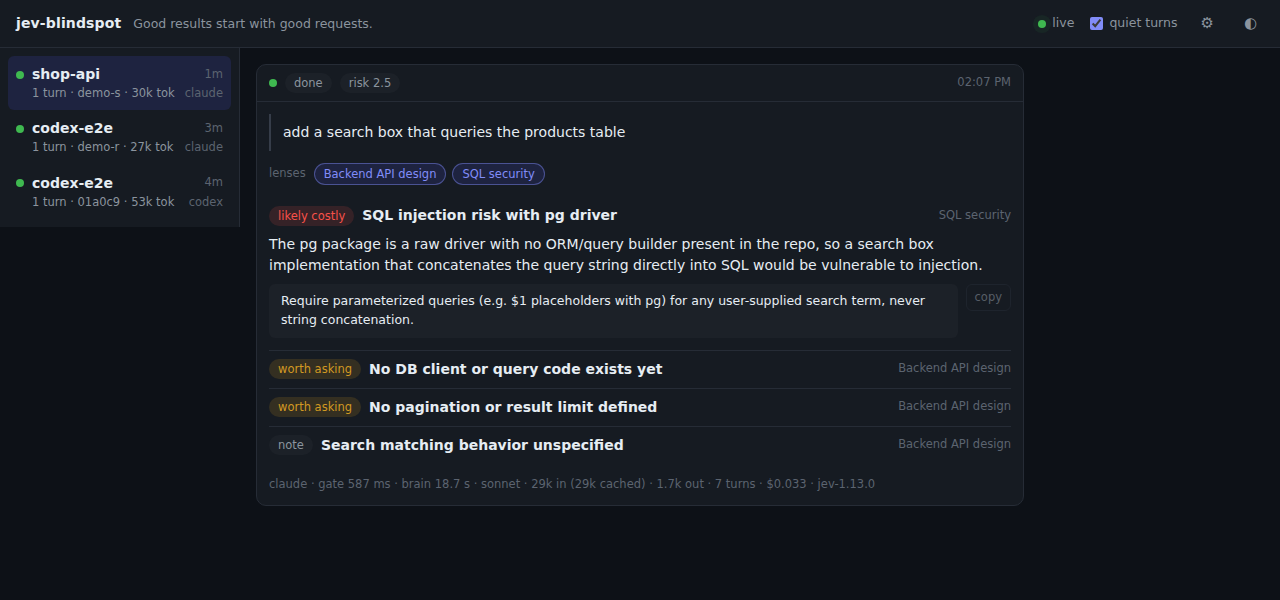
jev-blindspot is a side panel for Claude Code and Codex CLI. Each time you submit a prompt, the panel shows the prompt's blind spots: what the request would have needed to consider, and shows no sign of considering. It runs next to the session in a browser tab. It does not block the prompt, does not edit it, and does not add anything to the agent's context.
Quick start
Node 20 or newer, a TypeSafe API key, and Claude Code or Codex CLI already logged in.
npm install -g jev-blindspot
mkdir -p ~/.config/jev-blindspot
echo 'TYPESAFE_API_KEY=your-key' > ~/.config/jev-blindspot/env && chmod 600 ~/.config/jev-blindspot/env
jev-blindspot install-hook      # hooks into every agent it finds
For Codex, also trust the new hook once: jev-blindspot install-hook codex --trust,
or /hooks inside Codex. Details in Install.
Then type /blindspot in Claude Code, or /prompts:blindspot in Codex. The
panel URL comes back in the session at once, with no model turn spent. Open it
in a browser tab next to the session and keep working as usual.
From then on, every prompt you submit becomes a card in the panel: quiet when there is nothing to consider, otherwise the blind spots of that request, each with a sentence you can paste into the next prompt. The card also shows what the check cost: the model, the time, the tokens in and out, and for Claude the dollar amount and the number of turns. Nothing changes in the session itself.
Why
To get good work out of an AI you have to ask for it well, and asking well means knowing the work. The skill that matters most here is knowing what you do not know. A request written without that knowledge is not wrong; it is silent about the questions it never knew were there, and the answer will be silent about them too. Those gaps are invisible from the inside. You cannot list what you did not think of.
Prompt linting tries to fix this at the input, and pays for it in exactly the places that matter: it intercepts what you typed, makes you wait, and spends tokens on every prompt whether or not there was anything to find.
jev-blindspot moves the check out of the way. A single classifier call first decides whether the prompt is worth a second look at all. Only then does a light model go looking, in the project directory, for what the request did not consider. That happens in the background while the agent is already working, and the result appears in a separate tab, where you can fold it into the next request. Nothing is inserted into the session.
The panel reviews the request only. It does not inspect or predict what the assistant does with it. It is a thinking aid: it keeps showing you the questions you did not know to ask, in work you know well and in work you do not.
How it works
Two stages run for every prompt. The first is a single classifier call on every prompt; the second is a model run that happens only when the first stage returns a positive decision.
Gate: TypeSafe jev, one request. jev answers a fixed set of typed questions about a state object and returns probabilities instead of text. The gate sends six questions in one call. Two of them decide:
worth_checking: does this request have a blind spot? Is there something anyone who knows this kind of work would have considered, that the request shows no sign of, and that would change the result? Things the author clearly left out on purpose do not count.risk: a five-level rubric from read-only to irreversible (delete, force push, real sends, production data). High risk lowers theworth_checkingbar.
The other four are the knowledge-gap taxonomy from Towards Detecting Prompt Knowledge Gaps for Improved LLM-guided Issue Resolution (arXiv:2501.11709): missing context, missing specification, unclear instruction, several requests bundled. They never decide anything. They appear as chips on the card as soon as the gate returns and go to the second stage as hints.
Only questions with a closed answer set go to jev. Which kinds of knowledge the request calls for, and what exactly it did not consider, are open questions and go to the second stage.
Brain: the agent's own headless mode. When the gate passes, the daemon runs a model on the login you already have, in the project directory, with read-only file access. The run matches the agent the prompt was typed into:
| prompt typed into | brain run | project instructions |
|---|---|---|
| Claude Code | claude -p --model sonnet --effort low with Read, Grep and Glob | CLAUDE.md loads as in a normal session |
| Codex CLI | codex exec -m gpt-5.6-luna with low reasoning effort, a read-only sandbox and hooks disabled | AGENTS.md loads as usual |
The model reads what the request
touches, and the effort level is the only brake. It decides for itself which
kinds of knowledge the request calls for, then returns up to five items: the
consideration that is absent, why it matters for this request, and a sentence
you can paste into the next prompt.
Latency depends on your plan, region and how much the model decides to read;
the panel shows the analyzing state as soon as the gate passes.
Quiet turns stay visible. Acknowledgements, follow-ups and small mechanical edits produce a one-line quiet card with the gate's probabilities, so you can see why the panel stayed quiet and adjust the threshold when a decision looks wrong.
What you see
Each prompt becomes a card in the panel:
| state | shown |
|---|---|
| checking | the prompt and a progress bar (gate in flight) |
| analyzing | the gap flags and risk level from the gate, while the brain works |
| done | the perspectives the brain applied and its items, sorted by severity, each with a copy button, plus the model, time and tokens it took |
| quiet | one grey line: the reason and the probabilities |
| gate unavailable | the gate call failed (timeout, key, network); no analysis was run |
| stopped | the daemon shut down while this analysis was running |
Every finished card ends with a meta line: the agent, the gate time, the brain time, the model, the tokens it read (with how many came from cache), the tokens it wrote, and for the Claude brain the number of turns and the cost in dollars. The session list on the left sums the brain tokens per session, so you can see what the panel has spent on each project.
Items are written in the language of the prompt, whatever it is. The panel's own labels follow the browser language and can be pinned in settings (English, Korean, Japanese, Chinese, Spanish, French, German, Portuguese, Russian, Italian). Sessions are listed on the left by project directory; the panel switches to the session that last received a prompt.
The gear in the top bar opens settings: the panel language, which brain runs,
the Claude and Codex models, the effort level of each, and the jev model.
Saving writes ~/.config/jev-blindspot/env and applies to the running daemon
at once. The Codex model list comes from what Codex has cached for your
account.
Install
Requirements: Linux or macOS, Node 20 or newer, a TypeSafe API key, and the agent you use logged in: Claude Code 2.1.278 or newer with a subscription, or Codex CLI 0.144 or newer with a ChatGPT login. Each agent's prompts are analyzed by that agent's own headless mode, so you need only the one you type into.
npm install -g jev-blindspot

mkdir -p ~/.config/jev-blindspot
cat > ~/.config/jev-blindspot/env <<'EOT'
TYPESAFE_API_KEY=your-key
EOT
chmod 600 ~/.config/jev-blindspot/env

jev-blindspot install-hook   # registers the UserPromptSubmit hook with every agent found
jev-blindspot status
install-hook looks for ~/.claude and ~/.codex and registers with each;
pass claude or codex to pick one. It backs up the file it edits and is a
no-op when the hook is already present.
From source instead: git clone, npm install, npm run build, then use
node bin/jev-blindspot.mjs in place of jev-blindspot.
Claude Code
The hook goes into hooks.UserPromptSubmit in ~/.claude/settings.json and
runs from the next prompt on. install-hook also writes
~/.claude/commands/blindspot.md, so /blindspot prints the panel URL: the
hook answers it itself and blocks the prompt, so no model turn is spent.
/blindspot status adds daemon counters. Prompts show a claude tag in the
panel and their brain run is claude -p on your subscription.
Codex CLI
The hook goes into ~/.codex/hooks.json, and install-hook writes
~/.codex/prompts/blindspot.md, so /prompts:blindspot does the same as
/blindspot above. Codex runs a hook you added only after you have trusted its
definition, so after jev-blindspot install-hook codex either open Codex and
trust jev-blindspot under /hooks, or run
jev-blindspot install-hook codex --trust, which writes the same
[hooks.state] entry to ~/.codex/config.toml that /hooks would (backup
taken first). Prompts show a codex tag in the panel and their brain run is
codex exec on your ChatGPT login.
The hook starts the daemon on the first prompt. To open the panel, type
/blindspot in Claude Code or /prompts:blindspot in Codex: the URL is
printed into the session by the hook itself, without a model turn, so it is
the fastest way to get there from where you already are. /blindspot status
adds daemon counters. Outside a session, jev-blindspot open prints the same
URL, and the panel is at http://127.0.0.1:7461/ by default. The daemon exits
after 30 idle minutes when no panel is attached and comes back with the next
prompt.
Use
| command | what it does |
|---|---|
jev-blindspot status | daemon, gate key, brain, hook and config state |
jev-blindspot open | print the panel URL |
jev-blindspot start / stop | manage the daemon by hand |
jev-blindspot gate "<prompt>" [--cwd dir] | run the gate only and print every probability |
jev-blindspot fixtures [file] | run a fixture file through the gate; exit code is the number of mismatches |
jev-blindspot smoke [prompt] | post one event and wait for the card to settle |
| `jev-blindspot install-hook [claude | codex |
JEV_FAKE=1 replaces the gate and the brain with stubs, for checking the
plumbing before adding a key.
Turning it off
- One project: create a file named
.jev-blindspot-offin the project root or any parent directory. Do this first in repositories you are not allowed to send text out of. - One shell:
JEV_BLINDSPOT_DISABLE=1. - Everywhere: remove the
jev-blindspotentry fromhooks.UserPromptSubmitin~/.claude/settings.jsonand, for Codex, in~/.codex/hooks.json(the trust entry inconfig.tomlis then inert and can be deleted). The command files~/.claude/commands/blindspot.mdand~/.codex/prompts/blindspot.mdcan go too.
What leaves your machine
Per prompt, the gate request to TypeSafe contains:
{
  "prompt": "the prompt you just submitted (cut at 6000 characters)",
  "history": [
    { "user": "an earlier prompt from the same session, cut at 500 characters",
      "assistant": "the text of the reply it got, last 1500 characters" }
  ],
  "project": {
    "dir_name": "my-app", "languages": ["typescript"], "frameworks": ["react"],
    "has_tests": true, "has_ci": true, "git_branch": "main", "is_git_repo": true
  }
}
history holds the two exchanges before the current prompt, read from the
agent's transcript: the prompt text and the assistant's reply text. Tool calls,
tool output, and thinking are not in it. No file contents or diffs are in it
either, unless a reply quoted them. Directory and branch names are; check them
before enabling this in a work repository.
When the gate passes, the brain runs claude -p (Claude Code prompts) or
codex exec (Codex prompts) on your own login with the prompt, the same two
exchanges, the gate's flags, and the project directory. The model reads
files in that directory as it sees fit (read-only: Read, Grep and Glob for
Claude; a read-only sandbox for Codex), so whatever it opens is sent along,
and so are your project instructions. That traffic goes to Anthropic under
your Claude account, or to OpenAI under your ChatGPT account, the same as any
session of that agent.
Locally, each session's prompts and results are appended to
~/.local/share/jev-blindspot/sessions/<session>.jsonl and deleted after 30 days.
Logs in ~/.local/state/jev-blindspot/ do not contain prompt text.
The daemon listens on 127.0.0.1 only unless JEV_BIND_EXTRA adds an address.
On any added address, anyone who can reach the port can read the panel; set
JEV_TOKEN to require one. The routes that accept prompts and stop the daemon
take loopback connections only; the settings route accepts any allowed host,
since a reader of the panel already sees every prompt and the settings only
choose models.
Configuration
Everything lives in ~/.config/jev-blindspot/env, one KEY=VALUE per line;
environment variables take precedence. The settings dialog in the panel covers
the models and effort levels. The keys you are most likely to touch by hand:
TYPESAFE_API_KEY: the gate key, required.JEV_WORTH_MIN(default0.65): theworth_checkingprobability from which a prompt is analyzed. Runjev-blindspot gate "<prompt>"on a few of your own prompts and move it until quiet and analyze match what you would want.JEV_BIND_EXTRAandJEV_TOKEN: reach the panel from another machine, and require a token when you do.
The full list, with defaults, is in docs/configuration.md.
Known limits
- Linux and macOS. Windows is untested.
- The Claude brain needs Claude Code 2.1.278 or newer for
--json-schema,--effortand--permission-prompts none. It runs with your settings, hooks andCLAUDE.mdthe way a session does; the jev-blindspot hook recognises the brain's own run and does not fire inside it.--bareis not used because it reads onlyANTHROPIC_API_KEY, which subscription logins do not have. - The Codex brain needs
codex execwith--output-schema,--ephemeraland--disable hooks(Codex CLI 0.144 was used). The model list differs per account; ifgpt-5.6-lunais not available to you, setJEV_BRAIN_CODEX_MODELto a light model you have. - One gate call per prompt, one brain run per analyzed prompt. Runs of one session go in order, at most two sessions at a time.
- Codex support was built against Codex CLI 0.144 (hook payload
prompt,session_id,turn_id,transcript_path; rolloutuser_messageandagent_messagelines for history). The trust-hash recipe follows Codex's source and can change with a Codex release;/hooksinside Codex is always the fallback.
Development
npm test                              # unit tests: thresholds, transcript, parser, repo scan
node bin/jev-blindspot.mjs fixtures     # gate fixtures against the real jev
node scripts/brain-try.mjs "prompt" [--codex]   # one brain run against this repository
node scripts/gate-tune.mjs            # compare question wordings over the fixtures
Layout: bin/ (the dependency-free hook and the CLI launcher), src/cli/
(commands, Codex trust recipe), src/daemon/
(HTTP, SSE, store, pipeline), src/gate/ (jev state, questions, thresholds),
src/brain/ (prompt, schema, claude -p and codex exec runners), src/context/ (repository
scan, transcript tail), web/ (the panel, no build step; labels in i18n.js).
jev-blindspot is a community project and is not affiliated with TypeSafe.
License
Contributors

1 commits
Similar repos


Languages
TypeScript
64.1%
JavaScript
26.6%
CSS
6.8%
HTML
2.5%
A side-panel assistant that finds the blind spots in your prompts. For Claude Code and Codex CLI.
TypeScript
2
1 commits
updated Sep 22, 2026
See what people are saying
README
jev-blindspot
Good results start with good requests.
jev-blindspot is a side panel for Claude Code and Codex CLI. Each time you submit a prompt, the panel shows the prompt's blind spots: what the request would have needed to consider, and shows no sign of considering. It runs next to the session in a browser tab. It does not block the prompt, does not edit it, and does not add anything to the agent's context.
Quick start
Node 20 or newer, a TypeSafe API key, and Claude Code or Codex CLI already logged in.
npm install -g jev-blindspot
mkdir -p ~/.config/jev-blindspot
echo 'TYPESAFE_API_KEY=your-key' > ~/.config/jev-blindspot/env && chmod 600 ~/.config/jev-blindspot/env
jev-blindspot install-hook      # hooks into every agent it finds
For Codex, also trust the new hook once: jev-blindspot install-hook codex --trust,
or /hooks inside Codex. Details in Install.
Then type /blindspot in Claude Code, or /prompts:blindspot in Codex. The
panel URL comes back in the session at once, with no model turn spent. Open it
in a browser tab next to the session and keep working as usual.
From then on, every prompt you submit becomes a card in the panel: quiet when there is nothing to consider, otherwise the blind spots of that request, each with a sentence you can paste into the next prompt. The card also shows what the check cost: the model, the time, the tokens in and out, and for Claude the dollar amount and the number of turns. Nothing changes in the session itself.
Why
To get good work out of an AI you have to ask for it well, and asking well means knowing the work. The skill that matters most here is knowing what you do not know. A request written without that knowledge is not wrong; it is silent about the questions it never knew were there, and the answer will be silent about them too. Those gaps are invisible from the inside. You cannot list what you did not think of.
Prompt linting tries to fix this at the input, and pays for it in exactly the places that matter: it intercepts what you typed, makes you wait, and spends tokens on every prompt whether or not there was anything to find.
jev-blindspot moves the check out of the way. A single classifier call first decides whether the prompt is worth a second look at all. Only then does a light model go looking, in the project directory, for what the request did not consider. That happens in the background while the agent is already working, and the result appears in a separate tab, where you can fold it into the next request. Nothing is inserted into the session.
The panel reviews the request only. It does not inspect or predict what the assistant does with it. It is a thinking aid: it keeps showing you the questions you did not know to ask, in work you know well and in work you do not.
How it works
Two stages run for every prompt. The first is a single classifier call on every prompt; the second is a model run that happens only when the first stage returns a positive decision.
Gate: TypeSafe jev, one request. jev answers a fixed set of typed questions about a state object and returns probabilities instead of text. The gate sends six questions in one call. Two of them decide:
worth_checking: does this request have a blind spot? Is there something anyone who knows this kind of work would have considered, that the request shows no sign of, and that would change the result? Things the author clearly left out on purpose do not count.risk: a five-level rubric from read-only to irreversible (delete, force push, real sends, production data). High risk lowers theworth_checkingbar.
The other four are the knowledge-gap taxonomy from Towards Detecting Prompt Knowledge Gaps for Improved LLM-guided Issue Resolution (arXiv:2501.11709): missing context, missing specification, unclear instruction, several requests bundled. They never decide anything. They appear as chips on the card as soon as the gate returns and go to the second stage as hints.
Only questions with a closed answer set go to jev. Which kinds of knowledge the request calls for, and what exactly it did not consider, are open questions and go to the second stage.
Brain: the agent's own headless mode. When the gate passes, the daemon runs a model on the login you already have, in the project directory, with read-only file access. The run matches the agent the prompt was typed into:
| prompt typed into | brain run | project instructions |
|---|---|---|
| Claude Code | claude -p --model sonnet --effort low with Read, Grep and Glob | CLAUDE.md loads as in a normal session |
| Codex CLI | codex exec -m gpt-5.6-luna with low reasoning effort, a read-only sandbox and hooks disabled | AGENTS.md loads as usual |
The model reads what the request
touches, and the effort level is the only brake. It decides for itself which
kinds of knowledge the request calls for, then returns up to five items: the
consideration that is absent, why it matters for this request, and a sentence
you can paste into the next prompt.
Latency depends on your plan, region and how much the model decides to read;
the panel shows the analyzing state as soon as the gate passes.
Quiet turns stay visible. Acknowledgements, follow-ups and small mechanical edits produce a one-line quiet card with the gate's probabilities, so you can see why the panel stayed quiet and adjust the threshold when a decision looks wrong.
What you see
Each prompt becomes a card in the panel:
| state | shown |
|---|---|
| checking | the prompt and a progress bar (gate in flight) |
| analyzing | the gap flags and risk level from the gate, while the brain works |
| done | the perspectives the brain applied and its items, sorted by severity, each with a copy button, plus the model, time and tokens it took |
| quiet | one grey line: the reason and the probabilities |
| gate unavailable | the gate call failed (timeout, key, network); no analysis was run |
| stopped | the daemon shut down while this analysis was running |
Every finished card ends with a meta line: the agent, the gate time, the brain time, the model, the tokens it read (with how many came from cache), the tokens it wrote, and for the Claude brain the number of turns and the cost in dollars. The session list on the left sums the brain tokens per session, so you can see what the panel has spent on each project.
Items are written in the language of the prompt, whatever it is. The panel's own labels follow the browser language and can be pinned in settings (English, Korean, Japanese, Chinese, Spanish, French, German, Portuguese, Russian, Italian). Sessions are listed on the left by project directory; the panel switches to the session that last received a prompt.
The gear in the top bar opens settings: the panel language, which brain runs,
the Claude and Codex models, the effort level of each, and the jev model.
Saving writes ~/.config/jev-blindspot/env and applies to the running daemon
at once. The Codex model list comes from what Codex has cached for your
account.
Install
Requirements: Linux or macOS, Node 20 or newer, a TypeSafe API key, and the agent you use logged in: Claude Code 2.1.278 or newer with a subscription, or Codex CLI 0.144 or newer with a ChatGPT login. Each agent's prompts are analyzed by that agent's own headless mode, so you need only the one you type into.
npm install -g jev-blindspot

mkdir -p ~/.config/jev-blindspot
cat > ~/.config/jev-blindspot/env <<'EOT'
TYPESAFE_API_KEY=your-key
EOT
chmod 600 ~/.config/jev-blindspot/env

jev-blindspot install-hook   # registers the UserPromptSubmit hook with every agent found
jev-blindspot status
install-hook looks for ~/.claude and ~/.codex and registers with each;
pass claude or codex to pick one. It backs up the file it edits and is a
no-op when the hook is already present.
From source instead: git clone, npm install, npm run build, then use
node bin/jev-blindspot.mjs in place of jev-blindspot.
Claude Code
The hook goes into hooks.UserPromptSubmit in ~/.claude/settings.json and
runs from the next prompt on. install-hook also writes
~/.claude/commands/blindspot.md, so /blindspot prints the panel URL: the
hook answers it itself and blocks the prompt, so no model turn is spent.
/blindspot status adds daemon counters. Prompts show a claude tag in the
panel and their brain run is claude -p on your subscription.
Codex CLI
The hook goes into ~/.codex/hooks.json, and install-hook writes
~/.codex/prompts/blindspot.md, so /prompts:blindspot does the same as
/blindspot above. Codex runs a hook you added only after you have trusted its
definition, so after jev-blindspot install-hook codex either open Codex and
trust jev-blindspot under /hooks, or run
jev-blindspot install-hook codex --trust, which writes the same
[hooks.state] entry to ~/.codex/config.toml that /hooks would (backup
taken first). Prompts show a codex tag in the panel and their brain run is
codex exec on your ChatGPT login.
The hook starts the daemon on the first prompt. To open the panel, type
/blindspot in Claude Code or /prompts:blindspot in Codex: the URL is
printed into the session by the hook itself, without a model turn, so it is
the fastest way to get there from where you already are. /blindspot status
adds daemon counters. Outside a session, jev-blindspot open prints the same
URL, and the panel is at http://127.0.0.1:7461/ by default. The daemon exits
after 30 idle minutes when no panel is attached and comes back with the next
prompt.
Use
| command | what it does |
|---|---|
jev-blindspot status | daemon, gate key, brain, hook and config state |
jev-blindspot open | print the panel URL |
jev-blindspot start / stop | manage the daemon by hand |
jev-blindspot gate "<prompt>" [--cwd dir] | run the gate only and print every probability |
jev-blindspot fixtures [file] | run a fixture file through the gate; exit code is the number of mismatches |
jev-blindspot smoke [prompt] | post one event and wait for the card to settle |
| `jev-blindspot install-hook [claude | codex |
JEV_FAKE=1 replaces the gate and the brain with stubs, for checking the
plumbing before adding a key.
Turning it off
- One project: create a file named
.jev-blindspot-offin the project root or any parent directory. Do this first in repositories you are not allowed to send text out of. - One shell:
JEV_BLINDSPOT_DISABLE=1. - Everywhere: remove the
jev-blindspotentry fromhooks.UserPromptSubmitin~/.claude/settings.jsonand, for Codex, in~/.codex/hooks.json(the trust entry inconfig.tomlis then inert and can be deleted). The command files~/.claude/commands/blindspot.mdand~/.codex/prompts/blindspot.mdcan go too.
What leaves your machine
Per prompt, the gate request to TypeSafe contains:
{
  "prompt": "the prompt you just submitted (cut at 6000 characters)",
  "history": [
    { "user": "an earlier prompt from the same session, cut at 500 characters",
      "assistant": "the text of the reply it got, last 1500 characters" }
  ],
  "project": {
    "dir_name": "my-app", "languages": ["typescript"], "frameworks": ["react"],
    "has_tests": true, "has_ci": true, "git_branch": "main", "is_git_repo": true
  }
}
history holds the two exchanges before the current prompt, read from the
agent's transcript: the prompt text and the assistant's reply text. Tool calls,
tool output, and thinking are not in it. No file contents or diffs are in it
either, unless a reply quoted them. Directory and branch names are; check them
before enabling this in a work repository.
When the gate passes, the brain runs claude -p (Claude Code prompts) or
codex exec (Codex prompts) on your own login with the prompt, the same two
exchanges, the gate's flags, and the project directory. The model reads
files in that directory as it sees fit (read-only: Read, Grep and Glob for
Claude; a read-only sandbox for Codex), so whatever it opens is sent along,
and so are your project instructions. That traffic goes to Anthropic under
your Claude account, or to OpenAI under your ChatGPT account, the same as any
session of that agent.
Locally, each session's prompts and results are appended to
~/.local/share/jev-blindspot/sessions/<session>.jsonl and deleted after 30 days.
Logs in ~/.local/state/jev-blindspot/ do not contain prompt text.
The daemon listens on 127.0.0.1 only unless JEV_BIND_EXTRA adds an address.
On any added address, anyone who can reach the port can read the panel; set
JEV_TOKEN to require one. The routes that accept prompts and stop the daemon
take loopback connections only; the settings route accepts any allowed host,
since a reader of the panel already sees every prompt and the settings only
choose models.
Configuration
Everything lives in ~/.config/jev-blindspot/env, one KEY=VALUE per line;
environment variables take precedence. The settings dialog in the panel covers
the models and effort levels. The keys you are most likely to touch by hand:
TYPESAFE_API_KEY: the gate key, required.JEV_WORTH_MIN(default0.65): theworth_checkingprobability from which a prompt is analyzed. Runjev-blindspot gate "<prompt>"on a few of your own prompts and move it until quiet and analyze match what you would want.JEV_BIND_EXTRAandJEV_TOKEN: reach the panel from another machine, and require a token when you do.
The full list, with defaults, is in docs/configuration.md.
Known limits
- Linux and macOS. Windows is untested.
- The Claude brain needs Claude Code 2.1.278 or newer for
--json-schema,--effortand--permission-prompts none. It runs with your settings, hooks andCLAUDE.mdthe way a session does; the jev-blindspot hook recognises the brain's own run and does not fire inside it.--bareis not used because it reads onlyANTHROPIC_API_KEY, which subscription logins do not have. - The Codex brain needs
codex execwith--output-schema,--ephemeraland--disable hooks(Codex CLI 0.144 was used). The model list differs per account; ifgpt-5.6-lunais not available to you, setJEV_BRAIN_CODEX_MODELto a light model you have. - One gate call per prompt, one brain run per analyzed prompt. Runs of one session go in order, at most two sessions at a time.
- Codex support was built against Codex CLI 0.144 (hook payload
prompt,session_id,turn_id,transcript_path; rolloutuser_messageandagent_messagelines for history). The trust-hash recipe follows Codex's source and can change with a Codex release;/hooksinside Codex is always the fallback.
Development
npm test                              # unit tests: thresholds, transcript, parser, repo scan
node bin/jev-blindspot.mjs fixtures     # gate fixtures against the real jev
node scripts/brain-try.mjs "prompt" [--codex]   # one brain run against this repository
node scripts/gate-tune.mjs            # compare question wordings over the fixtures
Layout: bin/ (the dependency-free hook and the CLI launcher), src/cli/
(commands, Codex trust recipe), src/daemon/
(HTTP, SSE, store, pipeline), src/gate/ (jev state, questions, thresholds),
src/brain/ (prompt, schema, claude -p and codex exec runners), src/context/ (repository
scan, transcript tail), web/ (the panel, no build step; labels in i18n.js).
jev-blindspot is a community project and is not affiliated with TypeSafe.
License
Similar repos
Contributors
1 commits
Languages
TypeScript
64.1%
JavaScript
26.6%
CSS
6.8%
HTML
2.5%