
A code snippet storage solution written in React & node.js
TypeScript
2,541
388 commits
updated Sep 28, 2026
See what people are saying
README
ByteStash
ByteStash is a self-hosted web application designed to store, organise, and manage your code snippets efficiently. With support for creating, editing, and filtering snippets, ByteStash helps you keep track of your code in one secure place.
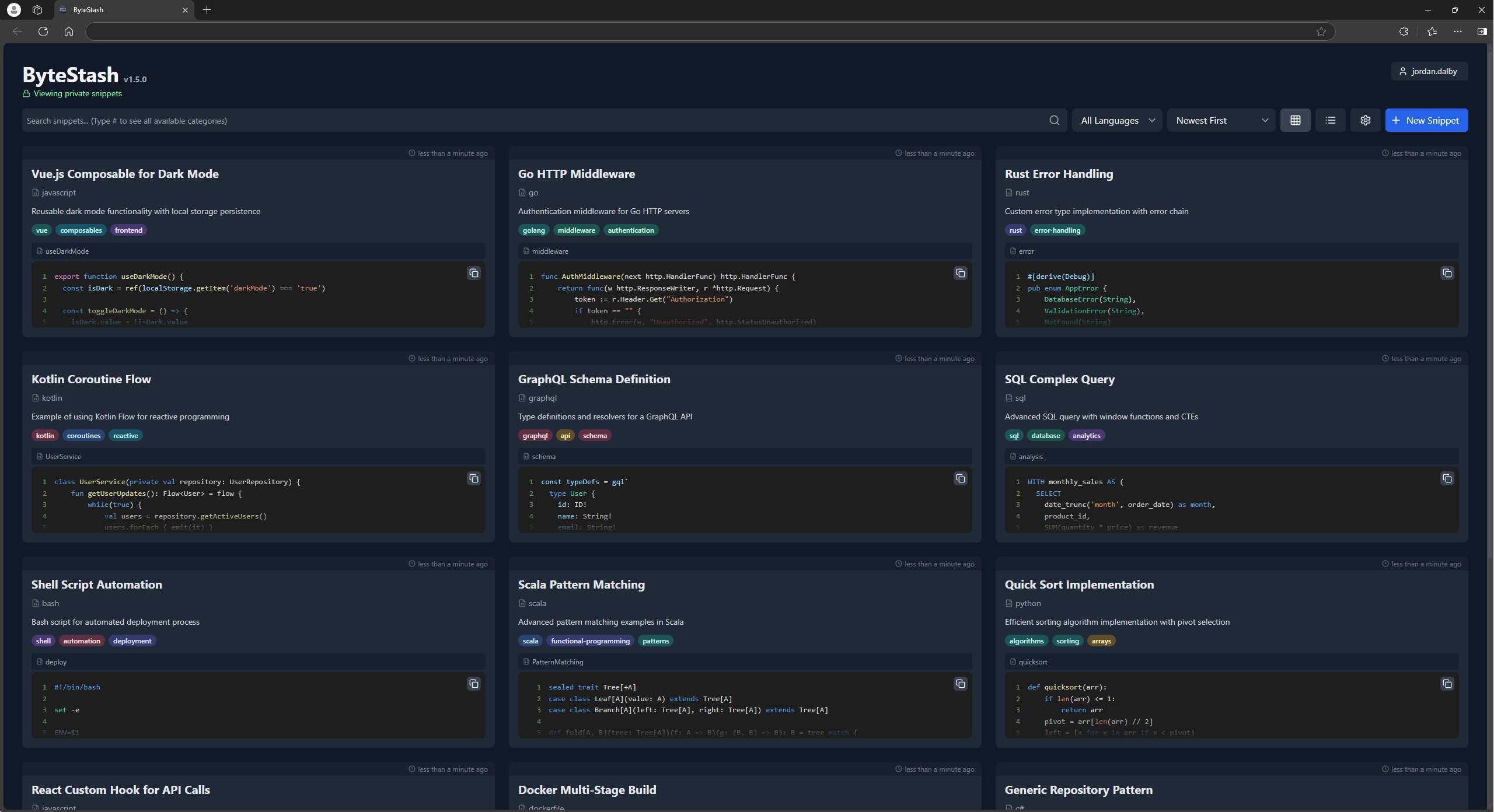
Demo
Check out the ByteStash demo powered by PikaPods!
Username: demo
Password: demodemo
Features
- Create and Edit Snippets: Easily add new code snippets or update existing ones with an intuitive interface.
- Filter by Language and Content: Quickly find the right snippet by filtering based on programming language or keywords in the content.
- Secure Storage: All snippets are securely stored in a sqlite database, ensuring your code remains safe and accessible only to you.
- AI Integration (MCP): Connect AI assistants such as Claude, OpenAI and Perplexity through a built-in Model Context Protocol endpoint to search and manage your snippets, authenticated with your existing API key. See MCP (AI assistants).
Howto
Unraid
ByteStash is now on the Unraid App Store! Install it from there.
PikaPods
Also available on PikaPods for 1-click install from $1/month.
Docker
ByteStash can also be hosted manually via the docker-compose file:
services:
  bytestash:
    image: "ghcr.io/jordan-dalby/bytestash:latest"
    restart: always
    volumes:
      - /your/snippet/path:/data/snippets
    ports:
      - "5000:5000"
    environment:
      # See https://github.com/jordan-dalby/ByteStash/wiki/FAQ#environment-variables
      #ALLOWED_HOSTS: localhost,my.domain.com,my.domain.net
      BASE_PATH: ""
      TOKEN_EXPIRY: 24h
      ALLOW_NEW_ACCOUNTS: "true"
      DEBUG: "true"
      DISABLE_ACCOUNTS: "false"
      DISABLE_INTERNAL_ACCOUNTS: "false"

      # See https://github.com/jordan-dalby/ByteStash/wiki/Single-Sign%E2%80%90on-Setup for more info
      OIDC_ENABLED: "false"
      OIDC_DISPLAY_NAME: ""
      OIDC_ISSUER_URL: ""
      OIDC_CLIENT_ID: ""
      OIDC_CLIENT_SECRET: ""
      OIDC_SCOPES: ""
Tech Stack
- Frontend: React, Tailwind CSS
- Backend: Node.js, Express
- Containerisation: Docker
API Documentation
Once the server is running you can explore the API via Swagger UI. Open
/api-docs in your browser to view the documentation for all endpoints.
MCP (AI assistants)
ByteStash exposes a remote Model Context Protocol endpoint so AI assistants such as Claude (desktop & web), OpenAI/ChatGPT and Perplexity can search, read and manage your snippets directly.
- Endpoint:
https://<your-host>/mcp(orhttps://<your-host><BASE_PATH>/mcpwhen a base path is configured). It is served on the same host/port as the app, so nothing extra needs to be exposed in your deployment. - Transport: Streamable HTTP.
- Auth: the same API key used by the REST API. Create one under
Settings → API Keys in the UI, then send it as
Authorization: Bearer <api-key>(or thex-api-keyheader). The MCP tools only ever access snippets owned by that key.
Available tools
list_snippets, get_snippet, create_snippet, update_snippet, delete_snippet,
list_metadata.
Connecting clients
- Claude Desktop (
claude_desktop_config.json):{ "mcpServers": { "bytestash": { "type": "http", "url": "https://your-host/mcp", "headers": { "Authorization": "Bearer YOUR_API_KEY" } } } } - Claude.ai / web & other custom connectors: add a custom connector pointing at
https://your-host/mcpand supply theAuthorization: Bearer YOUR_API_KEYheader. - OpenAI Responses API: pass it as an MCP tool:
{ "type": "mcp", "server_label": "bytestash", "server_url": "https://your-host/mcp", "headers": { "Authorization": "Bearer YOUR_API_KEY" } } - Perplexity: add a remote MCP connector with the URL above and the same
Authorizationheader.
The endpoint requires HTTPS for remote clients — terminate TLS at your reverse proxy/ingress as you already do for the web UI.
Contributing
Contributions are welcome! Please submit a pull request or open an issue for any improvements or bug fixes.
I18n
To add phrases for a new language, follow these steps. Example for fr locale:
- Add the locale name to the
Localeenum in theclient/src/i18n/types.tsfile - Add the locale name to the
localesarray in theclient/i18next.config.tsfile - Run translation synchronization:
cd client && npm run i18n:extract - Replace all
__TRANSLATE_ME__lines with the desired phrases - Create new resources file as
client/src/i18n/resources/fr.ts - Update export resources in file
client/src/i18n/resources/index.ts - Run the server in development mode:
npm run dev - Run the client in development mode:
cd client && npm run start
Significant stargazers

215 followers · starred Jun 2026

4,097 followers · starred Jan 2025

15 followers · starred Sep 2025

183 followers · starred Jan 2025
Similar repos


Languages
TypeScript
72.6%
JavaScript
23.0%
Python
2.2%
Shell
1.0%
A code snippet storage solution written in React & node.js
TypeScript
2,541
388 commits
updated Sep 28, 2026
See what people are saying
README
ByteStash
ByteStash is a self-hosted web application designed to store, organise, and manage your code snippets efficiently. With support for creating, editing, and filtering snippets, ByteStash helps you keep track of your code in one secure place.
Demo
Check out the ByteStash demo powered by PikaPods!
Username: demo
Password: demodemo
Features
- Create and Edit Snippets: Easily add new code snippets or update existing ones with an intuitive interface.
- Filter by Language and Content: Quickly find the right snippet by filtering based on programming language or keywords in the content.
- Secure Storage: All snippets are securely stored in a sqlite database, ensuring your code remains safe and accessible only to you.
- AI Integration (MCP): Connect AI assistants such as Claude, OpenAI and Perplexity through a built-in Model Context Protocol endpoint to search and manage your snippets, authenticated with your existing API key. See MCP (AI assistants).
Howto
Unraid
ByteStash is now on the Unraid App Store! Install it from there.
PikaPods
Also available on PikaPods for 1-click install from $1/month.
Docker
ByteStash can also be hosted manually via the docker-compose file:
services:
  bytestash:
    image: "ghcr.io/jordan-dalby/bytestash:latest"
    restart: always
    volumes:
      - /your/snippet/path:/data/snippets
    ports:
      - "5000:5000"
    environment:
      # See https://github.com/jordan-dalby/ByteStash/wiki/FAQ#environment-variables
      #ALLOWED_HOSTS: localhost,my.domain.com,my.domain.net
      BASE_PATH: ""
      TOKEN_EXPIRY: 24h
      ALLOW_NEW_ACCOUNTS: "true"
      DEBUG: "true"
      DISABLE_ACCOUNTS: "false"
      DISABLE_INTERNAL_ACCOUNTS: "false"

      # See https://github.com/jordan-dalby/ByteStash/wiki/Single-Sign%E2%80%90on-Setup for more info
      OIDC_ENABLED: "false"
      OIDC_DISPLAY_NAME: ""
      OIDC_ISSUER_URL: ""
      OIDC_CLIENT_ID: ""
      OIDC_CLIENT_SECRET: ""
      OIDC_SCOPES: ""
Tech Stack
- Frontend: React, Tailwind CSS
- Backend: Node.js, Express
- Containerisation: Docker
API Documentation
Once the server is running you can explore the API via Swagger UI. Open
/api-docs in your browser to view the documentation for all endpoints.
MCP (AI assistants)
ByteStash exposes a remote Model Context Protocol endpoint so AI assistants such as Claude (desktop & web), OpenAI/ChatGPT and Perplexity can search, read and manage your snippets directly.
- Endpoint:
https://<your-host>/mcp(orhttps://<your-host><BASE_PATH>/mcpwhen a base path is configured). It is served on the same host/port as the app, so nothing extra needs to be exposed in your deployment. - Transport: Streamable HTTP.
- Auth: the same API key used by the REST API. Create one under
Settings → API Keys in the UI, then send it as
Authorization: Bearer <api-key>(or thex-api-keyheader). The MCP tools only ever access snippets owned by that key.
Available tools
list_snippets, get_snippet, create_snippet, update_snippet, delete_snippet,
list_metadata.
Connecting clients
- Claude Desktop (
claude_desktop_config.json):{ "mcpServers": { "bytestash": { "type": "http", "url": "https://your-host/mcp", "headers": { "Authorization": "Bearer YOUR_API_KEY" } } } } - Claude.ai / web & other custom connectors: add a custom connector pointing at
https://your-host/mcpand supply theAuthorization: Bearer YOUR_API_KEYheader. - OpenAI Responses API: pass it as an MCP tool:
{ "type": "mcp", "server_label": "bytestash", "server_url": "https://your-host/mcp", "headers": { "Authorization": "Bearer YOUR_API_KEY" } } - Perplexity: add a remote MCP connector with the URL above and the same
Authorizationheader.
The endpoint requires HTTPS for remote clients — terminate TLS at your reverse proxy/ingress as you already do for the web UI.
Contributing
Contributions are welcome! Please submit a pull request or open an issue for any improvements or bug fixes.
I18n
To add phrases for a new language, follow these steps. Example for fr locale:
- Add the locale name to the
Localeenum in theclient/src/i18n/types.tsfile - Add the locale name to the
localesarray in theclient/i18next.config.tsfile - Run translation synchronization:
cd client && npm run i18n:extract - Replace all
__TRANSLATE_ME__lines with the desired phrases - Create new resources file as
client/src/i18n/resources/fr.ts - Update export resources in file
client/src/i18n/resources/index.ts - Run the server in development mode:
npm run dev - Run the client in development mode:
cd client && npm run start
Similar repos
Significant stargazers
215 followers · starred Jun 2026
4,097 followers · starred Jan 2025
15 followers · starred Sep 2025
183 followers · starred Jan 2025
Languages
TypeScript
72.6%
JavaScript
23.0%
Python
2.2%
Shell
1.0%