
PasteDB is a modern paste-sharing platform built for quickly sharing code, notes, text snippets, and images through simple links.
See the codeSee what people are saying
README
 PasteDB
PasteDBPasteDB is a modern paste-sharing platform built for quickly sharing code, notes, text snippets, and images through simple links.
🌐 Live Website: https://pastedb.netlify.app





✨ Features
📝 Text & Code Sharing
- Create and share text snippets instantly.
- Syntax highlighting for multiple programming languages.
- Raw view for copying and exporting content.
- Markdown support with preview.
🔐 End-to-End Encrypted (E2EE) Pastes
PasteDB supports End-to-End Encrypted (E2EE) pastes for maximum privacy.
- 🔒 Content is encrypted before it leaves your device.
- 🗝️ The encryption key is never stored on the PasteDB server.
- 🚫 Server administrators cannot read encrypted pastes.
- 📱 Encryption keys remain on your trusted devices.
- 🔗 Share encrypted pastes securely with the intended recipient.
- 🛡️ Ideal for passwords, API keys, confidential notes, and sensitive code.
Note: Since the server never has access to the encryption key, encrypted pastes cannot be recovered if all trusted devices or keys are lost.
🖼️ Image Sharing
- Upload and share images using links.
- Dedicated image viewer.
- View images associated with a paste.
🔒 Privacy Controls
- Public and private pastes.
- Password-protected pastes.
- Optional expiration times.
👤 User Dashboard
- Login and registration.
- Manage your own pastes.
- View and organize created content.
⚡ Built-in Utilities
- Copy to clipboard.
- HTML preview.
- Markdown rendering.
- Code execution support for selected languages.
- Mobile-friendly interface.
🎨 Modern Interface
- Responsive design.
- Dark and light themes.
- Glassmorphism-inspired UI.
- Optimized for desktop and mobile devices.
🚀 Tech Stack
Frontend
- HTML
- CSS
- JavaScript
- Highlight.js
- Marked.js
- DOMPurify
Backend
- FastAPI
- Python
Database
- MongoDB
- Cloudinary (For Images)
Deployment
- Netlify (Frontend)
- Render (Backend)
🚀 Advanced Features
- 🔥 Burn After Read — Automatically destroy a paste after it has been viewed.
- 📅 Custom Expiration — Choose from 10 minutes, 1 hour, 1 day, 1 week, 30 days, or never.
- 📂 Image Uploads — Upload images alongside text and code.
- 🎨 40+ Syntax Highlighting Languages — Support for a wide range of programming languages.
- 🏷️ Code Templates — Ready-made templates for HTML, Flask, FastAPI, Django, Tailwind CSS, and more.
- 🔍 Public Paste Exploration — Discover and search public pastes.
- 📱 QR Code Sharing — Generate QR codes for quick paste sharing.
- 🔗 Custom Paste IDs — Create memorable custom URLs for pastes.
- 📊 Paste Analytics — View paste statistics such as views and creation date.
- 🔑 API Key Management — Create and manage API keys for programmatic access.
- 🌐 Official Node.js SDK — Create and manage PasteDB pastes programmatically from Node.js applications.
- 🌐 Official Python SDK — Create and manage pastes directly from Python applications.
- 🖥️ Official VS Code Extension — Upload code directly from Visual Studio Code.
- 📄 HTML Preview — Preview HTML with one click.
- ⚡ Code Execution — Run supported languages directly from PasteDB.
🔗 Link Paste
Create a paste that is stored directly inside the URL.
- 📦 Paste content is compressed using URL-safe compression.
- 🔗 No server-side storage is required for the paste content.
- ⚡ Share the generated link instantly.
- 📱 Works well with QR codes and link sharing.
- 🔒 Useful for quickly sharing small pieces of text or code.
📱 Device Management
Manage devices that interact with your PasteDB account and nearby-transfer features.
- 👥 View recognized devices.
- ✅ Approve unknown devices before allowing transfers.
- 🚫 Reject devices you don't recognize.
- 🔐 Helps prevent unwanted nearby-transfer connections.
- 📲 Designed for managing trusted devices across your workflow.
📚 Version History
Keep previous versions of your pastes when making changes.
- 🕐 Save previous versions before updating a paste.
- 📜 View historical versions of your content.
- 🔢 Keep up to 10 historical versions.
- ♻️ Older versions are automatically removed when the limit is exceeded.
- 🔒 Available for supported logged-in pastes.
👥 Real-Time Collaboration
🚧 Collaboration is currently under development.
PasteDB is being expanded with collaborative editing capabilities that will allow multiple users to work on the same paste.
Planned/experimental features include:
- 👥 Multiple users editing the same paste.
- 🟢 Real-time editing presence.
- 📍 Line-level indicators showing which user is editing a particular line.
- 🔐 Host-controlled access.
- 👤 Editor and viewer roles.
- ✅ Join-request approval by the host.
🖥️ VS Code Extension
Upload code directly from Visual Studio Code.
Features:
- Upload current file
- Upload selected text
- Secure API key storage
- Dashboard
- Copy URL automatically
Marketplace: https://marketplace.visualstudio.com/items?itemName=adityasorathiya.pastedb
🖥️ PasteDB CLI


PasteDB now also comes with a developer-friendly CLI for quickly creating and managing pastes directly from your terminal.
Want to do this?
pdb create app.py
and instantly upload app.py to PasteDB and get a shareable link?
Now you can. 🚀
✨ What you can do
📤 Create pastes directly from local files
📥 Fetch existing pastes
🗑️ Delete pastes
🔑 Manage PasteDB API keys
🔍 Check custom ID availability
▶️ Run supported code through PasteDB
🌐 Explore public pastes
👤 View your account information
⚡ Quick Example
pdb create app.py
PasteDB uploads the file and returns a shareable URL.
✓ Paste created!

https://pastedb.netlify.app/paste/abc123
📦 Built with
JavaScript (Node.js)
Read the documentation here
View Source Code here
📡 Nearby Transfer
Share pastes instantly with nearby devices — no links or QR codes required.
🚀 How to Use
-
Open the Transfer page from the PasteDB Home or Landing page (Transfer).
-
Make the receiving device discoverable:
- 📱 Mobile: Hold three fingers on the screen for 3 seconds or press and hold the "Be Discoverable" button for 3 seconds.
- 💻 Desktop / Laptop: Press and hold the "Be Discoverable" button for 3 seconds.
-
The receiving device becomes discoverable for 10 seconds.
-
On the sender's device, open the paste you want to share and click Nearby Share.
-
Select the discovered device from the list and confirm the transfer.
-
The paste is sent instantly to the selected device.
📍 Location Permission
Nearby Transfer requires location permission on both the sender and receiver for reliable nearby device discovery. Your location is used only to improve discovery accuracy and is not shared with other users.
🔗 Project Links
- Website: https://pastedb.netlify.app
- Backend API: Hosted on Render
- Repository: https://github.com/sorathiya903/pastedb
🎯 Why PasteDB?
PasteDB began as a personal learning project with a simple goal: build a modern, production-style web application while exploring real-world software development.
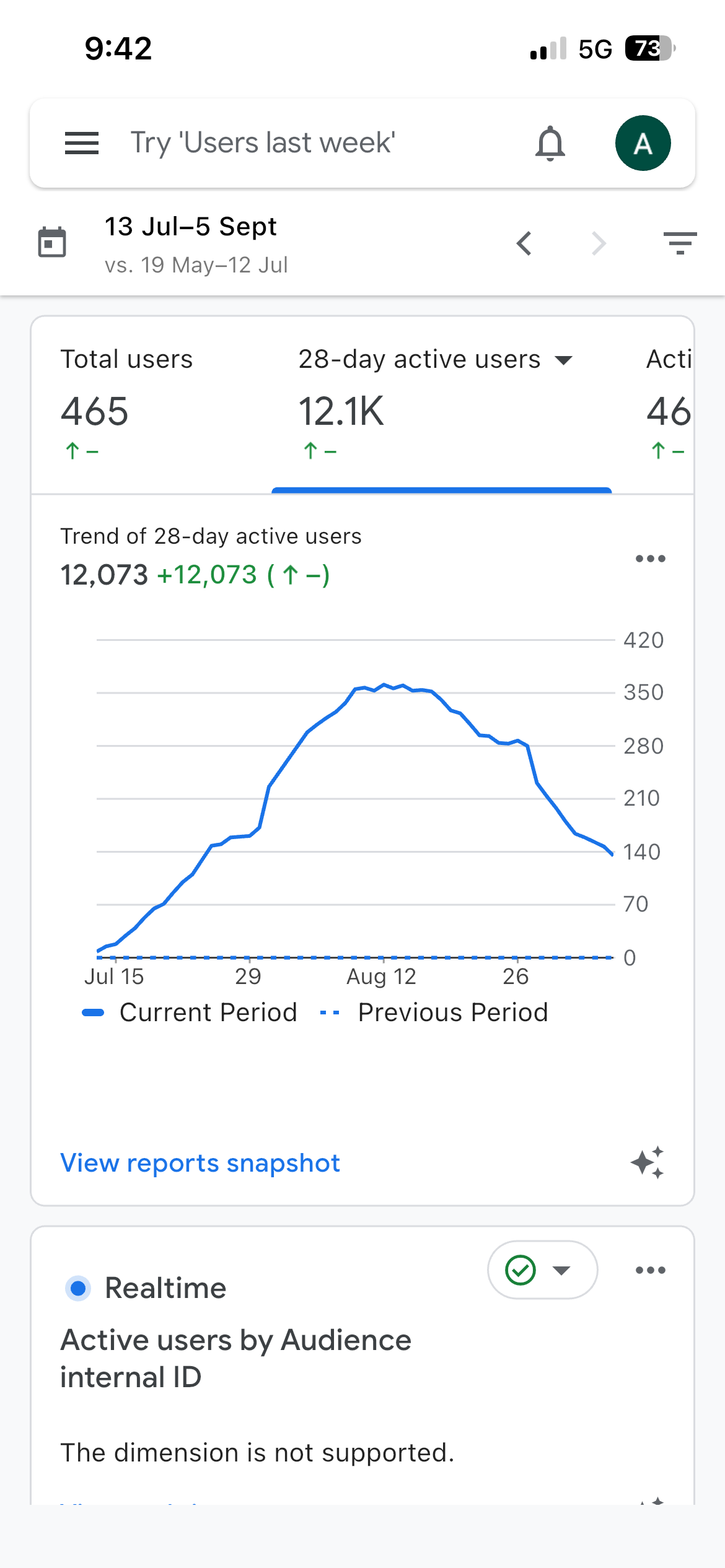
But now the metrics (5/9/26)
- 👥 User Base: 12,000+ active users per month (28-day rolling average).📊
- Analytics: Tracked and verified via Google Analytics 4 (GA4).
Instead of creating another basic CRUD project, I wanted to build something that people could actually use every day. Along the way, PasteDB became a platform for experimenting with new ideas, improving my development skills, and solving practical problems.
Through this project, I gained hands-on experience with:
- 🔐 Authentication and authorization
- 🌐 Official Python SDK
- 🍃 MongoDB database integration
- 📁 Image uploads
- 🛡️ Secure content sharing and privacy features
- 🔒 End-to-End Encryption (E2EE)
- 📡 Nearby device transfer
- ⚡ Code execution and syntax highlighting
- 🎨 Responsive UI/UX design
- ☁️ Cloud deployment with Netlify and Render
- 🔗 Frontend-backend communication
- 📊 Analytics, SEO, and performance optimization
PasteDB continues to evolve as I learn new technologies and build features that make sharing code, notes, and files faster, simpler, and more secure.
📄 License
This project is available under the MIT License.
Made with passion and thousands of lines of code by Aditya Sorathiya.
Similar repos


Languages
HTML
85.0%
Python
11.9%
JavaScript
3.1%
PasteDB is a modern paste-sharing platform built for quickly sharing code, notes, text snippets, and images through simple links.
See the codeSee what people are saying
README
PasteDB
PasteDBPasteDB is a modern paste-sharing platform built for quickly sharing code, notes, text snippets, and images through simple links.
🌐 Live Website: https://pastedb.netlify.app
✨ Features
📝 Text & Code Sharing
- Create and share text snippets instantly.
- Syntax highlighting for multiple programming languages.
- Raw view for copying and exporting content.
- Markdown support with preview.
🔐 End-to-End Encrypted (E2EE) Pastes
PasteDB supports End-to-End Encrypted (E2EE) pastes for maximum privacy.
- 🔒 Content is encrypted before it leaves your device.
- 🗝️ The encryption key is never stored on the PasteDB server.
- 🚫 Server administrators cannot read encrypted pastes.
- 📱 Encryption keys remain on your trusted devices.
- 🔗 Share encrypted pastes securely with the intended recipient.
- 🛡️ Ideal for passwords, API keys, confidential notes, and sensitive code.
Note: Since the server never has access to the encryption key, encrypted pastes cannot be recovered if all trusted devices or keys are lost.
🖼️ Image Sharing
- Upload and share images using links.
- Dedicated image viewer.
- View images associated with a paste.
🔒 Privacy Controls
- Public and private pastes.
- Password-protected pastes.
- Optional expiration times.
👤 User Dashboard
- Login and registration.
- Manage your own pastes.
- View and organize created content.
⚡ Built-in Utilities
- Copy to clipboard.
- HTML preview.
- Markdown rendering.
- Code execution support for selected languages.
- Mobile-friendly interface.
🎨 Modern Interface
- Responsive design.
- Dark and light themes.
- Glassmorphism-inspired UI.
- Optimized for desktop and mobile devices.
🚀 Tech Stack
Frontend
- HTML
- CSS
- JavaScript
- Highlight.js
- Marked.js
- DOMPurify
Backend
- FastAPI
- Python
Database
- MongoDB
- Cloudinary (For Images)
Deployment
- Netlify (Frontend)
- Render (Backend)
🚀 Advanced Features
- 🔥 Burn After Read — Automatically destroy a paste after it has been viewed.
- 📅 Custom Expiration — Choose from 10 minutes, 1 hour, 1 day, 1 week, 30 days, or never.
- 📂 Image Uploads — Upload images alongside text and code.
- 🎨 40+ Syntax Highlighting Languages — Support for a wide range of programming languages.
- 🏷️ Code Templates — Ready-made templates for HTML, Flask, FastAPI, Django, Tailwind CSS, and more.
- 🔍 Public Paste Exploration — Discover and search public pastes.
- 📱 QR Code Sharing — Generate QR codes for quick paste sharing.
- 🔗 Custom Paste IDs — Create memorable custom URLs for pastes.
- 📊 Paste Analytics — View paste statistics such as views and creation date.
- 🔑 API Key Management — Create and manage API keys for programmatic access.
- 🌐 Official Node.js SDK — Create and manage PasteDB pastes programmatically from Node.js applications.
- 🌐 Official Python SDK — Create and manage pastes directly from Python applications.
- 🖥️ Official VS Code Extension — Upload code directly from Visual Studio Code.
- 📄 HTML Preview — Preview HTML with one click.
- ⚡ Code Execution — Run supported languages directly from PasteDB.
🔗 Link Paste
Create a paste that is stored directly inside the URL.
- 📦 Paste content is compressed using URL-safe compression.
- 🔗 No server-side storage is required for the paste content.
- ⚡ Share the generated link instantly.
- 📱 Works well with QR codes and link sharing.
- 🔒 Useful for quickly sharing small pieces of text or code.
📱 Device Management
Manage devices that interact with your PasteDB account and nearby-transfer features.
- 👥 View recognized devices.
- ✅ Approve unknown devices before allowing transfers.
- 🚫 Reject devices you don't recognize.
- 🔐 Helps prevent unwanted nearby-transfer connections.
- 📲 Designed for managing trusted devices across your workflow.
📚 Version History
Keep previous versions of your pastes when making changes.
- 🕐 Save previous versions before updating a paste.
- 📜 View historical versions of your content.
- 🔢 Keep up to 10 historical versions.
- ♻️ Older versions are automatically removed when the limit is exceeded.
- 🔒 Available for supported logged-in pastes.
👥 Real-Time Collaboration
🚧 Collaboration is currently under development.
PasteDB is being expanded with collaborative editing capabilities that will allow multiple users to work on the same paste.
Planned/experimental features include:
- 👥 Multiple users editing the same paste.
- 🟢 Real-time editing presence.
- 📍 Line-level indicators showing which user is editing a particular line.
- 🔐 Host-controlled access.
- 👤 Editor and viewer roles.
- ✅ Join-request approval by the host.
🖥️ VS Code Extension
Upload code directly from Visual Studio Code.
Features:
- Upload current file
- Upload selected text
- Secure API key storage
- Dashboard
- Copy URL automatically
Marketplace: https://marketplace.visualstudio.com/items?itemName=adityasorathiya.pastedb
🖥️ PasteDB CLI
PasteDB now also comes with a developer-friendly CLI for quickly creating and managing pastes directly from your terminal.
Want to do this?
pdb create app.py
and instantly upload app.py to PasteDB and get a shareable link?
Now you can. 🚀
✨ What you can do
📤 Create pastes directly from local files
📥 Fetch existing pastes
🗑️ Delete pastes
🔑 Manage PasteDB API keys
🔍 Check custom ID availability
▶️ Run supported code through PasteDB
🌐 Explore public pastes
👤 View your account information
⚡ Quick Example
pdb create app.py
PasteDB uploads the file and returns a shareable URL.
✓ Paste created!

https://pastedb.netlify.app/paste/abc123
📦 Built with
JavaScript (Node.js)
Read the documentation here
View Source Code here
📡 Nearby Transfer
Share pastes instantly with nearby devices — no links or QR codes required.
🚀 How to Use
-
Open the Transfer page from the PasteDB Home or Landing page (Transfer).
-
Make the receiving device discoverable:
- 📱 Mobile: Hold three fingers on the screen for 3 seconds or press and hold the "Be Discoverable" button for 3 seconds.
- 💻 Desktop / Laptop: Press and hold the "Be Discoverable" button for 3 seconds.
-
The receiving device becomes discoverable for 10 seconds.
-
On the sender's device, open the paste you want to share and click Nearby Share.
-
Select the discovered device from the list and confirm the transfer.
-
The paste is sent instantly to the selected device.
📍 Location Permission
Nearby Transfer requires location permission on both the sender and receiver for reliable nearby device discovery. Your location is used only to improve discovery accuracy and is not shared with other users.
🔗 Project Links
- Website: https://pastedb.netlify.app
- Backend API: Hosted on Render
- Repository: https://github.com/sorathiya903/pastedb
🎯 Why PasteDB?
PasteDB began as a personal learning project with a simple goal: build a modern, production-style web application while exploring real-world software development.
But now the metrics (5/9/26)
- 👥 User Base: 12,000+ active users per month (28-day rolling average).📊
- Analytics: Tracked and verified via Google Analytics 4 (GA4).
Instead of creating another basic CRUD project, I wanted to build something that people could actually use every day. Along the way, PasteDB became a platform for experimenting with new ideas, improving my development skills, and solving practical problems.
Through this project, I gained hands-on experience with:
- 🔐 Authentication and authorization
- 🌐 Official Python SDK
- 🍃 MongoDB database integration
- 📁 Image uploads
- 🛡️ Secure content sharing and privacy features
- 🔒 End-to-End Encryption (E2EE)
- 📡 Nearby device transfer
- ⚡ Code execution and syntax highlighting
- 🎨 Responsive UI/UX design
- ☁️ Cloud deployment with Netlify and Render
- 🔗 Frontend-backend communication
- 📊 Analytics, SEO, and performance optimization
PasteDB continues to evolve as I learn new technologies and build features that make sharing code, notes, and files faster, simpler, and more secure.
📄 License
This project is available under the MIT License.
Made with passion and thousands of lines of code by Aditya Sorathiya.
Similar repos
Languages
HTML
85.0%
Python
11.9%
JavaScript
3.1%