
README
Mpv-Playlistmanager
Mpv lua script to create and manage playlists.
This script allows you to see and interact with your playlist in an intuitive way. The key features are removing, reordering and playing files. Additional features include resolving url titles, stripping filenames according to patterns and creating/saving/selecting/shuffling/sorting playlists.
Requires mpv version 0.39.0, for a more compatible playlistmanager version see this.
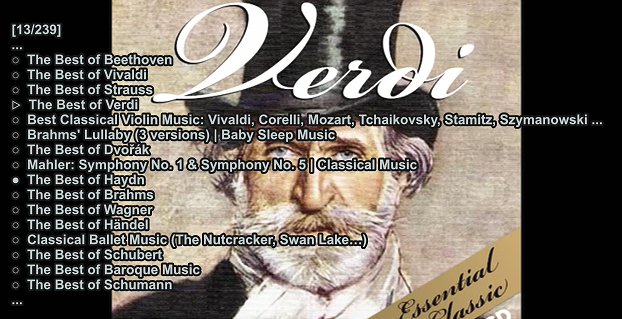
Default visual cues(might render differently on browsers):
○ default file
▷ playing file
● hovered file(for removing, playing and moving)
▶ playing and hovered file
➔ selected file(file is being moved)
➤ playing and selected file
It will make sense once you try the script!
Installation
Copy the playlistmanager.lua file to your mpv scripts directory which is usually ~/.config/mpv/scripts/ or %APPDATA%/mpv/scripts/. See https://mpv.io/manual/master/#files and https://mpv.io/manual/master/#script-location for more detailed information.
Settings
You can modify behaviour of the script in the settings variable in the lua file or a playlistmanager.conf lua-setting file in script-opts directory.
Note: the conf file will override any changed setting in the lua file. There is a playlistmanager.conf file in this repo with the default values of the script for reference.
You can pass settings from the command line on startup such as mpv --idle=once --script-opts=playlistmanager-loadfiles_on_start=yes.
You can also change settings during runtime with a keybind or command like KEY change-list script-opts append playlistmanager-showamount=10.
If you are using save-position-on-quit then the playlist will by default write watch later config when switching between files. There is a setting to disable this.
Title resolving
This script is able to resolve titles for local files with ffprobe and urls with youtube-dl. See the resolve_url_titles, resolve_local_titles, prefer_titles and youtube_dl_executable settings for details.
Keybinds
Static keybindings
- showplaylist(SHIFT+ENTER)
- Displays the current playlist and loads the dynamic keybinds for navigating
Functions without default keybindings
- openmenu
- One keybind to execute all playlistmanager functions. This is useful if you do not use the individual actions often and do not want to bind individual keys for every action.
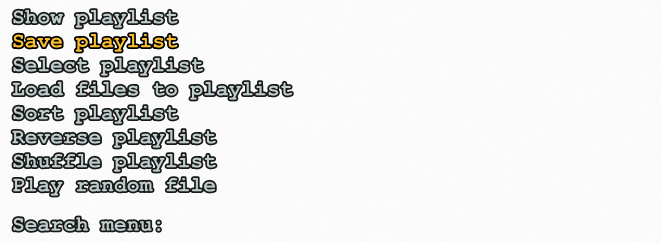
- One keybind to execute all playlistmanager functions. This is useful if you do not use the individual actions often and do not want to bind individual keys for every action.
- sortplaylist
- Sorts the current playlist with stripped values from filename(not media title, no paths, usercreated strips applied). To start playlist from start you can use a script message
KEY script-message playlistmanager sortplaylist startover. Settings involving sort include alphanumeric sort(nonpadded numbers in order, case insensitivity), sort on mpv start and sort on file added to playlist. Sort algorithm credit zsugabubus
- Sorts the current playlist with stripped values from filename(not media title, no paths, usercreated strips applied). To start playlist from start you can use a script message
- shuffleplaylist
- Shuffles the current playlist. Stops currently playing file and starts playlist from start of new playlist unlike native shuffle that doesn't shuffle current file.
- reverseplaylist
- Reverses the current playlist. Does not stop playing the current file.
- loadfiles
- Attempts to load all files from the currently playing files directory to the playlist keeping the order. Option to run at startup if 0 or 1 files are opened, with 0 opens files from working directory. On startup with no file requires
--idle=yes or --idle=once.
- Attempts to load all files from the currently playing files directory to the playlist keeping the order. Option to run at startup if 0 or 1 files are opened, with 0 opens files from working directory. On startup with no file requires
- saveplaylist
- Saves the current playlist to m3u file. Saves to
mpv/playlists/by default. Prompts for filename by default.
- Saves the current playlist to m3u file. Saves to
- selectplaylist
- Opens a search prompt of saved playlists and loads the playlist on enter.
The above functions do not have default keybindings(except for showplaylist). There is a couple of ways to bind keys for them:
- Edit the
playlistmanager.luasettings- Downside: you have to merge two versions if you want to update the script
- Edit the
playlistmanager.confsettings- Upside: you can update the
playlistmanager.luafile without losing your configurations
- Upside: you can update the
- Edit
input.confwith for exampleKEY script-binding playlistmanager/showplaylist- in above example you might want to remove the default keybind of
showplaylistor use--no-input-default-bindings
- in above example you might want to remove the default keybind of
Dynamic keybindings for navigating the playlist
- moveup(UP)
- movedown(DOWN)
- movepageup (Page Up)
- movepagedown (Page Down)
- movebegin (Home)
- moveend (End)
- removefile(Backspace)
- Removes the file currently selected with the cursor from the playlist
- playfile(Enter)
- Opens the file currently selected with the cursor, if cursor on playing file, open the next file
- selectfile(RIGHT or LEFT)
- Selects or unselects the file under the cursor
- When moving the cursor the selected file will follow, allowing reordering of the playlist
- unselectfile(no default bind)
- Unselects the file under the cursor if it was selected
- closeplaylist(ESC)
Dynamic keybinds will only work when playlist is visible. Dynamic binds cannot be defined in input.conf, only in playlistmanager.lua or playlistmanager.conf. There is a setting to change the binds to static ones, which allows you to define keybindings in input.conf.
Script messages
In order to control the playlistmanager from other script it registers some script messages.
The script messages can also be invoked by keybinds KEY script-message playlistmanager command value value2.
List of commands, values and their effects:
| Command | Value | Value2 | Effect |
|---|---|---|---|
| show | playlist | - / duration / toggle | show for default duration, show for given seconds, toggle playlist visibility |
| show | playlist-nokeys | - / duration / toggle | same as above but don't bind dynamic keys to navigate playlist |
| show | filename | - / seconds | shows stripped filename for default or set seconds |
| sort | startover | - | Sorts the playlist, any value will start playlist from start on sort |
| shuffle | - | - | Shuffles the playlist |
| reverse | - | - | Reverses the playlist |
| loadfiles | - / path | - | Loads files from playing files dir(default), or specified path |
| save | - / filename | - | Saves the playlist |
| save-interactive | - | - | Prompts for playlist name and saves on enter |
| open-menu | - | - | Opens the playlistmanager menu |
| select-playlist | - | - | Opens the saved playlist list |
| playlist-next | - | - | Plays next item in playlist (position of current file saved) |
| playlist-prev | - | - | Plays previous item in playlist (position of current file saved) |
| playlist-next-random | - | - | Jumps to a random file in the playlist |
| close | - | - | Hides the playlist if it's being rendered |
examples:
RIGHT playlist-next ; script-message playlistmanager show playlist Shows the playlist after playlist-next. Note that the playlist-next is native mpv command, not the playlistmanager one.
KEY show-text "Shuffled playlist" ; script-message playlistmanager shuffle Text message on shuffle
My other mpv scripts
Contributors


Similar repos


Languages
Lua
100.0%
README
Mpv-Playlistmanager
Mpv lua script to create and manage playlists.
This script allows you to see and interact with your playlist in an intuitive way. The key features are removing, reordering and playing files. Additional features include resolving url titles, stripping filenames according to patterns and creating/saving/selecting/shuffling/sorting playlists.
Requires mpv version 0.39.0, for a more compatible playlistmanager version see this.
Default visual cues(might render differently on browsers):
○ default file
▷ playing file
● hovered file(for removing, playing and moving)
▶ playing and hovered file
➔ selected file(file is being moved)
➤ playing and selected file
It will make sense once you try the script!
Installation
Copy the playlistmanager.lua file to your mpv scripts directory which is usually ~/.config/mpv/scripts/ or %APPDATA%/mpv/scripts/. See https://mpv.io/manual/master/#files and https://mpv.io/manual/master/#script-location for more detailed information.
Settings
You can modify behaviour of the script in the settings variable in the lua file or a playlistmanager.conf lua-setting file in script-opts directory.
Note: the conf file will override any changed setting in the lua file. There is a playlistmanager.conf file in this repo with the default values of the script for reference.
You can pass settings from the command line on startup such as mpv --idle=once --script-opts=playlistmanager-loadfiles_on_start=yes.
You can also change settings during runtime with a keybind or command like KEY change-list script-opts append playlistmanager-showamount=10.
If you are using save-position-on-quit then the playlist will by default write watch later config when switching between files. There is a setting to disable this.
Title resolving
This script is able to resolve titles for local files with ffprobe and urls with youtube-dl. See the resolve_url_titles, resolve_local_titles, prefer_titles and youtube_dl_executable settings for details.
Keybinds
Static keybindings
- showplaylist(SHIFT+ENTER)
- Displays the current playlist and loads the dynamic keybinds for navigating
Functions without default keybindings
- openmenu
- One keybind to execute all playlistmanager functions. This is useful if you do not use the individual actions often and do not want to bind individual keys for every action.
- One keybind to execute all playlistmanager functions. This is useful if you do not use the individual actions often and do not want to bind individual keys for every action.
- sortplaylist
- Sorts the current playlist with stripped values from filename(not media title, no paths, usercreated strips applied). To start playlist from start you can use a script message
KEY script-message playlistmanager sortplaylist startover. Settings involving sort include alphanumeric sort(nonpadded numbers in order, case insensitivity), sort on mpv start and sort on file added to playlist. Sort algorithm credit zsugabubus
- Sorts the current playlist with stripped values from filename(not media title, no paths, usercreated strips applied). To start playlist from start you can use a script message
- shuffleplaylist
- Shuffles the current playlist. Stops currently playing file and starts playlist from start of new playlist unlike native shuffle that doesn't shuffle current file.
- reverseplaylist
- Reverses the current playlist. Does not stop playing the current file.
- loadfiles
- Attempts to load all files from the currently playing files directory to the playlist keeping the order. Option to run at startup if 0 or 1 files are opened, with 0 opens files from working directory. On startup with no file requires
--idle=yes or --idle=once.
- Attempts to load all files from the currently playing files directory to the playlist keeping the order. Option to run at startup if 0 or 1 files are opened, with 0 opens files from working directory. On startup with no file requires
- saveplaylist
- Saves the current playlist to m3u file. Saves to
mpv/playlists/by default. Prompts for filename by default.
- Saves the current playlist to m3u file. Saves to
- selectplaylist
- Opens a search prompt of saved playlists and loads the playlist on enter.
The above functions do not have default keybindings(except for showplaylist). There is a couple of ways to bind keys for them:
- Edit the
playlistmanager.luasettings- Downside: you have to merge two versions if you want to update the script
- Edit the
playlistmanager.confsettings- Upside: you can update the
playlistmanager.luafile without losing your configurations
- Upside: you can update the
- Edit
input.confwith for exampleKEY script-binding playlistmanager/showplaylist- in above example you might want to remove the default keybind of
showplaylistor use--no-input-default-bindings
- in above example you might want to remove the default keybind of
Dynamic keybindings for navigating the playlist
- moveup(UP)
- movedown(DOWN)
- movepageup (Page Up)
- movepagedown (Page Down)
- movebegin (Home)
- moveend (End)
- removefile(Backspace)
- Removes the file currently selected with the cursor from the playlist
- playfile(Enter)
- Opens the file currently selected with the cursor, if cursor on playing file, open the next file
- selectfile(RIGHT or LEFT)
- Selects or unselects the file under the cursor
- When moving the cursor the selected file will follow, allowing reordering of the playlist
- unselectfile(no default bind)
- Unselects the file under the cursor if it was selected
- closeplaylist(ESC)
Dynamic keybinds will only work when playlist is visible. Dynamic binds cannot be defined in input.conf, only in playlistmanager.lua or playlistmanager.conf. There is a setting to change the binds to static ones, which allows you to define keybindings in input.conf.
Script messages
In order to control the playlistmanager from other script it registers some script messages.
The script messages can also be invoked by keybinds KEY script-message playlistmanager command value value2.
List of commands, values and their effects:
| Command | Value | Value2 | Effect |
|---|---|---|---|
| show | playlist | - / duration / toggle | show for default duration, show for given seconds, toggle playlist visibility |
| show | playlist-nokeys | - / duration / toggle | same as above but don't bind dynamic keys to navigate playlist |
| show | filename | - / seconds | shows stripped filename for default or set seconds |
| sort | startover | - | Sorts the playlist, any value will start playlist from start on sort |
| shuffle | - | - | Shuffles the playlist |
| reverse | - | - | Reverses the playlist |
| loadfiles | - / path | - | Loads files from playing files dir(default), or specified path |
| save | - / filename | - | Saves the playlist |
| save-interactive | - | - | Prompts for playlist name and saves on enter |
| open-menu | - | - | Opens the playlistmanager menu |
| select-playlist | - | - | Opens the saved playlist list |
| playlist-next | - | - | Plays next item in playlist (position of current file saved) |
| playlist-prev | - | - | Plays previous item in playlist (position of current file saved) |
| playlist-next-random | - | - | Jumps to a random file in the playlist |
| close | - | - | Hides the playlist if it's being rendered |
examples:
RIGHT playlist-next ; script-message playlistmanager show playlist Shows the playlist after playlist-next. Note that the playlist-next is native mpv command, not the playlistmanager one.
KEY show-text "Shuffled playlist" ; script-message playlistmanager shuffle Text message on shuffle
My other mpv scripts
Similar repos
Contributors
Languages
Lua
100.0%