
See what people are saying
README
SNP Browser
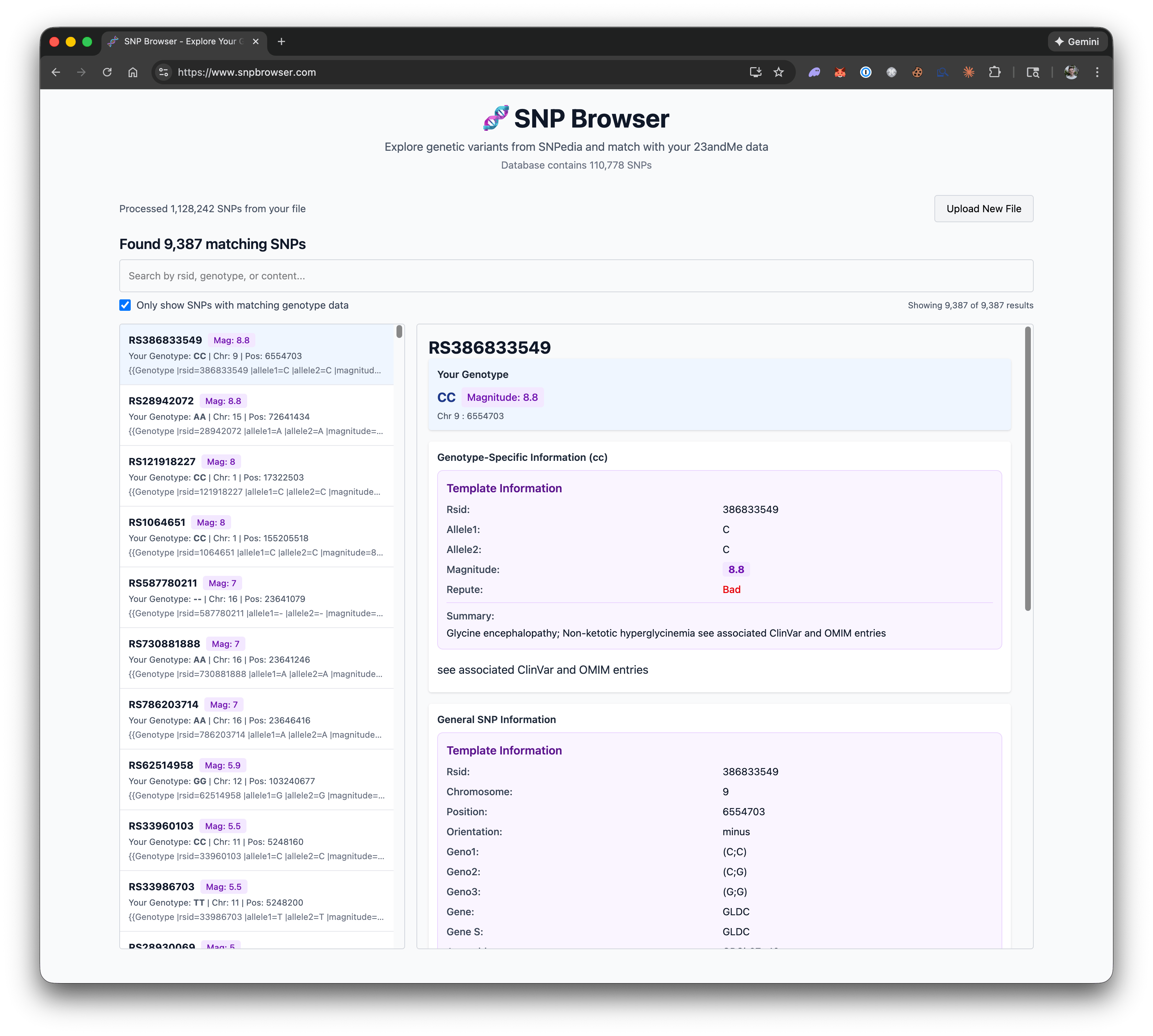
A high-performance web application for browsing and analyzing Single Nucleotide Polymorphism (SNP) data from multiple DNA testing providers. Built with modern web technologies to handle large genomic datasets efficiently in the browser.
Privacy-first: Personal genetic data stays on your device. The app downloads public reference files and processes your DNA locally in browser workers.
Multi-format support: Works with DNA data from 23andMe, AncestryDNA, MyHeritage, FamilyTreeDNA, and more.
Live at: snpbrowser.com
Data
The original data is originally based on a scrape from https://github.com/jaykobdetar/SNPedia-Scraper. The database schema was slightly modified to make querying it easier.
The SNP database is hosted at https://static.snpbrowser.com/snpedia.db
Additional references are available from Data sources: ClinVar, dbSNP, gnomAD, GWAS Catalog, Ensembl VEP, ClinPGx/PharmGKB, CPIC, ClinGen, Orphanet, UniProt, Open Targets, and HPO. Each download shows its actual coverage, release, size, and attribution. Some packs cover selected public variants or chromosomes; an absent annotation does not mean a variant is absent from the original source.
Reference packs are versioned, checksum-verified SQLite shards stored compressed in the browser Cache API. Downloads are explicit and contain whole public packs; searches and matching never send a person's variants to an annotation service. After downloading, queries expand one local shard at a time. Compression preserves every annotation and source field. Browser storage limits and eviction can require a fresh download.
When replacing older uncompressed packs, reload the app and use Data sources → Clear reference downloads before downloading the new versions. This frees older cached files as well as current references, while retaining SNPedia and your open analysis. Select the sources you want to download again.
See reference preparation and publishing for reproducible source adapters, coverage, source terms, and static deployment. Binary reference files are excluded from Git. The tracked .env.production configures production builds to request https://static.snpbrowser.com/references/manifest-v2.json from R2, so they do not need or bundle local reference binaries. Development uses the local /references/manifest-v2.json by default. When explicitly building with a local catalog, only its selected assets and provenance are copied.
The browser workspace guide explains the six evidence-backed About you trait suggestions, compact new source packs, and offline behavior. Production builds save public app files for offline use; personal DNA and findings stay in tab memory and must be reopened after a reload.
Features
- Multi-Format Support: Automatically detects and parses DNA data from multiple providers
- 23andMe (TXT, CSV)
- AncestryDNA (TXT, CSV)
- Color discovery genotypes (CSV)
- MyHeritage (CSV)
- FamilyTreeDNA (CSV)
- Vitagene (TXT, CSV)
- VCF/gVCF, including compressed whole-genome exports, insertions, deletions, and multi-base calls
- Promethease HTML reports with embedded personal genotype data
- PDF reports, displayed as searchable source text without inferring raw genotype calls
- ZIP archives containing a supported data file or report
- Haplogroups: Simple Y-DNA and mitochondrial haplogroup estimates in About you, with a separate CSV export. A bundled, limited marker panel runs locally without reference downloads. Sparse or conflicting data remains inconclusive; these are broad lineage estimates, not a full haplogroup-tree classification. See panel coverage, sources, and limitations.
- Imported calls: Browse all retained calls, including variants without annotations, and filter insertions, deletions, and multi-base calls
- Source reports: Search and page through locally extracted PDF or Promethease text. Imported HTML scripts never run
- Automatic Format Detection: Smart detection system identifies file format with confidence scoring
- Client-side SQLite: Process genomic data entirely in the browser using sql.js
- Independent reference sources: Browse and match downloaded public datasets beyond SNPedia, with assembly, allele, review, population, study, and gene–drug context kept distinct
- Conservative matching: Exact allele evidence requires compatible assembly, position, strand, and bases. Unknown or conflicting identity remains unresolved; gene–drug context does not imply a personal drug recommendation
- Virtualized Rendering: Efficiently display large datasets with react-virtuoso
- Web Worker Processing: Offload heavy computations using Comlink for a smooth UI experience
- Large-file progress: Stage labels, measured file-reading and matching progress, elapsed time, and a notice when progress reports pause. ZIP extraction and result preparation stay visible even when a percentage is unavailable.
- Modern React: Built with React 19 and the React Compiler for optimal performance
- Extensible Architecture: Easy to add support for new DNA file formats
VCF imports require exactly one sample; export the person you want to analyze from a multi-sample file before importing it. Calls explicitly marked as failing the site's FILTER or the sample's FT checks are skipped and counted in import notes. PASS or missing filter information does not establish clinical accuracy, and the app does not invent numeric quality thresholds.
VCF sequence calls preserve explicit allele boundaries. Indel evidence requires the same build, position, REF and called ALT representation; the app does not guess equivalent representations by left-aligning or converting genome builds. Calls on noncanonical contigs remain available in Imported calls. Reference blocks, symbolic alleles, and missing genotypes are reported in import notes when skipped. Contradictory calls remain inspectable, but their genotype-specific interpretations are withheld even when no additional reference packs are enabled.
Promethease imports only explicit personal calls from the report's embedded data. Historical annotations and genosets remain source report text. Annotation coordinates are not substituted for the original call's coordinates. PDFs preserve extractable text and page numbers; scanned pages need local OCR, and images or charts are not transcribed. These imports and the PDF parser run entirely on the device with locally served application assets.
Tech Stack
- React 19 with React Compiler for automatic optimizations
- TypeScript for type safety
- Vite (via Rolldown) for fast builds and HMR
- TanStack Query for data fetching and caching
- Tailwind CSS for styling
- sql.js for in-browser SQLite databases
- Comlink for web worker communication
- React Virtuoso for virtualized list rendering
Development
Quick Start
Production builds use the public catalog URL in .env.production and do not require local reference binaries. Reference downloads require the catalog and its assets to be published at that URL with CORS access. The start scripts build the app; they do not publish or prepare reference data.
For the fastest setup, use the included start scripts that automatically install bun (if needed), install dependencies, and build/run the production version:
Mac/Linux:
./start.sh
Windows (PowerShell - Recommended):
.\start.ps1
Windows (Command Prompt):
start.bat
These scripts will:
- Check if bun is installed (and install it if needed)
- Run
bun installto install dependencies - Run
bun run prodto build and preview the production version
Manual Setup
If you prefer to set up manually, development uses bun, so all commands are run with bun.
# Install bun first (if not already installed)
curl -fsSL https://bun.sh/install | bash  # Mac/Linux
# or visit https://bun.sh for Windows instructions

# Install dependencies
bun install

# Start development server
bun dev

# Build and run production version
bun run prod
For bun dev, prepare local reference assets or set VITE_REFERENCE_MANIFEST_URL=https://static.snpbrowser.com/references/manifest-v2.json in an ignored .env.development.local file to use the public catalog. To build with prepared local assets instead, set VITE_REFERENCE_MANIFEST_URL=/references/manifest-v2.json in .env.production.local. Restart development or rebuild production after changing these settings. The public R2 catalog permits the production domains and the standard localhost development/preview ports; use http://localhost:5173 or http://localhost:4173 for a public-catalog preview.
Supported DNA File Formats
23andMe
- Format: Tab or space-separated text files
- Extensions:
.txt,.csv - Structure:
rsid chromosome position genotype - Example:
rs4477212 1 82154 AA
AncestryDNA
- Format: Tab-separated text files
- Extensions:
.txt,.csv - Structure:
rsid chromosome position allele1 allele2 - Example:
rs4477212 1 82154 A A
MyHeritage
- Format: CSV (comma-separated values)
- Extensions:
.csv - Structure:
RSID,CHROMOSOME,POSITION,RESULT - Example:
rs4477212,1,82154,AA
FamilyTreeDNA (FTDNA)
- Format: CSV with quoted values
- Extensions:
.csv - Structure:
RSID,"CHROMOSOME","POSITION","RESULT" - Example:
rs4477212,"1","82154","AA"
Color Discovery Genotypes
- Format: CSV with sample, chromosome, position, rsID, and genotype columns
- Extensions:
.csv - Structure:
SampleID,Chromosome,Position,RSID,Genotype,ReferenceVersion - Example:
synthetic-sample,1,100,rs100,AG,GRCh37
Vitagene
- Format: CSV/TXT with RSID, chromosome, position, and result columns
- Extensions:
.txt,.csv - Structure:
RSID,CHROMOSOME,POSITION,RESULT - Example:
rs4477212,1,82154,AA - Note: Non-rs chip IDs are skipped before matching against SNPedia.
VCF / gVCF
- Format: Variant Call Format or genomic VCF with
GTgenotype sample fields - Extensions:
.vcf,.gvcf,.g.vcf,.vcf.gz,.g.vcf.gz,.gz - Structure:
#CHROM POS ID REF ALT QUAL FILTER INFO FORMAT SAMPLE - Example:
1 82154 rs4477212 A G . PASS . GT 0/1 - Note: Concrete SNP, insertion, deletion and multi-base calls are retained. Calls without an rsID need an explicit GRCh37/GRCh38 build and valid coordinates; their display ID includes the build, contig, position, REF and ALT. Noncanonical contigs remain inspectable without claiming a canonical reference match. Reference blocks and unsupported symbolic calls are counted in import notes.
Promethease
- Format: HTML with embedded personal genotype records, or its ZIP download
- Extensions:
.html,.htm,.zip - Views: New reference matches, imported calls, and searchable historical report text
- Note: Only explicit personal calls are imported. Genoset notes and literature examples stay in the source report. Unknown orientation remains unresolved.
PDF Reports
- Format: Text-bearing PDF reports
- Extensions:
.pdf, including a PDF inside a ZIP - View: Searchable, paginated source text; raw genotypes are not inferred from narrative findings
- Note: Password-protected reports must be unlocked locally. Image-only scans require local OCR.
The application automatically detects the file format when you upload your DNA data. For ZIP downloads, the app detects the supported data file or report by its content, skipping unrelated files. Archives with multiple recognized inputs must be extracted so you can choose one file explicitly.
Architecture
Parser System
The application uses a modular parser architecture that makes it easy to add support for new DNA file formats:
src/
├── parsers/
│   ├── types.ts           # Core parser interfaces
│   ├── registry.ts        # Parser registry and detection
│   ├── index.ts           # Exports and auto-registration
│   ├── 23andme/
│   │   └── index.ts       # 23andMe parser
│   ├── ancestry/
│   │   └── index.ts       # AncestryDNA parser
│   ├── myheritage/
│   │   └── index.ts       # MyHeritage parser
│   ├── ftdna/
│   │   └── index.ts       # FamilyTreeDNA parser
│   └── vcf/
│       └── index.ts       # VCF parser
Adding a New Parser
-
Create a new directory under
src/parsers/(e.g.,myformat/) -
Implement the
DNAParserinterface inindex.ts:import type { DNAParser } from "../types"; export class MyFormatParser implements DNAParser { readonly metadata = { id: "myformat", name: "My Format", description: "My DNA testing format", version: "1.0.0", fileExtensions: [".txt"], }; validate(content: string): ValidationResult { // Return validation result with confidence score (0-1) } async parse(content: string, onProgress: ProgressCallback): Promise<ParseResult> { // Parse the file and return genotype data } } export default new MyFormatParser(); -
Register your parser in
src/parsers/index.ts:import parserMyFormat from "./myformat"; parserRegistry.register(parserMyFormat);
That's it! Your new format will be automatically detected and supported.
Project Structure
snp-browser/
├── src/
│   ├── parsers/         # DNA file format parsers
│   ├── components/      # React components
│   ├── workers/         # Web Workers
│   ├── hooks/           # React hooks
│   ├── types/           # TypeScript types
│   └── utils/           # Utility functions
├── public/              # Static assets
├── dist/                # Production build output
└── vite.config.ts       # Vite configuration
Building for Production
Build Only
bun run build
The build process includes:
- TypeScript type checking (
tsc -b) - Vite production build with Rolldown
- Output to
dist/directory
Build and Preview
To build and run a local preview of the production version:
bun run prod
This will build the project and start a local server to preview the production build.
Automated Setup and Build
For a complete automated setup (installs bun, dependencies, builds, and previews), use the platform-specific start scripts:
- Mac/Linux:
./start.sh - Windows PowerShell:
.\start.ps1 - Windows CMD:
start.bat
Contributors

50 commits
Similar repos


Languages
TypeScript
76.2%
Python
22.4%
See what people are saying
README
SNP Browser
A high-performance web application for browsing and analyzing Single Nucleotide Polymorphism (SNP) data from multiple DNA testing providers. Built with modern web technologies to handle large genomic datasets efficiently in the browser.
Privacy-first: Personal genetic data stays on your device. The app downloads public reference files and processes your DNA locally in browser workers.
Multi-format support: Works with DNA data from 23andMe, AncestryDNA, MyHeritage, FamilyTreeDNA, and more.
Live at: snpbrowser.com
Data
The original data is originally based on a scrape from https://github.com/jaykobdetar/SNPedia-Scraper. The database schema was slightly modified to make querying it easier.
The SNP database is hosted at https://static.snpbrowser.com/snpedia.db
Additional references are available from Data sources: ClinVar, dbSNP, gnomAD, GWAS Catalog, Ensembl VEP, ClinPGx/PharmGKB, CPIC, ClinGen, Orphanet, UniProt, Open Targets, and HPO. Each download shows its actual coverage, release, size, and attribution. Some packs cover selected public variants or chromosomes; an absent annotation does not mean a variant is absent from the original source.
Reference packs are versioned, checksum-verified SQLite shards stored compressed in the browser Cache API. Downloads are explicit and contain whole public packs; searches and matching never send a person's variants to an annotation service. After downloading, queries expand one local shard at a time. Compression preserves every annotation and source field. Browser storage limits and eviction can require a fresh download.
When replacing older uncompressed packs, reload the app and use Data sources → Clear reference downloads before downloading the new versions. This frees older cached files as well as current references, while retaining SNPedia and your open analysis. Select the sources you want to download again.
See reference preparation and publishing for reproducible source adapters, coverage, source terms, and static deployment. Binary reference files are excluded from Git. The tracked .env.production configures production builds to request https://static.snpbrowser.com/references/manifest-v2.json from R2, so they do not need or bundle local reference binaries. Development uses the local /references/manifest-v2.json by default. When explicitly building with a local catalog, only its selected assets and provenance are copied.
The browser workspace guide explains the six evidence-backed About you trait suggestions, compact new source packs, and offline behavior. Production builds save public app files for offline use; personal DNA and findings stay in tab memory and must be reopened after a reload.
Features
- Multi-Format Support: Automatically detects and parses DNA data from multiple providers
- 23andMe (TXT, CSV)
- AncestryDNA (TXT, CSV)
- Color discovery genotypes (CSV)
- MyHeritage (CSV)
- FamilyTreeDNA (CSV)
- Vitagene (TXT, CSV)
- VCF/gVCF, including compressed whole-genome exports, insertions, deletions, and multi-base calls
- Promethease HTML reports with embedded personal genotype data
- PDF reports, displayed as searchable source text without inferring raw genotype calls
- ZIP archives containing a supported data file or report
- Haplogroups: Simple Y-DNA and mitochondrial haplogroup estimates in About you, with a separate CSV export. A bundled, limited marker panel runs locally without reference downloads. Sparse or conflicting data remains inconclusive; these are broad lineage estimates, not a full haplogroup-tree classification. See panel coverage, sources, and limitations.
- Imported calls: Browse all retained calls, including variants without annotations, and filter insertions, deletions, and multi-base calls
- Source reports: Search and page through locally extracted PDF or Promethease text. Imported HTML scripts never run
- Automatic Format Detection: Smart detection system identifies file format with confidence scoring
- Client-side SQLite: Process genomic data entirely in the browser using sql.js
- Independent reference sources: Browse and match downloaded public datasets beyond SNPedia, with assembly, allele, review, population, study, and gene–drug context kept distinct
- Conservative matching: Exact allele evidence requires compatible assembly, position, strand, and bases. Unknown or conflicting identity remains unresolved; gene–drug context does not imply a personal drug recommendation
- Virtualized Rendering: Efficiently display large datasets with react-virtuoso
- Web Worker Processing: Offload heavy computations using Comlink for a smooth UI experience
- Large-file progress: Stage labels, measured file-reading and matching progress, elapsed time, and a notice when progress reports pause. ZIP extraction and result preparation stay visible even when a percentage is unavailable.
- Modern React: Built with React 19 and the React Compiler for optimal performance
- Extensible Architecture: Easy to add support for new DNA file formats
VCF imports require exactly one sample; export the person you want to analyze from a multi-sample file before importing it. Calls explicitly marked as failing the site's FILTER or the sample's FT checks are skipped and counted in import notes. PASS or missing filter information does not establish clinical accuracy, and the app does not invent numeric quality thresholds.
VCF sequence calls preserve explicit allele boundaries. Indel evidence requires the same build, position, REF and called ALT representation; the app does not guess equivalent representations by left-aligning or converting genome builds. Calls on noncanonical contigs remain available in Imported calls. Reference blocks, symbolic alleles, and missing genotypes are reported in import notes when skipped. Contradictory calls remain inspectable, but their genotype-specific interpretations are withheld even when no additional reference packs are enabled.
Promethease imports only explicit personal calls from the report's embedded data. Historical annotations and genosets remain source report text. Annotation coordinates are not substituted for the original call's coordinates. PDFs preserve extractable text and page numbers; scanned pages need local OCR, and images or charts are not transcribed. These imports and the PDF parser run entirely on the device with locally served application assets.
Tech Stack
- React 19 with React Compiler for automatic optimizations
- TypeScript for type safety
- Vite (via Rolldown) for fast builds and HMR
- TanStack Query for data fetching and caching
- Tailwind CSS for styling
- sql.js for in-browser SQLite databases
- Comlink for web worker communication
- React Virtuoso for virtualized list rendering
Development
Quick Start
Production builds use the public catalog URL in .env.production and do not require local reference binaries. Reference downloads require the catalog and its assets to be published at that URL with CORS access. The start scripts build the app; they do not publish or prepare reference data.
For the fastest setup, use the included start scripts that automatically install bun (if needed), install dependencies, and build/run the production version:
Mac/Linux:
./start.sh
Windows (PowerShell - Recommended):
.\start.ps1
Windows (Command Prompt):
start.bat
These scripts will:
- Check if bun is installed (and install it if needed)
- Run
bun installto install dependencies - Run
bun run prodto build and preview the production version
Manual Setup
If you prefer to set up manually, development uses bun, so all commands are run with bun.
# Install bun first (if not already installed)
curl -fsSL https://bun.sh/install | bash  # Mac/Linux
# or visit https://bun.sh for Windows instructions

# Install dependencies
bun install

# Start development server
bun dev

# Build and run production version
bun run prod
For bun dev, prepare local reference assets or set VITE_REFERENCE_MANIFEST_URL=https://static.snpbrowser.com/references/manifest-v2.json in an ignored .env.development.local file to use the public catalog. To build with prepared local assets instead, set VITE_REFERENCE_MANIFEST_URL=/references/manifest-v2.json in .env.production.local. Restart development or rebuild production after changing these settings. The public R2 catalog permits the production domains and the standard localhost development/preview ports; use http://localhost:5173 or http://localhost:4173 for a public-catalog preview.
Supported DNA File Formats
23andMe
- Format: Tab or space-separated text files
- Extensions:
.txt,.csv - Structure:
rsid chromosome position genotype - Example:
rs4477212 1 82154 AA
AncestryDNA
- Format: Tab-separated text files
- Extensions:
.txt,.csv - Structure:
rsid chromosome position allele1 allele2 - Example:
rs4477212 1 82154 A A
MyHeritage
- Format: CSV (comma-separated values)
- Extensions:
.csv - Structure:
RSID,CHROMOSOME,POSITION,RESULT - Example:
rs4477212,1,82154,AA
FamilyTreeDNA (FTDNA)
- Format: CSV with quoted values
- Extensions:
.csv - Structure:
RSID,"CHROMOSOME","POSITION","RESULT" - Example:
rs4477212,"1","82154","AA"
Color Discovery Genotypes
- Format: CSV with sample, chromosome, position, rsID, and genotype columns
- Extensions:
.csv - Structure:
SampleID,Chromosome,Position,RSID,Genotype,ReferenceVersion - Example:
synthetic-sample,1,100,rs100,AG,GRCh37
Vitagene
- Format: CSV/TXT with RSID, chromosome, position, and result columns
- Extensions:
.txt,.csv - Structure:
RSID,CHROMOSOME,POSITION,RESULT - Example:
rs4477212,1,82154,AA - Note: Non-rs chip IDs are skipped before matching against SNPedia.
VCF / gVCF
- Format: Variant Call Format or genomic VCF with
GTgenotype sample fields - Extensions:
.vcf,.gvcf,.g.vcf,.vcf.gz,.g.vcf.gz,.gz - Structure:
#CHROM POS ID REF ALT QUAL FILTER INFO FORMAT SAMPLE - Example:
1 82154 rs4477212 A G . PASS . GT 0/1 - Note: Concrete SNP, insertion, deletion and multi-base calls are retained. Calls without an rsID need an explicit GRCh37/GRCh38 build and valid coordinates; their display ID includes the build, contig, position, REF and ALT. Noncanonical contigs remain inspectable without claiming a canonical reference match. Reference blocks and unsupported symbolic calls are counted in import notes.
Promethease
- Format: HTML with embedded personal genotype records, or its ZIP download
- Extensions:
.html,.htm,.zip - Views: New reference matches, imported calls, and searchable historical report text
- Note: Only explicit personal calls are imported. Genoset notes and literature examples stay in the source report. Unknown orientation remains unresolved.
PDF Reports
- Format: Text-bearing PDF reports
- Extensions:
.pdf, including a PDF inside a ZIP - View: Searchable, paginated source text; raw genotypes are not inferred from narrative findings
- Note: Password-protected reports must be unlocked locally. Image-only scans require local OCR.
The application automatically detects the file format when you upload your DNA data. For ZIP downloads, the app detects the supported data file or report by its content, skipping unrelated files. Archives with multiple recognized inputs must be extracted so you can choose one file explicitly.
Architecture
Parser System
The application uses a modular parser architecture that makes it easy to add support for new DNA file formats:
src/
├── parsers/
│   ├── types.ts           # Core parser interfaces
│   ├── registry.ts        # Parser registry and detection
│   ├── index.ts           # Exports and auto-registration
│   ├── 23andme/
│   │   └── index.ts       # 23andMe parser
│   ├── ancestry/
│   │   └── index.ts       # AncestryDNA parser
│   ├── myheritage/
│   │   └── index.ts       # MyHeritage parser
│   ├── ftdna/
│   │   └── index.ts       # FamilyTreeDNA parser
│   └── vcf/
│       └── index.ts       # VCF parser
Adding a New Parser
-
Create a new directory under
src/parsers/(e.g.,myformat/) -
Implement the
DNAParserinterface inindex.ts:import type { DNAParser } from "../types"; export class MyFormatParser implements DNAParser { readonly metadata = { id: "myformat", name: "My Format", description: "My DNA testing format", version: "1.0.0", fileExtensions: [".txt"], }; validate(content: string): ValidationResult { // Return validation result with confidence score (0-1) } async parse(content: string, onProgress: ProgressCallback): Promise<ParseResult> { // Parse the file and return genotype data } } export default new MyFormatParser(); -
Register your parser in
src/parsers/index.ts:import parserMyFormat from "./myformat"; parserRegistry.register(parserMyFormat);
That's it! Your new format will be automatically detected and supported.
Project Structure
snp-browser/
├── src/
│   ├── parsers/         # DNA file format parsers
│   ├── components/      # React components
│   ├── workers/         # Web Workers
│   ├── hooks/           # React hooks
│   ├── types/           # TypeScript types
│   └── utils/           # Utility functions
├── public/              # Static assets
├── dist/                # Production build output
└── vite.config.ts       # Vite configuration
Building for Production
Build Only
bun run build
The build process includes:
- TypeScript type checking (
tsc -b) - Vite production build with Rolldown
- Output to
dist/directory
Build and Preview
To build and run a local preview of the production version:
bun run prod
This will build the project and start a local server to preview the production build.
Automated Setup and Build
For a complete automated setup (installs bun, dependencies, builds, and previews), use the platform-specific start scripts:
- Mac/Linux:
./start.sh - Windows PowerShell:
.\start.ps1 - Windows CMD:
start.bat
Similar repos
Contributors
50 commits
Languages
TypeScript
76.2%
Python
22.4%