


WonderZoom: Multi-Scale 3D World Generation
Jin Cao*, Koven Yu*, Jiajun Wu
(* denotes equal contribution)
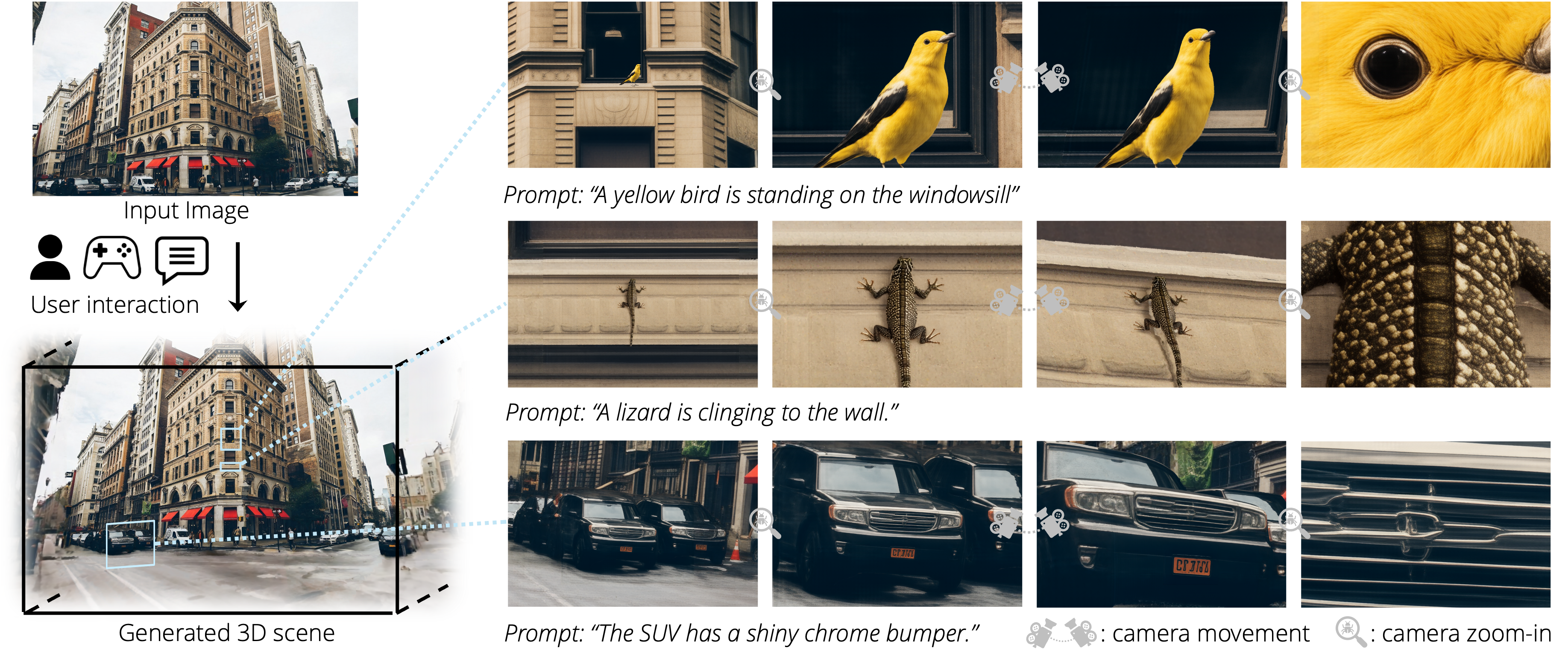
WonderZoom generates multi-scale 3D worlds from a single image. Starting from an input photograph, it builds a 3D Gaussian Splatting scene that supports continuous zoom-in navigation, revealing new details and objects at each scale.
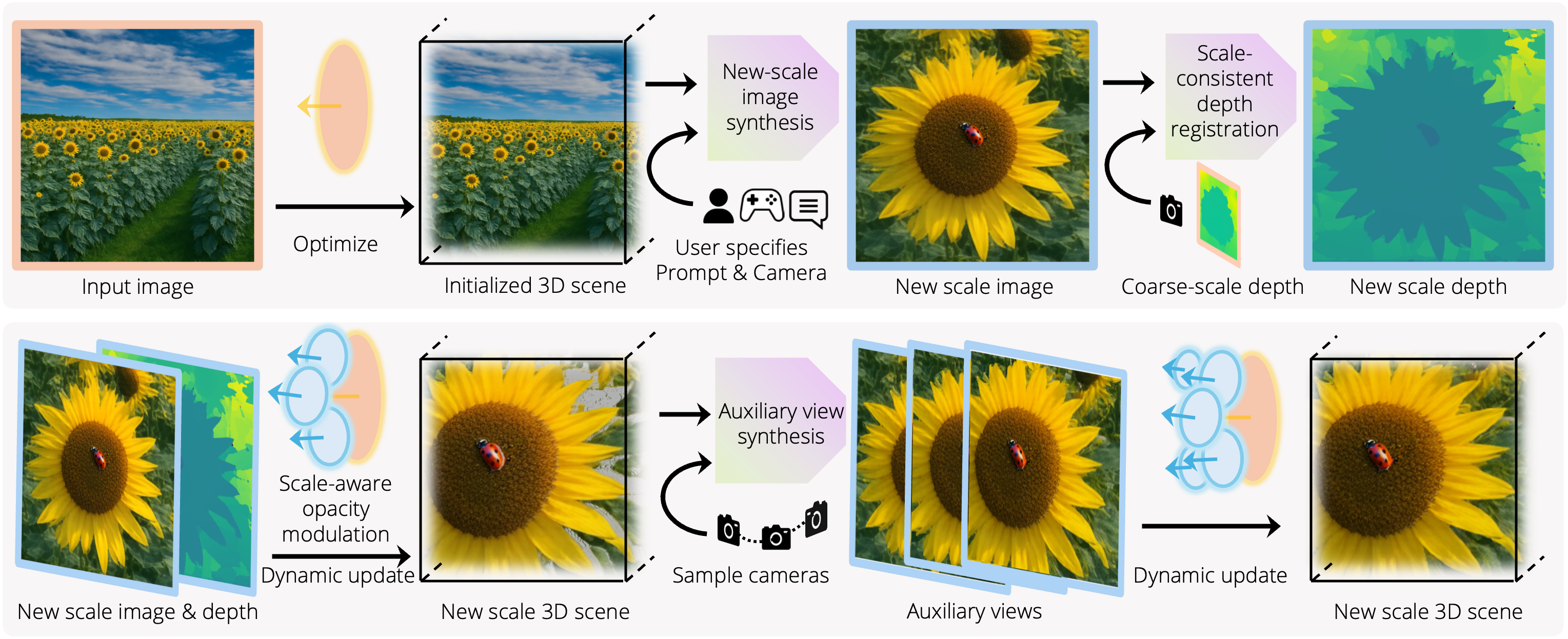
The scene is made of scale-adaptive Gaussian surfels: each primitive knows the scale it was generated at, and the renderer fades it in and out with the viewing scale. A progressive detail synthesizer grows the scene interactively:
One server, run.py, serves one page, splat-main/index_gen.html, at http://localhost:7747/ in both modes.
| Mode | Entry point | What you need |
|---|---|---|
| Generation (default): the page shows the scene live while it is generated | run.py (or scripts/run_server.sh) | four conda environments, about 168 GB of checkpoints and a large GPU (see Hardware) |
| Viewing a released or saved scene: no generation model, no worker | run.py --view | one GPU, the wz-main environment and the pre-generated scenes |
run.py --view replaces run_render_only.py and splat-main/index_stream.html of the first release.
The generation pipeline runs the three video and image models (Gen3C, Chain-of-Zoom and Step1X-Edit) as persistent
worker processes in their own environments. On a single 46-48 GB GPU, the default auto GPU policy lets the models
take turns on the GPU and parks the idle ones in host RAM. Scripts install the environments, download pinned
checkpoints and check the installation.
Non-commercial use only. Both viewing (
run.py --view) and generation depend on components that do not allow commercial use. Read THIRD_PARTY_LICENSES.md before you use or redistribute the code, the weights or the generated scenes.
WonderZoom's own code: the license has not been chosen yet (TODO(authors)). Until the authors add a LICENSE
file, no license is granted for it.
Non-commercial components:
| Component | License | Needed by |
|---|---|---|
3DGS rasterizer, simple-knn and the 3DGS-derived code (submodules/, scene/, gaussian_renderer/, parts of utils/) | Inria Gaussian-Splatting License: non-commercial research and evaluation | viewing and generation |
Files derived from LucidDreamer (utils/trajectory.py, utils/depth.py, arguments_in.py, scene/__init__.py, scene/dataset_readers.py) | CC BY-NC-SA 4.0 (LICENSES/): attribution, non-commercial, share-alike | viewing and generation |
| GeometryCrafter code and weights | GeometryCrafter license: academic, research and education only | generation |
| Stable Diffusion 3 Medium (diffusers, gated) | Stability AI Non-Commercial Research Community License | generation (zoom-in) |
| Qwen2.5-VL-3B-Instruct | Qwen Research License (non-commercial) | generation (zoom-in) |
Other terms to be aware of:
services.gen3c.disable_guardrail: true in
config/services.yaml). Set it to false to run the guardrail; see
THIRD_PARTY_LICENSES.md.1. Install the main environment. It builds PyTorch3D and the 3DGS CUDA extensions, which takes about 30-60 min on 16 CPUs.
git clone https://github.com/jin-cao-tma/WonderZoom.git && cd WonderZoom
bash scripts/install_env_main.sh          # creates the conda env wz-main
conda activate wz-main
2. Download the pre-generated scenes (~7.8 GB) into gaussian/:
bash scripts/download_checkpoints.sh --scenes
# or, with the Hugging Face CLI:
huggingface-cli download TmaKiss/WonderZoom --repo-type dataset --include "gaussian/*.pth" --local-dir ./
3. Start the server in view mode:
python run.py --view --example_config config/more_examples/street.yaml
--view loads the scene file of the config (pth_path), renders it at the config's orig_H x orig_W (else
gen_H x gen_W) and uses the config's orbit code for Space. It loads no generation model and starts no worker.
Start-up takes about 35 s for the largest released scene.
| Config | Scene | Resolution |
|---|---|---|
street.yaml | City street with bird | 720x1080 |
fish.yaml | Coral reef with fish | 720x1080 |
tree.yaml | Lakeside tree with beetle | 720x1080 |
beach.yaml | Beach with conch shell | 720x1080 |
sunflower.yaml | Sunflower field with ladybug | 720x1080 |
wooden.yaml | Wooden wall with lizard | 720x1080 |
tea_garden.yaml | Tea garden with butterfly | 720x1080 |
lego.yaml | Lego scene | 480x720 |
beach2.yaml | Beach (480p) | 480x720 |
tea_garden2.yaml | Tea garden (480p) | 480x720 |
You can also pass a .pth file directly (--pth_path implies --view):
python run.py --view --pth_path ./gaussian/gau_bird3_complete1080.pth \
    --example_config config/more_examples/street.yaml
Add --dry_run to print the resolved scene path, render size and stream settings and exit before loading the scene.
Streaming quality: view mode streams JPEG frames of quality 80, at most 1080 px on the longest edge
(--stream_quality 80 --stream_max_size 1080). If the viewer lags over SSH, lower them, e.g.
--stream_max_size 512 --stream_quality 40.
4. Open the page. The server binds to 127.0.0.1:7747. If it is remote, forward the port first:
ssh -N -L 7747:localhost:7747 <your-server>
Then open http://localhost:7747/. Pass --host 0.0.0.0 to serve other machines directly. The page also works as
a local file: splat-main/index_gen.html?server=localhost:7747.
In view mode the page is titled "WonderZoom Viewer", hides the generation controls and shows idle with
Viewing <file> in the status line. Generation keys are refused; start run.py without --view to generate.
Stop the server with Ctrl+C.
| Key | Action |
|---|---|
| W / A / S / D | Rotate camera |
| ↑ / ↓ / ← / → | Move camera |
| V | Zoom in |
| B | Zoom out |
| Space | Orbit rotation |
# 1. Clone
git clone https://github.com/jin-cao-tma/WonderZoom.git && cd WonderZoom

# 2. Build the environments wz-main, wz-gen3c and wz-coz (add --objects for object insertion: wz-step1x + GroundedSAM)
bash scripts/install_all.sh [--objects]

# 3. Accept the SD3-Medium license (Stability AI Non-Commercial Research Community License) on
#    https://huggingface.co/stabilityai/stable-diffusion-3-medium-diffusers, then log in
conda activate wz-main && huggingface-cli login      # or: export HF_TOKEN=hf_...

# 4. Download the checkpoints: the groups for the three default environments (~111 GB) ...
bash scripts/download_checkpoints.sh --core --gen3c --coz
#    ... or everything, including object insertion (~168 GB)
# bash scripts/download_checkpoints.sh --all

# 5. On a GPU node, check every registered environment (add --objects after install_all.sh --objects)
python scripts/check_install.py

# 6. Start the server
bash scripts/run_server.sh --example_config config/more_examples/street.yaml
The server binds to 127.0.0.1:7747. Forward the port from your laptop and open the generation UI:
ssh -L 7747:localhost:7747 <your-server> # then open http://localhost:7747/
The status line at the top of the page reports progress. The main models load first. The model workers then
start in the background while the initial scene is built, and the status becomes idle once the server accepts
requests. A request that needs a worker that is still loading waits for it. Every session is written to
runs/<example_name>/<YYYYmmdd-HHMMSS>/.
To generate from your own image, run bash scripts/run_server.sh --image /path/to/photo.jpg --name my_scene.
Relative paths are resolved against your current directory first, then against the repository root.
Details: docs/INSTALL.md for environments and troubleshooting, docs/GENERATION_GUIDE.md for workflows and configuration.
| Key | Action |
|---|---|
| W / A / S / D | Rotate camera (pitch / yaw) |
| ↑ / ↓ / ← / → | Move forward / back / left / right |
| N / M | Move down / up |
| V / B | Zoom in / out (focal length ×1.05 per press; B stops at the initial focal length) |
| H | Add the current view as a trajectory point (zoom-in: press once at the start view) |
| J | Clear the trajectory |
| R | Generate to the current view: zoomed in = zoom-in generation (Chain-of-Zoom), otherwise camera move (Gen3C) |
| Q | Toggle rewrite / overwrite mode for zoom-in (default: rewrite) |
| Space | Orbit preview (no scene change) |
| Ctrl + Shift + Space | High-quality orbit refinement with Gen3C (auxiliary views) |
| Ctrl + Alt + Space | Fix small cracks |
| P | Complete the background behind objects in the current view (only with object insertion) |
| Z | Undo the last generation (one level) |
| X | Save the scene to <session>/scenes/<example_name>_<NNN>.pth |
| C | Delete the Gaussians visible in the current view |
Object insertion: type an object (e.g. a ladybug) into the box at the top of the page and press Enter. The
object is inserted at the end of the next zoom-in.
X saves the scene in the same format as the released scenes, so run.py --view can load it. Pass the
session's config.yaml as the scene config: it records the generation resolution and the scene's orbit code.
Run it in the wz-main environment, on another port if the generation server is still running:
python run.py --view --pth_path runs/street/<YYYYmmdd-HHMMSS>/scenes/street_000.pth \
    --example_config runs/street/<YYYYmmdd-HHMMSS>/config.yaml --port 7748
Then forward port 7748 and open http://localhost:7748/. See
Viewing saved scenes and, for .splat export,
tools/export_splat.py.
MAX_JOBS, TORCH_CUDA_ARCH_LIST),
checkpoints, check_install.py and troubleshooting.config/services.yaml and the GPU policies.Viewing (run.py --view) | Generation | |
|---|---|---|
| GPU | one NVIDIA GPU, compute capability 8.0 / 8.6 / 8.9 / 9.0 with the default build; peak 5,258 MiB in nvidia-smi for the largest released scene | two GPUs with ≥46 GB (profile B, tested), or one GPU with ≥46 GB (profile A, single-GPU exclusive policy; tested end to end on one L40S 46 GB, peak 39,971 MiB in nvidia-smi) |
| Tested on | 1x NVIDIA L40S 46 GB | 2x NVIDIA L40S 46 GB: the main process on GPU 0, Gen3C, Chain-of-Zoom and Step1X-Edit taking turns on GPU 1 (exclusive) |
| Host RAM | about 1.3 GB RSS for the largest released scene | ≥192 GB recommended, 256 GB to be safe (idle models are parked in RAM; measured peak RSS of the server and its workers: 135 GB with object insertion); loading Gen3C alone needs ≥96 GB |
| Disk | ~7.8 GB scenes + wz-main (12 GB) | ~168 GB checkpoints (--all) + four environments (about 40 GB) |
| Time per camera move / zoom-in | n/a | measured on 2x L40S: about 16.5 min per camera move (in the test, the first move included about 3 min of waiting for the other workers to load), 1.7-2.5 min per zoom-in, 5.5 min for a zoom-in with object insertion |
See docs/HARDWARE.md for per-model numbers and multi-GPU profiles.
| Paper component | Code |
|---|---|
| Single-image initialization (depth → surfels → initial 3DGS) | run.py run(); models/vdm_model.py VideoGaussianProcessor.process_single_img (MoGe depth, OneFormer sky mask generate_sky_mask, Marigold normals get_normal in models/models_vdm.py); scene/gaussian_model.py GaussianModel.create_from_pcd; run.py compute_3D_filter, train_gaussian |
| Scale-adaptive Gaussian surfels (prior / current / next scale per primitive) | scene/gaussian_model.py create_from_pcd, get_prior_scale_all / get_now_scale_all / get_next_scale_all, merge_gaussian, merge_gaussian_with_trainability_control; run.py setup_gaussian_scales_and_merge; gaussian_renderer/__init__.py compute_target_scale_per_frame |
| Scale-aware opacity modulation (LOD rendering) | gaussian_renderer/__init__.py render() (filter_scale=True, opt.lod_q_enable), compute_log_scale_weights, compute_inv_target_scale_per_frame |
| Progressive detail synthesizer (zoom-in) | run.py zoom branch of the main loop in run() (49 frames from util/utils.py interpolate_cameras_K) and process_one_seq(zoom_in=True); run.py render_zoomin_rough_video3 (3 keyframes, utils/zoom_utils.py zoom_image_by_focal_change, two Chain-of-Zoom calls, onion-style compositing); super-resolution: third_party/chain_of_zoom/wonderzoom_coz.py SimpleChainZoomModel.inference via services/coz.py and services/workers/coz_worker.py |
| Scale-consistent depth registration (zoom-in keyframes) | models/vdm_model.py process_zoomin_frames_rewrite (compute_scale_and_shift_full, finetune_depth_model, inpaint_nearest_bilateral_preserve); overwrite mode (Q): process_zoomin_frames_overwrite, process_zoomin_frames_overwrite_obj_mask |
| Depth registration for camera-move videos and auxiliary views | models/vdm_model.py process_video_frames, process_frames_inpainting; GeometryCrafter/geo_infer.py get_moge_geo_model, inf_geometry |
| Scene extension by camera moves (Gen3C) | run.py move branch of the main loop in run() (121 frames from util/utils.py interpolate_cameras_RT), render_rough_video, save_rough_video_frames; services/gen3c.py and services/workers/gen3c_worker.py (Gen3cWorker.op_generate) |
| Auxiliary view synthesis (HQ orbit) and crack fixing | run.py handle_generate_nvs_hq, handle_fix_small_cracks, generate_orbit_cameras (or the per-scene generate_orbit_cameras_code), orbit capture in render_current_scene, processing in the main loop of run() |
| Semantic content / object insertion at a new scale | run.py add_object_to_image (Step1X-Edit via services/step1x.py, util/gpt4.py generate_edit_prompt, util/back_ground.py GroundedSAMSegmentationModel, INR harmonization, get_pure_background with SD2 inpaint_background, models/vdm_model.py process_single_img_mask and _apply_constrained_tilt_transform); object refresh during later zooms: add_object_to_image_with_image, update_gaussian_obj |
| Incremental scene update (train only new content) | run.py train_gaussian (newly_added_points, trainable_mask, hq_mode); scene/gaussian_model.py set_trainable_mask, merge_all_to_trainable, set_points_label, get_label_mask, freeze_labels |
| Interactive exploration (streaming viewer, trajectory UI) | run.py render_current_scene and the Socket.IO handlers (handle_gen, ...); models/vdm_model.py get_camera_by_js_view_matrix; splat-main/main_stream.js, splat-main/index_gen.html |
| Saving and viewing scenes | run.py save_gaussian_with_global_labels, load_gaussian_with_global_labels (--view); tools/export_splat.py |
WonderZoom/
├── run.py                   # the server (Flask + Socket.IO): generation, or --view for saved / released scenes; serves splat-main/index_gen.html
├── config/
│   ├── base-config.yaml     # every scene key with its default
│   ├── custom_template.yaml # used by run.py --image
│   ├── more_examples/       # per-scene configs
│   └── services.yaml        # model workers, GPUs, checkpoint paths
├── services/                # worker clients, GPU arbiter; services/workers/ runs inside each worker env
├── scripts/                 # install_*.sh, download_checkpoints.sh, check_install.py, run_server.sh, ...
├── third_party/             # pins.env, checksums, WonderZoom files added to the upstream clones
├── tools/export_splat.py    # export a saved scene to .splat
├── tests/                   # worker smoke tests, headless end-to-end driver
├── docs/                    # INSTALL, GENERATION_GUIDE, HARDWARE
├── THIRD_PARTY_LICENSES.md, LICENSES/   # third-party license summary and license texts
├── envs/, requirements/     # conda toolchain and pinned pip requirements (no top-level requirements.txt; use the install scripts)
├── models/, scene/, gaussian_renderer/, util/, utils/, marigold_lcm/   # WonderZoom core
├── GeometryCrafter/, MoGe/, RepViT/   # vendored (trimmed) dependencies
├── submodules/              # 3DGS rasterizer and simple-knn CUDA extensions
├── splat-main/              # web page (index_gen.html, main_stream.js)
├── external/                # pinned upstream clones (created by the scripts; gitignored)
├── checkpoints/             # Gen3C, Step1X-Edit and other weights (created by the scripts; gitignored)
├── gaussian/                # released scenes (download_checkpoints.sh --scenes)
└── runs/                    # generation sessions (gitignored)
@misc{wonderzoom,
    title={WonderZoom: Multi-Scale 3D World Generation},
    author={Jin Cao and Hong-Xing Yu and Jiajun Wu},
    year={2025},
    eprint={2512.09164},
    archivePrefix={arXiv},
    primaryClass={cs.CV},
    url={https://arxiv.org/abs/2512.09164}
}
We appreciate the authors of the following projects for sharing their code:
3D Gaussian Splatting,
LucidDreamer (CC BY-NC-SA 4.0; several files in utils/,
scene/ and arguments_in.py are derived from it, see THIRD_PARTY_LICENSES.md),
WonderWorld,
MoGe,
GeometryCrafter,
Marigold,
OneFormer,
RepViT-SAM,
PyTorch3D,
Chain-of-Zoom,
Gen3C,
Step1X-Edit,
Stable Diffusion,
Grounded-Segment-Anything,
VGGT,
Kornia,
and INR-Harmonization.
53 followers · starred Dec 2025
WonderZoom: Multi-Scale 3D World Generation
Jin Cao*, Koven Yu*, Jiajun Wu
(* denotes equal contribution)
WonderZoom generates multi-scale 3D worlds from a single image. Starting from an input photograph, it builds a 3D Gaussian Splatting scene that supports continuous zoom-in navigation, revealing new details and objects at each scale.
The scene is made of scale-adaptive Gaussian surfels: each primitive knows the scale it was generated at, and the renderer fades it in and out with the viewing scale. A progressive detail synthesizer grows the scene interactively:
One server, run.py, serves one page, splat-main/index_gen.html, at http://localhost:7747/ in both modes.
| Mode | Entry point | What you need |
|---|---|---|
| Generation (default): the page shows the scene live while it is generated | run.py (or scripts/run_server.sh) | four conda environments, about 168 GB of checkpoints and a large GPU (see Hardware) |
| Viewing a released or saved scene: no generation model, no worker | run.py --view | one GPU, the wz-main environment and the pre-generated scenes |
run.py --view replaces run_render_only.py and splat-main/index_stream.html of the first release.
The generation pipeline runs the three video and image models (Gen3C, Chain-of-Zoom and Step1X-Edit) as persistent
worker processes in their own environments. On a single 46-48 GB GPU, the default auto GPU policy lets the models
take turns on the GPU and parks the idle ones in host RAM. Scripts install the environments, download pinned
checkpoints and check the installation.
Non-commercial use only. Both viewing (
run.py --view) and generation depend on components that do not allow commercial use. Read THIRD_PARTY_LICENSES.md before you use or redistribute the code, the weights or the generated scenes.
WonderZoom's own code: the license has not been chosen yet (TODO(authors)). Until the authors add a LICENSE
file, no license is granted for it.
Non-commercial components:
| Component | License | Needed by |
|---|---|---|
3DGS rasterizer, simple-knn and the 3DGS-derived code (submodules/, scene/, gaussian_renderer/, parts of utils/) | Inria Gaussian-Splatting License: non-commercial research and evaluation | viewing and generation |
Files derived from LucidDreamer (utils/trajectory.py, utils/depth.py, arguments_in.py, scene/__init__.py, scene/dataset_readers.py) | CC BY-NC-SA 4.0 (LICENSES/): attribution, non-commercial, share-alike | viewing and generation |
| GeometryCrafter code and weights | GeometryCrafter license: academic, research and education only | generation |
| Stable Diffusion 3 Medium (diffusers, gated) | Stability AI Non-Commercial Research Community License | generation (zoom-in) |
| Qwen2.5-VL-3B-Instruct | Qwen Research License (non-commercial) | generation (zoom-in) |
Other terms to be aware of:
services.gen3c.disable_guardrail: true in
config/services.yaml). Set it to false to run the guardrail; see
THIRD_PARTY_LICENSES.md.1. Install the main environment. It builds PyTorch3D and the 3DGS CUDA extensions, which takes about 30-60 min on 16 CPUs.
git clone https://github.com/jin-cao-tma/WonderZoom.git && cd WonderZoom
bash scripts/install_env_main.sh          # creates the conda env wz-main
conda activate wz-main
2. Download the pre-generated scenes (~7.8 GB) into gaussian/:
bash scripts/download_checkpoints.sh --scenes
# or, with the Hugging Face CLI:
huggingface-cli download TmaKiss/WonderZoom --repo-type dataset --include "gaussian/*.pth" --local-dir ./
3. Start the server in view mode:
python run.py --view --example_config config/more_examples/street.yaml
--view loads the scene file of the config (pth_path), renders it at the config's orig_H x orig_W (else
gen_H x gen_W) and uses the config's orbit code for Space. It loads no generation model and starts no worker.
Start-up takes about 35 s for the largest released scene.
| Config | Scene | Resolution |
|---|---|---|
street.yaml | City street with bird | 720x1080 |
fish.yaml | Coral reef with fish | 720x1080 |
tree.yaml | Lakeside tree with beetle | 720x1080 |
beach.yaml | Beach with conch shell | 720x1080 |
sunflower.yaml | Sunflower field with ladybug | 720x1080 |
wooden.yaml | Wooden wall with lizard | 720x1080 |
tea_garden.yaml | Tea garden with butterfly | 720x1080 |
lego.yaml | Lego scene | 480x720 |
beach2.yaml | Beach (480p) | 480x720 |
tea_garden2.yaml | Tea garden (480p) | 480x720 |
You can also pass a .pth file directly (--pth_path implies --view):
python run.py --view --pth_path ./gaussian/gau_bird3_complete1080.pth \
    --example_config config/more_examples/street.yaml
Add --dry_run to print the resolved scene path, render size and stream settings and exit before loading the scene.
Streaming quality: view mode streams JPEG frames of quality 80, at most 1080 px on the longest edge
(--stream_quality 80 --stream_max_size 1080). If the viewer lags over SSH, lower them, e.g.
--stream_max_size 512 --stream_quality 40.
4. Open the page. The server binds to 127.0.0.1:7747. If it is remote, forward the port first:
ssh -N -L 7747:localhost:7747 <your-server>
Then open http://localhost:7747/. Pass --host 0.0.0.0 to serve other machines directly. The page also works as
a local file: splat-main/index_gen.html?server=localhost:7747.
In view mode the page is titled "WonderZoom Viewer", hides the generation controls and shows idle with
Viewing <file> in the status line. Generation keys are refused; start run.py without --view to generate.
Stop the server with Ctrl+C.
| Key | Action |
|---|---|
| W / A / S / D | Rotate camera |
| ↑ / ↓ / ← / → | Move camera |
| V | Zoom in |
| B | Zoom out |
| Space | Orbit rotation |
# 1. Clone
git clone https://github.com/jin-cao-tma/WonderZoom.git && cd WonderZoom

# 2. Build the environments wz-main, wz-gen3c and wz-coz (add --objects for object insertion: wz-step1x + GroundedSAM)
bash scripts/install_all.sh [--objects]

# 3. Accept the SD3-Medium license (Stability AI Non-Commercial Research Community License) on
#    https://huggingface.co/stabilityai/stable-diffusion-3-medium-diffusers, then log in
conda activate wz-main && huggingface-cli login      # or: export HF_TOKEN=hf_...

# 4. Download the checkpoints: the groups for the three default environments (~111 GB) ...
bash scripts/download_checkpoints.sh --core --gen3c --coz
#    ... or everything, including object insertion (~168 GB)
# bash scripts/download_checkpoints.sh --all

# 5. On a GPU node, check every registered environment (add --objects after install_all.sh --objects)
python scripts/check_install.py

# 6. Start the server
bash scripts/run_server.sh --example_config config/more_examples/street.yaml
The server binds to 127.0.0.1:7747. Forward the port from your laptop and open the generation UI:
ssh -L 7747:localhost:7747 <your-server> # then open http://localhost:7747/
The status line at the top of the page reports progress. The main models load first. The model workers then
start in the background while the initial scene is built, and the status becomes idle once the server accepts
requests. A request that needs a worker that is still loading waits for it. Every session is written to
runs/<example_name>/<YYYYmmdd-HHMMSS>/.
To generate from your own image, run bash scripts/run_server.sh --image /path/to/photo.jpg --name my_scene.
Relative paths are resolved against your current directory first, then against the repository root.
Details: docs/INSTALL.md for environments and troubleshooting, docs/GENERATION_GUIDE.md for workflows and configuration.
| Key | Action |
|---|---|
| W / A / S / D | Rotate camera (pitch / yaw) |
| ↑ / ↓ / ← / → | Move forward / back / left / right |
| N / M | Move down / up |
| V / B | Zoom in / out (focal length ×1.05 per press; B stops at the initial focal length) |
| H | Add the current view as a trajectory point (zoom-in: press once at the start view) |
| J | Clear the trajectory |
| R | Generate to the current view: zoomed in = zoom-in generation (Chain-of-Zoom), otherwise camera move (Gen3C) |
| Q | Toggle rewrite / overwrite mode for zoom-in (default: rewrite) |
| Space | Orbit preview (no scene change) |
| Ctrl + Shift + Space | High-quality orbit refinement with Gen3C (auxiliary views) |
| Ctrl + Alt + Space | Fix small cracks |
| P | Complete the background behind objects in the current view (only with object insertion) |
| Z | Undo the last generation (one level) |
| X | Save the scene to <session>/scenes/<example_name>_<NNN>.pth |
| C | Delete the Gaussians visible in the current view |
Object insertion: type an object (e.g. a ladybug) into the box at the top of the page and press Enter. The
object is inserted at the end of the next zoom-in.
X saves the scene in the same format as the released scenes, so run.py --view can load it. Pass the
session's config.yaml as the scene config: it records the generation resolution and the scene's orbit code.
Run it in the wz-main environment, on another port if the generation server is still running:
python run.py --view --pth_path runs/street/<YYYYmmdd-HHMMSS>/scenes/street_000.pth \
    --example_config runs/street/<YYYYmmdd-HHMMSS>/config.yaml --port 7748
Then forward port 7748 and open http://localhost:7748/. See
Viewing saved scenes and, for .splat export,
tools/export_splat.py.
MAX_JOBS, TORCH_CUDA_ARCH_LIST),
checkpoints, check_install.py and troubleshooting.config/services.yaml and the GPU policies.Viewing (run.py --view) | Generation | |
|---|---|---|
| GPU | one NVIDIA GPU, compute capability 8.0 / 8.6 / 8.9 / 9.0 with the default build; peak 5,258 MiB in nvidia-smi for the largest released scene | two GPUs with ≥46 GB (profile B, tested), or one GPU with ≥46 GB (profile A, single-GPU exclusive policy; tested end to end on one L40S 46 GB, peak 39,971 MiB in nvidia-smi) |
| Tested on | 1x NVIDIA L40S 46 GB | 2x NVIDIA L40S 46 GB: the main process on GPU 0, Gen3C, Chain-of-Zoom and Step1X-Edit taking turns on GPU 1 (exclusive) |
| Host RAM | about 1.3 GB RSS for the largest released scene | ≥192 GB recommended, 256 GB to be safe (idle models are parked in RAM; measured peak RSS of the server and its workers: 135 GB with object insertion); loading Gen3C alone needs ≥96 GB |
| Disk | ~7.8 GB scenes + wz-main (12 GB) | ~168 GB checkpoints (--all) + four environments (about 40 GB) |
| Time per camera move / zoom-in | n/a | measured on 2x L40S: about 16.5 min per camera move (in the test, the first move included about 3 min of waiting for the other workers to load), 1.7-2.5 min per zoom-in, 5.5 min for a zoom-in with object insertion |
See docs/HARDWARE.md for per-model numbers and multi-GPU profiles.
| Paper component | Code |
|---|---|
| Single-image initialization (depth → surfels → initial 3DGS) | run.py run(); models/vdm_model.py VideoGaussianProcessor.process_single_img (MoGe depth, OneFormer sky mask generate_sky_mask, Marigold normals get_normal in models/models_vdm.py); scene/gaussian_model.py GaussianModel.create_from_pcd; run.py compute_3D_filter, train_gaussian |
| Scale-adaptive Gaussian surfels (prior / current / next scale per primitive) | scene/gaussian_model.py create_from_pcd, get_prior_scale_all / get_now_scale_all / get_next_scale_all, merge_gaussian, merge_gaussian_with_trainability_control; run.py setup_gaussian_scales_and_merge; gaussian_renderer/__init__.py compute_target_scale_per_frame |
| Scale-aware opacity modulation (LOD rendering) | gaussian_renderer/__init__.py render() (filter_scale=True, opt.lod_q_enable), compute_log_scale_weights, compute_inv_target_scale_per_frame |
| Progressive detail synthesizer (zoom-in) | run.py zoom branch of the main loop in run() (49 frames from util/utils.py interpolate_cameras_K) and process_one_seq(zoom_in=True); run.py render_zoomin_rough_video3 (3 keyframes, utils/zoom_utils.py zoom_image_by_focal_change, two Chain-of-Zoom calls, onion-style compositing); super-resolution: third_party/chain_of_zoom/wonderzoom_coz.py SimpleChainZoomModel.inference via services/coz.py and services/workers/coz_worker.py |
| Scale-consistent depth registration (zoom-in keyframes) | models/vdm_model.py process_zoomin_frames_rewrite (compute_scale_and_shift_full, finetune_depth_model, inpaint_nearest_bilateral_preserve); overwrite mode (Q): process_zoomin_frames_overwrite, process_zoomin_frames_overwrite_obj_mask |
| Depth registration for camera-move videos and auxiliary views | models/vdm_model.py process_video_frames, process_frames_inpainting; GeometryCrafter/geo_infer.py get_moge_geo_model, inf_geometry |
| Scene extension by camera moves (Gen3C) | run.py move branch of the main loop in run() (121 frames from util/utils.py interpolate_cameras_RT), render_rough_video, save_rough_video_frames; services/gen3c.py and services/workers/gen3c_worker.py (Gen3cWorker.op_generate) |
| Auxiliary view synthesis (HQ orbit) and crack fixing | run.py handle_generate_nvs_hq, handle_fix_small_cracks, generate_orbit_cameras (or the per-scene generate_orbit_cameras_code), orbit capture in render_current_scene, processing in the main loop of run() |
| Semantic content / object insertion at a new scale | run.py add_object_to_image (Step1X-Edit via services/step1x.py, util/gpt4.py generate_edit_prompt, util/back_ground.py GroundedSAMSegmentationModel, INR harmonization, get_pure_background with SD2 inpaint_background, models/vdm_model.py process_single_img_mask and _apply_constrained_tilt_transform); object refresh during later zooms: add_object_to_image_with_image, update_gaussian_obj |
| Incremental scene update (train only new content) | run.py train_gaussian (newly_added_points, trainable_mask, hq_mode); scene/gaussian_model.py set_trainable_mask, merge_all_to_trainable, set_points_label, get_label_mask, freeze_labels |
| Interactive exploration (streaming viewer, trajectory UI) | run.py render_current_scene and the Socket.IO handlers (handle_gen, ...); models/vdm_model.py get_camera_by_js_view_matrix; splat-main/main_stream.js, splat-main/index_gen.html |
| Saving and viewing scenes | run.py save_gaussian_with_global_labels, load_gaussian_with_global_labels (--view); tools/export_splat.py |
WonderZoom/
├── run.py                   # the server (Flask + Socket.IO): generation, or --view for saved / released scenes; serves splat-main/index_gen.html
├── config/
│   ├── base-config.yaml     # every scene key with its default
│   ├── custom_template.yaml # used by run.py --image
│   ├── more_examples/       # per-scene configs
│   └── services.yaml        # model workers, GPUs, checkpoint paths
├── services/                # worker clients, GPU arbiter; services/workers/ runs inside each worker env
├── scripts/                 # install_*.sh, download_checkpoints.sh, check_install.py, run_server.sh, ...
├── third_party/             # pins.env, checksums, WonderZoom files added to the upstream clones
├── tools/export_splat.py    # export a saved scene to .splat
├── tests/                   # worker smoke tests, headless end-to-end driver
├── docs/                    # INSTALL, GENERATION_GUIDE, HARDWARE
├── THIRD_PARTY_LICENSES.md, LICENSES/   # third-party license summary and license texts
├── envs/, requirements/     # conda toolchain and pinned pip requirements (no top-level requirements.txt; use the install scripts)
├── models/, scene/, gaussian_renderer/, util/, utils/, marigold_lcm/   # WonderZoom core
├── GeometryCrafter/, MoGe/, RepViT/   # vendored (trimmed) dependencies
├── submodules/              # 3DGS rasterizer and simple-knn CUDA extensions
├── splat-main/              # web page (index_gen.html, main_stream.js)
├── external/                # pinned upstream clones (created by the scripts; gitignored)
├── checkpoints/             # Gen3C, Step1X-Edit and other weights (created by the scripts; gitignored)
├── gaussian/                # released scenes (download_checkpoints.sh --scenes)
└── runs/                    # generation sessions (gitignored)
@misc{wonderzoom,
    title={WonderZoom: Multi-Scale 3D World Generation},
    author={Jin Cao and Hong-Xing Yu and Jiajun Wu},
    year={2025},
    eprint={2512.09164},
    archivePrefix={arXiv},
    primaryClass={cs.CV},
    url={https://arxiv.org/abs/2512.09164}
}
We appreciate the authors of the following projects for sharing their code:
3D Gaussian Splatting,
LucidDreamer (CC BY-NC-SA 4.0; several files in utils/,
scene/ and arguments_in.py are derived from it, see THIRD_PARTY_LICENSES.md),
WonderWorld,
MoGe,
GeometryCrafter,
Marigold,
OneFormer,
RepViT-SAM,
PyTorch3D,
Chain-of-Zoom,
Gen3C,
Step1X-Edit,
Stable Diffusion,
Grounded-Segment-Anything,
VGGT,
Kornia,
and INR-Harmonization.
53 followers · starred Dec 2025








