jiatastic/NotchPod

A minimal podcast listener in your notch, with bilingual captions.

Swift

3

16 commits

updated Oct 19, 2026
See the code

See what people are saying

SourceMessageScoreDate

I turned MacBook's notch into a super tiny podcast player with live subtitles (r/SideProject)

The notch might be the most underutilized space on a MacBook. I listen to a lot of podcasts while working and I'm tired of using apple podcasts and spotify, so I made this little thing. The subtitles are transcribed on your Mac as you listen. It works a bit ahead of where you are, so the words show…

2

Oct 20, 2026

README

NotchPod
NotchPod

A minimal podcast listener in your notch, with bilingual captions.

macOS 14+ Swift 6 No dependencies On-device GPL-3.0

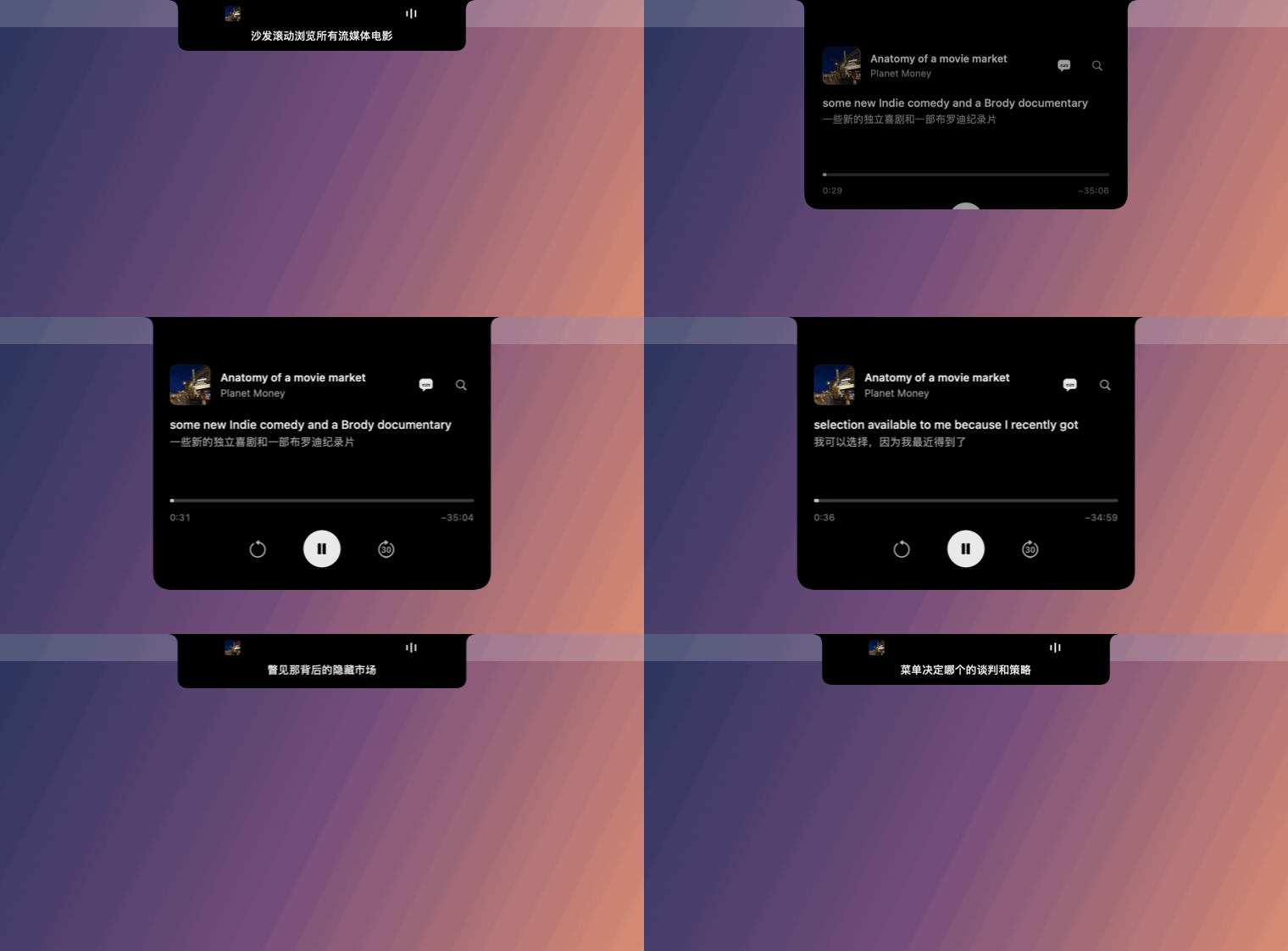
NotchPod: a caption under the tucked notch, then the player springing open with English and Chinese captions

Hover over the notch to listen; move away and it tucks back in while the audio keeps going. Turn on captions and NotchPod transcribes the episode on your Mac, a little ahead of the playhead, then translates it into your language. No window, no Dock icon, no account.

Install

One line (recommended; skips the unidentified-developer warning):

curl -fsSL https://raw.githubusercontent.com/jiatastic/NotchPod/main/scripts/install.sh | bash

Or drag and drop: download NotchPod.dmg, open it, and drag NotchPod into Applications. NotchPod isn't notarized yet, so on first launch go to System Settings → Privacy & Security → Open Anyway.

Requires an Apple Silicon Mac with a notch and macOS 14 or later (macOS 15 or later for translation). Macs without a notch get a menu-bar popover instead.

Features

  • Notch player. Hover to open, move away to tuck, with an interruptible spring animation. It never steals focus.
  • Bilingual captions. The original line sits on top and the translation underneath, Immersive Translate style. While the notch is tucked, one line hangs under the camera. Use the captions button to pick Off, Original or Bilingual, and the language to translate to.
  • On-device only. Apple's speech recognition and translation run locally. NotchPod has no accounts, analytics or API keys.
  • Sentence-aware rewind. With captions on, ⟲ jumps to the start of the sentence you missed.
  • One search field for episodes and shows from Apple's directory, plus any public RSS feed, including video.

⌘K search · Space play/pause · ⌘← back a sentence · ⌘→ forward 30s · Esc tuck

Build from source

git clone https://github.com/jiatastic/NotchPod.git && cd NotchPod
bash scripts/build-app.sh && open dist/NotchPod.app
bash scripts/e2e.sh    # end-to-end tests

No third-party dependencies. Architecture and design notes: docs/DEVELOPMENT.md. History: CHANGELOG.md.

Credits

Inspired by boring.notch, Immersive Translate and Language Reactor. Licensed under GPL-3.0.

captions
macos
notch
podcast
swiftui

jiatastic/NotchPod

A minimal podcast listener in your notch, with bilingual captions.

Swift

3

16 commits

updated Oct 19, 2026

See the code

See what people are saying

SourceMessageScoreDate

I turned MacBook's notch into a super tiny podcast player with live subtitles (r/SideProject)

The notch might be the most underutilized space on a MacBook. I listen to a lot of podcasts while working and I'm tired of using apple podcasts and spotify, so I made this little thing. The subtitles are transcribed on your Mac as you listen. It works a bit ahead of where you are, so the words show…

2

Oct 20, 2026

README

NotchPod
NotchPod

A minimal podcast listener in your notch, with bilingual captions.

macOS 14+ Swift 6 No dependencies On-device GPL-3.0

NotchPod: a caption under the tucked notch, then the player springing open with English and Chinese captions

Hover over the notch to listen; move away and it tucks back in while the audio keeps going. Turn on captions and NotchPod transcribes the episode on your Mac, a little ahead of the playhead, then translates it into your language. No window, no Dock icon, no account.

Install

One line (recommended; skips the unidentified-developer warning):

curl -fsSL https://raw.githubusercontent.com/jiatastic/NotchPod/main/scripts/install.sh | bash

Or drag and drop: download NotchPod.dmg, open it, and drag NotchPod into Applications. NotchPod isn't notarized yet, so on first launch go to System Settings → Privacy & Security → Open Anyway.

Requires an Apple Silicon Mac with a notch and macOS 14 or later (macOS 15 or later for translation). Macs without a notch get a menu-bar popover instead.

Features

  • Notch player. Hover to open, move away to tuck, with an interruptible spring animation. It never steals focus.
  • Bilingual captions. The original line sits on top and the translation underneath, Immersive Translate style. While the notch is tucked, one line hangs under the camera. Use the captions button to pick Off, Original or Bilingual, and the language to translate to.
  • On-device only. Apple's speech recognition and translation run locally. NotchPod has no accounts, analytics or API keys.
  • Sentence-aware rewind. With captions on, ⟲ jumps to the start of the sentence you missed.
  • One search field for episodes and shows from Apple's directory, plus any public RSS feed, including video.

⌘K search · Space play/pause · ⌘← back a sentence · ⌘→ forward 30s · Esc tuck

Build from source

git clone https://github.com/jiatastic/NotchPod.git && cd NotchPod
bash scripts/build-app.sh && open dist/NotchPod.app
bash scripts/e2e.sh    # end-to-end tests

No third-party dependencies. Architecture and design notes: docs/DEVELOPMENT.md. History: CHANGELOG.md.

Credits

Inspired by boring.notch, Immersive Translate and Language Reactor. Licensed under GPL-3.0.

captions
macos
notch
podcast
swiftui