Jianzong Wu
·
Hao Lian
·
Dachao Hao
·
Ye Tian
·
Qingyu Shi
·
Biaolong Chen
·
Hao Jiang
·
Yunhai Tong



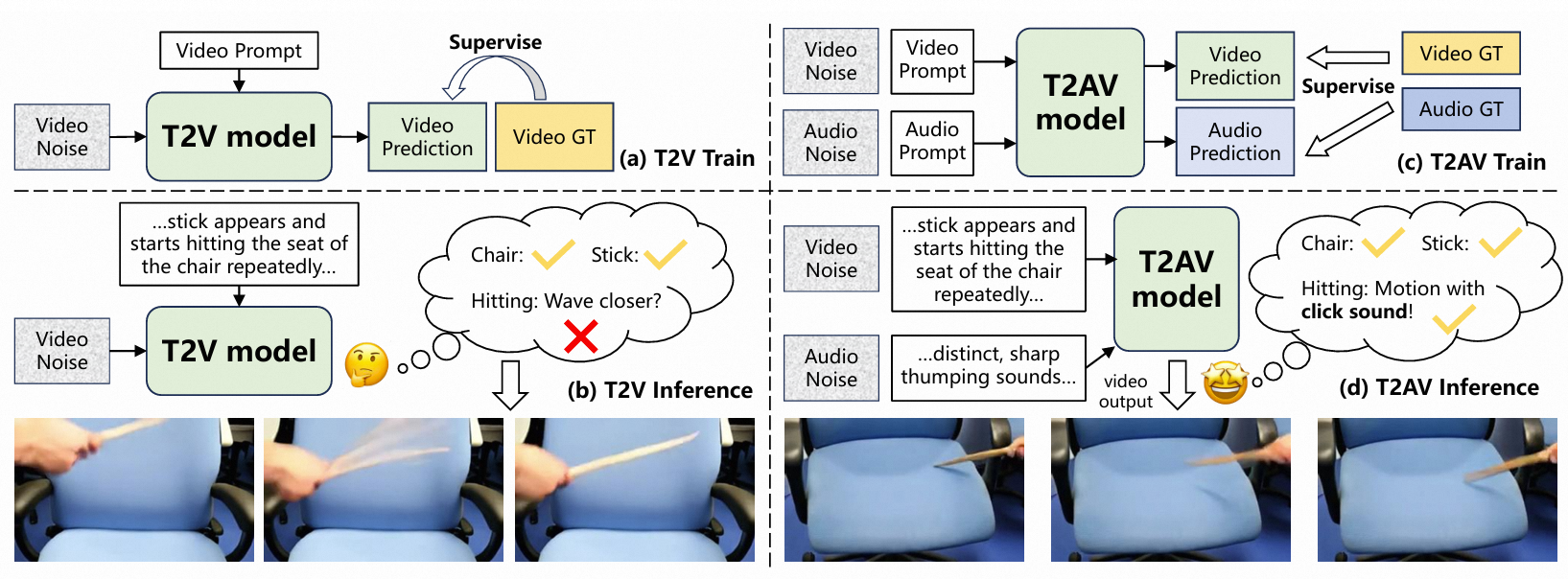
The Problem: T2V models often produce hallucinations, exaggerated motion, or "contact avoidance" (where objects don't actually touch) because they lack a grounding in physical laws. The Hypothesis: Audio is inherently causal (e.g., a thud implies a collision). Training on audio should regularize video dynamics. The Method: We propose AVFullDiT, a parameter-efficient framework that:
# Create a new environment with Conda
conda create -n t2av python=3.10
conda activate t2av

# Install pytorch
pip install torch==2.6.0 torchvision==0.21.0 torchaudio==2.6.0 --index-url https://download.pytorch.org/whl/cu118

# Install other dependencies
pip install -r requirements.txt
Download Wan2.2-TI2V-5B-Diffusers, flan-t5-large, and TangoFlux. Place them in the following way.
t2av
└── checkpoints
    └── Wan2.2-TI2V-5B-Diffusers
    └── TangoFlux
    └── flan-t5-large
In order to load the TangoFlux model in a Diffusers and local way, we make some modifications to the TangoFlux checkpoint.
First, modify the text_encoder_name in checkpoints/TangoFlux/config.json to checkpoints/flan-t5-large (Or if you wish to download the model online, you don't need to process this step).
Then,
cd checkpoints/TangoFlux
mkdir vae
mv vae.safetensors vae/diffusion_pytorch_model.safetensors
Please also copy the following config into checkpoints/TangoFlux/vae/config.json
{
    "_class_name": "AutoencoderOobleck",
    "_diffusers_version": "0.30.0.dev0",
    "audio_channels": 2,
    "channel_multiples": [
      1,
      2,
      4,
      8,
      16
    ],
    "decoder_channels": 128,
    "decoder_input_channels": 64,
    "downsampling_ratios": [
      2,
      4,
      4,
      8,
      8
    ],
    "encoder_hidden_size": 128,
    "sampling_rate": 44100
  }
Then, we need to prepare everything for evaluation. You need to download several checkpoints for all the metrics. If you don't want metris result, just set --metrics=False in the training script and skip to Dataset Preparation, or you need to download the following things and also place them in the ./checkpoint folder.
Download i3d model from flateon/FVD-I3D-torchscript and put it in checkpoints/evaluation/i3d_torchscript.pt
Download mert model from MERT-v1-330M and put it in checkpoints/evaluation/MERT-v1-330M
Download VideoPhy2 model from VideoPhy2 and put it in checkpoints/evaluation/videophy_2_auto
Download Clap model from Clap and put it in checkpoints/evaluation/clap-htsat-unfused
Download Clip model from Clip and put it in checkpoints/evaluation/ViT-B-32.pt
Download Synchformer model from Synchformer and put it in checkpoints/evaluation/synchformer
Note that there are also other checkpoints for evaluation that are downloaded automatically in the evaluation process (Keep an eye on your network! You may need manually download them if your network is issued.)
For VBench, VideoPhy, and Synchformer, we also need to clone their repos and make some modifications.
mkdir libs
cd libs
git clone https://github.com/Vchitect/VBench.git
Then add following code in "libs/VBench/vbench/__init__.py"
import sys
import os

local_lib_path = os.path.abspath("libs/VBench")

if local_lib_path not in sys.path:
    sys.path.append(local_lib_path)
Besides, due to the high version of Numpy, the following error may occur during runtime.
AttributeError: `np.sctypes` was removed in the NumPy 2.0 release. Access dtypes explicitly instead.
You can refer to the suggestions below to modify lines 45-47 of file [PATH_TO_YOUR_PYTHON_LIBS]/imgaug/imgaug.py.
# NP_FLOAT_TYPES = set(np.sctypes["float"])
# NP_INT_TYPES = set(np.sctypes["int"])
# NP_UINT_TYPES = set(np.sctypes["uint"])

NP_FLOAT_TYPES = {np.float16, np.float32, np.float64, np.longdouble}
NP_INT_TYPES = {np.int8, np.int16, np.int32, np.int64, np.longlong}
NP_UINT_TYPES = {np.uint8, np.uint16, np.uint32, np.uint64, np.ulonglong}
First, download its repo into the libs folder
cd libs
git clone https://github.com/Hritikbansal/videophy.git
Them, you should modify line 237 in libs/videophy/VIDEOPHY2/mplug_owl_video/configuration_mplug_owl.py
# from ..llama.configuration_llama import LlamaConfig
from transformers.models.llama.configuration_llama import LlamaConfig
Finally, because of a unknown bug, you should comment line 420 in libs/videophy/VIDEOPHY2/mplug_owl_video/modeling_mplug_owl.py
# _keep_in_fp32_modules = ["wo"]
First, download Synchformer repo following commands below:
cd libs
git clone https://github.com/v-iashin/Synchformer.git
Then, to avoid conficts between libs, you should modify the code according to the following suggestions:
# libs/Synchformer/scripts/train_utils.py
# from utils.utils import fix_prefix, get_obj_from_str, get_transform_instance_from_compose, instantiate_from_config, show_cfg_diffs
from ..utils.utils import fix_prefix, get_obj_from_str, get_transform_instance_from_compose, instantiate_from_config, show_cfg_diffs

# libs/Synchformer/model/sync_model.py
# from utils.utils import instantiate_from_config
# from model.modules.transformer import Block, Config
from ..utils.utils import instantiate_from_config
from ..model.modules.transformer import Block, Config

# libs/Synchformer/model/modules/transformer.py
# from utils.utils import instantiate_from_config
from ...utils.utils import instantiate_from_config

# libs/Synchformer/model/modules/feat_extractors/visual/motionformer.py
# from motionformer_src.video_model_builder import VisionTransformer
# from utils.utils import check_if_file_exists_else_download
from .motionformer_src.video_model_builder import VisionTransformer
from .....utils.utils import check_if_file_exists_else_download

# libs/Synchformer/model/modules/feat_extractors/visual/motionformer_src/video_model_builder.py
# from motionformer_src import vit_helper
from ..motionformer_src import vit_helper

# libs/Synchformer/model/modules/feat_extractors/audio/ast.py
# from model.modules.feat_extractors.visual.motionformer import (AveragePooling, BaseEncoderLayer,
#                                                                TemporalTransformerEncoderLayer)
# from utils.utils import check_if_file_exists_else_download
# from model.modules.feat_extractors.audio.hf_src.modeling_ast import ASTForAudioClassification, ASTConfig
from .....model.modules.feat_extractors.audio.hf_src.modeling_ast import ASTForAudioClassification, ASTConfig
from .....model.modules.feat_extractors.visual.motionformer import (AveragePooling, BaseEncoderLayer,
                                                               TemporalTransformerEncoderLayer)
from .....utils.utils import check_if_file_exists_else_download

# libs/Synchformer/dataset/dataset_utils.py
# from utils.utils import get_fixed_off_fname
from ..utils.utils import get_fixed_off_fname
Please download our curated ALT-Merge and VGGSound, unzip them, and put all the datasets to the ./data folder.
The data folder should be organized as follows:
data
  └── AVSync15X
    └── video
  └── Landscape
    └── xxx
  └── TheGreatestHits
    └── vis-data
  └── ALT_merge
    └── metadata_train.csv
    └── metadata_eval.csv
  └── VGGSound
    └── metadata_train.csv
    └── metadata_eval.csv
You can train on our provided datasets to compare T2AV and T2V. Generation and evaluation are automatically done each evaluation_interval steps (You can adjust this value in corresponding config files).
We train all the experiments using Accelerate and DeepSpeed. For the ALT-Merge dataset, we use 8 GPUs with a total batchsize of 8.
T2AV:
accelerate launch \
  --num_processes 8 \
  --deepspeed_config_file configs/deepspeed_stage2.json \
  -m scripts.train.train \
    --config_path configs/alt_merge/t2av.yaml
T2V:
accelerate launch \
  --num_processes 8 \
  --deepspeed_config_file configs/deepspeed_stage2.json \
  -m scripts.train.train \
    --config_path configs/alt_merge/t2v.yaml
For the VGGSound dataset, we use 32 GPUs with a total batchsize of 32
T2AV:
accelerate launch \
  --num_processes 32 \
  --deepspeed_config_file configs/deepspeed_stage2.json \
  -m scripts.train.train \
    --config_path configs/vggsound/t2av.yaml
T2V:
accelerate launch \
  --num_processes 32 \
  --deepspeed_config_file configs/deepspeed_stage2.json \
  -m scripts.train.train \
    --config_path configs/vggsound/t2v.yaml
Jianzong Wu (吴健宗): [email protected]
@article{wu2025doeshearinghelpseeing,
      title={Does Hearing Help Seeing? Investigating Audio-Video Joint Denoising for Video Generation},
      author={Jianzong Wu and Hao Lian and Dachao Hao and Ye Tian and Qingyu Shi and Biaolong Chen and Hao Jiang},
      journal={arXiv preprint arXiv:2512.02457},
      year={2025},
}
722 followers · starred Jan 2026
102 followers · starred Dec 2025
Jianzong Wu
·
Hao Lian
·
Dachao Hao
·
Ye Tian
·
Qingyu Shi
·
Biaolong Chen
·
Hao Jiang
·
Yunhai Tong
The Problem: T2V models often produce hallucinations, exaggerated motion, or "contact avoidance" (where objects don't actually touch) because they lack a grounding in physical laws. The Hypothesis: Audio is inherently causal (e.g., a thud implies a collision). Training on audio should regularize video dynamics. The Method: We propose AVFullDiT, a parameter-efficient framework that:
# Create a new environment with Conda
conda create -n t2av python=3.10
conda activate t2av

# Install pytorch
pip install torch==2.6.0 torchvision==0.21.0 torchaudio==2.6.0 --index-url https://download.pytorch.org/whl/cu118

# Install other dependencies
pip install -r requirements.txt
Download Wan2.2-TI2V-5B-Diffusers, flan-t5-large, and TangoFlux. Place them in the following way.
t2av
└── checkpoints
    └── Wan2.2-TI2V-5B-Diffusers
    └── TangoFlux
    └── flan-t5-large
In order to load the TangoFlux model in a Diffusers and local way, we make some modifications to the TangoFlux checkpoint.
First, modify the text_encoder_name in checkpoints/TangoFlux/config.json to checkpoints/flan-t5-large (Or if you wish to download the model online, you don't need to process this step).
Then,
cd checkpoints/TangoFlux
mkdir vae
mv vae.safetensors vae/diffusion_pytorch_model.safetensors
Please also copy the following config into checkpoints/TangoFlux/vae/config.json
{
    "_class_name": "AutoencoderOobleck",
    "_diffusers_version": "0.30.0.dev0",
    "audio_channels": 2,
    "channel_multiples": [
      1,
      2,
      4,
      8,
      16
    ],
    "decoder_channels": 128,
    "decoder_input_channels": 64,
    "downsampling_ratios": [
      2,
      4,
      4,
      8,
      8
    ],
    "encoder_hidden_size": 128,
    "sampling_rate": 44100
  }
Then, we need to prepare everything for evaluation. You need to download several checkpoints for all the metrics. If you don't want metris result, just set --metrics=False in the training script and skip to Dataset Preparation, or you need to download the following things and also place them in the ./checkpoint folder.
Download i3d model from flateon/FVD-I3D-torchscript and put it in checkpoints/evaluation/i3d_torchscript.pt
Download mert model from MERT-v1-330M and put it in checkpoints/evaluation/MERT-v1-330M
Download VideoPhy2 model from VideoPhy2 and put it in checkpoints/evaluation/videophy_2_auto
Download Clap model from Clap and put it in checkpoints/evaluation/clap-htsat-unfused
Download Clip model from Clip and put it in checkpoints/evaluation/ViT-B-32.pt
Download Synchformer model from Synchformer and put it in checkpoints/evaluation/synchformer
Note that there are also other checkpoints for evaluation that are downloaded automatically in the evaluation process (Keep an eye on your network! You may need manually download them if your network is issued.)
For VBench, VideoPhy, and Synchformer, we also need to clone their repos and make some modifications.
mkdir libs
cd libs
git clone https://github.com/Vchitect/VBench.git
Then add following code in "libs/VBench/vbench/__init__.py"
import sys
import os

local_lib_path = os.path.abspath("libs/VBench")

if local_lib_path not in sys.path:
    sys.path.append(local_lib_path)
Besides, due to the high version of Numpy, the following error may occur during runtime.
AttributeError: `np.sctypes` was removed in the NumPy 2.0 release. Access dtypes explicitly instead.
You can refer to the suggestions below to modify lines 45-47 of file [PATH_TO_YOUR_PYTHON_LIBS]/imgaug/imgaug.py.
# NP_FLOAT_TYPES = set(np.sctypes["float"])
# NP_INT_TYPES = set(np.sctypes["int"])
# NP_UINT_TYPES = set(np.sctypes["uint"])

NP_FLOAT_TYPES = {np.float16, np.float32, np.float64, np.longdouble}
NP_INT_TYPES = {np.int8, np.int16, np.int32, np.int64, np.longlong}
NP_UINT_TYPES = {np.uint8, np.uint16, np.uint32, np.uint64, np.ulonglong}
First, download its repo into the libs folder
cd libs
git clone https://github.com/Hritikbansal/videophy.git
Them, you should modify line 237 in libs/videophy/VIDEOPHY2/mplug_owl_video/configuration_mplug_owl.py
# from ..llama.configuration_llama import LlamaConfig
from transformers.models.llama.configuration_llama import LlamaConfig
Finally, because of a unknown bug, you should comment line 420 in libs/videophy/VIDEOPHY2/mplug_owl_video/modeling_mplug_owl.py
# _keep_in_fp32_modules = ["wo"]
First, download Synchformer repo following commands below:
cd libs
git clone https://github.com/v-iashin/Synchformer.git
Then, to avoid conficts between libs, you should modify the code according to the following suggestions:
# libs/Synchformer/scripts/train_utils.py
# from utils.utils import fix_prefix, get_obj_from_str, get_transform_instance_from_compose, instantiate_from_config, show_cfg_diffs
from ..utils.utils import fix_prefix, get_obj_from_str, get_transform_instance_from_compose, instantiate_from_config, show_cfg_diffs

# libs/Synchformer/model/sync_model.py
# from utils.utils import instantiate_from_config
# from model.modules.transformer import Block, Config
from ..utils.utils import instantiate_from_config
from ..model.modules.transformer import Block, Config

# libs/Synchformer/model/modules/transformer.py
# from utils.utils import instantiate_from_config
from ...utils.utils import instantiate_from_config

# libs/Synchformer/model/modules/feat_extractors/visual/motionformer.py
# from motionformer_src.video_model_builder import VisionTransformer
# from utils.utils import check_if_file_exists_else_download
from .motionformer_src.video_model_builder import VisionTransformer
from .....utils.utils import check_if_file_exists_else_download

# libs/Synchformer/model/modules/feat_extractors/visual/motionformer_src/video_model_builder.py
# from motionformer_src import vit_helper
from ..motionformer_src import vit_helper

# libs/Synchformer/model/modules/feat_extractors/audio/ast.py
# from model.modules.feat_extractors.visual.motionformer import (AveragePooling, BaseEncoderLayer,
#                                                                TemporalTransformerEncoderLayer)
# from utils.utils import check_if_file_exists_else_download
# from model.modules.feat_extractors.audio.hf_src.modeling_ast import ASTForAudioClassification, ASTConfig
from .....model.modules.feat_extractors.audio.hf_src.modeling_ast import ASTForAudioClassification, ASTConfig
from .....model.modules.feat_extractors.visual.motionformer import (AveragePooling, BaseEncoderLayer,
                                                               TemporalTransformerEncoderLayer)
from .....utils.utils import check_if_file_exists_else_download

# libs/Synchformer/dataset/dataset_utils.py
# from utils.utils import get_fixed_off_fname
from ..utils.utils import get_fixed_off_fname
Please download our curated ALT-Merge and VGGSound, unzip them, and put all the datasets to the ./data folder.
The data folder should be organized as follows:
data
  └── AVSync15X
    └── video
  └── Landscape
    └── xxx
  └── TheGreatestHits
    └── vis-data
  └── ALT_merge
    └── metadata_train.csv
    └── metadata_eval.csv
  └── VGGSound
    └── metadata_train.csv
    └── metadata_eval.csv
You can train on our provided datasets to compare T2AV and T2V. Generation and evaluation are automatically done each evaluation_interval steps (You can adjust this value in corresponding config files).
We train all the experiments using Accelerate and DeepSpeed. For the ALT-Merge dataset, we use 8 GPUs with a total batchsize of 8.
T2AV:
accelerate launch \
  --num_processes 8 \
  --deepspeed_config_file configs/deepspeed_stage2.json \
  -m scripts.train.train \
    --config_path configs/alt_merge/t2av.yaml
T2V:
accelerate launch \
  --num_processes 8 \
  --deepspeed_config_file configs/deepspeed_stage2.json \
  -m scripts.train.train \
    --config_path configs/alt_merge/t2v.yaml
For the VGGSound dataset, we use 32 GPUs with a total batchsize of 32
T2AV:
accelerate launch \
  --num_processes 32 \
  --deepspeed_config_file configs/deepspeed_stage2.json \
  -m scripts.train.train \
    --config_path configs/vggsound/t2av.yaml
T2V:
accelerate launch \
  --num_processes 32 \
  --deepspeed_config_file configs/deepspeed_stage2.json \
  -m scripts.train.train \
    --config_path configs/vggsound/t2v.yaml
Jianzong Wu (吴健宗): [email protected]
@article{wu2025doeshearinghelpseeing,
      title={Does Hearing Help Seeing? Investigating Audio-Video Joint Denoising for Video Generation},
      author={Jianzong Wu and Hao Lian and Dachao Hao and Ye Tian and Qingyu Shi and Biaolong Chen and Hao Jiang},
      journal={arXiv preprint arXiv:2512.02457},
      year={2025},
}
722 followers · starred Jan 2026
102 followers · starred Dec 2025