The chat decision assistant: before you reply, Jev reads the chat, judges intent and risk, and drafts replies you fill in with one tap. You press send. Android · Windows · macOS · iOS | 聊天辅助决策工具:先看懂对方再回复,发不发由你。
See the code
Read them first, then reply. Before you answer, Jev works out what the other person really means, how risky the moment is and how to respond, then drafts replies you can fill in with one tap. Whether to send is always up to you.


English | 简体中文 | Tiếng Việt | Releases
Download · Products · How It Works · Privacy · Community
 | Thanks to Bocha for sponsoring this project! Bocha is a search engine for AI, giving your applications access to information from across the web with clean, accurate, high-quality results. Its services include the Web Search API, Bocha Jev API, and other search and model APIs. open.bocha.cn |
 | Thanks to Xiaoyou Store for sponsoring this project! Xiaoyou Store sells digital products and account services, with a selection available to users of this project. Visit the store. |
 | Thanks to Vytal for sponsoring this project! Vytal is an AI video workflow platform with reusable workflows for batch production, making video creation more accessible to content creators, training providers, and small teams. Visit Vytal. |
When a message lands, the hard part is not typing. It is working out what the other person really means: are they upset, testing you, or just chatting? Most AI tools skip that step and go straight to writing a reply.
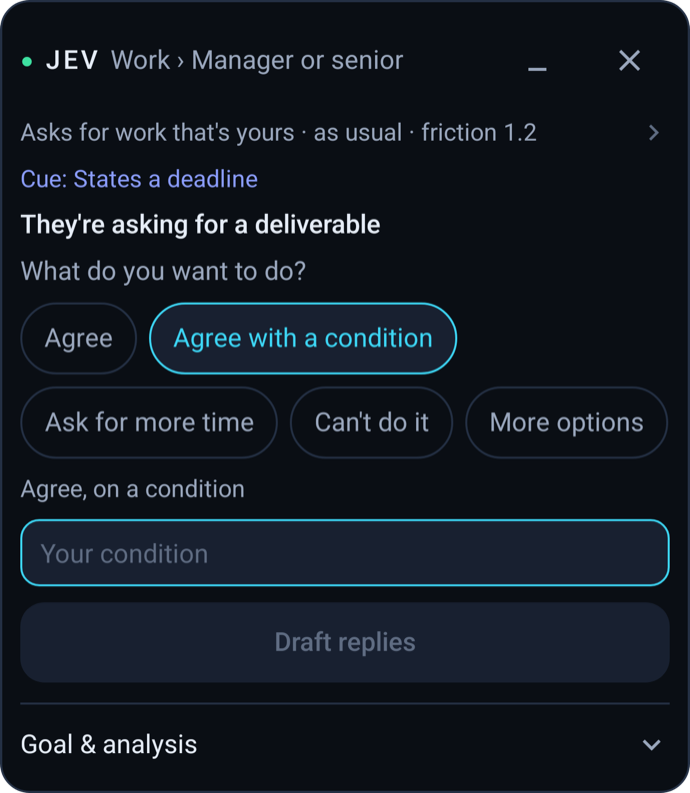
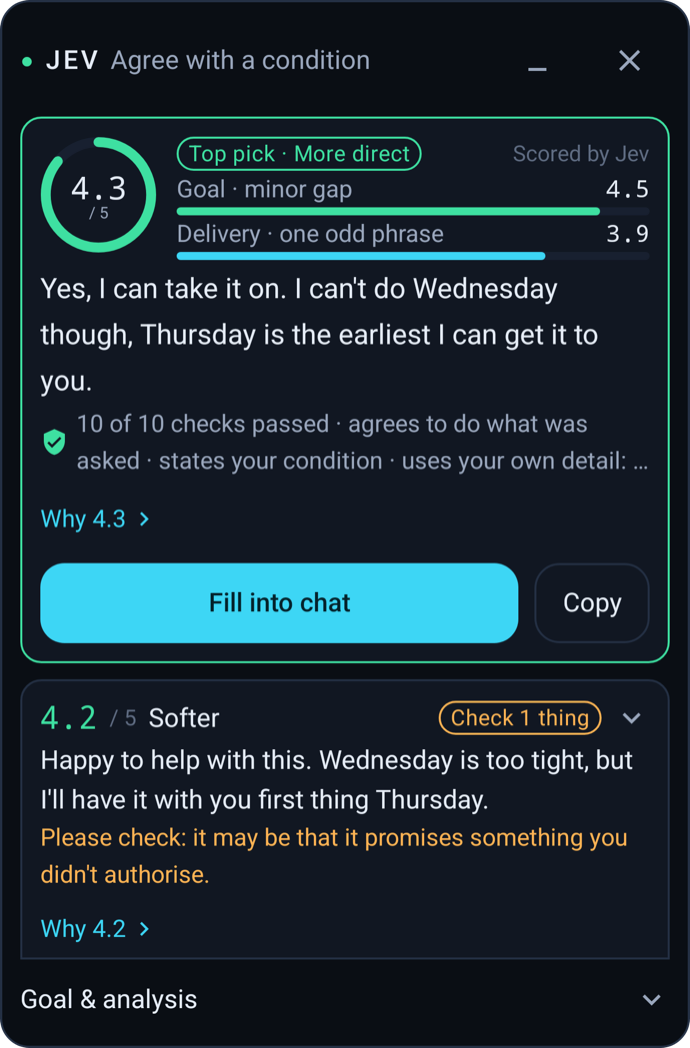
jev-chat judges first. Its Jev judgment model reads the conversation and works out the other person's intent, the risk in the moment and the best way to respond. Only then does it draft replies, and it fills the one you pick into the message box.
| Platform | Product | How you use it | Status |
|---|---|---|---|
| Android | Jev for WhatsApp (global edition) | Overlay on WhatsApp chats in English | Preview v0.1.0 |
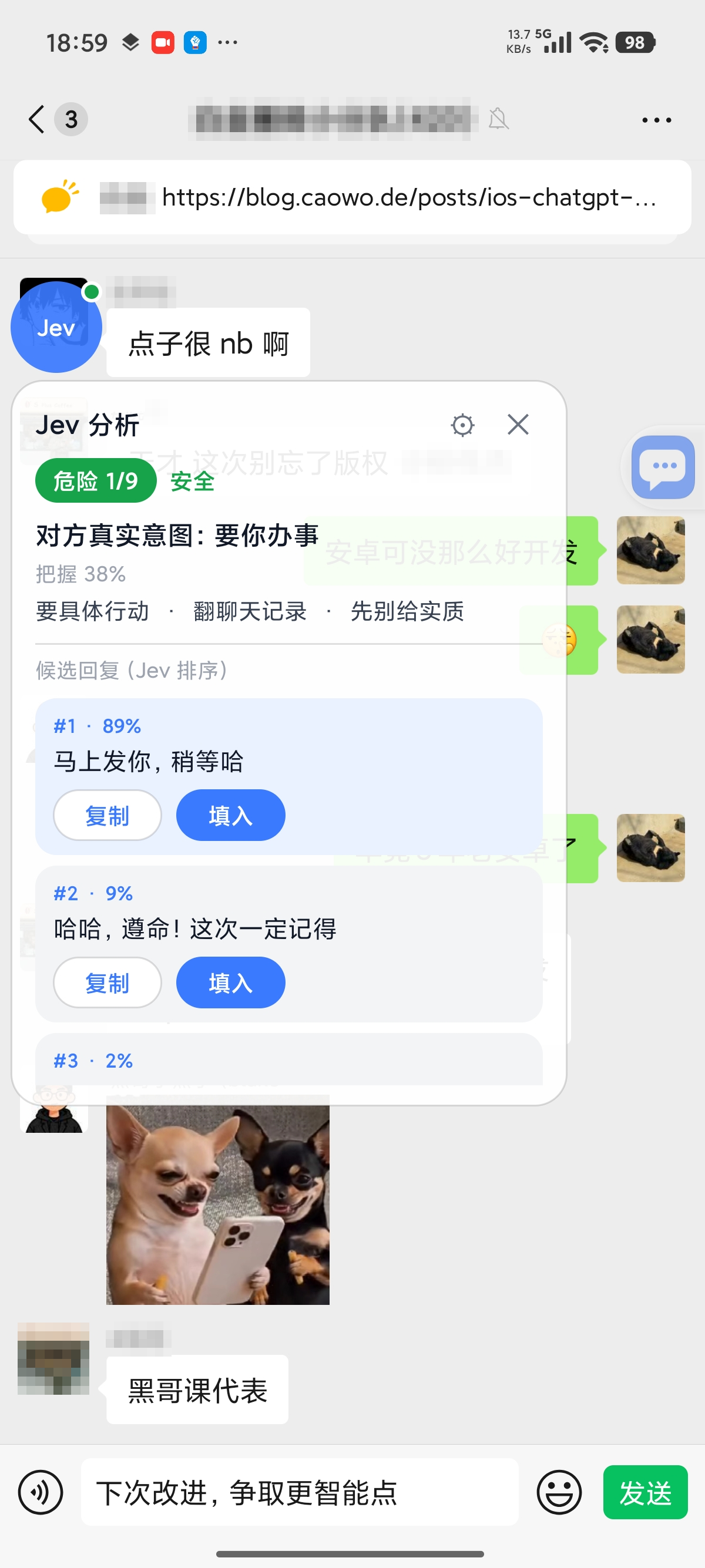
| Android | Jev Chat Assistant (Chinese edition) | Overlay on QQ, Feishu, X and WhatsApp | v1.7 |
| Windows | Jev for Windows | Sits beside your chat window and reads it with screenshots and on-device OCR | Released |
| macOS | Jev for macOS | Overlay that reads the chat on screen and judges with a local model | Released (Apple Silicon) |
| iOS | Jev Keyboard | A custom keyboard: copy a message and see intent, risk and replies on the keyboard | Source only, build it yourself |
Both Android editions live in this repository. The other platforms have their own repositories.
| Global edition · analysis | Global edition · scored replies | Chinese edition · overlay |
|---|---|---|
 |  |  |
| Global edition | Chinese edition | |
|---|---|---|
| For | Chats in English on WhatsApp | Chats in Chinese on QQ, Feishu, X and WhatsApp |
| Download | jev-whatsapp-v0.1.0-release.apk | jev-assistant-v1.7-release.apk |
| Guide | Global edition README | Chinese edition README |
Both can be installed on the same phone. After installing, open the app and follow its guide to turn on the accessibility service and the overlay permission. The global edition is built by @smgonthebeat.
Download the latest version from the Releases page. See the project README for setup.
Download the latest version from the Releases page. Apple Silicon only. See the project README for setup.
There is no App Store build yet. Build the keyboard from source with Xcode.
Use at your own risk: Using Jev inside third-party apps such as QQ, Feishu, X, or WhatsApp may not comply with those apps' terms of service, and your account could be restricted or banned. Decide for yourself whether to use it.
Please get in touch by messaging the WeChat official account. Use it for partnerships, sponsorships or feedback. Messages sent elsewhere may be missed.

We'd love to hear what you actually need. Which chat app would you most like to use Jev with? What should it pick up on, how should it alert you, and what should it never touch? Send your thoughts to the official account.
Copyright © 2026 Finderchangchang and the jev-chat contributors. The code is available under the MIT License. See also NOTICE. Contributors are listed in CONTRIBUTORS.
Based on Jev Chat Assistant (https://github.com/jev-chat/jev-chat-jarvis).Disclaimer: This project only processes conversations on your own device that you are authorized to view. Follow the terms of service of QQ, X, Feishu, WhatsApp, and any other apps you use, as well as applicable local laws and regulations. The authors accept no responsibility for the consequences of its use.
(top 24 of 25)
581 followers · starred Sep 2026
24,818 followers · starred Sep 2026
416 followers · starred Sep 2026
5,122 followers · starred Sep 2026
The chat decision assistant: before you reply, Jev reads the chat, judges intent and risk, and drafts replies you fill in with one tap. You press send. Android · Windows · macOS · iOS | 聊天辅助决策工具:先看懂对方再回复,发不发由你。
See the code
Read them first, then reply. Before you answer, Jev works out what the other person really means, how risky the moment is and how to respond, then drafts replies you can fill in with one tap. Whether to send is always up to you.
English | 简体中文 | Tiếng Việt | Releases
Download · Products · How It Works · Privacy · Community
| Thanks to Bocha for sponsoring this project! Bocha is a search engine for AI, giving your applications access to information from across the web with clean, accurate, high-quality results. Its services include the Web Search API, Bocha Jev API, and other search and model APIs. open.bocha.cn |
| Thanks to Xiaoyou Store for sponsoring this project! Xiaoyou Store sells digital products and account services, with a selection available to users of this project. Visit the store. |
| Thanks to Vytal for sponsoring this project! Vytal is an AI video workflow platform with reusable workflows for batch production, making video creation more accessible to content creators, training providers, and small teams. Visit Vytal. |
When a message lands, the hard part is not typing. It is working out what the other person really means: are they upset, testing you, or just chatting? Most AI tools skip that step and go straight to writing a reply.
jev-chat judges first. Its Jev judgment model reads the conversation and works out the other person's intent, the risk in the moment and the best way to respond. Only then does it draft replies, and it fills the one you pick into the message box.
| Platform | Product | How you use it | Status |
|---|---|---|---|
| Android | Jev for WhatsApp (global edition) | Overlay on WhatsApp chats in English | Preview v0.1.0 |
| Android | Jev Chat Assistant (Chinese edition) | Overlay on QQ, Feishu, X and WhatsApp | v1.7 |
| Windows | Jev for Windows | Sits beside your chat window and reads it with screenshots and on-device OCR | Released |
| macOS | Jev for macOS | Overlay that reads the chat on screen and judges with a local model | Released (Apple Silicon) |
| iOS | Jev Keyboard | A custom keyboard: copy a message and see intent, risk and replies on the keyboard | Source only, build it yourself |
Both Android editions live in this repository. The other platforms have their own repositories.
| Global edition · analysis | Global edition · scored replies | Chinese edition · overlay |
|---|---|---|
| | |
| Global edition | Chinese edition | |
|---|---|---|
| For | Chats in English on WhatsApp | Chats in Chinese on QQ, Feishu, X and WhatsApp |
| Download | jev-whatsapp-v0.1.0-release.apk | jev-assistant-v1.7-release.apk |
| Guide | Global edition README | Chinese edition README |
Both can be installed on the same phone. After installing, open the app and follow its guide to turn on the accessibility service and the overlay permission. The global edition is built by @smgonthebeat.
Download the latest version from the Releases page. See the project README for setup.
Download the latest version from the Releases page. Apple Silicon only. See the project README for setup.
There is no App Store build yet. Build the keyboard from source with Xcode.
Use at your own risk: Using Jev inside third-party apps such as QQ, Feishu, X, or WhatsApp may not comply with those apps' terms of service, and your account could be restricted or banned. Decide for yourself whether to use it.
Please get in touch by messaging the WeChat official account. Use it for partnerships, sponsorships or feedback. Messages sent elsewhere may be missed.
We'd love to hear what you actually need. Which chat app would you most like to use Jev with? What should it pick up on, how should it alert you, and what should it never touch? Send your thoughts to the official account.
Copyright © 2026 Finderchangchang and the jev-chat contributors. The code is available under the MIT License. See also NOTICE. Contributors are listed in CONTRIBUTORS.
Based on Jev Chat Assistant (https://github.com/jev-chat/jev-chat-jarvis).Disclaimer: This project only processes conversations on your own device that you are authorized to view. Follow the terms of service of QQ, X, Feishu, WhatsApp, and any other apps you use, as well as applicable local laws and regulations. The authors accept no responsibility for the consequences of its use.
(top 24 of 25)
581 followers · starred Sep 2026
24,818 followers · starred Sep 2026
416 followers · starred Sep 2026
5,122 followers · starred Sep 2026