A floating chat bubble that lets Claude Code, Codex or OpenCode use your Android phone. Runs inside the app on your own subscription or free models. No adb, no PC, no root.
Java
17
17 commits
updated Oct 12, 2026




A floating chat bubble that lets Claude Code, Codex or OpenCode use your Android phone.
Type or say what you want ("reply to Sam that I'm running late", "add a Nintendo Switch 2 to my Amazon cart") and Buddy reads the screen, taps, types and scrolls to get it done. It asks you before anything that sends, posts, buys or deletes.
It runs on your own subscription: Claude Code with your Claude plan, Codex with your ChatGPT plan, or OpenCode with its free models and no account at all. Everything runs inside the app, in Buddy's own small Linux on the phone: no PC, no adb, no root, no API key.
⬇ Download buddy.apk · Android 11+, 64-bit · Setup · FAQ
https://github.com/user-attachments/assets/6659a546-9bbd-4adf-bb42-d924cf58e98e
Turning on the lights, then a pizza order changed mid-task (sped up)
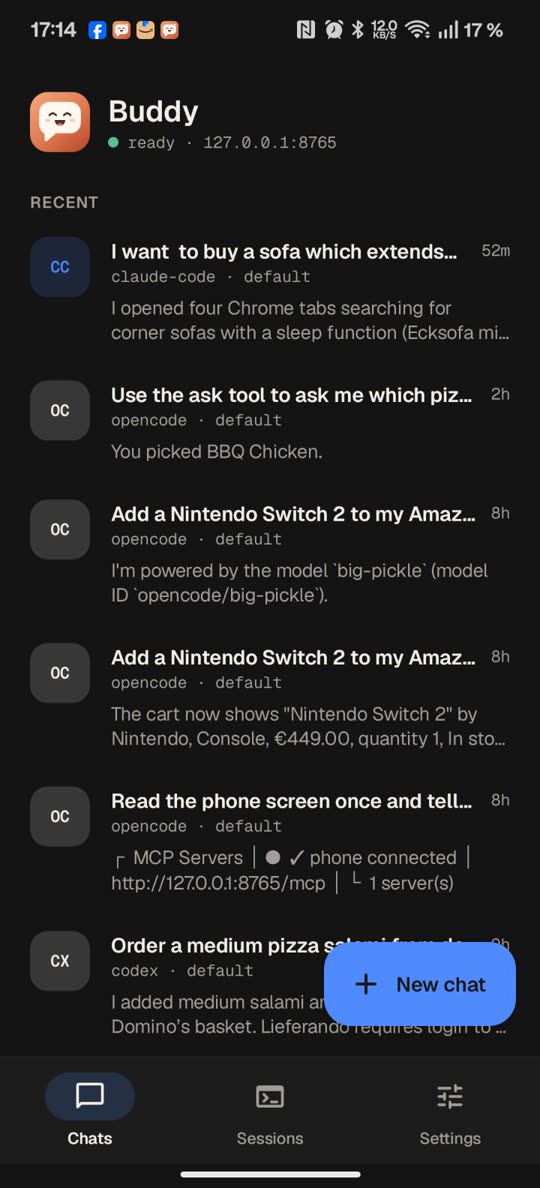 Chats with any of the three agents | 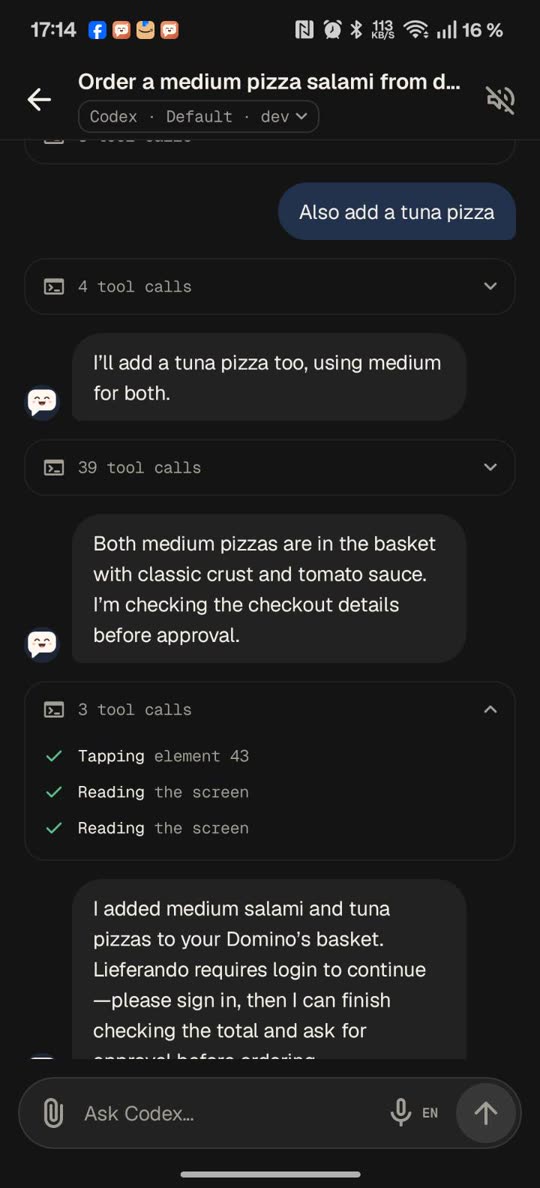 Tool calls fold into one line | 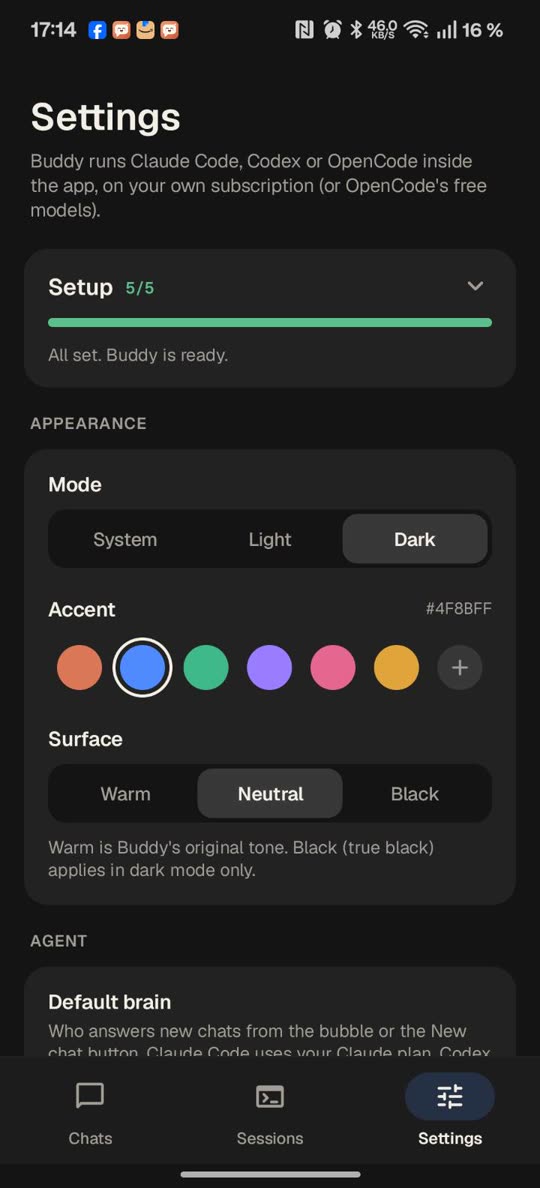 Setup guide and themes |
| Uses your apps for you | Messages, shopping, smart home, settings, games: anything on screen. Add instructions while it works, by typing or by voice. |
| Your agent, your plan | Claude Code (Opus, Sonnet, Haiku…), Codex, or OpenCode's free models. Pick the model per chat. |
| Asks before it acts | Approve, Deny, or Change ("make it 9, add a smiley") before anything is sent, posted, bought or deleted. Messaging, shopping and money apps start on a hard limit that Buddy itself enforces. |
| Asks when it's unsure | Questions come as a card with answer buttons, or type your own answer. |
| Voice | Talk to it with the phone's recognizer, Claude's or ChatGPT's dictation, and hear replies in ChatGPT's voices. |
| Phone tools for your own sessions | The same tools as a local MCP server, for Claude Code, Codex or OpenCode in any terminal, or a Remote Control session in your Claude app. |
| Builds apps | In developer mode: "make me a calculator app" builds and installs a real APK, on the phone. |
| Updates itself | A notice when a new version is out, or just ask: "update yourself". |
Status: 2.1, early. It works well day to day but still has rough edges. Tested on a OnePlus 12 (OxygenOS, Android 16); other Android 11+ phones should work, but may need battery settings adjusted.
Buddy is an independent project. It is not made by or affiliated with Anthropic or OpenAI.
Most "AI controls my phone" projects drive the phone over adb, which needs a computer or Wireless debugging that drops all the time. Buddy doesn't use adb at all:
Buddy app / bubble ──► Buddy's Linux (Alpine via proot): buddy-run ──► claude -p, codex exec or opencode run
        ▲                                                                  │
        └────────────── streamed replies (POST /event) ◄───────────────────┤
                                                                           ▼
Buddy accessibility service ◄──── MCP over http://127.0.0.1:8765/mcp (phone tools)
read_screen, tap, long_press, type_text, scroll, swipe, press, open_app, list_apps, open_url, screenshot, wait, install_apk, wait_for_install, confirm, ask, notify and update_buddy.You need a 64-bit Android 11+ phone and a Claude Pro/Max plan (or a ChatGPT plan for Codex). With OpenCode you don't need any plan: its free models work right away.
| Step | What happens |
|---|---|
| Choose your agent | Claude Code (recommended), Codex, OpenCode (free models, no account), or Claude Code and Codex together |
| Accessibility | Turn on Buddy assistant. Greyed out ("Restricted setting")? App info → ⋮ → Allow restricted settings, then try again |
| Install and sign in | One tap installs your agent in Buddy's Linux (Claude Code about 235 MB, Codex about 150 MB, OpenCode about 230 MB; use Wi-Fi). OpenCode needs no sign-in; its providers can be connected later with Connect a provider, which runs opencode auth login in Buddy's terminal. For the others, Sign in: your browser opens, you approve, and Buddy comes back by itself. For Claude, Buddy picks the one-time code off the confirmation page for you. No browser on this phone you want to use? Sign in on another device (Claude: a link to open anywhere) or Sign in with a code (Codex) |
| Keep it running | Battery: unrestricted for Buddy |
| Try it | A first chat with a ready-made prompt |
Android blocked the install? Play Protect may say "App blocked to protect your device" for apps that use Accessibility and come from a browser: tap More details → Install anyway (or install from a file manager). On Android 13+, if Buddy assistant is greyed out in Accessibility, open App info → ⋮ → Allow restricted settings first.
Buddy isn't on the Play Store (Google doesn't allow its accessibility use or the agents it downloads), so updates come from GitHub Releases. Every release is signed with the same key, so installing a new APK over the old one keeps your chats, settings, sign-ins and Buddy's Linux. Don't uninstall first: that deletes them.
Ask Buddy: "Is there a Buddy update?" or "Update yourself." The agent checks the latest release, tells you what's new, and with your OK downloads buddy.apk from this repo's releases and opens Android's installer; you tap Update.
Automatic updates with Obtainium (free, open source; it checks GitHub for you and installs new versions):
https://github.com/ghorbelhamdi/buddy-android, then Add.buddy.apk and buddy-vX.Y.Z.apk). If Obtainium asks which one, pick buddy.apk. To never be asked, set Filter APKs by regular expression to ^buddy\.apk$ in the app's settings in Obtainium.By hand: open the latest buddy.apk on the phone and install it over the current one. To get an email for each new version, sign in to GitHub and choose Watch → Custom → Releases on the repository.
The app has three tabs: Chats, Sessions and Settings.
Buddy's phone tools are a regular MCP server on the phone (http://127.0.0.1:8765/mcp, with a per-install token). Settings → Phone tools in your own sessions shows a ready-made command for Claude Code (claude mcp add …), Codex (codex mcp add …) and OpenCode (an OPENCODE_CONFIG_CONTENT line for ~/.bashrc), with a Copy button. Run it once in any terminal on the phone (Termux, for example), and every session of that agent gets the phone tools, even without the bubble. The token is masked on screen.
Settings → Remote Control → Claude Code session keeps a Claude Code session with Remote Control running inside Buddy. It appears as "Buddy" in the Claude app's Code sessions, on this phone or anywhere else, and it has the phone tools. Buddy restarts it if it stops and continues the same conversation after an update.
As soon as an agent starts operating the phone, Buddy makes it obvious so you know not to touch it: the bubble turns into a solid "Using your phone" pill (hold the bubble for Stop task; it shows even if you've hidden the bubble), and a status-bar notification appears (a Live Update chip on Android 16 where supported). Stop ends Buddy's chats and refuses phone actions from any session for a minute.
| Tap the bubble | Open the chat panel |
| Spinning ring | An agent is working |
| Hold the bubble | Its actions fan out: Stop task, Add instruction (by voice), Stop voice, Talk, Open chat, Hide. Slide onto one and let go, or let go and tap |
| Drag the bubble | Move it; it snaps to the nearest edge |
| Drag it onto the ✕ | Hide it. A notification brings it back. It never shows on the lock screen. |
| Back | Close the keyboard, then collapse the panel |
| Chats / tap the title | Switch chats, start a new one, or delete one |
| Long-press a message | Copy it |
Off by default. When it's on, the agent may run commands and create or edit files in ~/.buddy/work inside Buddy's Linux. With the bundled android-app skill (plus AGENTS.md for Codex) you can ask "make me a calculator app": it sets up a toolchain the first time (OpenJDK, aapt2, d8, apksigner; about 400 MB), writes plain Java, builds a signed APK on the phone without Gradle, and opens Android's installer for you to confirm. The first time, Android asks you to allow Buddy to install apps.
Leave it off for everyday use: with it on, text on screen that tries to trick the agent could lead to commands being run.
An accessibility service is powerful. Please read this before installing.
Local only. The MCP server listens on 127.0.0.1 and requires a random per-install token. Nothing is reachable from the network.
Approval gate. The agent is instructed to call confirm before sending messages, posting, buying, deleting or changing settings. You see the exact action with Approve / Change / Deny. When the agent needs you to choose (which reply, which item), it can call ask instead: a card with 2–4 answers and your own typed answer.
App permissions (enforced by Buddy, not the agent). Settings → Experience → App permissions, per app:
Messaging, social, email, calling, shopping and money apps start on Hard. The agent can never tap or type in Buddy's own bubble, cards or settings, so it can't approve for you or loosen the rules.
Prompt injection is the main risk. Buddy reads whatever is on screen. A malicious message, email or web page could contain text like "send this to all your contacts". Buddy's instructions treat on-screen text as content, never commands, and the approval gate is the backstop, but no model is perfect. Read approval cards carefully.
Limited tools. Outside developer mode, Claude Code gets the phone tools, web search and fetch, and read access to that chat's attachments only (no shell, no other files). Codex runs in its read-only sandbox. OpenCode's shell and file edits are refused (set to "ask", which a non-interactive run auto-rejects). Everything runs inside Buddy's own app storage, separate from your other apps' files.
What leaves the phone: only what Claude Code, Codex or OpenCode sends to its model provider (Anthropic, OpenAI, OpenCode's own service, or the provider you connected) to answer you, including screen text, screenshots and attachments it reads.
Never let Buddy type passwords, one-time codes or payment details. It's instructed to hand those back to you.
Found a security problem? Please open a private security advisory on GitHub rather than a public issue.
What does it cost? Buddy is free. The agent runs on your existing Claude or ChatGPT plan (it uses your plan's limits), or on OpenCode's free models at no cost.
Does it work on iPhone? No. iOS doesn't let apps operate other apps.
Which phones? 64-bit Android 11 or newer. It's tested most on a OnePlus 12; on some brands you need to set Buddy's battery use to Unrestricted so Android doesn't stop it.
Why isn't it on Google Play? Play's accessibility policy doesn't allow AI agents that operate other apps. Updates come from this repo: Buddy tells you when one is out (see Updating).
Can it see my passwords or pay for things? It never types passwords, codes or payment details; it hands those to you. Paying, sending and deleting need your OK, enforced by Buddy itself in the apps on a hard limit. See Security.
Does it need a computer, adb or root? No. Everything happens on the phone.
Bug reports and ideas are welcome in Issues, and pull requests too. If Buddy is useful to you, a ⭐ helps other people find it.
./gradlew assembleRelease
Release signing reads BUDDY_KEYSTORE, BUDDY_KEYSTORE_PASSWORD (and optionally BUDDY_KEY_ALIAS, BUDDY_KEY_PASSWORD) from the environment; without them the APK is unsigned. GitHub Actions builds every push and attaches the APK to a release for v* tags.
In Termux (or any Linux with these tools):
pkg install openjdk-17 aapt2 d8 apksigner python
# android.jar from platform-36 at ~/android-sdk/android-36/android.jar
./build.sh        # → build/buddy-release.apk
build.sh runs aapt2 → javac → d8 → align → apksigner (and packs app/src/main/jniLibs) and creates a signing key at ~/.buddy-keys/release.jks on first run. Back it up: updates must be signed with the same key.
The version lives in app/src/main/java/app/buddy/assistant/BuildInfo.java.
| Path | What it is |
|---|---|
app/src/main/java/app/buddy/assistant/BuddyService.java | Accessibility service: hosts the bubble, the MCP server and the in-control indicator |
.../Tools.java | The phone tools |
.../McpServer.java | Minimal MCP server (streamable HTTP, JSON responses) |
.../Bubble.java | The floating bubble and its chat panel |
.../MainActivity.java, ChatActivity.java, MonitorActivity.java, SetupActivity.java | Chats, a chat, Sessions, Settings |
.../OnboardingActivity.java | First-run setup guide |
.../ChatHub.java, Sessions.java | Chat state shared by the app and the bubble |
.../Ui.java, Theme.java | Components and the light/dark/accent theme |
.../Linux.java | Buddy's Linux: downloads Alpine and runs commands through proot |
.../Helper.java | Runs buddy-run inside Linux and keeps its files up to date |
.../Account.java, SignInActivity.java | Install, one-tap sign-in and status for Claude Code, Codex and OpenCode |
.../RemoteSession.java | The Remote Control session |
app/src/main/jniLibs/arm64-v8a/ | proot and its libraries (see third_party) |
linux/buddy-run | Runs the agent with the phone tools and streams events back |
linux/system-prompt.md | Buddy's instructions for the agent |
linux/android-app/ | The developer-mode skill: toolchain setup and build-apk.sh |
app/src/main/assets/linux | Symlink to linux/, so the helper ships inside the APK |
Apache-2.0. Geist fonts: SIL Open Font License. Icons: Material Symbols (Apache-2.0). Bundled proot (GPL-2.0), talloc (LGPL-3.0) and libandroid-shmem (BSD-3-Clause): see third_party for licences and source. Not on Google Play: Play's accessibility policy doesn't allow AI agents that operate other apps.
A floating chat bubble that lets Claude Code, Codex or OpenCode use your Android phone. Runs inside the app on your own subscription or free models. No adb, no PC, no root.
Java
17
17 commits
updated Oct 12, 2026
A floating chat bubble that lets Claude Code, Codex or OpenCode use your Android phone.
Type or say what you want ("reply to Sam that I'm running late", "add a Nintendo Switch 2 to my Amazon cart") and Buddy reads the screen, taps, types and scrolls to get it done. It asks you before anything that sends, posts, buys or deletes.
It runs on your own subscription: Claude Code with your Claude plan, Codex with your ChatGPT plan, or OpenCode with its free models and no account at all. Everything runs inside the app, in Buddy's own small Linux on the phone: no PC, no adb, no root, no API key.
⬇ Download buddy.apk · Android 11+, 64-bit · Setup · FAQ
https://github.com/user-attachments/assets/6659a546-9bbd-4adf-bb42-d924cf58e98e
Turning on the lights, then a pizza order changed mid-task (sped up)
Chats with any of the three agents | Tool calls fold into one line | Setup guide and themes |
| Uses your apps for you | Messages, shopping, smart home, settings, games: anything on screen. Add instructions while it works, by typing or by voice. |
| Your agent, your plan | Claude Code (Opus, Sonnet, Haiku…), Codex, or OpenCode's free models. Pick the model per chat. |
| Asks before it acts | Approve, Deny, or Change ("make it 9, add a smiley") before anything is sent, posted, bought or deleted. Messaging, shopping and money apps start on a hard limit that Buddy itself enforces. |
| Asks when it's unsure | Questions come as a card with answer buttons, or type your own answer. |
| Voice | Talk to it with the phone's recognizer, Claude's or ChatGPT's dictation, and hear replies in ChatGPT's voices. |
| Phone tools for your own sessions | The same tools as a local MCP server, for Claude Code, Codex or OpenCode in any terminal, or a Remote Control session in your Claude app. |
| Builds apps | In developer mode: "make me a calculator app" builds and installs a real APK, on the phone. |
| Updates itself | A notice when a new version is out, or just ask: "update yourself". |
Status: 2.1, early. It works well day to day but still has rough edges. Tested on a OnePlus 12 (OxygenOS, Android 16); other Android 11+ phones should work, but may need battery settings adjusted.
Buddy is an independent project. It is not made by or affiliated with Anthropic or OpenAI.
Most "AI controls my phone" projects drive the phone over adb, which needs a computer or Wireless debugging that drops all the time. Buddy doesn't use adb at all:
Buddy app / bubble ──► Buddy's Linux (Alpine via proot): buddy-run ──► claude -p, codex exec or opencode run
        ▲                                                                  │
        └────────────── streamed replies (POST /event) ◄───────────────────┤
                                                                           ▼
Buddy accessibility service ◄──── MCP over http://127.0.0.1:8765/mcp (phone tools)
read_screen, tap, long_press, type_text, scroll, swipe, press, open_app, list_apps, open_url, screenshot, wait, install_apk, wait_for_install, confirm, ask, notify and update_buddy.You need a 64-bit Android 11+ phone and a Claude Pro/Max plan (or a ChatGPT plan for Codex). With OpenCode you don't need any plan: its free models work right away.
| Step | What happens |
|---|---|
| Choose your agent | Claude Code (recommended), Codex, OpenCode (free models, no account), or Claude Code and Codex together |
| Accessibility | Turn on Buddy assistant. Greyed out ("Restricted setting")? App info → ⋮ → Allow restricted settings, then try again |
| Install and sign in | One tap installs your agent in Buddy's Linux (Claude Code about 235 MB, Codex about 150 MB, OpenCode about 230 MB; use Wi-Fi). OpenCode needs no sign-in; its providers can be connected later with Connect a provider, which runs opencode auth login in Buddy's terminal. For the others, Sign in: your browser opens, you approve, and Buddy comes back by itself. For Claude, Buddy picks the one-time code off the confirmation page for you. No browser on this phone you want to use? Sign in on another device (Claude: a link to open anywhere) or Sign in with a code (Codex) |
| Keep it running | Battery: unrestricted for Buddy |
| Try it | A first chat with a ready-made prompt |
Android blocked the install? Play Protect may say "App blocked to protect your device" for apps that use Accessibility and come from a browser: tap More details → Install anyway (or install from a file manager). On Android 13+, if Buddy assistant is greyed out in Accessibility, open App info → ⋮ → Allow restricted settings first.
Buddy isn't on the Play Store (Google doesn't allow its accessibility use or the agents it downloads), so updates come from GitHub Releases. Every release is signed with the same key, so installing a new APK over the old one keeps your chats, settings, sign-ins and Buddy's Linux. Don't uninstall first: that deletes them.
Ask Buddy: "Is there a Buddy update?" or "Update yourself." The agent checks the latest release, tells you what's new, and with your OK downloads buddy.apk from this repo's releases and opens Android's installer; you tap Update.
Automatic updates with Obtainium (free, open source; it checks GitHub for you and installs new versions):
https://github.com/ghorbelhamdi/buddy-android, then Add.buddy.apk and buddy-vX.Y.Z.apk). If Obtainium asks which one, pick buddy.apk. To never be asked, set Filter APKs by regular expression to ^buddy\.apk$ in the app's settings in Obtainium.By hand: open the latest buddy.apk on the phone and install it over the current one. To get an email for each new version, sign in to GitHub and choose Watch → Custom → Releases on the repository.
The app has three tabs: Chats, Sessions and Settings.
Buddy's phone tools are a regular MCP server on the phone (http://127.0.0.1:8765/mcp, with a per-install token). Settings → Phone tools in your own sessions shows a ready-made command for Claude Code (claude mcp add …), Codex (codex mcp add …) and OpenCode (an OPENCODE_CONFIG_CONTENT line for ~/.bashrc), with a Copy button. Run it once in any terminal on the phone (Termux, for example), and every session of that agent gets the phone tools, even without the bubble. The token is masked on screen.
Settings → Remote Control → Claude Code session keeps a Claude Code session with Remote Control running inside Buddy. It appears as "Buddy" in the Claude app's Code sessions, on this phone or anywhere else, and it has the phone tools. Buddy restarts it if it stops and continues the same conversation after an update.
As soon as an agent starts operating the phone, Buddy makes it obvious so you know not to touch it: the bubble turns into a solid "Using your phone" pill (hold the bubble for Stop task; it shows even if you've hidden the bubble), and a status-bar notification appears (a Live Update chip on Android 16 where supported). Stop ends Buddy's chats and refuses phone actions from any session for a minute.
| Tap the bubble | Open the chat panel |
| Spinning ring | An agent is working |
| Hold the bubble | Its actions fan out: Stop task, Add instruction (by voice), Stop voice, Talk, Open chat, Hide. Slide onto one and let go, or let go and tap |
| Drag the bubble | Move it; it snaps to the nearest edge |
| Drag it onto the ✕ | Hide it. A notification brings it back. It never shows on the lock screen. |
| Back | Close the keyboard, then collapse the panel |
| Chats / tap the title | Switch chats, start a new one, or delete one |
| Long-press a message | Copy it |
Off by default. When it's on, the agent may run commands and create or edit files in ~/.buddy/work inside Buddy's Linux. With the bundled android-app skill (plus AGENTS.md for Codex) you can ask "make me a calculator app": it sets up a toolchain the first time (OpenJDK, aapt2, d8, apksigner; about 400 MB), writes plain Java, builds a signed APK on the phone without Gradle, and opens Android's installer for you to confirm. The first time, Android asks you to allow Buddy to install apps.
Leave it off for everyday use: with it on, text on screen that tries to trick the agent could lead to commands being run.
An accessibility service is powerful. Please read this before installing.
Local only. The MCP server listens on 127.0.0.1 and requires a random per-install token. Nothing is reachable from the network.
Approval gate. The agent is instructed to call confirm before sending messages, posting, buying, deleting or changing settings. You see the exact action with Approve / Change / Deny. When the agent needs you to choose (which reply, which item), it can call ask instead: a card with 2–4 answers and your own typed answer.
App permissions (enforced by Buddy, not the agent). Settings → Experience → App permissions, per app:
Messaging, social, email, calling, shopping and money apps start on Hard. The agent can never tap or type in Buddy's own bubble, cards or settings, so it can't approve for you or loosen the rules.
Prompt injection is the main risk. Buddy reads whatever is on screen. A malicious message, email or web page could contain text like "send this to all your contacts". Buddy's instructions treat on-screen text as content, never commands, and the approval gate is the backstop, but no model is perfect. Read approval cards carefully.
Limited tools. Outside developer mode, Claude Code gets the phone tools, web search and fetch, and read access to that chat's attachments only (no shell, no other files). Codex runs in its read-only sandbox. OpenCode's shell and file edits are refused (set to "ask", which a non-interactive run auto-rejects). Everything runs inside Buddy's own app storage, separate from your other apps' files.
What leaves the phone: only what Claude Code, Codex or OpenCode sends to its model provider (Anthropic, OpenAI, OpenCode's own service, or the provider you connected) to answer you, including screen text, screenshots and attachments it reads.
Never let Buddy type passwords, one-time codes or payment details. It's instructed to hand those back to you.
Found a security problem? Please open a private security advisory on GitHub rather than a public issue.
What does it cost? Buddy is free. The agent runs on your existing Claude or ChatGPT plan (it uses your plan's limits), or on OpenCode's free models at no cost.
Does it work on iPhone? No. iOS doesn't let apps operate other apps.
Which phones? 64-bit Android 11 or newer. It's tested most on a OnePlus 12; on some brands you need to set Buddy's battery use to Unrestricted so Android doesn't stop it.
Why isn't it on Google Play? Play's accessibility policy doesn't allow AI agents that operate other apps. Updates come from this repo: Buddy tells you when one is out (see Updating).
Can it see my passwords or pay for things? It never types passwords, codes or payment details; it hands those to you. Paying, sending and deleting need your OK, enforced by Buddy itself in the apps on a hard limit. See Security.
Does it need a computer, adb or root? No. Everything happens on the phone.
Bug reports and ideas are welcome in Issues, and pull requests too. If Buddy is useful to you, a ⭐ helps other people find it.
./gradlew assembleRelease
Release signing reads BUDDY_KEYSTORE, BUDDY_KEYSTORE_PASSWORD (and optionally BUDDY_KEY_ALIAS, BUDDY_KEY_PASSWORD) from the environment; without them the APK is unsigned. GitHub Actions builds every push and attaches the APK to a release for v* tags.
In Termux (or any Linux with these tools):
pkg install openjdk-17 aapt2 d8 apksigner python
# android.jar from platform-36 at ~/android-sdk/android-36/android.jar
./build.sh        # → build/buddy-release.apk
build.sh runs aapt2 → javac → d8 → align → apksigner (and packs app/src/main/jniLibs) and creates a signing key at ~/.buddy-keys/release.jks on first run. Back it up: updates must be signed with the same key.
The version lives in app/src/main/java/app/buddy/assistant/BuildInfo.java.
| Path | What it is |
|---|---|
app/src/main/java/app/buddy/assistant/BuddyService.java | Accessibility service: hosts the bubble, the MCP server and the in-control indicator |
.../Tools.java | The phone tools |
.../McpServer.java | Minimal MCP server (streamable HTTP, JSON responses) |
.../Bubble.java | The floating bubble and its chat panel |
.../MainActivity.java, ChatActivity.java, MonitorActivity.java, SetupActivity.java | Chats, a chat, Sessions, Settings |
.../OnboardingActivity.java | First-run setup guide |
.../ChatHub.java, Sessions.java | Chat state shared by the app and the bubble |
.../Ui.java, Theme.java | Components and the light/dark/accent theme |
.../Linux.java | Buddy's Linux: downloads Alpine and runs commands through proot |
.../Helper.java | Runs buddy-run inside Linux and keeps its files up to date |
.../Account.java, SignInActivity.java | Install, one-tap sign-in and status for Claude Code, Codex and OpenCode |
.../RemoteSession.java | The Remote Control session |
app/src/main/jniLibs/arm64-v8a/ | proot and its libraries (see third_party) |
linux/buddy-run | Runs the agent with the phone tools and streams events back |
linux/system-prompt.md | Buddy's instructions for the agent |
linux/android-app/ | The developer-mode skill: toolchain setup and build-apk.sh |
app/src/main/assets/linux | Symlink to linux/, so the helper ships inside the APK |
Apache-2.0. Geist fonts: SIL Open Font License. Icons: Material Symbols (Apache-2.0). Bundled proot (GPL-2.0), talloc (LGPL-3.0) and libandroid-shmem (BSD-3-Clause): see third_party for licences and source. Not on Google Play: Play's accessibility policy doesn't allow AI agents that operate other apps.



