
A terminal dashboard with stats from Google Analytics, GitHub, Travis CI, and Jenkins. Very much built specific to me.
Go
320
75 commits
updated Feb 24, 2023
README
tdash




A terminal dashboard with stats from Google Analytics, GitHub, Travis CI, and Jenkins. Very much built specific to me.
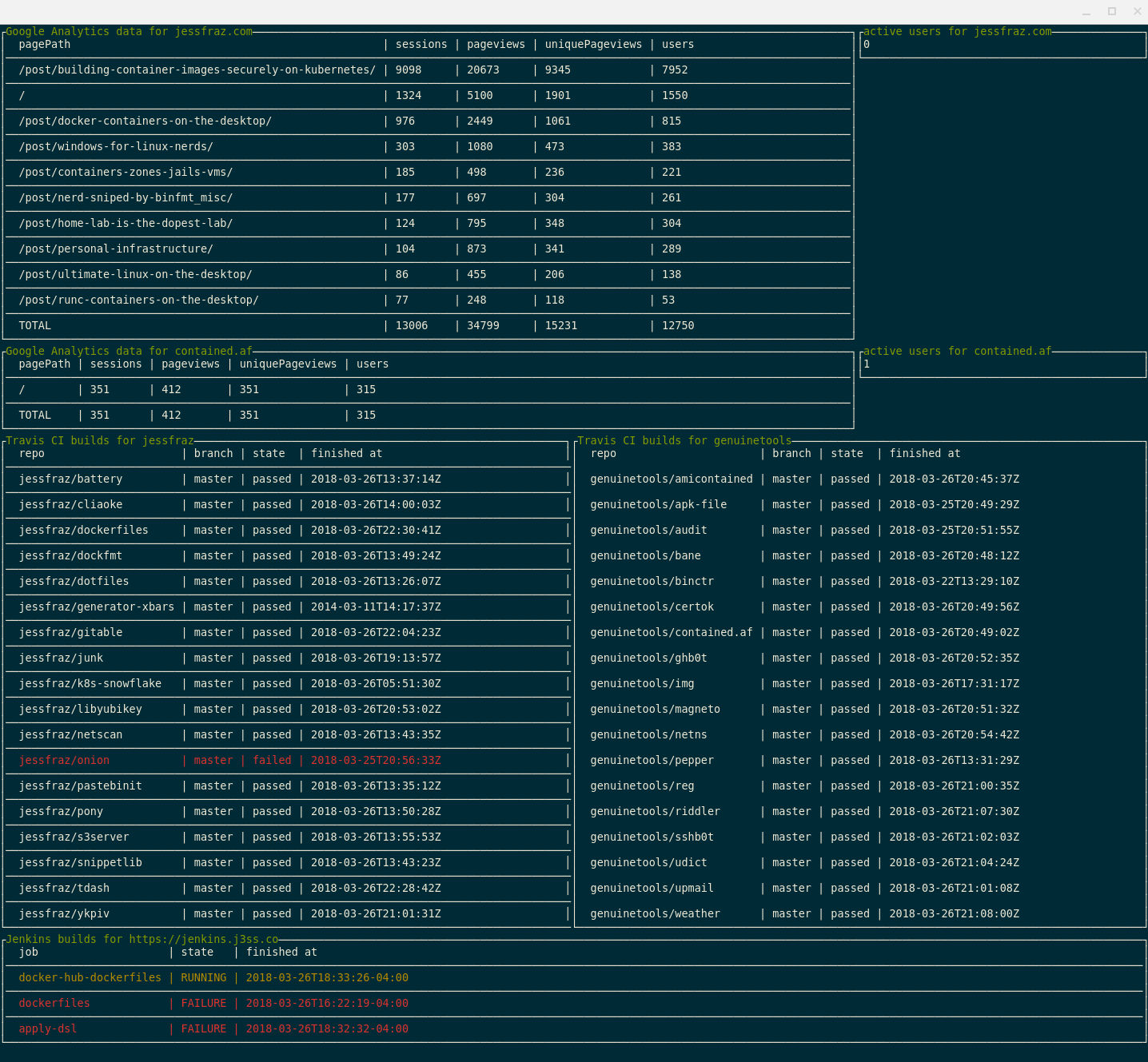
Table of Contents
Installation
Binaries
For installation instructions from binaries please visit the Releases Page.
Via Go
$ go get github.com/jessfraz/tdash
Running with Docker
$ docker run --rm -it \
    --name tdash \
    --volume /home/user/.tdash:/root/.tdash:ro \ # for the  Google Analytics key file
    r.j3ss.co/tdash
Usage
$ tdash -h
tdash -  A terminal dashboard with stats from Google Analytics, GitHub, Travis CI, and Jenkins.

Usage: tdash <command>

Flags:

  --travis-owner      Travis owner name for builds (can have more than one) (default: [])
  -d                  enable debug logging (default: false)
  --ga-viewid         Google Analytics view IDs (can have more than one) (default: [])
  --interval          update interval (ex. 5ms, 10s, 1m, 3h) (default: 2m0s)
  --jenkins-password  Jenkins password for authentication (or env var JENKINS_PASSWORD)
  --jenkins-uri       Jenkins base URI (or env var JENKINS_BASE_URI)
  --jenkins-username  Jenkins username for authentication (or env var JENKINS_USERNAME)
  --all               Show all builds even successful ones, defaults to only showing failures (default: false)
  --ga-keyfile        Path to Google Analytics keyfile (default: ~/.tdash/ga.json)
  --travis-token      Travis CI API token (or env var TRAVISCI_API_TOKEN)

Commands:

  version  Show the version information.
Setup
Google Analytics
-
Enable the API: To get started using Analytics Reporting API v4, you need to first create a project in the Google API Console, enable the API, and create credentials.
Follow the instructions for step enabling the API here.
-
Add the new service account to the Google Analytics account with Read & Analyze permission.
The newly created service account will have an email address that looks similar to:
quickstart@PROJECT-ID.iam.gserviceaccount.com.Use this email address to add a user to the Google Analytics view you want to access via the API.
Travis
- Get your Travis token: Go to the "Profile" tab on your Accounts page
Contributors


Similar repos


Languages
Go
78.7%
Makefile
19.4%
Dockerfile
1.8%
A terminal dashboard with stats from Google Analytics, GitHub, Travis CI, and Jenkins. Very much built specific to me.
Go
320
75 commits
updated Feb 24, 2023
README
tdash
A terminal dashboard with stats from Google Analytics, GitHub, Travis CI, and Jenkins. Very much built specific to me.
Table of Contents
Installation
Binaries
For installation instructions from binaries please visit the Releases Page.
Via Go
$ go get github.com/jessfraz/tdash
Running with Docker
$ docker run --rm -it \
    --name tdash \
    --volume /home/user/.tdash:/root/.tdash:ro \ # for the  Google Analytics key file
    r.j3ss.co/tdash
Usage
$ tdash -h
tdash -  A terminal dashboard with stats from Google Analytics, GitHub, Travis CI, and Jenkins.

Usage: tdash <command>

Flags:

  --travis-owner      Travis owner name for builds (can have more than one) (default: [])
  -d                  enable debug logging (default: false)
  --ga-viewid         Google Analytics view IDs (can have more than one) (default: [])
  --interval          update interval (ex. 5ms, 10s, 1m, 3h) (default: 2m0s)
  --jenkins-password  Jenkins password for authentication (or env var JENKINS_PASSWORD)
  --jenkins-uri       Jenkins base URI (or env var JENKINS_BASE_URI)
  --jenkins-username  Jenkins username for authentication (or env var JENKINS_USERNAME)
  --all               Show all builds even successful ones, defaults to only showing failures (default: false)
  --ga-keyfile        Path to Google Analytics keyfile (default: ~/.tdash/ga.json)
  --travis-token      Travis CI API token (or env var TRAVISCI_API_TOKEN)

Commands:

  version  Show the version information.
Setup
Google Analytics
-
Enable the API: To get started using Analytics Reporting API v4, you need to first create a project in the Google API Console, enable the API, and create credentials.
Follow the instructions for step enabling the API here.
-
Add the new service account to the Google Analytics account with Read & Analyze permission.
The newly created service account will have an email address that looks similar to:
quickstart@PROJECT-ID.iam.gserviceaccount.com.Use this email address to add a user to the Google Analytics view you want to access via the API.
Travis
- Get your Travis token: Go to the "Profile" tab on your Accounts page
Similar repos
Contributors
Languages
Go
78.7%
Makefile
19.4%
Dockerfile
1.8%