
Instagram without Reels, feed or ads: an open-source, updatable Instagram app for Android that keeps DMs and stories.
See the codeREADME

Feurstagram
Instagram without Reels, feed, Explore or ads.
Feurstagram is Instagram without Reels: an open-source patch for the official Android app that removes the feed, Reels, Explore, ads and telemetry, while keeping DMs, stories, search, notifications and profiles.






Download APK · Install · Build from source · FAQ · Privacy · Support · Buy me a coffee · Issues
What it keeps and blocks
| Keep using Instagram for | Remove or block |
|---|---|
| Direct Messages | Endless Home feed |
| Stories | Reels surfaces |
| Search and profiles | Explore and suggested-account recommendations |
| Notifications | Ads, shopping preloads, and telemetry |
Preview
Is it safe?
Feurstagram does not collect, proxy, store, or transmit your credentials.
It patches the official Instagram Android app to remove distracting features. The patches are open source and documented, so you can inspect what is changed.
For maximum trust, you can build the APK yourself instead of downloading a prebuilt release.
That said, Feurstagram is an unofficial project and is not affiliated with Instagram or Meta. It is a modified APK installed outside the Play Store, so Android may show installation warnings. Using a modified client may violate Instagram's terms of service. Use it at your own risk.
What Feurstagram does NOT do
Feurstagram does not:
- bypass Instagram login;
- collect your password or session tokens;
- proxy your traffic through a third-party server;
- add tracking or analytics;
- scrape accounts;
- sell or transmit user data;
- claim affiliation with Instagram or Meta.
Why Feurstagram?
Unlike WebView-based alternatives, Feurstagram patches the real Android Instagram app.
Unlike accessibility-service blockers, it does not simply react to the interface after it loads.
Unlike closed-source Instagram mods, every patch is public and auditable.
Feurstagram is built for people who want to keep Instagram's useful social features without the addictive parts.
I built this project for myself as an alternative to DFInstagram which hasn't been maintained for a long time and was difficult to update. I'm sharing it so others can do the same for themselves.
This project is entirely free and open-source. Feel free to fork, copy, enhance, or submit pull requests - do whatever you want with it!
Documentation
How do I get notified when there is a new update ?
Feurstagram checks GitHub for a newer release on every launch and shows a download prompt when your build is out of date. This automatic update check is on by default and can be turned off in the Feurstagram settings page (Updates section).
There is also a story on the official Feurstagram account every time there is an update:
Just follow this account and you will get a new story on each release.
Community
Join the Discord server to get support, follow updates, and discuss development:
Contact
Official email: feurstagram@gmail.com. Journalists can find facts, screenshots and logos in the press kit.
Installation
You have two options:
- Ready-to-install APK - Grab the latest patched APK from the Releases page and install it directly
- DIY Patching - Use the toolkit below to patch any Instagram version yourself
What Gets Disabled
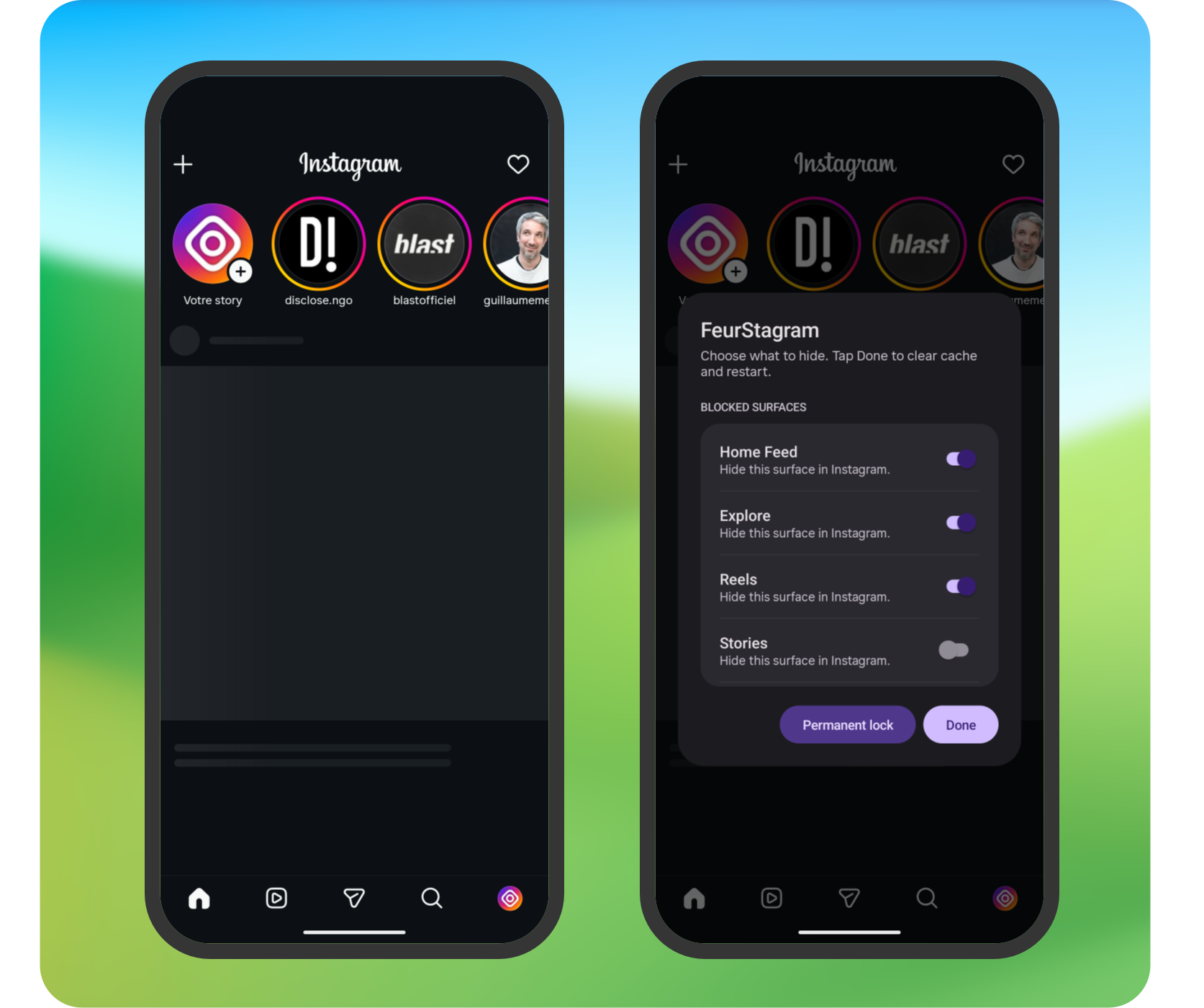
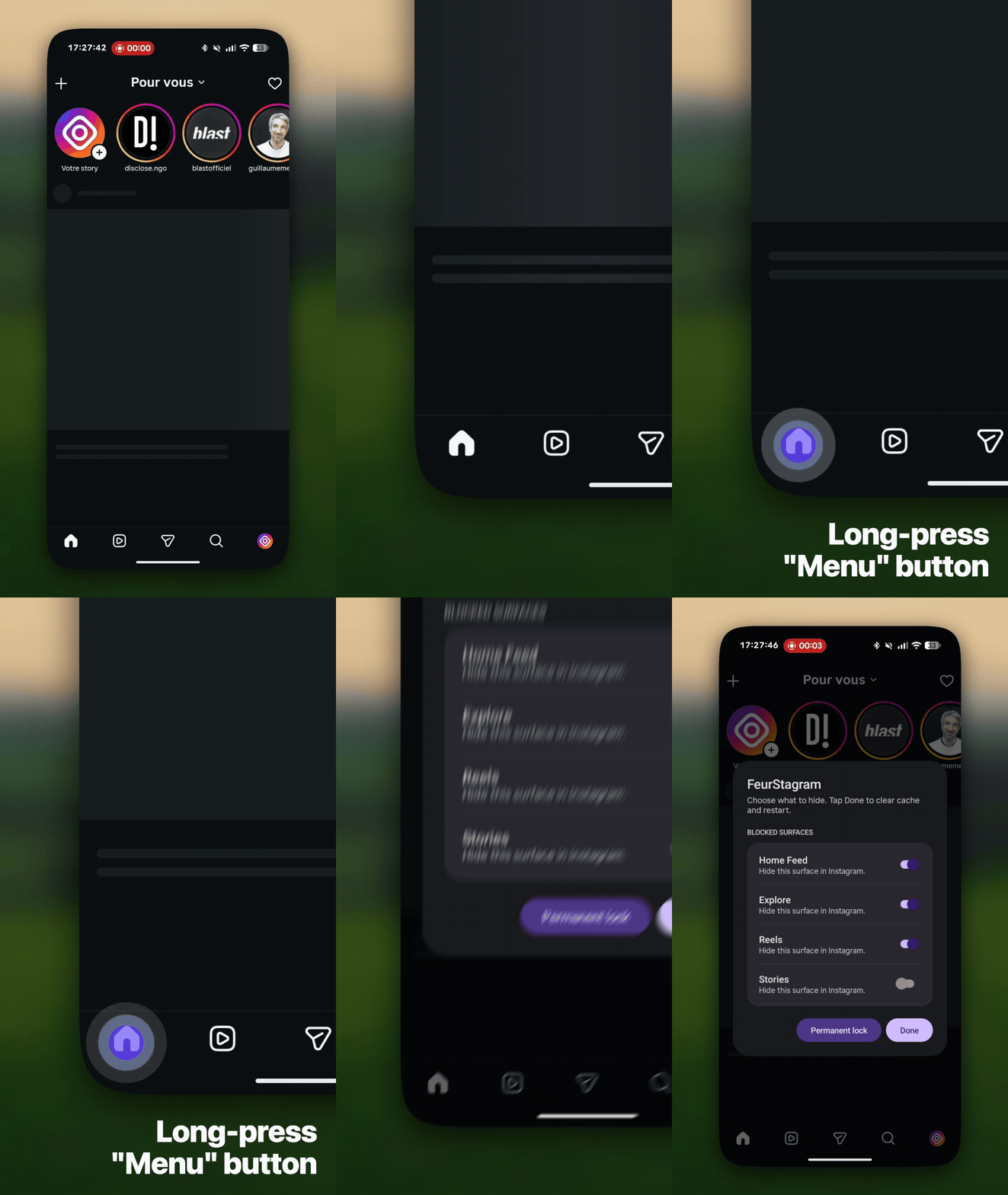
All content blocks are individual runtime toggles — long-press the Home tab at the bottom-left of the main tab bar to open the Feurstagram settings page and check/uncheck what you want blocked. A single APK covers every combination.
| Feature | Default | Toggleable | How |
|---|---|---|---|
| Home Feed | Blocked | Yes | Network-level blocking |
| Following feed only | Off | Yes | Feed-request header rewrite |
| Explore | Blocked | Yes | Network-level blocking |
| Reels | Blocked | Yes | Network-level blocking + Tab hidden |
| Stories | Visible | Yes | Network-level blocking |
| Suggested accounts | Blocked | Yes | Network-level + feed-parse blocking |
| Instants (+ button in DMs) | Blocked | Yes | View visibility hidden |
| Notes (text bubbles above DMs) | Blocked | Yes | View visibility hidden |
| Ads | Blocked | Yes | Network-level + feed-parse blocking |
| Analytics & telemetry | Blocked | No | Always blocked |
| Shopping / commerce preloads | Blocked | No | Always blocked |
Following feed only is a softer alternative to blocking the Home Feed entirely: leave the feed unblocked and turn this on to get a chronological feed of just the accounts you follow, with the recommended/ranked posts dropped.
What Still Works
| Feature | Status |
|---|---|
| Direct Messages | Works |
| Profile | Works |
| Reels in DMs | Works |
| Search | Works |
| Notifications | Works |
| Deep links | Works |
Settings Page
Long-press the Home tab (the house icon at the bottom-left of Instagram's main tab bar). A full-screen, scrollable settings page opens — Material 3 Expressive, monochrome, and padded to fit around system bars and cutouts on any device — with:
- Blocked surfaces — toggles for Home Feed, Explore, Reels, Stories, Suggested accounts, Ads, Instants, and Notes.
- Navigation bar — show or hide each bottom-bar icon (Search, Reels, Create, Messages, Profile) independently of the content blocks. Home always stays, since long-pressing it is how you get back here. A swipe that would land on a hidden tab carries straight on to the next visible one, so a hidden section stays hidden instead of being one flick away.
- Feed — Following feed only: restrict the Home Feed to accounts you follow (chronological), instead of the recommended feed. Has effect only when the Home Feed is left unblocked.
- Display — Force dark (disable HDR) (on by default): stops Instagram forcing its window into HDR mode, which lifts the black floor and washes out the dark UI on HDR OLED screens. Turn it off to keep Instagram's HDR behaviour.
- Landing page — choose which surface the app jumps to on cold start (Home feed, Search, Direct messages, or Profile). A surface whose navigation icon is hidden can't be picked, and stops being used if you hide it later: landing on it would hand back exactly what you removed.
- Updates — after an update, the first launch shows a What's new card with that version's release notes. Then, Automatic update check (on by default): on launch, Feurstagram checks GitHub for a newer release and, if your build is out of date, opens a page showing what changed in it. Choosing Update downloads the APK on a progress page you can cancel — or leave, in which case the download carries on in a notification — then hands it to Android's installer. No browser, no manual download. Turn the check off here if you'd rather look yourself.
- Donate — opens the project's GitHub Sponsors page.
- Permanent lock and Done buttons pinned at the bottom so they stay reachable on any screen size.
Changes persist across restarts (stored in SharedPreferences
feurstagram_prefs).
Once you change any setting, the page can only be left by restarting: both Done and Back clear the cache and relaunch, so a changed block can never leave the app in a half-applied state with stale content still loaded. If you open the page and change nothing, Back simply closes it.
Permanent lock
The permanent lock freezes your restrictions for this installation. It only prevents relaxing them: you can still make settings stricter (turn a block on), but you cannot turn a block back off without reinstalling.
The freeze is captured per settings session, not the instant you flip a switch. When you open the settings page, Feurstagram snapshots which surfaces are currently blocked; only those stay frozen. A surface you turn on by mistake during a session can still be turned back off until you tap Done — Done clears the cache and restarts, which bakes the new state in as the next snapshot. This means a stray tap on a surface (e.g. Stories) is recoverable within the same session instead of forcing a reinstall.
Requirements
- JDK 21 and the Android SDK (
ANDROID_HOMEset, build-tools installed) - A GitHub token with the
read:packagesscope in~/.gradle/gradle.properties, used to fetch the patcher dependency:gpr.user=<your-github-username> gpr.key=<token-with-read:packages>
Build from source
-
Download an Instagram APK from APKMirror (arm64-v8a recommended).
-
Build and apply:
./build.sh instagram.apkAdd
--cloneto install Feurstagram alongside a stock Instagram (separate package and data), and--installto push it to a connected device:./build.sh instagram.apk --clone --installThe signed result is written to
feurstagram.apk.
Project structure
Feurstagram/
├── build.sh                      # Build the bundle and apply it to an APK
├── patches/                      # Patches (Kotlin): where to inject, by fingerprint
│   └── src/main/kotlin/com/feurstagram/patches/
│       ├── network/              # Network blocking + feed-item filter + following-feed
│       ├── settings/             # Long-press settings entry point (tab bar)
│       ├── signature/            # Signing-cert trust bypass (deep links)
│       ├── display/              # Force SDR (disable Instagram's forced HDR window)
│       ├── debug/                # ADB settings bridge (dev only, --debug)
│       └── clone/                # Side-by-side package/label rename
└── extensions/                   # Runtime code (Java), compiled and merged in
    └── .../com/feurstagram/extension/
        ├── Block.java            # URI blocking rules + feed-item type filter
        ├── LimitFeed.java        # Following-feed header rewrite
        ├── Config.java           # SharedPreferences toggles + permanent lock
        ├── Settings.java         # Settings dialog
        ├── Display.java          # Window colour-mode control (Force dark / SDR)
        ├── Hiders.java           # Nav-tab / Notes / Instants hiders + landing redirect
        ├── HiddenTabSwipeSkipper.java  # Keeps swipes off hidden tabs' pages
        ├── DebugBridge.java      # Dev-only ADB bridge over the settings (--debug builds)
        └── UpdateChecker.java    # On-launch GitHub release check
Design
Feurstagram's own screens follow Material 3 Expressive in a monochrome dark scheme — white is the only accent, and everything is built in code because the mod has no resources of its own. The tokens, shapes, type scale, component rules and the window-inset requirements are written down in docs/DESIGN.md; read it before changing or adding any UI.
Signing
The bundle is signed during build.sh. Set FEURSTAGRAM_KEYSTORE_PASS (and
optionally FEURSTAGRAM_KEY_PASS) to sign with feurstagram.keystore;
otherwise a throwaway keystore is generated. Reuse the same keystore across
builds to install updates without uninstalling first.
Debugging
Blocked requests surface as java.io.IOException: Blocked by Feurstagram in
logcat:
adb logcat | grep "Blocked by Feurstagram"
How It Works
Patches locate their injection points by fingerprint (matching code by stable traits like class names, strings and method shapes) rather than by obfuscated names, so they keep applying across Instagram updates. The runtime logic lives in compiled extension classes that are merged into the app.
Settings Hook
A fingerprint matches the main tab-bar binder and injects a watcher on it. The
watcher resolves the feed_tab id via Resources.getIdentifier(...), grabs
the Home tab once laid out, and installs a long-press listener. Long-pressing
opens a full-screen Material dark page: content toggles plus a landing-page
selector, all backed by SharedPreferences (feurstagram_prefs). The same
hook installs the navigation-tab/Notes/Instants hiders, the hidden-tab swipe
skipper and the cold-start landing-page redirect.
Network Blocking
A fingerprint matches TigonServiceLayer.startRequest (a named class) and
injects a call on the request URI. Blocked calls throw an IOException, so the
surface fails to load and stays empty.
Feed Item Filtering
Network blocking can't touch ads and "suggested" units that Instagram injects
inline into the Home Feed payload — they arrive inside the normal
/feed/timeline/ response, not on a separate URL. A second fingerprint matches
the feed-item JSON deserialiser (by the stable wire-format type tokens like
clips_netego and the parseFromJson method name) and rewrites a blocked
unit's type token to an invalid one. Instagram's own parser then routes it to
its "unknown FeedItem type" branch and drops it — no crash. Ad/promo units are
gated on the Ads toggle, suggested/netego units on the Suggested
accounts toggle.
Following Feed Only
A fingerprint matches the main-feed request class (by its debug-string shape)
and rewrites the request's pagination_source header from the recommended feed
to following, so the Home Feed returns only accounts you follow. The header
field is obfuscated, so it is resolved dynamically each build rather than
hardcoded. Gated on the Following feed only toggle.
Deep-link signature bypass
Instagram checks that the running APK is signed by Meta before it follows a deep link into its own content. A re-signed FeurStagram build fails that check, so shared links (posts, reels, profiles) silently dropped to the home feed. A patch forces Instagram's signing-certificate trust checks to always pass, so it treats the build as genuine and deep links resolve normally. It matches on a stable error string rather than obfuscated names, so it needs no per-version maintenance. Fixes #36 and #106.
Force SDR display
Instagram switches its window into HDR mode at runtime (server-gated per
account), which lifts the black floor on HDR OLED panels and leaves the flat dark
UI looking washed out for no benefit. A patch reroutes every window colour-mode
change through an extension helper that pins the window to SDR when the Force
dark toggle is on (default), keeping blacks deep; turning it off passes
Instagram's original colour mode through untouched. It hooks the framework
Window.setColorMode call, so it too needs no per-version maintenance.
Blocked network paths
| Path / pattern | Purpose | Toggleable |
|---|---|---|
/feed/timeline/ | Home feed posts | Yes |
/feed/reels_tray | Stories tray | Yes |
/discover/topical_explore | Explore tab content | Yes |
/clips/home/, /clips/discover, /clips/get_blend_medias/ | Reels feed + discovery + Blend reels | Yes |
/discover/ayml/, /discover/sectioned_ayml/, /discover/chaining/, /discover/recommended_accounts_for_category/, /discover/suggested_businesses/, /discover/recs_from_friends_suggestions/, /discover/recs_from_friends_user_info/, /discover/surface_with_su/, /discover/fetch_suggestion_details/, /discover/account_discovery/, /discover/reshare_suggestions/, /fbsearch/accounts_recs/, /friendships/feed_favorites_suggestions/, /friendships/share_to_friends_story_suggested_users/, /direct_v2/search_friending_suggestions/, /business/discovery/suggest_business/ | Suggested-account recommendations (profile "Suggested for you", stories-tray injected accounts, search null-state recs, post-follow chaining, friend/business suggestions) | Yes |
/api/v1/ads/ (all ads/*), /feed/async_ads_ranking/, /feed/shop_everything_feed_of_ads*, /feed/user_interests_contextual_feed_of_ads/, /discover/chaining_experience_contextual_ads/, /discover/chaining_experience_notification_ads/, /direct_v2/ads_for_ctd_ads_thread_view/, /direct_v2/should_show_ad_responses_tab/, /profile_ads/get_profile_ads/, /stories/stories_high_intent_discovery_ads/, /stories/stories_intent_aware_ads/, /commerce/product_collections/ads_collection_page/ | Sponsored ads injected into the feed, stories, profile, DMs, Explore chaining and commerce | Yes |
/logging/ | Client event logging | No |
/async_ads_privacy/ | Ad-related tracking | No |
/async_critical_notices/ | Engagement nudge analytics | No |
/api/v1/media/.../seen/ (path contains /api/v1/media/ and /seen) | Post “seen” tracking | No |
/api/v1/fbupload/ | Telemetry upload | No |
/api/v1/stats/ | Performance / usage stats | No |
/api/v1/commerce/, /api/v1/shopping/, /api/v1/sellable_items/ | Shopping / commerce preloads | No |
Note: despite the name, /feed/reels_tray is the stories tray endpoint in Instagram internals.
Matching uses String.contains() on the URI path. Instagram changes URL shapes over time; adjust the rules in extensions/.../Block.java if a block stops matching.
Updating for New Instagram Versions
Because patches are fingerprint-based, a new Instagram version usually just
needs a rebuild (./build.sh <new-instagram.apk>). If Instagram restructures a
targeted area, only the affected fingerprint needs adjusting.
Contributing
This is a personal project I'm sharing with the community. Contributions are welcome!
- 🍴 Fork it - Make your own version
- 🔧 Pull requests - Improvements and fixes are appreciated
- 📋 Copy it - Use the code however you want
- ✨ Enhance it - Build something even better
License
This project is released under the GNU General Public License v3.0. See LICENSE for details.
Built with the Morphe patcher and adapts Instagram patch ideas from Piko, both GPLv3. See NOTICE for attribution. Feurstagram is an independent project, not affiliated with or endorsed by Morphe or Piko.
Significant stargazers

97 followers · starred Jul 2026

46 followers · starred May 2026
Similar repos


Languages
Java
81.3%
Kotlin
15.0%
Shell
3.6%
Instagram without Reels, feed or ads: an open-source, updatable Instagram app for Android that keeps DMs and stories.
See the codeREADME
Feurstagram
Instagram without Reels, feed, Explore or ads.
Feurstagram is Instagram without Reels: an open-source patch for the official Android app that removes the feed, Reels, Explore, ads and telemetry, while keeping DMs, stories, search, notifications and profiles.
Download APK · Install · Build from source · FAQ · Privacy · Support · Buy me a coffee · Issues
What it keeps and blocks
| Keep using Instagram for | Remove or block |
|---|---|
| Direct Messages | Endless Home feed |
| Stories | Reels surfaces |
| Search and profiles | Explore and suggested-account recommendations |
| Notifications | Ads, shopping preloads, and telemetry |
Preview
Is it safe?
Feurstagram does not collect, proxy, store, or transmit your credentials.
It patches the official Instagram Android app to remove distracting features. The patches are open source and documented, so you can inspect what is changed.
For maximum trust, you can build the APK yourself instead of downloading a prebuilt release.
That said, Feurstagram is an unofficial project and is not affiliated with Instagram or Meta. It is a modified APK installed outside the Play Store, so Android may show installation warnings. Using a modified client may violate Instagram's terms of service. Use it at your own risk.
What Feurstagram does NOT do
Feurstagram does not:
- bypass Instagram login;
- collect your password or session tokens;
- proxy your traffic through a third-party server;
- add tracking or analytics;
- scrape accounts;
- sell or transmit user data;
- claim affiliation with Instagram or Meta.
Why Feurstagram?
Unlike WebView-based alternatives, Feurstagram patches the real Android Instagram app.
Unlike accessibility-service blockers, it does not simply react to the interface after it loads.
Unlike closed-source Instagram mods, every patch is public and auditable.
Feurstagram is built for people who want to keep Instagram's useful social features without the addictive parts.
I built this project for myself as an alternative to DFInstagram which hasn't been maintained for a long time and was difficult to update. I'm sharing it so others can do the same for themselves.
This project is entirely free and open-source. Feel free to fork, copy, enhance, or submit pull requests - do whatever you want with it!
Documentation
How do I get notified when there is a new update ?
Feurstagram checks GitHub for a newer release on every launch and shows a download prompt when your build is out of date. This automatic update check is on by default and can be turned off in the Feurstagram settings page (Updates section).
There is also a story on the official Feurstagram account every time there is an update:
Just follow this account and you will get a new story on each release.
Community
Join the Discord server to get support, follow updates, and discuss development:
Contact
Official email: feurstagram@gmail.com. Journalists can find facts, screenshots and logos in the press kit.
Installation
You have two options:
- Ready-to-install APK - Grab the latest patched APK from the Releases page and install it directly
- DIY Patching - Use the toolkit below to patch any Instagram version yourself
What Gets Disabled
All content blocks are individual runtime toggles — long-press the Home tab at the bottom-left of the main tab bar to open the Feurstagram settings page and check/uncheck what you want blocked. A single APK covers every combination.
| Feature | Default | Toggleable | How |
|---|---|---|---|
| Home Feed | Blocked | Yes | Network-level blocking |
| Following feed only | Off | Yes | Feed-request header rewrite |
| Explore | Blocked | Yes | Network-level blocking |
| Reels | Blocked | Yes | Network-level blocking + Tab hidden |
| Stories | Visible | Yes | Network-level blocking |
| Suggested accounts | Blocked | Yes | Network-level + feed-parse blocking |
| Instants (+ button in DMs) | Blocked | Yes | View visibility hidden |
| Notes (text bubbles above DMs) | Blocked | Yes | View visibility hidden |
| Ads | Blocked | Yes | Network-level + feed-parse blocking |
| Analytics & telemetry | Blocked | No | Always blocked |
| Shopping / commerce preloads | Blocked | No | Always blocked |
Following feed only is a softer alternative to blocking the Home Feed entirely: leave the feed unblocked and turn this on to get a chronological feed of just the accounts you follow, with the recommended/ranked posts dropped.
What Still Works
| Feature | Status |
|---|---|
| Direct Messages | Works |
| Profile | Works |
| Reels in DMs | Works |
| Search | Works |
| Notifications | Works |
| Deep links | Works |
Settings Page
Long-press the Home tab (the house icon at the bottom-left of Instagram's main tab bar). A full-screen, scrollable settings page opens — Material 3 Expressive, monochrome, and padded to fit around system bars and cutouts on any device — with:
- Blocked surfaces — toggles for Home Feed, Explore, Reels, Stories, Suggested accounts, Ads, Instants, and Notes.
- Navigation bar — show or hide each bottom-bar icon (Search, Reels, Create, Messages, Profile) independently of the content blocks. Home always stays, since long-pressing it is how you get back here. A swipe that would land on a hidden tab carries straight on to the next visible one, so a hidden section stays hidden instead of being one flick away.
- Feed — Following feed only: restrict the Home Feed to accounts you follow (chronological), instead of the recommended feed. Has effect only when the Home Feed is left unblocked.
- Display — Force dark (disable HDR) (on by default): stops Instagram forcing its window into HDR mode, which lifts the black floor and washes out the dark UI on HDR OLED screens. Turn it off to keep Instagram's HDR behaviour.
- Landing page — choose which surface the app jumps to on cold start (Home feed, Search, Direct messages, or Profile). A surface whose navigation icon is hidden can't be picked, and stops being used if you hide it later: landing on it would hand back exactly what you removed.
- Updates — after an update, the first launch shows a What's new card with that version's release notes. Then, Automatic update check (on by default): on launch, Feurstagram checks GitHub for a newer release and, if your build is out of date, opens a page showing what changed in it. Choosing Update downloads the APK on a progress page you can cancel — or leave, in which case the download carries on in a notification — then hands it to Android's installer. No browser, no manual download. Turn the check off here if you'd rather look yourself.
- Donate — opens the project's GitHub Sponsors page.
- Permanent lock and Done buttons pinned at the bottom so they stay reachable on any screen size.
Changes persist across restarts (stored in SharedPreferences
feurstagram_prefs).
Once you change any setting, the page can only be left by restarting: both Done and Back clear the cache and relaunch, so a changed block can never leave the app in a half-applied state with stale content still loaded. If you open the page and change nothing, Back simply closes it.
Permanent lock
The permanent lock freezes your restrictions for this installation. It only prevents relaxing them: you can still make settings stricter (turn a block on), but you cannot turn a block back off without reinstalling.
The freeze is captured per settings session, not the instant you flip a switch. When you open the settings page, Feurstagram snapshots which surfaces are currently blocked; only those stay frozen. A surface you turn on by mistake during a session can still be turned back off until you tap Done — Done clears the cache and restarts, which bakes the new state in as the next snapshot. This means a stray tap on a surface (e.g. Stories) is recoverable within the same session instead of forcing a reinstall.
Requirements
- JDK 21 and the Android SDK (
ANDROID_HOMEset, build-tools installed) - A GitHub token with the
read:packagesscope in~/.gradle/gradle.properties, used to fetch the patcher dependency:gpr.user=<your-github-username> gpr.key=<token-with-read:packages>
Build from source
-
Download an Instagram APK from APKMirror (arm64-v8a recommended).
-
Build and apply:
./build.sh instagram.apkAdd
--cloneto install Feurstagram alongside a stock Instagram (separate package and data), and--installto push it to a connected device:./build.sh instagram.apk --clone --installThe signed result is written to
feurstagram.apk.
Project structure
Feurstagram/
├── build.sh                      # Build the bundle and apply it to an APK
├── patches/                      # Patches (Kotlin): where to inject, by fingerprint
│   └── src/main/kotlin/com/feurstagram/patches/
│       ├── network/              # Network blocking + feed-item filter + following-feed
│       ├── settings/             # Long-press settings entry point (tab bar)
│       ├── signature/            # Signing-cert trust bypass (deep links)
│       ├── display/              # Force SDR (disable Instagram's forced HDR window)
│       ├── debug/                # ADB settings bridge (dev only, --debug)
│       └── clone/                # Side-by-side package/label rename
└── extensions/                   # Runtime code (Java), compiled and merged in
    └── .../com/feurstagram/extension/
        ├── Block.java            # URI blocking rules + feed-item type filter
        ├── LimitFeed.java        # Following-feed header rewrite
        ├── Config.java           # SharedPreferences toggles + permanent lock
        ├── Settings.java         # Settings dialog
        ├── Display.java          # Window colour-mode control (Force dark / SDR)
        ├── Hiders.java           # Nav-tab / Notes / Instants hiders + landing redirect
        ├── HiddenTabSwipeSkipper.java  # Keeps swipes off hidden tabs' pages
        ├── DebugBridge.java      # Dev-only ADB bridge over the settings (--debug builds)
        └── UpdateChecker.java    # On-launch GitHub release check
Design
Feurstagram's own screens follow Material 3 Expressive in a monochrome dark scheme — white is the only accent, and everything is built in code because the mod has no resources of its own. The tokens, shapes, type scale, component rules and the window-inset requirements are written down in docs/DESIGN.md; read it before changing or adding any UI.
Signing
The bundle is signed during build.sh. Set FEURSTAGRAM_KEYSTORE_PASS (and
optionally FEURSTAGRAM_KEY_PASS) to sign with feurstagram.keystore;
otherwise a throwaway keystore is generated. Reuse the same keystore across
builds to install updates without uninstalling first.
Debugging
Blocked requests surface as java.io.IOException: Blocked by Feurstagram in
logcat:
adb logcat | grep "Blocked by Feurstagram"
How It Works
Patches locate their injection points by fingerprint (matching code by stable traits like class names, strings and method shapes) rather than by obfuscated names, so they keep applying across Instagram updates. The runtime logic lives in compiled extension classes that are merged into the app.
Settings Hook
A fingerprint matches the main tab-bar binder and injects a watcher on it. The
watcher resolves the feed_tab id via Resources.getIdentifier(...), grabs
the Home tab once laid out, and installs a long-press listener. Long-pressing
opens a full-screen Material dark page: content toggles plus a landing-page
selector, all backed by SharedPreferences (feurstagram_prefs). The same
hook installs the navigation-tab/Notes/Instants hiders, the hidden-tab swipe
skipper and the cold-start landing-page redirect.
Network Blocking
A fingerprint matches TigonServiceLayer.startRequest (a named class) and
injects a call on the request URI. Blocked calls throw an IOException, so the
surface fails to load and stays empty.
Feed Item Filtering
Network blocking can't touch ads and "suggested" units that Instagram injects
inline into the Home Feed payload — they arrive inside the normal
/feed/timeline/ response, not on a separate URL. A second fingerprint matches
the feed-item JSON deserialiser (by the stable wire-format type tokens like
clips_netego and the parseFromJson method name) and rewrites a blocked
unit's type token to an invalid one. Instagram's own parser then routes it to
its "unknown FeedItem type" branch and drops it — no crash. Ad/promo units are
gated on the Ads toggle, suggested/netego units on the Suggested
accounts toggle.
Following Feed Only
A fingerprint matches the main-feed request class (by its debug-string shape)
and rewrites the request's pagination_source header from the recommended feed
to following, so the Home Feed returns only accounts you follow. The header
field is obfuscated, so it is resolved dynamically each build rather than
hardcoded. Gated on the Following feed only toggle.
Deep-link signature bypass
Instagram checks that the running APK is signed by Meta before it follows a deep link into its own content. A re-signed FeurStagram build fails that check, so shared links (posts, reels, profiles) silently dropped to the home feed. A patch forces Instagram's signing-certificate trust checks to always pass, so it treats the build as genuine and deep links resolve normally. It matches on a stable error string rather than obfuscated names, so it needs no per-version maintenance. Fixes #36 and #106.
Force SDR display
Instagram switches its window into HDR mode at runtime (server-gated per
account), which lifts the black floor on HDR OLED panels and leaves the flat dark
UI looking washed out for no benefit. A patch reroutes every window colour-mode
change through an extension helper that pins the window to SDR when the Force
dark toggle is on (default), keeping blacks deep; turning it off passes
Instagram's original colour mode through untouched. It hooks the framework
Window.setColorMode call, so it too needs no per-version maintenance.
Blocked network paths
| Path / pattern | Purpose | Toggleable |
|---|---|---|
/feed/timeline/ | Home feed posts | Yes |
/feed/reels_tray | Stories tray | Yes |
/discover/topical_explore | Explore tab content | Yes |
/clips/home/, /clips/discover, /clips/get_blend_medias/ | Reels feed + discovery + Blend reels | Yes |
/discover/ayml/, /discover/sectioned_ayml/, /discover/chaining/, /discover/recommended_accounts_for_category/, /discover/suggested_businesses/, /discover/recs_from_friends_suggestions/, /discover/recs_from_friends_user_info/, /discover/surface_with_su/, /discover/fetch_suggestion_details/, /discover/account_discovery/, /discover/reshare_suggestions/, /fbsearch/accounts_recs/, /friendships/feed_favorites_suggestions/, /friendships/share_to_friends_story_suggested_users/, /direct_v2/search_friending_suggestions/, /business/discovery/suggest_business/ | Suggested-account recommendations (profile "Suggested for you", stories-tray injected accounts, search null-state recs, post-follow chaining, friend/business suggestions) | Yes |
/api/v1/ads/ (all ads/*), /feed/async_ads_ranking/, /feed/shop_everything_feed_of_ads*, /feed/user_interests_contextual_feed_of_ads/, /discover/chaining_experience_contextual_ads/, /discover/chaining_experience_notification_ads/, /direct_v2/ads_for_ctd_ads_thread_view/, /direct_v2/should_show_ad_responses_tab/, /profile_ads/get_profile_ads/, /stories/stories_high_intent_discovery_ads/, /stories/stories_intent_aware_ads/, /commerce/product_collections/ads_collection_page/ | Sponsored ads injected into the feed, stories, profile, DMs, Explore chaining and commerce | Yes |
/logging/ | Client event logging | No |
/async_ads_privacy/ | Ad-related tracking | No |
/async_critical_notices/ | Engagement nudge analytics | No |
/api/v1/media/.../seen/ (path contains /api/v1/media/ and /seen) | Post “seen” tracking | No |
/api/v1/fbupload/ | Telemetry upload | No |
/api/v1/stats/ | Performance / usage stats | No |
/api/v1/commerce/, /api/v1/shopping/, /api/v1/sellable_items/ | Shopping / commerce preloads | No |
Note: despite the name, /feed/reels_tray is the stories tray endpoint in Instagram internals.
Matching uses String.contains() on the URI path. Instagram changes URL shapes over time; adjust the rules in extensions/.../Block.java if a block stops matching.
Updating for New Instagram Versions
Because patches are fingerprint-based, a new Instagram version usually just
needs a rebuild (./build.sh <new-instagram.apk>). If Instagram restructures a
targeted area, only the affected fingerprint needs adjusting.
Contributing
This is a personal project I'm sharing with the community. Contributions are welcome!
- 🍴 Fork it - Make your own version
- 🔧 Pull requests - Improvements and fixes are appreciated
- 📋 Copy it - Use the code however you want
- ✨ Enhance it - Build something even better
License
This project is released under the GNU General Public License v3.0. See LICENSE for details.
Built with the Morphe patcher and adapts Instagram patch ideas from Piko, both GPLv3. See NOTICE for attribution. Feurstagram is an independent project, not affiliated with or endorsed by Morphe or Piko.
Similar repos
Significant stargazers
97 followers · starred Jul 2026
46 followers · starred May 2026
Languages
Java
81.3%
Kotlin
15.0%
Shell
3.6%