An offline Kinyarwanda picture-to-speech communication app for disabled children who cannot speak or are hard to understand, with machine-learning next-word suggestions.
| GitHub repository | https://github.com/jbyiringiro/capstone-project |
| Video demo | Watch the demo on Google Drive |
| Author | Josue Byiringiro, BSc Software Engineering (Machine Learning), African Leadership University |
| Supervisor | Junior Turatsinze |
Who it is for. Many disabled children cannot use speech to ask for help, make a choice, say "no" or join a conversation. Others speak, but people outside the family cannot understand them. This includes children with:
Rwanda's child census identifies children with communication difficulties (NISR children report).
Problem. Augmentative and alternative communication (AAC) lets these children communicate with pictures and a device that speaks for them (ASHA AAC overview). In Rwanda, though, most families and schools cannot use AAC apps:
Without a way to communicate, a child's needs and choices are easily missed. Frustration can show up as behaviour, and the child is left out of class and family life.
Solution. Vuga ("speak" in Kinyarwanda) is a free communication app in Kinyarwanda. It runs on an ordinary Android tablet or phone and works fully offline after the first load.
How it adapts to each child's disability. Each child has their own profile, and the caregiver adjusts the board to fit that child:
| Feature | Who it helps |
|---|---|
| The main board layout never moves; word suggestions appear in a separate row | Autistic children and children with motor-planning difficulties, who learn where words are and rely on them staying there |
| Large-tile setting per child | Children with limited hand control (for example, cerebral palsy) or low vision |
| Real photographs or simple pictograms, chosen per child | Children with intellectual disability who recognise photos more easily than symbols, or who need a simpler image |
| Reduced-motion setting, and the device's reduce-motion preference is respected | Children who are distracted or upset by animation |
| Erekana shows the message as large text and pictures | When speech audio fails, in a noisy place, or when the listener has hearing loss |
| Caregivers can record words in their own voice | Children who respond better to a familiar voice |
| The caregiver area opens only with a long press and a PIN | Prevents the child from accidentally changing their settings |
| Word suggestions can be turned off | Children for whom suggestions are confusing rather than helpful |
A 3D-printable keyguard design in hardware/ (not yet produced) | Children who accidentally press neighbouring tiles |
Not yet supported. These are planned or open problems:
Machine learning. A next-symbol predictor suggests likely next words in a separate row, so the main board's layout never moves. The model notebook (HTML version) covers data engineering, visualisations, model architecture and metrics. It compares three models trained on Kinyarwanda sentences mapped to the board vocabulary:
| Model | Validation top-3 accuracy |
|---|---|
| Frequency baseline | 21.96% |
| Kneser-Ney trigram | 45.78% |
| GRU | 46.92% |
The app ships the small trigram model because it is almost as accurate as the GRU, runs instantly offline, and is only about 100 KB.
Architecture.
/predict.ml/.Status (12 October 2026). This is an initial demonstration.
The app's labels, dialogs, accessible names and messages are in Kinyarwanda. Developer documentation is in English.
Prerequisites:
git clone https://github.com/jbyiringiro/capstone-project.git
cd capstone-project
If you downloaded the ZIP from GitHub instead, unzip it and open a terminal in the extracted folder.
cd app
npm ci              # install dependencies
npm test            # run the unit tests
npm run build       # production build with offline service worker
npm run preview -- --host 127.0.0.1
Open http://localhost:4173. For development with hot reload, run npm run dev and open http://localhost:5173. On Windows PowerShell, use npm.cmd if the execution policy blocks npm.
Using the app:
From the repository root:
python -m venv .venv
# Windows: .venv\Scripts\activate    macOS/Linux: source .venv/bin/activate
python -m pip install -e "./ml[dev,notebook]" -e "./api[dev]"

python ml/notebooks/run_notebook.py          # re-run the model notebook
python -m pytest ml/tests api/tests          # run the Python tests
python -m uvicorn app.main:app --app-dir api --host 127.0.0.1 --port 8000
Open Swagger UI at http://localhost:8000/docs.
API configuration. Copy .env.example to .env to configure the API:
VUGA_MODEL_DIR to ml/artifacts.VUGA_CORS_ORIGINS to the app's origin.VUGA_JWT_SECRET to a private value of at least 32 characters. Without it, local development uses a temporary key.To run the API with PostgreSQL in Docker instead, set VUGA_JWT_SECRET and run docker compose up.
The notebook reads the committed ml/notebooks/evidence/ snapshot. It does not download the corpus or retrain the neural models. To regenerate the trigram model from that snapshot, run python ml/scripts/export_artifacts.py --data ml/notebooks/evidence. Optional neural tests need ml[neural].
More detail: project guide.
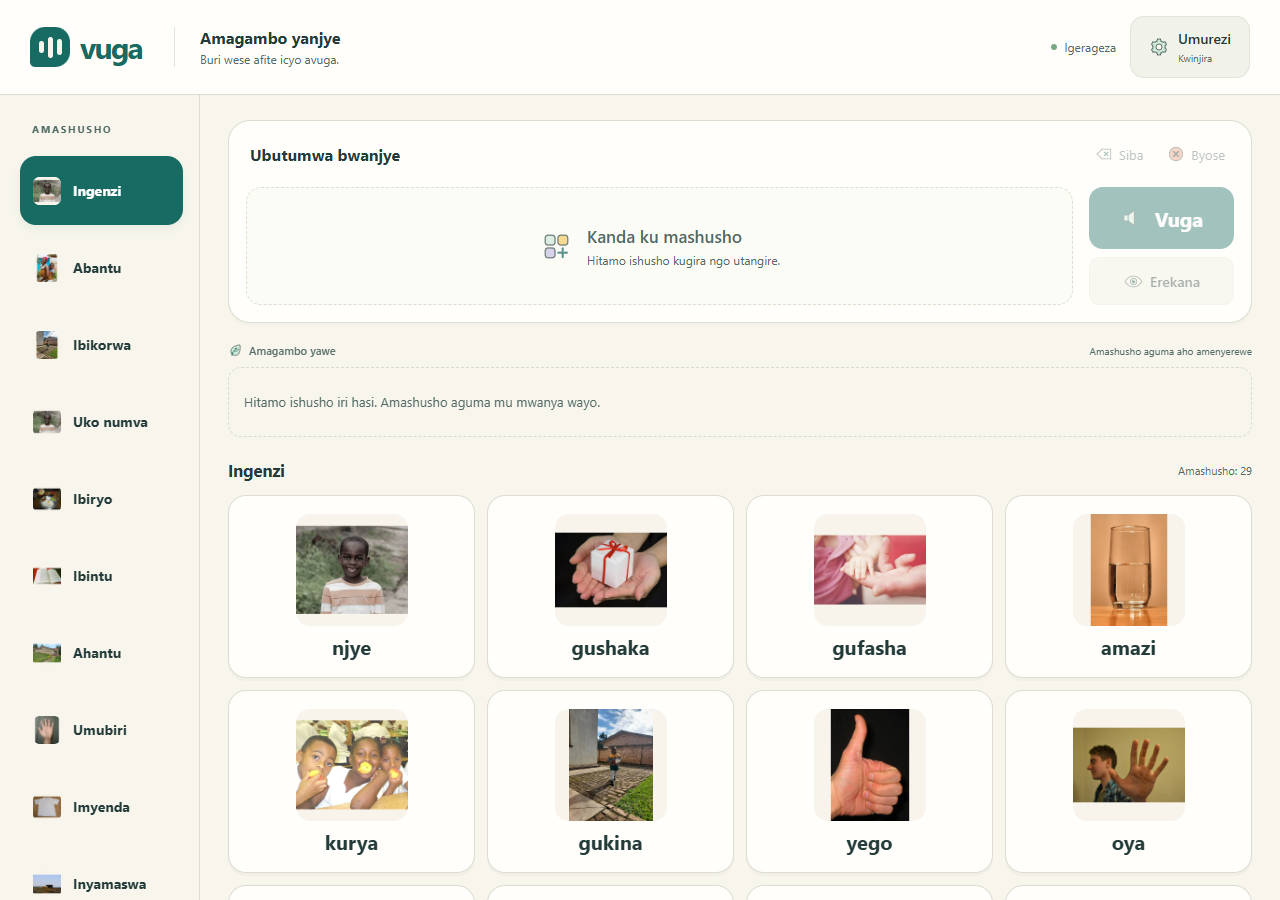
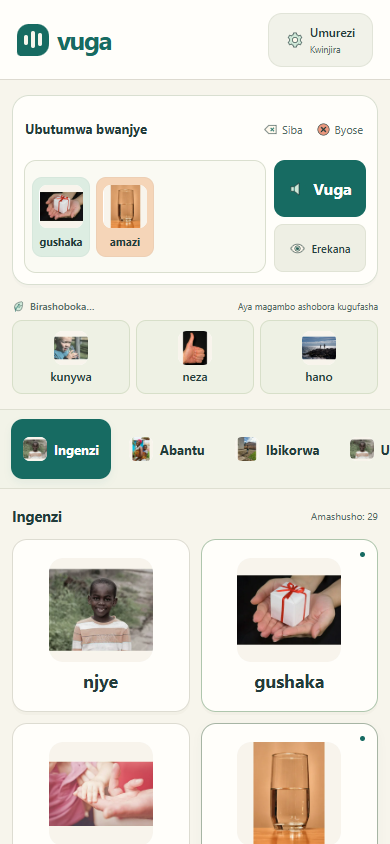
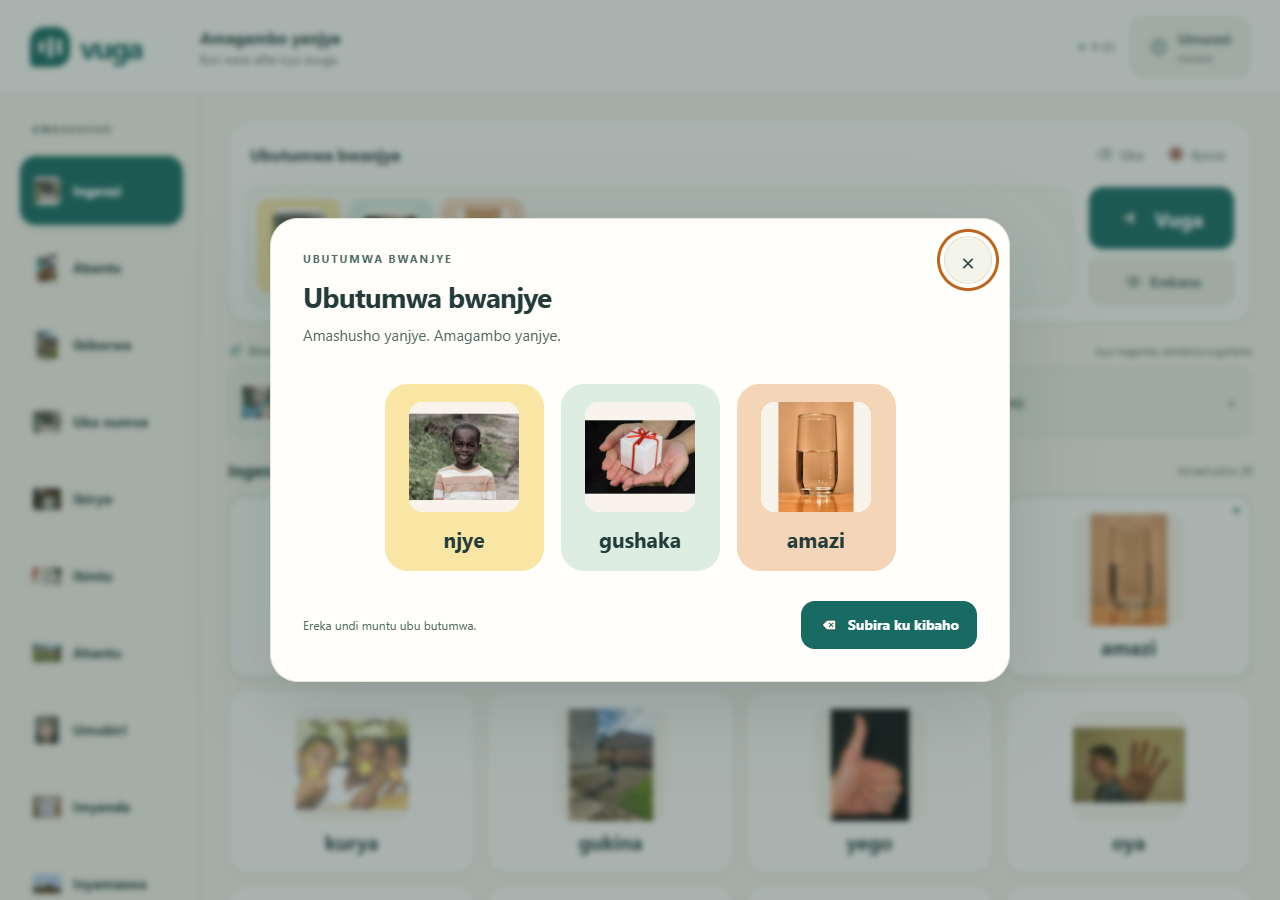
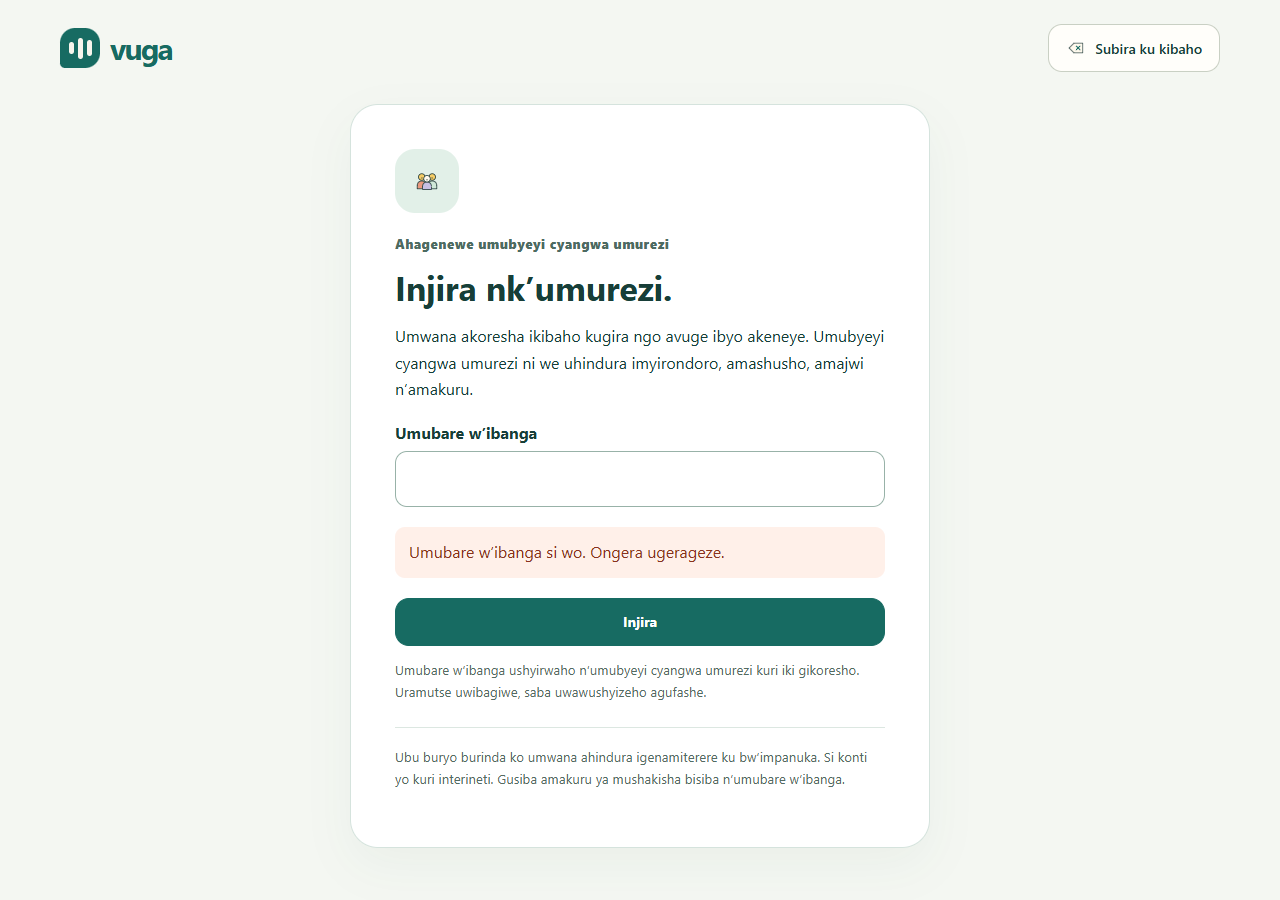
Screenshots of the working app (from docs/screenshots/licensed-2026-10-10):
| Communication board (tablet/desktop) | Board on a phone, offline |
|---|---|
 |  |
| Message shown full screen (Erekana) | Parent PIN unlock |
 |  |
| Caregiver: child profiles | Caregiver: vocabulary |
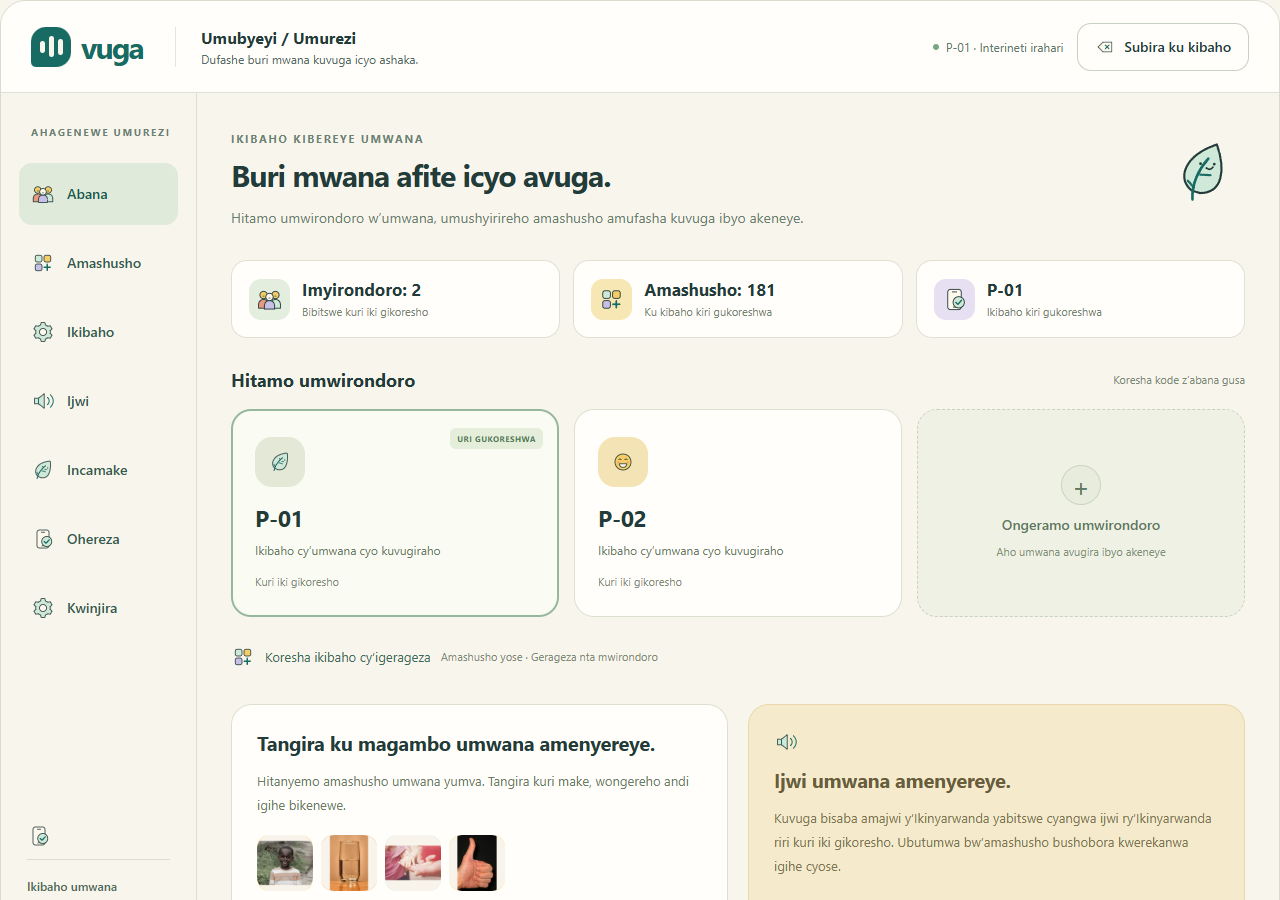 | 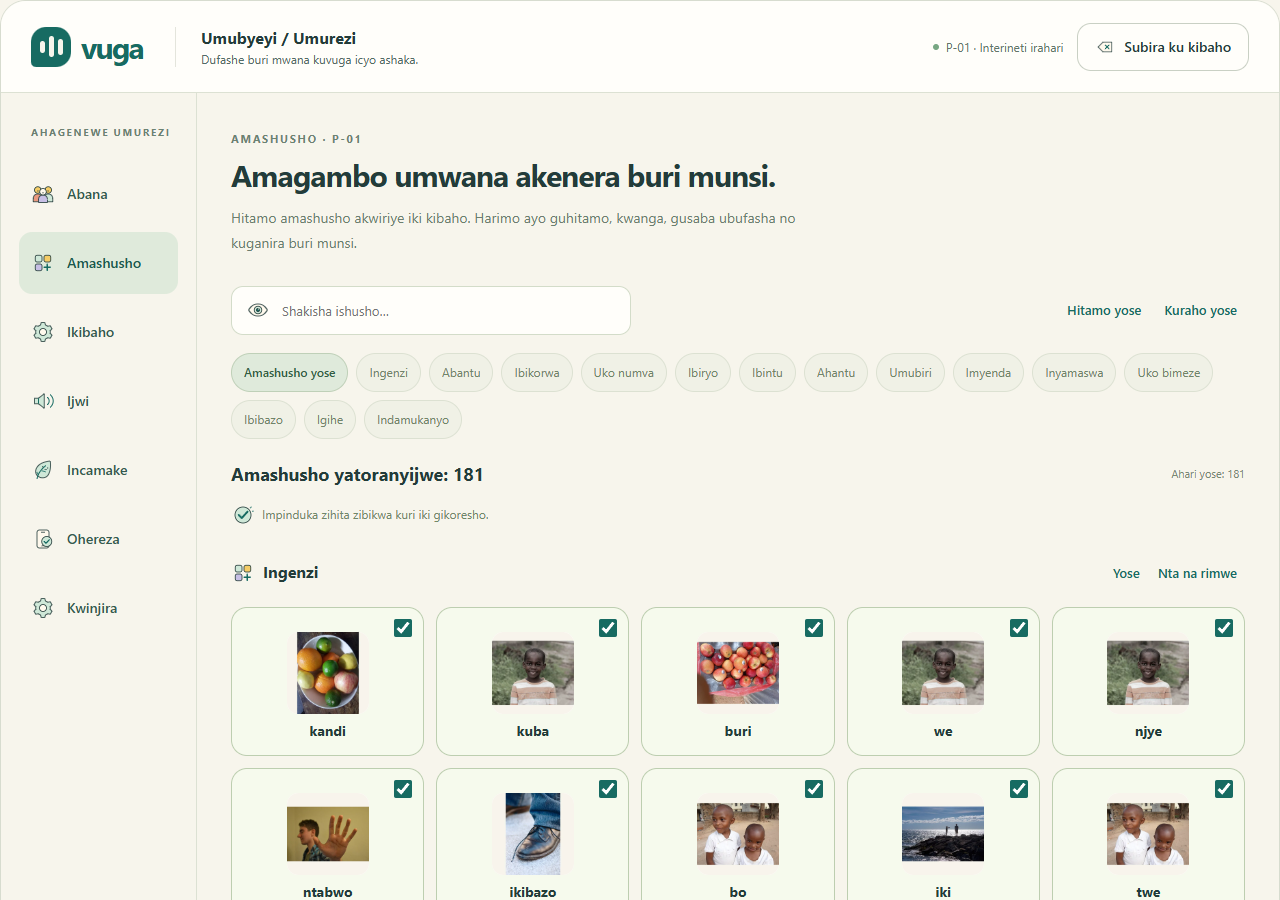 |
| Caregiver: speech and recordings | Caregiver: board preferences |
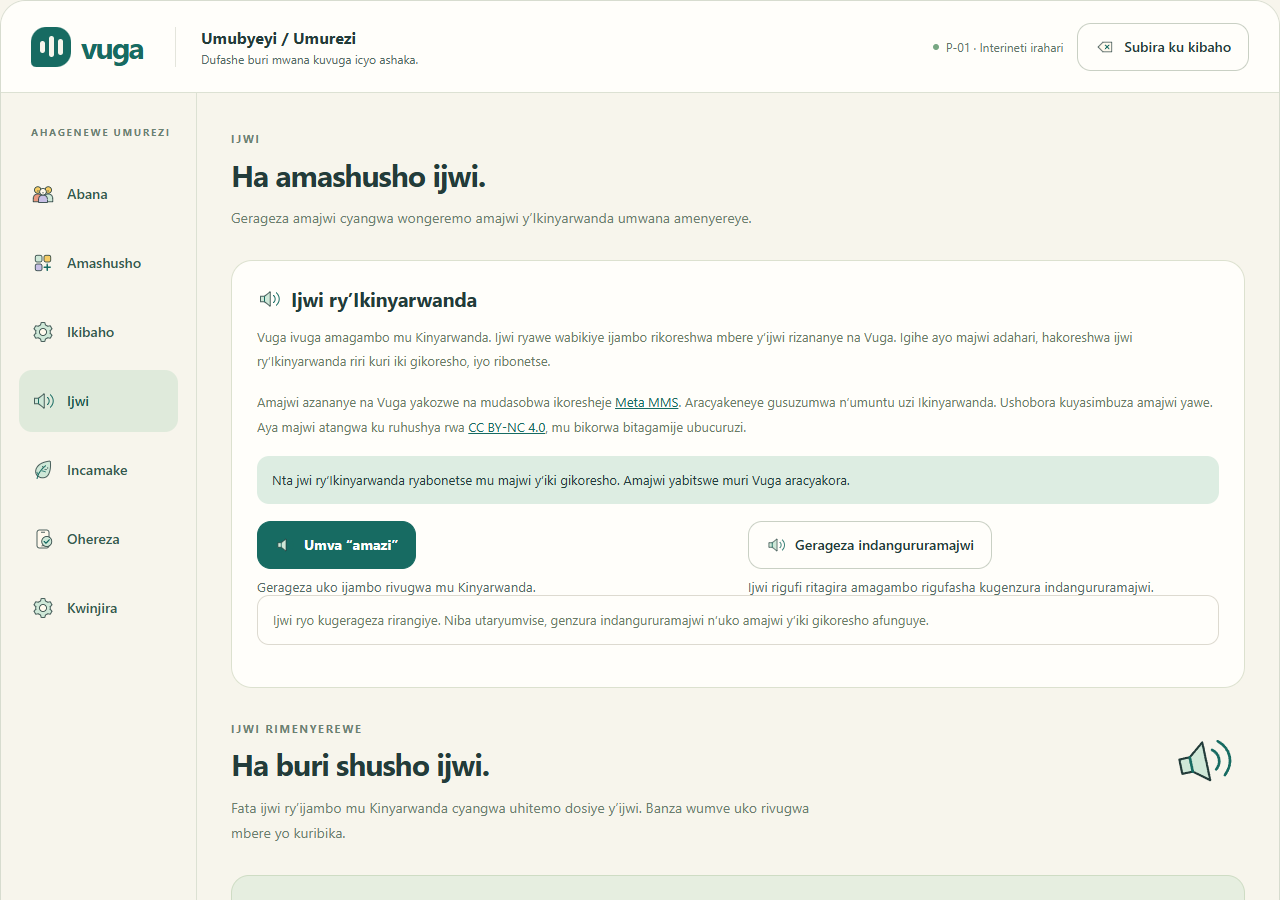 | 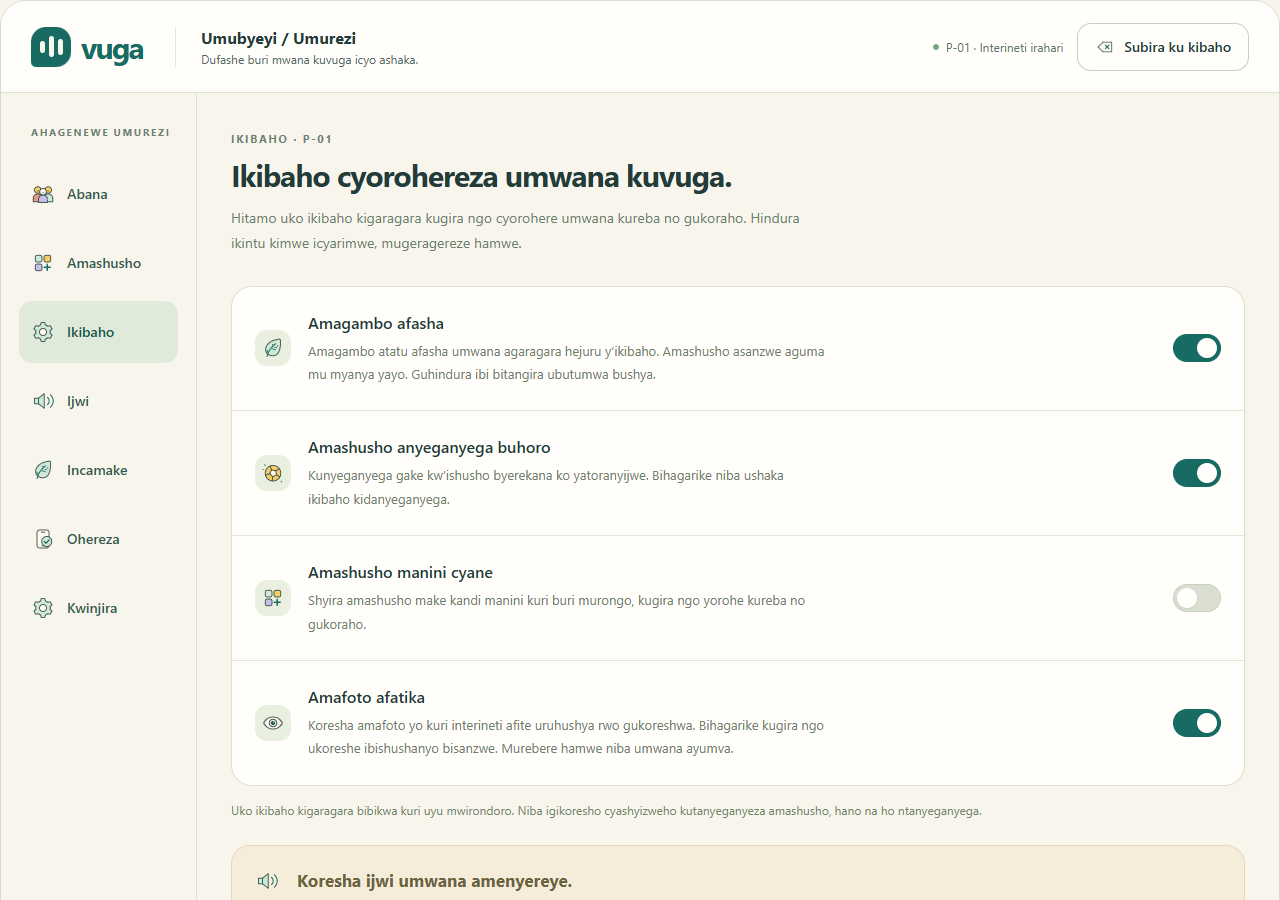 |
Figma mockups and design system (in design/):
The mockups record the earlier visual design. The running app (screenshots above) is the current version, with Kinyarwanda text and licensed photographs.
Circuit diagram. Not applicable. Vuga is a software project that runs on existing tablets and phones. The physical-access parts in hardware/ (a 3D-printable keyguard) and device/ (firmware scaffold for a possible talker box) are early drafts and have not been built.
The full plan is in docs/deployment_plan.md. In summary:
npm run build and npm run preview, as shown in the video demo.app/dist) on Netlify or Cloudflare Pages over HTTPS. The board needs no server, so this alone makes it usable. A tablet installs the app once and then works offline.api/Dockerfile to Render with managed PostgreSQL, secrets set as environment variables, CORS limited to the app's domain, and a /health check.The plan also covers configuration, checks after each deploy, rollback, privacy for children's data, licensing and cost ($0 for the demo).
| Folder | Contents |
|---|---|
app/ | React PWA: communication board, caregiver screens, speech, prediction, offline storage, tests |
api/ | FastAPI backend (auth, profiles, vocabulary, sync, summary, prediction), database models, Dockerfile, tests |
ml/ | Prediction models (unigram, trigram, GRU), training and export scripts, model notebook, tests |
vocab/ | The 181-word Kinyarwanda vocabulary and lexicon |
design/ | Figma mockups, design tokens, icons and previews |
docs/ | Project guide, deployment plan, verification records and screenshots |
hardware/, device/ | Keyguard and talker-box firmware drafts (not yet built) |
scripts/ | Asset generation (pictures, speech) |
Key source files:
| Component | Location |
|---|---|
| Board and caregiver UI | app/src/Board.jsx, app/src/Dashboard.jsx |
| Profiles, vocabulary and messages | app/src/db.js, app/src/message-session.js |
| Parent access | app/src/ParentAccess.jsx, app/src/parent-access.js |
| Speech and recordings | app/src/speech.js, app/src/VoiceSettings.jsx, app/src/AudioSettings.jsx |
| Next-symbol prediction (in app) | app/src/predictor.js |
| API endpoints, schemas, database models | api/app/main.py, api/app/schemas.py, api/app/models.py |
| ML models and training | ml/vuga_ml/ |
Pictures. Each card uses a licensed online image, bundled locally in app/public/photos/ so it works offline. The photo manifest records source pages, authors, licences and hashes. These are not photographs of project participants. Umurezi → Ikibaho → Amafoto afatika switches a profile to ARASAAC pictograms instead. Fetch those with python ml/scripts/fetch_pictograms.py; they have their own licence.
Speech. The app bundles 181 synthetic Kinyarwanda WAV clips, generated from the exact label_rw entries in vocab/symbols.csv with Meta AI's pinned facebook/mms-tts-kin model. They have not been reviewed by a native speaker.
/audio/SYMBOL.wav, then the bundled /audio/rw/SYMBOL.wav, then a Kinyarwanda system voice if one is installed. English is never used as a fallback.Details: audio setup and speech licensing and generation.
Parent access security.
This PIN is a local guard against accidental settings changes. It is not a server account.
The current implementation record has the executed checks and screenshots. They cover:
The API and ML results are from September; the later interface changes did not retrain the predictor.
This repository includes the bundled pictures, Kinyarwanda speech, the trigram model and the executed notebook. It does not include dependencies (node_modules, .venv), model weights or private data; install those with the setup steps above.
| Material | Licence |
|---|---|
| Code | MIT |
| Online pictures | Per-image licence and attribution, recorded in the photo manifest |
| Original vocabulary translations and permitted human recordings | CC BY 4.0 |
| Synthetic Kinyarwanda speech (Meta AI MMS-TTS) | CC BY-NC 4.0 (non-commercial). Its provenance and licence notice ship with the bundle |
| ARASAAC pictograms | CC BY-NC-SA 4.0 |
| Training text (Digital Umuganda Common Voice Kinyarwanda sentence corpus, pinned by commit) | MPL-2.0. See the source notice |
No held-out test examples or participant data are included.
An offline Kinyarwanda picture-to-speech communication app for disabled children who cannot speak or are hard to understand, with machine-learning next-word suggestions.
| GitHub repository | https://github.com/jbyiringiro/capstone-project |
| Video demo | Watch the demo on Google Drive |
| Author | Josue Byiringiro, BSc Software Engineering (Machine Learning), African Leadership University |
| Supervisor | Junior Turatsinze |
Who it is for. Many disabled children cannot use speech to ask for help, make a choice, say "no" or join a conversation. Others speak, but people outside the family cannot understand them. This includes children with:
Rwanda's child census identifies children with communication difficulties (NISR children report).
Problem. Augmentative and alternative communication (AAC) lets these children communicate with pictures and a device that speaks for them (ASHA AAC overview). In Rwanda, though, most families and schools cannot use AAC apps:
Without a way to communicate, a child's needs and choices are easily missed. Frustration can show up as behaviour, and the child is left out of class and family life.
Solution. Vuga ("speak" in Kinyarwanda) is a free communication app in Kinyarwanda. It runs on an ordinary Android tablet or phone and works fully offline after the first load.
How it adapts to each child's disability. Each child has their own profile, and the caregiver adjusts the board to fit that child:
| Feature | Who it helps |
|---|---|
| The main board layout never moves; word suggestions appear in a separate row | Autistic children and children with motor-planning difficulties, who learn where words are and rely on them staying there |
| Large-tile setting per child | Children with limited hand control (for example, cerebral palsy) or low vision |
| Real photographs or simple pictograms, chosen per child | Children with intellectual disability who recognise photos more easily than symbols, or who need a simpler image |
| Reduced-motion setting, and the device's reduce-motion preference is respected | Children who are distracted or upset by animation |
| Erekana shows the message as large text and pictures | When speech audio fails, in a noisy place, or when the listener has hearing loss |
| Caregivers can record words in their own voice | Children who respond better to a familiar voice |
| The caregiver area opens only with a long press and a PIN | Prevents the child from accidentally changing their settings |
| Word suggestions can be turned off | Children for whom suggestions are confusing rather than helpful |
A 3D-printable keyguard design in hardware/ (not yet produced) | Children who accidentally press neighbouring tiles |
Not yet supported. These are planned or open problems:
Machine learning. A next-symbol predictor suggests likely next words in a separate row, so the main board's layout never moves. The model notebook (HTML version) covers data engineering, visualisations, model architecture and metrics. It compares three models trained on Kinyarwanda sentences mapped to the board vocabulary:
| Model | Validation top-3 accuracy |
|---|---|
| Frequency baseline | 21.96% |
| Kneser-Ney trigram | 45.78% |
| GRU | 46.92% |
The app ships the small trigram model because it is almost as accurate as the GRU, runs instantly offline, and is only about 100 KB.
Architecture.
/predict.ml/.Status (12 October 2026). This is an initial demonstration.
The app's labels, dialogs, accessible names and messages are in Kinyarwanda. Developer documentation is in English.
Prerequisites:
git clone https://github.com/jbyiringiro/capstone-project.git
cd capstone-project
If you downloaded the ZIP from GitHub instead, unzip it and open a terminal in the extracted folder.
cd app
npm ci              # install dependencies
npm test            # run the unit tests
npm run build       # production build with offline service worker
npm run preview -- --host 127.0.0.1
Open http://localhost:4173. For development with hot reload, run npm run dev and open http://localhost:5173. On Windows PowerShell, use npm.cmd if the execution policy blocks npm.
Using the app:
From the repository root:
python -m venv .venv
# Windows: .venv\Scripts\activate    macOS/Linux: source .venv/bin/activate
python -m pip install -e "./ml[dev,notebook]" -e "./api[dev]"

python ml/notebooks/run_notebook.py          # re-run the model notebook
python -m pytest ml/tests api/tests          # run the Python tests
python -m uvicorn app.main:app --app-dir api --host 127.0.0.1 --port 8000
Open Swagger UI at http://localhost:8000/docs.
API configuration. Copy .env.example to .env to configure the API:
VUGA_MODEL_DIR to ml/artifacts.VUGA_CORS_ORIGINS to the app's origin.VUGA_JWT_SECRET to a private value of at least 32 characters. Without it, local development uses a temporary key.To run the API with PostgreSQL in Docker instead, set VUGA_JWT_SECRET and run docker compose up.
The notebook reads the committed ml/notebooks/evidence/ snapshot. It does not download the corpus or retrain the neural models. To regenerate the trigram model from that snapshot, run python ml/scripts/export_artifacts.py --data ml/notebooks/evidence. Optional neural tests need ml[neural].
More detail: project guide.
Screenshots of the working app (from docs/screenshots/licensed-2026-10-10):
| Communication board (tablet/desktop) | Board on a phone, offline |
|---|---|
| |
| Message shown full screen (Erekana) | Parent PIN unlock |
| |
| Caregiver: child profiles | Caregiver: vocabulary |
| |
| Caregiver: speech and recordings | Caregiver: board preferences |
| |
Figma mockups and design system (in design/):
The mockups record the earlier visual design. The running app (screenshots above) is the current version, with Kinyarwanda text and licensed photographs.
Circuit diagram. Not applicable. Vuga is a software project that runs on existing tablets and phones. The physical-access parts in hardware/ (a 3D-printable keyguard) and device/ (firmware scaffold for a possible talker box) are early drafts and have not been built.
The full plan is in docs/deployment_plan.md. In summary:
npm run build and npm run preview, as shown in the video demo.app/dist) on Netlify or Cloudflare Pages over HTTPS. The board needs no server, so this alone makes it usable. A tablet installs the app once and then works offline.api/Dockerfile to Render with managed PostgreSQL, secrets set as environment variables, CORS limited to the app's domain, and a /health check.The plan also covers configuration, checks after each deploy, rollback, privacy for children's data, licensing and cost ($0 for the demo).
| Folder | Contents |
|---|---|
app/ | React PWA: communication board, caregiver screens, speech, prediction, offline storage, tests |
api/ | FastAPI backend (auth, profiles, vocabulary, sync, summary, prediction), database models, Dockerfile, tests |
ml/ | Prediction models (unigram, trigram, GRU), training and export scripts, model notebook, tests |
vocab/ | The 181-word Kinyarwanda vocabulary and lexicon |
design/ | Figma mockups, design tokens, icons and previews |
docs/ | Project guide, deployment plan, verification records and screenshots |
hardware/, device/ | Keyguard and talker-box firmware drafts (not yet built) |
scripts/ | Asset generation (pictures, speech) |
Key source files:
| Component | Location |
|---|---|
| Board and caregiver UI | app/src/Board.jsx, app/src/Dashboard.jsx |
| Profiles, vocabulary and messages | app/src/db.js, app/src/message-session.js |
| Parent access | app/src/ParentAccess.jsx, app/src/parent-access.js |
| Speech and recordings | app/src/speech.js, app/src/VoiceSettings.jsx, app/src/AudioSettings.jsx |
| Next-symbol prediction (in app) | app/src/predictor.js |
| API endpoints, schemas, database models | api/app/main.py, api/app/schemas.py, api/app/models.py |
| ML models and training | ml/vuga_ml/ |
Pictures. Each card uses a licensed online image, bundled locally in app/public/photos/ so it works offline. The photo manifest records source pages, authors, licences and hashes. These are not photographs of project participants. Umurezi → Ikibaho → Amafoto afatika switches a profile to ARASAAC pictograms instead. Fetch those with python ml/scripts/fetch_pictograms.py; they have their own licence.
Speech. The app bundles 181 synthetic Kinyarwanda WAV clips, generated from the exact label_rw entries in vocab/symbols.csv with Meta AI's pinned facebook/mms-tts-kin model. They have not been reviewed by a native speaker.
/audio/SYMBOL.wav, then the bundled /audio/rw/SYMBOL.wav, then a Kinyarwanda system voice if one is installed. English is never used as a fallback.Details: audio setup and speech licensing and generation.
Parent access security.
This PIN is a local guard against accidental settings changes. It is not a server account.
The current implementation record has the executed checks and screenshots. They cover:
The API and ML results are from September; the later interface changes did not retrain the predictor.
This repository includes the bundled pictures, Kinyarwanda speech, the trigram model and the executed notebook. It does not include dependencies (node_modules, .venv), model weights or private data; install those with the setup steps above.
| Material | Licence |
|---|---|
| Code | MIT |
| Online pictures | Per-image licence and attribution, recorded in the photo manifest |
| Original vocabulary translations and permitted human recordings | CC BY 4.0 |
| Synthetic Kinyarwanda speech (Meta AI MMS-TTS) | CC BY-NC 4.0 (non-commercial). Its provenance and licence notice ship with the bundle |
| ARASAAC pictograms | CC BY-NC-SA 4.0 |
| Training text (Digital Umuganda Common Voice Kinyarwanda sentence corpus, pinned by commit) | MPL-2.0. See the source notice |
No held-out test examples or participant data are included.



