
Native macOS agent activity and usage monitor
See the codeSee what people are saying
README
Agent HUD Open
Your agents, at a glance.
A native macOS utility for agent activity, remaining usage, and local usage statistics.
Website · Quick start · Supported clients · Documentation
macOS 14+ · Swift 6 · Apache-2.0

At a glance
- Activity in your notch. A breathing glow follows agent activity. Expand the panel to see quotas, token usage, and active sessions. Every display gets its own HUD — a screen without a notch shows the watched agents' logos in a row instead of a bar pretending to have one.
- Answers without a detour. When a client stops to ask whether a tool may run, the request arrives on the HUD. Hover to read what it wants — the file, the command, the lines it would change — and allow or deny it there. Saying nothing is always available: the client keeps waiting on its own prompt in the terminal, exactly as if the HUD were closed.
- Usage in context. Track reset times, quota trends, model usage, and available API balances in one statistics window.
- Make it yours. Choose visible agents, glow appearance (a soft blur or a halftone, ASCII, block, Braille or binary grid, each with breathe, flow, scan, ripple, shimmer and boot effects), language, and startup preferences. Usage alert levels are fixed at 70% / 90% used.
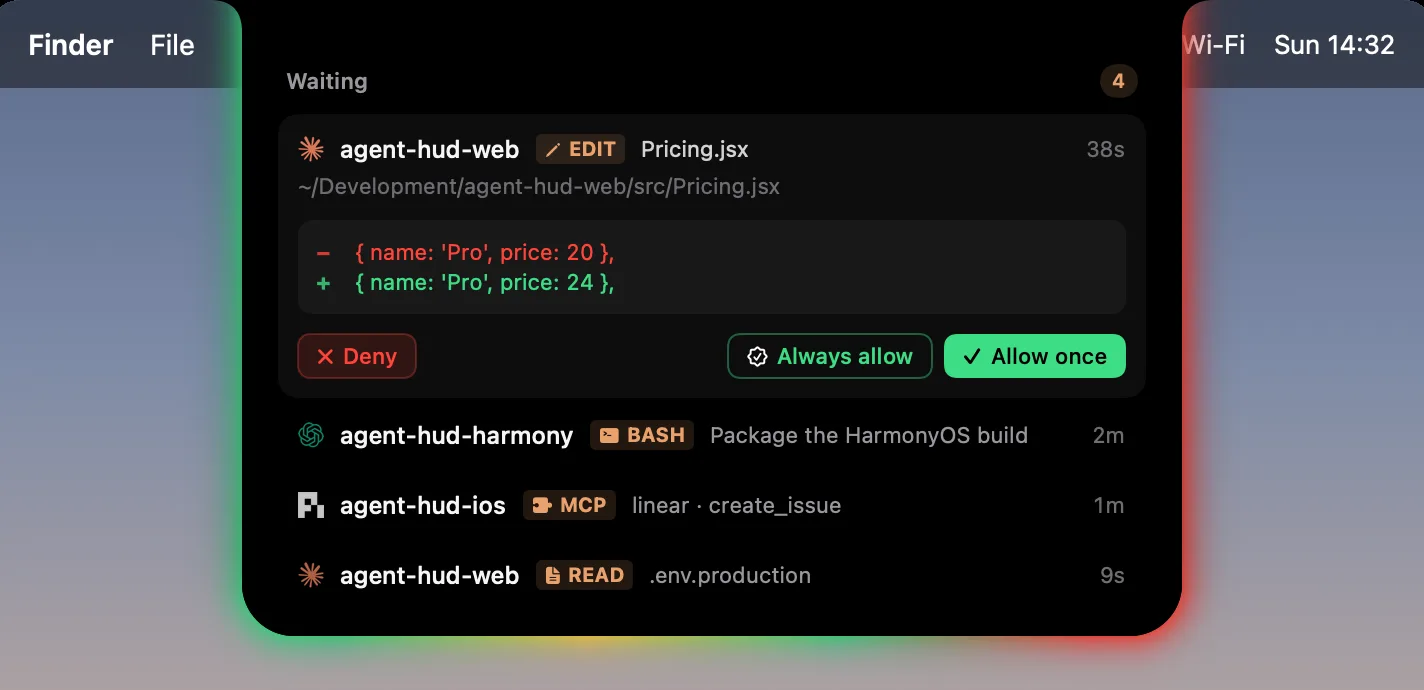
Press ⌘⌥H to toggle the glow. The menu bar gives you quick access to usage and settings.
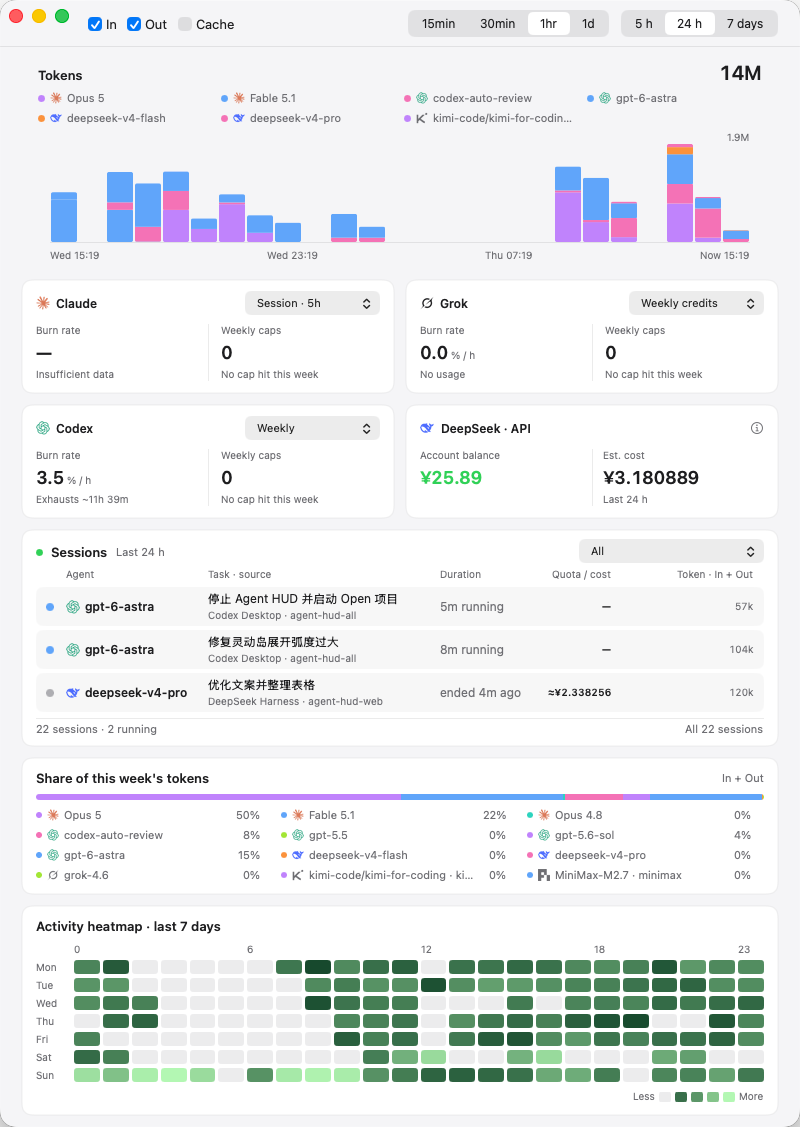
Quick start
Requirements: macOS 14 or later, plus Xcode or the Xcode Command Line Tools with a Swift 6 toolchain.
git clone https://github.com/jazzenchen/agent-hud-open.git
cd agent-hud-open
make check
make test
make run
This builds and opens build/Agent HUD Open.app. The app is signed ad-hoc for local use; no developer account, signing identity, or provisioning profile is required.
Supported clients
Claude Code · Codex Desktop / CLI · DeepSeek Harness · Antigravity · Cursor · Grok CLI · GitHub Copilot CLI · OpenCode · Kimi · GLM · Pi · OpenClaw · Hermes Agent · ZCode · CodeBuddy · WorkBuddy · Qwen Code
Install and sign into the clients you want to monitor. Available activity, quota, and balance information depends on the client and account. See session lifecycle coverage for support for running and terminal turns.
Permission requests can be answered from the HUD for the clients whose own hook runs just before they ask: Claude Code, Codex, CodeBuddy, WorkBuddy, ZCode, Qwen Code and the Qoder builds. See approvals.
Data access
No Agent HUD account is required. The app reads local agent activity and queries the corresponding providers for usage or balances where supported, using the installed clients' existing sign-in or configured credentials.
See data access for provider details, credential boundaries, and local storage.
Development
| Command | Purpose |
|---|---|
make check | Check source and package boundaries |
make test | Run unit tests |
make build | Build the locally signed macOS app |
make demo | Open settings with sample data |
make snapshot | Render the interface to build/snapshots |
Continuous integration checks source boundaries, runs unit tests, builds the application, and verifies its signature and bundled resources. It does not publish binaries.
Modules
| Product | Responsibility |
|---|---|
AgentHUDSupport | Structured JSON, deterministic record identities, and dates |
AgentHUDCore | Agent providers, usage models, local caches, and calculations |
AgentHUDDesktop | Native menu bar, notch, settings, and statistics UI |
AgentHUDOpen | Standalone macOS executable |
The libraries can also be consumed through Swift Package Manager. DesktopApplication(options:settings:store:additionalSettingsPages:onIslandEvents:) takes a SettingsStore and UsageStore plus optional host settings pages and an alert relay, and showSettings(pageID:) opens one of those pages; the host owns any additional services. See architecture.
Documentation
- Architecture — modules, host integration, storage, design invariants, and versioning.
- The HUD on screen — per-display placement, the logo queue, the glow, hovering, events, and approvals.
- Data access — provider queries, credentials, and local storage.
- Usage semantics — token dimensions, percentages, alert levels, request intervals, and reading retention.
- Providers — per-client data sources, credentials, endpoints, counting, billing pools, caches, tests, and upstream references.
- Session lifecycle — running and terminal turn evidence, live status, the Pi observer, and completion hooks.
- Command line — launch options, read-only probes, adapter commands, and environment variables.
- Brand assets — bundled client logos, their sources, rendering, and licenses.
- Roadmap — what is in progress, next, and later.
- Changelog — released versions and host-visible API changes.
License
Apache-2.0. Included provider references and icon assets retain their third-party notices and icon license.
Contributors

116 commits
Similar repos


Languages
Swift
99.7%
Native macOS agent activity and usage monitor
See the codeSee what people are saying
README
Agent HUD Open
Your agents, at a glance.
A native macOS utility for agent activity, remaining usage, and local usage statistics.
Website · Quick start · Supported clients · Documentation
macOS 14+ · Swift 6 · Apache-2.0
At a glance
- Activity in your notch. A breathing glow follows agent activity. Expand the panel to see quotas, token usage, and active sessions. Every display gets its own HUD — a screen without a notch shows the watched agents' logos in a row instead of a bar pretending to have one.
- Answers without a detour. When a client stops to ask whether a tool may run, the request arrives on the HUD. Hover to read what it wants — the file, the command, the lines it would change — and allow or deny it there. Saying nothing is always available: the client keeps waiting on its own prompt in the terminal, exactly as if the HUD were closed.
- Usage in context. Track reset times, quota trends, model usage, and available API balances in one statistics window.
- Make it yours. Choose visible agents, glow appearance (a soft blur or a halftone, ASCII, block, Braille or binary grid, each with breathe, flow, scan, ripple, shimmer and boot effects), language, and startup preferences. Usage alert levels are fixed at 70% / 90% used.
Press ⌘⌥H to toggle the glow. The menu bar gives you quick access to usage and settings.
Quick start
Requirements: macOS 14 or later, plus Xcode or the Xcode Command Line Tools with a Swift 6 toolchain.
git clone https://github.com/jazzenchen/agent-hud-open.git
cd agent-hud-open
make check
make test
make run
This builds and opens build/Agent HUD Open.app. The app is signed ad-hoc for local use; no developer account, signing identity, or provisioning profile is required.
Supported clients
Claude Code · Codex Desktop / CLI · DeepSeek Harness · Antigravity · Cursor · Grok CLI · GitHub Copilot CLI · OpenCode · Kimi · GLM · Pi · OpenClaw · Hermes Agent · ZCode · CodeBuddy · WorkBuddy · Qwen Code
Install and sign into the clients you want to monitor. Available activity, quota, and balance information depends on the client and account. See session lifecycle coverage for support for running and terminal turns.
Permission requests can be answered from the HUD for the clients whose own hook runs just before they ask: Claude Code, Codex, CodeBuddy, WorkBuddy, ZCode, Qwen Code and the Qoder builds. See approvals.
Data access
No Agent HUD account is required. The app reads local agent activity and queries the corresponding providers for usage or balances where supported, using the installed clients' existing sign-in or configured credentials.
See data access for provider details, credential boundaries, and local storage.
Development
| Command | Purpose |
|---|---|
make check | Check source and package boundaries |
make test | Run unit tests |
make build | Build the locally signed macOS app |
make demo | Open settings with sample data |
make snapshot | Render the interface to build/snapshots |
Continuous integration checks source boundaries, runs unit tests, builds the application, and verifies its signature and bundled resources. It does not publish binaries.
Modules
| Product | Responsibility |
|---|---|
AgentHUDSupport | Structured JSON, deterministic record identities, and dates |
AgentHUDCore | Agent providers, usage models, local caches, and calculations |
AgentHUDDesktop | Native menu bar, notch, settings, and statistics UI |
AgentHUDOpen | Standalone macOS executable |
The libraries can also be consumed through Swift Package Manager. DesktopApplication(options:settings:store:additionalSettingsPages:onIslandEvents:) takes a SettingsStore and UsageStore plus optional host settings pages and an alert relay, and showSettings(pageID:) opens one of those pages; the host owns any additional services. See architecture.
Documentation
- Architecture — modules, host integration, storage, design invariants, and versioning.
- The HUD on screen — per-display placement, the logo queue, the glow, hovering, events, and approvals.
- Data access — provider queries, credentials, and local storage.
- Usage semantics — token dimensions, percentages, alert levels, request intervals, and reading retention.
- Providers — per-client data sources, credentials, endpoints, counting, billing pools, caches, tests, and upstream references.
- Session lifecycle — running and terminal turn evidence, live status, the Pi observer, and completion hooks.
- Command line — launch options, read-only probes, adapter commands, and environment variables.
- Brand assets — bundled client logos, their sources, rendering, and licenses.
- Roadmap — what is in progress, next, and later.
- Changelog — released versions and host-visible API changes.
License
Apache-2.0. Included provider references and icon assets retain their third-party notices and icon license.
Similar repos
Contributors
116 commits
Languages
Swift
99.7%