
Know when your AI limits come back: Claude and ChatGPT/Codex usage across all your accounts.
See the codeSee what people are saying (1)
README

Know when your AI limits come back.
Every Claude and ChatGPT/Codex limit, across all your accounts, on one screen.
Use it now · Self-host · Security · Issues


Why this exists
If you pay for Claude and ChatGPT, maybe on more than one account, you know the feeling: you are in the middle of something, and the model tells you that you have hit a limit. Come back in a few hours. Which account still has room? When does the weekly reset land? Is the Fable limit the one blocking you, or the general one?
Both providers expose this information, but they hide it in different places and none of them show it side by side. AI Cooldown pulls every rate-limit window from every account you connect and answers the only question that matters: can I keep working right now, and on which account?
What you get
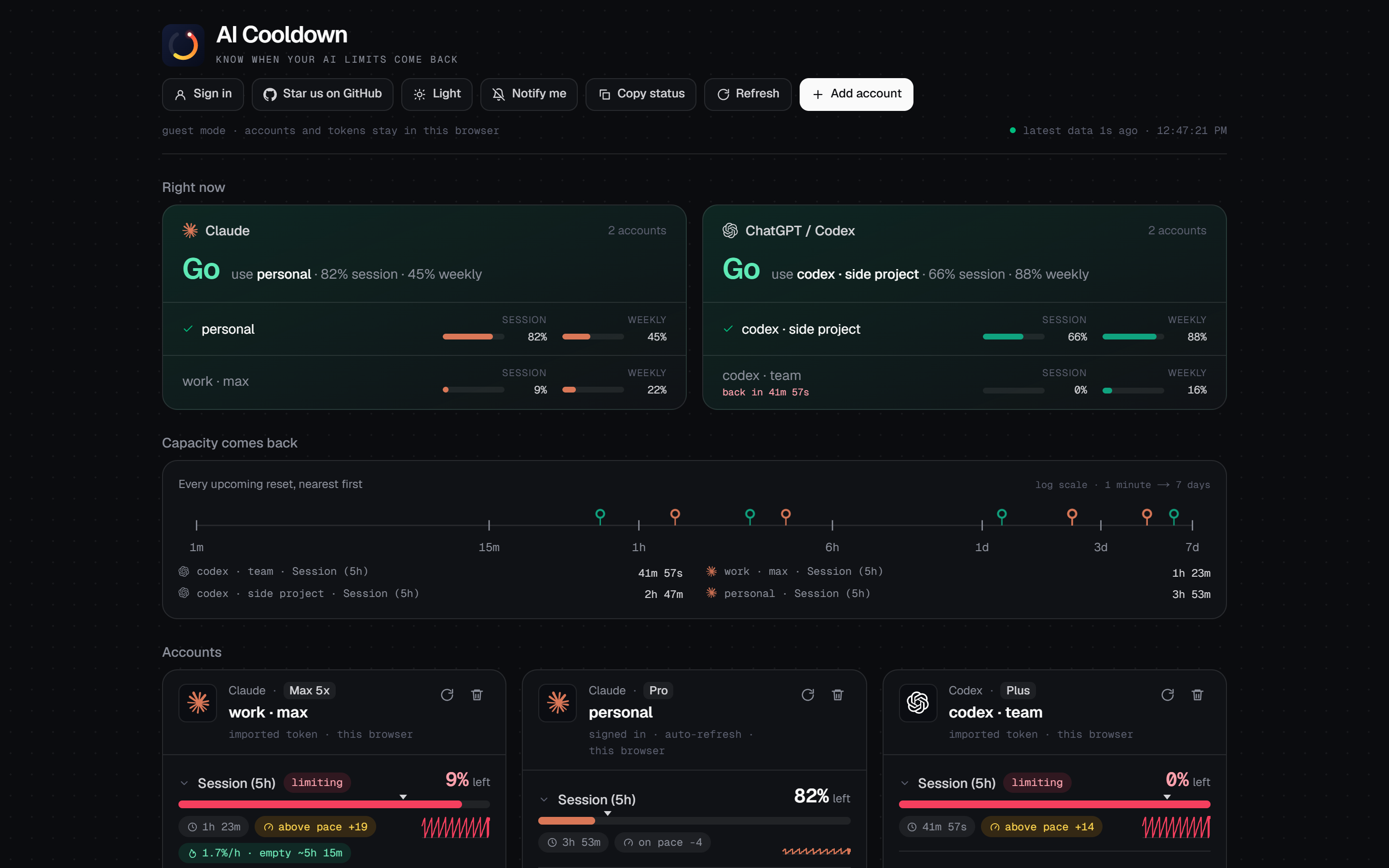
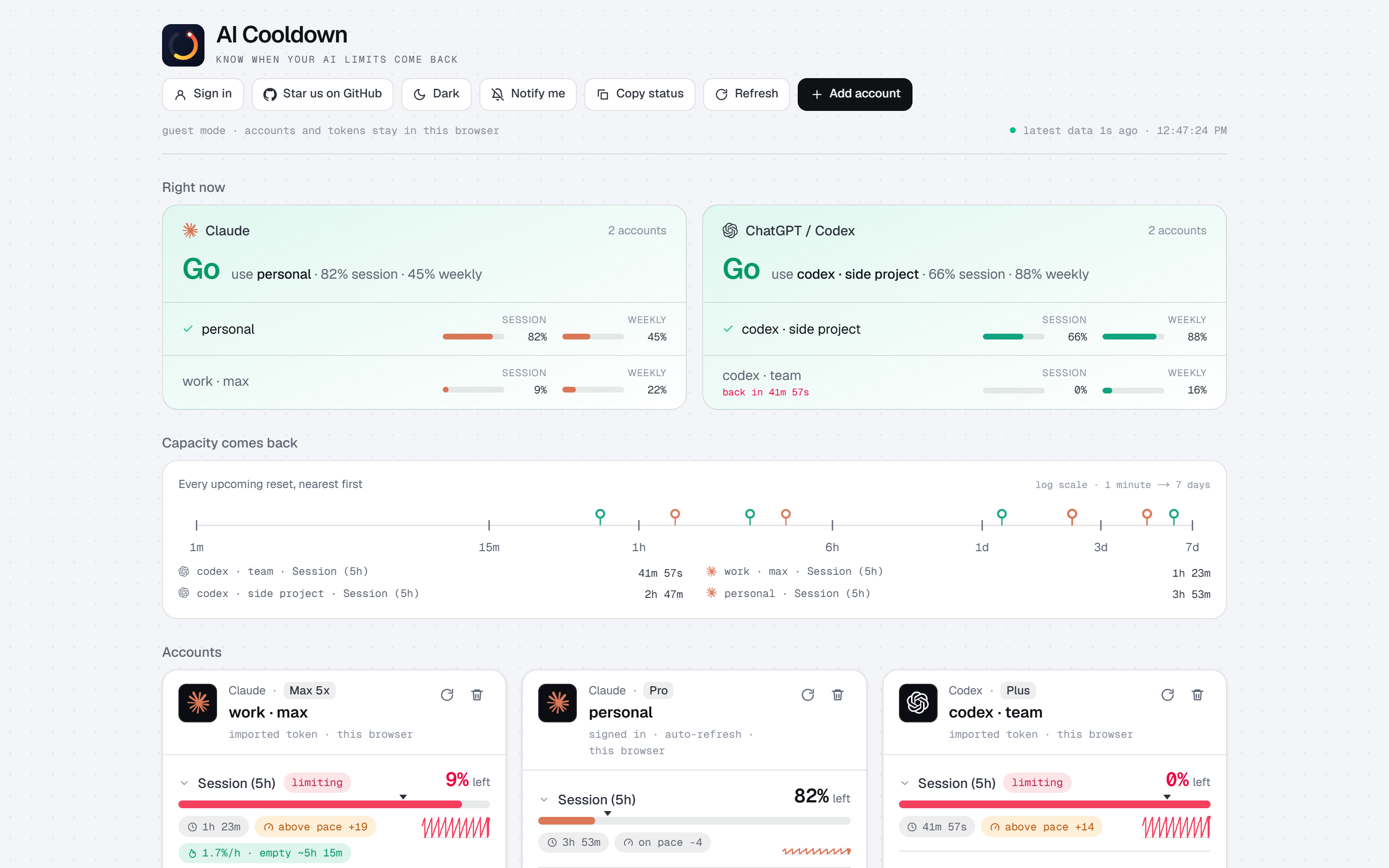
One verdict per provider. At the top of the page, a plain Go or Wait for Claude and for Codex, naming the account with the most headroom. Below it, your accounts ranked by how much they have left right now.
Every window the provider reports. The 5-hour session, the weekly limit, and the per-model weekly limits (Fable, Opus, Sonnet), with the one that is currently limiting you flagged. Your subscription tier is shown on each account.
A timeline of when capacity comes back. Every upcoming reset on one log-scale line from one minute to seven days, so you can see at a glance whether relief is minutes or days away.
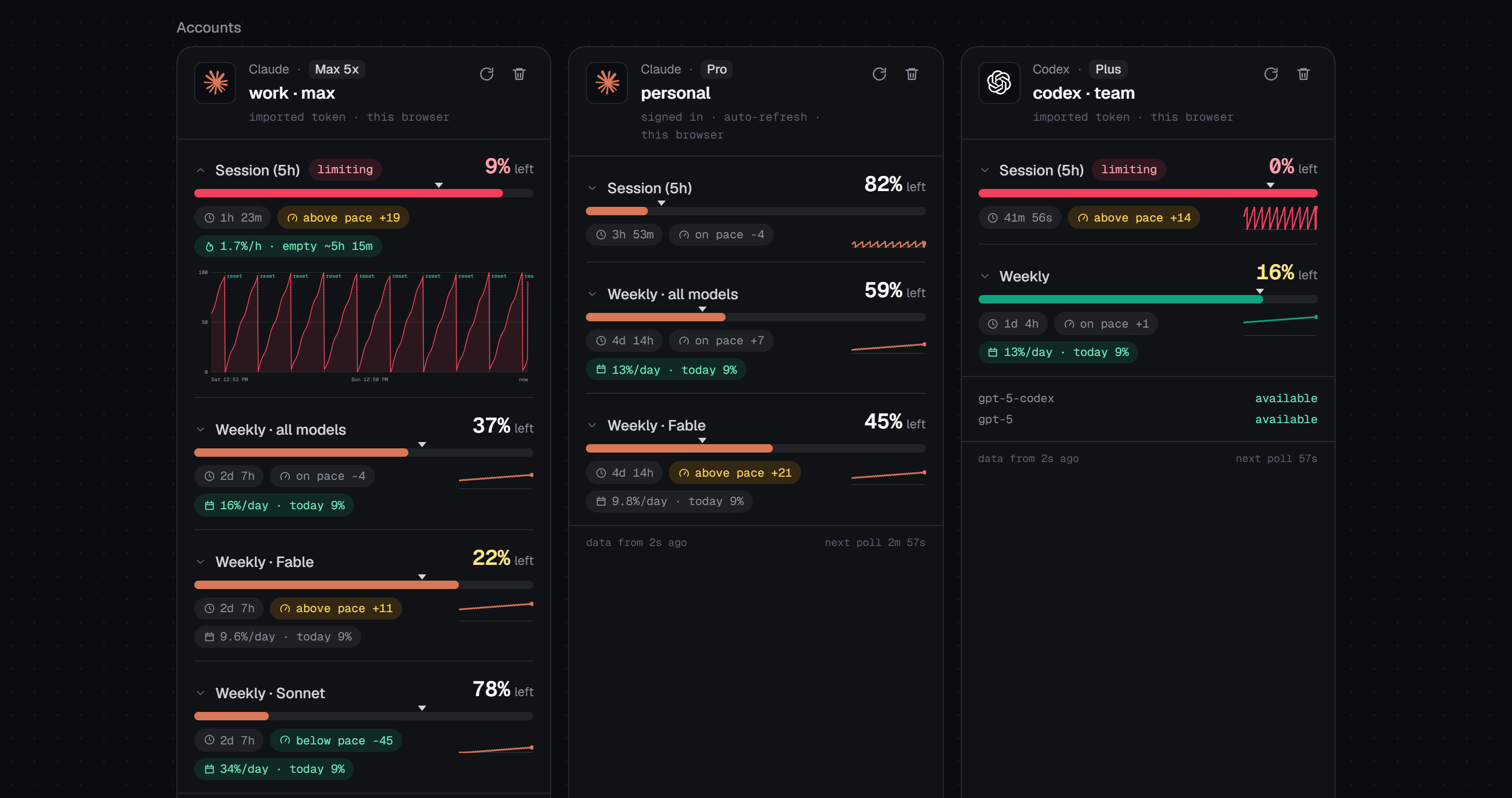
Pace, burn rate and daily budget. A tick on each meter shows how far through the window you are. If the fill is left of the tick, you are under pace. Your recent burn rate projects whether you run dry before the reset, and weekly windows show how much you can spend per day and still make it.
History. Click any window for a 48-hour chart of your usage with reset markers, built from your own polling history and kept in your browser.
The small things. Browser notifications when a limit resets or runs out. A countdown in the tab title so a pinned tab is enough. One-click "copy status" for pasting into chat. Rename accounts to whatever makes sense to you. Light and dark themes.
Getting started
The hosted version at aicooldown.com needs no setup. Click Add account, then either:
- Sign in with your Claude or ChatGPT account. This uses the same OAuth flow the official CLIs use, so the app can refresh its own tokens and keep polling for weeks.
- Import a token the CLI already saved on your machine. Paste the whole credentials file or just the access token. Imported tokens are never refreshed here (both providers rotate refresh tokens, and doing it from two places would log your CLI out), so you paste again when they expire.
| Provider | Where the CLI keeps its token | Notes |
|---|---|---|
| Claude Code | ~/.claude/.credentials.json | On macOS the live token is in Keychain (item Claude Code-credentials); the file can be stale. |
| Codex CLI | ~/.codex/auth.json | Written by codex login. |
You can use the whole thing as a guest, with everything kept in your browser. Or create an AI Cooldown account with an email and password to have your linked accounts follow you across devices.
How it treats your tokens
This app needs your provider tokens to read your limits, so here is exactly what happens with them.
| Guest (no sign-in) | Signed in | |
|---|---|---|
| Where linked accounts live | this browser's localStorage | the database, encrypted with APP_SECRET (AES-256-GCM) |
| Where tokens go | sent with each usage request to the site's proxy, never stored | never leave the server; the browser asks by account id |
| Other devices | no | yes |
| Polling history and theme | this browser | this browser |
The server only ever calls the providers' own usage endpoints. It reads limits and your account email, nothing else: no conversations, no messages. Passwords are scrypt-hashed, sessions are an httpOnly cookie, and there is no third-party auth service.
If you would rather not have your tokens pass through someone else's server at all, that is a reasonable position. Host your own copy. It is one click on Vercel and the code is all here to read.
Run it yourself
git clone https://github.com/iyedbhd/aicooldown.git
cd aicooldown
npm install
npm run dev
Open http://localhost:3000. Guest mode works with zero configuration. Sign-up works too: it creates a SQLite file at data/aicooldown.db and uses a development encryption key with a console warning.
Deploy
| Variable | Required | What |
|---|---|---|
APP_SECRET | yes, in production | 32+ random characters. Encrypts stored provider tokens. Changing it makes existing stored tokens unreadable. |
LIBSQL_URL | on serverless hosts | libSQL database URL, e.g. a free Turso database (libsql://...). Defaults to file:data/aicooldown.db, which does not persist on Vercel. Vercel's Turso integration sets TURSO_DATABASE_URL and TURSO_AUTH_TOKEN instead, and those work too. |
LIBSQL_AUTH_TOKEN | with Turso | The database auth token. |
Any host that runs Next.js works: Vercel, Netlify, a Node server, Docker. The API routes need outbound HTTPS to api.anthropic.com, platform.claude.com, chatgpt.com and auth.openai.com. Copy .env.example to .env.local to get started.
Under the hood
On a schedule (Claude every 3 minutes, Codex every minute) the browser asks /api/usage for each account. The server calls the provider's usage endpoint, refreshes tokens it owns when they are about to expire, keeps a short in-memory cache per token so repeated requests do not hit the provider, and if the provider answers 429 it returns the last good copy marked stale while the client backs off (5, 10, 20, then 30 minutes).
Anthropic rate-limits its usage endpoint per token, sends no Retry-After header, and a tripped limit can last hours. If a card says "rate-limiting this token", the dashboard keeps showing the last data it got. Running several usage tools against the same token at once is the usual cause.
These are the endpoints the official CLIs use. They are not publicly documented and may change without notice.
| Provider | Usage | Auth |
|---|---|---|
| Claude | GET https://api.anthropic.com/api/oauth/usage (+ /api/oauth/profile for the email) | https://claude.ai/oauth/authorize → https://platform.claude.com/v1/oauth/token |
| Codex | GET https://chatgpt.com/backend-api/wham/usage | https://auth.openai.com/oauth/authorize → https://auth.openai.com/oauth/token |
src/app/api/usage            usage for a stored account (by id) or a guest account (tokens in body)
src/app/api/accounts         signed-in CRUD for linked accounts
src/app/api/auth/*           register, login, logout, me, PKCE code exchange
src/app/api/identity         account email / plan for a guest token
src/lib/providers/*.ts       per-provider endpoints and response normalization
src/lib/server/usage.ts      fetch + refresh-on-expiry + cache, shared by both callers
src/lib/server/{db,auth,accounts,crypto}.ts
                             libSQL schema, sessions, encrypted account storage
src/lib/store.ts             browser-side account store: localStorage or the API
src/components/*             dashboard UI
Built with Next.js 16, React 19, Tailwind 4 and libSQL. The name, tagline and domain live in src/lib/site.ts; logo files are in public/ and the /brand page shows them with the color tokens.
Contributing
Bug reports, ideas and pull requests are all welcome. The most useful things right now:
- A provider response that the app parses wrongly or does not show (a redacted JSON sample in an issue is perfect).
- Any rate-limit behaviour you see that the backoff does not handle well.
- Support for another provider that exposes its limits.
Keep changes focused and run npm run lint and npm run build before opening a PR.
If this saved you a "come back in 3 hours"
A star on the repo genuinely helps other people find it, and it is the easiest way to say the tool was useful. Thank you.
Disclaimer and license
Not affiliated with Anthropic or OpenAI. The Claude and OpenAI marks shown next to accounts are their owners' trademarks, used only to identify each provider (glyphs via Simple Icons). The app reads your own account's usage data with your own credentials. Keep your tokens private: anyone who has them can act as you.
MIT. See LICENSE.
Contributors

6 commits
Similar repos


Languages
TypeScript
96.2%
CSS
3.4%
Know when your AI limits come back: Claude and ChatGPT/Codex usage across all your accounts.
See the codeSee what people are saying (1)
README
Know when your AI limits come back.
Every Claude and ChatGPT/Codex limit, across all your accounts, on one screen.
Use it now · Self-host · Security · Issues
Why this exists
If you pay for Claude and ChatGPT, maybe on more than one account, you know the feeling: you are in the middle of something, and the model tells you that you have hit a limit. Come back in a few hours. Which account still has room? When does the weekly reset land? Is the Fable limit the one blocking you, or the general one?
Both providers expose this information, but they hide it in different places and none of them show it side by side. AI Cooldown pulls every rate-limit window from every account you connect and answers the only question that matters: can I keep working right now, and on which account?
What you get
One verdict per provider. At the top of the page, a plain Go or Wait for Claude and for Codex, naming the account with the most headroom. Below it, your accounts ranked by how much they have left right now.
Every window the provider reports. The 5-hour session, the weekly limit, and the per-model weekly limits (Fable, Opus, Sonnet), with the one that is currently limiting you flagged. Your subscription tier is shown on each account.
A timeline of when capacity comes back. Every upcoming reset on one log-scale line from one minute to seven days, so you can see at a glance whether relief is minutes or days away.
Pace, burn rate and daily budget. A tick on each meter shows how far through the window you are. If the fill is left of the tick, you are under pace. Your recent burn rate projects whether you run dry before the reset, and weekly windows show how much you can spend per day and still make it.
History. Click any window for a 48-hour chart of your usage with reset markers, built from your own polling history and kept in your browser.
The small things. Browser notifications when a limit resets or runs out. A countdown in the tab title so a pinned tab is enough. One-click "copy status" for pasting into chat. Rename accounts to whatever makes sense to you. Light and dark themes.
Getting started
The hosted version at aicooldown.com needs no setup. Click Add account, then either:
- Sign in with your Claude or ChatGPT account. This uses the same OAuth flow the official CLIs use, so the app can refresh its own tokens and keep polling for weeks.
- Import a token the CLI already saved on your machine. Paste the whole credentials file or just the access token. Imported tokens are never refreshed here (both providers rotate refresh tokens, and doing it from two places would log your CLI out), so you paste again when they expire.
| Provider | Where the CLI keeps its token | Notes |
|---|---|---|
| Claude Code | ~/.claude/.credentials.json | On macOS the live token is in Keychain (item Claude Code-credentials); the file can be stale. |
| Codex CLI | ~/.codex/auth.json | Written by codex login. |
You can use the whole thing as a guest, with everything kept in your browser. Or create an AI Cooldown account with an email and password to have your linked accounts follow you across devices.
How it treats your tokens
This app needs your provider tokens to read your limits, so here is exactly what happens with them.
| Guest (no sign-in) | Signed in | |
|---|---|---|
| Where linked accounts live | this browser's localStorage | the database, encrypted with APP_SECRET (AES-256-GCM) |
| Where tokens go | sent with each usage request to the site's proxy, never stored | never leave the server; the browser asks by account id |
| Other devices | no | yes |
| Polling history and theme | this browser | this browser |
The server only ever calls the providers' own usage endpoints. It reads limits and your account email, nothing else: no conversations, no messages. Passwords are scrypt-hashed, sessions are an httpOnly cookie, and there is no third-party auth service.
If you would rather not have your tokens pass through someone else's server at all, that is a reasonable position. Host your own copy. It is one click on Vercel and the code is all here to read.
Run it yourself
git clone https://github.com/iyedbhd/aicooldown.git
cd aicooldown
npm install
npm run dev
Open http://localhost:3000. Guest mode works with zero configuration. Sign-up works too: it creates a SQLite file at data/aicooldown.db and uses a development encryption key with a console warning.
Deploy
| Variable | Required | What |
|---|---|---|
APP_SECRET | yes, in production | 32+ random characters. Encrypts stored provider tokens. Changing it makes existing stored tokens unreadable. |
LIBSQL_URL | on serverless hosts | libSQL database URL, e.g. a free Turso database (libsql://...). Defaults to file:data/aicooldown.db, which does not persist on Vercel. Vercel's Turso integration sets TURSO_DATABASE_URL and TURSO_AUTH_TOKEN instead, and those work too. |
LIBSQL_AUTH_TOKEN | with Turso | The database auth token. |
Any host that runs Next.js works: Vercel, Netlify, a Node server, Docker. The API routes need outbound HTTPS to api.anthropic.com, platform.claude.com, chatgpt.com and auth.openai.com. Copy .env.example to .env.local to get started.
Under the hood
On a schedule (Claude every 3 minutes, Codex every minute) the browser asks /api/usage for each account. The server calls the provider's usage endpoint, refreshes tokens it owns when they are about to expire, keeps a short in-memory cache per token so repeated requests do not hit the provider, and if the provider answers 429 it returns the last good copy marked stale while the client backs off (5, 10, 20, then 30 minutes).
Anthropic rate-limits its usage endpoint per token, sends no Retry-After header, and a tripped limit can last hours. If a card says "rate-limiting this token", the dashboard keeps showing the last data it got. Running several usage tools against the same token at once is the usual cause.
These are the endpoints the official CLIs use. They are not publicly documented and may change without notice.
| Provider | Usage | Auth |
|---|---|---|
| Claude | GET https://api.anthropic.com/api/oauth/usage (+ /api/oauth/profile for the email) | https://claude.ai/oauth/authorize → https://platform.claude.com/v1/oauth/token |
| Codex | GET https://chatgpt.com/backend-api/wham/usage | https://auth.openai.com/oauth/authorize → https://auth.openai.com/oauth/token |
src/app/api/usage            usage for a stored account (by id) or a guest account (tokens in body)
src/app/api/accounts         signed-in CRUD for linked accounts
src/app/api/auth/*           register, login, logout, me, PKCE code exchange
src/app/api/identity         account email / plan for a guest token
src/lib/providers/*.ts       per-provider endpoints and response normalization
src/lib/server/usage.ts      fetch + refresh-on-expiry + cache, shared by both callers
src/lib/server/{db,auth,accounts,crypto}.ts
                             libSQL schema, sessions, encrypted account storage
src/lib/store.ts             browser-side account store: localStorage or the API
src/components/*             dashboard UI
Built with Next.js 16, React 19, Tailwind 4 and libSQL. The name, tagline and domain live in src/lib/site.ts; logo files are in public/ and the /brand page shows them with the color tokens.
Contributing
Bug reports, ideas and pull requests are all welcome. The most useful things right now:
- A provider response that the app parses wrongly or does not show (a redacted JSON sample in an issue is perfect).
- Any rate-limit behaviour you see that the backoff does not handle well.
- Support for another provider that exposes its limits.
Keep changes focused and run npm run lint and npm run build before opening a PR.
If this saved you a "come back in 3 hours"
A star on the repo genuinely helps other people find it, and it is the easiest way to say the tool was useful. Thank you.
Disclaimer and license
Not affiliated with Anthropic or OpenAI. The Claude and OpenAI marks shown next to accounts are their owners' trademarks, used only to identify each provider (glyphs via Simple Icons). The app reads your own account's usage data with your own credentials. Keep your tokens private: anyone who has them can act as you.
MIT. See LICENSE.
Similar repos
Contributors
6 commits
Languages
TypeScript
96.2%
CSS
3.4%