High-resolution, low-overhead systems and service telemetry
See the codeHigh-resolution systems telemetry for tail latency, missed deadlines, and performance regressions.
Rezolus measures CPU, GPU, scheduler, I/O, and network behavior so you can investigate what the machine was doing when a workload slowed down. It preserves latency distributions, records telemetry for later analysis, and provides live and offline dashboards—all from one binary.
Use it for performance engineering, production incidents, inference serving, and latency-critical workloads such as physical AI, trading, and storage. It complements application metrics, tracing, and profiling: Rezolus supplies system-level evidence, not individual request traces or call-stack profiles.
Quick start · Choose a workflow · Metrics · Documentation map
See it before installing: explore the sample recording in the web viewer. The sample loads automatically and is processed in your browser. A viewer URL carries the time range and selectors, so a link reopens the same view (see linking to a view). Explore the scheduler and I/O histograms alongside CPU activity; no installation or file upload is needed.
For supported Debian, Ubuntu, Enterprise Linux, and Amazon Linux systems with systemd:
curl -fsSL https://install.rezolus.com | sudo bash
The installer asks whether to enable continuous collection. Accepting starts
the Agent and Exporter; Hindsight remains disabled. For unattended installation,
use sudo bash -s -- -y; add --disable-services to install without starting
collection. See the installation guide for supported
releases, package repositories, and source builds.
With the local agent running, capture a minute and open it:
rezolus record --duration 60s -o first-run.dendro
rezolus view first-run.dendro
The recorder defaults to http://localhost:4241. It does not start an agent.
Choose a new output filename for each .dendro capture; existing files are not
overwritten. The viewer prints its local address for your browser. To watch the
agent without recording:
rezolus view http://localhost:4241
Collection requirements: Linux kernel 5.8+ with usable BTF and root/sudo for
eBPF instrumentation; x86_64 or ARM64. Sampler availability depends on kernel,
hardware, drivers, and permissions. The agent listens on 0.0.0.0:4241 by
default; use 127.0.0.1:4241 in its configuration for local-only access.
brew install iopsystems/iop/rezolus
rezolus view first-run.dendro
# Or inspect a reachable Linux agent:
rezolus view http://linux-host:4241
Viewing and analyzing an existing recording does not require Linux eBPF or root. Local collection on macOS is limited to CPU and Apple GPU metrics; it does not provide Linux scheduler, syscall, or block-I/O instrumentation. The macOS installer does not install Linux systemd services.
Build from source · Docker · Troubleshooting
| You want to… | Start here | What it needs / produces |
|---|---|---|
| See the machine now | rezolus view http://host:4241 | A reachable agent; live dashboard. Add --tui for a terminal view. |
| Capture a benchmark | rezolus record -o run.dendro -- ./benchmark | An existing agent; records for the command's lifetime. Then rezolus view run.dendro. |
| Explain a past incident | Hindsight | A buffer running before the incident; save recent history to a recording. |
| Feed Prometheus | Exporter | A running agent; set the exporter interval to match the scrape interval. |
| Compare a change | rezolus recording combine baseline.dendro experiment.dendro -o ab.dendro, then rezolus view ab.dendro | Two recordings in one archive; browser A/B comparison. |
| Capture service and system metrics together | Multiple endpoints | Agent and/or Prometheus endpoints; one recording per endpoint in a .dendro archive. |
| Investigate with an AI assistant | MCP workflow | A recording; discovery, feature extraction, and targeted queries. |
| Inspect or transform captures | rezolus recording --help | Recording tools for metadata, annotation, combination, filtering, conversion, and snapshots. |
For example, record at 100 ms while a benchmark runs:
rezolus record --interval 100ms -o benchmark.dendro -- ./my-benchmark --threads 8
rezolus view benchmark.dendro
System and service endpoints can also share an archive:
rezolus record --duration 60s \
  --endpoint http://localhost:4241,source=system \
  --endpoint http://localhost:9121/metrics,source=valkey \
  -o combined.dendro
Each endpoint remains a distinct recording. KPI templates for vLLM, SGLang, and
Valkey provide service-specific dashboards; they consume exposed service metrics,
not automatically instrument application code. See KPI dashboard setup
for annotation and template instructions (archives require an explicit
--queries file), and the usage guide for recording labels and selection.
| Area | Examples | Availability |
|---|---|---|
| CPU and scheduler | Usage, runqueue latency, cycles/instructions, cache/TLB behavior, migrations, frequency | Linux; PMU counters depend on hardware and available counter slots |
| I/O and networking | Block-I/O latency and sizes, TCP behavior, interface statistics, syscall latency/counts | Linux; individual samplers depend on kernel support |
| Containers | Cgroup CPU usage and counters, migrations, syscalls, bandwidth/throttling | Linux cgroups; coverage varies by metric |
| GPUs | Utilization, memory activity, clocks, power, temperature, and hardware counters | NVIDIA NVML/GPM, AMD SMI/PMU, Intel i915 PMU, Apple GPU; metric sets differ |
| Memory and capacity | Memory/NUMA statistics, local filesystem occupancy, drive health | Platform and device dependent |
| Services | Inference and datastore KPIs alongside system telemetry | Prometheus-compatible metrics and service templates |
Consult the metric definitions, sampler configuration, and GPU-specific guides before assuming a signal exists. A disabled or unsupported sampler is not evidence of zero activity.
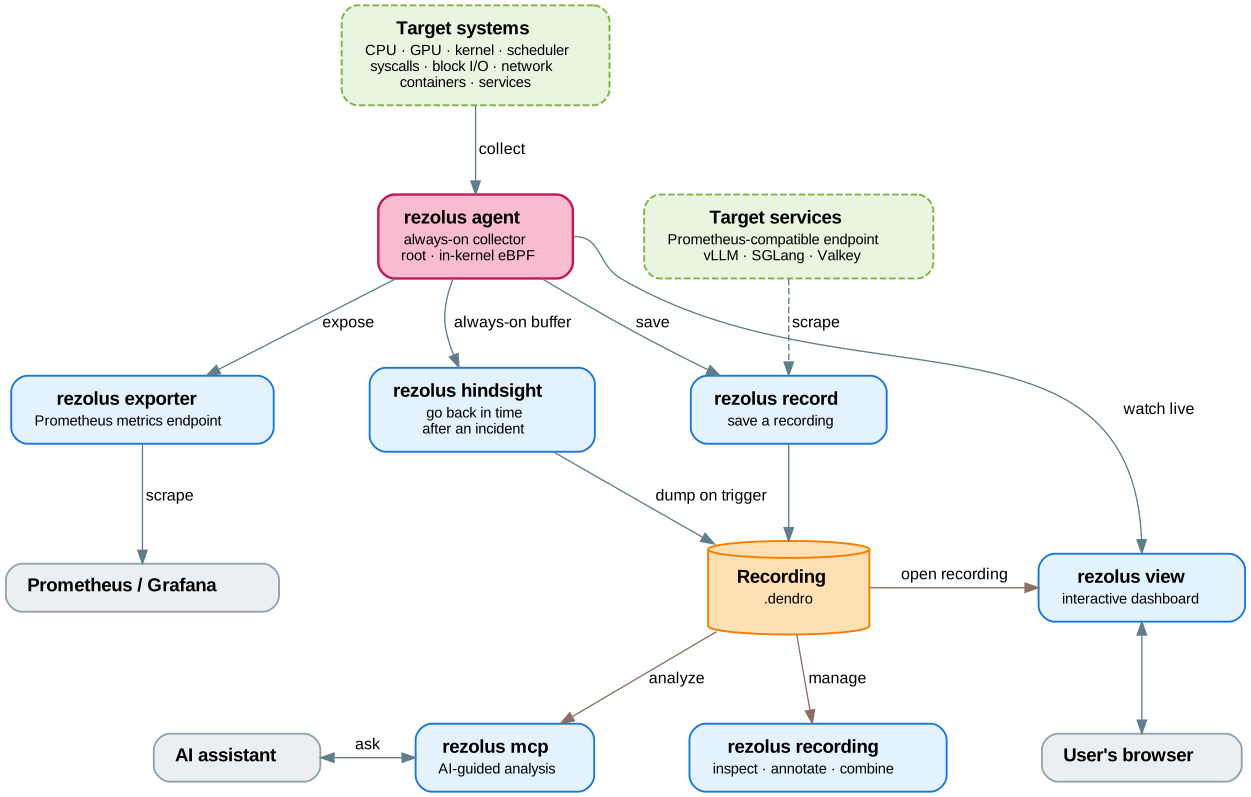
One rezolus binary supplies these roles. The Agent, Exporter, and Hindsight
can run as managed services; Recorder, Viewer, MCP, and recording tools run on
demand. Solid boxes in the diagram are Rezolus commands; dashed boxes are the
systems and services being measured.
Recorder and Hindsight write .dendro archives only: a recording per
endpoint, each acquisition group at its own cadence. One archive can hold
Rezolus agents and Prometheus endpoints. An output path not ending in
.dendro is refused; a rezolus 5.x recorder (5.27.0 or later) still writes
.rez, parquet and raw. Every tool still reads .rez and .parquet, and
rezolus recording upgrade --to dendro converts a .rez. See
Output format for the overwrite rules.
rezolus view runs a local Rust server that evaluates queries and serves the
web dashboard. The browser-only viewer instead
uses WebAssembly to process uploaded recordings entirely in the browser.
Both can inspect .dendro, .rez and .parquet recordings; the CLI viewer
also connects to live agents.
An assistant can launch rezolus mcp as a stdio MCP server or invoke the same
capabilities as one-shot CLI commands. Start by discovering what is actually
in the recording:
rezolus mcp describe-recording run.rez
rezolus mcp describe-metrics run.rez
rezolus mcp extract-features run.rez
extract-features produces versioned JSON with summary statistics, anomalies,
regime shifts, correlations, resource rankings, and coverage. It requires at
least 10 seconds of data. Then query a specific hypothesis using the metric
names, types, and labels returned by describe-metrics:
rezolus mcp query run.rez 'sum(irate(cpu_cycles[1m]))'
For a multi-recording archive, first run describe-recording without a selector
to list the recordings, then pass --recording source=system (or another
matching label set) to subsequent commands. MCP tools take the equivalent
recording object. A selector must identify exactly one recording.
Before drawing conclusions, check the time range, source identity, metric coverage, units, and acquisition uncertainty. Missing data is not zero; correlation is a lead to investigate, not proof of causation. See the MCP reference for tool names and selection examples.
Linux packages place configuration under /etc/rezolus/:
| Service | Configuration | Installer default when services are enabled |
|---|---|---|
Agent (rezolus) | agent.toml | Running |
Exporter (rezolus-exporter) | exporter.toml | Running |
Hindsight (rezolus-hindsight) | hindsight.toml | Disabled |
Enable or disable samplers in the agent config and restart the agent to apply
changes. Recorder/Hindsight intervals control how often they request samples;
general.ttl and slower sampler-specific intervals bound freshness. Match the
exporter's interval to your Prometheus scrape interval. Review Hindsight's
lookback and disk requirements before enabling it.
| Task | Read next |
|---|---|
| Install packages, build from source, or check platform requirements | Installation, Docker |
| Record, compare, export, retain history, or analyze recordings | Usage guide |
| Find a metric's meaning, unit, and labels | Metrics |
| Configure service KPI dashboards | KPI definitions and annotation |
| Send application metrics into the agent over a Unix socket | External metrics |
| Check flags or HTTP endpoints | rezolus <command> --help, CLI reference, HTTP API |
| Diagnose installation or collection problems | Troubleshooting |
| Understand sampler cost and measurement constraints | Design principles |
| Change the implementation | Contributor guidance, samplers, shared dashboards, browser viewer, recording format |
This README describes the checked-out revision. For installed releases, check
rezolus --version and that binary's help when a documented flag is unavailable.
Before starting a change, check existing issues and PRs. If none covers it, open an issue to discuss the bug or proposed feature. Fork the repository, create a branch, add relevant tests, and open a PR. Develop Linux samplers on Linux and read the sampler principles first.
Questions and discussions: Discord · GitHub issues
Dual-licensed under Apache 2.0 and MIT, unless otherwise specified. See COPYRIGHT for details.
2,018 followers · starred Sep 2024
1,159 followers · starred May 2025
3,934 followers · starred May 2025
2,985 followers · starred May 2023
High-resolution, low-overhead systems and service telemetry
See the codeHigh-resolution systems telemetry for tail latency, missed deadlines, and performance regressions.
Rezolus measures CPU, GPU, scheduler, I/O, and network behavior so you can investigate what the machine was doing when a workload slowed down. It preserves latency distributions, records telemetry for later analysis, and provides live and offline dashboards—all from one binary.
Use it for performance engineering, production incidents, inference serving, and latency-critical workloads such as physical AI, trading, and storage. It complements application metrics, tracing, and profiling: Rezolus supplies system-level evidence, not individual request traces or call-stack profiles.
Quick start · Choose a workflow · Metrics · Documentation map
See it before installing: explore the sample recording in the web viewer. The sample loads automatically and is processed in your browser. A viewer URL carries the time range and selectors, so a link reopens the same view (see linking to a view). Explore the scheduler and I/O histograms alongside CPU activity; no installation or file upload is needed.
For supported Debian, Ubuntu, Enterprise Linux, and Amazon Linux systems with systemd:
curl -fsSL https://install.rezolus.com | sudo bash
The installer asks whether to enable continuous collection. Accepting starts
the Agent and Exporter; Hindsight remains disabled. For unattended installation,
use sudo bash -s -- -y; add --disable-services to install without starting
collection. See the installation guide for supported
releases, package repositories, and source builds.
With the local agent running, capture a minute and open it:
rezolus record --duration 60s -o first-run.dendro
rezolus view first-run.dendro
The recorder defaults to http://localhost:4241. It does not start an agent.
Choose a new output filename for each .dendro capture; existing files are not
overwritten. The viewer prints its local address for your browser. To watch the
agent without recording:
rezolus view http://localhost:4241
Collection requirements: Linux kernel 5.8+ with usable BTF and root/sudo for
eBPF instrumentation; x86_64 or ARM64. Sampler availability depends on kernel,
hardware, drivers, and permissions. The agent listens on 0.0.0.0:4241 by
default; use 127.0.0.1:4241 in its configuration for local-only access.
brew install iopsystems/iop/rezolus
rezolus view first-run.dendro
# Or inspect a reachable Linux agent:
rezolus view http://linux-host:4241
Viewing and analyzing an existing recording does not require Linux eBPF or root. Local collection on macOS is limited to CPU and Apple GPU metrics; it does not provide Linux scheduler, syscall, or block-I/O instrumentation. The macOS installer does not install Linux systemd services.
Build from source · Docker · Troubleshooting
| You want to… | Start here | What it needs / produces |
|---|---|---|
| See the machine now | rezolus view http://host:4241 | A reachable agent; live dashboard. Add --tui for a terminal view. |
| Capture a benchmark | rezolus record -o run.dendro -- ./benchmark | An existing agent; records for the command's lifetime. Then rezolus view run.dendro. |
| Explain a past incident | Hindsight | A buffer running before the incident; save recent history to a recording. |
| Feed Prometheus | Exporter | A running agent; set the exporter interval to match the scrape interval. |
| Compare a change | rezolus recording combine baseline.dendro experiment.dendro -o ab.dendro, then rezolus view ab.dendro | Two recordings in one archive; browser A/B comparison. |
| Capture service and system metrics together | Multiple endpoints | Agent and/or Prometheus endpoints; one recording per endpoint in a .dendro archive. |
| Investigate with an AI assistant | MCP workflow | A recording; discovery, feature extraction, and targeted queries. |
| Inspect or transform captures | rezolus recording --help | Recording tools for metadata, annotation, combination, filtering, conversion, and snapshots. |
For example, record at 100 ms while a benchmark runs:
rezolus record --interval 100ms -o benchmark.dendro -- ./my-benchmark --threads 8
rezolus view benchmark.dendro
System and service endpoints can also share an archive:
rezolus record --duration 60s \
  --endpoint http://localhost:4241,source=system \
  --endpoint http://localhost:9121/metrics,source=valkey \
  -o combined.dendro
Each endpoint remains a distinct recording. KPI templates for vLLM, SGLang, and
Valkey provide service-specific dashboards; they consume exposed service metrics,
not automatically instrument application code. See KPI dashboard setup
for annotation and template instructions (archives require an explicit
--queries file), and the usage guide for recording labels and selection.
| Area | Examples | Availability |
|---|---|---|
| CPU and scheduler | Usage, runqueue latency, cycles/instructions, cache/TLB behavior, migrations, frequency | Linux; PMU counters depend on hardware and available counter slots |
| I/O and networking | Block-I/O latency and sizes, TCP behavior, interface statistics, syscall latency/counts | Linux; individual samplers depend on kernel support |
| Containers | Cgroup CPU usage and counters, migrations, syscalls, bandwidth/throttling | Linux cgroups; coverage varies by metric |
| GPUs | Utilization, memory activity, clocks, power, temperature, and hardware counters | NVIDIA NVML/GPM, AMD SMI/PMU, Intel i915 PMU, Apple GPU; metric sets differ |
| Memory and capacity | Memory/NUMA statistics, local filesystem occupancy, drive health | Platform and device dependent |
| Services | Inference and datastore KPIs alongside system telemetry | Prometheus-compatible metrics and service templates |
Consult the metric definitions, sampler configuration, and GPU-specific guides before assuming a signal exists. A disabled or unsupported sampler is not evidence of zero activity.
One rezolus binary supplies these roles. The Agent, Exporter, and Hindsight
can run as managed services; Recorder, Viewer, MCP, and recording tools run on
demand. Solid boxes in the diagram are Rezolus commands; dashed boxes are the
systems and services being measured.
Recorder and Hindsight write .dendro archives only: a recording per
endpoint, each acquisition group at its own cadence. One archive can hold
Rezolus agents and Prometheus endpoints. An output path not ending in
.dendro is refused; a rezolus 5.x recorder (5.27.0 or later) still writes
.rez, parquet and raw. Every tool still reads .rez and .parquet, and
rezolus recording upgrade --to dendro converts a .rez. See
Output format for the overwrite rules.
rezolus view runs a local Rust server that evaluates queries and serves the
web dashboard. The browser-only viewer instead
uses WebAssembly to process uploaded recordings entirely in the browser.
Both can inspect .dendro, .rez and .parquet recordings; the CLI viewer
also connects to live agents.
An assistant can launch rezolus mcp as a stdio MCP server or invoke the same
capabilities as one-shot CLI commands. Start by discovering what is actually
in the recording:
rezolus mcp describe-recording run.rez
rezolus mcp describe-metrics run.rez
rezolus mcp extract-features run.rez
extract-features produces versioned JSON with summary statistics, anomalies,
regime shifts, correlations, resource rankings, and coverage. It requires at
least 10 seconds of data. Then query a specific hypothesis using the metric
names, types, and labels returned by describe-metrics:
rezolus mcp query run.rez 'sum(irate(cpu_cycles[1m]))'
For a multi-recording archive, first run describe-recording without a selector
to list the recordings, then pass --recording source=system (or another
matching label set) to subsequent commands. MCP tools take the equivalent
recording object. A selector must identify exactly one recording.
Before drawing conclusions, check the time range, source identity, metric coverage, units, and acquisition uncertainty. Missing data is not zero; correlation is a lead to investigate, not proof of causation. See the MCP reference for tool names and selection examples.
Linux packages place configuration under /etc/rezolus/:
| Service | Configuration | Installer default when services are enabled |
|---|---|---|
Agent (rezolus) | agent.toml | Running |
Exporter (rezolus-exporter) | exporter.toml | Running |
Hindsight (rezolus-hindsight) | hindsight.toml | Disabled |
Enable or disable samplers in the agent config and restart the agent to apply
changes. Recorder/Hindsight intervals control how often they request samples;
general.ttl and slower sampler-specific intervals bound freshness. Match the
exporter's interval to your Prometheus scrape interval. Review Hindsight's
lookback and disk requirements before enabling it.
| Task | Read next |
|---|---|
| Install packages, build from source, or check platform requirements | Installation, Docker |
| Record, compare, export, retain history, or analyze recordings | Usage guide |
| Find a metric's meaning, unit, and labels | Metrics |
| Configure service KPI dashboards | KPI definitions and annotation |
| Send application metrics into the agent over a Unix socket | External metrics |
| Check flags or HTTP endpoints | rezolus <command> --help, CLI reference, HTTP API |
| Diagnose installation or collection problems | Troubleshooting |
| Understand sampler cost and measurement constraints | Design principles |
| Change the implementation | Contributor guidance, samplers, shared dashboards, browser viewer, recording format |
This README describes the checked-out revision. For installed releases, check
rezolus --version and that binary's help when a documented flag is unavailable.
Before starting a change, check existing issues and PRs. If none covers it, open an issue to discuss the bug or proposed feature. Fork the repository, create a branch, add relevant tests, and open a PR. Develop Linux samplers on Linux and read the sampler principles first.
Questions and discussions: Discord · GitHub issues
Dual-licensed under Apache 2.0 and MIT, unless otherwise specified. See COPYRIGHT for details.
2,018 followers · starred Sep 2024
1,159 followers · starred May 2025
3,934 followers · starred May 2025
2,985 followers · starred May 2023