
This application allows you to control your AMD, Nvidia or Intel GPU on a Linux system.
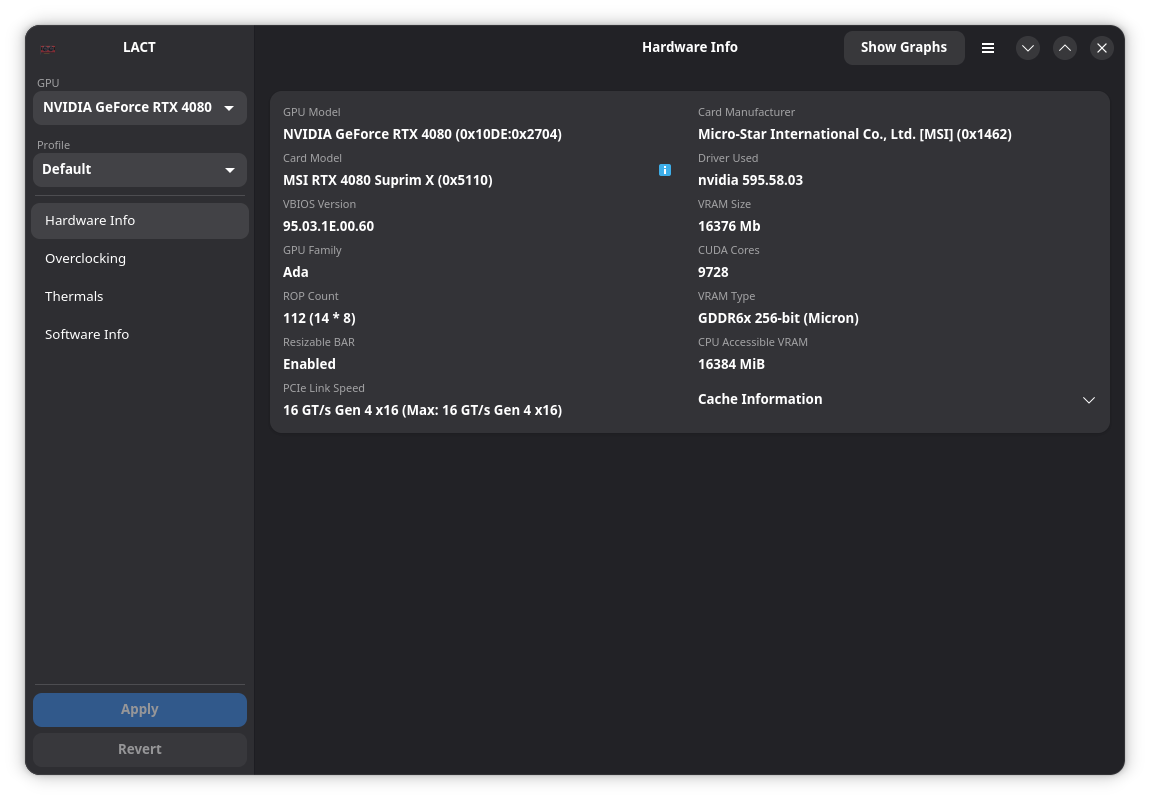
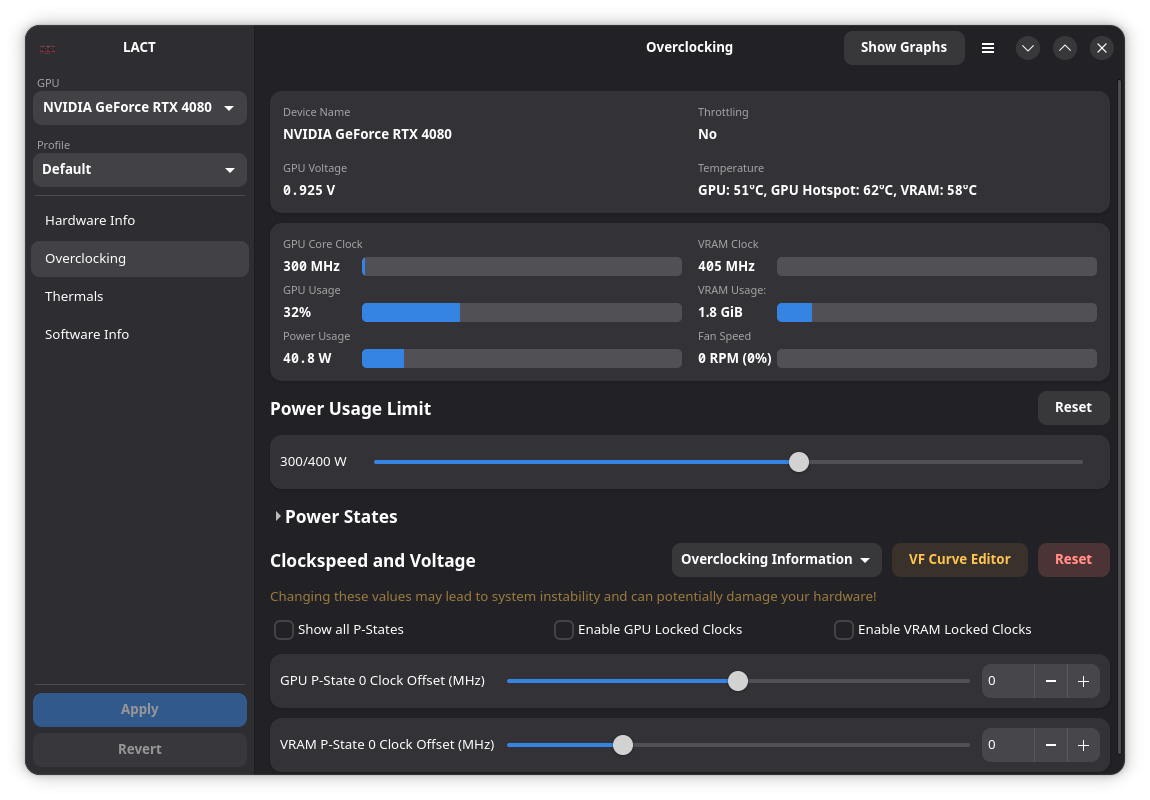
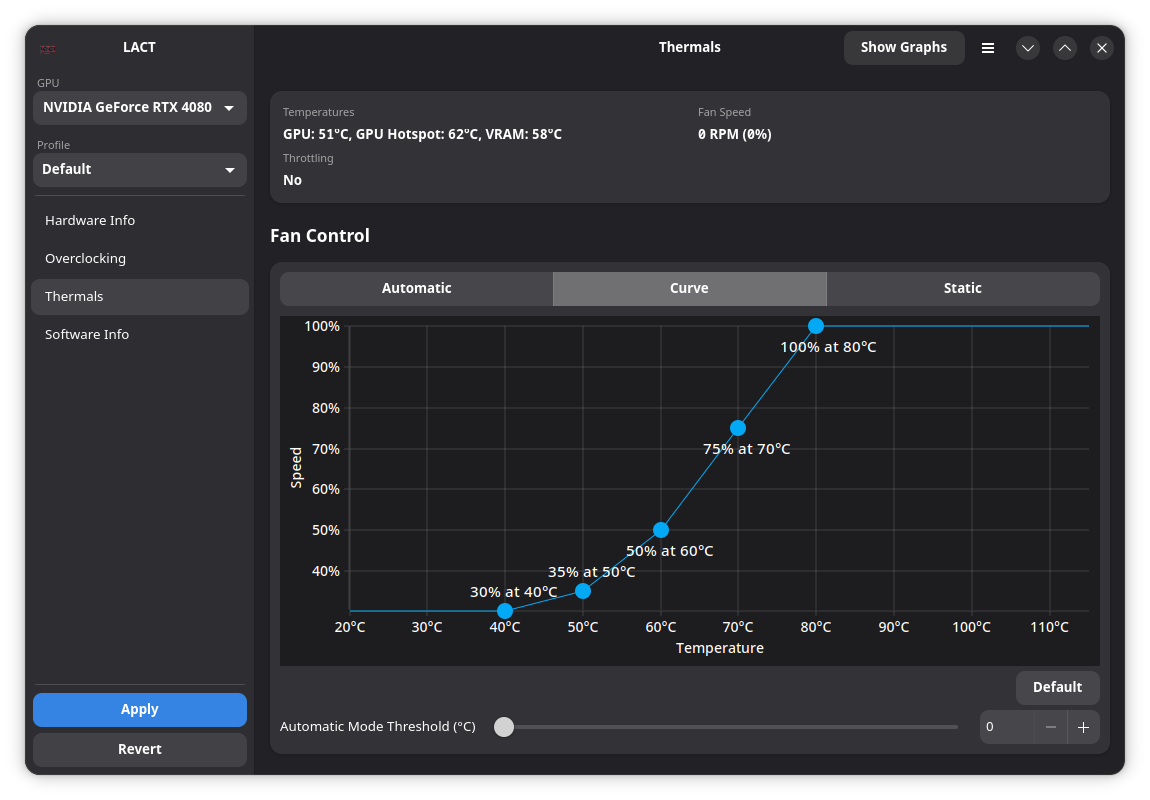
| GPU info | Overclocking | Fan control |
|---|---|---|
 |  |  |
| Software info | Historical data | |
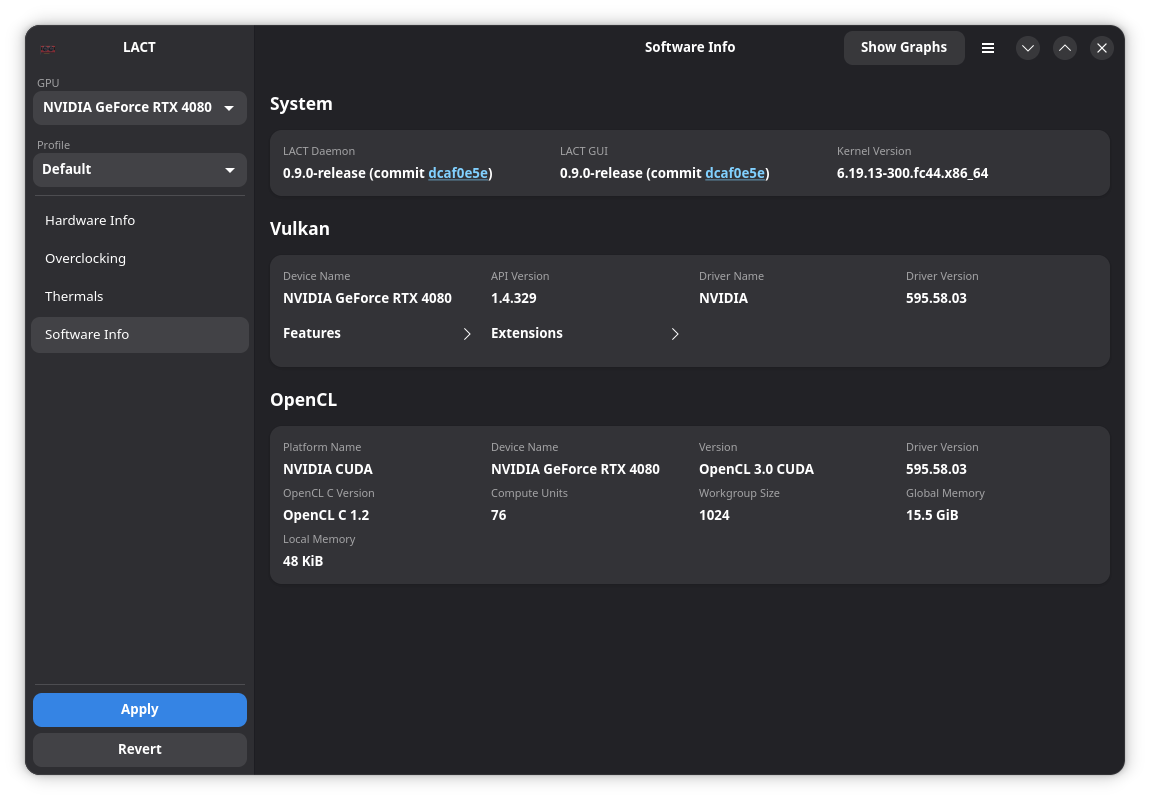 | 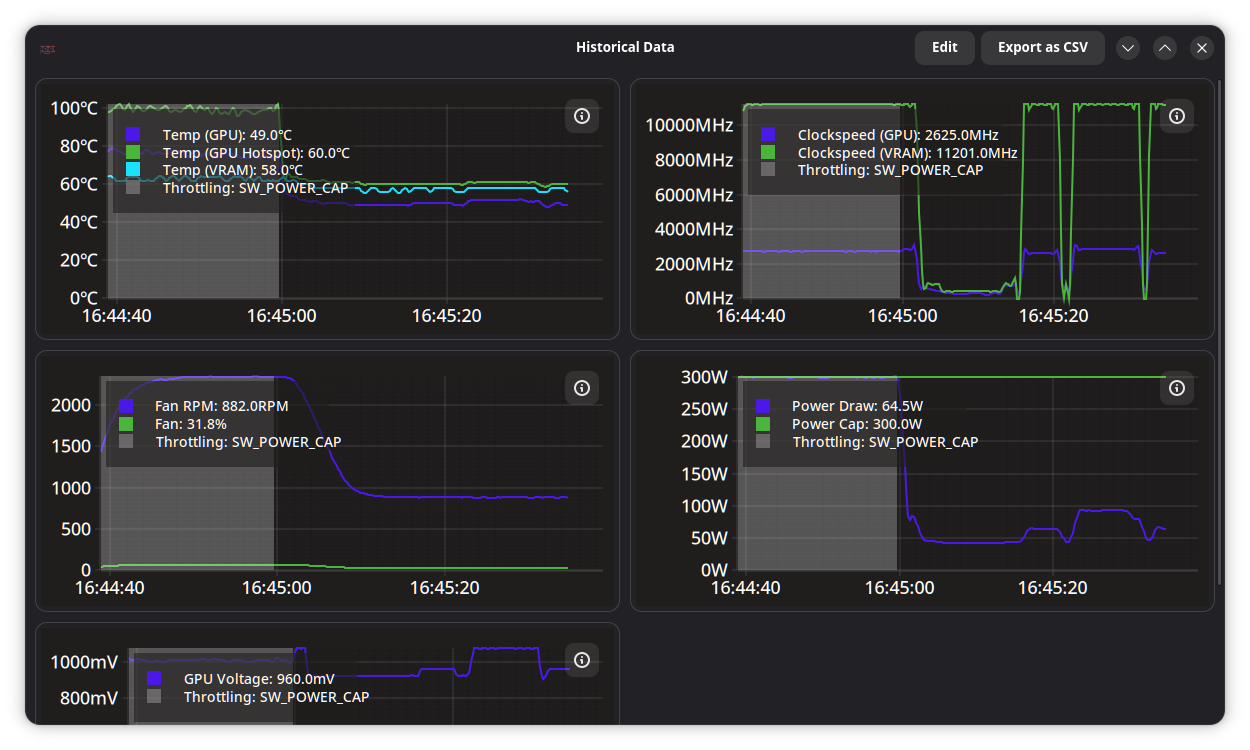 |
GPU configuration is handled by a system service that does not depend on a graphical session (Wayland/X11).
The service can also be used standalone with a config file, for example in headless scenarios.
Arch Linux: Install the package from official repositories: pacman -S lact
(or lact-git from AUR for development builds).
Debian/Ubuntu/Derivatives: Download a .deb from releases.
It is only available on Debian 12+ and Ubuntu 22.04+ as older versions don't ship gtk4.
Fedora: use the Copr repository, or download an RPM from releases.
Bazzite/Fedora Atomic: Use the Flatpak.
Gentoo: Available in GURU.
OpenSUSE: an RPM is available in releases.
Only tumbleweed is supported as leap does not have the required dependencies in the repos.
NixOS: There is a package available in nixpkgs.
Solus: Available in the offical repository: eopkg it lact
Flatpak (universal): Available on Flathub and in releases.
See the Flatpak documentation for additional notes.
Docker (service only, no GUI): See DOCKER.md
Build from source.
Note: Nvidia support requires the Nvidia proprietary driver with CUDA libraries installed.
To get latest fixes or features that have not yet been released in a stable
version, there are packages built from the latest commit that you can install
from the
test release
or using the lact-git AUR package on Arch-based distros.
Note: the date that GitHub shows next to the test release is not when the packages were built, the actual date is specified next to the attached package files.
Enable and start the service (otherwise you won't be able to change any settings):
sudo systemctl enable --now lactd
You can now use the GUI to change settings and view information.
See the Wiki page
There is a configuration file available in /etc/lact/config.yaml. Most of the
settings are accessible through the GUI, but some of them may be useful to be
edited manually (like admin_group and admin_user to specify who has access
to the daemon)
See CONFIG.md for more information.
Socket permissions setup:
By default, LACT uses either ether the wheel or sudo group (whichever is
available) for the ownership of the unix socket that the GUI needs to connect
to.
On most desktop configurations (such as the default setup on Arch-based, most Debian-based or Fedora systems) this includes the default user, so you do not need to configure this.
This is not needed if you are using the Flatpak, the flatpak service setup handles permissions.
However, some systems may have different user configuration. In particular, this has been reported to be a problem on OpenSUSE.
To fix socket permissions in such configurations, edit /etc/lact/config.yaml
and under the daemon section either:
admin_user to your usernameadmin_group to a group that your user is a part of, then restart the
service (sudo systemctl restart lactd).Some functionality requires enabling an option in the amdgpu driver, see the wiki page for more information.
If you are using power-profiles-daemon (which is installed by default on many
distributions), by default it may override the amdgpu performance level setting
according to its own profile.
When using LACT 0.7.5+ and power-profiles-daemon 0.30+, LACT will try to connect to power-profiles-daemon and automatically disable the conflicting amdgpu action in ppd to avoid this conflict.
If running older versions, you can resolve this manually by creating a file at
/etc/systemd/system/power-profiles-daemon.service.d/override.conf with the
following contents:
[Service]
ExecStart=
ExecStart=/usr/libexec/power-profiles-daemon --block-action=amdgpu_dpm
Note: the /usr/libexec path might be different on your system, check it in
systemctl status power-profiles-daemon
See https://github.com/ilya-zlobintsev/LACT/issues/370 for more information.
As some of the GPU settings may get reset when suspending the system, LACT will
reload them on system resume. This may not work on distributions which don't use
systemd, as it relies on the org.freedesktop.login2 DBus interface.
Dependencies:
Optional Dependencies:
Command to install all dependencies:
sudo dnf install rust cargo make git clang gtk4-devel libadwaita-devel libdrm-devel vulkan-tools libdisplay-info-devel clinfosudo pacman -S --needed base-devel git clang make rust gtk4 libadwaita hwdata vulkan-tools clinfo libdisplay-infoSteps:
git clone https://github.com/ilya-zlobintsev/LACT && cd LACTmakesudo make installIt's possible to change which features LACT gets built with. To do so, replace
the make command with the following variation:
Headless build with no GUI:
make build-release-headless
It's possible to have the LACT daemon running on one machine, and then manage it remotely from another.
This is disabled by default, as the TCP connection does not have any authentication or encryption mechanism! Make sure to only use it in trusted networks and/or set up appropriate firewall rules.
To enable it, edit /etc/lact/config.yaml and add tcp_listen_address with
your desired address and in the daemon section.
Example:
daemon:
  tcp_listen_address: 0.0.0.0:12853
  log_level: info
  admin_group: wheel
  disable_clocks_cleanup: false
After this restart the service (sudo systemctl restart lactd).
To connect to a remote instance with the GUI, run it with
lact gui --tcp-address 192.168.1.10:12853.
There is also a cli available.
List system GPUs:
lact cli list-gpus
Example output:
0: 10DE:2704-1462:5110-0000:09:00.0 (GeForce RTX 4080) [Dedicated]
Getting GPU information:
lact cli info
Example output:
$ lact cli info
GPU 10DE:2704-1462:5110-0000:09:00.0:
=====================================
GPU Model: GeForce RTX 4080 (0x10DE:0x2704)
Card Manufacturer: Micro-Star International Co., Ltd. [MSI] (0x1462)
Card Model: Unknown (0x5110)
Driver Used: nvidia 570.124.04
VBIOS Version: 95.03.1E.00.60
VRAM Size: 16376 MiB
GPU Family: Ada
Cuda Cores: 9728
SM Count: 76
ROP Count: 112 (14 * 8)
VRAM Type: GDDR6x
VRAM Manufacturer: Micron
L2 Cache: 65536 KiB
Resizeable bar: Enabled
CPU Accessible VRAM: 16384
Link Speed: 8 GT/s PCIe gen 3 x8
Profiles
lact cli profile [COMMAND]
List profiles:
lact cli profile list
Example output:
Default
Gaming
Performance
Balanced
Get current Profile:
lact cli profile get or lact cli profile
Example output:
Gaming
Set Profile:
lact cli profile set "Performance"
Example output:
Performance
Auto switch profiles
lact cli profile auto-switch [COMMAND]
Get auto-switch state:
lact cli profile auto-switch get or lact cli profile auto-switch
Example output:
enabled
Enable auto switch:
lact cli profile auto-switch enable
Example output:
enabled
Disable auto switch:
lact cli profile auto-switch disable
Example output:
disabled
Detach GPU (makes LACT temporarily ignore it):
lact cli --gpu-id=10DE:2704-1462:5110-0000:01:00.0 detach
Reattach GPU:
lact cli --gpu-id=10DE:2704-1462:5110-0000:01:00.0 reattach
Note that not all functionality is exposed through the CLI. If you want to integrate LACT with some application/script, you can use the API instead.
When reporting issues, please include your system info and GPU model.
If you're having an issue with changing the GPU's configuration, it's highly recommended to include a debug snapshot in the bug report. You can generate one using the option in the dropdown menu:
The snapshot is an archive which includes the SysFS that LACT uses to interact with the GPU.
If there's a crash, run lact gui from the command line to get GUI logs, check
daemon logs in journalctl -u lactd for errors, and see dmesg for kernel logs
that might include information about driver and system issues.
You can contribute translations to LACT using Weblate.
If you wish to support the project, you can do so via Patreon: https://www.patreon.com/IlyaZlobintsev
Or using cryptocurrency:
12FuTXZzd5peGb7QfoRkXaLnbJ1DNVW4pP0x80875173316aa6317641bfbc50644e7ca74d6b6d42E93NZXM7STBUsnMRGNyxKryFVgpHKNP6aza94C5hn17j2W7zUnFHe7ASQzB3KorYYnsaVzWUyHHVYfcTLQRtB63qkv5jEHere's a list of other useful tools for AMD GPUs on Linux:
(top 24 of 85)
307 followers · starred Sep 2025
1,488 followers · starred Nov 2025
386 followers · starred Aug 2026
162 followers · starred Aug 2026
This application allows you to control your AMD, Nvidia or Intel GPU on a Linux system.
| GPU info | Overclocking | Fan control |
|---|---|---|
| | |
| Software info | Historical data | |
| |
GPU configuration is handled by a system service that does not depend on a graphical session (Wayland/X11).
The service can also be used standalone with a config file, for example in headless scenarios.
Arch Linux: Install the package from official repositories: pacman -S lact
(or lact-git from AUR for development builds).
Debian/Ubuntu/Derivatives: Download a .deb from releases.
It is only available on Debian 12+ and Ubuntu 22.04+ as older versions don't ship gtk4.
Fedora: use the Copr repository, or download an RPM from releases.
Bazzite/Fedora Atomic: Use the Flatpak.
Gentoo: Available in GURU.
OpenSUSE: an RPM is available in releases.
Only tumbleweed is supported as leap does not have the required dependencies in the repos.
NixOS: There is a package available in nixpkgs.
Solus: Available in the offical repository: eopkg it lact
Flatpak (universal): Available on Flathub and in releases.
See the Flatpak documentation for additional notes.
Docker (service only, no GUI): See DOCKER.md
Build from source.
Note: Nvidia support requires the Nvidia proprietary driver with CUDA libraries installed.
To get latest fixes or features that have not yet been released in a stable
version, there are packages built from the latest commit that you can install
from the
test release
or using the lact-git AUR package on Arch-based distros.
Note: the date that GitHub shows next to the test release is not when the packages were built, the actual date is specified next to the attached package files.
Enable and start the service (otherwise you won't be able to change any settings):
sudo systemctl enable --now lactd
You can now use the GUI to change settings and view information.
See the Wiki page
There is a configuration file available in /etc/lact/config.yaml. Most of the
settings are accessible through the GUI, but some of them may be useful to be
edited manually (like admin_group and admin_user to specify who has access
to the daemon)
See CONFIG.md for more information.
Socket permissions setup:
By default, LACT uses either ether the wheel or sudo group (whichever is
available) for the ownership of the unix socket that the GUI needs to connect
to.
On most desktop configurations (such as the default setup on Arch-based, most Debian-based or Fedora systems) this includes the default user, so you do not need to configure this.
This is not needed if you are using the Flatpak, the flatpak service setup handles permissions.
However, some systems may have different user configuration. In particular, this has been reported to be a problem on OpenSUSE.
To fix socket permissions in such configurations, edit /etc/lact/config.yaml
and under the daemon section either:
admin_user to your usernameadmin_group to a group that your user is a part of, then restart the
service (sudo systemctl restart lactd).Some functionality requires enabling an option in the amdgpu driver, see the wiki page for more information.
If you are using power-profiles-daemon (which is installed by default on many
distributions), by default it may override the amdgpu performance level setting
according to its own profile.
When using LACT 0.7.5+ and power-profiles-daemon 0.30+, LACT will try to connect to power-profiles-daemon and automatically disable the conflicting amdgpu action in ppd to avoid this conflict.
If running older versions, you can resolve this manually by creating a file at
/etc/systemd/system/power-profiles-daemon.service.d/override.conf with the
following contents:
[Service]
ExecStart=
ExecStart=/usr/libexec/power-profiles-daemon --block-action=amdgpu_dpm
Note: the /usr/libexec path might be different on your system, check it in
systemctl status power-profiles-daemon
See https://github.com/ilya-zlobintsev/LACT/issues/370 for more information.
As some of the GPU settings may get reset when suspending the system, LACT will
reload them on system resume. This may not work on distributions which don't use
systemd, as it relies on the org.freedesktop.login2 DBus interface.
Dependencies:
Optional Dependencies:
Command to install all dependencies:
sudo dnf install rust cargo make git clang gtk4-devel libadwaita-devel libdrm-devel vulkan-tools libdisplay-info-devel clinfosudo pacman -S --needed base-devel git clang make rust gtk4 libadwaita hwdata vulkan-tools clinfo libdisplay-infoSteps:
git clone https://github.com/ilya-zlobintsev/LACT && cd LACTmakesudo make installIt's possible to change which features LACT gets built with. To do so, replace
the make command with the following variation:
Headless build with no GUI:
make build-release-headless
It's possible to have the LACT daemon running on one machine, and then manage it remotely from another.
This is disabled by default, as the TCP connection does not have any authentication or encryption mechanism! Make sure to only use it in trusted networks and/or set up appropriate firewall rules.
To enable it, edit /etc/lact/config.yaml and add tcp_listen_address with
your desired address and in the daemon section.
Example:
daemon:
  tcp_listen_address: 0.0.0.0:12853
  log_level: info
  admin_group: wheel
  disable_clocks_cleanup: false
After this restart the service (sudo systemctl restart lactd).
To connect to a remote instance with the GUI, run it with
lact gui --tcp-address 192.168.1.10:12853.
There is also a cli available.
List system GPUs:
lact cli list-gpus
Example output:
0: 10DE:2704-1462:5110-0000:09:00.0 (GeForce RTX 4080) [Dedicated]
Getting GPU information:
lact cli info
Example output:
$ lact cli info
GPU 10DE:2704-1462:5110-0000:09:00.0:
=====================================
GPU Model: GeForce RTX 4080 (0x10DE:0x2704)
Card Manufacturer: Micro-Star International Co., Ltd. [MSI] (0x1462)
Card Model: Unknown (0x5110)
Driver Used: nvidia 570.124.04
VBIOS Version: 95.03.1E.00.60
VRAM Size: 16376 MiB
GPU Family: Ada
Cuda Cores: 9728
SM Count: 76
ROP Count: 112 (14 * 8)
VRAM Type: GDDR6x
VRAM Manufacturer: Micron
L2 Cache: 65536 KiB
Resizeable bar: Enabled
CPU Accessible VRAM: 16384
Link Speed: 8 GT/s PCIe gen 3 x8
Profiles
lact cli profile [COMMAND]
List profiles:
lact cli profile list
Example output:
Default
Gaming
Performance
Balanced
Get current Profile:
lact cli profile get or lact cli profile
Example output:
Gaming
Set Profile:
lact cli profile set "Performance"
Example output:
Performance
Auto switch profiles
lact cli profile auto-switch [COMMAND]
Get auto-switch state:
lact cli profile auto-switch get or lact cli profile auto-switch
Example output:
enabled
Enable auto switch:
lact cli profile auto-switch enable
Example output:
enabled
Disable auto switch:
lact cli profile auto-switch disable
Example output:
disabled
Detach GPU (makes LACT temporarily ignore it):
lact cli --gpu-id=10DE:2704-1462:5110-0000:01:00.0 detach
Reattach GPU:
lact cli --gpu-id=10DE:2704-1462:5110-0000:01:00.0 reattach
Note that not all functionality is exposed through the CLI. If you want to integrate LACT with some application/script, you can use the API instead.
When reporting issues, please include your system info and GPU model.
If you're having an issue with changing the GPU's configuration, it's highly recommended to include a debug snapshot in the bug report. You can generate one using the option in the dropdown menu:
The snapshot is an archive which includes the SysFS that LACT uses to interact with the GPU.
If there's a crash, run lact gui from the command line to get GUI logs, check
daemon logs in journalctl -u lactd for errors, and see dmesg for kernel logs
that might include information about driver and system issues.
You can contribute translations to LACT using Weblate.
If you wish to support the project, you can do so via Patreon: https://www.patreon.com/IlyaZlobintsev
Or using cryptocurrency:
12FuTXZzd5peGb7QfoRkXaLnbJ1DNVW4pP0x80875173316aa6317641bfbc50644e7ca74d6b6d42E93NZXM7STBUsnMRGNyxKryFVgpHKNP6aza94C5hn17j2W7zUnFHe7ASQzB3KorYYnsaVzWUyHHVYfcTLQRtB63qkv5jEHere's a list of other useful tools for AMD GPUs on Linux:
(top 24 of 85)
307 followers · starred Sep 2025
1,488 followers · starred Nov 2025
386 followers · starred Aug 2026
162 followers · starred Aug 2026



