A tool for converting dictionary files aka glossaries. Mainly to help use our offline glossaries in any Open Source dictionary we like on any operating system / device.
Python
2,701
4,435 commits
updated Oct 3, 2026




A tool for converting dictionary files aka glossaries.
The primary purpose is to be able to use our offline glossaries in any Open Source dictionary we like on any OS/device.
There are countless formats, and my time is limited, so I implement formats that seem more useful for myself, or for Open Source community. Also diversity of languages is taken into account. Pull requests are welcome.
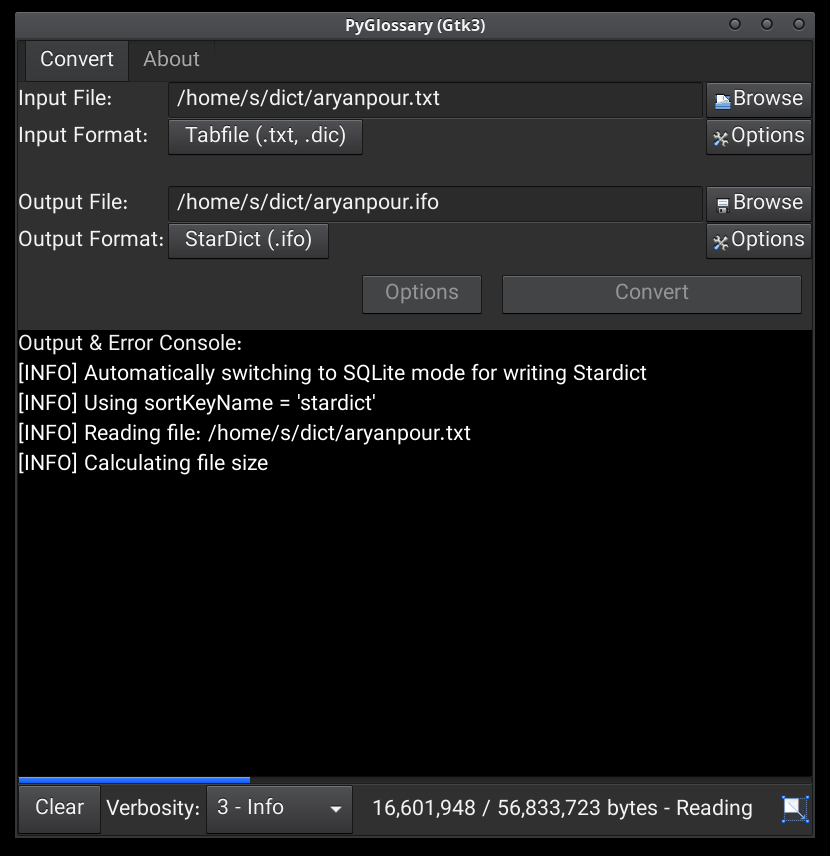
Linux - Gtk3-based interface
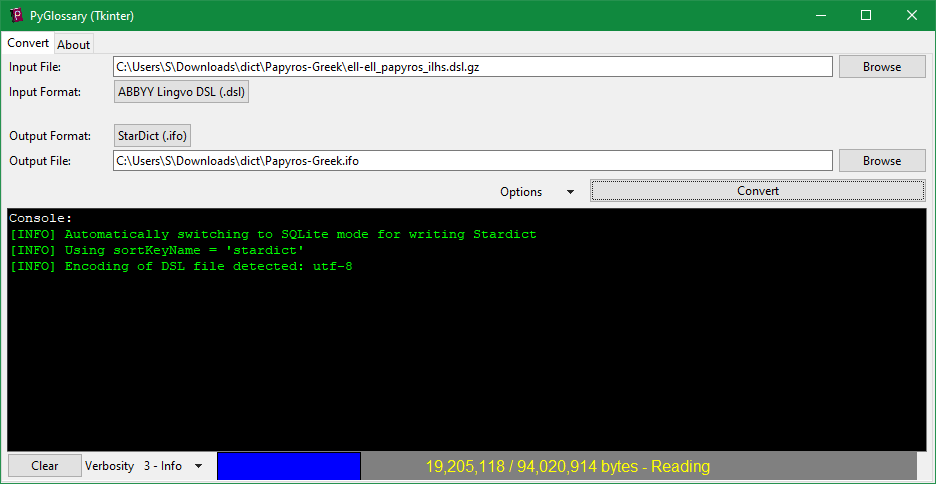
Windows - Tkinter-based interface
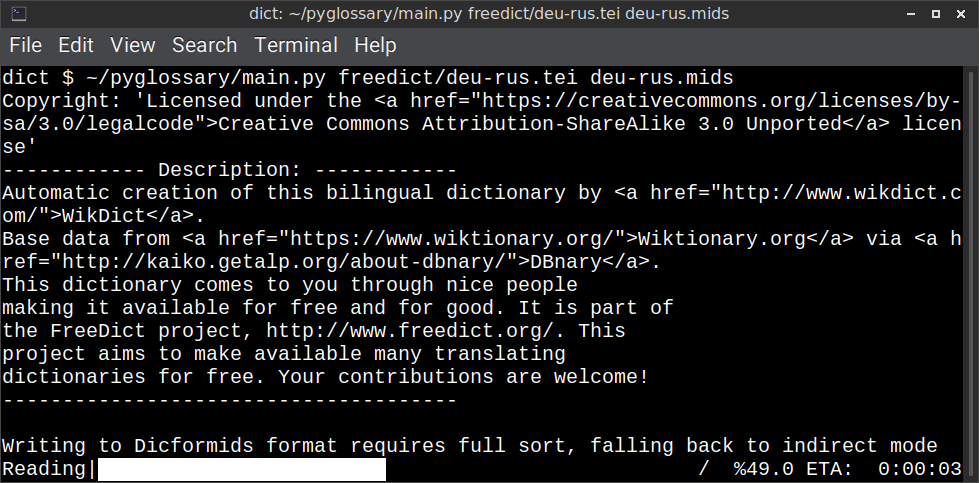
Linux - command-line interface
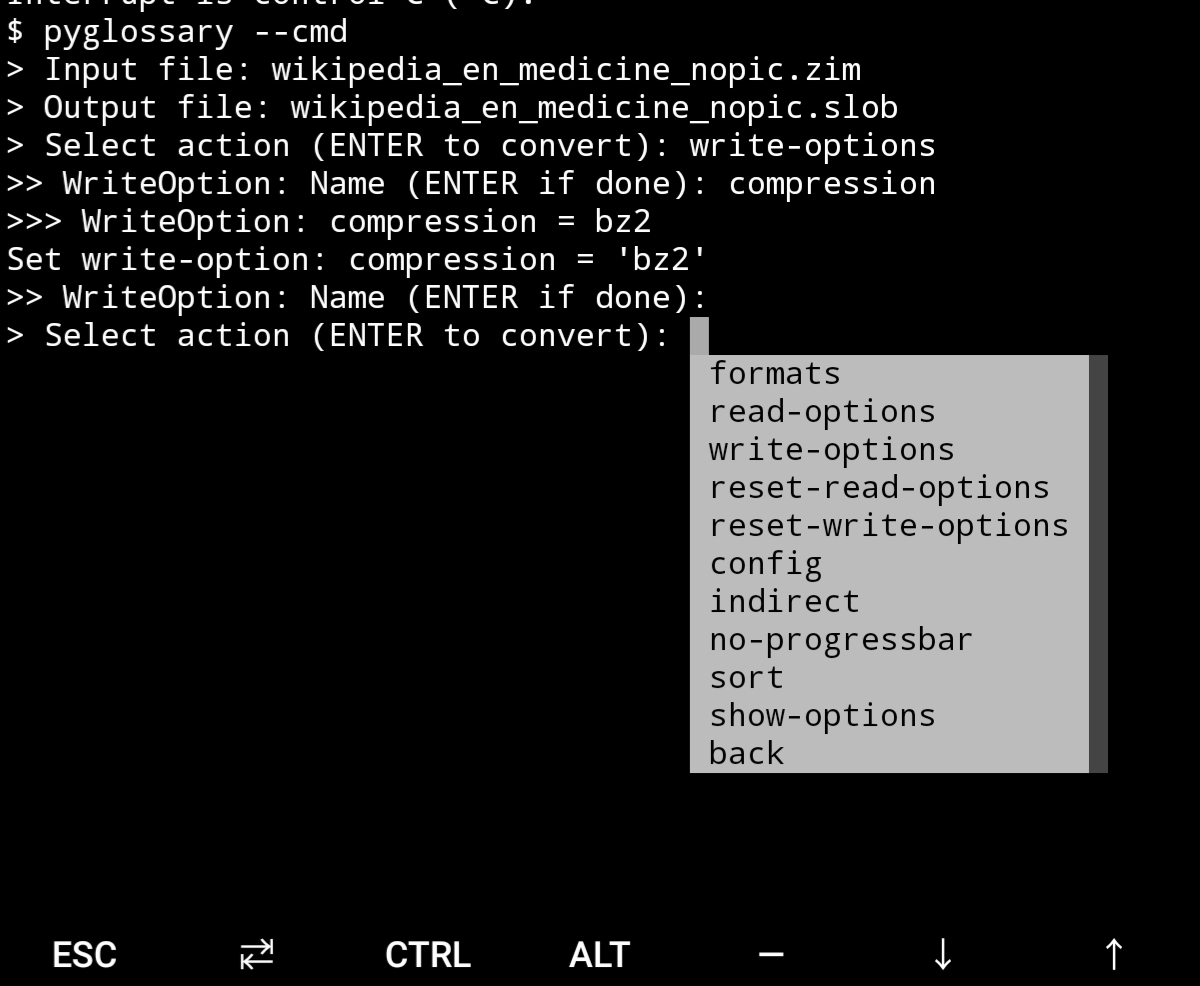
Android Termux - interactive command-line interface
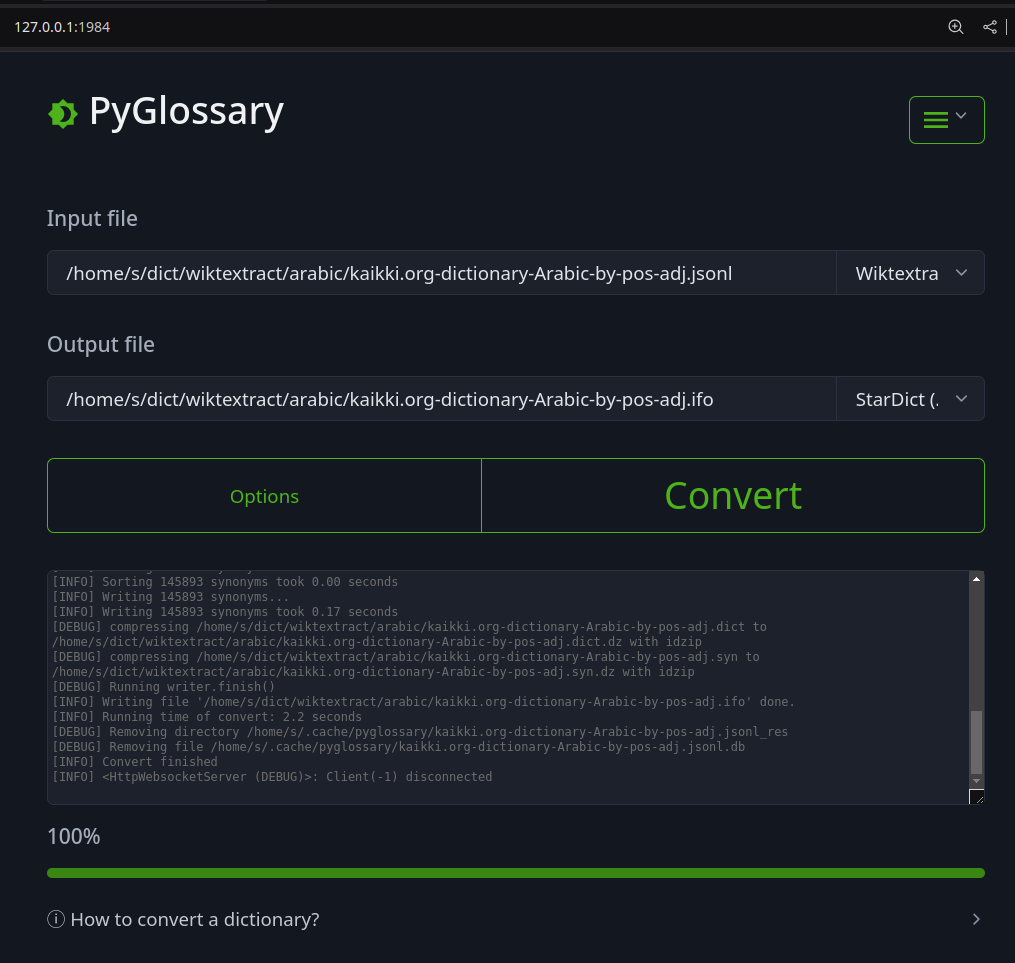
Web interface
Legend:
Note: SQLite-based formats are not detected by extension (.db);
So you need to select the format (with UI or --read-format flag).
Also don't confuse SQLite-based formats with SQLite mode.
PyGlossary requires Python 3.12 or higher, and works in practically all mainstream operating systems, including GNU/Linux, Windows, Mac OS, FreeBSD and other common Unix-based operating systems.
As shown in screenshots, there are multiple User Interface types (multiple ways to use the program).
Gtk3-based interface, uses PyGI+Gtk3. Best option for most Linux users. See doc/gtk3.md for how to install it on Linux and Mac OS X.
Gtk4-based interface, uses PyGI+Gtk4. See doc/gtk4.md.
Qt6-based interface, good native-looking interface for all operating systems. Requires either PySide6 or PyQt6. Uses a wizard-based UI flow for simplicity of use.
wxPython-based interface, wizard-style GUI using wxPython. Install with
pip install pyglossary[wx] (or install wxPython separately).
Tkinter-based interface, meant to be used in the lack of more modern UI. Specially on Windows where Tkinter library is installed with Python itself. You can install Tkinter on Linux or Mac OS X.
Command-line interface, works in all operating systems without
any specific requirements, just type ./main.py --help or pyglossary --help
pip install prompt_toolkit$DISPLAY environment variable is empty or not set
tkinter module is found--cmd or --ui=cmd
./main.py --cmd--interactive to change it.--no-interactive to force disable interactive ui
When you run PyGlossary without any command-line arguments or options/flags, PyGlossary will try to run the first available interface:
prompt_toolkit and run interactive command-line interface.The order depends on operating system. On GNU/Linux the default order is Gtk3, Gtk4, Qt 6, wxPython, Tkinter (classic), Tk wizard, then web. On Mac OS and Windows, Qt 6, wxPython, and the Tk wizard are tried before classic Tkinter and Gtk.
You can explicitly select user interface type using --ui
./main.py --ui=gtk3./main.py --ui=gtk4./main.py --ui=gtk which currently selects gtk3./main.py --ui=qt6 or ./main.py --ui=qt: Qt 6 wizard-based interface./main.py --ui=wx or ./main.py --wx: wxPython wizard-based interface./main.py --ui=tk./main.py --ui=tk_wizard: new wizard-based Tkinter interface
./main.py --tkw./main.py --ui=web./main.py --ui=cmd with no extra arguments opens interactive command-line interfaceYou can either download the latest setup.exe from Releases and install it via a wizard, or install it using Python and pip:
pip, run: python -m ensurepip --upgradepip install --upgrade pyglossarypyglossary command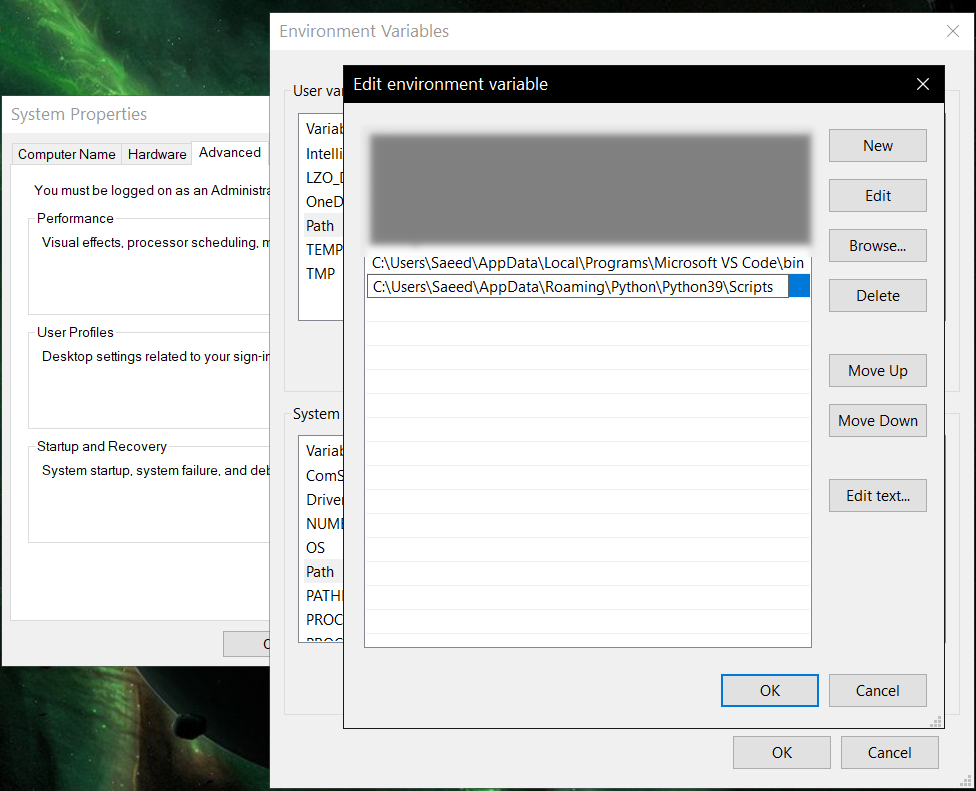
If you download the DMG file from Releases and install it, Mac may refuse to run it, showing the app is damaged and cannot be opened error. In that case, move the unpacked bundle to /Applications, and run this from the Terminal:
/usr/bin/xattr -d com.apple.quarantine /Applications/PyGlossaryWX.app
Or
/usr/bin/xattr -d com.apple.quarantine /Applications/PyGlossaryTK.app
Now you should be able to open the app by right-clicking on /Applications/PyGlossary.app in Finder, selecting Open and confirming running an app unsigned by Apple (only needs to be done once).
Using Sort by Locale feature requires PyICU
Using --remove-html-all flag requires:
pip install lxml beautifulsoup4
Some formats have additional requirements. If you have trouble with any format, please check the link given for that format to see its documentations.
The Qt 6 wizard GUI (--ui=qt, --ui=qt6, --qt, or --qt6) needs PySide6 or PyQt6: pip install pyglossary[qt6] (or install PySide6 separately). On macOS, that extra also installs pyobjc-framework-Cocoa so the Dock and app switcher can show PyGlossary’s icon (standalone python/CLI runs do not ship an .app bundle icon otherwise).
The wxPython wizard GUI (--ui=wx or --wx) needs wxPython: pip install pyglossary[wx] (or install wxPython separately). On macOS, that extra also installs pyobjc-framework-Cocoa for the same Dock icon behaviour as the Qt extra.
Using Termux on Android? See doc/termux.md
See doc/config.rst.
Indirect mode means that input glossary is completely read and loaded into RAM, then converted into output format. This was the only method available in old versions (before 3.0.0).
Direct mode means entries are one-at-a-time read, processed and written into output glossary.
Direct mode was added to limit memory usage for large glossaries; But it may reduce the conversion time for most cases as well.
Converting glossaries into these formats requires sorting entries:
That's why direct mode will not work for these formats, and PyGlossary has to switch to indirect mode (or it previously had to, see SQLite mode).
For other formats, direct mode will be default. You may override this by --indirect flag.
As mentioned above, converting glossaries to some specific formats will need them to loaded into RAM.
This can be problematic if the glossary is too big to fit into RAM. That's when
you should try adding --sqlite flag to your command. Then it uses SQLite3 as intermediate
storage for storing, sorting and then fetching entries. This fixes the memory issue, and may
even reduce running time of conversion (depending on your home directory storage).
The temporary SQLite file is stored in cache directory then
deleted after conversion (unless you pass --no-cleanup flag).
SQLite mode is automatically enabled for writing these formats if auto_sqlite
config parameter is true (which is default).
This also applies to when you pass --sort flag for any format.
You may use --no-sqlite to override this and switch to indirect mode.
Currently you can not disable alternates in SQLite mode (--no-alts is ignored).
There are two things than can activate sorting entries:
--sort flag in command line.In the case of passing --sort, you can also pass:
--sort-key to select sort key aka sorting order (including locale), see doc/sort-key.md
--sort-encoding to change the encoding used for sort
? byte (only for sorting)Cache directory is used for storing temporary files which are either moved or deleted
after conversion. You can pass --no-cleanup flag in order to keep them.
The path for cache directory:
~/.cache/pyglossary/~/Library/Caches/PyGlossary/C:\Users\USERNAME\AppData\Local\PyGlossary\Cache\If you want to add your own plugin without adding it to source code directory, or you want to use a plugin that has been removed from repository, you can place it in this directory:
~/.pyglossary/plugins/~/Library/Preferences/PyGlossary/plugins/C:\Users\USERNAME\AppData\Roaming\PyGlossary\plugins\
See doc/lib-usage.md for how to use PyGlossary as a Python library.
To learn how to develop plugins, see test plugin as a basic example, or CSV plugin for example.
Whenever you add a new plugin, or change options/metedata of an existing plugin, make sure to run ./scripts/gen script to update generated files (index and documentation) that we keep.
See doc/internals.md for information about internal glossary structure and entry filters.
Overall
Maintained
Code review
PyPI
Latest release
Releases this year
1,036 followers · starred Sep 2021
309 followers · starred Jun 2016
182 followers · starred May 2021
445 followers · starred Jan 2011
A tool for converting dictionary files aka glossaries. Mainly to help use our offline glossaries in any Open Source dictionary we like on any operating system / device.
Python
2,701
4,435 commits
updated Oct 3, 2026
A tool for converting dictionary files aka glossaries.
The primary purpose is to be able to use our offline glossaries in any Open Source dictionary we like on any OS/device.
There are countless formats, and my time is limited, so I implement formats that seem more useful for myself, or for Open Source community. Also diversity of languages is taken into account. Pull requests are welcome.
Linux - Gtk3-based interface
Windows - Tkinter-based interface
Linux - command-line interface
Android Termux - interactive command-line interface
Web interface
Legend:
Note: SQLite-based formats are not detected by extension (.db);
So you need to select the format (with UI or --read-format flag).
Also don't confuse SQLite-based formats with SQLite mode.
PyGlossary requires Python 3.12 or higher, and works in practically all mainstream operating systems, including GNU/Linux, Windows, Mac OS, FreeBSD and other common Unix-based operating systems.
As shown in screenshots, there are multiple User Interface types (multiple ways to use the program).
Gtk3-based interface, uses PyGI+Gtk3. Best option for most Linux users. See doc/gtk3.md for how to install it on Linux and Mac OS X.
Gtk4-based interface, uses PyGI+Gtk4. See doc/gtk4.md.
Qt6-based interface, good native-looking interface for all operating systems. Requires either PySide6 or PyQt6. Uses a wizard-based UI flow for simplicity of use.
wxPython-based interface, wizard-style GUI using wxPython. Install with
pip install pyglossary[wx] (or install wxPython separately).
Tkinter-based interface, meant to be used in the lack of more modern UI. Specially on Windows where Tkinter library is installed with Python itself. You can install Tkinter on Linux or Mac OS X.
Command-line interface, works in all operating systems without
any specific requirements, just type ./main.py --help or pyglossary --help
pip install prompt_toolkit$DISPLAY environment variable is empty or not set
tkinter module is found--cmd or --ui=cmd
./main.py --cmd--interactive to change it.--no-interactive to force disable interactive ui
When you run PyGlossary without any command-line arguments or options/flags, PyGlossary will try to run the first available interface:
prompt_toolkit and run interactive command-line interface.The order depends on operating system. On GNU/Linux the default order is Gtk3, Gtk4, Qt 6, wxPython, Tkinter (classic), Tk wizard, then web. On Mac OS and Windows, Qt 6, wxPython, and the Tk wizard are tried before classic Tkinter and Gtk.
You can explicitly select user interface type using --ui
./main.py --ui=gtk3./main.py --ui=gtk4./main.py --ui=gtk which currently selects gtk3./main.py --ui=qt6 or ./main.py --ui=qt: Qt 6 wizard-based interface./main.py --ui=wx or ./main.py --wx: wxPython wizard-based interface./main.py --ui=tk./main.py --ui=tk_wizard: new wizard-based Tkinter interface
./main.py --tkw./main.py --ui=web./main.py --ui=cmd with no extra arguments opens interactive command-line interfaceYou can either download the latest setup.exe from Releases and install it via a wizard, or install it using Python and pip:
pip, run: python -m ensurepip --upgradepip install --upgrade pyglossarypyglossary commandIf you download the DMG file from Releases and install it, Mac may refuse to run it, showing the app is damaged and cannot be opened error. In that case, move the unpacked bundle to /Applications, and run this from the Terminal:
/usr/bin/xattr -d com.apple.quarantine /Applications/PyGlossaryWX.app
Or
/usr/bin/xattr -d com.apple.quarantine /Applications/PyGlossaryTK.app
Now you should be able to open the app by right-clicking on /Applications/PyGlossary.app in Finder, selecting Open and confirming running an app unsigned by Apple (only needs to be done once).
Using Sort by Locale feature requires PyICU
Using --remove-html-all flag requires:
pip install lxml beautifulsoup4
Some formats have additional requirements. If you have trouble with any format, please check the link given for that format to see its documentations.
The Qt 6 wizard GUI (--ui=qt, --ui=qt6, --qt, or --qt6) needs PySide6 or PyQt6: pip install pyglossary[qt6] (or install PySide6 separately). On macOS, that extra also installs pyobjc-framework-Cocoa so the Dock and app switcher can show PyGlossary’s icon (standalone python/CLI runs do not ship an .app bundle icon otherwise).
The wxPython wizard GUI (--ui=wx or --wx) needs wxPython: pip install pyglossary[wx] (or install wxPython separately). On macOS, that extra also installs pyobjc-framework-Cocoa for the same Dock icon behaviour as the Qt extra.
Using Termux on Android? See doc/termux.md
See doc/config.rst.
Indirect mode means that input glossary is completely read and loaded into RAM, then converted into output format. This was the only method available in old versions (before 3.0.0).
Direct mode means entries are one-at-a-time read, processed and written into output glossary.
Direct mode was added to limit memory usage for large glossaries; But it may reduce the conversion time for most cases as well.
Converting glossaries into these formats requires sorting entries:
That's why direct mode will not work for these formats, and PyGlossary has to switch to indirect mode (or it previously had to, see SQLite mode).
For other formats, direct mode will be default. You may override this by --indirect flag.
As mentioned above, converting glossaries to some specific formats will need them to loaded into RAM.
This can be problematic if the glossary is too big to fit into RAM. That's when
you should try adding --sqlite flag to your command. Then it uses SQLite3 as intermediate
storage for storing, sorting and then fetching entries. This fixes the memory issue, and may
even reduce running time of conversion (depending on your home directory storage).
The temporary SQLite file is stored in cache directory then
deleted after conversion (unless you pass --no-cleanup flag).
SQLite mode is automatically enabled for writing these formats if auto_sqlite
config parameter is true (which is default).
This also applies to when you pass --sort flag for any format.
You may use --no-sqlite to override this and switch to indirect mode.
Currently you can not disable alternates in SQLite mode (--no-alts is ignored).
There are two things than can activate sorting entries:
--sort flag in command line.In the case of passing --sort, you can also pass:
--sort-key to select sort key aka sorting order (including locale), see doc/sort-key.md
--sort-encoding to change the encoding used for sort
? byte (only for sorting)Cache directory is used for storing temporary files which are either moved or deleted
after conversion. You can pass --no-cleanup flag in order to keep them.
The path for cache directory:
~/.cache/pyglossary/~/Library/Caches/PyGlossary/C:\Users\USERNAME\AppData\Local\PyGlossary\Cache\If you want to add your own plugin without adding it to source code directory, or you want to use a plugin that has been removed from repository, you can place it in this directory:
~/.pyglossary/plugins/~/Library/Preferences/PyGlossary/plugins/C:\Users\USERNAME\AppData\Roaming\PyGlossary\plugins\
See doc/lib-usage.md for how to use PyGlossary as a Python library.
To learn how to develop plugins, see test plugin as a basic example, or CSV plugin for example.
Whenever you add a new plugin, or change options/metedata of an existing plugin, make sure to run ./scripts/gen script to update generated files (index and documentation) that we keep.
See doc/internals.md for information about internal glossary structure and entry filters.
Overall
Maintained
Code review
PyPI
Latest release
Releases this year
1,036 followers · starred Sep 2021
309 followers · starred Jun 2016
182 followers · starred May 2021
445 followers · starred Jan 2011