Claw3D is an open source 3D engine built on OpenClaw for creating games, simulations, and high-performance 3D applications.
See the code
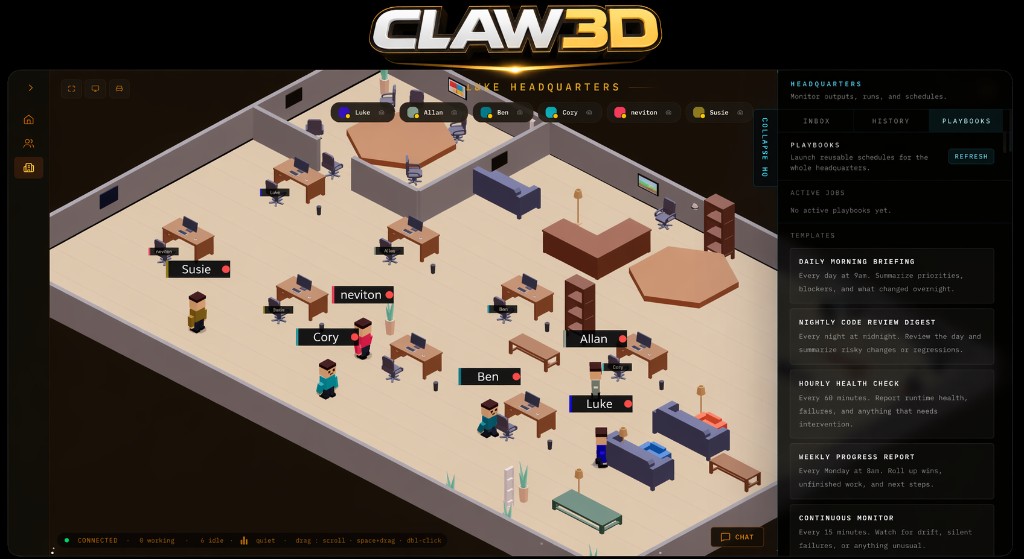
AN OFFICE FOR YOUR AI TEAM!





Claw3D is a 3D virtual office for AI agents you run on your own infrastructure. Instead of watching automation through dashboards and logs, you walk through a live 3D office where your agents collaborate, review code, run standups, ship pull requests, and execute tasks side by side. The Gateway is just the control plane — the product is the office.
If you want a personal, self-hosted workspace that turns your AI workforce into something you can actually see, this is it.
Supported runtimes include: OpenClaw Gateway, Hermes, a direct HTTP custom runtime provider for orchestrator-backed stacks, and a built-in demo gateway for office exploration without a real agent framework.
Website · Vision · Architecture · Tutorial · Getting Started · Runtime Profiles · Multi-Agent Beta · Contributing · Security · Discord
Unofficial project. Claw3D is an independent, community-driven project and is not affiliated with, endorsed by, or maintained by the OpenClaw team. OpenClaw is a separate project, and this repository is not the official OpenClaw repository.
Built and maintained by LukeTheDev. Follow on X: @iamlukethedev.
Claw3D is the visualization and interaction layer.
Today it can sit on top of:
custom runtime provider for orchestrator-backed stacksIn practical terms, this app gives you:
/office retro-office environment where agents appear as workers moving through a shared 3D world/office/builder surface for editing and publishing office layoutsThis repository does not build the upstream runtimes themselves. It is the frontend, Studio, and adapter/proxy layer that connects to a runtime speaking the Claw3D gateway protocol.
AI systems are becoming more capable, but their work is still usually hidden behind logs, terminal output, and dashboards.
Claw3D exists to make agent systems visible:
For the broader direction of the project, see VISION.md.
The current app already includes a substantial Claw3D surface:
Requirements:
Prerequisite:
TUTORIAL.md.Run from source:
git clone <your-public-repo-url> claw3d
cd claw3d
npm install
cp .env.example .env
npm run dev
Then open http://localhost:3000 and configure the gateway URL and token in Studio.
Studio now also persists the selected backend mode (OpenClaw, Hermes, Demo, Local, Claw3D, or Custom) and
shows the active backend reported by the connected gateway.
If you are integrating an orchestrator-backed runtime through the direct HTTP runtime seam, start your runtime first, then start Claw3D:
npm run dev
Then open http://localhost:3000, choose Local runtime, Claw3D runtime,
or Custom backend, and point the upstream URL at your runtime boundary.
Typical examples:
http://127.0.0.1:7770
http://localhost:3000/api/runtime/custom
Current direct-runtime expectations:
GET /healthGET /stateGET /registryPOST /v1/chat/completionsThe browser does not call that runtime directly. Claw3D proxies the
custom provider through its own same-origin route at
/api/runtime/custom, which avoids browser-side CORS problems and keeps
the provider transport separate from the OpenClaw/Hermes gateway path.
If you only want to see the office and agent interactions without installing OpenClaw or Hermes:
npm run demo-gateway
npm run dev
Then connect Studio to:
ws://localhost:18789
This starts a mock local gateway with demo agents, streaming chat, session previews, and office presence.
In the connect screen, choose Demo backend, then connect.
If you want to use Hermes instead of OpenClaw:
npm run hermes-adapter
npm run dev
See docs/hermes-gateway.md for setup details and current scope.
For a local gateway on the same machine, the usual upstream URL is:
ws://localhost:18789
In the connect screen, choose Hermes backend, then connect.
Claw3D uses two separate network hops:
/api/gateway/ws.That means ws://localhost:18789 always refers to the gateway reachable from the Studio host, not necessarily from the browser device.
This design keeps gateway settings persisted on the Studio host and lets Studio open the upstream connection server-side. The current UI still loads the configured upstream URL/token into browser memory at runtime, so treat the browser as part of the active trust boundary.
npm run dev.http://localhost:3000.ws://localhost:18789 plus your OpenClaw gateway token.Use any gateway URL your machine can reach.
Recommended with Tailscale:
tailscale serve --yes --bg --https 443 http://127.0.0.1:18789.wss://<gateway-host>.ts.net.Alternative with SSH:
ssh -L 18789:127.0.0.1:18789 user@<gateway-host>.ws://localhost:18789.STUDIO_ACCESS_TOKEN if Studio binds to a public host.HOST=0.0.0.0 (or a specific LAN/Tailscale host).STUDIO_ACCESS_TOKEN before exposing Studio beyond localhost.localhost.openclaw devices approve --latest
Important runtime paths:
~/.openclaw/openclaw.json~/.openclaw/claw3d/settings.jsonCommon environment variables:
HOST and PORT control the Studio server bind address and port.STUDIO_ACCESS_TOKEN protects Studio when binding to a public host.UPSTREAM_ALLOWLIST restricts which upstream gateway hosts Studio may proxy to. Set this in production.CUSTOM_RUNTIME_ALLOWLIST restricts which hosts /api/runtime/custom may fetch. If unset, it falls back to UPSTREAM_ALLOWLIST.NEXT_PUBLIC_GATEWAY_URL provides the default upstream gateway URL when Studio settings are empty. Note: this is a build-time variable — changes require npm run build to take effect.CLAW3D_GATEWAY_URL and CLAW3D_GATEWAY_TOKEN provide a runtime alternative to NEXT_PUBLIC_GATEWAY_URL that takes effect on server restart without a rebuild.CLAW3D_GATEWAY_ADAPTER_TYPE can pair with CLAW3D_GATEWAY_URL to mark those runtime defaults as openclaw, hermes, demo, local, claw3d, or custom.CLAW3D_GATEWAY_URL is not set, Studio can still surface local Hermes or demo adapter defaults from HERMES_ADAPTER_PORT / DEMO_ADAPTER_PORT.~/.openclaw/openclaw.json when present.OPENCLAW_STATE_DIR and OPENCLAW_CONFIG_PATH override the default OpenClaw paths.OPENCLAW_GATEWAY_SSH_TARGET, OPENCLAW_GATEWAY_SSH_USER, OPENCLAW_GATEWAY_SSH_PORT, and OPENCLAW_GATEWAY_SSH_STRICT_HOST_KEY_CHECKING support advanced gateway-host operations over SSH when needed.ELEVENLABS_API_KEY, ELEVENLABS_VOICE_ID, and ELEVENLABS_MODEL_ID enable voice reply integration.See .env.example for the full local development template.
npm run dev starts the Studio dev server.npm run hermes-adapter starts the Hermes WebSocket adapter.npm run demo-gateway starts the built-in mock gateway for demo mode.npm run build builds the production Next.js app.npm run start starts the production server.npm run lint runs ESLint.npm run typecheck runs TypeScript without emitting output.npm run test runs unit tests with Vitest.npm run e2e runs Playwright tests.npm run studio:setup prepares common local Studio prerequisites.npm run smoke:dev-server runs a basic dev-server smoke check.VISION.md: project direction and long-term guardrails.ARCHITECTURE.md: system boundaries, data flow, and major trade-offs.TUTORIAL.md: detailed step-by-step setup for OpenClaw + Tailscale + Claw3D.docs/multi-agent-beta.md: remote office beta setup, connection modes, and limitations.docs/runtime-profiles.md: saved backend/runtime profiles and the current HTTP runtime seam.CODE_DOCUMENTATION.md: practical code map, extension points, and contributor onboarding order.CONTRIBUTING.md: local workflow, testing, and PR expectations.SUPPORT.md: where to ask for help and how to route reports.ROADMAP.md: near-term priorities and contributor-friendly work areas.docs/pi-chat-streaming.md: gateway runtime streaming and transcript rendering.docs/permissions-sandboxing.md: Studio permissions and OpenClaw behavior.docs/hermes-gateway.md: Hermes adapter setup, capabilities, and current limitations./office) and the Phaser builder (/office/builder) are related but still separate stacks.SOUNDCLAW currently stores an access token only. Refresh-token handling is not implemented yet, so local Spotify auth may need to be repeated after the token expires.If the UI loads but Connect fails, the problem is usually on the Studio -> Gateway side:
EPROTO or wrong version number usually means wss:// was used against a non-TLS endpoint.INVALID_REQUEST errors mentioning minProtocol or maxProtocol usually mean the gateway is too old for Claw3D protocol v3. Upgrade OpenClaw, use the Hermes adapter, or run npm run demo-gateway.401 Studio access token required usually means STUDIO_ACCESS_TOKEN is enabled and the request is missing the expected studio_access cookie./api/runtime/custom returns a blocked-host error in production, set CUSTOM_RUNTIME_ALLOWLIST or include the runtime host in UPSTREAM_ALLOWLIST.studio.gateway_url_missing, studio.gateway_token_missing, studio.upstream_error, and studio.upstream_closed.Marketplace skill installs now use a gateway-native workspace flow and do not require enabling SSH on the user machine.
If you are testing the SOUNDCLAW jukebox locally and Spotify OAuth does not accept your localhost callback, use an ngrok callback bridge:
http://localhost:3000.ngrok for the local Studio server, for example ngrok http 3000.ngrok URL into the ngrok Public URL field.https://<your-ngrok-host>/spotify/callback as the redirect URI.How it works:
localhost, so your normal local office state and agent state remain intact.ngrok callback URL.Current local limitation:
ngrok auth flow when that token expires during local development.If you use other advanced gateway-host operations over SSH:
System Settings -> General -> Sharing -> Remote Login, and make sure the target user is allowed.OpenSSH Server optional feature, start the sshd service, and allow it through the firewall.sshd is installed, running, and reachable from the Studio machine.For first-time SSH connections, Claw3D uses StrictHostKeyChecking=accept-new by default so a new host key can be trusted automatically. If you need stricter behavior, set OPENCLAW_GATEWAY_SSH_STRICT_HOST_KEY_CHECKING=yes, or set it to no only if you explicitly want to skip host key checks.
Keep pull requests focused, run npm run lint, npm run typecheck, and npm run test before opening a PR, and update docs when behavior or architecture changes.
If you use Cursor or another AI-assisted workflow, review the committed project guardrails in .cursor/rules/claw3d-project-guardrails.mdc.
That rule file captures the shared editing expectations for this repository, including the Claw3D-vs-OpenClaw boundary, code placement conventions, office-stack distinctions, and documentation/test update expectations.
Community expectations live in CODE_OF_CONDUCT.md. Security reporting instructions live in SECURITY.md.
3,596 followers · starred Jul 2026
129 followers · starred Mar 2026
5 followers · starred May 2026
12 followers · starred Apr 2026
Claw3D is an open source 3D engine built on OpenClaw for creating games, simulations, and high-performance 3D applications.
See the code
AN OFFICE FOR YOUR AI TEAM!
Claw3D is a 3D virtual office for AI agents you run on your own infrastructure. Instead of watching automation through dashboards and logs, you walk through a live 3D office where your agents collaborate, review code, run standups, ship pull requests, and execute tasks side by side. The Gateway is just the control plane — the product is the office.
If you want a personal, self-hosted workspace that turns your AI workforce into something you can actually see, this is it.
Supported runtimes include: OpenClaw Gateway, Hermes, a direct HTTP custom runtime provider for orchestrator-backed stacks, and a built-in demo gateway for office exploration without a real agent framework.
Website · Vision · Architecture · Tutorial · Getting Started · Runtime Profiles · Multi-Agent Beta · Contributing · Security · Discord
Unofficial project. Claw3D is an independent, community-driven project and is not affiliated with, endorsed by, or maintained by the OpenClaw team. OpenClaw is a separate project, and this repository is not the official OpenClaw repository.
Built and maintained by LukeTheDev. Follow on X: @iamlukethedev.
Claw3D is the visualization and interaction layer.
Today it can sit on top of:
custom runtime provider for orchestrator-backed stacksIn practical terms, this app gives you:
/office retro-office environment where agents appear as workers moving through a shared 3D world/office/builder surface for editing and publishing office layoutsThis repository does not build the upstream runtimes themselves. It is the frontend, Studio, and adapter/proxy layer that connects to a runtime speaking the Claw3D gateway protocol.
AI systems are becoming more capable, but their work is still usually hidden behind logs, terminal output, and dashboards.
Claw3D exists to make agent systems visible:
For the broader direction of the project, see VISION.md.
The current app already includes a substantial Claw3D surface:
Requirements:
Prerequisite:
TUTORIAL.md.Run from source:
git clone <your-public-repo-url> claw3d
cd claw3d
npm install
cp .env.example .env
npm run dev
Then open http://localhost:3000 and configure the gateway URL and token in Studio.
Studio now also persists the selected backend mode (OpenClaw, Hermes, Demo, Local, Claw3D, or Custom) and
shows the active backend reported by the connected gateway.
If you are integrating an orchestrator-backed runtime through the direct HTTP runtime seam, start your runtime first, then start Claw3D:
npm run dev
Then open http://localhost:3000, choose Local runtime, Claw3D runtime,
or Custom backend, and point the upstream URL at your runtime boundary.
Typical examples:
http://127.0.0.1:7770
http://localhost:3000/api/runtime/custom
Current direct-runtime expectations:
GET /healthGET /stateGET /registryPOST /v1/chat/completionsThe browser does not call that runtime directly. Claw3D proxies the
custom provider through its own same-origin route at
/api/runtime/custom, which avoids browser-side CORS problems and keeps
the provider transport separate from the OpenClaw/Hermes gateway path.
If you only want to see the office and agent interactions without installing OpenClaw or Hermes:
npm run demo-gateway
npm run dev
Then connect Studio to:
ws://localhost:18789
This starts a mock local gateway with demo agents, streaming chat, session previews, and office presence.
In the connect screen, choose Demo backend, then connect.
If you want to use Hermes instead of OpenClaw:
npm run hermes-adapter
npm run dev
See docs/hermes-gateway.md for setup details and current scope.
For a local gateway on the same machine, the usual upstream URL is:
ws://localhost:18789
In the connect screen, choose Hermes backend, then connect.
Claw3D uses two separate network hops:
/api/gateway/ws.That means ws://localhost:18789 always refers to the gateway reachable from the Studio host, not necessarily from the browser device.
This design keeps gateway settings persisted on the Studio host and lets Studio open the upstream connection server-side. The current UI still loads the configured upstream URL/token into browser memory at runtime, so treat the browser as part of the active trust boundary.
npm run dev.http://localhost:3000.ws://localhost:18789 plus your OpenClaw gateway token.Use any gateway URL your machine can reach.
Recommended with Tailscale:
tailscale serve --yes --bg --https 443 http://127.0.0.1:18789.wss://<gateway-host>.ts.net.Alternative with SSH:
ssh -L 18789:127.0.0.1:18789 user@<gateway-host>.ws://localhost:18789.STUDIO_ACCESS_TOKEN if Studio binds to a public host.HOST=0.0.0.0 (or a specific LAN/Tailscale host).STUDIO_ACCESS_TOKEN before exposing Studio beyond localhost.localhost.openclaw devices approve --latest
Important runtime paths:
~/.openclaw/openclaw.json~/.openclaw/claw3d/settings.jsonCommon environment variables:
HOST and PORT control the Studio server bind address and port.STUDIO_ACCESS_TOKEN protects Studio when binding to a public host.UPSTREAM_ALLOWLIST restricts which upstream gateway hosts Studio may proxy to. Set this in production.CUSTOM_RUNTIME_ALLOWLIST restricts which hosts /api/runtime/custom may fetch. If unset, it falls back to UPSTREAM_ALLOWLIST.NEXT_PUBLIC_GATEWAY_URL provides the default upstream gateway URL when Studio settings are empty. Note: this is a build-time variable — changes require npm run build to take effect.CLAW3D_GATEWAY_URL and CLAW3D_GATEWAY_TOKEN provide a runtime alternative to NEXT_PUBLIC_GATEWAY_URL that takes effect on server restart without a rebuild.CLAW3D_GATEWAY_ADAPTER_TYPE can pair with CLAW3D_GATEWAY_URL to mark those runtime defaults as openclaw, hermes, demo, local, claw3d, or custom.CLAW3D_GATEWAY_URL is not set, Studio can still surface local Hermes or demo adapter defaults from HERMES_ADAPTER_PORT / DEMO_ADAPTER_PORT.~/.openclaw/openclaw.json when present.OPENCLAW_STATE_DIR and OPENCLAW_CONFIG_PATH override the default OpenClaw paths.OPENCLAW_GATEWAY_SSH_TARGET, OPENCLAW_GATEWAY_SSH_USER, OPENCLAW_GATEWAY_SSH_PORT, and OPENCLAW_GATEWAY_SSH_STRICT_HOST_KEY_CHECKING support advanced gateway-host operations over SSH when needed.ELEVENLABS_API_KEY, ELEVENLABS_VOICE_ID, and ELEVENLABS_MODEL_ID enable voice reply integration.See .env.example for the full local development template.
npm run dev starts the Studio dev server.npm run hermes-adapter starts the Hermes WebSocket adapter.npm run demo-gateway starts the built-in mock gateway for demo mode.npm run build builds the production Next.js app.npm run start starts the production server.npm run lint runs ESLint.npm run typecheck runs TypeScript without emitting output.npm run test runs unit tests with Vitest.npm run e2e runs Playwright tests.npm run studio:setup prepares common local Studio prerequisites.npm run smoke:dev-server runs a basic dev-server smoke check.VISION.md: project direction and long-term guardrails.ARCHITECTURE.md: system boundaries, data flow, and major trade-offs.TUTORIAL.md: detailed step-by-step setup for OpenClaw + Tailscale + Claw3D.docs/multi-agent-beta.md: remote office beta setup, connection modes, and limitations.docs/runtime-profiles.md: saved backend/runtime profiles and the current HTTP runtime seam.CODE_DOCUMENTATION.md: practical code map, extension points, and contributor onboarding order.CONTRIBUTING.md: local workflow, testing, and PR expectations.SUPPORT.md: where to ask for help and how to route reports.ROADMAP.md: near-term priorities and contributor-friendly work areas.docs/pi-chat-streaming.md: gateway runtime streaming and transcript rendering.docs/permissions-sandboxing.md: Studio permissions and OpenClaw behavior.docs/hermes-gateway.md: Hermes adapter setup, capabilities, and current limitations./office) and the Phaser builder (/office/builder) are related but still separate stacks.SOUNDCLAW currently stores an access token only. Refresh-token handling is not implemented yet, so local Spotify auth may need to be repeated after the token expires.If the UI loads but Connect fails, the problem is usually on the Studio -> Gateway side:
EPROTO or wrong version number usually means wss:// was used against a non-TLS endpoint.INVALID_REQUEST errors mentioning minProtocol or maxProtocol usually mean the gateway is too old for Claw3D protocol v3. Upgrade OpenClaw, use the Hermes adapter, or run npm run demo-gateway.401 Studio access token required usually means STUDIO_ACCESS_TOKEN is enabled and the request is missing the expected studio_access cookie./api/runtime/custom returns a blocked-host error in production, set CUSTOM_RUNTIME_ALLOWLIST or include the runtime host in UPSTREAM_ALLOWLIST.studio.gateway_url_missing, studio.gateway_token_missing, studio.upstream_error, and studio.upstream_closed.Marketplace skill installs now use a gateway-native workspace flow and do not require enabling SSH on the user machine.
If you are testing the SOUNDCLAW jukebox locally and Spotify OAuth does not accept your localhost callback, use an ngrok callback bridge:
http://localhost:3000.ngrok for the local Studio server, for example ngrok http 3000.ngrok URL into the ngrok Public URL field.https://<your-ngrok-host>/spotify/callback as the redirect URI.How it works:
localhost, so your normal local office state and agent state remain intact.ngrok callback URL.Current local limitation:
ngrok auth flow when that token expires during local development.If you use other advanced gateway-host operations over SSH:
System Settings -> General -> Sharing -> Remote Login, and make sure the target user is allowed.OpenSSH Server optional feature, start the sshd service, and allow it through the firewall.sshd is installed, running, and reachable from the Studio machine.For first-time SSH connections, Claw3D uses StrictHostKeyChecking=accept-new by default so a new host key can be trusted automatically. If you need stricter behavior, set OPENCLAW_GATEWAY_SSH_STRICT_HOST_KEY_CHECKING=yes, or set it to no only if you explicitly want to skip host key checks.
Keep pull requests focused, run npm run lint, npm run typecheck, and npm run test before opening a PR, and update docs when behavior or architecture changes.
If you use Cursor or another AI-assisted workflow, review the committed project guardrails in .cursor/rules/claw3d-project-guardrails.mdc.
That rule file captures the shared editing expectations for this repository, including the Claw3D-vs-OpenClaw boundary, code placement conventions, office-stack distinctions, and documentation/test update expectations.
Community expectations live in CODE_OF_CONDUCT.md. Security reporting instructions live in SECURITY.md.
3,596 followers · starred Jul 2026
129 followers · starred Mar 2026
5 followers · starred May 2026
12 followers · starred Apr 2026



