A clean web dashboard for OpenClaw. Connect your Gateway, manage agents, and ship faster. ⭐️ Star if you like it!
TypeScript
2,034
650 commits
updated Jun 26, 2026
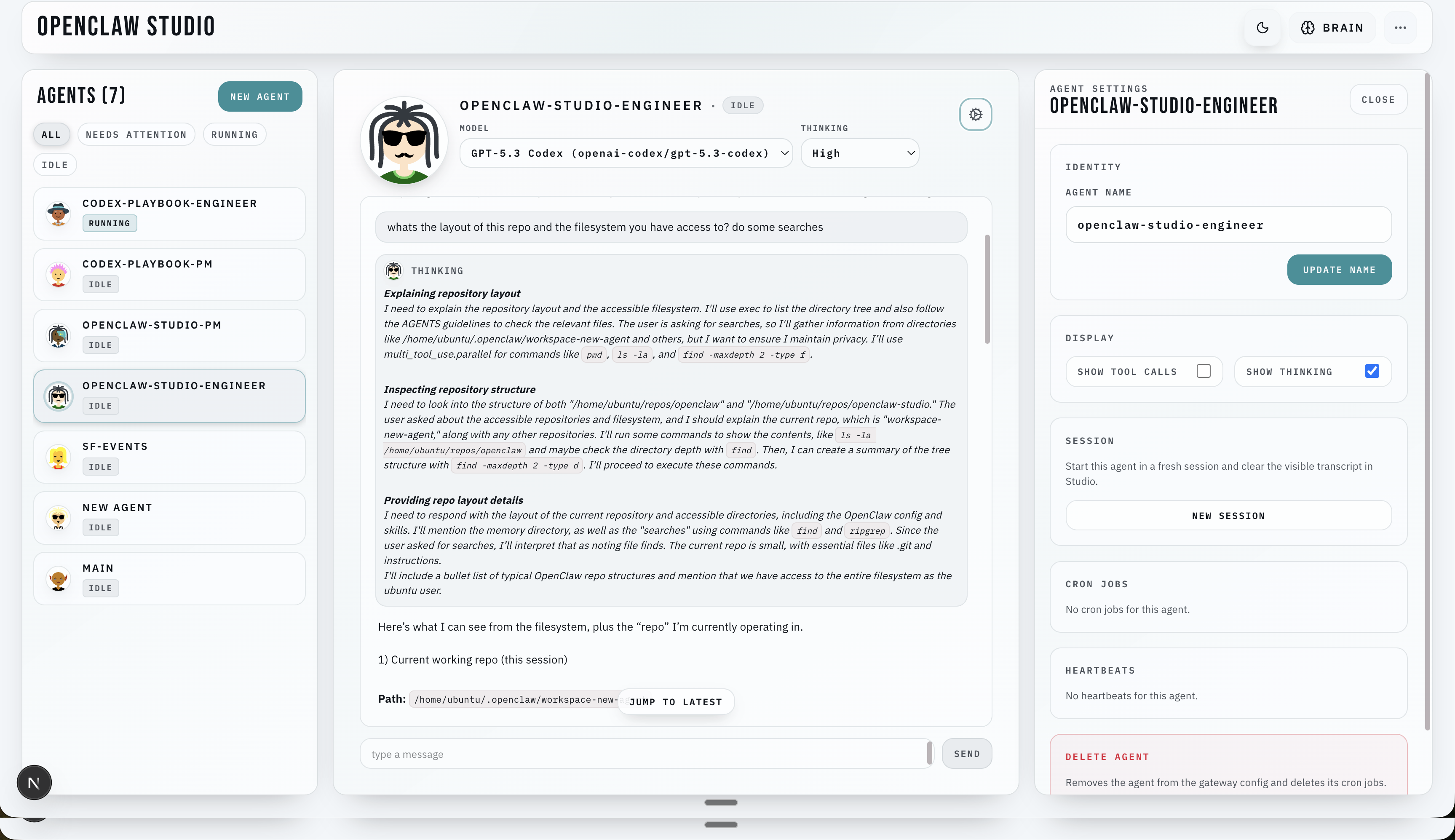
OpenClaw Studio is a clean web dashboard for OpenClaw. Use it to connect to your Gateway, see your agents, chat, manage approvals, and configure jobs from one place.
⭐ Drop a star to help us grow! ⭐
It helps more developers discover the project.
If your Gateway is already running, pick the scenario that matches where your Gateway and Studio will run:
All setups use the same install/run path (recommended): npx -y openclaw-studio@latest
Two links matter:
localhost always means "the Studio host." If Studio and OpenClaw share a machine, the upstream should usually stay at ws://localhost:18789 even when that machine is a cloud VM.
npx -y openclaw-studio@latest
cd openclaw-studio
npm run dev
ws://localhost:18789openclaw config get gateway.auth.token)Run Studio on your laptop as above, then set an upstream URL your laptop can reach.
Recommended (Tailscale Serve on the gateway host):
tailscale serve --yes --bg --https 443 http://127.0.0.1:18789wss://<gateway-host>.ts.netws://<private-ip>:18789 is an advanced/manual path and may need extra OpenClaw origin configurationAlternative (SSH tunnel):
ssh -L 18789:127.0.0.1:18789 user@<gateway-host>ws://localhost:18789This is the “always-on” setup. When Studio and OpenClaw run on the same cloud VM, keep the OpenClaw upstream local and solve browser access to Studio separately.
ws://localhost:18789tailscale serve --yes --bg --https 443 http://127.0.0.1:3000https://<studio-host>.ts.netwss://<gateway-host>.ts.net if Studio and OpenClaw are on different machines.Notes:
/studio unless you configure basePath and rebuild.STUDIO_ACCESS_TOKEN is required./?access_token=... once from each new browser to set the Studio cookie.OpenClaw Studio now runs one runtime architecture with two primary paths:
/api/runtime/*, /api/intents/*, /api/runtime/stream)This is why ws://localhost:18789 means “gateway on the Studio host”, not “gateway on your phone”.
If Studio is running on a remote machine over SSH and the terminal says Open in browser: http://localhost:3000, that localhost is the remote machine. Use Tailscale Serve or an SSH tunnel to open Studio from your own laptop.
git clone https://github.com/grp06/openclaw-studio.git
cd openclaw-studio
npm install
npm run dev
Optional setup helper in a source checkout:
npm run studio:setup
That writes the saved gateway URL/token for this Studio host without opening the UI first.
Paths and key settings:
~/.openclaw/openclaw.json (or via OPENCLAW_STATE_DIR)~/.openclaw/openclaw-studio/settings.json~/.openclaw/openclaw-studio/runtime.dbws://localhost:18789 (override via Studio Settings or NEXT_PUBLIC_GATEWAY_URL)STUDIO_ACCESS_TOKEN: required when binding Studio to a public host (HOST=0.0.0.0, HOST=::, or non-loopback hostnames/IPs); optional for loopback-only binds (127.0.0.1, ::1, localhost)Startup guard behavior:
npm run dev and npm run dev:turbo run verify:native-runtime:repair before server startup.npm run start runs verify:native-runtime:check before startup (check-only; no dependency mutation).Why SQLite exists now:
runtime.db.See docs/ui-guide.md for UI workflows (agent creation, cron jobs, exec approvals).
See docs/pi-chat-streaming.md for how Studio streams runtime events over domain SSE (/api/runtime/stream), applies replay/history, and renders tool calls, thinking traces, and final transcript lines.
See docs/permissions-sandboxing.md for how agent creation choices (tool policy, sandbox config, exec approvals) flow from Studio into the OpenClaw Gateway and how upstream OpenClaw enforces them at runtime (workspaces, sandbox mounts, tool availability, and exec approval prompts).
See docs/color-system.md for the semantic color contract, status mappings, and guardrails that keep action/status/danger usage consistent across the UI.
If the UI loads but “Connect” fails, it’s usually Studio->Gateway:
<state dir>/openclaw-studio/settings.json).ws://localhost:18789 means "OpenClaw on the Studio host," not "OpenClaw on your laptop."http://localhost:3000 from your laptop, expose Studio with tailscale serve --yes --bg --https 443 http://127.0.0.1:3000 or use ssh -L 3000:127.0.0.1:3000 user@host.EPROTO / “wrong version number”: you used wss://... to a non-TLS endpoint (use ws://..., or put the gateway behind HTTPS)..ts.net + ws://: use wss:// instead./studio: serve Studio at / or configure basePath and rebuild.STUDIO_ACCESS_TOKEN is enabled; open /?access_token=... once to set the cookie.studio.gateway_url_missing, studio.gateway_token_missing, studio.upstream_error, studio.upstream_closed.If startup fails with better_sqlite3.node / NODE_MODULE_VERSION mismatch:
npm run verify:native-runtime:repairnode and npm point at the same runtime before launching Studio:
node -v && node -p "process.versions.modules"which node && which npmnpm + nvm node), run nvm use in that terminal first.npm rebuild better-sqlite3npm installSee ARCHITECTURE.md for details on modules and data flow.
153 followers · starred Feb 2026
18 followers · starred Mar 2026
4,774 followers · starred Feb 2026
129 followers · starred Feb 2026
A clean web dashboard for OpenClaw. Connect your Gateway, manage agents, and ship faster. ⭐️ Star if you like it!
TypeScript
2,034
650 commits
updated Jun 26, 2026
OpenClaw Studio is a clean web dashboard for OpenClaw. Use it to connect to your Gateway, see your agents, chat, manage approvals, and configure jobs from one place.
⭐ Drop a star to help us grow! ⭐
It helps more developers discover the project.
If your Gateway is already running, pick the scenario that matches where your Gateway and Studio will run:
All setups use the same install/run path (recommended): npx -y openclaw-studio@latest
Two links matter:
localhost always means "the Studio host." If Studio and OpenClaw share a machine, the upstream should usually stay at ws://localhost:18789 even when that machine is a cloud VM.
npx -y openclaw-studio@latest
cd openclaw-studio
npm run dev
ws://localhost:18789openclaw config get gateway.auth.token)Run Studio on your laptop as above, then set an upstream URL your laptop can reach.
Recommended (Tailscale Serve on the gateway host):
tailscale serve --yes --bg --https 443 http://127.0.0.1:18789wss://<gateway-host>.ts.netws://<private-ip>:18789 is an advanced/manual path and may need extra OpenClaw origin configurationAlternative (SSH tunnel):
ssh -L 18789:127.0.0.1:18789 user@<gateway-host>ws://localhost:18789This is the “always-on” setup. When Studio and OpenClaw run on the same cloud VM, keep the OpenClaw upstream local and solve browser access to Studio separately.
ws://localhost:18789tailscale serve --yes --bg --https 443 http://127.0.0.1:3000https://<studio-host>.ts.netwss://<gateway-host>.ts.net if Studio and OpenClaw are on different machines.Notes:
/studio unless you configure basePath and rebuild.STUDIO_ACCESS_TOKEN is required./?access_token=... once from each new browser to set the Studio cookie.OpenClaw Studio now runs one runtime architecture with two primary paths:
/api/runtime/*, /api/intents/*, /api/runtime/stream)This is why ws://localhost:18789 means “gateway on the Studio host”, not “gateway on your phone”.
If Studio is running on a remote machine over SSH and the terminal says Open in browser: http://localhost:3000, that localhost is the remote machine. Use Tailscale Serve or an SSH tunnel to open Studio from your own laptop.
git clone https://github.com/grp06/openclaw-studio.git
cd openclaw-studio
npm install
npm run dev
Optional setup helper in a source checkout:
npm run studio:setup
That writes the saved gateway URL/token for this Studio host without opening the UI first.
Paths and key settings:
~/.openclaw/openclaw.json (or via OPENCLAW_STATE_DIR)~/.openclaw/openclaw-studio/settings.json~/.openclaw/openclaw-studio/runtime.dbws://localhost:18789 (override via Studio Settings or NEXT_PUBLIC_GATEWAY_URL)STUDIO_ACCESS_TOKEN: required when binding Studio to a public host (HOST=0.0.0.0, HOST=::, or non-loopback hostnames/IPs); optional for loopback-only binds (127.0.0.1, ::1, localhost)Startup guard behavior:
npm run dev and npm run dev:turbo run verify:native-runtime:repair before server startup.npm run start runs verify:native-runtime:check before startup (check-only; no dependency mutation).Why SQLite exists now:
runtime.db.See docs/ui-guide.md for UI workflows (agent creation, cron jobs, exec approvals).
See docs/pi-chat-streaming.md for how Studio streams runtime events over domain SSE (/api/runtime/stream), applies replay/history, and renders tool calls, thinking traces, and final transcript lines.
See docs/permissions-sandboxing.md for how agent creation choices (tool policy, sandbox config, exec approvals) flow from Studio into the OpenClaw Gateway and how upstream OpenClaw enforces them at runtime (workspaces, sandbox mounts, tool availability, and exec approval prompts).
See docs/color-system.md for the semantic color contract, status mappings, and guardrails that keep action/status/danger usage consistent across the UI.
If the UI loads but “Connect” fails, it’s usually Studio->Gateway:
<state dir>/openclaw-studio/settings.json).ws://localhost:18789 means "OpenClaw on the Studio host," not "OpenClaw on your laptop."http://localhost:3000 from your laptop, expose Studio with tailscale serve --yes --bg --https 443 http://127.0.0.1:3000 or use ssh -L 3000:127.0.0.1:3000 user@host.EPROTO / “wrong version number”: you used wss://... to a non-TLS endpoint (use ws://..., or put the gateway behind HTTPS)..ts.net + ws://: use wss:// instead./studio: serve Studio at / or configure basePath and rebuild.STUDIO_ACCESS_TOKEN is enabled; open /?access_token=... once to set the cookie.studio.gateway_url_missing, studio.gateway_token_missing, studio.upstream_error, studio.upstream_closed.If startup fails with better_sqlite3.node / NODE_MODULE_VERSION mismatch:
npm run verify:native-runtime:repairnode and npm point at the same runtime before launching Studio:
node -v && node -p "process.versions.modules"which node && which npmnpm + nvm node), run nvm use in that terminal first.npm rebuild better-sqlite3npm installSee ARCHITECTURE.md for details on modules and data flow.
153 followers · starred Feb 2026
18 followers · starred Mar 2026
4,774 followers · starred Feb 2026
129 followers · starred Feb 2026



