Chrome Extension for Special Copying for AI Chat Apps (ChatGPT, Gemini, etc)
JavaScript
3
32 commits
updated Oct 15, 2026
Copies browser selections as structured text for LLMs, preserving visual and semantic relationships that plain-text copy drops.
Status: v0.1.0, published. Works well on conventional markup; rough edges remain on heavily component-generated pages.
Or load it unpacked for development:
chrome://extensions, enable Developer mode, and click Load unpacked on this directory.
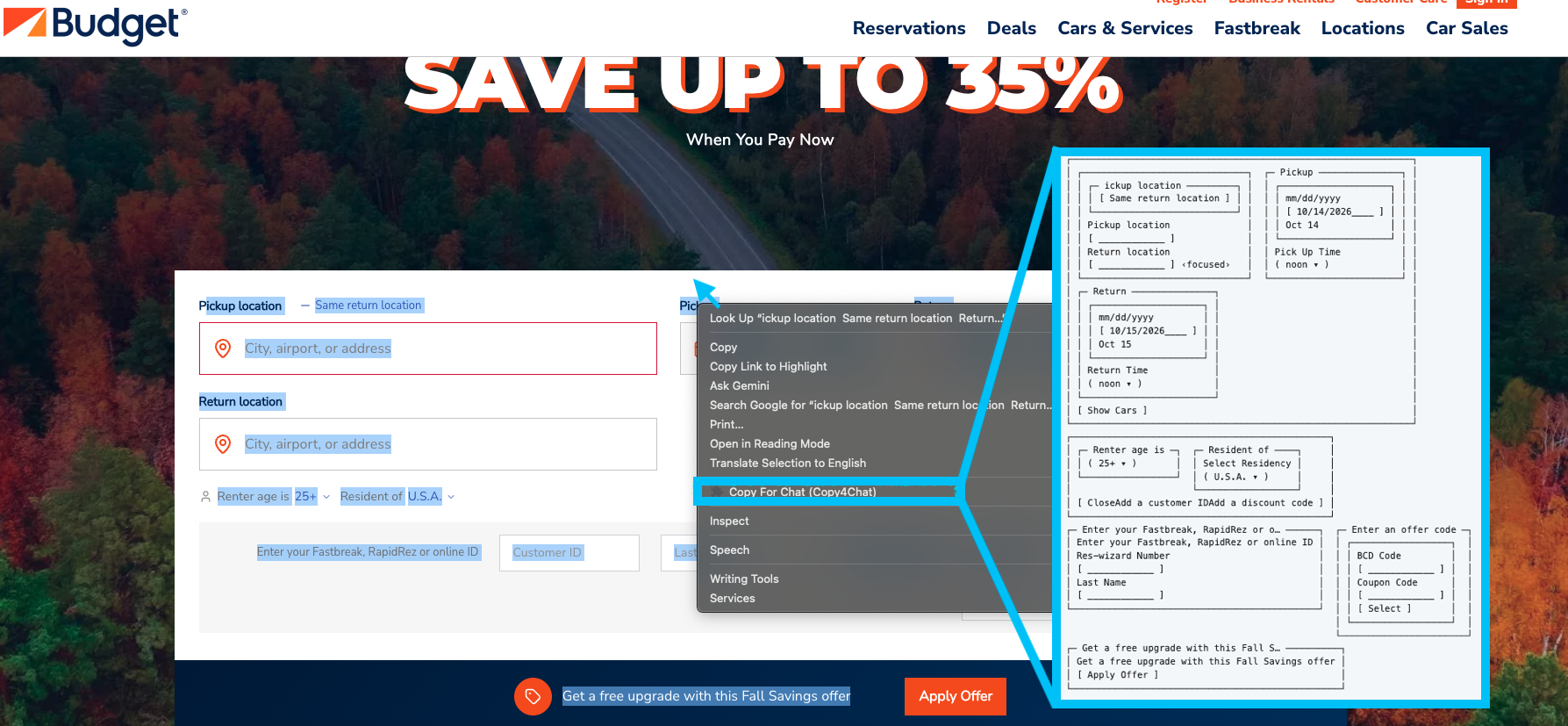
The same selection, copied both ways.
| Copy4Chat | Ordinary copy |
|---|---|
┌──────────────────────────────────────────────────────────────┐
│ ┌──────────────────────────────┐  ┌─ Pickup ───────────────┐ │
│ │ ┌─ ickup location ─────────┐ │  │ ┌────────────────────┐ │ │
│ │ │ [ Same return location ] │ │  │ │ mm/dd/yyyy         │ │ │
│ │ └──────────────────────────┘ │  │ │ [ 10/14/2026____ ] │ │ │
│ │ Pickup location              │  │ │ Oct 14             │ │ │
│ │ [ ____________ ]             │  │ └────────────────────┘ │ │
│ │ Return location              │  │ Pick Up Time           │ │
│ │ [ ____________ ] ‹focused›   │  │ ( noon ▾ )             │ │
│ └──────────────────────────────┘  └────────────────────────┘ │
│ ┌─ Return ───────────────┐                                   │
│ │ ┌────────────────────┐ │                                   │
│ │ │ mm/dd/yyyy         │ │                                   │
│ │ │ [ 10/15/2026____ ] │ │                                   │
│ │ │ Oct 15             │ │                                   │
│ │ └────────────────────┘ │                                   │
│ │ Return Time            │                                   │
│ │ ( noon ▾ )             │                                   │
│ └────────────────────────┘                                   │
│ [ Show Cars ]                                                │
└──────────────────────────────────────────────────────────────┘
┌───────────────────────────────────────────────┐
│ ┌─ Renter age is ─┐  ┌─ Resident of ────┐     │
│ │ ( 25+ ▾ )       │  │ Select Residency │     │
│ └─────────────────┘  │ ( U.S.A. ▾ )     │     │
│                      └──────────────────┘     │
│ [ CloseAdd a customer IDAdd a discount code ] │
└───────────────────────────────────────────────┘
┌─ Enter your Fastbreak, RapidRez or o… ──────┐  ┌─ Enter an offer code ─┐
│ Enter your Fastbreak, RapidRez or online ID │  │ ┌──────────────────┐  │
│ Res-wizard Number                           │  │ │ BCD Code         │  │
│ [ ____________ ]                            │  │ │ [ ____________ ] │  │
│ Last Name                                   │  │ │ Coupon Code      │  │
│ [ ____________ ]                            │  │ │ [ ____________ ] │  │
└─────────────────────────────────────────────┘  │ │ [ Select ]       │  │
                                                 │ └──────────────────┘  │
                                                 └───────────────────────┘
┌─ Get a free upgrade with this Fall S… ──────────┐
│ Get a free upgrade with this Fall Savings offer │
│ [ Apply Offer ]                                 │
└─────────────────────────────────────────────────┘
|
**ickup location**svgSame return location svg **Return location** svg **Pickup** svgOct 14 midnight12:30 AM1:00 AM1:30 AM2:00 AM2:30 AM 3:00 AM3:30 AM4:00 AM4:30 AM… [48 options] **Return** svgOct 15 midnight12:30 AM1:00 AM1:30 AM2:00 AM2:30 AM 3:00 AM3:30 AM4:00 AM4:30 AM… [48 options] svgRenter age is 25+24232221201918svg Resident of AfghanistanAlbaniaAlgeriaAndorraAngolaAnguilla Antigua & BarbudaArgentinaArmeniaArubaAustralia AustriaAzerbaijanBahamasBahrainBangladesh BarbadosBelarusBelgiumBelize… [240+ options] Close **Enter your Fastbreak, RapidRez or online ID** **Enter an offer code** svg Get a free upgrade with this Fall Savings offer |
The dropdown lists in the right column are truncated here for length — mechanically, at the first 20 entries in the page's own order, so no entry is singled out. Everything else is verbatim.
That truncation is itself the point. Ordinary copy emits every option of every dropdown as run-on text: 48 time slots, twice; eight renter ages; over 240 countries. None of it tells you what is actually selected. Copy4Chat emits the value:
( noon ▾ ), ( U.S.A. ▾ ), ( 25+ ▾ ) — the current selection, not the
menu it came from.Oct 14 is a line that happens to follow the
word Pickup.‹focused› — live state that exists nowhere in
the DOM text.svg appears seven times on the right. Those are icons leaking through as
the literal string "svg".Rough edges are left in rather than cleaned up. They are open bugs, not stylistic choices:
[ CloseAdd a customer IDAdd a discount code ] — inline elements
concatenated without separators. The same bug drops the spaces in the
right-hand column's option lists.ickup location is missing its first letter in both columns, so the
selection began mid-word. That is the no-expansion rule working as designed,
but it reads as a bug and probably wants a word-boundary nudge.….Budget is an independent third party and is not affiliated with, sponsoring, or endorsing Copy4Chat. Budget and its associated trademarks belong to their respective owners.
icons/icon.svg is the source; the PNGs Chrome loads are generated from it:
./tools/make-icons.sh # writes icons/icon{16,32,48,128}.png
Chrome itself is the rasteriser, so there is no ImageMagick or librsvg dependency and the result matches what the browser will draw. Edit the SVG, re-run the script, then reload the extension.
Sizes are the ones Chrome asks for: 16 and 32 for the context menu and
favicon slots, 48 for chrome://extensions, 128 for installation and the
Web Store listing.
./tools/make-promo.sh renders the 440×280 Web Store promo tile the same
way, so the artwork lives in one place.
context-menu click  (service worker — routing only, never sees page content)
      └─ chrome.scripting.executeScript  (activeTab; no host permissions)
            ├─ extract.js    selection → IR
            ├─ render.js     IR → text
            └─ clipboard.js  write, two paths
Nothing runs on pages until invoked via activeTab (no <all_urls> content script). The service worker only routes the click and never touches page content.
‹context: Checkout › Payment Form›

Error
  Payment failed
  Card number is invalid
text-transform, ::before, masked passwords) over raw DOM strings. Icons count as visible content: an <svg>/<img> is transcribed via its accessible name, because the glyph is what tells a sighted reader that 8 means stars.order, row-reverse, absolute positioning).<table> elements render as Markdown tables.The extractor produces a renderer-agnostic IR, so output style is a swap, not a rewrite. Set RENDERER at the top of src/content/main.js.
boxed (default) — visual-text. Frames the things whose frame carries meaning: forms, repeated records, side-by-side arrangements. Prose and headings stay Markdown. Output is wrapped in a ``` fence, without which a chat client's proportional font destroys the alignment on arrival.text — nested Markdown. Cheaper in tokens, and the thing boxed has to beat.┌─ Welcome back ────────────────┐
│ Email address │
│ [ [email protected]____ ] │
│ Password │
│ [ ••••••••••____ ] │
│ ☑ Remember me │
│ [ Sign in ] │
│ ⚠ Incorrect email or password │
└───────────────────────────────┘
Framing is driven by the IR, not by guesswork: a group earns a frame when it directly holds controls or is one of a set of repeated records, and a run of records becomes columns only when the container's measured axis is row. Recording the arrangement is not a claim that the items are comparable — pricing-cards.html is the fixture that keeps that honest.
Open question: boxes roughly double the token count and models have seen far more Markdown than box art, so recognisability may cost comprehension. Score both renderers on the fixtures before treating the default as settled.
input[type=password], sensitive autocomplete attributes (cc-number, cc-csc, one-time-code, etc.), secret-like field names/labels, token patterns, and Luhn-valid card numbers—applied to both content and context labels.The control is not selection.toString(). A chat client pastes by reading the clipboard's text/html flavour and converting it to Markdown, which gets links, headings, lists and real tables for free. That is the baseline users actually have, so that is the baseline to beat — score every fixture against Turndown + the GFM plugin. Any fixture the control also passes is measuring nothing; delete it rather than keep it as a comfortable win.
What a converter structurally cannot see, and where our value therefore lives: live interaction state, visual reading order under CSS reordering, visibility filtering, CSS-rendered text, and masking.
| Fixture | Role |
|---|---|
repo-cards.html | Regression. Ordinary copy beat us on a real GitHub profile — links, record boundaries, icon-labelled counts. Must tie at minimum. |
kanban-reordered.html | Differentiator: DOM order contradicts visual order, so the converter is wrong, not vague |
split-labels.html | Differentiator: live .value / selectedOptions are invisible to a converter |
pricing-cards.html | Negative test: must remain nested, not coerced into a table |
feature-matrix.html | At risk — a GFM converter handles real tables, so this may no longer measure anything. Re-score, then likely delete. |
./tools/check.sh                        # everything
node test/render-invariants.js          # renderer geometry
node test/run-fixtures.js               # fixture snapshots, in a real browser
node test/run-fixtures.js --update      # re-record snapshots after an intended change
node test/run-fixtures.js kanban --print  # look at one fixture
test/run-fixtures.js loads every fixture in headless Chrome with the content
scripts injected, selects the whole body, and compares the boxed output, the
text output and selection.toString() against test/snapshots/. Any
difference fails.
This is the regression guard. Nothing else asserts on what the extractor and
renderers actually produce — the invariant tests only check that the boxes are
well-formed, which stayed true even when the boxed renderer was silently
dropping every list item. When a change is intended, re-record with
--update and let the snapshot diff show up in the commit.
The boxed renderer holds one invariant, and the United regression was a violation of it rather than a tuning problem:
Every render operation returns a Rect —
{ lines, w }with every line padded to exactlywdisplay columns — and nothing downstream ever re-wraps it.
Wrapping is a property of text, so it happens once, when text becomes a Rect. The earlier renderer returned bare string arrays of unknown width and wrapped them inside the panel builder, which could word-wrap a nested box's border. Budget flows downward: a frame at budget B renders its body at B-4, so a child can never return wider than its parent allows. Horizontal composition is attempted on finished rectangles and falls back to packing or stacking them unchanged — a composed block is never reflowed.
The tests assert this rather than eyeballing it: nothing exceeds 80 columns,
every opening corner has a closing corner in the same display column (not
string index — they diverge under CJK), no orphaned border fragments, and
balanced verticals. test/ir/*.json are IR fixtures replayed through the same
checks; united-search.json is the page that broke it.
None — all rights reserved.
The source is public so that anyone can check what the extension does with their page content. Privacy claims about a clipboard tool should be verifiable rather than taken on faith, and that only works if the code can be read.
Public is not the same as permissively licensed. You may read this code. You may not copy, modify, or redistribute it, and in particular not repackage it as a competing Web Store listing.
Building your own extension that does something similar is entirely fair — copyright covers this particular expression, not the idea. Do the work.
Source-available, not open source. You may read it, build it, and install it in your own browser; you may not redistribute it or publish it to an extension store. See LICENSE.
The code is public so the privacy claims above can be verified rather than taken on faith. Copyright covers this expression, not the idea — writing your own extension that does something similar is entirely fair.
For commercial use or distribution, ask — it is negotiable, it just needs separate written authorization. Open an issue.
Selection.getComposedRanges().Chrome Extension for Special Copying for AI Chat Apps (ChatGPT, Gemini, etc)
JavaScript
3
32 commits
updated Oct 15, 2026
Copies browser selections as structured text for LLMs, preserving visual and semantic relationships that plain-text copy drops.
Status: v0.1.0, published. Works well on conventional markup; rough edges remain on heavily component-generated pages.
Or load it unpacked for development:
chrome://extensions, enable Developer mode, and click Load unpacked on this directory.
The same selection, copied both ways.
| Copy4Chat | Ordinary copy |
|---|---|
┌──────────────────────────────────────────────────────────────┐
│ ┌──────────────────────────────┐  ┌─ Pickup ───────────────┐ │
│ │ ┌─ ickup location ─────────┐ │  │ ┌────────────────────┐ │ │
│ │ │ [ Same return location ] │ │  │ │ mm/dd/yyyy         │ │ │
│ │ └──────────────────────────┘ │  │ │ [ 10/14/2026____ ] │ │ │
│ │ Pickup location              │  │ │ Oct 14             │ │ │
│ │ [ ____________ ]             │  │ └────────────────────┘ │ │
│ │ Return location              │  │ Pick Up Time           │ │
│ │ [ ____________ ] ‹focused›   │  │ ( noon ▾ )             │ │
│ └──────────────────────────────┘  └────────────────────────┘ │
│ ┌─ Return ───────────────┐                                   │
│ │ ┌────────────────────┐ │                                   │
│ │ │ mm/dd/yyyy         │ │                                   │
│ │ │ [ 10/15/2026____ ] │ │                                   │
│ │ │ Oct 15             │ │                                   │
│ │ └────────────────────┘ │                                   │
│ │ Return Time            │                                   │
│ │ ( noon ▾ )             │                                   │
│ └────────────────────────┘                                   │
│ [ Show Cars ]                                                │
└──────────────────────────────────────────────────────────────┘
┌───────────────────────────────────────────────┐
│ ┌─ Renter age is ─┐  ┌─ Resident of ────┐     │
│ │ ( 25+ ▾ )       │  │ Select Residency │     │
│ └─────────────────┘  │ ( U.S.A. ▾ )     │     │
│                      └──────────────────┘     │
│ [ CloseAdd a customer IDAdd a discount code ] │
└───────────────────────────────────────────────┘
┌─ Enter your Fastbreak, RapidRez or o… ──────┐  ┌─ Enter an offer code ─┐
│ Enter your Fastbreak, RapidRez or online ID │  │ ┌──────────────────┐  │
│ Res-wizard Number                           │  │ │ BCD Code         │  │
│ [ ____________ ]                            │  │ │ [ ____________ ] │  │
│ Last Name                                   │  │ │ Coupon Code      │  │
│ [ ____________ ]                            │  │ │ [ ____________ ] │  │
└─────────────────────────────────────────────┘  │ │ [ Select ]       │  │
                                                 │ └──────────────────┘  │
                                                 └───────────────────────┘
┌─ Get a free upgrade with this Fall S… ──────────┐
│ Get a free upgrade with this Fall Savings offer │
│ [ Apply Offer ]                                 │
└─────────────────────────────────────────────────┘
|
**ickup location**svgSame return location svg **Return location** svg **Pickup** svgOct 14 midnight12:30 AM1:00 AM1:30 AM2:00 AM2:30 AM 3:00 AM3:30 AM4:00 AM4:30 AM… [48 options] **Return** svgOct 15 midnight12:30 AM1:00 AM1:30 AM2:00 AM2:30 AM 3:00 AM3:30 AM4:00 AM4:30 AM… [48 options] svgRenter age is 25+24232221201918svg Resident of AfghanistanAlbaniaAlgeriaAndorraAngolaAnguilla Antigua & BarbudaArgentinaArmeniaArubaAustralia AustriaAzerbaijanBahamasBahrainBangladesh BarbadosBelarusBelgiumBelize… [240+ options] Close **Enter your Fastbreak, RapidRez or online ID** **Enter an offer code** svg Get a free upgrade with this Fall Savings offer |
The dropdown lists in the right column are truncated here for length — mechanically, at the first 20 entries in the page's own order, so no entry is singled out. Everything else is verbatim.
That truncation is itself the point. Ordinary copy emits every option of every dropdown as run-on text: 48 time slots, twice; eight renter ages; over 240 countries. None of it tells you what is actually selected. Copy4Chat emits the value:
( noon ▾ ), ( U.S.A. ▾ ), ( 25+ ▾ ) — the current selection, not the
menu it came from.Oct 14 is a line that happens to follow the
word Pickup.‹focused› — live state that exists nowhere in
the DOM text.svg appears seven times on the right. Those are icons leaking through as
the literal string "svg".Rough edges are left in rather than cleaned up. They are open bugs, not stylistic choices:
[ CloseAdd a customer IDAdd a discount code ] — inline elements
concatenated without separators. The same bug drops the spaces in the
right-hand column's option lists.ickup location is missing its first letter in both columns, so the
selection began mid-word. That is the no-expansion rule working as designed,
but it reads as a bug and probably wants a word-boundary nudge.….Budget is an independent third party and is not affiliated with, sponsoring, or endorsing Copy4Chat. Budget and its associated trademarks belong to their respective owners.
icons/icon.svg is the source; the PNGs Chrome loads are generated from it:
./tools/make-icons.sh # writes icons/icon{16,32,48,128}.png
Chrome itself is the rasteriser, so there is no ImageMagick or librsvg dependency and the result matches what the browser will draw. Edit the SVG, re-run the script, then reload the extension.
Sizes are the ones Chrome asks for: 16 and 32 for the context menu and
favicon slots, 48 for chrome://extensions, 128 for installation and the
Web Store listing.
./tools/make-promo.sh renders the 440×280 Web Store promo tile the same
way, so the artwork lives in one place.
context-menu click  (service worker — routing only, never sees page content)
      └─ chrome.scripting.executeScript  (activeTab; no host permissions)
            ├─ extract.js    selection → IR
            ├─ render.js     IR → text
            └─ clipboard.js  write, two paths
Nothing runs on pages until invoked via activeTab (no <all_urls> content script). The service worker only routes the click and never touches page content.
‹context: Checkout › Payment Form›

Error
  Payment failed
  Card number is invalid
text-transform, ::before, masked passwords) over raw DOM strings. Icons count as visible content: an <svg>/<img> is transcribed via its accessible name, because the glyph is what tells a sighted reader that 8 means stars.order, row-reverse, absolute positioning).<table> elements render as Markdown tables.The extractor produces a renderer-agnostic IR, so output style is a swap, not a rewrite. Set RENDERER at the top of src/content/main.js.
boxed (default) — visual-text. Frames the things whose frame carries meaning: forms, repeated records, side-by-side arrangements. Prose and headings stay Markdown. Output is wrapped in a ``` fence, without which a chat client's proportional font destroys the alignment on arrival.text — nested Markdown. Cheaper in tokens, and the thing boxed has to beat.┌─ Welcome back ────────────────┐
│ Email address │
│ [ [email protected]____ ] │
│ Password │
│ [ ••••••••••____ ] │
│ ☑ Remember me │
│ [ Sign in ] │
│ ⚠ Incorrect email or password │
└───────────────────────────────┘
Framing is driven by the IR, not by guesswork: a group earns a frame when it directly holds controls or is one of a set of repeated records, and a run of records becomes columns only when the container's measured axis is row. Recording the arrangement is not a claim that the items are comparable — pricing-cards.html is the fixture that keeps that honest.
Open question: boxes roughly double the token count and models have seen far more Markdown than box art, so recognisability may cost comprehension. Score both renderers on the fixtures before treating the default as settled.
input[type=password], sensitive autocomplete attributes (cc-number, cc-csc, one-time-code, etc.), secret-like field names/labels, token patterns, and Luhn-valid card numbers—applied to both content and context labels.The control is not selection.toString(). A chat client pastes by reading the clipboard's text/html flavour and converting it to Markdown, which gets links, headings, lists and real tables for free. That is the baseline users actually have, so that is the baseline to beat — score every fixture against Turndown + the GFM plugin. Any fixture the control also passes is measuring nothing; delete it rather than keep it as a comfortable win.
What a converter structurally cannot see, and where our value therefore lives: live interaction state, visual reading order under CSS reordering, visibility filtering, CSS-rendered text, and masking.
| Fixture | Role |
|---|---|
repo-cards.html | Regression. Ordinary copy beat us on a real GitHub profile — links, record boundaries, icon-labelled counts. Must tie at minimum. |
kanban-reordered.html | Differentiator: DOM order contradicts visual order, so the converter is wrong, not vague |
split-labels.html | Differentiator: live .value / selectedOptions are invisible to a converter |
pricing-cards.html | Negative test: must remain nested, not coerced into a table |
feature-matrix.html | At risk — a GFM converter handles real tables, so this may no longer measure anything. Re-score, then likely delete. |
./tools/check.sh                        # everything
node test/render-invariants.js          # renderer geometry
node test/run-fixtures.js               # fixture snapshots, in a real browser
node test/run-fixtures.js --update      # re-record snapshots after an intended change
node test/run-fixtures.js kanban --print  # look at one fixture
test/run-fixtures.js loads every fixture in headless Chrome with the content
scripts injected, selects the whole body, and compares the boxed output, the
text output and selection.toString() against test/snapshots/. Any
difference fails.
This is the regression guard. Nothing else asserts on what the extractor and
renderers actually produce — the invariant tests only check that the boxes are
well-formed, which stayed true even when the boxed renderer was silently
dropping every list item. When a change is intended, re-record with
--update and let the snapshot diff show up in the commit.
The boxed renderer holds one invariant, and the United regression was a violation of it rather than a tuning problem:
Every render operation returns a Rect —
{ lines, w }with every line padded to exactlywdisplay columns — and nothing downstream ever re-wraps it.
Wrapping is a property of text, so it happens once, when text becomes a Rect. The earlier renderer returned bare string arrays of unknown width and wrapped them inside the panel builder, which could word-wrap a nested box's border. Budget flows downward: a frame at budget B renders its body at B-4, so a child can never return wider than its parent allows. Horizontal composition is attempted on finished rectangles and falls back to packing or stacking them unchanged — a composed block is never reflowed.
The tests assert this rather than eyeballing it: nothing exceeds 80 columns,
every opening corner has a closing corner in the same display column (not
string index — they diverge under CJK), no orphaned border fragments, and
balanced verticals. test/ir/*.json are IR fixtures replayed through the same
checks; united-search.json is the page that broke it.
None — all rights reserved.
The source is public so that anyone can check what the extension does with their page content. Privacy claims about a clipboard tool should be verifiable rather than taken on faith, and that only works if the code can be read.
Public is not the same as permissively licensed. You may read this code. You may not copy, modify, or redistribute it, and in particular not repackage it as a competing Web Store listing.
Building your own extension that does something similar is entirely fair — copyright covers this particular expression, not the idea. Do the work.
Source-available, not open source. You may read it, build it, and install it in your own browser; you may not redistribute it or publish it to an extension store. See LICENSE.
The code is public so the privacy claims above can be verified rather than taken on faith. Copyright covers this expression, not the idea — writing your own extension that does something similar is entirely fair.
For commercial use or distribution, ask — it is negotiable, it just needs separate written authorization. Open an issue.
Selection.getComposedRanges().


