SD card image for Raspberry Pi with Docker: HypriotOS
Ruby
1,056
558 commits
updated Feb 18, 2022




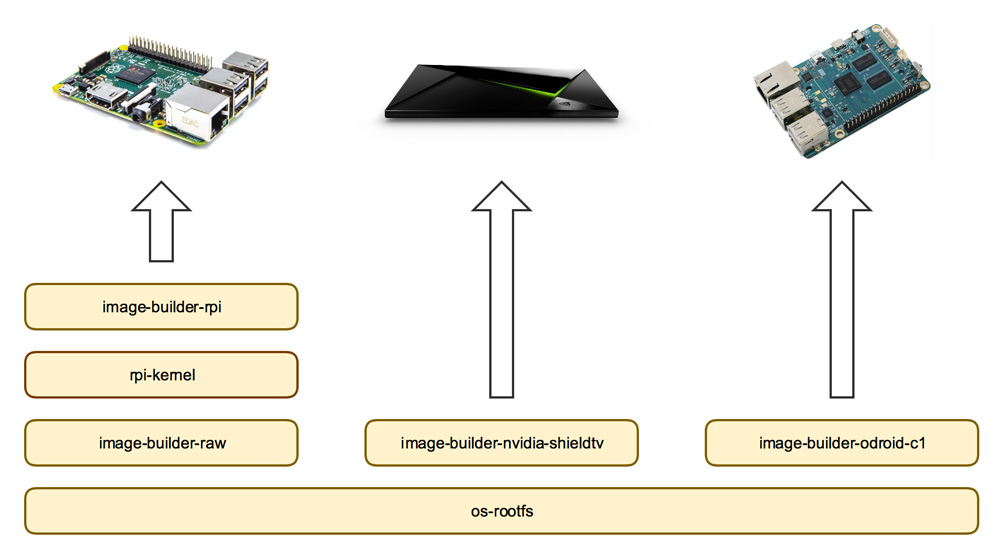
This repo builds the SD card image with HypriotOS for the Raspberry Pi 1, 2, 3, 4 and Zero. You can find released versions of the SD card image here in the GitHub releases page. To build this SD card image we have to
os-rootfsimage-builder-raw with the two partitionsrpi-kernelHere is an example how all the GitHub repos play together:
You can contribute to this repo by forking it and sending us pull requests. Feedback is always welcome!
You can build the SD card image locally with Vagrant.
Make sure you have vagrant installed.
Then run the following command to create the Vagrant box and use the Vagrant Docker
daemon. The Vagrant box is needed to run guestfish inside.
Use export VAGRANT_DEFAULT_PROVIDER=virtualbox to strictly create a VirtualBox VM.
Start vagrant box
vagrant up
Export docker host
export DOCKER_HOST=tcp://127.0.0.1:2375
Check you are using docker from inside vagrant
docker info | grep 'Operating System'
Operating System: Ubuntu 16.04.3 LTS
From here you can just make the SD card image. The output will be written and
compressed to hypriotos-rpi-dirty.img.zip.
make sd-image
To test the compressed SD card image with Serverspec
just run the following command. It will expand the SD card image in a Docker
container and run the Serverspec tests in builder/test/ folder against it.
make test
Now flash the SD card image and boot up a Raspberry Pi. Run the Serverspec integration tests in builder/test-integration/
folder against your Raspberry Pi. Set the environment variable BOARD to the
IP address or host name of your running Raspberry Pi.
flash hypriotos-rpi-dirty.img.zip
BOARD=black-pearl.local make test-integration
This test works with any Docker Machine, so you do not need to create the Vagrant box.
For maintainers of this project you can release a new version and deploy the SD card image to GitHub releases with
TAG=v0.0.1 make tag
After that open the GitHub release of this version and fill it with relevant changes and links to resolved issues.
MIT - see the LICENSE file for details.
877 followers · starred May 2018
103 followers · starred Jun 2018
977 followers · starred Apr 2020
76 followers · starred Jan 2018
SD card image for Raspberry Pi with Docker: HypriotOS
Ruby
1,056
558 commits
updated Feb 18, 2022
This repo builds the SD card image with HypriotOS for the Raspberry Pi 1, 2, 3, 4 and Zero. You can find released versions of the SD card image here in the GitHub releases page. To build this SD card image we have to
os-rootfsimage-builder-raw with the two partitionsrpi-kernelHere is an example how all the GitHub repos play together:
You can contribute to this repo by forking it and sending us pull requests. Feedback is always welcome!
You can build the SD card image locally with Vagrant.
Make sure you have vagrant installed.
Then run the following command to create the Vagrant box and use the Vagrant Docker
daemon. The Vagrant box is needed to run guestfish inside.
Use export VAGRANT_DEFAULT_PROVIDER=virtualbox to strictly create a VirtualBox VM.
Start vagrant box
vagrant up
Export docker host
export DOCKER_HOST=tcp://127.0.0.1:2375
Check you are using docker from inside vagrant
docker info | grep 'Operating System'
Operating System: Ubuntu 16.04.3 LTS
From here you can just make the SD card image. The output will be written and
compressed to hypriotos-rpi-dirty.img.zip.
make sd-image
To test the compressed SD card image with Serverspec
just run the following command. It will expand the SD card image in a Docker
container and run the Serverspec tests in builder/test/ folder against it.
make test
Now flash the SD card image and boot up a Raspberry Pi. Run the Serverspec integration tests in builder/test-integration/
folder against your Raspberry Pi. Set the environment variable BOARD to the
IP address or host name of your running Raspberry Pi.
flash hypriotos-rpi-dirty.img.zip
BOARD=black-pearl.local make test-integration
This test works with any Docker Machine, so you do not need to create the Vagrant box.
For maintainers of this project you can release a new version and deploy the SD card image to GitHub releases with
TAG=v0.0.1 make tag
After that open the GitHub release of this version and fill it with relevant changes and links to resolved issues.
MIT - see the LICENSE file for details.
877 followers · starred May 2018
103 followers · starred Jun 2018
977 followers · starred Apr 2020
76 followers · starred Jan 2018



