Synthetic pretraining data by rephrasing the web
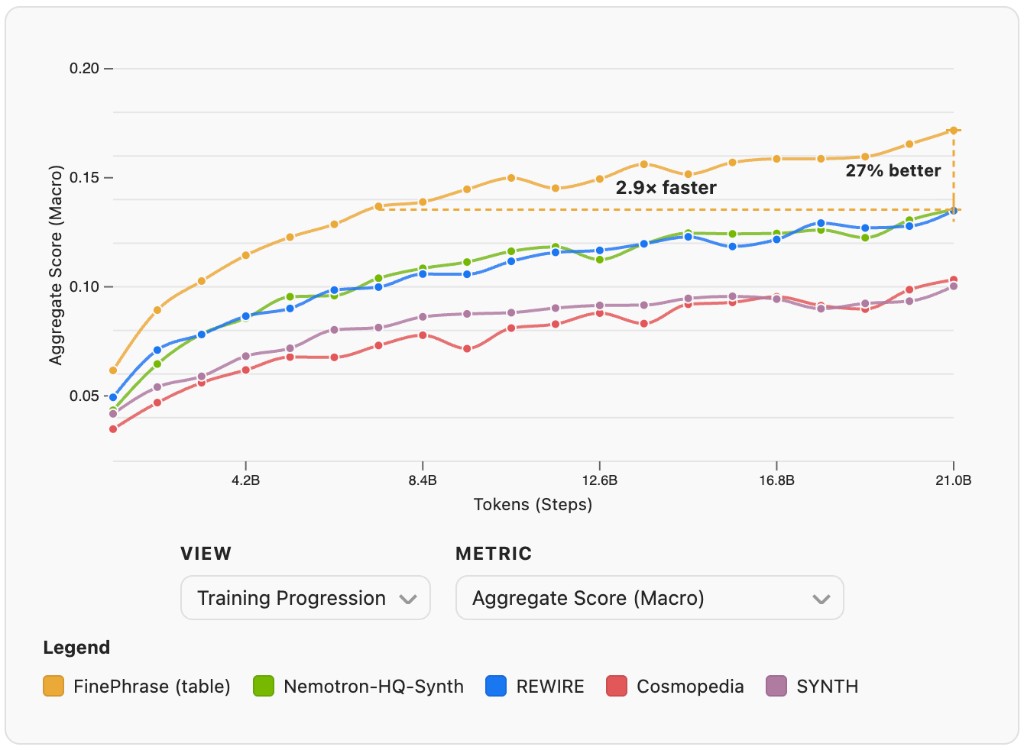
We ran 90 experiments, generated over 1 trillion tokens, and spent 12.7 GPU years to find the best recipe for synthetic pretraining data. The result is FinePhrase, a 486B token dataset that clearly outperforms all existing synthetic data baselines. It's available on the Hub, and this post walks you through everything we learned along the way.
curl -LsSf https://astral.sh/uv/install.sh | sh
uv venv --python 3.10
FinePhrase depends on custom branches of nanotron, lighteval, and datatrove. Each needs a small patch on top:
| Patch | Why |
|---|---|
datatrove-folder-dataset-repeat.patch | Wraps sample indices with modulo so nanotron blending doesn't IndexError |
nanotron-recursive-dataloader.patch | Sets recursive=True so build_dataset discovers .ds files in subdirectories |
lighteval-trust-remote-code.patch | Removes trust_remote_code arg dropped in newer HF libraries |
From the FinePhrase repo root, on a GPU node (srun --gpus=1 --qos=high --time="01:59:00" --pty bash && module load cuda/12.4):
git clone -b nanotron-working-branch [email protected]:huggingface/nanotron.git
git clone -b lighteval-experiment-setup [email protected]:huggingface/lighteval.git
git clone -b fix-nanotron [email protected]:joelniklaus/datatrove.git

patch -p1 -d datatrove  < patches/datatrove-folder-dataset-repeat.patch
patch -p1 -d nanotron   < patches/nanotron-recursive-dataloader.patch
patch -p1 -d lighteval  < patches/lighteval-trust-remote-code.patch

uv pip install setuptools
uv pip install --find-links https://download.pytorch.org/whl/cu124/torch/ "torch==2.6.0+cu124"
uv pip install --find-links https://download.pytorch.org/whl/cu124/torchvision/ "torchvision==0.21.0+cu124"
uv pip install --no-build-isolation "flash_attn==2.7.4.post1"
uv pip install -e "nanotron" && uv pip install -e "lighteval[math,multilingual]" && uv pip install -e "datatrove[s3,io,processing]"
uv pip install -e .
python -c "import nanotron"
finephrase/                Python package
├── cli/                   CLI entry points (report_tokens, filter_dataset, ...)
├── utils.py               Shared paths, reader utilities, formatting helpers
├── quality_scores.py      FineWeb-Edu and DCLM quality classifiers
├── task_list.py           Lighteval custom task definitions
└── tasks.txt              Lighteval task list for evaluation
configs/                   YAML experiment matrices (rephrasing, training, tokenization)
prompts/                   Markdown prompt templates for rephrasing
patches/                   Patches for vendored dependencies
assets/                    Images for documentation
nanotron/                  Vendored training library
lighteval/                 Vendored evaluation harness
datatrove/                 Vendored data processing library
After installation, you can use these console commands for different aspects of the data pipeline:
report-tokens - Report token statistics for datasetsfilter - Filter datasets with selectable filtersiterate-prompt - Interactive prompt iteration with LLM feedbackrephrase - Rephrase datasets using LLM inferenceinspect-data - Pretty-print a few documents from a datasettokenize - Tokenize datasets for trainingtrain - Train models via Slurmevaluate - Evaluate checkpoints via Slurmlaunch-experiments - Launch multiple Slurm experiments from YAML configscollect-rephrasing-metadata - Collect rephrasing run metadata into a JSON filecollect-training-metadata - Collect training-only run metadata (proportion sweep / variance grids) into a JSON fileexport-benchmark-csv - Export all S3 lighteval evals into a single wide benchmark CSVaudit-contamination - N-gram overlap audit between training data and eval benchmarksclone-checkpoints-to-hf - Clone all training-run checkpoints from S3 into an HF Bucket (skips decay/rephrase/essentialweb)All commands support --help to see available options. Below, we walk through them in the order of a typical workflow: first understand your data, then prepare, rephrase, train, and evaluate.
report-tokensBefore doing anything, you need to know how many tokens you are working with:
report-tokens --data s3://path/to/dataset1,hf://datasets/owner/dataset2
filterOnce you know token counts, carve out the subset you want to rephrase. Supported filters include:
fineweb_edu_hq (FineWeb-Edu HQ: rounded int_score 4,5)fineweb_edu_lq (FineWeb-Edu LQ: rounded int_score 0,1)noop (no filtering, copy all data)HQ data:
filter \
  --data hf://datasets/HuggingFaceFW/fineweb-edu/data \
  --filter fineweb_edu_hq \
  --name fineweb-edu-hq-20BT \
  --subset-tokens 21.5e9 \
  --total-tokens 217715141792
LQ data:
filter \
  --data s3://fineweb-data-processing-us-east-1/edu_annotated/score1_2 \
  --filter fineweb_edu_lq \
  --name fineweb-edu-lq-20BT \
  --subset-tokens 21.5e9 \
  --total-tokens 1644271223950
Noop filter (copy all data):
filter \
  --data hf://datasets/mlfoundations/dclm-baseline-1.0-parquet/filtered/OH_eli5_vs_rw_v2_bigram_200k_train/fasttext_openhermes_reddit_eli5_vs_rw_v2_bigram_200k_train/processed_data/global-shard_01_of_10/local-shard_0_of_10 \
  --filter noop \
  --name dclm-37BT

filter \
  --data hf://datasets/HuggingFaceTB/cosmopedia/data \
  --filter noop \
  --name cosmopedia-25BT
Data sources:
Note: Token counting is handled separately via report-tokens.
iterate-promptBefore launching a large rephrasing run, refine your prompt on a handful of documents first:
iterate-prompt --prompt format/faq.md --model-size 1b --data-path hf://datasets/HuggingFaceFW/fineweb-edu
rephraseWith a tuned prompt and a filtered dataset, launch the rephrasing pipeline at scale:
rephrase --data s3://finephrase/experiments/filtered/fineweb-edu-lq-20BT --prompt dspy/rephrase/gemma-3-1b-it/budget-10.md --name dspy-rephrase-budget-10 --debug
Available prompts for data quality improvement:
For LQ data:
prompts/rewire/guided_rewrite_corrected.md - Guided rewriting with expert reasoningprompts/nemotron/wikipedia_style_rephrasing.md - Wikipedia-style paraphrasingprompts/dspy/5-max_full_evals.md - DSPy GEPA optimized promptFor HQ data:
prompts/nemotron/distill.md - Text condensation and paraphrasingprompts/nemotron/extract_knowledge.md - Knowledge extraction and rewritingprompts/nemotron/diverse_qa_pairs.md - Question-answer pair generationprompts/nemotron/knowledge_list.md - Factual information extractionprompts/nemotron/wikipedia_style_rephrasing.md - Wikipedia-style paraphrasinginspect-dataSpot-check the rephrased output before committing to tokenization:
inspect-data --data s3://finephrase/experiments/rephrased/dspy/rephrase/gemma-3-27b-it/ --limit 5
tokenizeWhen the rephrased data looks good, tokenize it into the binary format nanotron expects:
tokenize --data s3://finephrase/experiments/filtered/fineweb-edu-hq-20BT --name fw_edu_hq
tokenize --data s3://finephrase/experiments/filtered/fineweb-edu-lq-20BT --name fw_edu_lq
trainNow kick off pretraining on the tokenized data. This submits a Slurm job that trains Qwen-size models (0.5b, 1.7b, 2.9b, 6.2b) on your tokenized datasets.
The launcher prints the exact parameter count for the selected preset before submitting training.
Tensor parallelism and recomputation are configured per model preset in finephrase/cli/train_model.py.
Lighteval batch size in the generated Nanotron config scales with model size (eval_batch_size in QWEN_SIZE_PRESETS: e.g. 1.7b → 8, 6.2b → 2) to reduce eval OOM on larger models. Run names use a trailing -0.5b / -1.7b / -2.9b / -6.2b suffix; if missing, the 1.7b preset is used.
All presets keep depth/head topology fixed and only scale hidden_size + intermediate_size.
Slurm jobs use --qos low by default, --requeue, and a script that picks the latest checkpoint under s3://finephrase/experiments/checkpoints/<run>/ before each run. If that step is already >= train_steps, training is skipped (clean exit) so finished runs do not reload step-train_steps checkpoints and crash.
Repeating / blended data: Nanotron's blend builds sample indices up to train_steps × global_batch_size per dataset stream. With the datatrove-folder-dataset-repeat.patch, DatatroveFolderDataset maps any global index with index % len(dataset) before resolving the .ds file, so a smaller corpus is cycled instead of raising IndexError (same idea as OldTokenizedBytesFolderDataset in nanotron). Empty folders still fail with a clear IndexError.
train --data s3://finephrase/experiments/tokenized/fw_edu_hq --name fw_edu_hq
train --data s3://finephrase/experiments/tokenized/fw_edu_lq --name fw_edu_lq
train --data s3://finephrase/experiments/tokenized/fw_edu_hq --name fw_edu_hq_2.9b --model-size 2.9b
Custom blending weights: By default, multi-dataset runs blend uniformly (1/N per dataset). Pass --data-weights to override this with comma-separated weights matching the order of --data. Weight 0 disables a dataset, which makes it easy to sweep over a synthetic fraction with a fixed --data argument. Nanotron normalizes the weights internally; only the ratios matter.
train \
  --data s3://.../fw_edu_hq/,s3://.../math_smollm2_1.7b_hq/ \
  --data-weights "0.3,0.7" \
  --name mix-0.3-fw_edu_hq-0.7-math_smollm2_1.7b_hq
A 9-run synthetic-fraction sweep (10% → 90%) for the pair fw_edu_hq + math_smollm2_1.7b_hq is at the top of configs/training.yaml. Launch it with launch-experiments configs/training.yaml.
evaluateTraining runs lighteval automatically at checkpoints, but if some evaluations fail you can re-run them manually:
evaluate --name fw_edu_hq,fw_edu_lq
evaluate infers the same preset from the run folder name (suffix like -6.2b). Override the batch size if needed: evaluate --batch-size 1.
Run all missing evaluations:
evaluate --all
launch-experimentsTo sweep over many configurations at once (e.g. different prompts, model sizes, datasets), define them in a YAML file and submit them all in one shot:
# Submit all Slurm jobs in a configuration
launch-experiments configs/rephrasing.yaml

# Test configuration without submitting jobs (dry run)
launch-experiments configs/rephrasing.yaml --dry-run

# Submit only specific experiments
launch-experiments configs/rephrasing.yaml --run-names "qwen3-1.7b-hq,smollm2-1.7b-hq"
collect-rephrasing-metadataAfter experiments finish, aggregate all run metadata (token counts, quality scores, GPU time, benchmark results) into a single JSON file for analysis:
collect-rephrasing-metadata
Output is written to rephrasing_metadata.json in the project root.
collect-training-metadataFor training-only experiments (proportion sweep, variance check grids) that don't have a rephrasing folder, this writes a sibling training_metadata.json with the training-relevant fields (datasets, data_weights, seed, data_seed, model_size, train_steps, tokens_consumed_b) plus the same results schema as the rephrasing collector. Source of truth is each run's local config.yaml; benchmark results are fetched from S3.
collect-training-metadata
To add a new experiment family, append a (regex, family) entry to EXPERIMENT_FAMILIES in finephrase/cli/collect_training_metadata.py. Shared benchmark constants and the S3 result fetcher live in finephrase/benchmark.py.
export-benchmark-csvDownload all benchmark results into a single wide CSV. Every run and step under S3_EVALS_PATH is discovered and fetched directly from S3.
Each row is one (runname, seed, step): the twelve English lighteval tasks (prob_norm_token), agg_score_micro, the six task-type category aggregates, and agg_score_macro. Seeds are parsed from the run name (...-seed-<N> runs are split into runname + seed <N>; all others default to seed 42), missing tasks count as 0, and within a step the newest results_*.json wins per task. Decay-resumed runs (those with -decay- in the name) are excluded by default.
# Export all S3 runs (minus decay runs) to benchmark-results.csv in the project root
export-benchmark-csv

# Keep decay runs, restrict to a subset, or change the output path
export-benchmark-csv --include-decay
export-benchmark-csv --runs-regex 'mix-0\.[1-9]-.*' --output /tmp/sweep.csv
clone-checkpoints-to-hfClone the trained-model checkpoints from S3 into the
HuggingFaceFW/finephrase-checkpoints
HF Bucket. By default it auto-discovers every run folder under
s3://finephrase/experiments/checkpoints/, excludes runs whose name contains an
EXCLUDE_MARKERS substring (-decay- grids, rephrase budget ablations, essentialweb
raw datasets), and clones only the runs not yet present in the bucket. It is a thin
wrapper around the cluster-native clone-s3-to-hf.sh cloner (slurm-array sharded, streams
S3 → xet with no local disk staging); it only copies — it never deletes the S3 source.
The cloner derives each destination key by stripping the exact --source prefix,
and the bucket's layout is top-level <run>/… folders. So the script always clones from
the shared parent s3://finephrase/experiments/checkpoints/ (leaving <run>/… intact)
and selects runs by emitting one --exclude '<key>/<run>/*' glob per run it does not
want.
The cloner does not diff against the destination bucket — it re-reads and re-hashes its whole source set on every run. So this script does a cheap presence check itself (one bucket API call per run) and feeds the cloner only the run folders missing from the bucket, avoiding a wasteful S3 re-read of already-cloned runs. A run left half-cloned by an interrupted job counts as "present" and is skipped by default.
To recover such partial runs, pass --repair: it does a precise file-level diff —
lists the actual S3 vs bucket file keys, computes the missing files, and submits a clone
restricted to only the FNV shards (fnv1a64(key) % 64) and runs that hold them. Since a
failed shard loses a whole FNV bucket, this re-reads only those buckets (≈ the missing
fraction) rather than re-streaming every run. The S3 listing (~1.7M keys) takes a few
minutes, but the transfer is minimal. Use --runs <name> [<name> …] to force specific
runs instead (also overrides the name-marker filter).
# Preview the plan (discovers runs, diffs the bucket, prints the cloner command); submits nothing
clone-checkpoints-to-hf

# Actually submit the slurm-array clone of all not-yet-present non-decay runs
clone-checkpoints-to-hf --submit

# Repair: also re-clone runs only partially in the bucket (slow; enumerates all of S3)
clone-checkpoints-to-hf --repair --submit

# Clone an explicit subset (e.g. a single run), regardless of bucket state; tune array size
clone-checkpoints-to-hf --runs fw_edu_hq --shards 16 --submit
audit-contaminationQuantify n-gram overlap between training corpora and the eval suite defined in
finephrase/task_list.py. Builds a hash index from every benchmark's questions,
answers, and query/label overlap n-grams, then for each dataset reports the
fraction of documents that contain at least one matching n-gram against each
benchmark.
# Step 1+2: build the n-gram index (once) and submit one slurm audit job per
# dataset. --sample-rates lets you equalise token budgets across datasets so
# rates are comparable (each row will scan ~5B tokens here).
audit-contamination \
  --audit-name n10-5BT \
  --n-grams 10 \
  --n-tasks 200 \
  --data "s3://.../table-smollm2-1.7b-hq/,s3://.../math-smollm2-1.7b-hq/,s3://.../tutorial-smollm2-1.7b-hq/,s3://.../faq-smollm2-1.7b-hq/,s3://.../dclm-37BT/,s3://.../fineweb-edu-hq-20BT/,s3://.../fineweb-edu-lq-20BT/,s3://.../cosmopedia-25BT/" \
  --names "table_smollm2,math_smollm2,tutorial_smollm2,faq_smollm2,dclm,fw_edu_hq,fw_edu_lq,cosmopedia" \
  --sample-rates "0.9847,0.9630,0.7243,0.6833,0.1589,0.2619,0.2698,0.2728"

# Step 3: once all audit slurm jobs have finished, aggregate the per-dataset
# stats.json files. The canonical JSON report is written to
# contamination_audit_report.json in the project root.
audit-contamination --audit-name n10-5BT --report-only
Defaults: n_grams=10 (DCLM convention), find_query_ngrams=False,
find_overlap_ngrams=True. Query-only ngrams are off by default because
lighteval queries embed prompt-template boilerplate (e.g. Question: ... Answer:) that creates a flood of spurious matches across unrelated tasks.
On the training side we additionally skip degenerate n-grams (single token
covers more than 60% of the window) to suppress artifacts from datatrove's
simplify_text collapsing digit runs to 0 0 0 .... Enable query ngrams with
--find-query-ngrams if you specifically want to catch question-text
contamination and accept that noise. Use --skip-index on follow-up runs to
reuse the existing index_n<N>/ directory.
@misc{niklaus2026_the_synthetic_data_playbook_generating_trillions_of_the_finest_tokens,
  title={The Synthetic Data Playbook: Generating Trillions of the Finest Tokens},
  author={Joel Niklaus and Guilherme Penedo and Hynek Kydlicek and Elie Bakouch and Lewis Tunstall and Ed Beeching and Thibaud Frere and Colin Raffel and Leandro von Werra and Thomas Wolf},
  year={2026},
}
11 followers · starred Aug 2026
168 followers · starred May 2026
Synthetic pretraining data by rephrasing the web
We ran 90 experiments, generated over 1 trillion tokens, and spent 12.7 GPU years to find the best recipe for synthetic pretraining data. The result is FinePhrase, a 486B token dataset that clearly outperforms all existing synthetic data baselines. It's available on the Hub, and this post walks you through everything we learned along the way.
curl -LsSf https://astral.sh/uv/install.sh | sh
uv venv --python 3.10
FinePhrase depends on custom branches of nanotron, lighteval, and datatrove. Each needs a small patch on top:
| Patch | Why |
|---|---|
datatrove-folder-dataset-repeat.patch | Wraps sample indices with modulo so nanotron blending doesn't IndexError |
nanotron-recursive-dataloader.patch | Sets recursive=True so build_dataset discovers .ds files in subdirectories |
lighteval-trust-remote-code.patch | Removes trust_remote_code arg dropped in newer HF libraries |
From the FinePhrase repo root, on a GPU node (srun --gpus=1 --qos=high --time="01:59:00" --pty bash && module load cuda/12.4):
git clone -b nanotron-working-branch [email protected]:huggingface/nanotron.git
git clone -b lighteval-experiment-setup [email protected]:huggingface/lighteval.git
git clone -b fix-nanotron [email protected]:joelniklaus/datatrove.git

patch -p1 -d datatrove  < patches/datatrove-folder-dataset-repeat.patch
patch -p1 -d nanotron   < patches/nanotron-recursive-dataloader.patch
patch -p1 -d lighteval  < patches/lighteval-trust-remote-code.patch

uv pip install setuptools
uv pip install --find-links https://download.pytorch.org/whl/cu124/torch/ "torch==2.6.0+cu124"
uv pip install --find-links https://download.pytorch.org/whl/cu124/torchvision/ "torchvision==0.21.0+cu124"
uv pip install --no-build-isolation "flash_attn==2.7.4.post1"
uv pip install -e "nanotron" && uv pip install -e "lighteval[math,multilingual]" && uv pip install -e "datatrove[s3,io,processing]"
uv pip install -e .
python -c "import nanotron"
finephrase/                Python package
├── cli/                   CLI entry points (report_tokens, filter_dataset, ...)
├── utils.py               Shared paths, reader utilities, formatting helpers
├── quality_scores.py      FineWeb-Edu and DCLM quality classifiers
├── task_list.py           Lighteval custom task definitions
└── tasks.txt              Lighteval task list for evaluation
configs/                   YAML experiment matrices (rephrasing, training, tokenization)
prompts/                   Markdown prompt templates for rephrasing
patches/                   Patches for vendored dependencies
assets/                    Images for documentation
nanotron/                  Vendored training library
lighteval/                 Vendored evaluation harness
datatrove/                 Vendored data processing library
After installation, you can use these console commands for different aspects of the data pipeline:
report-tokens - Report token statistics for datasetsfilter - Filter datasets with selectable filtersiterate-prompt - Interactive prompt iteration with LLM feedbackrephrase - Rephrase datasets using LLM inferenceinspect-data - Pretty-print a few documents from a datasettokenize - Tokenize datasets for trainingtrain - Train models via Slurmevaluate - Evaluate checkpoints via Slurmlaunch-experiments - Launch multiple Slurm experiments from YAML configscollect-rephrasing-metadata - Collect rephrasing run metadata into a JSON filecollect-training-metadata - Collect training-only run metadata (proportion sweep / variance grids) into a JSON fileexport-benchmark-csv - Export all S3 lighteval evals into a single wide benchmark CSVaudit-contamination - N-gram overlap audit between training data and eval benchmarksclone-checkpoints-to-hf - Clone all training-run checkpoints from S3 into an HF Bucket (skips decay/rephrase/essentialweb)All commands support --help to see available options. Below, we walk through them in the order of a typical workflow: first understand your data, then prepare, rephrase, train, and evaluate.
report-tokensBefore doing anything, you need to know how many tokens you are working with:
report-tokens --data s3://path/to/dataset1,hf://datasets/owner/dataset2
filterOnce you know token counts, carve out the subset you want to rephrase. Supported filters include:
fineweb_edu_hq (FineWeb-Edu HQ: rounded int_score 4,5)fineweb_edu_lq (FineWeb-Edu LQ: rounded int_score 0,1)noop (no filtering, copy all data)HQ data:
filter \
  --data hf://datasets/HuggingFaceFW/fineweb-edu/data \
  --filter fineweb_edu_hq \
  --name fineweb-edu-hq-20BT \
  --subset-tokens 21.5e9 \
  --total-tokens 217715141792
LQ data:
filter \
  --data s3://fineweb-data-processing-us-east-1/edu_annotated/score1_2 \
  --filter fineweb_edu_lq \
  --name fineweb-edu-lq-20BT \
  --subset-tokens 21.5e9 \
  --total-tokens 1644271223950
Noop filter (copy all data):
filter \
  --data hf://datasets/mlfoundations/dclm-baseline-1.0-parquet/filtered/OH_eli5_vs_rw_v2_bigram_200k_train/fasttext_openhermes_reddit_eli5_vs_rw_v2_bigram_200k_train/processed_data/global-shard_01_of_10/local-shard_0_of_10 \
  --filter noop \
  --name dclm-37BT

filter \
  --data hf://datasets/HuggingFaceTB/cosmopedia/data \
  --filter noop \
  --name cosmopedia-25BT
Data sources:
Note: Token counting is handled separately via report-tokens.
iterate-promptBefore launching a large rephrasing run, refine your prompt on a handful of documents first:
iterate-prompt --prompt format/faq.md --model-size 1b --data-path hf://datasets/HuggingFaceFW/fineweb-edu
rephraseWith a tuned prompt and a filtered dataset, launch the rephrasing pipeline at scale:
rephrase --data s3://finephrase/experiments/filtered/fineweb-edu-lq-20BT --prompt dspy/rephrase/gemma-3-1b-it/budget-10.md --name dspy-rephrase-budget-10 --debug
Available prompts for data quality improvement:
For LQ data:
prompts/rewire/guided_rewrite_corrected.md - Guided rewriting with expert reasoningprompts/nemotron/wikipedia_style_rephrasing.md - Wikipedia-style paraphrasingprompts/dspy/5-max_full_evals.md - DSPy GEPA optimized promptFor HQ data:
prompts/nemotron/distill.md - Text condensation and paraphrasingprompts/nemotron/extract_knowledge.md - Knowledge extraction and rewritingprompts/nemotron/diverse_qa_pairs.md - Question-answer pair generationprompts/nemotron/knowledge_list.md - Factual information extractionprompts/nemotron/wikipedia_style_rephrasing.md - Wikipedia-style paraphrasinginspect-dataSpot-check the rephrased output before committing to tokenization:
inspect-data --data s3://finephrase/experiments/rephrased/dspy/rephrase/gemma-3-27b-it/ --limit 5
tokenizeWhen the rephrased data looks good, tokenize it into the binary format nanotron expects:
tokenize --data s3://finephrase/experiments/filtered/fineweb-edu-hq-20BT --name fw_edu_hq
tokenize --data s3://finephrase/experiments/filtered/fineweb-edu-lq-20BT --name fw_edu_lq
trainNow kick off pretraining on the tokenized data. This submits a Slurm job that trains Qwen-size models (0.5b, 1.7b, 2.9b, 6.2b) on your tokenized datasets.
The launcher prints the exact parameter count for the selected preset before submitting training.
Tensor parallelism and recomputation are configured per model preset in finephrase/cli/train_model.py.
Lighteval batch size in the generated Nanotron config scales with model size (eval_batch_size in QWEN_SIZE_PRESETS: e.g. 1.7b → 8, 6.2b → 2) to reduce eval OOM on larger models. Run names use a trailing -0.5b / -1.7b / -2.9b / -6.2b suffix; if missing, the 1.7b preset is used.
All presets keep depth/head topology fixed and only scale hidden_size + intermediate_size.
Slurm jobs use --qos low by default, --requeue, and a script that picks the latest checkpoint under s3://finephrase/experiments/checkpoints/<run>/ before each run. If that step is already >= train_steps, training is skipped (clean exit) so finished runs do not reload step-train_steps checkpoints and crash.
Repeating / blended data: Nanotron's blend builds sample indices up to train_steps × global_batch_size per dataset stream. With the datatrove-folder-dataset-repeat.patch, DatatroveFolderDataset maps any global index with index % len(dataset) before resolving the .ds file, so a smaller corpus is cycled instead of raising IndexError (same idea as OldTokenizedBytesFolderDataset in nanotron). Empty folders still fail with a clear IndexError.
train --data s3://finephrase/experiments/tokenized/fw_edu_hq --name fw_edu_hq
train --data s3://finephrase/experiments/tokenized/fw_edu_lq --name fw_edu_lq
train --data s3://finephrase/experiments/tokenized/fw_edu_hq --name fw_edu_hq_2.9b --model-size 2.9b
Custom blending weights: By default, multi-dataset runs blend uniformly (1/N per dataset). Pass --data-weights to override this with comma-separated weights matching the order of --data. Weight 0 disables a dataset, which makes it easy to sweep over a synthetic fraction with a fixed --data argument. Nanotron normalizes the weights internally; only the ratios matter.
train \
  --data s3://.../fw_edu_hq/,s3://.../math_smollm2_1.7b_hq/ \
  --data-weights "0.3,0.7" \
  --name mix-0.3-fw_edu_hq-0.7-math_smollm2_1.7b_hq
A 9-run synthetic-fraction sweep (10% → 90%) for the pair fw_edu_hq + math_smollm2_1.7b_hq is at the top of configs/training.yaml. Launch it with launch-experiments configs/training.yaml.
evaluateTraining runs lighteval automatically at checkpoints, but if some evaluations fail you can re-run them manually:
evaluate --name fw_edu_hq,fw_edu_lq
evaluate infers the same preset from the run folder name (suffix like -6.2b). Override the batch size if needed: evaluate --batch-size 1.
Run all missing evaluations:
evaluate --all
launch-experimentsTo sweep over many configurations at once (e.g. different prompts, model sizes, datasets), define them in a YAML file and submit them all in one shot:
# Submit all Slurm jobs in a configuration
launch-experiments configs/rephrasing.yaml

# Test configuration without submitting jobs (dry run)
launch-experiments configs/rephrasing.yaml --dry-run

# Submit only specific experiments
launch-experiments configs/rephrasing.yaml --run-names "qwen3-1.7b-hq,smollm2-1.7b-hq"
collect-rephrasing-metadataAfter experiments finish, aggregate all run metadata (token counts, quality scores, GPU time, benchmark results) into a single JSON file for analysis:
collect-rephrasing-metadata
Output is written to rephrasing_metadata.json in the project root.
collect-training-metadataFor training-only experiments (proportion sweep, variance check grids) that don't have a rephrasing folder, this writes a sibling training_metadata.json with the training-relevant fields (datasets, data_weights, seed, data_seed, model_size, train_steps, tokens_consumed_b) plus the same results schema as the rephrasing collector. Source of truth is each run's local config.yaml; benchmark results are fetched from S3.
collect-training-metadata
To add a new experiment family, append a (regex, family) entry to EXPERIMENT_FAMILIES in finephrase/cli/collect_training_metadata.py. Shared benchmark constants and the S3 result fetcher live in finephrase/benchmark.py.
export-benchmark-csvDownload all benchmark results into a single wide CSV. Every run and step under S3_EVALS_PATH is discovered and fetched directly from S3.
Each row is one (runname, seed, step): the twelve English lighteval tasks (prob_norm_token), agg_score_micro, the six task-type category aggregates, and agg_score_macro. Seeds are parsed from the run name (...-seed-<N> runs are split into runname + seed <N>; all others default to seed 42), missing tasks count as 0, and within a step the newest results_*.json wins per task. Decay-resumed runs (those with -decay- in the name) are excluded by default.
# Export all S3 runs (minus decay runs) to benchmark-results.csv in the project root
export-benchmark-csv

# Keep decay runs, restrict to a subset, or change the output path
export-benchmark-csv --include-decay
export-benchmark-csv --runs-regex 'mix-0\.[1-9]-.*' --output /tmp/sweep.csv
clone-checkpoints-to-hfClone the trained-model checkpoints from S3 into the
HuggingFaceFW/finephrase-checkpoints
HF Bucket. By default it auto-discovers every run folder under
s3://finephrase/experiments/checkpoints/, excludes runs whose name contains an
EXCLUDE_MARKERS substring (-decay- grids, rephrase budget ablations, essentialweb
raw datasets), and clones only the runs not yet present in the bucket. It is a thin
wrapper around the cluster-native clone-s3-to-hf.sh cloner (slurm-array sharded, streams
S3 → xet with no local disk staging); it only copies — it never deletes the S3 source.
The cloner derives each destination key by stripping the exact --source prefix,
and the bucket's layout is top-level <run>/… folders. So the script always clones from
the shared parent s3://finephrase/experiments/checkpoints/ (leaving <run>/… intact)
and selects runs by emitting one --exclude '<key>/<run>/*' glob per run it does not
want.
The cloner does not diff against the destination bucket — it re-reads and re-hashes its whole source set on every run. So this script does a cheap presence check itself (one bucket API call per run) and feeds the cloner only the run folders missing from the bucket, avoiding a wasteful S3 re-read of already-cloned runs. A run left half-cloned by an interrupted job counts as "present" and is skipped by default.
To recover such partial runs, pass --repair: it does a precise file-level diff —
lists the actual S3 vs bucket file keys, computes the missing files, and submits a clone
restricted to only the FNV shards (fnv1a64(key) % 64) and runs that hold them. Since a
failed shard loses a whole FNV bucket, this re-reads only those buckets (≈ the missing
fraction) rather than re-streaming every run. The S3 listing (~1.7M keys) takes a few
minutes, but the transfer is minimal. Use --runs <name> [<name> …] to force specific
runs instead (also overrides the name-marker filter).
# Preview the plan (discovers runs, diffs the bucket, prints the cloner command); submits nothing
clone-checkpoints-to-hf

# Actually submit the slurm-array clone of all not-yet-present non-decay runs
clone-checkpoints-to-hf --submit

# Repair: also re-clone runs only partially in the bucket (slow; enumerates all of S3)
clone-checkpoints-to-hf --repair --submit

# Clone an explicit subset (e.g. a single run), regardless of bucket state; tune array size
clone-checkpoints-to-hf --runs fw_edu_hq --shards 16 --submit
audit-contaminationQuantify n-gram overlap between training corpora and the eval suite defined in
finephrase/task_list.py. Builds a hash index from every benchmark's questions,
answers, and query/label overlap n-grams, then for each dataset reports the
fraction of documents that contain at least one matching n-gram against each
benchmark.
# Step 1+2: build the n-gram index (once) and submit one slurm audit job per
# dataset. --sample-rates lets you equalise token budgets across datasets so
# rates are comparable (each row will scan ~5B tokens here).
audit-contamination \
  --audit-name n10-5BT \
  --n-grams 10 \
  --n-tasks 200 \
  --data "s3://.../table-smollm2-1.7b-hq/,s3://.../math-smollm2-1.7b-hq/,s3://.../tutorial-smollm2-1.7b-hq/,s3://.../faq-smollm2-1.7b-hq/,s3://.../dclm-37BT/,s3://.../fineweb-edu-hq-20BT/,s3://.../fineweb-edu-lq-20BT/,s3://.../cosmopedia-25BT/" \
  --names "table_smollm2,math_smollm2,tutorial_smollm2,faq_smollm2,dclm,fw_edu_hq,fw_edu_lq,cosmopedia" \
  --sample-rates "0.9847,0.9630,0.7243,0.6833,0.1589,0.2619,0.2698,0.2728"

# Step 3: once all audit slurm jobs have finished, aggregate the per-dataset
# stats.json files. The canonical JSON report is written to
# contamination_audit_report.json in the project root.
audit-contamination --audit-name n10-5BT --report-only
Defaults: n_grams=10 (DCLM convention), find_query_ngrams=False,
find_overlap_ngrams=True. Query-only ngrams are off by default because
lighteval queries embed prompt-template boilerplate (e.g. Question: ... Answer:) that creates a flood of spurious matches across unrelated tasks.
On the training side we additionally skip degenerate n-grams (single token
covers more than 60% of the window) to suppress artifacts from datatrove's
simplify_text collapsing digit runs to 0 0 0 .... Enable query ngrams with
--find-query-ngrams if you specifically want to catch question-text
contamination and accept that noise. Use --skip-index on follow-up runs to
reuse the existing index_n<N>/ directory.
@misc{niklaus2026_the_synthetic_data_playbook_generating_trillions_of_the_finest_tokens,
  title={The Synthetic Data Playbook: Generating Trillions of the Finest Tokens},
  author={Joel Niklaus and Guilherme Penedo and Hynek Kydlicek and Elie Bakouch and Lewis Tunstall and Ed Beeching and Thibaud Frere and Colin Raffel and Leandro von Werra and Thomas Wolf},
  year={2026},
}
11 followers · starred Aug 2026
168 followers · starred May 2026