WebRover is an autonomous AI agent designed to interpret user input and execute actions by interacting with web elements to accomplish tasks or answer questions. It leverages advanced language models and web automation tools to navigate the web, gather information, and provide structured responses based on the user's needs.
Python
1,026
53 commits
updated Feb 15, 2025











Autonomous Web Agent | Task Automation | Information Retrieval | Deep Research
WebRover is an AI-powered web agent that combines autonomous browsing with advanced research capabilities. While maintaining its core ability to automate web tasks, version 2.0 introduces sophisticated research workflows including multi-source analysis, academic paper generation, and deep topic exploration. The system intelligently routes queries between task automation and research modes, providing a versatile tool for both quick actions and comprehensive research.
While traditional web automation tools excel at task execution, and search engines help with information retrieval, there's a growing need for tools that can handle both while specializing in deep research workflows. WebRover bridges this gap by offering task automation alongside intelligent research capabilities, with a particular focus on comprehensive information gathering, analysis, and synthesis. This dual-purpose approach aims to transform how we interact with web content, making both task execution and research more efficient and thorough.
https://github.com/user-attachments/assets/325c6c55-9384-4939-a912-3b1d13635799
Watch as the WebRover Deep Research Agent explores a topic, gathers information, and generates an academic paper.
https://github.com/user-attachments/assets/95ae9afb-3fdf-47f8-857e-f6a1a0d94df5
Watch as the WebRover Task Agent navigates a website and performs a task.
A specialized automation agent for executing web-based tasks and workflows.
An information gathering specialist with smart content processing.
An advanced research agent that produces academic-quality content through systematic topic exploration.
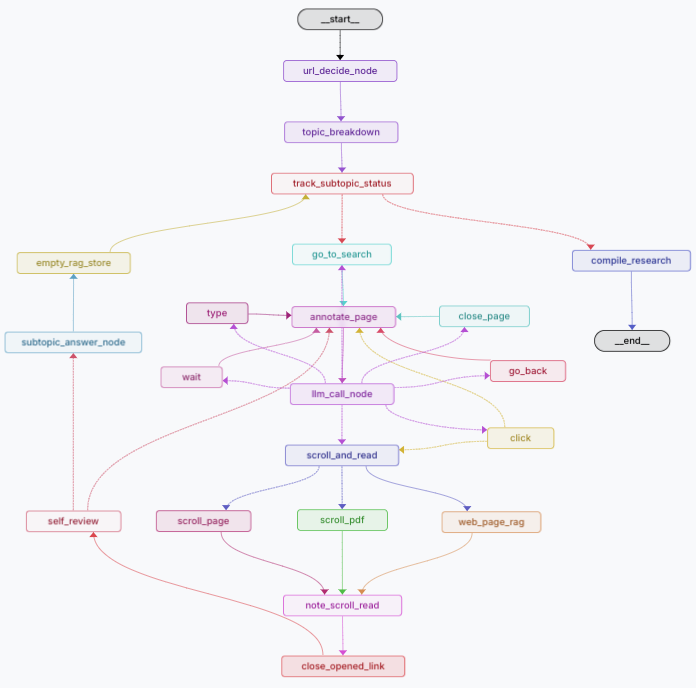
Deep Research Agent's workflow for comprehensive research and content generation
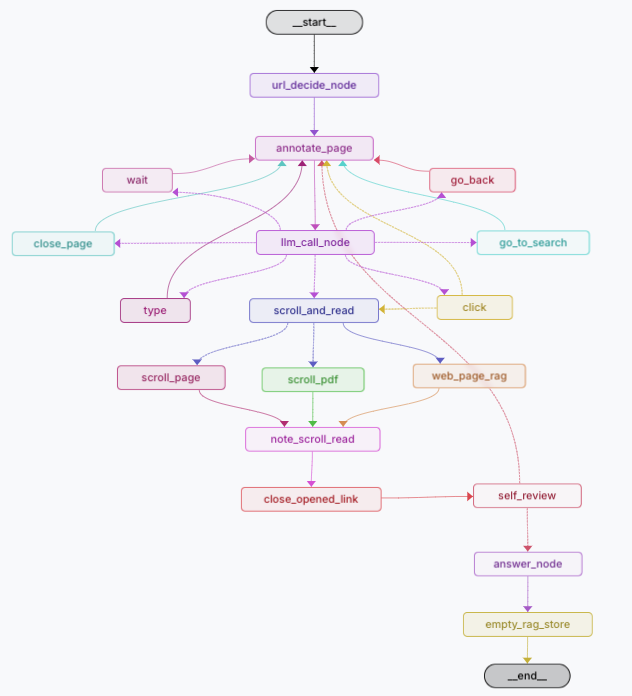
Research Agent's workflow for information gathering and synthesis
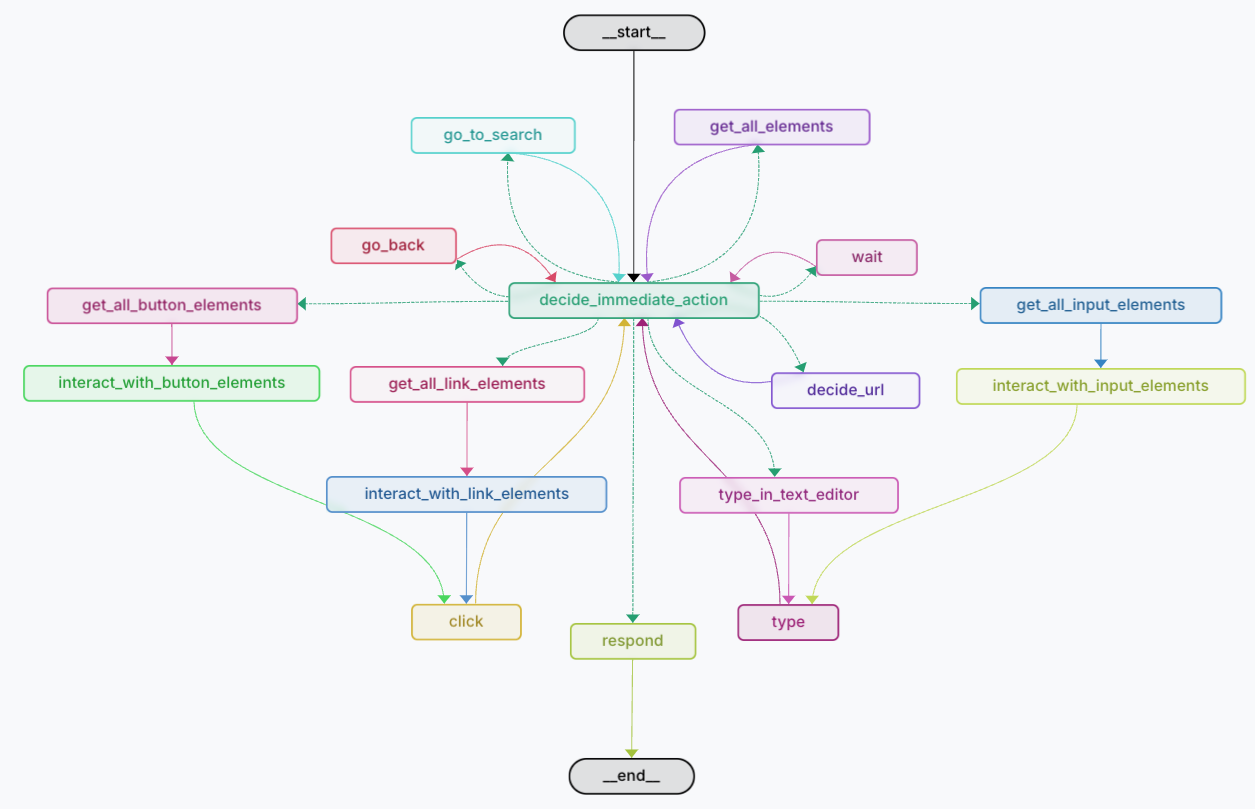
Task Agent's workflow for automating web interactions
The system is built on a modern tech stack with three distinct agent types, each powered by:
State Management
Browser Automation
Content Processing
AI Decision Making
Clone the repository
git clone https://github.com/hrithikkoduri18/WebRover.git
cd WebRover
cd backend
Install Poetry (if not already installed)
Mac/Linux:
curl -sSL https://install.python-poetry.org | python3 -
Windows:
(Invoke-WebRequest -Uri https://install.python-poetry.org -UseBasicParsing).Content | python -
Set Python version for Poetry
poetry env use python3.12
Activate the Poetry shell: For Unix/Linux/MacOS:
poetry shell
# or manually
source $(poetry env info --path)/bin/activate
For Windows:
poetry shell
# or manually
& (poetry env info --path)\Scripts\activate
Install dependencies using Poetry:
poetry install
Set up environment variables in .env:
OPENAI_API_KEY="your_openai_api_key"
LANGCHAIN_API_KEY="your_langchain_api_key"
LANGCHAIN_TRACING_V2="true"
LANGCHAIN_ENDPOINT="https://api.smith.langchain.com"
LANGCHAIN_PROJECT="your_project_name"
ANTHROPIC_API_KEY="your_anthropic_api_key"
Run the backend:
Make sure you are in the backend folder
uvicorn app.main:app --reload --port 8000
For Windows User:
uvicorn app.main:app --port 8000
Access the API at http://localhost:8000
Open a new terminal and make sure you are in the WebRover folder:
cd frontend
Install dependencies:
npm install
Run the frontend:
npm run dev
Access the frontend at http://localhost:3000
For mac users:
Try running http://localhost:3000 on Safari browser. If you face any with connecting to browser, open terminal and run:
pkill -9 "Chrome"
and try again.
If you still face issues, try changing the websocket port from 9222 to 9223 in the webrover_browser.py file in the backend/Browser folder.
git checkout -b feature/AmazingFeature)git commit -m 'Add some AmazingFeature')git push origin feature/AmazingFeature)This project is licensed under the MIT License - see the LICENSE file for details.
Made with ❤️ by @hrithikkoduri
10,215 followers · starred Jan 2025
156 followers · starred Feb 2025
3,262 followers · starred Jan 2025
32 followers · starred Jan 2025
WebRover is an autonomous AI agent designed to interpret user input and execute actions by interacting with web elements to accomplish tasks or answer questions. It leverages advanced language models and web automation tools to navigate the web, gather information, and provide structured responses based on the user's needs.
Python
1,026
53 commits
updated Feb 15, 2025
Autonomous Web Agent | Task Automation | Information Retrieval | Deep Research
WebRover is an AI-powered web agent that combines autonomous browsing with advanced research capabilities. While maintaining its core ability to automate web tasks, version 2.0 introduces sophisticated research workflows including multi-source analysis, academic paper generation, and deep topic exploration. The system intelligently routes queries between task automation and research modes, providing a versatile tool for both quick actions and comprehensive research.
While traditional web automation tools excel at task execution, and search engines help with information retrieval, there's a growing need for tools that can handle both while specializing in deep research workflows. WebRover bridges this gap by offering task automation alongside intelligent research capabilities, with a particular focus on comprehensive information gathering, analysis, and synthesis. This dual-purpose approach aims to transform how we interact with web content, making both task execution and research more efficient and thorough.
https://github.com/user-attachments/assets/325c6c55-9384-4939-a912-3b1d13635799
Watch as the WebRover Deep Research Agent explores a topic, gathers information, and generates an academic paper.
https://github.com/user-attachments/assets/95ae9afb-3fdf-47f8-857e-f6a1a0d94df5
Watch as the WebRover Task Agent navigates a website and performs a task.
A specialized automation agent for executing web-based tasks and workflows.
An information gathering specialist with smart content processing.
An advanced research agent that produces academic-quality content through systematic topic exploration.
Deep Research Agent's workflow for comprehensive research and content generation
Research Agent's workflow for information gathering and synthesis
Task Agent's workflow for automating web interactions
The system is built on a modern tech stack with three distinct agent types, each powered by:
State Management
Browser Automation
Content Processing
AI Decision Making
Clone the repository
git clone https://github.com/hrithikkoduri18/WebRover.git
cd WebRover
cd backend
Install Poetry (if not already installed)
Mac/Linux:
curl -sSL https://install.python-poetry.org | python3 -
Windows:
(Invoke-WebRequest -Uri https://install.python-poetry.org -UseBasicParsing).Content | python -
Set Python version for Poetry
poetry env use python3.12
Activate the Poetry shell: For Unix/Linux/MacOS:
poetry shell
# or manually
source $(poetry env info --path)/bin/activate
For Windows:
poetry shell
# or manually
& (poetry env info --path)\Scripts\activate
Install dependencies using Poetry:
poetry install
Set up environment variables in .env:
OPENAI_API_KEY="your_openai_api_key"
LANGCHAIN_API_KEY="your_langchain_api_key"
LANGCHAIN_TRACING_V2="true"
LANGCHAIN_ENDPOINT="https://api.smith.langchain.com"
LANGCHAIN_PROJECT="your_project_name"
ANTHROPIC_API_KEY="your_anthropic_api_key"
Run the backend:
Make sure you are in the backend folder
uvicorn app.main:app --reload --port 8000
For Windows User:
uvicorn app.main:app --port 8000
Access the API at http://localhost:8000
Open a new terminal and make sure you are in the WebRover folder:
cd frontend
Install dependencies:
npm install
Run the frontend:
npm run dev
Access the frontend at http://localhost:3000
For mac users:
Try running http://localhost:3000 on Safari browser. If you face any with connecting to browser, open terminal and run:
pkill -9 "Chrome"
and try again.
If you still face issues, try changing the websocket port from 9222 to 9223 in the webrover_browser.py file in the backend/Browser folder.
git checkout -b feature/AmazingFeature)git commit -m 'Add some AmazingFeature')git push origin feature/AmazingFeature)This project is licensed under the MIT License - see the LICENSE file for details.
Made with ❤️ by @hrithikkoduri
10,215 followers · starred Jan 2025
156 followers · starred Feb 2025
3,262 followers · starred Jan 2025
32 followers · starred Jan 2025



