
[NeurIPS 2025] 🌐 WebThinker: Empowering Large Reasoning Models with Deep Research Capability
Python
1,468
79 commits
updated Dec 8, 2025
README
🌐 WebThinker: Empowering Large Reasoning Models with Deep Research Capability





🤗 WebThinker-QwQ-32B | 🤗 WebThinker-R1-7B | 🤗 WebThinker-R1-14B | 🤗 WebThinker-R1-32B
If you like our project, please give us a star ⭐ on GitHub for the latest update.
📣 Latest News
- [Sep 18, 2025]: 🎉 Our paper WebThinker: Empowering Large Reasoning Models with Deep Research Capability has been accepted at NeurIPS 2025!
- [May 30, 2025]: 🔍 WebThinker now supports Google Serper API for web search! Important: Bing Search API will be retired in August 2025.
- [May 9, 2025]: The brief introduction of WebThinker can be found on platforms like X, Zhihu, and WeChat.
- [May 1, 2025]: 🤗 WebThinker Model Collection is now available on Hugging Face. You can deploy our optimized models for your deep research tasks.
- [May 1, 2025]: 📄 Our paper is now available on arXiv and Hugging Face.
- [March 31, 2025]: 🎉 WebThinker Notion Page launched with comprehensive project details.
- [March 31, 2025]: 🚀 Full codebase released. WebThinker now supports deep research with open-source reasoning models like QwQ-32B.
🔥 Deep Research Agent Family
Welcome to try our deep research agent series:
DeepAgent: A General Reasoning Agent with Scalable Toolsets (New!)
Authors: Xiaoxi Li, Wenxiang Jiao, Jiarui Jin, Guanting Dong, Jiajie Jin, Yinuo Wang, Hao Wang, Yutao Zhu, Ji-Rong Wen, Yuan Lu, Zhicheng Dou
TLDR: An end-to-end deep reasoning agent that performs autonomous thinking, tool discovery, and action execution with brain-inspired memory folding mechanism.



WebThinker: Empowering Large Reasoning Models with Deep Research Capability (NeurIPS 2025)
Authors: Xiaoxi Li*, Jiajie Jin*, Guanting Dong*, Hongjin Qian, Yutao Zhu, Yongkang Wu, Ji-Rong Wen, Zhicheng Dou
TLDR: A deep research agent that empowers large reasoning models with autonomous search, web browsing, and research report drafting capabilities.


Search-o1: Agentic Search-Enhanced Large Reasoning Models (EMNLP 2025)
Authors: Xiaoxi Li, Guanting Dong, Jiajie Jin, Yuyao Zhang, Yujia Zhou, Yutao Zhu, Peitian Zhang, Zhicheng Dou
TLDR: An agentic search-enhanced framework that integrates autonomous knowledge retrieval with large reasoning models through Agentic RAG and reasoning-in-documents modules.




🎬 Demo
💡 Overview
WebThinker is a deep research framework fully powered by large reasoning models (LRMs). WebThinker enables LRMs to autonomously search, deeply explore web pages, and draft research reports, all within their thinking process.
Unlike existing open-source deep search agents that typically employ retrieval-augmented generation (RAG) with predefined workflows, WebThinker allows the reasoning model itself to perform actions during thinking, achieving end-to-end task execution in a single generation.
📊 Overall Performance
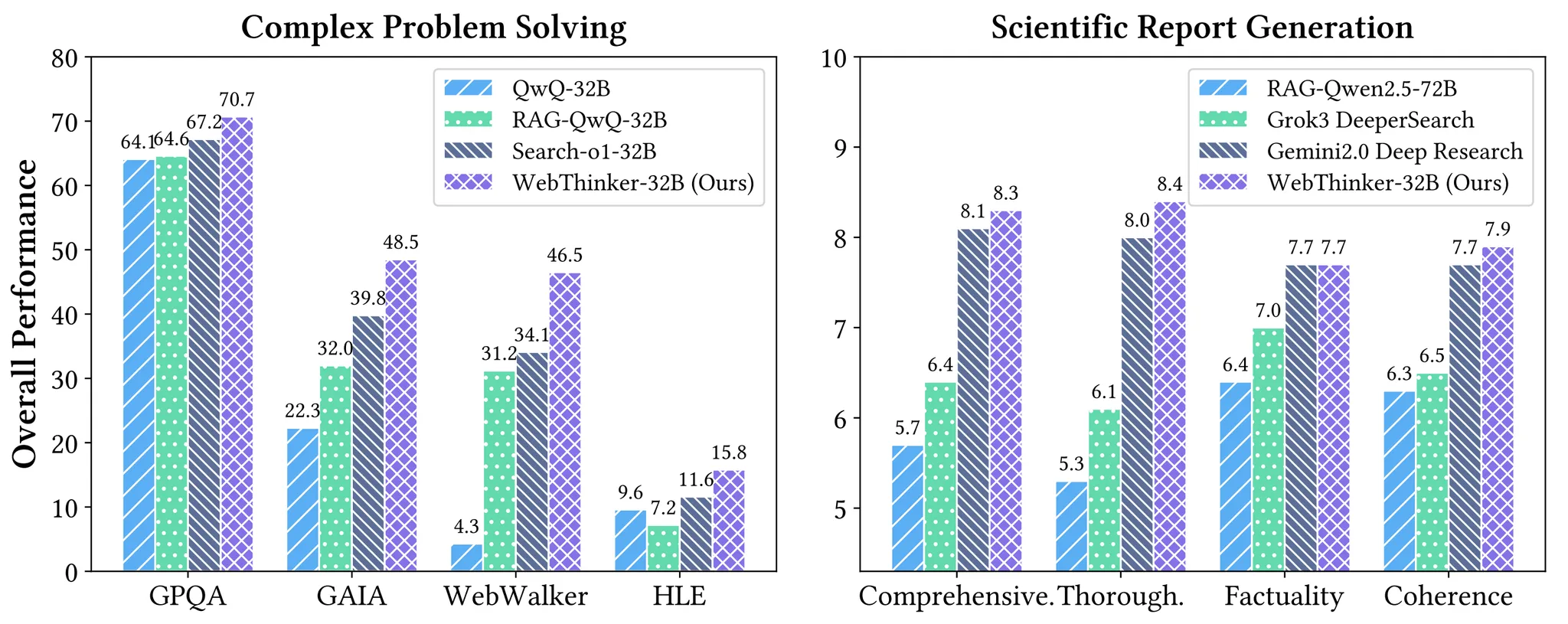
As shown above, WebThinker consistently outperforms competing approaches on both knowledge-intensive complex reasoning benchmarks (GPQA, GAIA, WebWalkerQA, HLE) and open-ended reasoning tasks for report generation. Our WebThinker-32B with QwQ-32B as backbone reasoning model achieves superior performance across all tasks.
✨ The WebThinker Framework
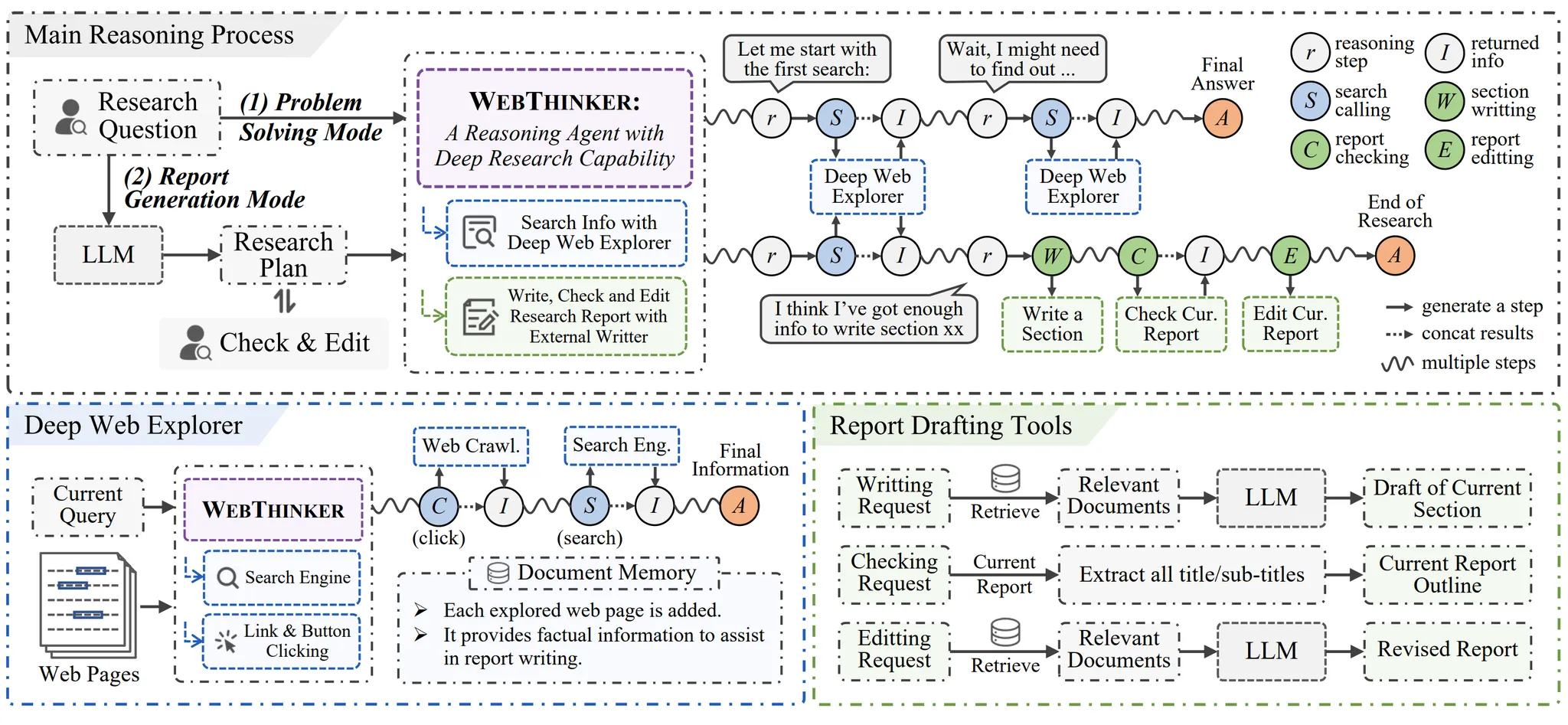
WebThinker enables reasoning models to autonomously conduct web searches and web page navigations to acquire external knowledge during their reasoning process. This approach significantly reduces the time and costs associated with information gathering for researchers in knowledge-intensive fields. Furthermore, WebThinker allows LRMs to draft section content while thinking and searching, producing comprehensive, customized reports that directly address users' research questions.
Key Features:
- We introduce a Deep Web Explorer that empowers LRMs to search, navigate pages by clicking interactive elements (like links or buttons), and extract relevant information. Based on initial search results, the LRM can initiate follow-up searches and traverse deeper links until it collects all relevant information.
- For scientific reporting, our Autonomous Think-Search-and-Draft strategy integrates real-time knowledge seeking with report creation. We equip LRMs with three specialized tools: (1) drafting content for specific chapters, (2) checking the current report, and (3) editing the report—ensuring reports remain comprehensive, coherent, and adaptive to new insights.
- We're developing RL-based training strategies to optimize end-to-end task performance by leveraging large-scale reasoning trajectories from complex tasks. Using accuracy of reasoning, tool usage, and final outputs, we construct preference pairs for online DPO training, enabling the model to progressively improve its research capabilities.
🔧 Installation
Environment Setup
# Create conda environment
conda create -n webthinker python=3.9
conda activate webthinker

# Install requirements
cd WebThinker-main
pip install -r requirements.txt
🏃 Quick Start
Pre-preparation
Model Serving
Before running WebThinker, ensure your reasoning model and auxiliary model are served using vLLM. In our experiments, we use QwQ-32B as the reasoning model and Qwen-32B-Instruct as the auxiliary model. You can also explore other instruction-tuned models as your auxiliary model, which will be used in webpage reading, report writting/editting, evaluation, etc. For detailed instructions on model serving, see here.
Web Parser Client
For better web crawling performance, we recommend setting up a web parser client in scripts/search/bing_search.py using Crawl4AI. This will help handle JavaScript-rendered content and provide more reliable webpage extraction.
Now you can run different inference modes using the provided scripts. Below are examples of how to execute each mode:
Problem Solving Mode
- If you would like to ask a single question, run the following command:
python scripts/run_web_thinker.py \
    --single_question "What is OpenAI Deep Research?" \
    --search_engine "serper" \
    --serper_api_key "YOUR_GOOGLE_SERPER_API" \
    --api_base_url "YOUR_API_BASE_URL" \
    --model_name "QwQ-32B" \
    --aux_api_base_url "YOUR_AUX_API_BASE_URL" \
    --aux_model_name "Qwen2.5-32B-Instruct" \
    --tokenizer_path "PATH_TO_YOUR_TOKENIZER" \
    --aux_tokenizer_path "PATH_TO_YOUR_AUX_TOKENIZER"
- If you would like to run results on benchmarks, run the following command:
python scripts/run_web_thinker.py \
    --dataset_name gaia \
    --split dev \
    --concurrent_limit 32 \
    --max_search_limit 15 \
    --search_engine "serper" \
    --serper_api_key "YOUR_GOOGLE_SERPER_API" \
    --api_base_url "YOUR_API_BASE_URL" \
    --model_name "QwQ-32B" \
    --aux_api_base_url "YOUR_AUX_API_BASE_URL" \
    --aux_model_name "Qwen2.5-32B-Instruct" \
    --tokenizer_path "PATH_TO_YOUR_TOKENIZER" \
    --aux_tokenizer_path "PATH_TO_YOUR_AUX_TOKENIZER"
Report Generation Mode
- If you would like to ask a single question, run the following command:
python scripts/run_web_thinker_report.py \
    --single_question "What are the models of OpenAI and what are the differences?" \
    --search_engine "serper" \
    --serper_api_key "YOUR_GOOGLE_SERPER_API" \
    --api_base_url "YOUR_API_BASE_URL" \
    --model_name "QwQ-32B" \
    --aux_api_base_url "YOUR_AUX_API_BASE_URL" \
    --aux_model_name "Qwen2.5-32B-Instruct" \
    --tokenizer_path "PATH_TO_YOUR_TOKENIZER" \
    --aux_tokenizer_path "PATH_TO_YOUR_AUX_TOKENIZER"
- If you would like to run results on benchmarks, run the following command:
python scripts/run_web_thinker_report.py \
    --dataset_name glaive \
    --split test \
    --concurrent_limit 32 \
    --search_engine "serper" \
    --serper_api_key "YOUR_GOOGLE_SERPER_API" \
    --api_base_url "YOUR_API_BASE_URL" \
    --model_name "QwQ-32B" \
    --aux_api_base_url "YOUR_AUX_API_BASE_URL" \
    --aux_model_name "Qwen2.5-32B-Instruct" \
    --tokenizer_path "PATH_TO_YOUR_TOKENIZER" \
    --aux_tokenizer_path "PATH_TO_YOUR_AUX_TOKENIZER"
Parameters Explanation:
--dataset_name: Name of the dataset to use (glaive).--split: Data split to run (test).--single_question: The question you want to ask when running in single question mode.--concurrent_limit: Maximum number of concurrent requests.--max_search_limit: Maximum number of search queries per reasoning session.--search_engine: Search engine to use (bing or serper). Default: bing.--serper_api_key: Your Google Serper API key (not required when using Bing).--bing_subscription_key: Your Bing Search API subscription key (not required when using Serper).--api_base_url: Base URL for the main model API.--model_name: Name of the main model to use.--aux_api_base_url: Base URL for the auxiliary model API.--aux_model_name: Name of the auxiliary model to use.
Run Demo
You can run the demo we have created with the following command, and we will conduct in-depth exploration and thinking based on the questions you input.
cd demo
streamlit run_demo.py
Note: Before running, it is necessary to configure the relevant parameters in demo/settings.py.
Benchmarks
The benchmarks we utilize are categorized into two types:
- Complex Reasoning Benchmarks:
- PhD-level Science QA: GPQA (198 questions)
- General AI Assistant: GAIA (103 questions)
- Web Exploration: WebWalkerQA (680 questions)
- Extremely Difficult Reasoning Problems: Humanity's Last Exam (HLE) (500 questions)
- Scientific Report Evaluation:
- General Open-ended Reasoning Problem: Reasoning-v1-20m (30 questions)
All the pre-processed data is available in the ./data/ directory. For GAIA, HLE and Reasoning-v1-20m, we sampled a text-only subset of questions to efficiently conduct our evaluation.
Evaluation
Our model inference scripts will automatically save the model's input and output texts for evaluation.
Problem Solving Evaluation
You can use the following command to evaluate the model's problem solving performance:
python scripts/evaluate/evaluate.py \
    --output_path "YOUR_OUTPUT_PATH" \
    --task math \
    --use_llm \
    --api_base_url "YOUR_AUX_API_BASE_URL" \
    --model_name "Qwen2.5-72B-Instruct" \
    --extract_answer
Parameters Explanation:
--output_path: Path to the model's outputs for evaluation.--task: Task name. You can always set it to math (suitable for any QA task), unless it is a code task, then set it to code.--use_llm: Whether to use the LLM to evaluate the model's performance.--api_base_url: Base URL for the LLM API.--model_name: Model name for LLM evaluation.--extract_answer: Whether to extract the answer from the model's output, otherwise it will use the last few lines of the model's output as the final answer. Only used when--use_llmis set toTrue.
Report Generation Evaluation
We employ DeepSeek-R1 and GPT-4o to perform listwise evaluation for comparison of reports generated by different models. You can evaluate the reports using:
python scripts/evaluate/evaluate_report.py \
    --api-base-url "YOUR_API_BASE_URL" \
    --api-key "YOUR_API_KEY" \
    --models "YOUR_MODEL_NAME" \
    --model-to-test-dir "YOUR_MODEL_OUTPUT_DIRECTORY"
Parameters Explanation:
--api-base-url: Base URL for the LLM API (e.g., "https://openrouter.ai/api/v1" or "https://api.openai.com/v1").--api-key: Your API key for the LLM service.--models: A list of model names (e.g., "deepseek/deepseek-r1", "openai/gpt-4o") to be used for evaluating the reports. The script will iterate through these models to get evaluations.--model-to-test-dir: Path to the directory where the generated reports (markdown files) from your model are stored.
📊 Report Comparison Available:
We've included the complete set of 30 test reports generated by WebThinker, Grok3 DeeperSearch and Gemini2.0 Deep Research in the ./outputs/ directory for your reference and comparison.
📄 Citation
If you find this work helpful, please cite our paper:
@article{Li2025WebThinker,
  author       = {Xiaoxi Li and
                  Jiajie Jin and
                  Guanting Dong and
                  Hongjin Qian and
                  Yutao Zhu and
                  Yongkang Wu and
                  Ji{-}Rong Wen and
                  Zhicheng Dou},
  title        = {WebThinker: Empowering Large Reasoning Models with Deep Research Capability},
  journal      = {CoRR},
  volume       = {abs/2504.21776},
  year         = {2025},
  url          = {https://doi.org/10.48550/arXiv.2504.21776},
  doi          = {10.48550/ARXIV.2504.21776},
  eprinttype    = {arXiv},
  eprint       = {2504.21776},
  timestamp    = {Sun, 25 May 2025 20:50:43 +0200},
  biburl       = {https://dblp.org/rec/journals/corr/abs-2504-21776.bib},
  bibsource    = {dblp computer science bibliography, https://dblp.org}
}
📄 License
This project is released under the MIT License.
📞 Contact
For any questions or feedback, please reach out to us at xiaoxi_li@ruc.edu.cn.
Star History
Contributors



Similar repos


Languages
Python
100.0%
[NeurIPS 2025] 🌐 WebThinker: Empowering Large Reasoning Models with Deep Research Capability
Python
1,468
79 commits
updated Dec 8, 2025
README
🌐 WebThinker: Empowering Large Reasoning Models with Deep Research Capability
🤗 WebThinker-QwQ-32B | 🤗 WebThinker-R1-7B | 🤗 WebThinker-R1-14B | 🤗 WebThinker-R1-32B
If you like our project, please give us a star ⭐ on GitHub for the latest update.
📣 Latest News
- [Sep 18, 2025]: 🎉 Our paper WebThinker: Empowering Large Reasoning Models with Deep Research Capability has been accepted at NeurIPS 2025!
- [May 30, 2025]: 🔍 WebThinker now supports Google Serper API for web search! Important: Bing Search API will be retired in August 2025.
- [May 9, 2025]: The brief introduction of WebThinker can be found on platforms like X, Zhihu, and WeChat.
- [May 1, 2025]: 🤗 WebThinker Model Collection is now available on Hugging Face. You can deploy our optimized models for your deep research tasks.
- [May 1, 2025]: 📄 Our paper is now available on arXiv and Hugging Face.
- [March 31, 2025]: 🎉 WebThinker Notion Page launched with comprehensive project details.
- [March 31, 2025]: 🚀 Full codebase released. WebThinker now supports deep research with open-source reasoning models like QwQ-32B.
🔥 Deep Research Agent Family
Welcome to try our deep research agent series:
DeepAgent: A General Reasoning Agent with Scalable Toolsets (New!)
Authors: Xiaoxi Li, Wenxiang Jiao, Jiarui Jin, Guanting Dong, Jiajie Jin, Yinuo Wang, Hao Wang, Yutao Zhu, Ji-Rong Wen, Yuan Lu, Zhicheng Dou
TLDR: An end-to-end deep reasoning agent that performs autonomous thinking, tool discovery, and action execution with brain-inspired memory folding mechanism.
WebThinker: Empowering Large Reasoning Models with Deep Research Capability (NeurIPS 2025)
Authors: Xiaoxi Li*, Jiajie Jin*, Guanting Dong*, Hongjin Qian, Yutao Zhu, Yongkang Wu, Ji-Rong Wen, Zhicheng Dou
TLDR: A deep research agent that empowers large reasoning models with autonomous search, web browsing, and research report drafting capabilities.
Search-o1: Agentic Search-Enhanced Large Reasoning Models (EMNLP 2025)
Authors: Xiaoxi Li, Guanting Dong, Jiajie Jin, Yuyao Zhang, Yujia Zhou, Yutao Zhu, Peitian Zhang, Zhicheng Dou
TLDR: An agentic search-enhanced framework that integrates autonomous knowledge retrieval with large reasoning models through Agentic RAG and reasoning-in-documents modules.
🎬 Demo
💡 Overview
WebThinker is a deep research framework fully powered by large reasoning models (LRMs). WebThinker enables LRMs to autonomously search, deeply explore web pages, and draft research reports, all within their thinking process.
Unlike existing open-source deep search agents that typically employ retrieval-augmented generation (RAG) with predefined workflows, WebThinker allows the reasoning model itself to perform actions during thinking, achieving end-to-end task execution in a single generation.
📊 Overall Performance
As shown above, WebThinker consistently outperforms competing approaches on both knowledge-intensive complex reasoning benchmarks (GPQA, GAIA, WebWalkerQA, HLE) and open-ended reasoning tasks for report generation. Our WebThinker-32B with QwQ-32B as backbone reasoning model achieves superior performance across all tasks.
✨ The WebThinker Framework
WebThinker enables reasoning models to autonomously conduct web searches and web page navigations to acquire external knowledge during their reasoning process. This approach significantly reduces the time and costs associated with information gathering for researchers in knowledge-intensive fields. Furthermore, WebThinker allows LRMs to draft section content while thinking and searching, producing comprehensive, customized reports that directly address users' research questions.
Key Features:
- We introduce a Deep Web Explorer that empowers LRMs to search, navigate pages by clicking interactive elements (like links or buttons), and extract relevant information. Based on initial search results, the LRM can initiate follow-up searches and traverse deeper links until it collects all relevant information.
- For scientific reporting, our Autonomous Think-Search-and-Draft strategy integrates real-time knowledge seeking with report creation. We equip LRMs with three specialized tools: (1) drafting content for specific chapters, (2) checking the current report, and (3) editing the report—ensuring reports remain comprehensive, coherent, and adaptive to new insights.
- We're developing RL-based training strategies to optimize end-to-end task performance by leveraging large-scale reasoning trajectories from complex tasks. Using accuracy of reasoning, tool usage, and final outputs, we construct preference pairs for online DPO training, enabling the model to progressively improve its research capabilities.
🔧 Installation
Environment Setup
# Create conda environment
conda create -n webthinker python=3.9
conda activate webthinker

# Install requirements
cd WebThinker-main
pip install -r requirements.txt
🏃 Quick Start
Pre-preparation
Model Serving
Before running WebThinker, ensure your reasoning model and auxiliary model are served using vLLM. In our experiments, we use QwQ-32B as the reasoning model and Qwen-32B-Instruct as the auxiliary model. You can also explore other instruction-tuned models as your auxiliary model, which will be used in webpage reading, report writting/editting, evaluation, etc. For detailed instructions on model serving, see here.
Web Parser Client
For better web crawling performance, we recommend setting up a web parser client in scripts/search/bing_search.py using Crawl4AI. This will help handle JavaScript-rendered content and provide more reliable webpage extraction.
Now you can run different inference modes using the provided scripts. Below are examples of how to execute each mode:
Problem Solving Mode
- If you would like to ask a single question, run the following command:
python scripts/run_web_thinker.py \
    --single_question "What is OpenAI Deep Research?" \
    --search_engine "serper" \
    --serper_api_key "YOUR_GOOGLE_SERPER_API" \
    --api_base_url "YOUR_API_BASE_URL" \
    --model_name "QwQ-32B" \
    --aux_api_base_url "YOUR_AUX_API_BASE_URL" \
    --aux_model_name "Qwen2.5-32B-Instruct" \
    --tokenizer_path "PATH_TO_YOUR_TOKENIZER" \
    --aux_tokenizer_path "PATH_TO_YOUR_AUX_TOKENIZER"
- If you would like to run results on benchmarks, run the following command:
python scripts/run_web_thinker.py \
    --dataset_name gaia \
    --split dev \
    --concurrent_limit 32 \
    --max_search_limit 15 \
    --search_engine "serper" \
    --serper_api_key "YOUR_GOOGLE_SERPER_API" \
    --api_base_url "YOUR_API_BASE_URL" \
    --model_name "QwQ-32B" \
    --aux_api_base_url "YOUR_AUX_API_BASE_URL" \
    --aux_model_name "Qwen2.5-32B-Instruct" \
    --tokenizer_path "PATH_TO_YOUR_TOKENIZER" \
    --aux_tokenizer_path "PATH_TO_YOUR_AUX_TOKENIZER"
Report Generation Mode
- If you would like to ask a single question, run the following command:
python scripts/run_web_thinker_report.py \
    --single_question "What are the models of OpenAI and what are the differences?" \
    --search_engine "serper" \
    --serper_api_key "YOUR_GOOGLE_SERPER_API" \
    --api_base_url "YOUR_API_BASE_URL" \
    --model_name "QwQ-32B" \
    --aux_api_base_url "YOUR_AUX_API_BASE_URL" \
    --aux_model_name "Qwen2.5-32B-Instruct" \
    --tokenizer_path "PATH_TO_YOUR_TOKENIZER" \
    --aux_tokenizer_path "PATH_TO_YOUR_AUX_TOKENIZER"
- If you would like to run results on benchmarks, run the following command:
python scripts/run_web_thinker_report.py \
    --dataset_name glaive \
    --split test \
    --concurrent_limit 32 \
    --search_engine "serper" \
    --serper_api_key "YOUR_GOOGLE_SERPER_API" \
    --api_base_url "YOUR_API_BASE_URL" \
    --model_name "QwQ-32B" \
    --aux_api_base_url "YOUR_AUX_API_BASE_URL" \
    --aux_model_name "Qwen2.5-32B-Instruct" \
    --tokenizer_path "PATH_TO_YOUR_TOKENIZER" \
    --aux_tokenizer_path "PATH_TO_YOUR_AUX_TOKENIZER"
Parameters Explanation:
--dataset_name: Name of the dataset to use (glaive).--split: Data split to run (test).--single_question: The question you want to ask when running in single question mode.--concurrent_limit: Maximum number of concurrent requests.--max_search_limit: Maximum number of search queries per reasoning session.--search_engine: Search engine to use (bing or serper). Default: bing.--serper_api_key: Your Google Serper API key (not required when using Bing).--bing_subscription_key: Your Bing Search API subscription key (not required when using Serper).--api_base_url: Base URL for the main model API.--model_name: Name of the main model to use.--aux_api_base_url: Base URL for the auxiliary model API.--aux_model_name: Name of the auxiliary model to use.
Run Demo
You can run the demo we have created with the following command, and we will conduct in-depth exploration and thinking based on the questions you input.
cd demo
streamlit run_demo.py
Note: Before running, it is necessary to configure the relevant parameters in demo/settings.py.
Benchmarks
The benchmarks we utilize are categorized into two types:
- Complex Reasoning Benchmarks:
- PhD-level Science QA: GPQA (198 questions)
- General AI Assistant: GAIA (103 questions)
- Web Exploration: WebWalkerQA (680 questions)
- Extremely Difficult Reasoning Problems: Humanity's Last Exam (HLE) (500 questions)
- Scientific Report Evaluation:
- General Open-ended Reasoning Problem: Reasoning-v1-20m (30 questions)
All the pre-processed data is available in the ./data/ directory. For GAIA, HLE and Reasoning-v1-20m, we sampled a text-only subset of questions to efficiently conduct our evaluation.
Evaluation
Our model inference scripts will automatically save the model's input and output texts for evaluation.
Problem Solving Evaluation
You can use the following command to evaluate the model's problem solving performance:
python scripts/evaluate/evaluate.py \
    --output_path "YOUR_OUTPUT_PATH" \
    --task math \
    --use_llm \
    --api_base_url "YOUR_AUX_API_BASE_URL" \
    --model_name "Qwen2.5-72B-Instruct" \
    --extract_answer
Parameters Explanation:
--output_path: Path to the model's outputs for evaluation.--task: Task name. You can always set it to math (suitable for any QA task), unless it is a code task, then set it to code.--use_llm: Whether to use the LLM to evaluate the model's performance.--api_base_url: Base URL for the LLM API.--model_name: Model name for LLM evaluation.--extract_answer: Whether to extract the answer from the model's output, otherwise it will use the last few lines of the model's output as the final answer. Only used when--use_llmis set toTrue.
Report Generation Evaluation
We employ DeepSeek-R1 and GPT-4o to perform listwise evaluation for comparison of reports generated by different models. You can evaluate the reports using:
python scripts/evaluate/evaluate_report.py \
    --api-base-url "YOUR_API_BASE_URL" \
    --api-key "YOUR_API_KEY" \
    --models "YOUR_MODEL_NAME" \
    --model-to-test-dir "YOUR_MODEL_OUTPUT_DIRECTORY"
Parameters Explanation:
--api-base-url: Base URL for the LLM API (e.g., "https://openrouter.ai/api/v1" or "https://api.openai.com/v1").--api-key: Your API key for the LLM service.--models: A list of model names (e.g., "deepseek/deepseek-r1", "openai/gpt-4o") to be used for evaluating the reports. The script will iterate through these models to get evaluations.--model-to-test-dir: Path to the directory where the generated reports (markdown files) from your model are stored.
📊 Report Comparison Available:
We've included the complete set of 30 test reports generated by WebThinker, Grok3 DeeperSearch and Gemini2.0 Deep Research in the ./outputs/ directory for your reference and comparison.
📄 Citation
If you find this work helpful, please cite our paper:
@article{Li2025WebThinker,
  author       = {Xiaoxi Li and
                  Jiajie Jin and
                  Guanting Dong and
                  Hongjin Qian and
                  Yutao Zhu and
                  Yongkang Wu and
                  Ji{-}Rong Wen and
                  Zhicheng Dou},
  title        = {WebThinker: Empowering Large Reasoning Models with Deep Research Capability},
  journal      = {CoRR},
  volume       = {abs/2504.21776},
  year         = {2025},
  url          = {https://doi.org/10.48550/arXiv.2504.21776},
  doi          = {10.48550/ARXIV.2504.21776},
  eprinttype    = {arXiv},
  eprint       = {2504.21776},
  timestamp    = {Sun, 25 May 2025 20:50:43 +0200},
  biburl       = {https://dblp.org/rec/journals/corr/abs-2504-21776.bib},
  bibsource    = {dblp computer science bibliography, https://dblp.org}
}
📄 License
This project is released under the MIT License.
📞 Contact
For any questions or feedback, please reach out to us at xiaoxi_li@ruc.edu.cn.
Star History
Similar repos
Contributors
Languages
Python
100.0%