
Label JSONL records with concepts defined in plain language: LLM-trained concept vectors, conformal confidence, one dot product per decision
Python
0
10 commits
updated Sep 23, 2026
See what people are saying
README
semlabel
semlabel labels text with categories you describe in plain English. It works on any kind of text: articles, social posts, documents, support tickets, agent transcripts and responses. An LLM labels a few hundred examples from your data once, then semlabel does the rest locally, in about 10 ms per text, with no more LLM calls.
./semlabel train concepts/ai_hardware.json data.jsonl --auto    # LLM labels examples, once
./semlabel tag concepts/ today.jsonl > tagged.jsonl             # runs locally from now on
Every record gets a confidence from 0 to 1 per category (example output):
{"id": "a1b2", "title": "New inference chip claims 3x lower cost per token", "tags": {"ai_hardware": 0.97, "slop": 0.04}}
I built it to filter my news feeds. I had around twenty categories and hundreds of posts a day, and running an LLM on every post was slow and expensive for what is basically a sorting job.
Install
git clone https://github.com/horiacristescu/semlabel.git && cd semlabel
./install.sh
This creates a virtual environment (with uv if you have it, pip otherwise), downloads a small embedding model (Snowflake/snowflake-arctic-embed-xs, 90 MB) and runs a quick test. After that it works offline.
You need Python 3.12+. For training you want the claude CLI, which does the labeling with your default Claude Code model. Without it you can label the examples yourself.
On Linux without a GPU, install the CPU build of PyTorch first (pip install torch --index-url https://download.pytorch.org/whl/cpu), the default one bundles CUDA and is several GB.
Compared with Jev
Jev by TypeSafe AI does the same kind of job. You send text and a question, it sends back an answer with a probability. The difference is that Jev is a big hosted model you call for every text and every question, while semlabel asks the LLM once, at training time, and then runs on your machine.
How fast is it?
About 10 ms for a text of 1,000 characters on a laptop CPU, and about 1 ms for a short one like a title. Almost all of that is computing its embedding. Checking it against a category is one dot product, so 20 categories cost about the same as one.
| Jev | semlabel | |
|---|---|---|
| Label one text | about 100 ms | about 10 ms |
| One text, 20 labels | 20 calls, about 2 s | still about 10 ms |
| A million texts, 20 labels each | 20 million API calls | about 2.5 hours on one laptop, 17 minutes for short texts like titles |
| Re-label an archive after changing a label | everything again | a few seconds, embeddings are cached |
How much does it cost?
Training a category takes about 15,000 LLM tokens in 5 short calls. After that it is free.
| Jev | semlabel | |
|---|---|---|
| Set up a label | nothing, you write the question | about 15,000 LLM tokens, once |
| A million texts, one label | about $11 | $0 |
| A million texts, 20 labels | about $230 | $0 |
| Change a label's definition | nothing to redo | retrain, another 15,000 tokens |
The Jev numbers assume texts of about 1,000 characters (270 tokens) at their published $0.042 per million input tokens, not counting the question. With a Claude subscription the training calls come out of your plan.
Do I need the cloud or a powerful machine?
No. It runs on CPU, no GPU needed, about 0.5 GB of RAM and 0.75 GB of disk (mostly PyTorch). It only needs the network to install and to train with --auto. Labeling runs offline, so your data never leaves your machine. With Jev every text goes to their API.
Can I trust the scores?
semlabel calibrates each category on your own labeled examples. A confidence of 0.95 means the text scored higher than almost all known non-matches for that category, on your data. show tells you how often a category is right on examples it was not trained on, and when a label is wrong you can see the examples behind it and fix it with add.
Jev's probabilities are calibrated by TypeSafe on synthetic training data, and the model can't be tuned on yours (docs). Independent tests found them good on public benchmarks but off on unfamiliar tasks, overconfident on some question types and underconfident on others (study, audit). The setups that worked best added the user's own labels and a small model on top (example), which is where semlabel starts.
Which should I use?
Jev or an LLM when the question changes every time, when you have no data, or when the answer needs real reasoning, like "is this claim true". semlabel when the categories are stable and there is a lot of text, when the data must stay local, or when you want to see why something got its label. You can also combine them: let the LLM or Jev label the training examples and let semlabel do the daily work.
Jev numbers are from TypeSafe's published figures and the tests linked above, as of September 2026. semlabel numbers are measured on an Apple M5 Pro, CPU only, with real news posts of about 1,000 characters. Details under Benchmark details.
Core idea 1: do the reasoning at training time
If you run an LLM on every record, you pay for reasoning on every record, forever. A one-pass model like Jev is cheaper, but it reads the input once and answers. It can't think in steps and never sees its own answer.
I moved the reasoning into training, where it happens once and can iterate. The LLM (claude -p) labels the 50 records closest to your description. semlabel fits a classifier on those labels, then sends the LLM the 40 records it is least sure about, the ones near the boundary. The new labels move the boundary, the next round asks about what became uncertain, and after 3 to 5 rounds it settles. What remains is a vector, and labeling a new text is a dot product with it.
The limit is that a category must be something a linear boundary can separate in embedding space. Topics and styles work well, like AI hardware news, clickbait or sports. Things that need thinking about a specific text don't work, like whether a claim is true or whether a text contradicts the previous one. If a category stays bad after a few corrections, use an LLM for it.
Core idea 2: the classifier is an embedding
A linear classifier on embeddings is just a weight vector with the same shape as the embeddings. semlabel fits it by ridge regression on +1/-1 labels, with class balancing and no bias term, and normalizes it to length 1. So a category is a unit vector w in the same space as the records, and a record's raw score is its cosine with w.
You can use w like any other embedding, for example as a query in a vector database built with the same model. It often finds the clear members of a category better than the description does. On my data the science vector found a receptor study and a new bamboo plastic, while searching with the science description found an AI benchmark post and a date header.
Interestingly, w is almost orthogonal to its own description (cosine 0.0 to 0.1). The regression removes what all texts have in common and keeps what separates matches from non-matches. Raw scores are small even for clear matches, it is the ranking that matters.
You can also compare categories by the cosine between their vectors. On my data health and science are +0.41, clickbait and web media -0.16. Many texts belong to two topics, so some overlap is normal.
And because most training examples are near misses, texts that look related but aren't, w learns where a category ends, not only where it is.
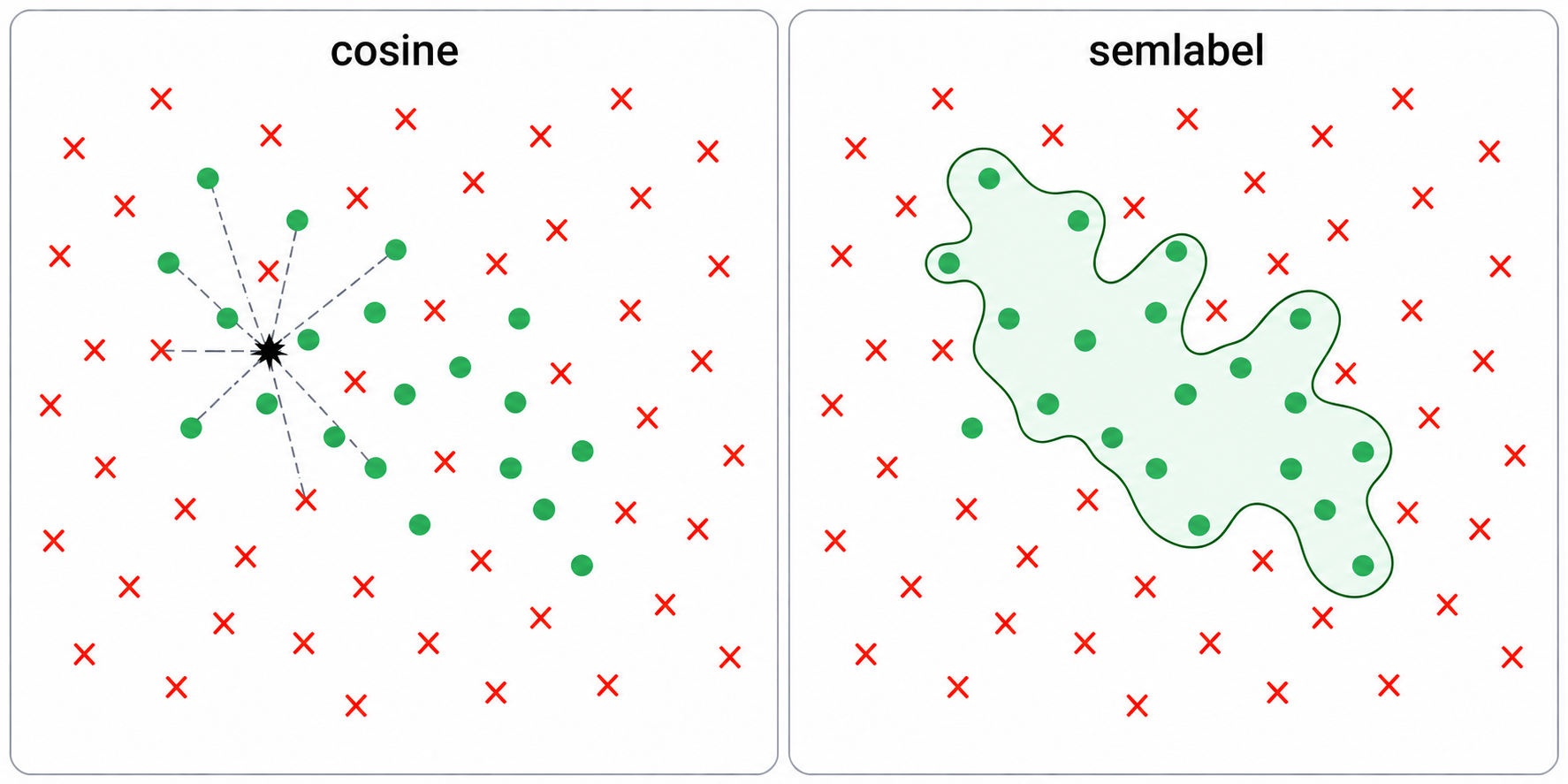
On the left, searching by cosine takes the closest texts to a query, and those include related texts that don't match. On the right, the trained category draws a boundary that picks out the matches from between the non-matches.
Core idea 3: each category carries its training data
A category file has the description, all labeled examples, the calibration scores and w.
Because the examples are kept, you can retrain on new data and continue where you left off. train category.json new.jsonl --auto starts from the stored examples and adds borderline cases from the new data, so a category can follow a feed as it changes. Fixing one wrong label is one command: add category.json data.jsonl <id> - moves that record to the negatives and refits. With --dry-run it shows which records would change side first.
The same examples calibrate the scores, with conformal prediction. Each example gets a score from a version of w trained without it (5-fold cross-validation), so it behaves like a score for an unseen text. For a new text with raw score s, semlabel checks what share of known matches scored s or lower, and what share of known non-matches scored s or higher. If almost no real match scores that low, it's probably not a match. If almost no non-match scores that high, it probably is. The reported confidence is the first share divided by the sum of both, with a small shared smoothing term. It goes from 0 to 1, grows with the raw score, and does not depend on having labeled more non-matches than matches.
So every category gets its own threshold. On my categories, confidence 0.5 corresponds to raw cosines between -0.06 and +0.08, and one fixed cutoff would be wrong for most of them.
How to read the numbers:
- 0.5 means the score is as typical of matches as of non-matches. It ignores how rare the category is, so for rare categories
> 0.5flags too much. Use 0.9 for precision and review what falls between 0.5 and 0.9. - It is based on ranks, so treat it as a calibrated score and don't read it as an exact probability. Most training examples are borderline, so calibration is best near the boundary and rougher far from it.
showprints recall and specificity on held-out examples. These are the hardest examples the category has, so on normal data it does better.
tag --raw gives the plain cosine.
Usage patterns
Anywhere you would pay an LLM to sort every item into the same few categories.
News and social feeds, which is what I built it for. Train categories like AI hardware, policy, clickbait or real research on a day or two of posts, then tag each new day and filter on the scores:
./semlabel tag concepts/ today.jsonl | jq -c 'select(.tags.slop < 0.2 and .tags.ai_hardware > 0.9)'
Agent outputs. Agents write much more than anyone reads: transcripts, tool outputs, reports, logs. Categories like "stuck retrying the same thing", "gave up", "asks the user for input", "touches credentials" or "went off task" can sort thousands of runs in seconds and pick the ones a human or an LLM judge should read. These are about what kind of text it is, which works well with linear categories. Whether the agent got the right answer is a different question and still needs a judge.
Large text collections, like archives, support tickets, documents, or datasets for evals and fine-tuning. discover clusters the collection so you see what's in it, search finds examples, and a few categories slice it. Embeddings are cached, so re-tagging everything after changing a category takes seconds. The labeled examples of each category also work as a small checked eval set.
Records need a title and optionally comments (see Input format below). If your data has other field names, one jq command converts it.
Reference
Input format
One JSON object per line. semlabel reads three fields and passes the rest through unchanged:
{"id": "a1b2c3", "title": "Octopuses learn by watching each other",
 "comments": [{"author": "Article", "text": "The study suggests..."},
              {"author": "someone", "text": "Fascinating result."}]}
The embedded text is the title, then comments whose author is Article or Abstract (treated as the body), then the remaining comments, cut at 2000 characters. A record with only a title works. id is optional for tag and search, but add and search --id use it to find records.
Workflow
# 1. See what's in the data
./semlabel discover data.jsonl -n 10          # 10 clusters, 5 examples each
./semlabel search "chip inference cost" data.jsonl -k 5

# 2. Describe a concept
echo '{"description": "New AI accelerator chips and inference cost. Not general GPU gaming news."}' \
  > concepts/ai_hardware.json

# 3. Train it
./semlabel train concepts/ai_hardware.json data.jsonl --auto

# 4. Inspect, correct
./semlabel show concepts/ai_hardware.json
./semlabel add concepts/ai_hardware.json data.jsonl a1b2c3 - --dry-run   # what changes if a1b2c3 is negative?
./semlabel add concepts/ai_hardware.json data.jsonl a1b2c3 -

# 5. Tag, in batch or in a pipeline
./semlabel tag concepts/ data.jsonl > tagged.jsonl
cat today.jsonl | ./semlabel tag concepts/ | jq -c 'select(.tags.ai_hardware > 0.9)'
concepts/ includes five untrained example descriptions, and examples/sample.jsonl is a small made-up dataset for trying search and discover. Training needs real data, at least a few hundred records.
Commands
| Command | What it does |
|---|---|
train CONCEPT DATA [--auto] | Active-learning training (above). Re-running continues from the existing labels, which is also how you extend a concept to new data. --trace FILE logs LLM prompts and replies; --log-texts FILE logs the exact embedded texts. |
tag CONCEPTS [DATA] | Adds "tags": {"concept": confidence, ...} to each record (0 to 1, conformal; --raw for the cosine). CONCEPTS is a file or a directory; untrained concepts are skipped. Reads stdin when DATA is omitted (all of it before writing output, so it batches rather than streams). --tag-name NAME renames the field. |
search QUERY DATA [-k N] [--id] | Nearest neighbors by cosine similarity, printed as JSONL with _score. With --id, QUERY is a record id ("more like this"). No concept needed. |
discover DATA [-n N] [-k K] | k-means into N clusters, K examples each. A quick survey of what a dataset contains. |
add CONCEPT DATA ID +/- ... | Adds records as positives (+) or negatives (-), then refits w and the calibration. --dry-run shows which records would change sides. |
show CONCEPTS | Description, example counts, held-out recall/specificity, and labeled examples for each concept. |
calibrate CONCEPTS | Computes and stores calibration for concepts trained before it existed. tag computes a missing calibration on the fly, but doesn't save it. |
embed-server / embed-stop | Keeps the model in memory on a unix socket (/tmp/semlabel-embed.sock). Other commands use it automatically when it's running, which saves a few seconds of model loading per call. |
Manual labeling: without --auto, train prints each batch with short ids, and at the pos> prompt you type the ids that match, separated by spaces. Everything else in the batch is a negative.
Caching
The first time a data file is embedded, semlabel writes data.jsonl.embeds.npy next to it, and later runs skip the embedding. The cache is keyed by byte offset, so appending records is fine. If you edit records in place, delete the .npy file. --no-cache bypasses the cache.
Benchmark details
Apple M5 Pro, CPU only, default model, real posts averaging 1,070 characters. Peak memory was 480 MB.
| Stage | Time |
|---|---|
| Starting up (loading the model) | 4.2 s, once. embed-server keeps the model loaded between calls |
| Embedding one post | 11 ms for full text, 5 ms for a title |
| Embedding in bulk | 109 posts/s full text, about 1,000/s titles |
| Scoring 20 labels | 0.15 ms for one post; 1.2 microseconds per post in bulk (16 million decisions/s) |
Embedding takes nearly all of the time. Scoring is so cheap that the number of labels hardly matters.
Choosing an embedding model
The default is Snowflake/snowflake-arctic-embed-xs: 22M parameters, 384 dimensions, fast on CPU and good at topical separation in English. Because the learned concept direction does the fine discrimination, a small model usually goes further than you'd expect. Consider switching when:
| Need | Candidates (dims) |
|---|---|
| Faster / smaller | sentence-transformers/all-MiniLM-L6-v2 (384) |
| Better English quality, still small | BAAI/bge-small-en-v1.5 (384), Snowflake/snowflake-arctic-embed-s (384) |
| Non-English or mixed-language data | intfloat/multilingual-e5-small (384), sentence-transformers/paraphrase-multilingual-MiniLM-L12-v2 (384) |
| Higher quality, slower | Snowflake/snowflake-arctic-embed-m-v1.5 (768), BAAI/bge-base-en-v1.5 (768) |
The quickest test for a candidate is to train one concept you care about with each model on the same data, then compare with show. If a model is better for your data, the positives come out cleaner and fewer boundary records need correcting.
To switch models, set MODEL_NAME at the top of src/semlabel.py. If the new model's dimension isn't 384, also replace the 384 literals in the same file (grep -n 384 src/semlabel.py). Also set QUERY_PREFIX, the text added to search queries and concept descriptions before they're embedded. Arctic-embed and BGE models expect an instruction prefix there (see the model card). Symmetric models like MiniLM expect "". Then:
- Retrain every concept. A concept vector only means something in the space of the model that produced it. The file records the model in its
modelfield. - Delete the
*.embeds.npycaches. They don't record which model produced them. - Restart the embed server if it's running (
./semlabel embed-stop).
Using it from Claude Code
skills/semlabel/SKILL.md is a Claude Code skill that teaches an agent the whole workflow: survey the data, write a concept description, train, inspect, correct labels by id, and tag new data with sensible thresholds. It also covers using the agent itself as the labeler: the agent reads candidates from search, labels them itself with add, and repeats on the uncertain band, with no separate claude -p calls. To install it:
mkdir -p ~/.claude/skills && ln -s "$PWD/skills/semlabel" ~/.claude/skills/semlabel
Then ask Claude Code something like "use semlabel to build a concept for AI hardware news from data.jsonl and tag today's feed". The skill expects SEMLABEL to point at the semlabel wrapper in this repo.
Limitations
- Concepts are linear. They capture topics and styles. Judgments that need reasoning about the content need an LLM.
- Confidences are rank-based and calibrated on mostly borderline examples, so read them as scores and don't take them as exact probabilities. 0.5 ignores the base rate, so use a higher cutoff for rare concepts.
- Input is truncated at 2000 characters. Long documents are represented by their beginning.
- Training is only as good as the labels. With
--auto, precision depends on the description being specific enough for the LLM to judge edge cases.
License
Apache License 2.0. See LICENSE.
Contributors

10 commits
Similar repos





Languages
Python
95.0%
Shell
5.0%
Label JSONL records with concepts defined in plain language: LLM-trained concept vectors, conformal confidence, one dot product per decision
Python
0
10 commits
updated Sep 23, 2026
See what people are saying
README
semlabel
semlabel labels text with categories you describe in plain English. It works on any kind of text: articles, social posts, documents, support tickets, agent transcripts and responses. An LLM labels a few hundred examples from your data once, then semlabel does the rest locally, in about 10 ms per text, with no more LLM calls.
./semlabel train concepts/ai_hardware.json data.jsonl --auto    # LLM labels examples, once
./semlabel tag concepts/ today.jsonl > tagged.jsonl             # runs locally from now on
Every record gets a confidence from 0 to 1 per category (example output):
{"id": "a1b2", "title": "New inference chip claims 3x lower cost per token", "tags": {"ai_hardware": 0.97, "slop": 0.04}}
I built it to filter my news feeds. I had around twenty categories and hundreds of posts a day, and running an LLM on every post was slow and expensive for what is basically a sorting job.
Install
git clone https://github.com/horiacristescu/semlabel.git && cd semlabel
./install.sh
This creates a virtual environment (with uv if you have it, pip otherwise), downloads a small embedding model (Snowflake/snowflake-arctic-embed-xs, 90 MB) and runs a quick test. After that it works offline.
You need Python 3.12+. For training you want the claude CLI, which does the labeling with your default Claude Code model. Without it you can label the examples yourself.
On Linux without a GPU, install the CPU build of PyTorch first (pip install torch --index-url https://download.pytorch.org/whl/cpu), the default one bundles CUDA and is several GB.
Compared with Jev
Jev by TypeSafe AI does the same kind of job. You send text and a question, it sends back an answer with a probability. The difference is that Jev is a big hosted model you call for every text and every question, while semlabel asks the LLM once, at training time, and then runs on your machine.
How fast is it?
About 10 ms for a text of 1,000 characters on a laptop CPU, and about 1 ms for a short one like a title. Almost all of that is computing its embedding. Checking it against a category is one dot product, so 20 categories cost about the same as one.
| Jev | semlabel | |
|---|---|---|
| Label one text | about 100 ms | about 10 ms |
| One text, 20 labels | 20 calls, about 2 s | still about 10 ms |
| A million texts, 20 labels each | 20 million API calls | about 2.5 hours on one laptop, 17 minutes for short texts like titles |
| Re-label an archive after changing a label | everything again | a few seconds, embeddings are cached |
How much does it cost?
Training a category takes about 15,000 LLM tokens in 5 short calls. After that it is free.
| Jev | semlabel | |
|---|---|---|
| Set up a label | nothing, you write the question | about 15,000 LLM tokens, once |
| A million texts, one label | about $11 | $0 |
| A million texts, 20 labels | about $230 | $0 |
| Change a label's definition | nothing to redo | retrain, another 15,000 tokens |
The Jev numbers assume texts of about 1,000 characters (270 tokens) at their published $0.042 per million input tokens, not counting the question. With a Claude subscription the training calls come out of your plan.
Do I need the cloud or a powerful machine?
No. It runs on CPU, no GPU needed, about 0.5 GB of RAM and 0.75 GB of disk (mostly PyTorch). It only needs the network to install and to train with --auto. Labeling runs offline, so your data never leaves your machine. With Jev every text goes to their API.
Can I trust the scores?
semlabel calibrates each category on your own labeled examples. A confidence of 0.95 means the text scored higher than almost all known non-matches for that category, on your data. show tells you how often a category is right on examples it was not trained on, and when a label is wrong you can see the examples behind it and fix it with add.
Jev's probabilities are calibrated by TypeSafe on synthetic training data, and the model can't be tuned on yours (docs). Independent tests found them good on public benchmarks but off on unfamiliar tasks, overconfident on some question types and underconfident on others (study, audit). The setups that worked best added the user's own labels and a small model on top (example), which is where semlabel starts.
Which should I use?
Jev or an LLM when the question changes every time, when you have no data, or when the answer needs real reasoning, like "is this claim true". semlabel when the categories are stable and there is a lot of text, when the data must stay local, or when you want to see why something got its label. You can also combine them: let the LLM or Jev label the training examples and let semlabel do the daily work.
Jev numbers are from TypeSafe's published figures and the tests linked above, as of September 2026. semlabel numbers are measured on an Apple M5 Pro, CPU only, with real news posts of about 1,000 characters. Details under Benchmark details.
Core idea 1: do the reasoning at training time
If you run an LLM on every record, you pay for reasoning on every record, forever. A one-pass model like Jev is cheaper, but it reads the input once and answers. It can't think in steps and never sees its own answer.
I moved the reasoning into training, where it happens once and can iterate. The LLM (claude -p) labels the 50 records closest to your description. semlabel fits a classifier on those labels, then sends the LLM the 40 records it is least sure about, the ones near the boundary. The new labels move the boundary, the next round asks about what became uncertain, and after 3 to 5 rounds it settles. What remains is a vector, and labeling a new text is a dot product with it.
The limit is that a category must be something a linear boundary can separate in embedding space. Topics and styles work well, like AI hardware news, clickbait or sports. Things that need thinking about a specific text don't work, like whether a claim is true or whether a text contradicts the previous one. If a category stays bad after a few corrections, use an LLM for it.
Core idea 2: the classifier is an embedding
A linear classifier on embeddings is just a weight vector with the same shape as the embeddings. semlabel fits it by ridge regression on +1/-1 labels, with class balancing and no bias term, and normalizes it to length 1. So a category is a unit vector w in the same space as the records, and a record's raw score is its cosine with w.
You can use w like any other embedding, for example as a query in a vector database built with the same model. It often finds the clear members of a category better than the description does. On my data the science vector found a receptor study and a new bamboo plastic, while searching with the science description found an AI benchmark post and a date header.
Interestingly, w is almost orthogonal to its own description (cosine 0.0 to 0.1). The regression removes what all texts have in common and keeps what separates matches from non-matches. Raw scores are small even for clear matches, it is the ranking that matters.
You can also compare categories by the cosine between their vectors. On my data health and science are +0.41, clickbait and web media -0.16. Many texts belong to two topics, so some overlap is normal.
And because most training examples are near misses, texts that look related but aren't, w learns where a category ends, not only where it is.
On the left, searching by cosine takes the closest texts to a query, and those include related texts that don't match. On the right, the trained category draws a boundary that picks out the matches from between the non-matches.
Core idea 3: each category carries its training data
A category file has the description, all labeled examples, the calibration scores and w.
Because the examples are kept, you can retrain on new data and continue where you left off. train category.json new.jsonl --auto starts from the stored examples and adds borderline cases from the new data, so a category can follow a feed as it changes. Fixing one wrong label is one command: add category.json data.jsonl <id> - moves that record to the negatives and refits. With --dry-run it shows which records would change side first.
The same examples calibrate the scores, with conformal prediction. Each example gets a score from a version of w trained without it (5-fold cross-validation), so it behaves like a score for an unseen text. For a new text with raw score s, semlabel checks what share of known matches scored s or lower, and what share of known non-matches scored s or higher. If almost no real match scores that low, it's probably not a match. If almost no non-match scores that high, it probably is. The reported confidence is the first share divided by the sum of both, with a small shared smoothing term. It goes from 0 to 1, grows with the raw score, and does not depend on having labeled more non-matches than matches.
So every category gets its own threshold. On my categories, confidence 0.5 corresponds to raw cosines between -0.06 and +0.08, and one fixed cutoff would be wrong for most of them.
How to read the numbers:
- 0.5 means the score is as typical of matches as of non-matches. It ignores how rare the category is, so for rare categories
> 0.5flags too much. Use 0.9 for precision and review what falls between 0.5 and 0.9. - It is based on ranks, so treat it as a calibrated score and don't read it as an exact probability. Most training examples are borderline, so calibration is best near the boundary and rougher far from it.
showprints recall and specificity on held-out examples. These are the hardest examples the category has, so on normal data it does better.
tag --raw gives the plain cosine.
Usage patterns
Anywhere you would pay an LLM to sort every item into the same few categories.
News and social feeds, which is what I built it for. Train categories like AI hardware, policy, clickbait or real research on a day or two of posts, then tag each new day and filter on the scores:
./semlabel tag concepts/ today.jsonl | jq -c 'select(.tags.slop < 0.2 and .tags.ai_hardware > 0.9)'
Agent outputs. Agents write much more than anyone reads: transcripts, tool outputs, reports, logs. Categories like "stuck retrying the same thing", "gave up", "asks the user for input", "touches credentials" or "went off task" can sort thousands of runs in seconds and pick the ones a human or an LLM judge should read. These are about what kind of text it is, which works well with linear categories. Whether the agent got the right answer is a different question and still needs a judge.
Large text collections, like archives, support tickets, documents, or datasets for evals and fine-tuning. discover clusters the collection so you see what's in it, search finds examples, and a few categories slice it. Embeddings are cached, so re-tagging everything after changing a category takes seconds. The labeled examples of each category also work as a small checked eval set.
Records need a title and optionally comments (see Input format below). If your data has other field names, one jq command converts it.
Reference
Input format
One JSON object per line. semlabel reads three fields and passes the rest through unchanged:
{"id": "a1b2c3", "title": "Octopuses learn by watching each other",
 "comments": [{"author": "Article", "text": "The study suggests..."},
              {"author": "someone", "text": "Fascinating result."}]}
The embedded text is the title, then comments whose author is Article or Abstract (treated as the body), then the remaining comments, cut at 2000 characters. A record with only a title works. id is optional for tag and search, but add and search --id use it to find records.
Workflow
# 1. See what's in the data
./semlabel discover data.jsonl -n 10          # 10 clusters, 5 examples each
./semlabel search "chip inference cost" data.jsonl -k 5

# 2. Describe a concept
echo '{"description": "New AI accelerator chips and inference cost. Not general GPU gaming news."}' \
  > concepts/ai_hardware.json

# 3. Train it
./semlabel train concepts/ai_hardware.json data.jsonl --auto

# 4. Inspect, correct
./semlabel show concepts/ai_hardware.json
./semlabel add concepts/ai_hardware.json data.jsonl a1b2c3 - --dry-run   # what changes if a1b2c3 is negative?
./semlabel add concepts/ai_hardware.json data.jsonl a1b2c3 -

# 5. Tag, in batch or in a pipeline
./semlabel tag concepts/ data.jsonl > tagged.jsonl
cat today.jsonl | ./semlabel tag concepts/ | jq -c 'select(.tags.ai_hardware > 0.9)'
concepts/ includes five untrained example descriptions, and examples/sample.jsonl is a small made-up dataset for trying search and discover. Training needs real data, at least a few hundred records.
Commands
| Command | What it does |
|---|---|
train CONCEPT DATA [--auto] | Active-learning training (above). Re-running continues from the existing labels, which is also how you extend a concept to new data. --trace FILE logs LLM prompts and replies; --log-texts FILE logs the exact embedded texts. |
tag CONCEPTS [DATA] | Adds "tags": {"concept": confidence, ...} to each record (0 to 1, conformal; --raw for the cosine). CONCEPTS is a file or a directory; untrained concepts are skipped. Reads stdin when DATA is omitted (all of it before writing output, so it batches rather than streams). --tag-name NAME renames the field. |
search QUERY DATA [-k N] [--id] | Nearest neighbors by cosine similarity, printed as JSONL with _score. With --id, QUERY is a record id ("more like this"). No concept needed. |
discover DATA [-n N] [-k K] | k-means into N clusters, K examples each. A quick survey of what a dataset contains. |
add CONCEPT DATA ID +/- ... | Adds records as positives (+) or negatives (-), then refits w and the calibration. --dry-run shows which records would change sides. |
show CONCEPTS | Description, example counts, held-out recall/specificity, and labeled examples for each concept. |
calibrate CONCEPTS | Computes and stores calibration for concepts trained before it existed. tag computes a missing calibration on the fly, but doesn't save it. |
embed-server / embed-stop | Keeps the model in memory on a unix socket (/tmp/semlabel-embed.sock). Other commands use it automatically when it's running, which saves a few seconds of model loading per call. |
Manual labeling: without --auto, train prints each batch with short ids, and at the pos> prompt you type the ids that match, separated by spaces. Everything else in the batch is a negative.
Caching
The first time a data file is embedded, semlabel writes data.jsonl.embeds.npy next to it, and later runs skip the embedding. The cache is keyed by byte offset, so appending records is fine. If you edit records in place, delete the .npy file. --no-cache bypasses the cache.
Benchmark details
Apple M5 Pro, CPU only, default model, real posts averaging 1,070 characters. Peak memory was 480 MB.
| Stage | Time |
|---|---|
| Starting up (loading the model) | 4.2 s, once. embed-server keeps the model loaded between calls |
| Embedding one post | 11 ms for full text, 5 ms for a title |
| Embedding in bulk | 109 posts/s full text, about 1,000/s titles |
| Scoring 20 labels | 0.15 ms for one post; 1.2 microseconds per post in bulk (16 million decisions/s) |
Embedding takes nearly all of the time. Scoring is so cheap that the number of labels hardly matters.
Choosing an embedding model
The default is Snowflake/snowflake-arctic-embed-xs: 22M parameters, 384 dimensions, fast on CPU and good at topical separation in English. Because the learned concept direction does the fine discrimination, a small model usually goes further than you'd expect. Consider switching when:
| Need | Candidates (dims) |
|---|---|
| Faster / smaller | sentence-transformers/all-MiniLM-L6-v2 (384) |
| Better English quality, still small | BAAI/bge-small-en-v1.5 (384), Snowflake/snowflake-arctic-embed-s (384) |
| Non-English or mixed-language data | intfloat/multilingual-e5-small (384), sentence-transformers/paraphrase-multilingual-MiniLM-L12-v2 (384) |
| Higher quality, slower | Snowflake/snowflake-arctic-embed-m-v1.5 (768), BAAI/bge-base-en-v1.5 (768) |
The quickest test for a candidate is to train one concept you care about with each model on the same data, then compare with show. If a model is better for your data, the positives come out cleaner and fewer boundary records need correcting.
To switch models, set MODEL_NAME at the top of src/semlabel.py. If the new model's dimension isn't 384, also replace the 384 literals in the same file (grep -n 384 src/semlabel.py). Also set QUERY_PREFIX, the text added to search queries and concept descriptions before they're embedded. Arctic-embed and BGE models expect an instruction prefix there (see the model card). Symmetric models like MiniLM expect "". Then:
- Retrain every concept. A concept vector only means something in the space of the model that produced it. The file records the model in its
modelfield. - Delete the
*.embeds.npycaches. They don't record which model produced them. - Restart the embed server if it's running (
./semlabel embed-stop).
Using it from Claude Code
skills/semlabel/SKILL.md is a Claude Code skill that teaches an agent the whole workflow: survey the data, write a concept description, train, inspect, correct labels by id, and tag new data with sensible thresholds. It also covers using the agent itself as the labeler: the agent reads candidates from search, labels them itself with add, and repeats on the uncertain band, with no separate claude -p calls. To install it:
mkdir -p ~/.claude/skills && ln -s "$PWD/skills/semlabel" ~/.claude/skills/semlabel
Then ask Claude Code something like "use semlabel to build a concept for AI hardware news from data.jsonl and tag today's feed". The skill expects SEMLABEL to point at the semlabel wrapper in this repo.
Limitations
- Concepts are linear. They capture topics and styles. Judgments that need reasoning about the content need an LLM.
- Confidences are rank-based and calibrated on mostly borderline examples, so read them as scores and don't take them as exact probabilities. 0.5 ignores the base rate, so use a higher cutoff for rare concepts.
- Input is truncated at 2000 characters. Long documents are represented by their beginning.
- Training is only as good as the labels. With
--auto, precision depends on the description being specific enough for the LLM to judge edge cases.
License
Apache License 2.0. See LICENSE.
Similar repos
Contributors
10 commits
Languages
Python
95.0%
Shell
5.0%