
A framework for evaluating RAG pipelines, specifically adapted for the legal domain.
Python
81
161 commits
updated Jul 3, 2026
README
 LRAGE: Legal Retrieval Augmented Generation Evaluation Tool

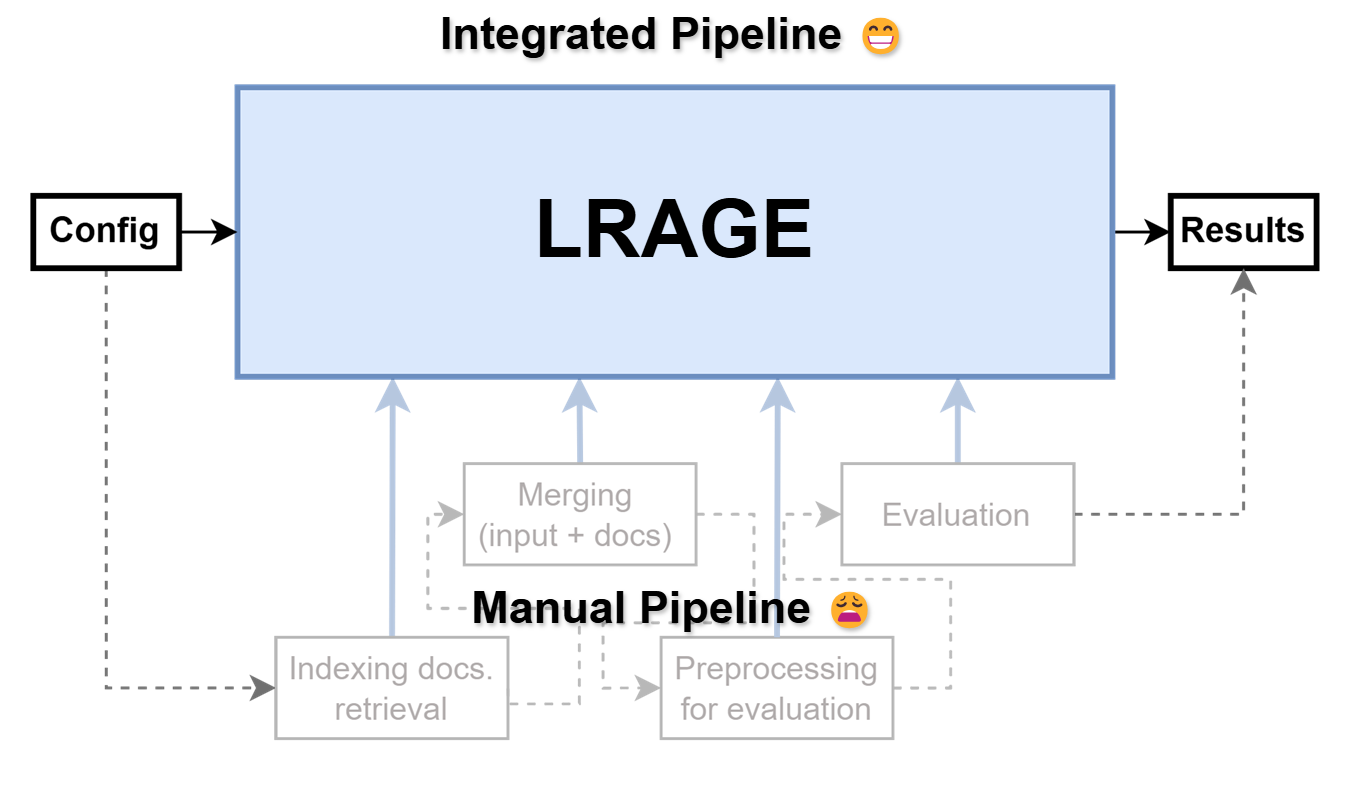
LRAGE (Legal Retrieval Augmented Generation Evaluation, pronounced as 'large') is an open-source toolkit designed to evaluate Large Language Models (LLMs) in a Retrieval-Augmented Generation (RAG) setting, specifically tailored for the legal domain.
LRAGE is developed to address the unique challenges that Legal AI researchers face, such as building and evaluating retrieval-augmented systems effectively. It seamlessly integrates datasets and tools to help researchers in evaluating LLM performance on legal tasks without cumbersome engineering overhead.
The submission version for ACL can be found in this tag.
You can check the demo video at here.
You can check out our GUI demo directly on HF Spaces.
For more details on our methodology, results, and analysis, please refer to our paper: LRAGE: Legal Retrieval Augmented Generation Evaluation and its supplementary materials, and the corresponding arXiv preprint.
Features
-
Legal Domain Focused Evaluation: LRAGE is specifically developed for evaluating LLMs in a RAG setting with datasets and document collections from the legal domain, such as Pile-of-law, LegalBench, LawBench, KBL, and Legal RAG Benchmarks.
-
Pre-compiled indexes for the legal domain: Comes with pre-generated BM25 indices and embeddings for Pile-of-law, reducing the setup effort for researchers.
-
Retriever & Reranker Integration: Easily integrate and evaluate different retrievers and rerankers. LRAGE modularizes retrieval and reranking components, allowing for flexible experimentation.
-
smolagents Integration: Seamlessly integrates with the
smolagentsframework, enabling evaluation of autonomous agents in legal RAG scenarios. This allows researchers to assess how agent-based approaches perform in complex legal tasks requiring multi-step reasoning. -
LLM-as-a-Judge: A feature where LLMs are used to evaluate the quality of LLM responses on an instance-by-instance basis, using customizable rubrics within the RAG setting.
-
Graphical User Interface: A GUI demo for intuitive usage, making the tool accessible even for those who are not deeply familiar with command-line interfaces.
Extensions for RAG Evaluation from lm-evaluation-harness
-
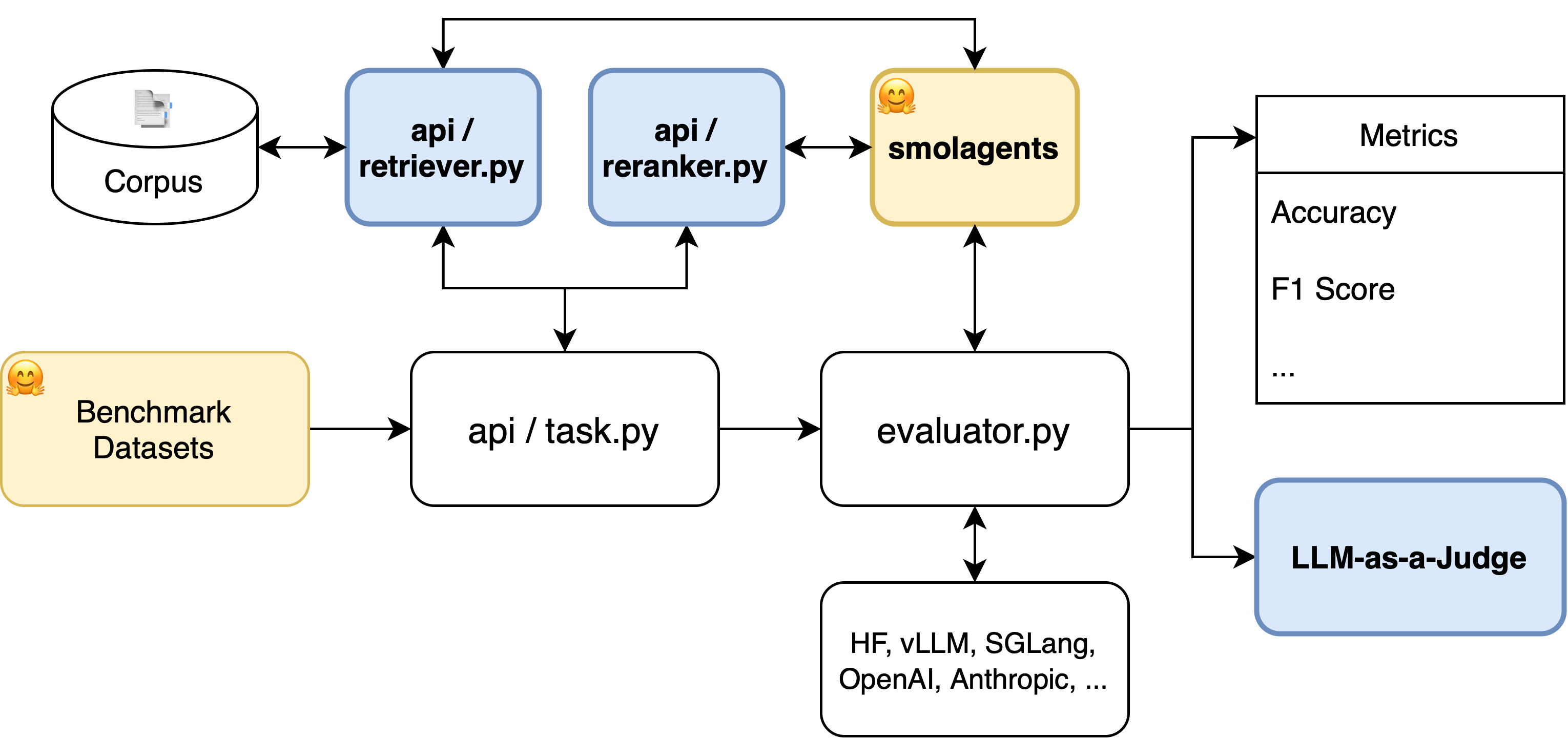
Addition of Retriever and Reranker abstract classes: LRAGE introduces
retrieverandrerankerabstract classes in thelrage/api/. These additions allow the process of building requests in theapi.task.Taskclass’sbuild_all_requests()method to go through both retrieval and reranking steps, enhancing the evaluation process for RAG. -
Extensible Retriever and Reranker implementations: While maintaining the same structure as
lm-evaluation-harness, LRAGE allows for the flexible integration of different retriever and reranker implementations. Just aslm-evaluation-harnessprovides an abstractLM classwith implementations for libraries like HuggingFace (hf) and vLLM, LRAGE providespyserini_retriever(powered by Pyserini) inlrage/retrievers/andrerankers_reranker(powered byrerankers) inlrage/rerankers/. This structure allows users to easily implement and integrate other retrievers or rerankers, such as those fromLlamaIndex, by simply extending the abstract classes. -
smolagents Support: LRAGE supports integration with
smolagents, providing an abstractCodeAgentLMclass inlrage/models/smolagent_lm.py. This extension enables the evaluation of autonomous agent behaviors in complex legal reasoning tasks, with standardized metrics for agent effectiveness, efficiency, and reasoning quality. -
Integration of LLM-as-a-judge: LRAGE modifies
ConfigurableTask.process_resultsto support 'LLM-Eval' metrics, enabling a more nuanced evaluation of RAG outputs by utilizing language models as judges.
Installation
-
Create conda environment:
conda create -n lrage python=3.10 -y conda activate lrage -
Clone the repository:
git clone https://github.com/hoorangyee/LRAGE.git cd LRAGE/ -
Install:
conda install -c conda-forge openjdk=21 -y # JDK 21 is required to use the Pyserini retriever
pip install -e .
Quick Start
To evaluate a model on a sample dataset using the RAG setting, follow these steps:
-
Prepare your dataset in the supported format.
-
Choose one of the following methods to run:
A. Run the evaluation script in CLI:
lrage \
--model hf \
--model_args pretrained=meta-llama/Llama-3.2-1B \
--tasks abercrombie_tiny \
--batch_size 8 \
--device cuda \
--retrieve_docs \
--top_k 3 \
--retriever pyserini \
--retriever_args retriever_type=bm25,bm25_index_path=msmarco-v1-passage \
--rerank \
--reranker rerankers \
--reranker_args reranker_type=colbert
B. Run the web UI:
pip install -e .[web]
lrage-serve --port 8000   # then open http://127.0.0.1:8000
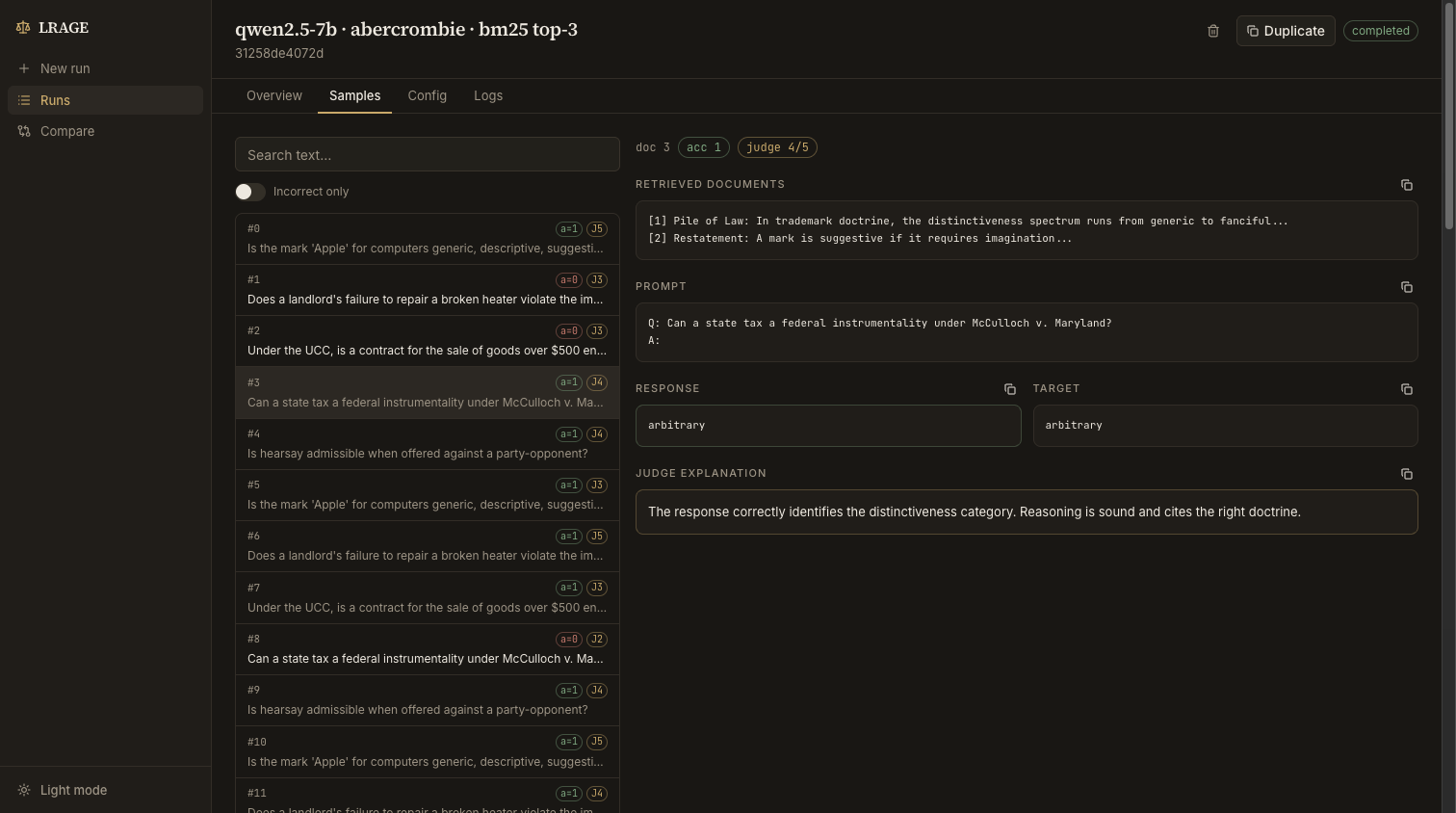
The web UI runs evaluations in the background with live progress streaming, keeps a run history with per-sample inspection (prompt / response / judge output), and can compare metrics across runs. Runs and results are stored under
~/.lrage/webapp/by default (--data-dir,--output-dirto change).The built web UI bundle ships in the repository (
lrage/webapp/static/, kept up to date by the "Build web UI" GitHub Action), so installing from source needs no Node/npm. npm is only needed to develop the frontend: runnpm install && npm run devinfrontend/(proxies/apitolrage-serveon port 8000);npm run buildemits the production bundle intolrage/webapp/static/.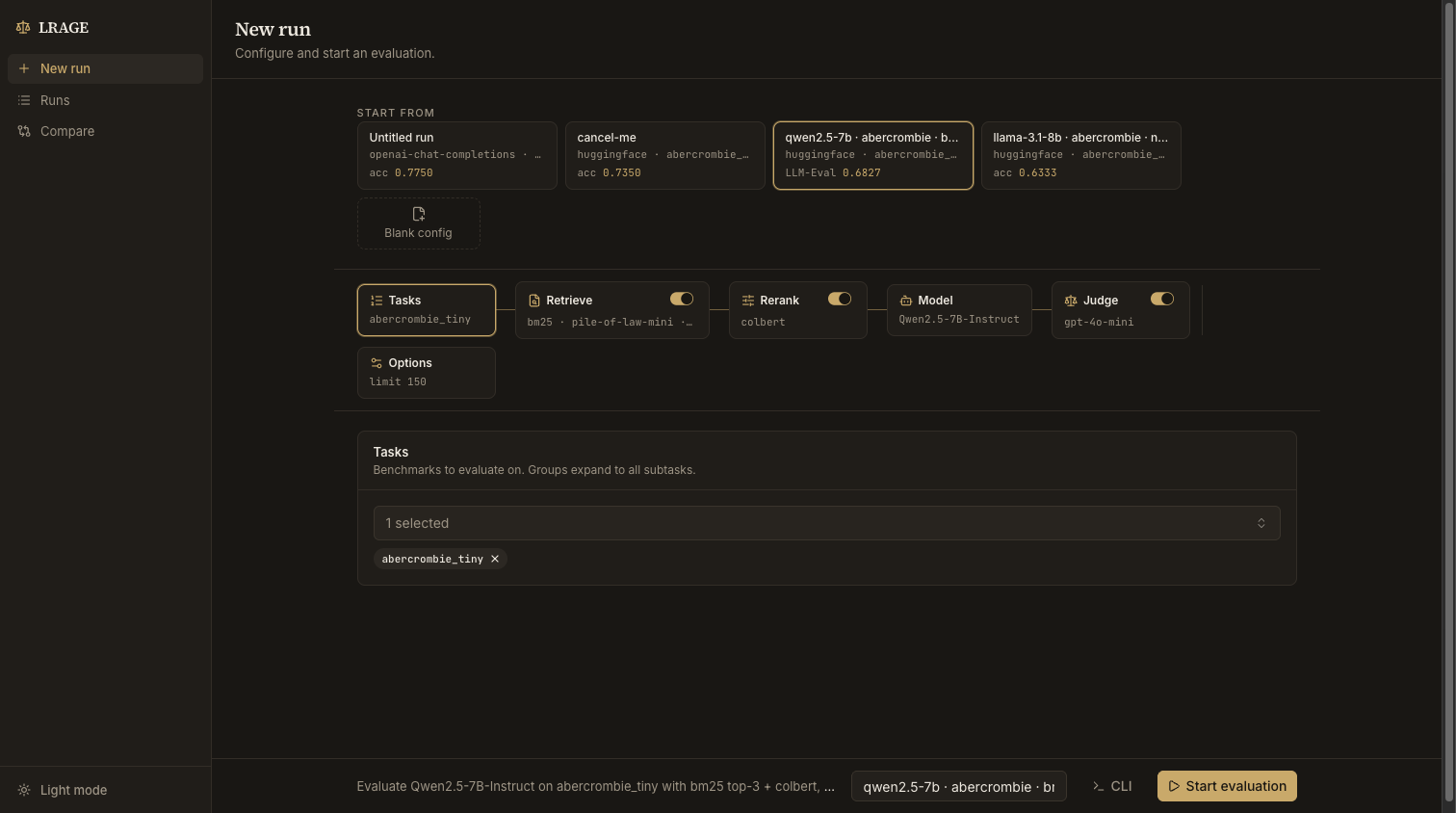
C. Run the legacy Gradio GUI:
cd LRAGE
./run_gui.sh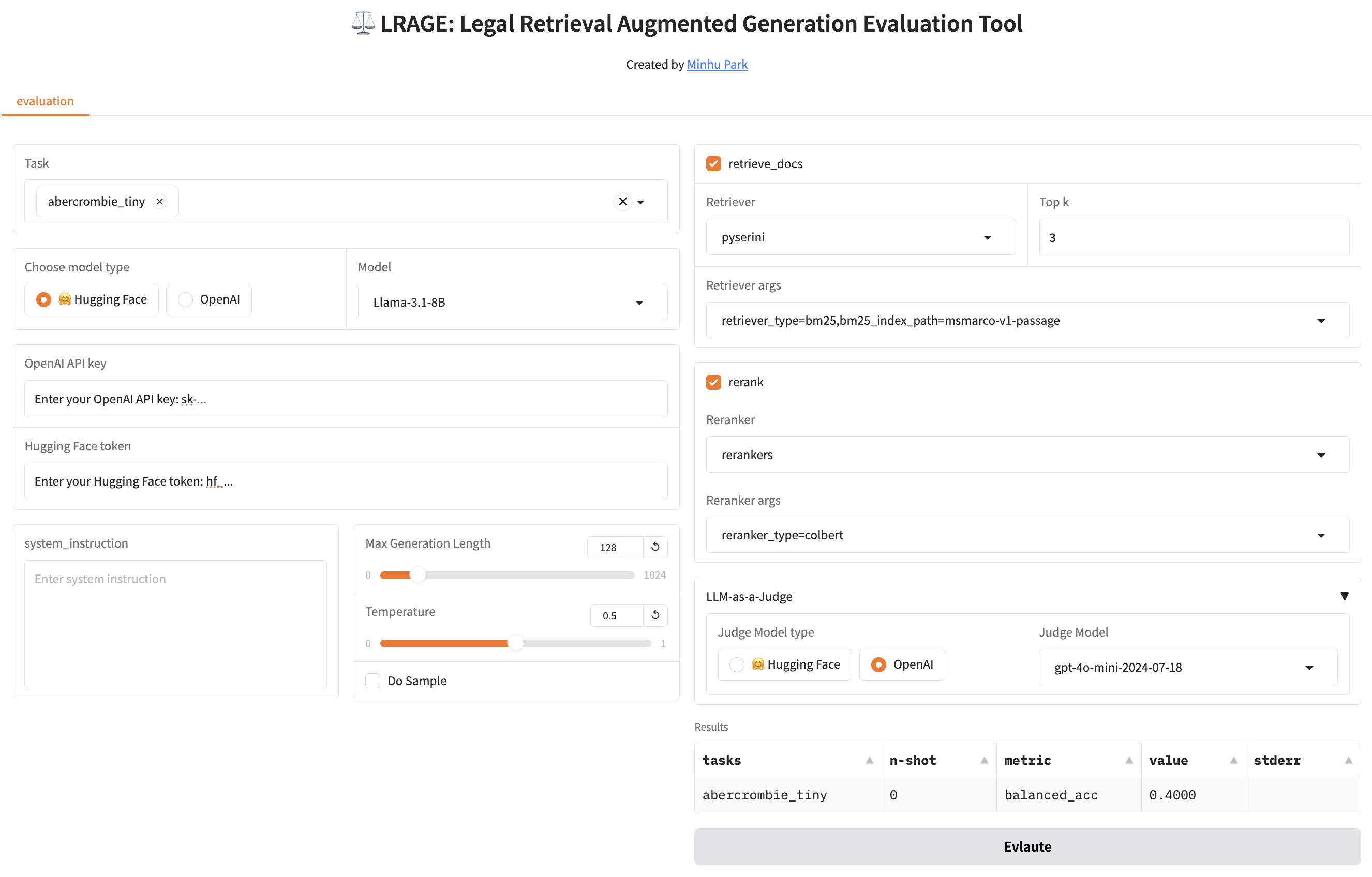
Basic Usage
The basic usage follows the lm-evaluation-harness documentation.
Below is a detailed guide for using the LRAGE CLI.
CLI Arguments
Required Arguments
--model,-m: Name of the model to use (e.g.,hffor HuggingFace models)- we are supportting now hf, vllm, sglang(beta), etc.
--tasks,-t: Names of tasks to evaluate (comma-separated)- To see available tasks:
lrage --tasks list
- To see available tasks:
Model Configuration
--model_args,-a: Arguments for model configuration- Format:
key1=value1,key2=value2 - Example:
pretrained=meta-llama/Llama-3.1-8B,dtype=float32
- Format:
--device: Device to use (e.g.,cuda,cuda:0,cpu)--batch_size,-b: Batch size (auto,auto:N, or integer)--system_instruction: System instruction for the prompt--apply_chat_template: Enable chat template (flag)
RAG Settings
--retrieve_docs: Enable document retrieval--top_k: Number of documents to retrieve per query (default: 3)--retriever: Type of retriever (e.g.,pyserini)--rerank: Enable reranking--reranker: Type of reranker (e.g.,rerankers)
Retrievers and Rerankers Configuration
Retriever Arguments
retriever | Argument | Required | Description | Example |
|---|---|---|---|---|
| pyserini | retriever_type | Yes | Type of retriever to use | bm25, sparse, dense, hybrid |
bm25_index_path | Yes | Path to BM25 index or prebuilt index name | msmarco-v1-passage | |
encoder_path | For sparse/dense/hybrid | Path to encoder or prebuilt encoder name | castorini/tct_colbert-v2-hnp-msmarco | |
encoder_type | Optional | Type of encoder | tct_colbert, dpr, auto | |
faiss_index_path | For dense/hybrid | Path to FAISS index or prebuilt index name | msmarco-v1-passage.tct_colbert-v2-hnp |
Note: Since FAISS index and Sparse Vector Index (embedding generated by SPLADE, etc.) do not contain the original documents, when using them, a BM25 index is also needed for original document lookup.
Supported Prebuilt Resources:
Example Usage:
--retriever_args retriever_type=bm25,bm25_index_path=msmarco-v1-passage
Reranker Arguments
reranker | Argument | Required | Description | Example |
|---|---|---|---|---|
| rerankers | reranker_type | Yes | Type of reranker to use | colbert |
reranker_path | Optional | Name of specific reranker model | gpt-4o with reranker_type=rankllm |
Example Usage:
--reranker_args reranker_type=colbert
Evaluation Settings
--judge_model: Model for LLM-as-judge evaluation--judge_model_args: Configuration for judge model--judge_device: Device for judge model--num_fewshot,-f: Number of few-shot examples--output_path,-o: Path for saving results--log_samples,-s: Save model outputs and documents--predict_only,-x: Only generate predictions without evaluation
Example Commands
1-1-hf. Basic BM25 Evaluation with huggingface:
lrage \
--model hf \
--model_args pretrained=meta-llama/Llama-3.1-8B \
--tasks legalbench_tiny \
--batch_size 8 \
--device cuda \
--retrieve_docs \
--retriever pyserini \
--retriever_args retriever_type=bm25,bm25_index_path=msmarco-v1-passage
1-2-vllm. Basic BM25 Evaluation with vllm:
lrage \
--model vllm \
--model_args pretrained=meta-llama/Llama-3.1-8B,tensor_parallel_size=1,dtype=auto,gpu_memory_utilization=0.8,data_parallel_size=4 \
--tasks legalbench_tiny \
--batch_size auto \
--device cuda \
--retrieve_docs \
--retriever pyserini \
--retriever_args retriever_type=bm25,bm25_index_path=msmarco-v1-passage
- Dense Retrieval with Reranking:
lrage \
--model hf \
--model_args pretrained=meta-llama/Llama-3.1-8B \
--tasks legalbench_tiny \
--batch_size 8 \
--device cuda \
--retrieve_docs \
--top_k 3 \
--retriever pyserini \
--retriever_args \
    retriever_type=dense,\
    bm25_index_path=msmarco-v1-passage,\
    faiss_index_path=msmarco-v1-passage.tct_colbert-v2-hnp,\
    encoder_path=castorini/tct_colbert-v2-hnp-msmarco,\
    encoder_type=tct_colbert \
--rerank \
--reranker rerankers \
--reranker_args reranker_type=colbert
- Evaluation with LLM-as-a-Judge:
Note: LLM-as-a-judge evaluation is only available for tasks that specifically use the 'LLM-Eval' metric in their configuration. Make sure your task is configured to use this metric before applying the judge model.
lrage \
--model hf \
--model_args pretrained=meta-llama/Llama-3.1-8B \
--tasks legalbench_tiny \
--judge_model openai-chat-completions \
--judge_model_args model=gpt-4o-mini \
--retrieve_docs \
--retriever pyserini \
--retriever_args retriever_type=bm25,bm25_index_path=msmarco-v1-passage
Indexing
For now, you have three options:
- Use Pyserini's prebuilt indexes available out of the box
- Use our prebuilt Pile-of-law-mini indexes
- Create your own index by following Pyserini's indexing documentation
How to Index a New Corpus Using Pyserini
3-1. Prepare the data file docs.json in the following format:
[
  {
    "id": "doc1",
    "contents": "contents of doc one."
  },
  {
    "id": "doc2",
    "contents": "contents of document two."
  },
  ...
]
3-2. Store the prepared data in the following directory structure.
📂 data
├── 📂 input
│   └── docs.json
└── 📂 index
3-3. Run the following script.
python -m pyserini.index.lucene \
  --collection JsonCollection \
  --input data/input \
  --index data/index \
  --generator DefaultLuceneDocumentGenerator \
  --threads 1 \
  --storePositions --storeDocvectors --storeRaw
Pre-compiled indexes for the legal domain
- pile-of-law-subsets-bm25
-
{
    "legal-case-opinions": ["courtlistener_opinions","tax_rulings", "canadian_decisions", "echr"],
    "laws": ["uscode", "state_codes", "cfr","eurlex"],
    "study-materials": ["cc_casebooks"]
}
-
- barexam-qa-bm25
- housing-qa-bm25
Roadmap
- Implement LLM-as-a-judge functionality
- Update pyserini_retriever to support Pyserini prebuilt index
- Develop a GUI Demo for easier access and visualization
- Document more detailed usage instructions
- Publish and share Pile-of-law BM25 index
- Publish and share Pile-of-law chunks
- Publish and share BM25 indices for the corpus released in the paper A Reasoning-Focused Legal Retrieval Benchmark
- Publish and share Pile-of-law embeddings
- Publish benchmark results obtained using LRAGE
- Refactor the agent integration structure and merge it into the main branch
- Add more integrations with the retriever, reranker, and agent frameworks
- Synchronize with latest version of lm-evaluation-harness
- Add an auto-indexing feature
Contributing
Contributions and community engagement are welcome! We value your input in making this project better🤗.
Citation
@misc{park2025lrage,
  title={LRAGE: Legal Retrieval Augmented Generation Evaluation Tool},
  author={Minhu Park, Hongseok Oh, Eunkyung Choi, and Wonseok Hwang},
  year={2025},
  eprint={2504.01840},
  archivePrefix={arXiv},
  primaryClass={cs.CL},
  url={https://arxiv.org/abs/2504.01840},
}
Contributors

159 commits

2 commits
Similar repos


Languages
Python
81.7%
TypeScript
17.8%
A framework for evaluating RAG pipelines, specifically adapted for the legal domain.
Python
81
161 commits
updated Jul 3, 2026
README
LRAGE: Legal Retrieval Augmented Generation Evaluation Tool
LRAGE (Legal Retrieval Augmented Generation Evaluation, pronounced as 'large') is an open-source toolkit designed to evaluate Large Language Models (LLMs) in a Retrieval-Augmented Generation (RAG) setting, specifically tailored for the legal domain.
LRAGE is developed to address the unique challenges that Legal AI researchers face, such as building and evaluating retrieval-augmented systems effectively. It seamlessly integrates datasets and tools to help researchers in evaluating LLM performance on legal tasks without cumbersome engineering overhead.
The submission version for ACL can be found in this tag.
You can check the demo video at here.
You can check out our GUI demo directly on HF Spaces.
For more details on our methodology, results, and analysis, please refer to our paper: LRAGE: Legal Retrieval Augmented Generation Evaluation and its supplementary materials, and the corresponding arXiv preprint.
Features
-
Legal Domain Focused Evaluation: LRAGE is specifically developed for evaluating LLMs in a RAG setting with datasets and document collections from the legal domain, such as Pile-of-law, LegalBench, LawBench, KBL, and Legal RAG Benchmarks.
-
Pre-compiled indexes for the legal domain: Comes with pre-generated BM25 indices and embeddings for Pile-of-law, reducing the setup effort for researchers.
-
Retriever & Reranker Integration: Easily integrate and evaluate different retrievers and rerankers. LRAGE modularizes retrieval and reranking components, allowing for flexible experimentation.
-
smolagents Integration: Seamlessly integrates with the
smolagentsframework, enabling evaluation of autonomous agents in legal RAG scenarios. This allows researchers to assess how agent-based approaches perform in complex legal tasks requiring multi-step reasoning. -
LLM-as-a-Judge: A feature where LLMs are used to evaluate the quality of LLM responses on an instance-by-instance basis, using customizable rubrics within the RAG setting.
-
Graphical User Interface: A GUI demo for intuitive usage, making the tool accessible even for those who are not deeply familiar with command-line interfaces.
Extensions for RAG Evaluation from lm-evaluation-harness
-
Addition of Retriever and Reranker abstract classes: LRAGE introduces
retrieverandrerankerabstract classes in thelrage/api/. These additions allow the process of building requests in theapi.task.Taskclass’sbuild_all_requests()method to go through both retrieval and reranking steps, enhancing the evaluation process for RAG. -
Extensible Retriever and Reranker implementations: While maintaining the same structure as
lm-evaluation-harness, LRAGE allows for the flexible integration of different retriever and reranker implementations. Just aslm-evaluation-harnessprovides an abstractLM classwith implementations for libraries like HuggingFace (hf) and vLLM, LRAGE providespyserini_retriever(powered by Pyserini) inlrage/retrievers/andrerankers_reranker(powered byrerankers) inlrage/rerankers/. This structure allows users to easily implement and integrate other retrievers or rerankers, such as those fromLlamaIndex, by simply extending the abstract classes. -
smolagents Support: LRAGE supports integration with
smolagents, providing an abstractCodeAgentLMclass inlrage/models/smolagent_lm.py. This extension enables the evaluation of autonomous agent behaviors in complex legal reasoning tasks, with standardized metrics for agent effectiveness, efficiency, and reasoning quality. -
Integration of LLM-as-a-judge: LRAGE modifies
ConfigurableTask.process_resultsto support 'LLM-Eval' metrics, enabling a more nuanced evaluation of RAG outputs by utilizing language models as judges.
Installation
-
Create conda environment:
conda create -n lrage python=3.10 -y conda activate lrage -
Clone the repository:
git clone https://github.com/hoorangyee/LRAGE.git cd LRAGE/ -
Install:
conda install -c conda-forge openjdk=21 -y # JDK 21 is required to use the Pyserini retriever
pip install -e .
Quick Start
To evaluate a model on a sample dataset using the RAG setting, follow these steps:
-
Prepare your dataset in the supported format.
-
Choose one of the following methods to run:
A. Run the evaluation script in CLI:
lrage \
--model hf \
--model_args pretrained=meta-llama/Llama-3.2-1B \
--tasks abercrombie_tiny \
--batch_size 8 \
--device cuda \
--retrieve_docs \
--top_k 3 \
--retriever pyserini \
--retriever_args retriever_type=bm25,bm25_index_path=msmarco-v1-passage \
--rerank \
--reranker rerankers \
--reranker_args reranker_type=colbert
B. Run the web UI:
pip install -e .[web]
lrage-serve --port 8000   # then open http://127.0.0.1:8000
The web UI runs evaluations in the background with live progress streaming, keeps a run history with per-sample inspection (prompt / response / judge output), and can compare metrics across runs. Runs and results are stored under
~/.lrage/webapp/by default (--data-dir,--output-dirto change).The built web UI bundle ships in the repository (
lrage/webapp/static/, kept up to date by the "Build web UI" GitHub Action), so installing from source needs no Node/npm. npm is only needed to develop the frontend: runnpm install && npm run devinfrontend/(proxies/apitolrage-serveon port 8000);npm run buildemits the production bundle intolrage/webapp/static/.
C. Run the legacy Gradio GUI:
cd LRAGE
./run_gui.sh
Basic Usage
The basic usage follows the lm-evaluation-harness documentation.
Below is a detailed guide for using the LRAGE CLI.
CLI Arguments
Required Arguments
--model,-m: Name of the model to use (e.g.,hffor HuggingFace models)- we are supportting now hf, vllm, sglang(beta), etc.
--tasks,-t: Names of tasks to evaluate (comma-separated)- To see available tasks:
lrage --tasks list
- To see available tasks:
Model Configuration
--model_args,-a: Arguments for model configuration- Format:
key1=value1,key2=value2 - Example:
pretrained=meta-llama/Llama-3.1-8B,dtype=float32
- Format:
--device: Device to use (e.g.,cuda,cuda:0,cpu)--batch_size,-b: Batch size (auto,auto:N, or integer)--system_instruction: System instruction for the prompt--apply_chat_template: Enable chat template (flag)
RAG Settings
--retrieve_docs: Enable document retrieval--top_k: Number of documents to retrieve per query (default: 3)--retriever: Type of retriever (e.g.,pyserini)--rerank: Enable reranking--reranker: Type of reranker (e.g.,rerankers)
Retrievers and Rerankers Configuration
Retriever Arguments
retriever | Argument | Required | Description | Example |
|---|---|---|---|---|
| pyserini | retriever_type | Yes | Type of retriever to use | bm25, sparse, dense, hybrid |
bm25_index_path | Yes | Path to BM25 index or prebuilt index name | msmarco-v1-passage | |
encoder_path | For sparse/dense/hybrid | Path to encoder or prebuilt encoder name | castorini/tct_colbert-v2-hnp-msmarco | |
encoder_type | Optional | Type of encoder | tct_colbert, dpr, auto | |
faiss_index_path | For dense/hybrid | Path to FAISS index or prebuilt index name | msmarco-v1-passage.tct_colbert-v2-hnp |
Note: Since FAISS index and Sparse Vector Index (embedding generated by SPLADE, etc.) do not contain the original documents, when using them, a BM25 index is also needed for original document lookup.
Supported Prebuilt Resources:
Example Usage:
--retriever_args retriever_type=bm25,bm25_index_path=msmarco-v1-passage
Reranker Arguments
reranker | Argument | Required | Description | Example |
|---|---|---|---|---|
| rerankers | reranker_type | Yes | Type of reranker to use | colbert |
reranker_path | Optional | Name of specific reranker model | gpt-4o with reranker_type=rankllm |
Example Usage:
--reranker_args reranker_type=colbert
Evaluation Settings
--judge_model: Model for LLM-as-judge evaluation--judge_model_args: Configuration for judge model--judge_device: Device for judge model--num_fewshot,-f: Number of few-shot examples--output_path,-o: Path for saving results--log_samples,-s: Save model outputs and documents--predict_only,-x: Only generate predictions without evaluation
Example Commands
1-1-hf. Basic BM25 Evaluation with huggingface:
lrage \
--model hf \
--model_args pretrained=meta-llama/Llama-3.1-8B \
--tasks legalbench_tiny \
--batch_size 8 \
--device cuda \
--retrieve_docs \
--retriever pyserini \
--retriever_args retriever_type=bm25,bm25_index_path=msmarco-v1-passage
1-2-vllm. Basic BM25 Evaluation with vllm:
lrage \
--model vllm \
--model_args pretrained=meta-llama/Llama-3.1-8B,tensor_parallel_size=1,dtype=auto,gpu_memory_utilization=0.8,data_parallel_size=4 \
--tasks legalbench_tiny \
--batch_size auto \
--device cuda \
--retrieve_docs \
--retriever pyserini \
--retriever_args retriever_type=bm25,bm25_index_path=msmarco-v1-passage
- Dense Retrieval with Reranking:
lrage \
--model hf \
--model_args pretrained=meta-llama/Llama-3.1-8B \
--tasks legalbench_tiny \
--batch_size 8 \
--device cuda \
--retrieve_docs \
--top_k 3 \
--retriever pyserini \
--retriever_args \
    retriever_type=dense,\
    bm25_index_path=msmarco-v1-passage,\
    faiss_index_path=msmarco-v1-passage.tct_colbert-v2-hnp,\
    encoder_path=castorini/tct_colbert-v2-hnp-msmarco,\
    encoder_type=tct_colbert \
--rerank \
--reranker rerankers \
--reranker_args reranker_type=colbert
- Evaluation with LLM-as-a-Judge:
Note: LLM-as-a-judge evaluation is only available for tasks that specifically use the 'LLM-Eval' metric in their configuration. Make sure your task is configured to use this metric before applying the judge model.
lrage \
--model hf \
--model_args pretrained=meta-llama/Llama-3.1-8B \
--tasks legalbench_tiny \
--judge_model openai-chat-completions \
--judge_model_args model=gpt-4o-mini \
--retrieve_docs \
--retriever pyserini \
--retriever_args retriever_type=bm25,bm25_index_path=msmarco-v1-passage
Indexing
For now, you have three options:
- Use Pyserini's prebuilt indexes available out of the box
- Use our prebuilt Pile-of-law-mini indexes
- Create your own index by following Pyserini's indexing documentation
How to Index a New Corpus Using Pyserini
3-1. Prepare the data file docs.json in the following format:
[
  {
    "id": "doc1",
    "contents": "contents of doc one."
  },
  {
    "id": "doc2",
    "contents": "contents of document two."
  },
  ...
]
3-2. Store the prepared data in the following directory structure.
📂 data
├── 📂 input
│   └── docs.json
└── 📂 index
3-3. Run the following script.
python -m pyserini.index.lucene \
  --collection JsonCollection \
  --input data/input \
  --index data/index \
  --generator DefaultLuceneDocumentGenerator \
  --threads 1 \
  --storePositions --storeDocvectors --storeRaw
Pre-compiled indexes for the legal domain
- pile-of-law-subsets-bm25
-
{
    "legal-case-opinions": ["courtlistener_opinions","tax_rulings", "canadian_decisions", "echr"],
    "laws": ["uscode", "state_codes", "cfr","eurlex"],
    "study-materials": ["cc_casebooks"]
}
-
- barexam-qa-bm25
- housing-qa-bm25
Roadmap
- Implement LLM-as-a-judge functionality
- Update pyserini_retriever to support Pyserini prebuilt index
- Develop a GUI Demo for easier access and visualization
- Document more detailed usage instructions
- Publish and share Pile-of-law BM25 index
- Publish and share Pile-of-law chunks
- Publish and share BM25 indices for the corpus released in the paper A Reasoning-Focused Legal Retrieval Benchmark
- Publish and share Pile-of-law embeddings
- Publish benchmark results obtained using LRAGE
- Refactor the agent integration structure and merge it into the main branch
- Add more integrations with the retriever, reranker, and agent frameworks
- Synchronize with latest version of lm-evaluation-harness
- Add an auto-indexing feature
Contributing
Contributions and community engagement are welcome! We value your input in making this project better🤗.
Citation
@misc{park2025lrage,
  title={LRAGE: Legal Retrieval Augmented Generation Evaluation Tool},
  author={Minhu Park, Hongseok Oh, Eunkyung Choi, and Wonseok Hwang},
  year={2025},
  eprint={2504.01840},
  archivePrefix={arXiv},
  primaryClass={cs.CL},
  url={https://arxiv.org/abs/2504.01840},
}
Similar repos
Contributors
159 commits
2 commits
Languages
Python
81.7%
TypeScript
17.8%