Node-based AI video keying, matting, mask generation, and compositing desktop app.
Python
0
40 commits
updated May 13, 2026
KeyFlow Studio is a desktop application for node-based AI video keying, matting, mask generation, and compositing workflows. It combines a Qt user interface with a graph runtime that can orchestrate models and services such as CorridorKey, SAM, BiRefNet, GVM, and MatAnyone2.
This public preview is intended for testing, source review, and collaboration around the current KeyFlow Studio workflow. The application is usable, but model integrations, packaging, and node contracts are still evolving.
KeyFlow Studio is under active development. APIs, node contracts, model integration details, and packaging behavior may change while the project is being stabilized.
Recommended current use:
Not yet recommended:
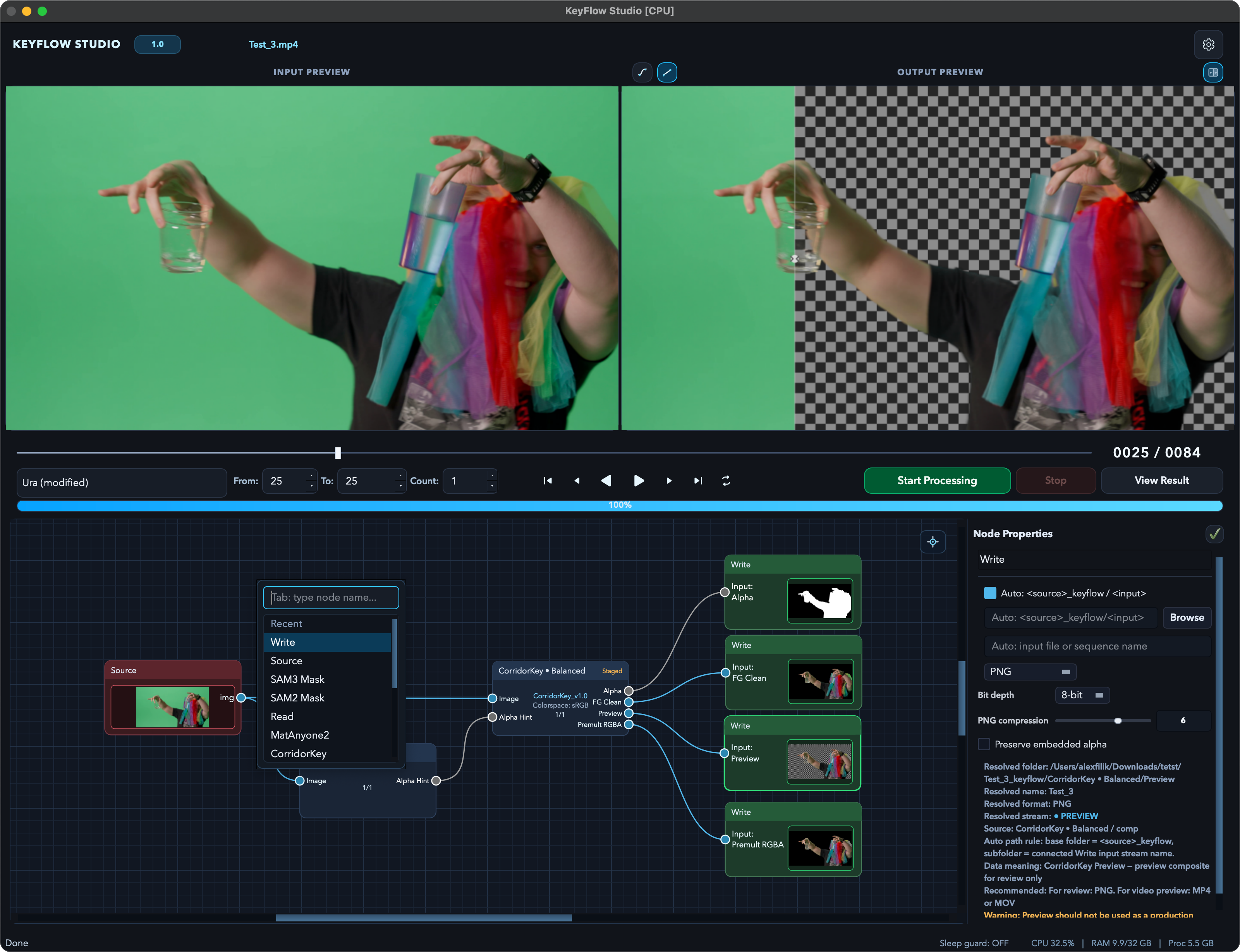
KeyFlow Studio combines input/output preview, frame controls, node graph editing, and per-node output settings in one workspace for keying and compositing workflows.
Core requirements:
PATH.Acceleration options:
Current validation has been done in two practical environments:
The Intel macOS path uses compatibility pins and small integration patches where newer upstream packages no longer support older architecture constraints cleanly. In particular, the project pins older PyTorch/torchvision on darwin x86_64, keeps numpy<2 there, constrains GVM-related diffusers, and includes helper patches/workarounds for model packages that assume newer Linux/CUDA-oriented stacks. See docs/installation.md and docs/models.md before treating this as a universal production support matrix.
git clone https://github.com/hockeytek/KeyFlowStudio.git
cd KeyFlowStudio

python3 -m venv .venv
source .venv/bin/activate
pip install --upgrade pip
pip install -r requirements.txt

python main.py
On macOS, install FFmpeg with Homebrew if needed:
brew install ffmpeg
A macOS Intel public-preview bundle is available on the GitHub releases page. The app is ad-hoc signed and not notarized, so macOS Gatekeeper may require an explicit Open action on first launch.
The release bundle includes the application code and default graph templates. It does not include third-party model weights or checkpoints.
Model weights are intentionally not stored in this repository. KeyFlow Studio resolves supported weights at runtime through the configured model cache or through model-specific setup steps.
KeyFlow Studio checks the configured model cache at runtime and downloads supported weights automatically when they are available from the configured upstream source. Models that require manual license acceptance, private tokens, or external setup should be configured through their model-specific instructions.
Typical local model locations are managed by the application settings or by KEYFLOW_MODELS_DIR. See docs/models.md for details.
KeyFlow Studio is an orchestration UI/runtime around several third-party model projects. Those projects and their authors retain their own copyrights, licenses, model terms, checkpoints, and trademarks. This repository does not claim ownership of the upstream models or weights.
Integrated or supported workflows include CorridorKey by nikopueringer, BiRefNet by ZhengPeng7, GVM by geyongtao, MatAnyone2 by pq-yang, and Meta/Facebook Research SAM-family models where installed by the user. See docs/models.md for links and attribution details.
The repository includes an optional EC2 worker under ec2_worker/ for headless GPU inference. This is useful when local hardware is not strong enough for final production-sized tests.
Start with docs/cloud-gpu.md before launching cloud resources. Use AWS profiles, instance roles, or environment-specific secret storage for credentials.
KeyFlowStudio/
├── main.py                     # Qt application entry point
├── app/
│   ├── coordinators/           # Runtime and UI orchestration
│   ├── node_graph/             # Node specs, rules, engine, panels
│   ├── services/               # Model services and inference backends
│   ├── workers/                # Background execution workers
│   └── utils/                  # Media, device, FFmpeg, write helpers
├── docs/                       # Architecture, setup, and workflow docs
├── ec2_worker/                 # Optional cloud GPU worker
├── scripts/                    # Local validation and helper scripts
├── tests/                      # Unit, smoke, and integration tests
└── UI/                         # Qt UI resources
Run a focused smoke test:
pytest tests/test_node_graph_dialog_smoke.py -q
Run the P1 regression script:
./run_p1.sh
Optional device override:
./run_p1.sh --device cpu
./run_p1.sh --device mps
./run_p1.sh --device auto
Please report security issues through a private channel rather than public issues. See SECURITY.md for reporting and handling guidance.
This repository is source-available with all rights reserved. See LICENSE. Third-party model projects retain their own licenses and usage terms.
Node-based AI video keying, matting, mask generation, and compositing desktop app.
Python
0
40 commits
updated May 13, 2026
KeyFlow Studio is a desktop application for node-based AI video keying, matting, mask generation, and compositing workflows. It combines a Qt user interface with a graph runtime that can orchestrate models and services such as CorridorKey, SAM, BiRefNet, GVM, and MatAnyone2.
This public preview is intended for testing, source review, and collaboration around the current KeyFlow Studio workflow. The application is usable, but model integrations, packaging, and node contracts are still evolving.
KeyFlow Studio is under active development. APIs, node contracts, model integration details, and packaging behavior may change while the project is being stabilized.
Recommended current use:
Not yet recommended:
KeyFlow Studio combines input/output preview, frame controls, node graph editing, and per-node output settings in one workspace for keying and compositing workflows.
Core requirements:
PATH.Acceleration options:
Current validation has been done in two practical environments:
The Intel macOS path uses compatibility pins and small integration patches where newer upstream packages no longer support older architecture constraints cleanly. In particular, the project pins older PyTorch/torchvision on darwin x86_64, keeps numpy<2 there, constrains GVM-related diffusers, and includes helper patches/workarounds for model packages that assume newer Linux/CUDA-oriented stacks. See docs/installation.md and docs/models.md before treating this as a universal production support matrix.
git clone https://github.com/hockeytek/KeyFlowStudio.git
cd KeyFlowStudio

python3 -m venv .venv
source .venv/bin/activate
pip install --upgrade pip
pip install -r requirements.txt

python main.py
On macOS, install FFmpeg with Homebrew if needed:
brew install ffmpeg
A macOS Intel public-preview bundle is available on the GitHub releases page. The app is ad-hoc signed and not notarized, so macOS Gatekeeper may require an explicit Open action on first launch.
The release bundle includes the application code and default graph templates. It does not include third-party model weights or checkpoints.
Model weights are intentionally not stored in this repository. KeyFlow Studio resolves supported weights at runtime through the configured model cache or through model-specific setup steps.
KeyFlow Studio checks the configured model cache at runtime and downloads supported weights automatically when they are available from the configured upstream source. Models that require manual license acceptance, private tokens, or external setup should be configured through their model-specific instructions.
Typical local model locations are managed by the application settings or by KEYFLOW_MODELS_DIR. See docs/models.md for details.
KeyFlow Studio is an orchestration UI/runtime around several third-party model projects. Those projects and their authors retain their own copyrights, licenses, model terms, checkpoints, and trademarks. This repository does not claim ownership of the upstream models or weights.
Integrated or supported workflows include CorridorKey by nikopueringer, BiRefNet by ZhengPeng7, GVM by geyongtao, MatAnyone2 by pq-yang, and Meta/Facebook Research SAM-family models where installed by the user. See docs/models.md for links and attribution details.
The repository includes an optional EC2 worker under ec2_worker/ for headless GPU inference. This is useful when local hardware is not strong enough for final production-sized tests.
Start with docs/cloud-gpu.md before launching cloud resources. Use AWS profiles, instance roles, or environment-specific secret storage for credentials.
KeyFlowStudio/
├── main.py                     # Qt application entry point
├── app/
│   ├── coordinators/           # Runtime and UI orchestration
│   ├── node_graph/             # Node specs, rules, engine, panels
│   ├── services/               # Model services and inference backends
│   ├── workers/                # Background execution workers
│   └── utils/                  # Media, device, FFmpeg, write helpers
├── docs/                       # Architecture, setup, and workflow docs
├── ec2_worker/                 # Optional cloud GPU worker
├── scripts/                    # Local validation and helper scripts
├── tests/                      # Unit, smoke, and integration tests
└── UI/                         # Qt UI resources
Run a focused smoke test:
pytest tests/test_node_graph_dialog_smoke.py -q
Run the P1 regression script:
./run_p1.sh
Optional device override:
./run_p1.sh --device cpu
./run_p1.sh --device mps
./run_p1.sh --device auto
Please report security issues through a private channel rather than public issues. See SECURITY.md for reporting and handling guidance.
This repository is source-available with all rights reserved. See LICENSE. Third-party model projects retain their own licenses and usage terms.



