NVIDIA AI Hub — One-click AI app launcher for NVIDIA DGX GPU. Install, run, and manage GPU-accelerated AI apps from a modern web UI.
JavaScript
8
166 commits
updated Aug 15, 2026













Quick links: Overview · Installation · Production deployment · Local development · Planning · Contributing · Security · Community · Licensing
Your AI app store for NVIDIA GPU platforms. Browse, install, and launch AI apps with one click.
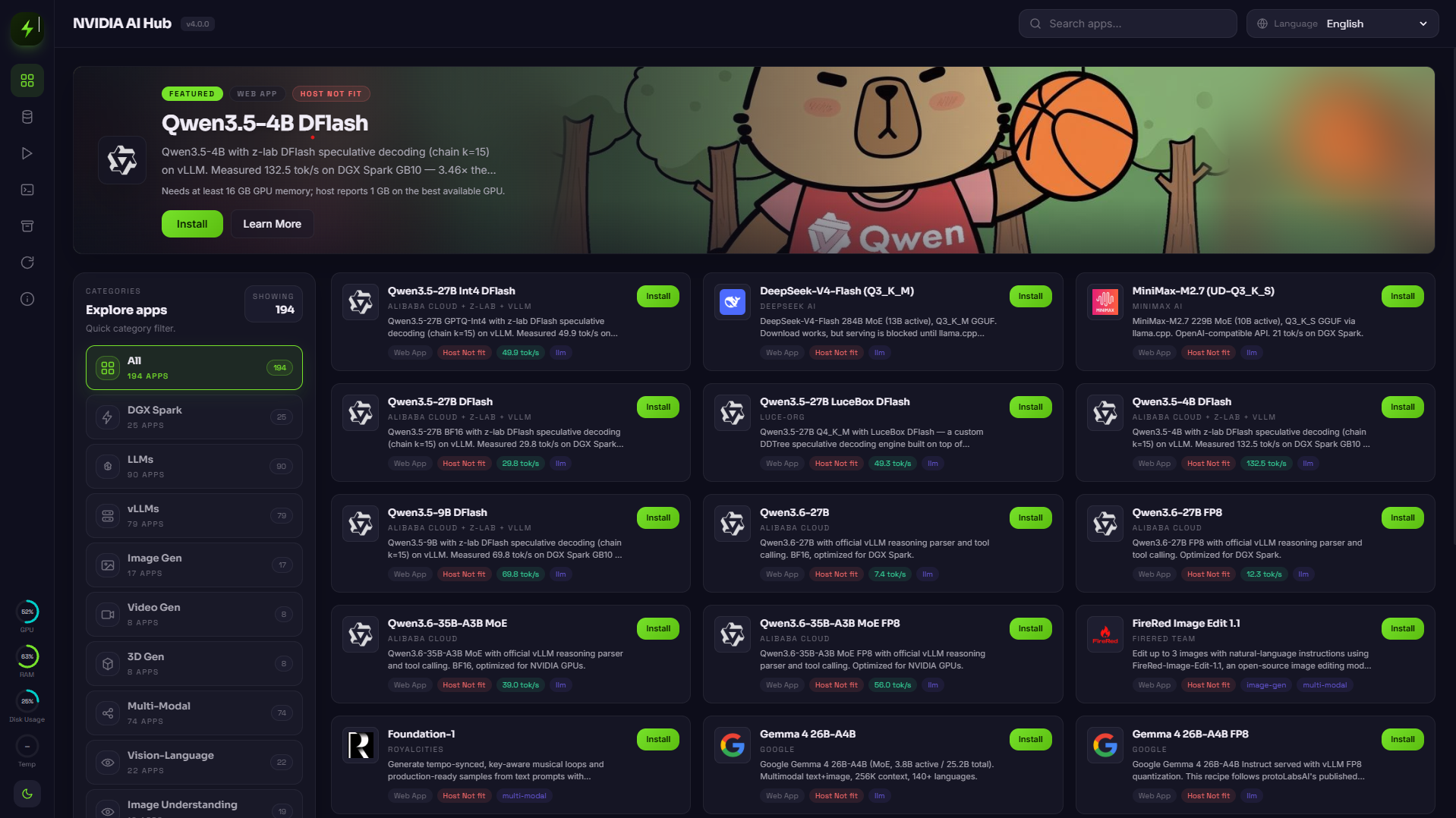
NVIDIA AI Hub by Pho Tue SoftWare Solutions JSC provides a web UI and API for managing curated AI application recipes across NVIDIA GPU workstations, servers, and DGX-class systems.
The project includes:
FastAPI backend for recipe, system, and container managementReact + Vite frontend served as static files by the backendElectron desktop shell for packaged Windows, macOS, and Linux buildsregistry/recipesFor a complete local dev workflow (backend + frontend), production build validation, and white-page troubleshooting, see docs/local-development.md.
The repository now includes optional Electron packaging assets under frontend/electron/.
Desktop packaging currently follows this model:
127.0.0.1electron-builderFrontend desktop commands:
npm run desktop:devnpm run desktop:packnpm run desktop:distThese commands are run from frontend/ and require local Python plus repository backend dependencies to package successfully.
Desktop packaging notes:
frontend/public/brand/spark-ai-hub-mark.svg during desktop packagingfrontend/release/ before packaging to avoid stale locked output directories on Windowsnpm install in frontend/ now re-checks and repairs an incomplete Electron binary install automaticallyCSC_LINK and CSC_KEY_PASSWORDCSC_NAME, APPLE_ID, APPLE_APP_SPECIFIC_PASSWORD, and APPLE_TEAM_ID504 during npm run desktop:dist; retrying the build is the expected first mitigationFor Linux deployment, Windows and macOS setup boundaries, Docker and NVIDIA runtime prerequisites, and optional PM2 process management, see docs/installation.md.
For repository automation, release packaging, and installer builds, see docs/github-actions.md.
For production-style Linux service management, reverse proxy setup, TLS, and network exposure guidance, see docs/deployment-production.md.
For tracked deployment example files, see deploy/systemd/[email protected], deploy/nginx/nvidia-ai-hub.conf, deploy/caddy/Caddyfile, and deploy/pm2/ecosystem.config.cjs.
See CONTRIBUTING.md for contribution workflow, development setup, recipe guidance, and pull request expectations.
SECURITY.mdCODE_OF_CONDUCT.mdCONTRIBUTING.mdSECURITY.mdCODE_OF_CONDUCT.mdSUPPORT.mddocs/community.mddocs/github-actions.mddocs/maintenance.mddocs/pull-request-process.mddocs/licensing.mdCOMMERCIAL-LICENSE.mdFor repository automation, governance maintenance, and review routing, use:
docs/github-actions.mddocs/maintenance.mddocs/pull-request-process.mdThe repository keeps product direction, implementation sequencing, and catalog growth planning in tracked planning documents.
planning/sparkdeck-project-blueprint.mdplanning/development-execution-plan.mdplanning/registry-expansion-roadmap.mdUse these documents together:
sparkdeck-project-blueprint.md defines the long-range product model and feature architecturedevelopment-execution-plan.md converts that model into bounded implementation workstreams and phasesregistry-expansion-roadmap.md governs recipe expansion batches, banner coverage, and category balanceWhen product scope, legal positioning, or rollout priorities change, keep the planning files synchronized with README.md, docs/community.md, and the relevant governance documents.
NVIDIA AI Hub by Pho Tue SoftWare Solutions JSC is a software solution developed and distributed by Pho Tue SoftWare And Technology Solutions Joint Stock Company (including the HiTechCloud brand).
Company information:
0318222903557339920128 Binh My Street, Binh My Commune, Ho Chi Minh CityNVIDIA AI Hub by Pho Tue SoftWare Solutions JSC, related repository branding, and associated product presentation in this repository are proprietary identifiers used for this solution.
NVIDIA, the NVIDIA logo, DGX, CUDA, and other NVIDIA product or program names are trademarks and/or registered trademarks of NVIDIA Corporation and its affiliates in the United States and other countries.
Any reference to NVIDIA hardware, software, platforms, runtimes, or ecosystem technologies in this repository is provided solely to describe compatibility, deployment requirements, or integration context.
No statement in this repository should be interpreted as:
The short product name NVIDIA AI Hub and the detailed product name NVIDIA AI Hub by Pho Tue SoftWare Solutions JSC both refer to the same software solution described in this repository.
All other trade names, trademarks, service marks, logos, and brand features mentioned in this repository remain the property of their respective owners.
For controlling legal terms, review LICENSE, NOTICE, COMMERCIAL-LICENSE.md, docs/licensing.md, docs/legal-notice.md, and the Vietnamese reference notice docs/legal-vi.md.
curl -fsSL https://raw.githubusercontent.com/hitechcloud-vietnam/nvidia-ai-hub/main/install.sh | bash
Install without starting the server:
curl -fsSL https://raw.githubusercontent.com/hitechcloud-vietnam/nvidia-ai-hub/main/install.sh | bash -s -- --no-start
Install on a custom port:
curl -fsSL https://raw.githubusercontent.com/hitechcloud-vietnam/nvidia-ai-hub/main/install.sh | bash -s -- --port 9010
Install on a custom host and port:
curl -fsSL https://raw.githubusercontent.com/hitechcloud-vietnam/nvidia-ai-hub/main/install.sh | bash -s -- --host 127.0.0.1 --port 9010
Use the local development guide for Windows-compatible commands:
For supported platform boundaries and deployment guidance, see docs/installation.md.
After installation, open:
http://localhost:9000http://<your-host-ip>:9000 from another device on the same networkRun the same command again to update.
The installer is designed to provision both backend and frontend automatically.
It will:
git if missingpython3, python3-venv, and pip if missingnvidia-ai-hub repository in $HOME/nvidia-ai-hub.venvrequirements.txtfrontend/package.jsonfrontend/dist.env from .env.example when neededNVIDIA_AI_HUB_HOST and NVIDIA_AI_HUB_PORT in the root .env./run.sh using the configured host and portBecause the backend serves the built frontend from frontend/dist, the UI is available immediately after install.
If --no-start or -NoStart is used, the installer completes all setup steps but skips launching the API server.
If --port, --host, -Port, or -Host is used during install, the chosen values are written into the shared root .env file.
run.sh also supports --host and --port for one-off overrides and will otherwise read the persisted values from .env.
| App | What it does | GPU |
|---|---|---|
| Open WebUI + Ollama | Chat with local LLMs | Yes |
| vLLM (Qwen 3.5) | High-performance LLM inference (8 model sizes) | Yes |
| ComfyUI | Image & video generation workflows | Yes |
| FaceFusion | Face swap & enhancement | Yes |
| Hunyuan3D 2.1 | Image to 3D model generation | Yes |
| TRELLIS 2 | Text/image to 3D generation | Yes |
| LocalAI | OpenAI-compatible API server | Yes |
| AnythingLLM | RAG & AI agents | No |
| Flowise | Drag-and-drop LLM workflows | No |
| Langflow | Visual LLM app builder | No |
Apps are delivered as Docker-based workloads with NVIDIA runtime integration. Architecture and GPU requirements vary by recipe.
apt-getsudo for package installationRun the installer again:
curl -fsSL https://raw.githubusercontent.com/hitechcloud-vietnam/nvidia-ai-hub/main/install.sh | bash
If the repository is already available locally:
./run.sh
Before starting, you can validate the machine state with:
./check.sh
run.sh now checks whether frontend/dist is missing or outdated. If needed, it rebuilds the UI automatically before starting the backend.
You can also start on a custom port for a single run:
./run.sh --port 9010
You can also override host and port for a single run:
./run.sh --host 127.0.0.1 --port 9010
If .env is present, run.sh uses NVIDIA_AI_HUB_HOST and NVIDIA_AI_HUB_PORT as defaults.
If the frontend must be rebuilt, ensure the machine has:
node >= 22npmhttp://localhost:9000http://localhost:9000Local development on Windows is supported through standard Python and npm commands. Use docs/local-development.md for setup and run instructions.
Windows is documented as a development environment rather than the primary local GPU deployment target. See docs/installation.md for platform boundaries.
The repository now includes a shared root .env local file format, with .env.example checked in as the template, used by:
daemon/config.pyinstall.shrun.shcheck.shDefault values include:
NVIDIA_AI_HUB_HOSTNVIDIA_AI_HUB_PORTNVIDIA_AI_HUB_NODE_MAJORNVIDIA_AI_HUB_REGISTRY_PATHNVIDIA_AI_HUB_DATA_DIRNVIDIA_AI_HUB_DB_PATHTo create a local configuration manually:
cp .env.example .env
or in PowerShell:
Copy-Item .env.example .env
install.sh creates .env from .env.example automatically when needed.
Update .env if you want to keep a custom default host, port, or path layout across runs.
This usually means the frontend build was not generated. Re-run the installer so it rebuilds frontend/dist.
You can also run ./check.sh to confirm whether the frontend bundle is missing or stale.
The installer adds the current user to the docker group. Log out and log back in, or run:
newgrp docker
python3 -m venv .venv failsEnsure python3-venv is installed. The installer attempts to install it automatically.
The installer installs Node.js 22.x when the detected version is too old. Re-run the installer if the system Node version changed unexpectedly.
run.sh exits with a frontend build requirement messageThis means the checked-in or generated UI bundle is missing or stale, and the current machine does not have a compatible Node.js toolchain. Run install.sh to provision Node.js and rebuild the frontend.
check.sh reports Docker daemon is not reachableStart Docker Desktop or the Docker service, then re-run ./check.sh. NVIDIA AI Hub by Pho Tue SoftWare Solutions JSC can start without Docker only in a limited UI/API state.
Install Git, Python 3.11+, Node.js 22+, and Docker Desktop manually, then follow docs/local-development.md.
curl -fsSL https://raw.githubusercontent.com/hitechcloud-vietnam/nvidia-ai-hub/main/uninstall.sh | bash
Preserve local runtime data during uninstall:
./uninstall.sh --keep-data
The uninstaller now removes, in order:
.venv and data/frontend/node_modules and frontend/dist.env files__pycache__It does not uninstall Docker itself.
For repository contribution standards and templates, see CONTRIBUTING.md.
This repository is licensed for strictly non-commercial use under the terms of LICENSE.
Copyright (c) 2026 HiTechCloud by Pho Tue SoftWare Solutions JSC.
Commercial use, client delivery, paid services, SaaS distribution, marketplace redistribution, and other revenue-generating usage require separate written permission from the copyright holder. See COMMERCIAL-LICENSE.md and docs/licensing.md.
NVIDIA AI Hub — One-click AI app launcher for NVIDIA DGX GPU. Install, run, and manage GPU-accelerated AI apps from a modern web UI.
JavaScript
8
166 commits
updated Aug 15, 2026
Quick links: Overview · Installation · Production deployment · Local development · Planning · Contributing · Security · Community · Licensing
Your AI app store for NVIDIA GPU platforms. Browse, install, and launch AI apps with one click.
NVIDIA AI Hub by Pho Tue SoftWare Solutions JSC provides a web UI and API for managing curated AI application recipes across NVIDIA GPU workstations, servers, and DGX-class systems.
The project includes:
FastAPI backend for recipe, system, and container managementReact + Vite frontend served as static files by the backendElectron desktop shell for packaged Windows, macOS, and Linux buildsregistry/recipesFor a complete local dev workflow (backend + frontend), production build validation, and white-page troubleshooting, see docs/local-development.md.
The repository now includes optional Electron packaging assets under frontend/electron/.
Desktop packaging currently follows this model:
127.0.0.1electron-builderFrontend desktop commands:
npm run desktop:devnpm run desktop:packnpm run desktop:distThese commands are run from frontend/ and require local Python plus repository backend dependencies to package successfully.
Desktop packaging notes:
frontend/public/brand/spark-ai-hub-mark.svg during desktop packagingfrontend/release/ before packaging to avoid stale locked output directories on Windowsnpm install in frontend/ now re-checks and repairs an incomplete Electron binary install automaticallyCSC_LINK and CSC_KEY_PASSWORDCSC_NAME, APPLE_ID, APPLE_APP_SPECIFIC_PASSWORD, and APPLE_TEAM_ID504 during npm run desktop:dist; retrying the build is the expected first mitigationFor Linux deployment, Windows and macOS setup boundaries, Docker and NVIDIA runtime prerequisites, and optional PM2 process management, see docs/installation.md.
For repository automation, release packaging, and installer builds, see docs/github-actions.md.
For production-style Linux service management, reverse proxy setup, TLS, and network exposure guidance, see docs/deployment-production.md.
For tracked deployment example files, see deploy/systemd/[email protected], deploy/nginx/nvidia-ai-hub.conf, deploy/caddy/Caddyfile, and deploy/pm2/ecosystem.config.cjs.
See CONTRIBUTING.md for contribution workflow, development setup, recipe guidance, and pull request expectations.
SECURITY.mdCODE_OF_CONDUCT.mdCONTRIBUTING.mdSECURITY.mdCODE_OF_CONDUCT.mdSUPPORT.mddocs/community.mddocs/github-actions.mddocs/maintenance.mddocs/pull-request-process.mddocs/licensing.mdCOMMERCIAL-LICENSE.mdFor repository automation, governance maintenance, and review routing, use:
docs/github-actions.mddocs/maintenance.mddocs/pull-request-process.mdThe repository keeps product direction, implementation sequencing, and catalog growth planning in tracked planning documents.
planning/sparkdeck-project-blueprint.mdplanning/development-execution-plan.mdplanning/registry-expansion-roadmap.mdUse these documents together:
sparkdeck-project-blueprint.md defines the long-range product model and feature architecturedevelopment-execution-plan.md converts that model into bounded implementation workstreams and phasesregistry-expansion-roadmap.md governs recipe expansion batches, banner coverage, and category balanceWhen product scope, legal positioning, or rollout priorities change, keep the planning files synchronized with README.md, docs/community.md, and the relevant governance documents.
NVIDIA AI Hub by Pho Tue SoftWare Solutions JSC is a software solution developed and distributed by Pho Tue SoftWare And Technology Solutions Joint Stock Company (including the HiTechCloud brand).
Company information:
0318222903557339920128 Binh My Street, Binh My Commune, Ho Chi Minh CityNVIDIA AI Hub by Pho Tue SoftWare Solutions JSC, related repository branding, and associated product presentation in this repository are proprietary identifiers used for this solution.
NVIDIA, the NVIDIA logo, DGX, CUDA, and other NVIDIA product or program names are trademarks and/or registered trademarks of NVIDIA Corporation and its affiliates in the United States and other countries.
Any reference to NVIDIA hardware, software, platforms, runtimes, or ecosystem technologies in this repository is provided solely to describe compatibility, deployment requirements, or integration context.
No statement in this repository should be interpreted as:
The short product name NVIDIA AI Hub and the detailed product name NVIDIA AI Hub by Pho Tue SoftWare Solutions JSC both refer to the same software solution described in this repository.
All other trade names, trademarks, service marks, logos, and brand features mentioned in this repository remain the property of their respective owners.
For controlling legal terms, review LICENSE, NOTICE, COMMERCIAL-LICENSE.md, docs/licensing.md, docs/legal-notice.md, and the Vietnamese reference notice docs/legal-vi.md.
curl -fsSL https://raw.githubusercontent.com/hitechcloud-vietnam/nvidia-ai-hub/main/install.sh | bash
Install without starting the server:
curl -fsSL https://raw.githubusercontent.com/hitechcloud-vietnam/nvidia-ai-hub/main/install.sh | bash -s -- --no-start
Install on a custom port:
curl -fsSL https://raw.githubusercontent.com/hitechcloud-vietnam/nvidia-ai-hub/main/install.sh | bash -s -- --port 9010
Install on a custom host and port:
curl -fsSL https://raw.githubusercontent.com/hitechcloud-vietnam/nvidia-ai-hub/main/install.sh | bash -s -- --host 127.0.0.1 --port 9010
Use the local development guide for Windows-compatible commands:
For supported platform boundaries and deployment guidance, see docs/installation.md.
After installation, open:
http://localhost:9000http://<your-host-ip>:9000 from another device on the same networkRun the same command again to update.
The installer is designed to provision both backend and frontend automatically.
It will:
git if missingpython3, python3-venv, and pip if missingnvidia-ai-hub repository in $HOME/nvidia-ai-hub.venvrequirements.txtfrontend/package.jsonfrontend/dist.env from .env.example when neededNVIDIA_AI_HUB_HOST and NVIDIA_AI_HUB_PORT in the root .env./run.sh using the configured host and portBecause the backend serves the built frontend from frontend/dist, the UI is available immediately after install.
If --no-start or -NoStart is used, the installer completes all setup steps but skips launching the API server.
If --port, --host, -Port, or -Host is used during install, the chosen values are written into the shared root .env file.
run.sh also supports --host and --port for one-off overrides and will otherwise read the persisted values from .env.
| App | What it does | GPU |
|---|---|---|
| Open WebUI + Ollama | Chat with local LLMs | Yes |
| vLLM (Qwen 3.5) | High-performance LLM inference (8 model sizes) | Yes |
| ComfyUI | Image & video generation workflows | Yes |
| FaceFusion | Face swap & enhancement | Yes |
| Hunyuan3D 2.1 | Image to 3D model generation | Yes |
| TRELLIS 2 | Text/image to 3D generation | Yes |
| LocalAI | OpenAI-compatible API server | Yes |
| AnythingLLM | RAG & AI agents | No |
| Flowise | Drag-and-drop LLM workflows | No |
| Langflow | Visual LLM app builder | No |
Apps are delivered as Docker-based workloads with NVIDIA runtime integration. Architecture and GPU requirements vary by recipe.
apt-getsudo for package installationRun the installer again:
curl -fsSL https://raw.githubusercontent.com/hitechcloud-vietnam/nvidia-ai-hub/main/install.sh | bash
If the repository is already available locally:
./run.sh
Before starting, you can validate the machine state with:
./check.sh
run.sh now checks whether frontend/dist is missing or outdated. If needed, it rebuilds the UI automatically before starting the backend.
You can also start on a custom port for a single run:
./run.sh --port 9010
You can also override host and port for a single run:
./run.sh --host 127.0.0.1 --port 9010
If .env is present, run.sh uses NVIDIA_AI_HUB_HOST and NVIDIA_AI_HUB_PORT as defaults.
If the frontend must be rebuilt, ensure the machine has:
node >= 22npmhttp://localhost:9000http://localhost:9000Local development on Windows is supported through standard Python and npm commands. Use docs/local-development.md for setup and run instructions.
Windows is documented as a development environment rather than the primary local GPU deployment target. See docs/installation.md for platform boundaries.
The repository now includes a shared root .env local file format, with .env.example checked in as the template, used by:
daemon/config.pyinstall.shrun.shcheck.shDefault values include:
NVIDIA_AI_HUB_HOSTNVIDIA_AI_HUB_PORTNVIDIA_AI_HUB_NODE_MAJORNVIDIA_AI_HUB_REGISTRY_PATHNVIDIA_AI_HUB_DATA_DIRNVIDIA_AI_HUB_DB_PATHTo create a local configuration manually:
cp .env.example .env
or in PowerShell:
Copy-Item .env.example .env
install.sh creates .env from .env.example automatically when needed.
Update .env if you want to keep a custom default host, port, or path layout across runs.
This usually means the frontend build was not generated. Re-run the installer so it rebuilds frontend/dist.
You can also run ./check.sh to confirm whether the frontend bundle is missing or stale.
The installer adds the current user to the docker group. Log out and log back in, or run:
newgrp docker
python3 -m venv .venv failsEnsure python3-venv is installed. The installer attempts to install it automatically.
The installer installs Node.js 22.x when the detected version is too old. Re-run the installer if the system Node version changed unexpectedly.
run.sh exits with a frontend build requirement messageThis means the checked-in or generated UI bundle is missing or stale, and the current machine does not have a compatible Node.js toolchain. Run install.sh to provision Node.js and rebuild the frontend.
check.sh reports Docker daemon is not reachableStart Docker Desktop or the Docker service, then re-run ./check.sh. NVIDIA AI Hub by Pho Tue SoftWare Solutions JSC can start without Docker only in a limited UI/API state.
Install Git, Python 3.11+, Node.js 22+, and Docker Desktop manually, then follow docs/local-development.md.
curl -fsSL https://raw.githubusercontent.com/hitechcloud-vietnam/nvidia-ai-hub/main/uninstall.sh | bash
Preserve local runtime data during uninstall:
./uninstall.sh --keep-data
The uninstaller now removes, in order:
.venv and data/frontend/node_modules and frontend/dist.env files__pycache__It does not uninstall Docker itself.
For repository contribution standards and templates, see CONTRIBUTING.md.
This repository is licensed for strictly non-commercial use under the terms of LICENSE.
Copyright (c) 2026 HiTechCloud by Pho Tue SoftWare Solutions JSC.
Commercial use, client delivery, paid services, SaaS distribution, marketplace redistribution, and other revenue-generating usage require separate written permission from the copyright holder. See COMMERCIAL-LICENSE.md and docs/licensing.md.





