An open-source bike computer with GPS and ANT+ capabilities, based on the Raspberry Pi Zero (W, WH, 2 W) or the Compute Module Zero (CM0). It also includes offline maps and navigation.
See the code
An open-source bike computer with GPS and ANT+ capabilities, based on the Raspberry Pi Zero (W, WH, 2 W) or the Compute Module Zero.
https://github.com/hishizuka/pizero_bikecomputer
install.sh can install the MIP driver and the optional DMA-BUF presenter for PyQt GPU maps. See the display setup guide and GPU map presenter guide.

/bin/bash -c "$(curl -fsSL https://raw.githubusercontent.com/hishizuka/pizero_bikecomputer/refs/heads/master/install.sh)"
Pi Zero Bikecomputer is a GPS and ANT+ bike computer based on Raspberry Pi Zero (W, WH, 2 W). This is the first DIY project in the world integrating the necessary hardware and software for a modern bike computer. It measures and records position (GPS), ANT+ sensors (speed / cadence / power), and I2C sensors (pressure / temperature / accelerometer, etc.). It also displays these values, maps, and courses in real time. In addition, it writes logs to .fit format files.
In this project, Pi Zero Bikecomputer has already got the basic functions needed for a bike computer. The next target is to add new functions that existing products do not have!
You will enjoy both cycling and the maker movement with Pi Zero Bikecomputer!
Here are detailed articles in Japanese. The original Japanese titles are kept below, with English translations for reference.
Daily updates are posted on X (@pi0bikecomputer), and my riding activities are on STRAVA.


Easy to make
apt-get install, pip and git command.Customization
Easy to develop
Good balance between battery life and performance
Some functions depend on your parts.
| Specs | Support | Detail |
|---|---|---|
| Logging | Yes | See below. |
| Sensors | Yes | ANT+ sensors and I2C sensors. See below. |
| Maps and navigations | Yes | A GPS module or the Android app GadgetBridge is required. See below. |
| Displays, controls and power | Yes | Multiple displays, hardware buttons, remote controls, and battery modules are supported. See below. |
| GUI | Yes | PyQt is the primary GUI. Kivy and headless modes are also available. |
| Wifi & Bluetooth | Yes | Using built-in modules. |
| Smartphone connections | Yes | Android only. GadgetBridge integration and route sharing from Google Maps via Bluetooth. |
| Battery life(Reference) | 18h | with 3100mAh mobile battery(Garmin Charge Power Pack) and MIP Reflective color LCD. |
| Specs | Support | Detail |
|---|---|---|
| Stopwatch | Yes | Timer, Lap, Lap timer |
| Average value | Yes | [Total, Lap ave, Pre lap ave] x [HR, Speed, Cadence, Power], [3s, 30s, 60s] x [HR, Power] |
| Cumulative value | Yes | [Total, Lap, Pre lap] x [Distance, Works, Ascent, Descent] |
| Gross | Yes | Elapsed time, gross average speed(=distance/elapsed time), gained time from average speed 15km/h(for brevet) |
| Auto stop | Yes | Automatic stop at speeds below 4km/h(configurable), or in the state of the acceleration sensor when calculating the speed by GPS alone |
| Recording insterval | 1s | Smart recording is not supported. |
| Resume | Yes | Recording continues even if the power is suddenly turned off and restored. |
| Output .fit log file | Yes | The standard format used by famous services as Strava and Garmin Connect. Also .csv format output is supported. |
| Upload | Yes | Strava, Garmin and Ride with GPS. |
| Live Track | Yes | Track data can be uploaded in real time to ThingsBoard or Garmin LiveTrack. |
The repository provides one responsive
Pizero Bikecomputer dashboard for both
desktop and mobile screens. It shows the recorded track, loaded course, current
cycling values, heart-rate/power history, and a ThingsBoard Live message
composer placed between the history chart and current-value widgets. The
supporting widget bundle and standalone notification rule chain are stored in
the same dashboards/ directory. The notification chain is
called from the tenant's existing root rule chain; it does not replace it.
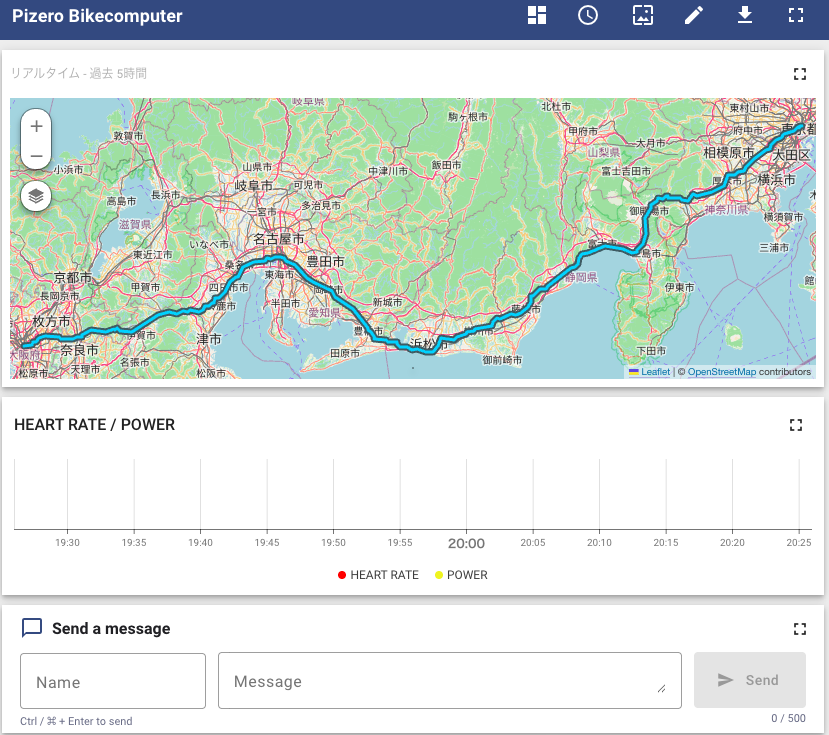
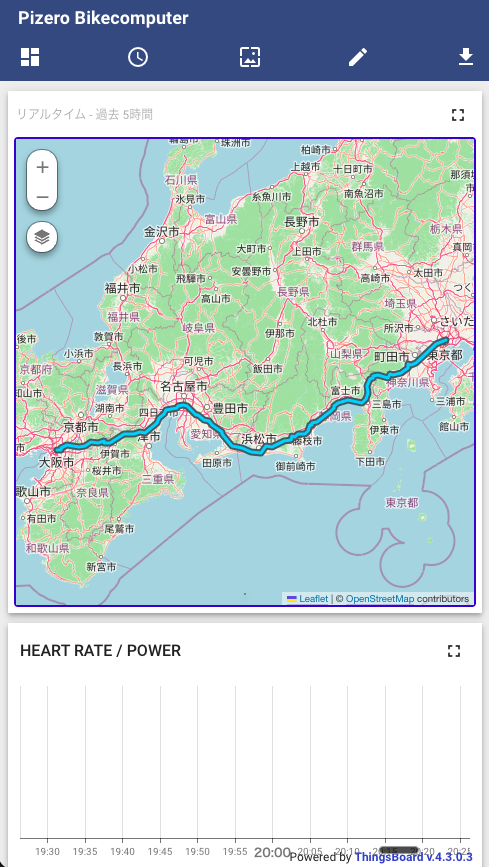
See ThingsBoard setup for the layout, data format, import, device connection, and notification setup instructions.
USB dongle is required if using ANT+ sensors.
| Specs | Support | Detail |
|---|---|---|
| ANT+ Heartrate sensor | Yes | |
| ANT+ Speed sensor | Yes | |
| ANT+ Cadence sensor | Yes | |
| ANT+ Speed&Cadence sensor | Yes | |
| ANT+ Powermeter | Yes | Calibration is not supported. |
| ANT+ Light | Yes | Bontrager Flare RT only. |
| ANT+ Control | Yes | Garmin Edge Remote only. |
| ANT+ Environment | Yes | Garmin tempe (temperature sensor) |
| BLE Heart Rate sensor | Partial | Bluetooth HRS 8/16-bit heart rate and RR intervals are supported. |
| BLE Speed / Cadence sensor | Partial | Bluetooth CSCS wheel and CSCS/CPS crank revolution data are supported. |
| BLE Power sensor | Partial | Bluetooth CPS instantaneous power and recording work are supported. Calibration is not supported. |
| BLE peripherals | Partial | Zwift Click V2 remote and Fake Trainer for Zwift are supported. |
| Barometric altimeter | Yes | I2C sensor(pressure, temperature) |
| Accelerometer | Yes | I2C sensor |
| Gyroscope | Yes | I2C sensor |
| Magnetometer | Yes | I2C sensor |
| Light sensor | Yes | I2C sensor. Use for auto backlight and lighting. |
| Specs | Support | Detail |
|---|---|---|
| GPS module | Yes | UART GPS module(via GPSd) and I2C GPS are supported. |
| Positioning from smartphones | Yes | Using the Android app GadgetBridge. |
| Map | Yes | Support raster map tile format like OSM (z/x/y.png or jpg). So, offline map is available with local caches. Also, raster .mbtile format is supported. |
| Course on the map | Yes | Local .tcx and .fit files, cloud courses from Ride with GPS, and routes shared from Google Maps on Android via Bluetooth. |
| Search route | Yes | Google Routes API (Compute Routes) |
| Course profile | Yes | |
| Detect climbs | Yes | Like Garmin ClimbPro. Only climbs on the course, not detect nearby climbs. |
| Cuesheet | Yes | Use course points included in .tcx and .fit course files. |
| Map overlay | Yes | Heatmap (Strava / Ride with GPS), weather (rain / wind), and configurable wind / DEM data sources. |
| DEM / wind data sources | Yes | External DEM tiles and wind data sources can be selected from the menu and settings. |
| Specs | Support | Detail |
|---|---|---|
| MIP reflective color LCD | Yes | JDI 2.7 / 4.4 inch and Azumo 3.4 inch modules are supported. |
| SHARP memory display | Yes | 2.7 / 4.4 inch monochrome MIP modules are supported. |
| TFT LCD | Yes | Pirate Audio, Display HAT Mini, generic ST7789 breakout, and PiTFT are supported. |
| E-paper | Yes | Papirus and DFRobot RPi Display are supported. |
| Touchscreen | Partial | Available on supported TFT displays. |
| Hardware buttons | Yes | Button SHIM, MCP23008 / MCP23009-based IO expanders, and display-attached buttons are supported. |
| Remote control | Yes | Garmin Edge Remote (ANT+) and Zwift Click V2 (BLE) are supported. |
| Battery modules | Partial | PiJuice HAT / Zero and PiSugar3 are supported. |


Strava heatmap.

RainViewer and openportguide are available worldwide.


In Japan, 気象庁降水ナウキャスト(rain) and SCW(wind) are available.

| Specs | Detail | Note |
|---|---|---|
| Basic page(values only) | Yes | |
| Graph | Yes | Altitude and performance(HR, PWR, W prime balance) |
| Customize data pages | Yes | With layout.yaml |
| ANT+ pairing | Yes | |
| Select course | Yes | local .tcx and .fit, Ride with GPS, and Android Google Maps via Bluetooth. |
| Upload activity | Yes | Strava, Garmin and Ride with GPS. |
| Select map | Yes | base maps, overlays, and external data sources |
| Adjust parameter | Yes | wheel size, altitude, CP and W prime balance |
| Network setting | Yes | Toggle Wi-Fi / Bluetooth, BT pairing / tethering, and GadgetBridge-related options. |
| Language localization | Yes | Font and translation file of items are required. |
| No GUI option | Yes | headless mode |
Loading local .fit courses uses the fitparse package included by the
standard installation. Custom installations without it hide .fit courses;
the application and JSON/TCX course loading continue to work.


it displays three of the people around you in the order in which you caught sensors using ANT+ continuous scanning mode.
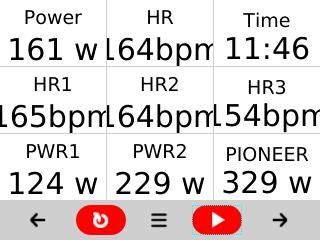
314km ride with GARMIN Edge Explore 2 and Pizero Bikecomputer (strava activity)
| Items | Edge830 | Pi Zero Bikecomputer |
|---|---|---|
| Distance | 313.7 km | 314.3 km |
| Work | 3,889 kJ | 3,926 kJ |
| Moving time | 12:03 | 12:04 |
| Total Ascent | 2,271 m | 1,958 m |
See hardware_installation.md for supported displays, GPS modules, I2C sensors, buttons, batteries, and assembly examples.
rpi-ble-tunnel integration is optional in install.sh. For an existing setup, run bash scripts/install/install-rpi-ble-tunnel.sh /path/to/rpi-ble-tunnel on the Pi using a checkout that includes caller-managed mode. Omitting the path clones it into tmp/ref/rpi-ble-tunnel. The service runs from system-installed files and does not depend on either checkout at runtime.
Open Menu → Connectivity → BLE Tunnel to enable the tunnel or prefer an external nRF52840 adapter. The entry is disabled when rpi-ble-tunnel integration is not installed or Bluetooth is off. Bluetooth power remains under Menu → System → Network → Bluetooth. Settings are saved in [RPI_BLE_TUNNEL] (enabled and use_secondary, both defaulting to False). Exiting the application keeps the tunnel running; disabling it or changing adapters disconnects BLE SSH. See the rpi-ble-tunnel operation guide for standalone service operations.
While the rpi-ble-tunnel Internet connection is active, queued downloads use the same single-download limit as Bluetooth tethering, including when Wi-Fi remains connected.
For a new Raspberry Pi OS Trixie setup, the recommended entry point is:
/bin/bash -c "$(curl -fsSL https://raw.githubusercontent.com/hishizuka/pizero_bikecomputer/refs/heads/master/install.sh)"
For macOS or Linux development, see the manual setup steps in software_installation.md.
Official Pi Zero Bikecomputer hardware is being designed and prototyped for Raspberry Pi Zero-family configurations.
The official hardware design files will be published by this project under the CERN Open Hardware Licence Version 2 - Strongly Reciprocal (CERN-OHL-S-2.0), unless otherwise stated.
Third-party boards are independent projects and are not official, endorsed, or supported by Pi Zero Bikecomputer unless they are explicitly listed in this repository.
The software in this repository is available under the GNU General Public License v3.0.
Official hardware design files, when published by this project, are available under the CERN Open Hardware Licence Version 2 - Strongly Reciprocal (CERN-OHL-S-2.0), unless otherwise stated.
ANT and ANT+ are trademarks of Garmin Canada Inc. Official ANT+ icon files are not included in this repository. Authorized ANT+ Adopters may obtain the icons from the ANT+ Brand Tools package and place them at img/logos/ant_plus_icon_standard.png and img/logos/ant_plus_icon_reverse.png. Their use remains subject to the ANT+ Adopter Agreement and ANT Wireless Brand Guidelines. Without these files, the application displays (ANT+) instead.
The code shown below is ported and modified from Azumo's code under the Apache License 2.0 (third_party/apache/LICENSE.Apache2). See the NOTICE file for details.
Sony CXD56xx GNSS support uses the separately installed rpi-cxd56xx-gnss package (Apache-2.0, including its NuttX-derived portions).
See the installation instructions and the package's NOTICE and THIRD_PARTY.md for details.
This project also includes code adapted from swiftcontrol under the GNU General Public License v3.0. See the NOTICE file for details.
This project also includes code ported and modified from Bosch Sensortec GmbH's code under the BSD 3-Clause License. See the NOTICE file for details.
This project also includes code vendored from hishizuka/crdp, which is based on the original biran0079/crdp project by Ran Bi, under the MIT License. See the NOTICE file for details.
hishizuka (@pi0bikecomputer on X, pizero bikecomputer on STRAVA)
413 followers · starred Jan 2023
89 followers · starred Jun 2025
642 followers · starred Jan 2023
35 followers · starred Dec 2025
An open-source bike computer with GPS and ANT+ capabilities, based on the Raspberry Pi Zero (W, WH, 2 W) or the Compute Module Zero (CM0). It also includes offline maps and navigation.
See the code
An open-source bike computer with GPS and ANT+ capabilities, based on the Raspberry Pi Zero (W, WH, 2 W) or the Compute Module Zero.
https://github.com/hishizuka/pizero_bikecomputer
install.sh can install the MIP driver and the optional DMA-BUF presenter for PyQt GPU maps. See the display setup guide and GPU map presenter guide. /bin/bash -c "$(curl -fsSL https://raw.githubusercontent.com/hishizuka/pizero_bikecomputer/refs/heads/master/install.sh)"
Pi Zero Bikecomputer is a GPS and ANT+ bike computer based on Raspberry Pi Zero (W, WH, 2 W). This is the first DIY project in the world integrating the necessary hardware and software for a modern bike computer. It measures and records position (GPS), ANT+ sensors (speed / cadence / power), and I2C sensors (pressure / temperature / accelerometer, etc.). It also displays these values, maps, and courses in real time. In addition, it writes logs to .fit format files.
In this project, Pi Zero Bikecomputer has already got the basic functions needed for a bike computer. The next target is to add new functions that existing products do not have!
You will enjoy both cycling and the maker movement with Pi Zero Bikecomputer!
Here are detailed articles in Japanese. The original Japanese titles are kept below, with English translations for reference.
Daily updates are posted on X (@pi0bikecomputer), and my riding activities are on STRAVA.
Easy to make
apt-get install, pip and git command.Customization
Easy to develop
Good balance between battery life and performance
Some functions depend on your parts.
| Specs | Support | Detail |
|---|---|---|
| Logging | Yes | See below. |
| Sensors | Yes | ANT+ sensors and I2C sensors. See below. |
| Maps and navigations | Yes | A GPS module or the Android app GadgetBridge is required. See below. |
| Displays, controls and power | Yes | Multiple displays, hardware buttons, remote controls, and battery modules are supported. See below. |
| GUI | Yes | PyQt is the primary GUI. Kivy and headless modes are also available. |
| Wifi & Bluetooth | Yes | Using built-in modules. |
| Smartphone connections | Yes | Android only. GadgetBridge integration and route sharing from Google Maps via Bluetooth. |
| Battery life(Reference) | 18h | with 3100mAh mobile battery(Garmin Charge Power Pack) and MIP Reflective color LCD. |
| Specs | Support | Detail |
|---|---|---|
| Stopwatch | Yes | Timer, Lap, Lap timer |
| Average value | Yes | [Total, Lap ave, Pre lap ave] x [HR, Speed, Cadence, Power], [3s, 30s, 60s] x [HR, Power] |
| Cumulative value | Yes | [Total, Lap, Pre lap] x [Distance, Works, Ascent, Descent] |
| Gross | Yes | Elapsed time, gross average speed(=distance/elapsed time), gained time from average speed 15km/h(for brevet) |
| Auto stop | Yes | Automatic stop at speeds below 4km/h(configurable), or in the state of the acceleration sensor when calculating the speed by GPS alone |
| Recording insterval | 1s | Smart recording is not supported. |
| Resume | Yes | Recording continues even if the power is suddenly turned off and restored. |
| Output .fit log file | Yes | The standard format used by famous services as Strava and Garmin Connect. Also .csv format output is supported. |
| Upload | Yes | Strava, Garmin and Ride with GPS. |
| Live Track | Yes | Track data can be uploaded in real time to ThingsBoard or Garmin LiveTrack. |
The repository provides one responsive
Pizero Bikecomputer dashboard for both
desktop and mobile screens. It shows the recorded track, loaded course, current
cycling values, heart-rate/power history, and a ThingsBoard Live message
composer placed between the history chart and current-value widgets. The
supporting widget bundle and standalone notification rule chain are stored in
the same dashboards/ directory. The notification chain is
called from the tenant's existing root rule chain; it does not replace it.
See ThingsBoard setup for the layout, data format, import, device connection, and notification setup instructions.
USB dongle is required if using ANT+ sensors.
| Specs | Support | Detail |
|---|---|---|
| ANT+ Heartrate sensor | Yes | |
| ANT+ Speed sensor | Yes | |
| ANT+ Cadence sensor | Yes | |
| ANT+ Speed&Cadence sensor | Yes | |
| ANT+ Powermeter | Yes | Calibration is not supported. |
| ANT+ Light | Yes | Bontrager Flare RT only. |
| ANT+ Control | Yes | Garmin Edge Remote only. |
| ANT+ Environment | Yes | Garmin tempe (temperature sensor) |
| BLE Heart Rate sensor | Partial | Bluetooth HRS 8/16-bit heart rate and RR intervals are supported. |
| BLE Speed / Cadence sensor | Partial | Bluetooth CSCS wheel and CSCS/CPS crank revolution data are supported. |
| BLE Power sensor | Partial | Bluetooth CPS instantaneous power and recording work are supported. Calibration is not supported. |
| BLE peripherals | Partial | Zwift Click V2 remote and Fake Trainer for Zwift are supported. |
| Barometric altimeter | Yes | I2C sensor(pressure, temperature) |
| Accelerometer | Yes | I2C sensor |
| Gyroscope | Yes | I2C sensor |
| Magnetometer | Yes | I2C sensor |
| Light sensor | Yes | I2C sensor. Use for auto backlight and lighting. |
| Specs | Support | Detail |
|---|---|---|
| GPS module | Yes | UART GPS module(via GPSd) and I2C GPS are supported. |
| Positioning from smartphones | Yes | Using the Android app GadgetBridge. |
| Map | Yes | Support raster map tile format like OSM (z/x/y.png or jpg). So, offline map is available with local caches. Also, raster .mbtile format is supported. |
| Course on the map | Yes | Local .tcx and .fit files, cloud courses from Ride with GPS, and routes shared from Google Maps on Android via Bluetooth. |
| Search route | Yes | Google Routes API (Compute Routes) |
| Course profile | Yes | |
| Detect climbs | Yes | Like Garmin ClimbPro. Only climbs on the course, not detect nearby climbs. |
| Cuesheet | Yes | Use course points included in .tcx and .fit course files. |
| Map overlay | Yes | Heatmap (Strava / Ride with GPS), weather (rain / wind), and configurable wind / DEM data sources. |
| DEM / wind data sources | Yes | External DEM tiles and wind data sources can be selected from the menu and settings. |
| Specs | Support | Detail |
|---|---|---|
| MIP reflective color LCD | Yes | JDI 2.7 / 4.4 inch and Azumo 3.4 inch modules are supported. |
| SHARP memory display | Yes | 2.7 / 4.4 inch monochrome MIP modules are supported. |
| TFT LCD | Yes | Pirate Audio, Display HAT Mini, generic ST7789 breakout, and PiTFT are supported. |
| E-paper | Yes | Papirus and DFRobot RPi Display are supported. |
| Touchscreen | Partial | Available on supported TFT displays. |
| Hardware buttons | Yes | Button SHIM, MCP23008 / MCP23009-based IO expanders, and display-attached buttons are supported. |
| Remote control | Yes | Garmin Edge Remote (ANT+) and Zwift Click V2 (BLE) are supported. |
| Battery modules | Partial | PiJuice HAT / Zero and PiSugar3 are supported. |
Strava heatmap.
RainViewer and openportguide are available worldwide.
In Japan, 気象庁降水ナウキャスト(rain) and SCW(wind) are available.
| Specs | Detail | Note |
|---|---|---|
| Basic page(values only) | Yes | |
| Graph | Yes | Altitude and performance(HR, PWR, W prime balance) |
| Customize data pages | Yes | With layout.yaml |
| ANT+ pairing | Yes | |
| Select course | Yes | local .tcx and .fit, Ride with GPS, and Android Google Maps via Bluetooth. |
| Upload activity | Yes | Strava, Garmin and Ride with GPS. |
| Select map | Yes | base maps, overlays, and external data sources |
| Adjust parameter | Yes | wheel size, altitude, CP and W prime balance |
| Network setting | Yes | Toggle Wi-Fi / Bluetooth, BT pairing / tethering, and GadgetBridge-related options. |
| Language localization | Yes | Font and translation file of items are required. |
| No GUI option | Yes | headless mode |
Loading local .fit courses uses the fitparse package included by the
standard installation. Custom installations without it hide .fit courses;
the application and JSON/TCX course loading continue to work.
it displays three of the people around you in the order in which you caught sensors using ANT+ continuous scanning mode.
314km ride with GARMIN Edge Explore 2 and Pizero Bikecomputer (strava activity)
| Items | Edge830 | Pi Zero Bikecomputer |
|---|---|---|
| Distance | 313.7 km | 314.3 km |
| Work | 3,889 kJ | 3,926 kJ |
| Moving time | 12:03 | 12:04 |
| Total Ascent | 2,271 m | 1,958 m |
See hardware_installation.md for supported displays, GPS modules, I2C sensors, buttons, batteries, and assembly examples.
rpi-ble-tunnel integration is optional in install.sh. For an existing setup, run bash scripts/install/install-rpi-ble-tunnel.sh /path/to/rpi-ble-tunnel on the Pi using a checkout that includes caller-managed mode. Omitting the path clones it into tmp/ref/rpi-ble-tunnel. The service runs from system-installed files and does not depend on either checkout at runtime.
Open Menu → Connectivity → BLE Tunnel to enable the tunnel or prefer an external nRF52840 adapter. The entry is disabled when rpi-ble-tunnel integration is not installed or Bluetooth is off. Bluetooth power remains under Menu → System → Network → Bluetooth. Settings are saved in [RPI_BLE_TUNNEL] (enabled and use_secondary, both defaulting to False). Exiting the application keeps the tunnel running; disabling it or changing adapters disconnects BLE SSH. See the rpi-ble-tunnel operation guide for standalone service operations.
While the rpi-ble-tunnel Internet connection is active, queued downloads use the same single-download limit as Bluetooth tethering, including when Wi-Fi remains connected.
For a new Raspberry Pi OS Trixie setup, the recommended entry point is:
/bin/bash -c "$(curl -fsSL https://raw.githubusercontent.com/hishizuka/pizero_bikecomputer/refs/heads/master/install.sh)"
For macOS or Linux development, see the manual setup steps in software_installation.md.
Official Pi Zero Bikecomputer hardware is being designed and prototyped for Raspberry Pi Zero-family configurations.
The official hardware design files will be published by this project under the CERN Open Hardware Licence Version 2 - Strongly Reciprocal (CERN-OHL-S-2.0), unless otherwise stated.
Third-party boards are independent projects and are not official, endorsed, or supported by Pi Zero Bikecomputer unless they are explicitly listed in this repository.
The software in this repository is available under the GNU General Public License v3.0.
Official hardware design files, when published by this project, are available under the CERN Open Hardware Licence Version 2 - Strongly Reciprocal (CERN-OHL-S-2.0), unless otherwise stated.
ANT and ANT+ are trademarks of Garmin Canada Inc. Official ANT+ icon files are not included in this repository. Authorized ANT+ Adopters may obtain the icons from the ANT+ Brand Tools package and place them at img/logos/ant_plus_icon_standard.png and img/logos/ant_plus_icon_reverse.png. Their use remains subject to the ANT+ Adopter Agreement and ANT Wireless Brand Guidelines. Without these files, the application displays (ANT+) instead.
The code shown below is ported and modified from Azumo's code under the Apache License 2.0 (third_party/apache/LICENSE.Apache2). See the NOTICE file for details.
Sony CXD56xx GNSS support uses the separately installed rpi-cxd56xx-gnss package (Apache-2.0, including its NuttX-derived portions).
See the installation instructions and the package's NOTICE and THIRD_PARTY.md for details.
This project also includes code adapted from swiftcontrol under the GNU General Public License v3.0. See the NOTICE file for details.
This project also includes code ported and modified from Bosch Sensortec GmbH's code under the BSD 3-Clause License. See the NOTICE file for details.
This project also includes code vendored from hishizuka/crdp, which is based on the original biran0079/crdp project by Ran Bi, under the MIT License. See the NOTICE file for details.
hishizuka (@pi0bikecomputer on X, pizero bikecomputer on STRAVA)
413 followers · starred Jan 2023
89 followers · starred Jun 2025
642 followers · starred Jan 2023
35 followers · starred Dec 2025