LanPaint: Universal Inpainting Sampler with "Think Mode"
8
11 commits
5 linked in READMEs
updated Sep 25, 2026






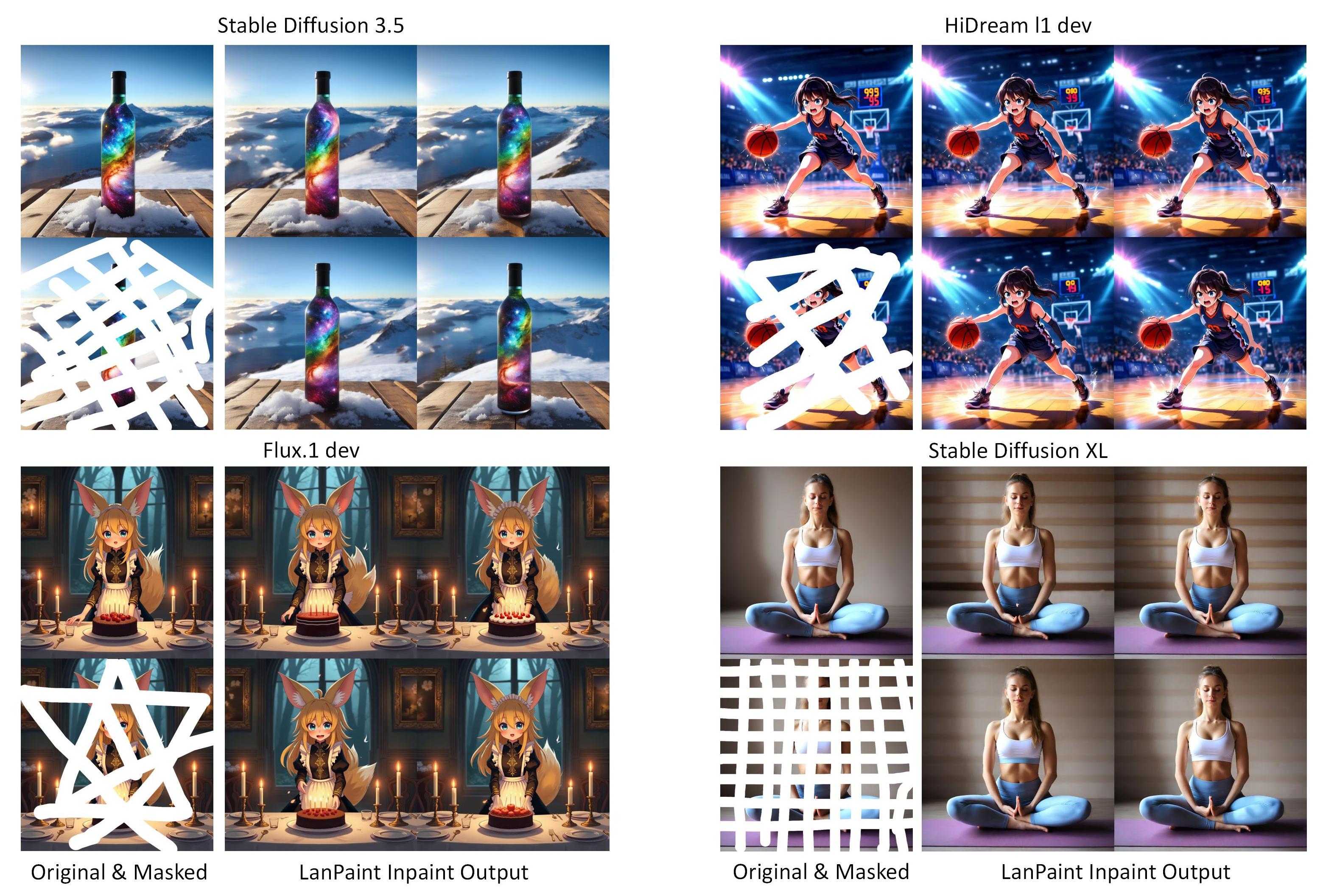
Universally applicable inpainting ability for every model. LanPaint sampler lets the model "think" through multiple iterations before denoising, enabling you to invest more computation time for superior inpainting quality.
LanPaint is a training-free partial conditional sampler that enables mask-constrained inpainting and local editing with pretrained diffusion and rectified-flow models, without fine-tuning or backpropagation.
@article{
zheng2025lanpaint,
title={LanPaint: Training-Free Diffusion Inpainting with Asymptotically Exact and Fast Conditional Sampling},
author={Candi Zheng and Yuan Lan and Yang Wang},
journal={Transactions on Machine Learning Research},
issn={2835-8856},
year={2025},
url={https://openreview.net/forum?id=JPC8JyOUSW}
}
 Check Mased Qwen Edit Workflow. You need to follow the ComfyUI version of Qwen Image Edit workflow to download and install the model.

Also check Qwen Inpaint Workflow and Qwen Outpaint Workflow. You need to follow the ComfyUI version of Qwen Image workflow to download and install the model.
Warning: LanPaint has degraded performance on distillation models, such as Flux.dev, due to a similar issue with LORA training. Please use low flux guidance (1.0-2.0) to mitigate this issue.
https://github.com/scraed/LanPaint.git
ComfyUI/custom_nodes folder.Once installed, you'll find the LanPaint nodes under the "sampling" category in ComfyUI. Use them just like the default KSampler for high-quality inpainting!
We are excited to announce that LanPaint now supports Qwen Image, providing powerful inpainting capabilities for image editing.
You need to follow the ComfyUI version of Qwen Image workflow to download and install the model.
The following examples utilize a random seed of 0 to generate a batch of 4 images for variance demonstration and fair comparison. (Note: Generating 4 images may exceed your GPU memory; please adjust the batch size as necessary.)
You need to follow the ComfyUI version of HiDream workflow to download and install the model.
You need to follow the ComfyUI version of HiDream workflow to download and install the model. Thanks Amazon90 for providing this example.
You need to follow the ComfyUI version of SD 3.5 workflow to download and install the model.

View Workflow & Masks
Model Used in This Example
(Note: Prompt First mode is disabled on Flux. As it does not use CFG guidance.)

View Workflow & Masks
Model Used in This Example
(Tricks 1: You can emphasize the character by copy it's image multiple times with Photoshop. Here I have made one extra copy.)
(Tricks 2: Use prompts like multiple views, multiple angles, clone, turnaround. Use LanPaint's Prompt first mode (does not support Flux))
(Tricks 3: Remeber LanPaint can in-paint: Mask non-consistent regions and try again!)

View Workflow & Masks
Model Used in This Example

View Workflow & Masks
Model Used in This Example

View Workflow & Masks
Model Used in This Example

View Workflow & Masks
Model Used in This Example

View Workflow & Masks
Model Used in This Example
Check more for use cases like inpaint on fine tuned models and face swapping, thanks to Amazon90.
Workflow Setup
Same as default ComfyUI KSampler - simply replace with LanPaint KSampler nodes. The inpainting workflow is the same as the SetLatentNoiseMask inpainting workflow.
Note

Simplified interface with recommended defaults:
Full parameter control: Key Parameters
| Parameter | Range | Description |
|---|---|---|
Steps | 0-100 | Total steps of diffusion sampling. Higher means better inpainting. Recommend 20-50. |
LanPaint_NumSteps | 0-20 | Reasoning iterations per denoising step ("thinking depth"). Easy task: 2-5. Hard task: 5-10 |
LanPaint_Lambda | 0.1-50 | Content alignment strength (higher = stricter). Recommend 4.0 - 10.0 |
LanPaint_StepSize | 0.1-1.0 | The StepSize of each thinking step. Recommend 0.1-0.5. |
LanPaint_Beta | 0.1-2.0 | The StepSize ratio between masked / unmasked region. Small value can compensate high lambda values. Recommend 1.0 |
LanPaint_Friction | 0.0-100.0 | The friction of Langevin dynamics. Higher means more slow but stable, lower means fast but unstable. Recommend 10.0 - 20.0 |
LanPaint_EarlyStop | 0-10 | Stop LanPaint iteration before the final sampling step. Helps to remove artifacts in some cases. Recommend 1-5 |
LanPaint_PromptMode | Image First / Prompt First | Image First mode focuses on the image context, maybe ignore prompt. Prompt First mode focuses more on the prompt. |
For detailed descriptions of each parameter, simply hover your mouse over the corresponding input field to view tooltips with additional information.
This node blends the original image with the inpainted image based on the mask. It is useful if you want the unmasked region to match the original image pixel perfectly.
For challenging inpainting tasks:
1️⃣ Boost Quality Increase total number of sampling steps (very important!), LanPaint_NumSteps (thinking iterations) or LanPaint_Lambda if the inpainted result does not meet your expectations.
2️⃣ Boost Speed Decrease LanPaint_NumSteps to accelerate generation! If you want better results but still need fewer steps, consider: - Increasing LanPaint_StepSize to speed up the thinking process. - Decreasing LanPaint_Friction to make the Langevin dynamics converges more faster.
3️⃣ Fix Unstability:
If you find the results have wired texture, try
⚠️ Notes:
Discover how the community is using LanPaint! Here are some user-created tutorials:
Submit a PR to add your tutorial/video here, or open an Issue with details!
@article{zheng2025lanpaint,
  title={LanPaint: Training-Free Diffusion Inpainting with Asymptotically Exact and Fast Conditional Sampling},
  author={Candi Zheng and Yuan Lan and Yang Wang},
  journal={Transactions on Machine Learning Research},
  issn={2835-8856},
  year={2025},
  url={https://openreview.net/forum?id=JPC8JyOUSW}
}
LanPaint: Universal Inpainting Sampler with "Think Mode"
8
11 commits
5 linked in READMEs
updated Sep 25, 2026
Universally applicable inpainting ability for every model. LanPaint sampler lets the model "think" through multiple iterations before denoising, enabling you to invest more computation time for superior inpainting quality.
LanPaint is a training-free partial conditional sampler that enables mask-constrained inpainting and local editing with pretrained diffusion and rectified-flow models, without fine-tuning or backpropagation.
@article{
zheng2025lanpaint,
title={LanPaint: Training-Free Diffusion Inpainting with Asymptotically Exact and Fast Conditional Sampling},
author={Candi Zheng and Yuan Lan and Yang Wang},
journal={Transactions on Machine Learning Research},
issn={2835-8856},
year={2025},
url={https://openreview.net/forum?id=JPC8JyOUSW}
}
Check Mased Qwen Edit Workflow. You need to follow the ComfyUI version of Qwen Image Edit workflow to download and install the model.
Also check Qwen Inpaint Workflow and Qwen Outpaint Workflow. You need to follow the ComfyUI version of Qwen Image workflow to download and install the model.
Warning: LanPaint has degraded performance on distillation models, such as Flux.dev, due to a similar issue with LORA training. Please use low flux guidance (1.0-2.0) to mitigate this issue.
https://github.com/scraed/LanPaint.git
ComfyUI/custom_nodes folder.Once installed, you'll find the LanPaint nodes under the "sampling" category in ComfyUI. Use them just like the default KSampler for high-quality inpainting!
We are excited to announce that LanPaint now supports Qwen Image, providing powerful inpainting capabilities for image editing.
You need to follow the ComfyUI version of Qwen Image workflow to download and install the model.
The following examples utilize a random seed of 0 to generate a batch of 4 images for variance demonstration and fair comparison. (Note: Generating 4 images may exceed your GPU memory; please adjust the batch size as necessary.)
You need to follow the ComfyUI version of HiDream workflow to download and install the model.
You need to follow the ComfyUI version of HiDream workflow to download and install the model. Thanks Amazon90 for providing this example.
You need to follow the ComfyUI version of SD 3.5 workflow to download and install the model.
View Workflow & Masks
Model Used in This Example
(Note: Prompt First mode is disabled on Flux. As it does not use CFG guidance.)
View Workflow & Masks
Model Used in This Example
(Tricks 1: You can emphasize the character by copy it's image multiple times with Photoshop. Here I have made one extra copy.)
(Tricks 2: Use prompts like multiple views, multiple angles, clone, turnaround. Use LanPaint's Prompt first mode (does not support Flux))
(Tricks 3: Remeber LanPaint can in-paint: Mask non-consistent regions and try again!)
View Workflow & Masks
Model Used in This Example
View Workflow & Masks
Model Used in This Example
View Workflow & Masks
Model Used in This Example
View Workflow & Masks
Model Used in This Example
View Workflow & Masks
Model Used in This Example
Check more for use cases like inpaint on fine tuned models and face swapping, thanks to Amazon90.
Workflow Setup
Same as default ComfyUI KSampler - simply replace with LanPaint KSampler nodes. The inpainting workflow is the same as the SetLatentNoiseMask inpainting workflow.
Note
Simplified interface with recommended defaults:
Full parameter control: Key Parameters
| Parameter | Range | Description |
|---|---|---|
Steps | 0-100 | Total steps of diffusion sampling. Higher means better inpainting. Recommend 20-50. |
LanPaint_NumSteps | 0-20 | Reasoning iterations per denoising step ("thinking depth"). Easy task: 2-5. Hard task: 5-10 |
LanPaint_Lambda | 0.1-50 | Content alignment strength (higher = stricter). Recommend 4.0 - 10.0 |
LanPaint_StepSize | 0.1-1.0 | The StepSize of each thinking step. Recommend 0.1-0.5. |
LanPaint_Beta | 0.1-2.0 | The StepSize ratio between masked / unmasked region. Small value can compensate high lambda values. Recommend 1.0 |
LanPaint_Friction | 0.0-100.0 | The friction of Langevin dynamics. Higher means more slow but stable, lower means fast but unstable. Recommend 10.0 - 20.0 |
LanPaint_EarlyStop | 0-10 | Stop LanPaint iteration before the final sampling step. Helps to remove artifacts in some cases. Recommend 1-5 |
LanPaint_PromptMode | Image First / Prompt First | Image First mode focuses on the image context, maybe ignore prompt. Prompt First mode focuses more on the prompt. |
For detailed descriptions of each parameter, simply hover your mouse over the corresponding input field to view tooltips with additional information.
This node blends the original image with the inpainted image based on the mask. It is useful if you want the unmasked region to match the original image pixel perfectly.
For challenging inpainting tasks:
1️⃣ Boost Quality Increase total number of sampling steps (very important!), LanPaint_NumSteps (thinking iterations) or LanPaint_Lambda if the inpainted result does not meet your expectations.
2️⃣ Boost Speed Decrease LanPaint_NumSteps to accelerate generation! If you want better results but still need fewer steps, consider: - Increasing LanPaint_StepSize to speed up the thinking process. - Decreasing LanPaint_Friction to make the Langevin dynamics converges more faster.
3️⃣ Fix Unstability:
If you find the results have wired texture, try
⚠️ Notes:
Discover how the community is using LanPaint! Here are some user-created tutorials:
Submit a PR to add your tutorial/video here, or open an Issue with details!
@article{zheng2025lanpaint,
  title={LanPaint: Training-Free Diffusion Inpainting with Asymptotically Exact and Fast Conditional Sampling},
  author={Candi Zheng and Yuan Lan and Yang Wang},
  journal={Transactions on Machine Learning Research},
  issn={2835-8856},
  year={2025},
  url={https://openreview.net/forum?id=JPC8JyOUSW}
}





.jpg?raw=true)