
🤖 ModelScope |
10
4 commits
1 linked in READMEs
updated Sep 20, 2026
README
🤖 ModelScope | 🤗 HuggingFace | 📑 Blog | 🖥️ Demo | 🫨 Discord
Introduction
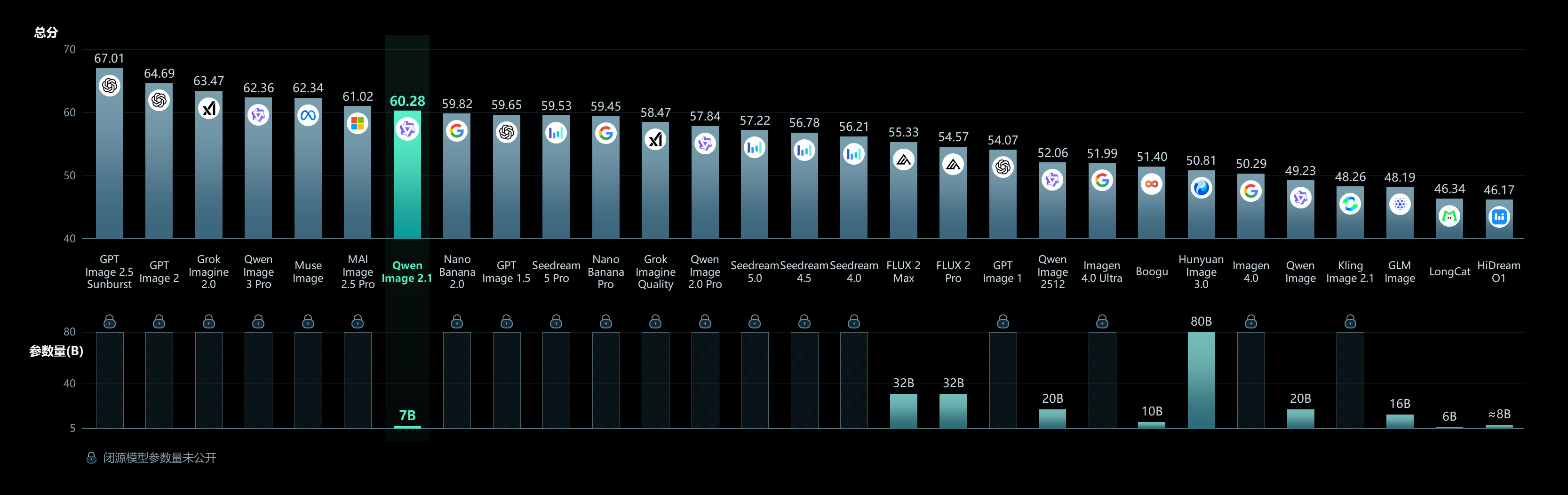
We are excited to open-source Qwen-Image-2.1, a unified text-to-image generation and image editing model in the Qwen family. With just 7B parameters in its visual generation component (32 Single-Stream DiT layers), Qwen-Image-2.1 balances generation quality, inference efficiency, and versatility.
Four key improvements define this release:
- Compact and Efficient — A lightweight architecture with mixed-granularity attention and prefix KV cache reuse delivers strong image quality at low computational cost.
- Native Transparency, Unified Creation and Editing — Generate regular or transparent (RGBA) images from text, edit transparent layers, and extract subjects from photographs—all in one model.
- Versatile Editing — Support up to 10 reference images, specify local edits via circles, painted annotations, or separate masks, and preserve identity for people and products.
- Realistic Textures and Refined Aesthetics — Improved typography, portrait lighting, and fine details for more visually compelling results.
Qwen-Image-2.1-PE-I2I
Image editing prompt rewriting model for Qwen-Image-2.1. A fine-tuned Qwen3.5-VL 9B that takes a vague editing instruction plus input image(s) and produces a precise, actionable prompt suitable for downstream image editing.
For more details, see the GitHub repo and Blog.
Quick Start
Installation
pip install transformers>=5.4.0 torch>=2.4.0 accelerate pillow
Usage with Transformers
import json
import torch
from PIL import Image
from transformers import AutoModelForImageTextToText, AutoProcessor

model_id = "Qwen/Qwen-Image-2.1-PE-I2I"
processor = AutoProcessor.from_pretrained(model_id)
model = AutoModelForImageTextToText.from_pretrained(
    model_id, dtype=torch.bfloat16, device_map="auto"
).eval()

# Load the system prompt shipped with the model
import huggingface_hub
sys_prompt_path = huggingface_hub.hf_hub_download(model_id, "system_prompt.txt")
system_prompt = open(sys_prompt_path).read().strip()

input_image = Image.open("input.png").convert("RGB")
user_prompt = "make the sky sunset"

messages = [
    {"role": "system", "content": [{"type": "text", "text": system_prompt}]},
    {"role": "user", "content": [
        {"type": "image", "image": input_image},
        {"type": "text", "text": user_prompt},
    ]},
]

inputs = processor.apply_chat_template(
    messages, add_generation_prompt=True, tokenize=True,
    return_dict=True, return_tensors="pt", enable_thinking=True,
).to(model.device)

with torch.no_grad():
    out = model.generate(
        **inputs, max_new_tokens=24000,
        do_sample=True, temperature=1.0, top_p=0.95, top_k=20,
    )
gen = processor.tokenizer.decode(
    out[0, inputs["input_ids"].shape[1]:], skip_special_tokens=True
)

# Split thinking from the answer
thinking, _, answer = gen.partition("</think>")
result = json.loads(answer.strip())
print(result)
# {"rewritten_prompt": "...", "wh_ratio": "", "ratio_follow": "<image1>"}
Multi-Image Editing
The model supports multiple input images — referred to as <image1>, <image2>, etc.:
images = [Image.open("portrait.png").convert("RGB"),
          Image.open("scene.png").convert("RGB")]

messages = [
    {"role": "system", "content": [{"type": "text", "text": system_prompt}]},
    {"role": "user", "content": [
        {"type": "image", "image": images[0]},
        {"type": "image", "image": images[1]},
        {"type": "text", "text": "Place <image1>'s subject into <image2>'s scene"},
    ]},
]
Integration with Diffusers
import torch
from PIL import Image
from diffusers import QwenImage21Pipeline

# Assuming `result` and `input_image` from above
prompt = result["rewritten_prompt"]

pipe = QwenImage21Pipeline.from_pretrained(
    "Qwen/Qwen-Image-2.1", torch_dtype=torch.bfloat16
).to("cuda")

image = pipe(
    prompt=prompt,
    image=input_image,
    num_inference_steps=40,
    generator=torch.Generator("cuda").manual_seed(42),
).images[0]

image.save("rewritten_edit.png")
Output Format
The model outputs a JSON object after a <think> reasoning block:
{
  "rewritten_prompt": "<precise editing instruction>",
  "wh_ratio": "",
  "ratio_follow": "<image1>"
}
rewritten_prompt— the expanded prompt to pass to the image editing modelwh_ratio— aspect ratio chosen by the model (e.g."16:9"), when the task creates a new compositionratio_follow— inherit aspect ratio from an input image (e.g."<image1>"), when editing in-place
wh_ratio and ratio_follow are mutually exclusive — exactly one carries a value.
License
This model is licensed under the Qwen Research License Agreement.
Contributors

4 commits
Similar repos



🤖 ModelScope |
10
4 commits
1 linked in READMEs
updated Sep 20, 2026
README
🤖 ModelScope | 🤗 HuggingFace | 📑 Blog | 🖥️ Demo | 🫨 Discord
Introduction
We are excited to open-source Qwen-Image-2.1, a unified text-to-image generation and image editing model in the Qwen family. With just 7B parameters in its visual generation component (32 Single-Stream DiT layers), Qwen-Image-2.1 balances generation quality, inference efficiency, and versatility.
Four key improvements define this release:
- Compact and Efficient — A lightweight architecture with mixed-granularity attention and prefix KV cache reuse delivers strong image quality at low computational cost.
- Native Transparency, Unified Creation and Editing — Generate regular or transparent (RGBA) images from text, edit transparent layers, and extract subjects from photographs—all in one model.
- Versatile Editing — Support up to 10 reference images, specify local edits via circles, painted annotations, or separate masks, and preserve identity for people and products.
- Realistic Textures and Refined Aesthetics — Improved typography, portrait lighting, and fine details for more visually compelling results.
Qwen-Image-2.1-PE-I2I
Image editing prompt rewriting model for Qwen-Image-2.1. A fine-tuned Qwen3.5-VL 9B that takes a vague editing instruction plus input image(s) and produces a precise, actionable prompt suitable for downstream image editing.
For more details, see the GitHub repo and Blog.
Quick Start
Installation
pip install transformers>=5.4.0 torch>=2.4.0 accelerate pillow
Usage with Transformers
import json
import torch
from PIL import Image
from transformers import AutoModelForImageTextToText, AutoProcessor

model_id = "Qwen/Qwen-Image-2.1-PE-I2I"
processor = AutoProcessor.from_pretrained(model_id)
model = AutoModelForImageTextToText.from_pretrained(
    model_id, dtype=torch.bfloat16, device_map="auto"
).eval()

# Load the system prompt shipped with the model
import huggingface_hub
sys_prompt_path = huggingface_hub.hf_hub_download(model_id, "system_prompt.txt")
system_prompt = open(sys_prompt_path).read().strip()

input_image = Image.open("input.png").convert("RGB")
user_prompt = "make the sky sunset"

messages = [
    {"role": "system", "content": [{"type": "text", "text": system_prompt}]},
    {"role": "user", "content": [
        {"type": "image", "image": input_image},
        {"type": "text", "text": user_prompt},
    ]},
]

inputs = processor.apply_chat_template(
    messages, add_generation_prompt=True, tokenize=True,
    return_dict=True, return_tensors="pt", enable_thinking=True,
).to(model.device)

with torch.no_grad():
    out = model.generate(
        **inputs, max_new_tokens=24000,
        do_sample=True, temperature=1.0, top_p=0.95, top_k=20,
    )
gen = processor.tokenizer.decode(
    out[0, inputs["input_ids"].shape[1]:], skip_special_tokens=True
)

# Split thinking from the answer
thinking, _, answer = gen.partition("</think>")
result = json.loads(answer.strip())
print(result)
# {"rewritten_prompt": "...", "wh_ratio": "", "ratio_follow": "<image1>"}
Multi-Image Editing
The model supports multiple input images — referred to as <image1>, <image2>, etc.:
images = [Image.open("portrait.png").convert("RGB"),
          Image.open("scene.png").convert("RGB")]

messages = [
    {"role": "system", "content": [{"type": "text", "text": system_prompt}]},
    {"role": "user", "content": [
        {"type": "image", "image": images[0]},
        {"type": "image", "image": images[1]},
        {"type": "text", "text": "Place <image1>'s subject into <image2>'s scene"},
    ]},
]
Integration with Diffusers
import torch
from PIL import Image
from diffusers import QwenImage21Pipeline

# Assuming `result` and `input_image` from above
prompt = result["rewritten_prompt"]

pipe = QwenImage21Pipeline.from_pretrained(
    "Qwen/Qwen-Image-2.1", torch_dtype=torch.bfloat16
).to("cuda")

image = pipe(
    prompt=prompt,
    image=input_image,
    num_inference_steps=40,
    generator=torch.Generator("cuda").manual_seed(42),
).images[0]

image.save("rewritten_edit.png")
Output Format
The model outputs a JSON object after a <think> reasoning block:
{
  "rewritten_prompt": "<precise editing instruction>",
  "wh_ratio": "",
  "ratio_follow": "<image1>"
}
rewritten_prompt— the expanded prompt to pass to the image editing modelwh_ratio— aspect ratio chosen by the model (e.g."16:9"), when the task creates a new compositionratio_follow— inherit aspect ratio from an input image (e.g."<image1>"), when editing in-place
wh_ratio and ratio_follow are mutually exclusive — exactly one carries a value.
License
This model is licensed under the Qwen Research License Agreement.
Similar repos
Linked in READMEs
Contributors
4 commits